
The hardest part of a first web app isn’t the building. It’s picking something small enough to finish. Most web app ideas lists hand you a marketplace, call it a weekend project, and move on. These 10 web app ideas for beginners are genuinely weekend-sized: one job each, no payments, no integrations, and a copy-ready prompt to start from.
A simple beginner web app is a single-purpose tool that collects, organizes, or calculates one kind of information for a small group of people. It has one main screen, one type of data, and no dependency on outside accounts or services. Think guest list, packing planner, or quote calculator instead of platform.
Key takeaways:
- The 10 simple web app ideas below share the same shape: one screen, one data type, and zero third-party integrations, which is what keeps a first build inside two days instead of two months.
- A first version should hold about 5 fields and 1 view. Anything you add beyond that roughly doubles the number of things that can break before you finish.
- Payments, user accounts, notifications, and file uploads are the four features that turn a weekend project into a month-long project. Leave all four out of version 1.
- Every idea here works with data you already have on your phone or in a spreadsheet, so you can test with 20 real entries the same day you build.
- Each idea includes a success check that takes under 5 minutes, because an app that looks finished and an app that works are different things.
- Coderick AI comes with a SiteGround hosting plan rather than a separate subscription, and every plan includes at least one project slot, which is all a first build needs.
What makes a simple web app idea small enough for a weekend
A weekend-sized app stores one kind of thing and answers one question about it. A guest-list tracker stores guests and answers “how many people are coming?” A packing planner stores items and answers “what haven’t I packed?” The moment an app has to answer two unrelated questions, it needs two data models, two screens, and roughly four times the testing.
Four properties separate an easy web app to build from a project that stalls:
- One data type. Guests, items, recipes, or ideas. Not guests and vendors and invoices.
- No money. As soon as a payment is involved, you inherit refunds, receipts, tax, and failure states.
- No permissions. If the app doesn’t need to know who’s looking at it, you skip login screens, roles, and password resets entirely.
- Data you already own. No scraping, no external feeds, no API keys.
This is where AI web app ideas for beginners differ from the classic beginner tutorial. The best apps to build with AI are the ones you can describe in a sentence, not the ones with the longest feature list. With vibe coding, you describe the tool in plain language and the builder generates the interface, the data structure, and the logic behind it. That changes what counts as beginner-sized. The limiting factor is no longer your coding ability. It’s how clearly you can describe one small job.
10 simple web app ideas to build with AI this weekend
Each idea below gives you three things: the boundary of the first version, a starter prompt you can paste into an AI builder, and a success check to run before you call it done. The prompts follow the same five-part structure used in other vibe coding prompts: context, goal, constraints, output, and success criteria. Adapt the details, keep the structure.
1. Event RSVP and guest-list tracker
An RSVP tracker collects names and responses for one event and shows a live headcount. It’s the smallest useful app most people can name, and it replaces a group chat where three people said “maybe” and nobody counted.
First version: one event, a form with name, email, attending (yes/no/maybe), and number of extra guests. One table of responses. A confirmed headcount at the top.
Leave out: multiple events, reminder emails, seating charts, ticket sales.
Build a single-page RSVP app for one private event. Visitors fill in a form with name, email, attending (yes, no, or maybe), and number of extra guests. Below the form, show a table of all responses and a large confirmed headcount that counts only “yes” responses plus their extra guests. No login, no payments, no email sending. Success: submitting the form adds a row instantly and the headcount updates without a page reload.
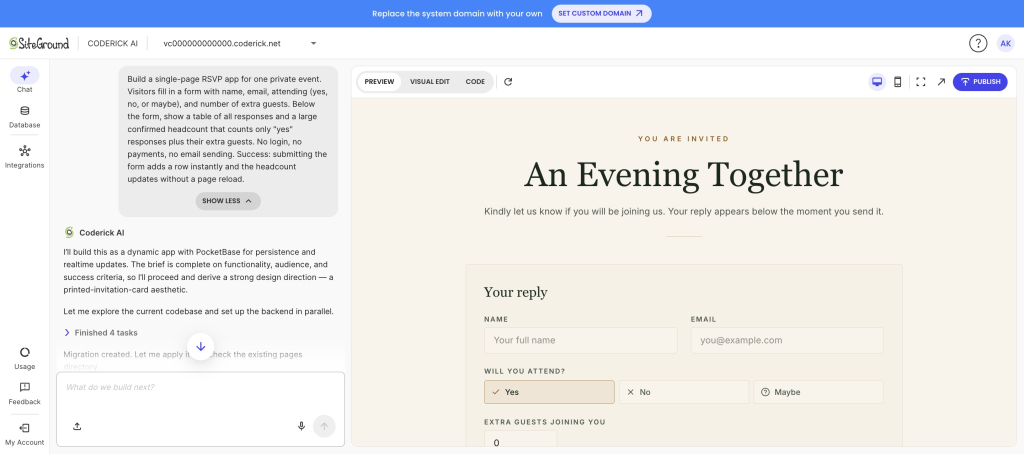
Success check: add 5 test guests including one “maybe” and one with 2 extra guests. The headcount should read 3 higher than the number of yes rows, and the maybe should not be counted.
2. Decision matrix for comparing options
A decision matrix scores options against weighted criteria and ranks them. It’s useful for choosing a laptop, a supplier, or an apartment, and it’s a good beginner app idea because the entire app is arithmetic on a grid.
First version: add up to 6 options as rows, up to 5 criteria as columns, a 1 to 5 weight per criterion, a 1 to 10 score per cell, and an automatic total with the winner highlighted.
Leave out: saving multiple matrices, sharing, templates, collaborative scoring.
Build a single-page decision matrix web app. Users add options as rows and criteria as columns. Each criterion has a weight from 1 to 5. Each cell takes a score from 1 to 10. Calculate a weighted total per option, sort options by total, and highlight the top row. Everything happens on one screen with no accounts. Success: changing any weight or score immediately reorders the ranking.
Success check: enter 3 options, then change one criterion’s weight from 1 to 5. If the ranking doesn’t move when the weight of a criterion you scored unevenly changes, the math is wrong.
3. Household inventory catalog
A household inventory catalog lists what you own, where it is, and what it cost. People build it for insurance claims, moves, or simply to stop buying a fourth pair of scissors.
First version: item name, room, purchase date, value, notes. A filter by room. A total value that reflects the current filter.
Leave out: photo uploads, barcode scanning, warranty reminders, insurance report exports.
Build a household inventory web app. Each item has a name, room, purchase date, estimated value, and a notes field. Show all items in a sortable table with a dropdown filter by room and a total estimated value above the table. The total must reflect the active filter. No image uploads, no accounts. Success: filtering to one room updates both the visible rows and the total.
Success check: enter 15 items across 3 rooms, then filter to the room with the most expensive item. The total has to drop, and it has to match the sum of the visible rows.
4. Reading or watchlist tracker
A watchlist tracker holds the books, films, or courses you mean to get to and moves them through three states. It’s one of the most common beginner web app project ideas because every list app you’ve tried is either too heavy or wants an account.
First version: title, type, status (want to start, in progress, finished), a 1 to 5 rating on finished items, and one short note. Two views: “up next” and “finished”.
Leave out: importing from external catalogs, cover art, friends, recommendations, reading streaks.
Build a personal watchlist web app. Each entry has a title, type (book, film, or show), status (want to start, in progress, finished), an optional rating from 1 to 5, and a one-line note. Show two tabs: “Up next” listing everything not finished, and “Finished” listing finished items sorted by rating. Status changes with one click from the row. No accounts, no external data sources. Success: marking an item finished moves it out of “Up next” and into “Finished” immediately.
Success check: mark an in-progress item as finished. It should disappear from “up next” in the same click, without a refresh.
5. Trip packing planner
A packing planner turns “did I pack the charger?” into a checklist you reuse for every trip. It’s the easiest of these apps to test, because the test is whether your checkmarks survive closing the browser.
First version: items grouped into 4 or 5 categories, a checkbox per item, a progress count, and a “clear all checks” button so the list is reusable.
Leave out: weather lookups, multiple simultaneous trips, shared lists, per-person packing.
Build a reusable trip packing checklist web app. Items are grouped under categories such as Clothes, Toiletries, Tech, and Documents. Each item has a checkbox. Show a packed count like “12 of 25 packed” at the top. Include a button to reset all checkboxes for the next trip, and let users add or delete items. Checked state must persist between visits. No accounts. Success: checking items, closing the browser, and returning shows the same items still checked.
Success check: check 10 of 25 items, close the tab, and open the app again. If the checks are gone, the app isn’t saving data. It’s redrawing it.
6. Recipe organizer and meal shortlist
A recipe organizer stores the meals you actually cook and builds a shopping list from the ones you pick for the week. This is where a small app beats a notes file, because a notes file can’t combine ingredients.
First version: recipe name, tags, ingredient list, and a “shortlist” toggle. One combined shopping list built from the shortlisted recipes, with duplicate ingredients merged into a single line.
Leave out: nutrition data, serving-size scaling, cooking instructions, grocery integrations.
Build a recipe organizer web app. Each recipe has a name, up to 3 tags, and a list of ingredients as free text lines. Users can toggle any recipe into a weekly shortlist. Generate a combined shopping list from all shortlisted recipes, merging identical ingredient names into one line with a count of how many recipes need them. No nutrition data, no accounts. Success: shortlisting two recipes that both need onions shows onions once, marked as needed by 2 recipes.
Success check: shortlist 3 recipes that share an ingredient. That ingredient must appear exactly once in the shopping list. If it appears three times, the merge logic didn’t happen.
7. Content idea organizer
A content idea organizer holds post ideas with their hook, channel, and status so they stop living in six different places. It’s one of two lightweight business tools on this list, and it stays small because it never touches a publishing API.
First version: idea title, channel, hook (one line), status (idea, drafting, scheduled, published), and target date. A board or table grouped by status with a count per group.
Leave out: publishing to social platforms, performance analytics, team assignment, approval workflows.
Build a content idea organizer web app. Each idea has a title, channel (blog, newsletter, or social), a one-line hook, a status (idea, drafting, scheduled, or published), and a target date. Group ideas by status with a count in each group heading, and let users change status from the idea itself. Sort within each group by target date, soonest first. No external publishing, no accounts. Success: changing an idea’s status moves it to the correct group and updates both counts.
Success check: move an idea from “idea” to “drafting”. Both group counts must change in the same action. One count moving is a partial update, which is a bug you’ll otherwise find weeks later.
8. Feedback and idea-voting board
A voting board collects suggestions and lets people upvote them, so the loudest request stops being the one that arrived most recently. Keep it to one board and it stays a weekend project.
First version: submit an idea with a title and one-line description, an upvote button per idea, a sort by votes, and a simple one-vote-per-browser check.
Leave out: accounts, comments, moderation queues, public roadmaps, status labels.
Build a public idea voting board web app. Anyone can submit an idea with a title and a one-line description. Each idea shows an upvote button and a vote count, and the list sorts by votes with the highest first. Prevent the same browser from voting twice on the same idea by storing votes locally. No accounts, no comments, no moderation. Success: voting twice on the same idea from the same browser increases the count only once.
Success check: vote on the same idea twice from one browser, then once from a different browser or a private window. The count should go from 0 to 1 to 1 to 2.
9. Simple quote or estimate calculator
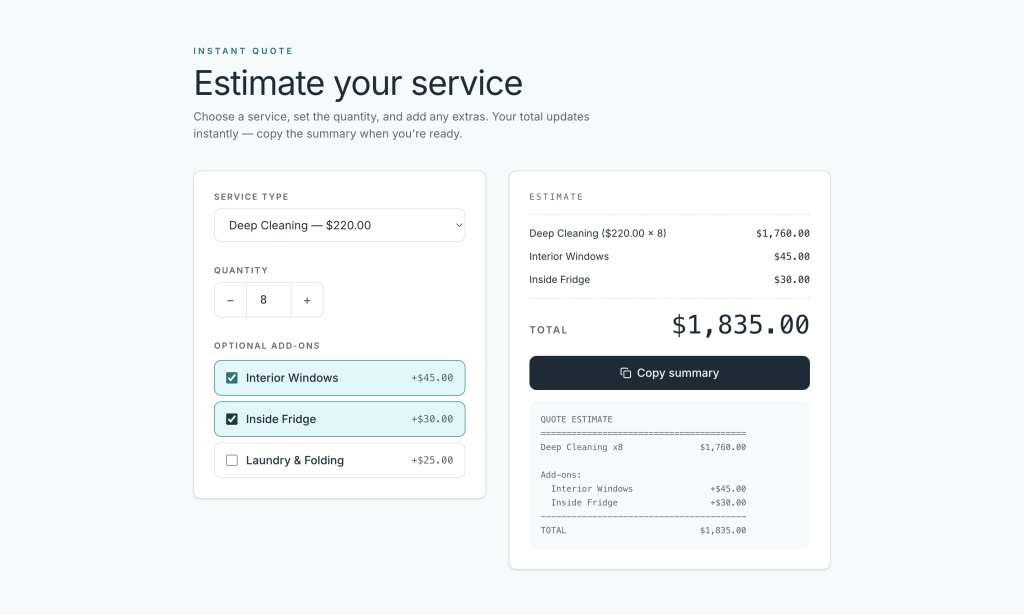
A quote calculator turns your pricing rules into a form that produces a number. It’s the most immediately useful of these no-code app ideas for anyone who currently answers “how much?” by opening a spreadsheet.
First version: service type, quantity, up to 3 add-ons with fixed prices, and a total with a plain-text summary the visitor can copy. Prices live in the app. No payment.
Leave out: taking payment, invoices, client accounts, regional tax rules, saved quotes.
Build a quote estimate calculator web app for a service business. The form has a service type dropdown with 3 options at fixed base prices, a quantity field, and 3 optional add-on checkboxes with fixed prices. Show a running total that updates as the visitor changes any field, plus a copyable plain-text summary listing every line item and the total. Do not collect payment or personal data. Success: the total always equals base price times quantity plus the checked add-ons.
Success check: run 3 jobs you’ve actually quoted in the past 6 months through the calculator. If any result is more than 10% off what you charged, your pricing rules aren’t what you thought they were, which is worth knowing before a client uses the form.
10. Plant-care or habit tracker
A recurring-task tracker records when you last did something and tells you what’s due today. Watering plants is the friendly version. It works identically for filters, medication reminders, or a workout schedule.
First version: item name, frequency in days, last-done date, and a “due today” list at the top. One button per item that sets last-done to today.
Leave out: push notifications, streaks and badges, multiple users, photo logs.
Build a recurring care tracker web app. Each item has a name, a frequency in days, and a last-done date. Calculate the next due date from the last-done date plus the frequency, and show a “Due now” section at the top listing every item whose due date has passed. Each item has a “Done today” button that sets last-done to today’s date and moves it out of the due list. No notifications, no accounts. Success: an item with a 3-day frequency last done 4 days ago appears in “Due now”.
Success check: create an item with a 3-day frequency and backdate the last-done field by 4 days. If it doesn’t appear as due, the date math is off by a day, which is the single most common bug in this app.
How to choose which web app idea to build first
Pick the idea whose data already exists somewhere you can copy from in 10 minutes. That’s the whole decision. If the guest list is in your phone, build the RSVP tracker. If your pricing rules are in a spreadsheet, build the quote calculator. An app you can fill with real data on day one gets tested honestly. An app that needs invented data gets admired and abandoned.
Three filters, in order:
- Will you use it within 7 days? A packing planner before a trip gets used.
- Do you already have 20 real entries? Twenty rows is enough to expose bad sorting, broken filters, and layouts that only work with three items.
- What happens if it’s wrong? A miscounted headcount is an inconvenience. A wrong invoice is a problem. Start where mistakes are cheap.
| If you want to | Build | Data it stores | Reusable after? |
| Organize a personal event | RSVP and guest-list tracker | Names, responses | Yes, per event |
| Make a hard choice | Decision matrix | Options, weighted scores | Yes, any decision |
| Prepare for insurance or a move | Household inventory catalog | Items, rooms, values | Ongoing |
| Stop losing track of media | Reading or watchlist tracker | Titles, statuses, ratings | Ongoing |
| Travel without forgetting things | Trip packing planner | Items, checked state | Yes, every trip |
| Plan the week’s cooking | Recipe organizer | Recipes, ingredients | Weekly |
| Keep creative work moving | Content idea organizer | Ideas, status, dates | Ongoing |
| Prioritize customer requests | Feedback and voting board | Suggestions, votes | Ongoing |
| Answer pricing questions faster | Quote calculator | Pricing rules | Ongoing |
| Remember recurring tasks | Plant-care or habit tracker | Items, frequency, dates | Ongoing |
Tool choice matters less than scope, with one exception: whether the app can save data without you setting up a database. A tracker that forgets everything on refresh isn’t a tracker. An AI website builder that works without code and generates its own backend removes that step, which is the difference between a working app and a pretty mockup.
What to leave out of your first version
Cut every feature that requires a second screen. Most beginner web app projects fail on scope, not on prompting, and the same four features are responsible: user accounts, payments, notifications, and file uploads. Each one brings its own error states, and error states are where beginners run out of weekend.
What to leave out, and what to do instead:
- User accounts. Instead, keep the app private by keeping the URL private. Add authentication in version 2, once you know the app is worth logging into.
- Payments. Instead, output a total and a copyable summary. Take the money the way you take it now.
- Notifications. Instead, show a “due now” or “waiting on you” section at the top of the screen. The app tells you when you open it.
- File and photo uploads. Instead, use a text field for the detail you’d have captured in the image, such as a serial number or a link.
- Multi-user editing. Instead, one person edits and everyone else reads.
There’s a practical reason to be strict here beyond time. Every refinement prompt spends some AI tokens, and simpler prompts consume fewer of them. A tight first version leaves you tokens to fix what testing reveals. A sprawling first version spends them arguing with a login screen you didn’t need. This is the most common of the AI app builder mistakes beginners make, and it happens before a single prompt is written.
How to test a small web app before anyone else sees it
Run five checks in this order. They take about 10 minutes together and they catch nearly everything that goes wrong in an app this size.
- The empty state. Load the app with zero entries. It should say something useful, not show a broken table or a total of NaN.
- Twenty real entries. Paste in actual data, not “test test test”. Real data has long names, missing fields, and duplicates, and it breaks layouts that three tidy rows never will.
- The refresh test. Enter data, close the tab, reopen the app. Anything that disappears was never saved.
- The phone test. Open it on your phone. Tables are the usual casualty. If you can’t read a row without pinching, the app needs a stacked layout on narrow screens.
- The wrong-input test. Type a word in a number field. Leave a required field blank. Enter a date in the past. The app should refuse politely instead of crashing or saving nonsense.
Fix one thing per prompt. Bundling five fixes into one instruction makes it hard to tell which change caused which result, and it’s how working features get quietly overwritten. Version control and staging exist for exactly this: if a refinement makes things worse, revert to the last good version instead of prompting your way back out. Testing in small loops like this is the core of a repeatable vibe coding workflow, and it’s what separates a build that survives contact with real users from one that doesn’t.
When all five checks pass, show it to one person who wasn’t involved. Watch them use it without explaining anything. Whatever they hesitate over is your version 2 list, and it will be shorter and more accurate than the feature list you would have invented on your own.
Start with one idea this weekend
Any of these 10 simple web app ideas is small enough to go from prompt to working app in a weekend, provided you hold the line on scope. One data type, one screen, no payments, and 20 rows of real data to test against. The idea that gets finished is almost never the most ambitious one on the list. It’s the one whose data you already had.
You can build any of them with Coderick AI, which turns a plain-language description into a working app with hosting, SSL, a generated backend, and version control included from the first prompt. Access comes with a SiteGround hosting plan, the only thing left to decide this weekend is which of the 10 ideas you’ll actually use.
[96]
Frequently asked questions (FAQ)
Simple web app ideas that work well with AI builders include an RSVP and guest-list tracker, a weighted decision matrix, a household inventory catalog, a watchlist tracker, a trip packing planner, a recipe organizer, a content idea organizer, an idea-voting board, a quote calculator, and a recurring-task tracker. All 10 store one type of data and answer one question about it.
Beginners can build any simple web app without coding that collects, organizes, or calculates data without needing payments, logins, or outside services. Trackers, checklists, calculators, and simple catalogs all qualify. You describe the tool in plain language, and the builder generates the interface and the data structure for you.
Web app ideas for beginners that can be finished in a weekend have one data type, about 5 fields, and one or two views. A packing checklist, a decision matrix, or a quote calculator fits comfortably. Anything with user accounts, payments, or multiple connected record types does not, regardless of how simple the pitch sounds.
Choose the idea whose data you can copy from somewhere in 10 minutes and that you’ll use within the next 7 days. Those two conditions matter more than how interesting the idea is, because they’re what get the app tested with real information instead of placeholder rows.
A beginner web app should include one input form, one list or table view, one calculated summary such as a count or total, and data that persists after a refresh. That’s the complete requirement. Everything else is version 2.
Leave out user accounts, payments, notifications, file uploads, and multi-user editing. Each one adds error states that take longer to handle than the core app itself. Keep the app private by keeping the URL private, and output a copyable summary instead of processing payments.
Yes. Coderick AI builds a web app from a plain-language prompt, then refines it through continued chat instructions. It generates the interface and the backend together, and includes hosting, SSL, custom domains, user authentication, and version control on paid plans, so there’s no separate infrastructure to configure.
Test a small AI-built web app in five passes: load it empty, add 20 real entries, refresh to confirm data was saved, open it on a phone, and feed it wrong input such as text in a number field. Fix one problem per prompt so you can tell which change fixed what.