
The online boutique you’ve been dreaming up is the fun part. Putting it into action might feel like a different story. Getting there means choosing a builder, sourcing an apparel line you can actually stock and ship, photographing it so shoppers trust the fit, and pricing it against real numbers instead of a vague “initial costs” line. We’ll cover all of that, plus the legal basics that usually get glossed over.
Key takeaways:
- How to start a successful online boutique comes down to four real jobs: choosing the right platform, sourcing your product, photographing and listing it correctly, and pricing the whole thing honestly.
- Inventory is the single biggest cost of launching a boutique if you’re holding stock upfront.
- Different sourcing paths, wholesale, private label, dropshipping, and made-to-order, trade off cost and control for how much cash sits in inventory before your first sale.
- You can start an online clothing boutique with little to no upfront inventory spend using made-to-order production or pre-orders instead of a bulk buy.
- Sales tax gets a lot more manageable with the right platform: many ecommerce builders include built-in rate calculation and nexus tracking, so you’re not tracking rates state by state on your own.
- Once you’ve chosen the right builder, connecting your domain and activating your store is the fast part, usually just pointing a domain and clicking through a few settings.
(Still getting oriented on what ecommerce actually involves? Start there before you dive into sourcing.)
Step 1: Pick and source your apparel niche
You’ve probably already got a business idea in mind. Maybe you’ve even done all the research. But if you’re starting from scratch, then pick a niche you can actually source and restock, not just one you’re excited to sell. Let’s quickly make sure you’re on the right track.
There are a few common ways to get product, each with a different tradeoff between cost, control, and how much inventory you need to hold upfront:
- Wholesale or resale: stock existing brands to test a niche before committing to your own designs
- Private label: put your own branding on an existing product without running full manufacturing yourself
- Custom manufacturing: design and produce your own line, with the most control but the biggest upfront commitment
- Dropshipping or made-to-order: sell without holding inventory upfront. Made-to-order works on most platforms; dropshipping specifically needs a builder that supports it, so confirm that before you commit to this route
Whichever route you choose, get clear on three things before you commit to a supplier: their minimum order quantity, what a sample costs and how long it takes to arrive, and whether they can back up their claims with a verifiable business history, reviews, or past client work. A sample itself is worth the cost no matter what: it’s the only way to check fabric weight, stitching quality, and true-to-size fit before you’re financially locked into a style, and a supplier who won’t produce one at any price is a red flag on its own.
How many styles should you start with? Enough to look like a real store, not so many you can’t restock evenly. A tight, focused lineup is easier to manage and sell through than a sprawling catalog, and you’ll have real sales data to guide you once you start scaling your business.
Step 2: Choose an ecommerce platform
You’re going to need a place to sell that product, and the easiest route will be to choose an ecommerce website builder. At a high level, look for a builder that can handle a variant-heavy catalog well, not just a generic product list. Run through these before you commit to one:
- Think about what job your site needs to do. For a boutique, that’s selling a variant-heavy catalog, not just publishing pages.
- Built-in size and color variants, so a shopper picks options from one product page instead of you creating a separate listing per combination.
- Bulk photo uploads, so listing 20 products doesn’t mean 20 separate upload sessions.
- Checkout that’s already optimized for conversions, not an added-on plugin you have to configure yourself.
- Works well on mobile, not just desktop. Most ecommerce traffic now comes from phones, so make sure mobile web design comes baked in: size and color selection, photos, and checkout all need to hold up on a small screen before you commit to a builder.
- Fast, reliable hosting with SSL bundled in. A catalog full of product photos is only as fast as the hosting underneath it, and slow pages cost you both search rankings and sales, so this shouldn’t be an afterthought or a separate purchase.
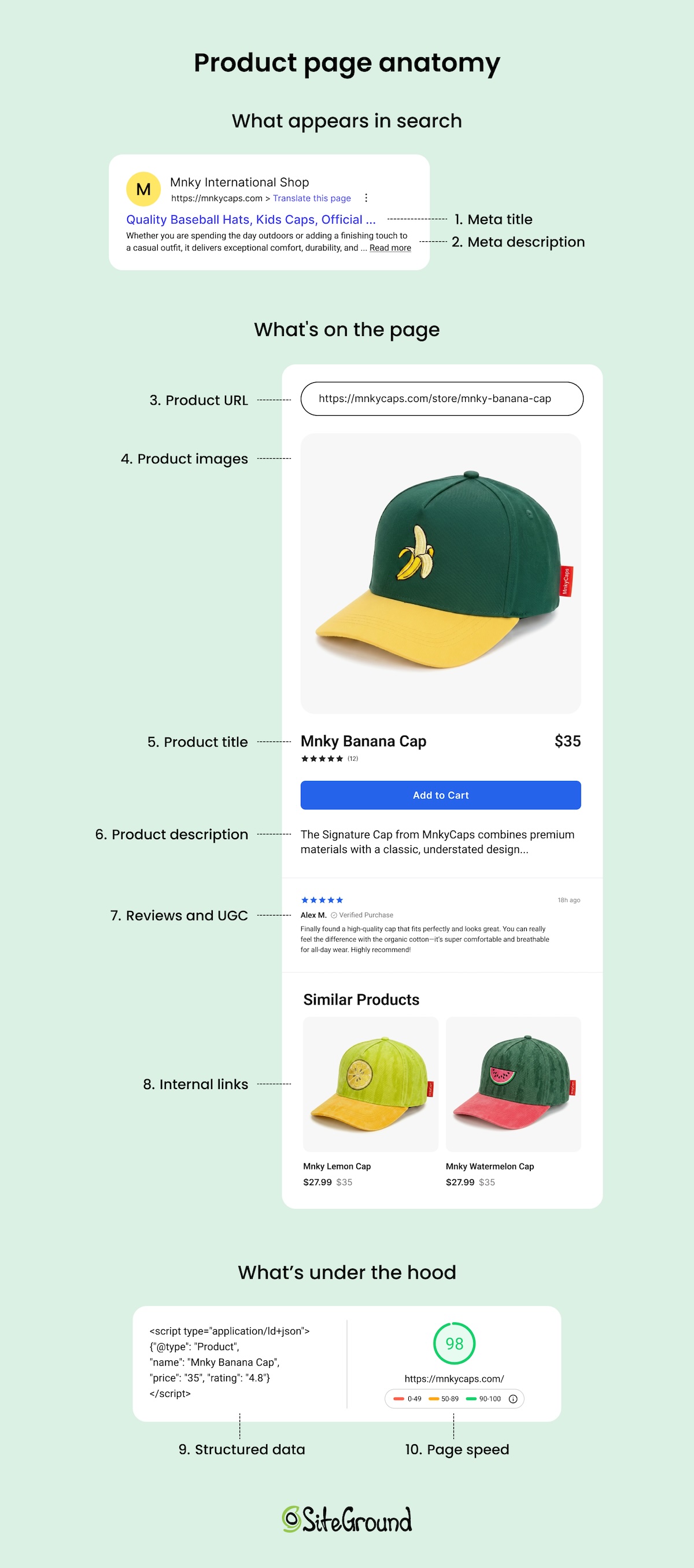
- Easy-to-manage ecommerce SEO, so product pages are structured to rank without a developer or a separate plugin to configure.
- Consider time to launch. A templated builder gets you live faster than one with unlimited design freedom and more decisions to make.
- Be thoughtful about pricing. Check whether the plan includes hosting, SSL, and a domain, or whether those show up as separate line items later.
Most general-purpose builders can technically sell clothes, but the difference shows up once you have 20 products with three sizes and four colors each. A builder that treats each variant as a separate product turns a simple catalog into a maintenance chore, so it’s worth taking a closer look at what a clothing storefront specifically needs from a builder before you commit to one.
Why SiteGround Ecommerce makes the difference here: variants live on a single product page instead of scattered listings, bulk photo uploads and AI-assisted product details cut the busywork, checkout comes optimized for conversions out of the box, and hosting, SSL, and SEO tools are all bundled in rather than added on afterward.
Start building your ecommerce website now>>
Step 3: Set up your domain and activate your store
With the right builder, this step covers two things at once: your domain and the hosting underneath it.
- New domain: Buy one directly through your builder and it connects automatically. No separate registrar, no DNS setup on your end.
- Existing domain: If you already own one from elsewhere, you’ll need to update its DNS records, usually just changing the nameservers, to point it at your new store. This is where support matters most: redirecting a pre-purchased domain trips up a lot of first-time sellers, so a builder with a real person on chat beats one that only offers a ticket queue.
- Hosting: With top-notch hosting, this is what keeps your store online, fast, and secure. It’s set up automatically with the right builder rather than something you shop for and configure on your own.
This is where an all-in-one platform actually pays off: look for one where your domain, hosting, and SSL connect automatically in a single setup, not three separate purchases you have to coordinate yourself. Hosting speed matters more than people expect, since a photo-heavy catalog is only as fast as what’s running underneath it. SiteGround Ecommerce, for example, builds speed optimization into hosting instead of treating it as an upsell. And when you’re moving a domain from elsewhere, real support on hand is the way to go.
Once you’ve connected your domain and activated your store, the boutique-specific work starts: getting your products photographed, listed, and priced.
Step 4: Photograph and list your products
Product photography is the one technical task that’s genuinely specific to selling clothes, and it’s what actually makes a storefront sellable. A shopper who can’t tell how a fabric drapes or what color it really is won’t buy, and if they do, they’ll return it. So let’s get this one right.
Photography basics that make a difference
- Consistency over expensive equipment: a phone camera, a $30 lighting kit, and one consistent background will outperform a mix of styles shot in different rooms
- Pick one format, flat-lay, mannequin, or model, and use it across your whole catalog so your store doesn’t look like three different sellers
- If you’re using a model, shoot the same size and model across the full catalog so shoppers have one consistent reference point
Size and color variants
Set up size and color variants on a single product page rather than creating a separate listing for every size and color combination. This is basic product page SEO: splitting variants across multiple URLs creates near-duplicate pages that compete with each other in search results instead of stacking their ranking power, and it forces shoppers to hunt for the right size instead of selecting it from a dropdown.
Listings that reduce returns
Write sizing details as if the shopper can’t try the item on…because they can’t. Include:
- Exact measurements (bust, waist, hip, length) for at least one size, not just “small, medium, large”
- The model’s height and which size they’re wearing, if you’re using a model
- Fabric composition and stretch, since a 95% cotton tee fits differently than a 5% spandex blend
- A direct answer to “does this run small or large,” since that’s the question behind most sizing-related returns
Photos and listings that convert browsers into buyers follow the same visual and structural principles as any ecommerce store, so it’s worth digging into the layout and conversion side of things once your catalog’s live.
Step 5: Connect payments and shipping
With the right builder, this step is generally just about flipping switches and not building technical integrations (thankfully). Most all-in-one platforms come with payment processor options already available and a shipping rate calculator built in, so you’re choosing settings rather than hunting down plugins.
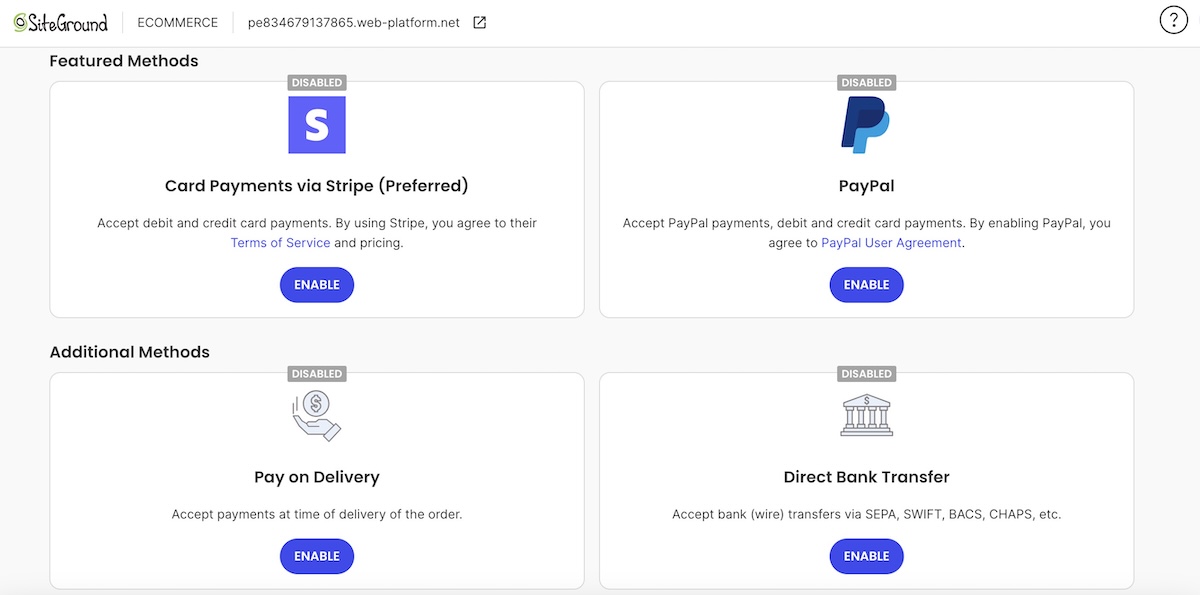
A few things worth getting right on the payments side:
- Check for a stacked platform fee. Card processing typically runs around 2.9% plus $0.30 per transaction, but some builders add their own fee on top of that, so it’s worth understanding how online payments actually get priced before assuming the headline rate is what you’ll pay.
- Run a test transaction before you go live. It takes two minutes and catches problems that are embarrassing to find out about on your first real sale.
- Set your returns policy before launch, and not after your first return request. Clothing returns are common because sizing varies by brand, so decide on free returns, a restocking fee, or store credit only, and state it clearly.
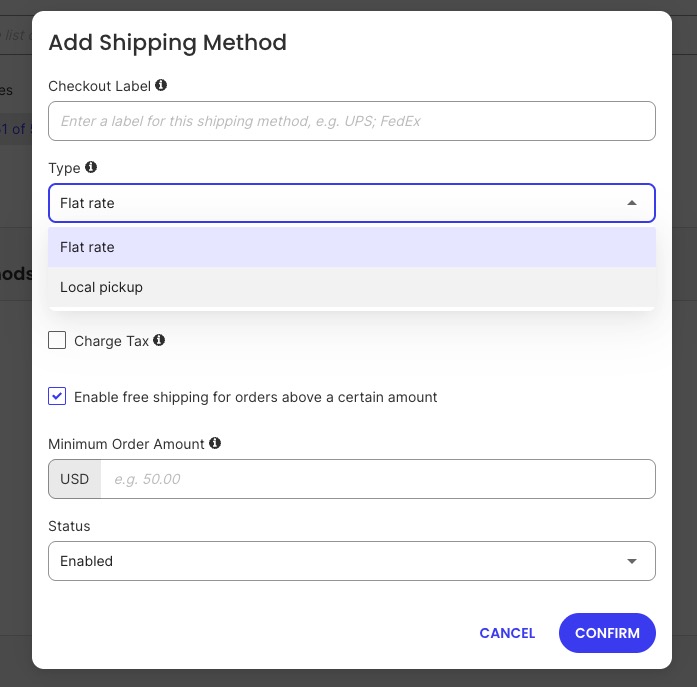
For shipping, you’re really making two separate calls: how the order gets to the customer, and how you charge for it. Here’s what to keep in mind:
- Pick a shipping cost rate strategy that fits your margins. A flat rate is simple but risks undercharging on heavy orders, which is why it’s worth setting shipping by weight and destination instead once your catalog has any real size range.
- If you offer free shipping, build it into your numbers on purpose. A minimum-order threshold, often set around 30% above your average order value, covers your cost while still nudging people to buy more.
- Get your product weights and dimensions right. Most rate calculations run on this data, and a wrong number is an easy way to lose money on every heavier order.
- Write a short shipping policy covering processing time, delivery estimates, and returns, and link it in your footer so customers don’t have to ask. Better yet, add a section about it as well as payment-related issues on an FAQ page.
Step 6: Start your boutique legally
Starting an online boutique legally comes down to four concrete things, and none of them require a lawyer to get right the first time.
- Business structure. A sole proprietorship needs no separate filing: you operate under your own name and Social Security number from day one. An LLC costs $150 to $800 to set up depending on your state, filed through your state’s Secretary of State website, and typically takes anywhere from same-day to a few weeks to process. The tradeoff for the extra cost: an LLC separates your personal assets from business liability, which matters more once you’re carrying real inventory.
- EIN. Most sole proprietors don’t need one unless they hire employees or their bank requires one to open a business account. Apply directly through irs.gov, skip any third-party site charging a fee for this, and you’ll have your EIN the same day, for free.
- Ecommerce sales tax. Cross a state’s economic nexus threshold, usually $100,000 in annual sales, and you’re required to register and collect there too, not just your home state. The right builder can automate most of this: a free basic setup applies predefined rates at checkout, and a Stripe-connected advanced setup handles real-time rates and nexus tracking automatically.
- Business license. Requirements vary by city and state, and some require a general license even for a store that only sells online. A quick search of your city and state government site tells you what applies before you launch.
Step 7: Launch and get your first sale
Before you announce anything, run a pre-launch checklist:
- Place a test order and confirm the checkout, confirmation email, and order notification all work
- Click through every size and color variant to confirm the right photo loads for each
- Test your shipping rate calculation with a real address, not just your own
- Read every product listing once more for sizing details and typos
Promoting your boutique doesn’t require a big budget in the first weeks, just a plan. A few things to get right early:
- Get your store ready to convert before you spend time or money on traffic. Product photos, sizing details, and a working checkout matter more than which channel you pick.
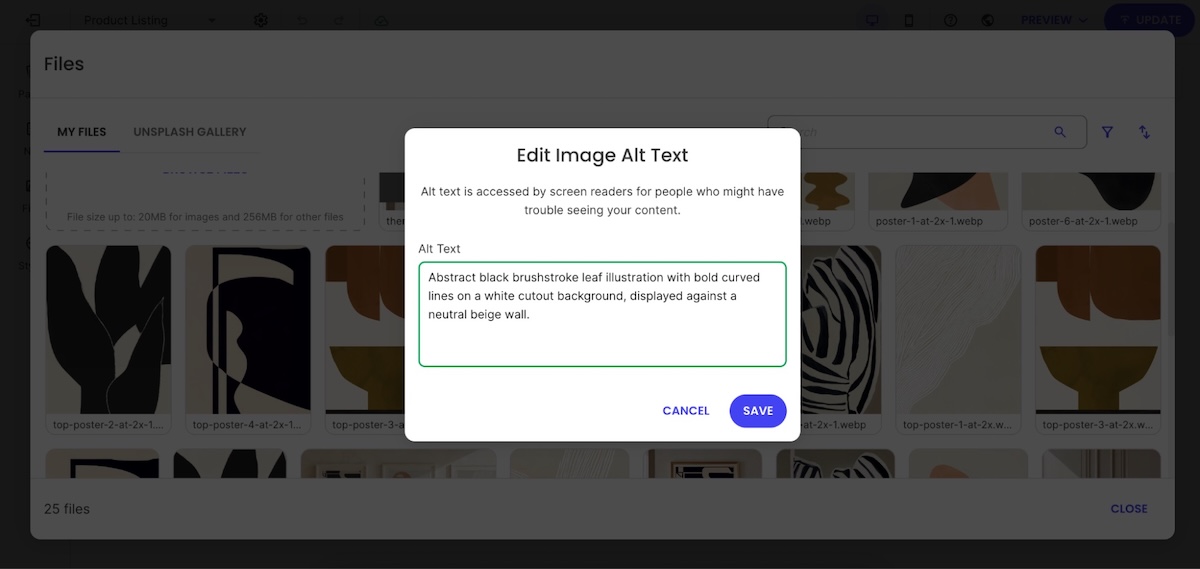
- Make sure your search engine optimization is dialed in. Write product titles and descriptions around the terms people actually search, add alt text to your photos, and claim a Google Business Profile if local SEO matters for your boutique too.
- Set up two automated email flows before you launch: an abandoned cart reminder and a post-purchase thank-you. Both run in the background and recover sales you’d otherwise lose.
- Pick two channels that match your product and target market. Visually driven products like clothing tend to do best on Instagram, TikTok, or Pinterest.
- Match your effort to your budget. With $0 to spend, lean on organic posting and your existing network; with a small business budget, you boost your best-performing posts instead of guessing where to start.
Want more structure than the basics above? A full 90-day marketing plan is there once you’re ready for it.
What it actually costs to start an online boutique
If you’re sourcing wholesale, private label, or custom-manufactured inventory, most first-time launches cost between $2,000 and $10,000. Inventory is the largest piece of that: StartupOwl’s guide to starting an online boutique puts your first inventory purchase at 60 to 70% of your total startup budget. Made-to-order and pre-order sellers see a much lower number here, since there’s no stock to buy upfront.
| Cost item | Type | Typical range |
| Starting inventory and samples | One-time | $1,000 to $5,000+ |
| Domain name | One-time, renews yearly | $10 to $20 per year |
| Business registration and licensing | One-time | $150 to $800, depending on your state |
| Store platform plan | Recurring | Roughly $15 to $50/month |
| Payment processing | Recurring, per transaction | Around 2.9% plus $0.30 per transaction, set by your processor |
| Marketing | Recurring, optional | Can start at $0 with organic promotion |
If you’re planning this line by line, there are more ways to trim costs without cutting corners on the stuff that actually affects sales.
Common mistakes that stall first-time boutique sellers
- Buying inventory before validating the niche. Committing to a large inventory run before you’ve sold a single item to a stranger is the single fastest way to tie up cash in stock that doesn’t move.
- Starting with too large a catalog. Launching with dozens of styles spreads your budget thin, makes restocking uneven, and makes it harder to tell what’s actually working when your attention is split across everything at once. A focused offering lets you build thoughtfully, watching what sells and expanding with intention instead of guessing.
- Inconsistent product photography. Mixing flat-lay, mannequin, and model shots, or shooting in different lighting across your catalog, makes a store look unfinished even when the product is good.
- Treating inventory as part of “initial costs” instead of its own budget line. Since inventory is typically 60 to 70% of your launch budget, folding it into a vague total makes it easy to underestimate.
- Skipping business registration and sales tax setup until after the first sale. Registering after you’ve already sold in a state creates back taxes and penalties that a same-day setup would have avoided.
- Splitting size and color variants into separate product listings. This is a common mistake on generic ecommerce sites too, and it hurts both search rankings and the shopper’s experience.
- Not confirming the payment processing rate before launch. That rate applies to every sale you make, so finding out what it costs after your first month of transactions is too late to factor it into your pricing.
- Repeating generic ecommerce mistakes on top of boutique-specific ones. Poor navigation, slow load times, and cluttered product pages sink clothing stores the same way they sink any other store. Worth running through the ones that trip up ecommerce sites across the board, not just the clothing-specific stuff.
The setup is handled: now build your boutique
Sourcing, photography, pricing, and legal setup are the real work of starting an online boutique. Once those pieces are in place, the technical side is the fastest part of the whole process: SiteGround Ecommerce bundles hosting, SSL, a store builder, and checkout into one dashboard, so you’re not wrangling five separate tools before you’ve listed a single product.
You can test the full setup with a 14-day free trial, no credit card required, before committing to a plan. That’s enough time to upload your first products, set up size and color variants, and see what your boutique actually looks like live before you spend a dollar on the platform itself.
[103]
Frequently asked questions
Most first-time sellers spend between $2,000 and $10,000, with inventory making up 60 to 70% of that total. Domain, registration, and platform costs are comparatively small next to the cost of your first batch of stock.
You can start with very little upfront cash by using made-to-order production, or pre-orders instead of buying bulk inventory. You’ll pay more per unit than a wholesale order, but you avoid tying up cash in stock before you know it sells.
Register a business structure, sole proprietorship or LLC, get an EIN if you plan to hire or need a dedicated business bank account, and register for a sales tax permit in any state where you cross that state’s economic nexus threshold.
It depends on your city and state. Many jurisdictions require a general business license even for a store that only sells online, so check your local government’s requirements before you launch rather than after.
Every step here, sourcing, photography, listing setup, and store activation, works the same whether you’re shipping from a spare room or a warehouse. The main home-specific consideration is storage space for inventory and a consistent spot to photograph products.
Pick one niche. For example, use made-to-order sourcing to skip the upfront inventory cost, and set up your store on a single platform that handles hosting, checkout, and product management together instead of pulling together separate tools.