

Somewhere in your business there’s a process running on a spreadsheet, three email threads, and someone’s memory. Maybe it works most of the time, but it also breaks the same way every month: two people edit the same row, a request stalls because nobody owned it, and the status column means different things to different people.
An internal tool replaces that with one place where the records live, the statuses are agreed, and each person sees the part that concerns them. You can now build internal tools with AI by describing the process instead of coding it or hiring a programmer, which moves the work from writing software to defining what your team actually does.
Key takeaways:
- Start with your records, not with a platform. What you track, what states it moves through, and who can do what. Platform roundups answer a question you don’t have yet.
- Eight elements make a specification build-ready. Users, records, actions, states, permissions, views, exceptions, and a success test.
- You can build internal tools with AI without coding. What decides the result is the description you write, not the software you write it into.
- Exceptions are the most skipped element and the one that decides whether the tool survives. Missing fields, duplicates, late items, and rejections happen in week one.
Dashboards, CRMs, and admin panels are the same system
If you search for the best internal tools, you’ll find dashboards in one roundup, CRMs in another, and admin panels in a third, as though you have to pick a category before you start. You don’t, because they aren’t different kinds of software. They’re different windows onto the same one.
Underneath each sit records, the individual things you track, and states, the stages those things move through. A CRM is a records view with a sales pipeline as its state model. A dashboard is the same records counted and summarized. An admin panel is those records again, opened for editing by people you trust with that. So when you set out to build a CRM with AI, or go looking for a dashboard builder, you are describing the same system twice.
This changes the question. You stop asking whether you need a dashboard or a CRM and start asking what your records are and what states they move through. Answer that once and the views follow. Most no-code internal tools are business process tools at heart, and a team that defines its records properly gets all three views without building three things.
Start with the process, not the platform
Nearly every guide on this subject opens with a ranked list of builders. That’s the wrong first question, and not only because most of those lists are published by the platforms on them. It’s the wrong question because the obstacle is rarely the tool. Most small businesses have never written down how their own process works.
This is also why non-technical teams that build internal tools without code are sometimes disappointed. Given a vague description, a builder produces a plausible, generic app that matches nothing in particular. But given a precise one, it produces something your team recognizes. The quality of what comes out tracks the quality of what went in, and the input is a specification you write, not a platform you choose.
If you haven’t settled on a builder yet, take a look at our guide to choosing a no code web app builder.
Eight questions that turn a process into an internal tool specification
Answered in order, the following eight elements turn an informal business process into an internal tool specification a builder can act on. Work through them against your own process rather than just reading them.
| Element | The question | Why it matters, and what goes wrong without it |
| Users | Who uses the tool? | Decides how many views you need. Teams design for themselves and forget the person who only submits a request and never opens anything else |
| Records | What information does it store? | The unit of work: a job, a lead, an invoice, a request. Getting this wrong at the start makes everything after it wrong |
| Actions | What can each user do? | Create, edit, approve, assign, close. Actions are where permissions and workflow meet |
| States | How does work move through the process? | The status field is the process. Most spreadsheet workflows already have states, in a column nobody formally agreed on |
| Permissions | Who can view, edit, approve, or delete? | The difference between a tool a team trusts and one where somebody deletes a month of records |
| Views | What does each user need to see? | This is where dashboards, board layouts, and admin screens come from. They’re outputs of the model rather than choices you make up front |
| Exceptions | What happens when information is missing, invalid, late, duplicated, or rejected? | The most skipped element, and the one that decides whether the tool survives contact with real data |
| Success test | What proves version one is useful? | Defined before building. Usually: the team stopped using the spreadsheet |
Take for example a team handling internal purchase requests through a shared sheet and an inbox. Here’s how the eight answers come out.
- Users. Anyone who can request something, the two managers who approve, the director who signs off on anything large, and the office administrator who orders and receives.
- Records. Requests, each holding an item, a cost, a reason, a requester, and a date needed.
- Actions. Submit, approve, reject, mark ordered, mark received.
- States. Submitted, approved, rejected, ordered, received.
- Permissions. Requesters see only their own and approve nothing. Managers approve up to a limit and pass anything larger to the director. The administrator edits any request and deletes none.
- Views. A requester sees a form and their own history. A manager sees a queue of pending approvals. The director sees monthly totals by team, which is the dashboard nobody had to specify separately.
- Success test. The sheet stops being updated within a month.
- Exceptions are where the real work is. What happens when a request arrives with no cost attached, when the same item is requested twice in a week, when an approval sits untouched for five days, and when a rejected request gets resubmitted with a different number? Each answer is a rule the builder needs. The success test is that the sheet stops being updated within a month.
Your states are already written down, in the messiest column of your spreadsheet. Before inventing a status list, sort that column and read every distinct value people have typed into it. You’ll find the official ones, and you’ll also find the informal ones: “waiting on Dave,” “chasing,” “held until budget.” Those are states your process has and nobody ever agreed on, which is exactly why work gets stuck in them. Deciding which to keep and which to merge is most of the states question, already done for you.
How to build internal tools with AI from your specification
With those eight answers written down, the build step is mostly transcription. You describe the tool to an AI internal tool builder in plain language, in the order of the model. A useful description names the records, the states, who does what, and one exception rule, rather than asking for a category of app.
So rather than just saying “build me an internal purchase request app”, which will just result in the AI builder guessing what you need, your initial vibe coding prompts can be something specific like this:
“Build a purchase request tool. Each request stores an item, cost, reason, requester, and date needed, and moves through submitted, approved, rejected, ordered, and received. Requesters see only their own requests. Managers approve up to $500 and anything higher goes to the director. Flag any request submitted without a cost instead of accepting it.”
If you give this prompt to an advanced AI builder like Coderick AI, what comes back is a working internal tool rather than a mockup:
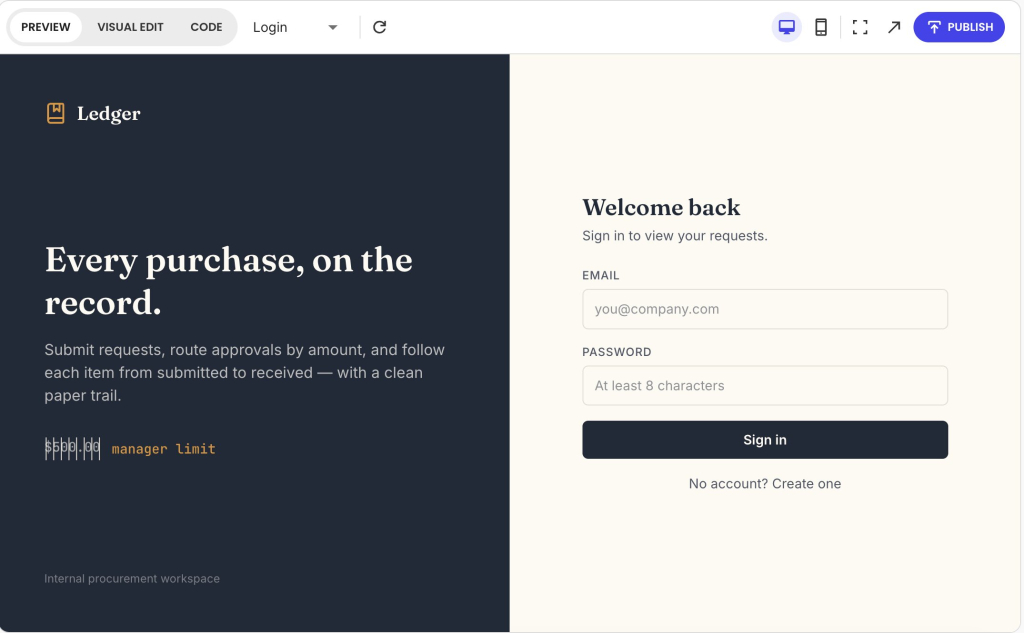
Coderick AI generates the database behind it with the fields you named, created the three roles, and built a separate view for each: requesters see their own requests, approvers get an approval desk with a queue of what’s waiting on them specifically, and everything moves through the status pipeline you defined. The approval limits are enforced in the data rather than just in the interface, and the exception rule comes back with a recovery path, since flagged requests give the requester an “Add cost” action instead of leaving them stuck. It also makes the design decisions you left out, which at this stage is very welcome.
From there, you can refine your internal tool (see our guide to vibe coding workflows for more insights on how to do it). When the version in front of you is right, publishing takes one click. Your tool goes live with hosting included, so there’s no separate deployment step and nothing to set up before your team can log in.
How to test an AI-built internal tool before your team depends on it
Your instinct might be to check that the AI-built internal tool works. But what matters more is whether it holds up when the process misbehaves, which is what week one will do to it. Most of the AI app builder mistakes that surface later are visible in the first hour if you test for the right things.
- Use real, messy data, not clean examples. Take fifty rows from the actual spreadsheet, including the incomplete ones and the ones with a note typed into a number field. A tool that only works on tidy input isn’t ready.
- Run every exception you wrote down. Submit a request with a field missing. Submit the same one twice. Leave an approval untouched past its deadline. Reject something and resubmit it. You defined what should happen in each case, so check that it does.
- Test each role as that person, not as yourself. Log in as a requester and try to approve your own request. Log in as a manager and try to exceed the limit. Permissions that were described correctly can still be built loosely, which is one of the checks our guide on whether vibe coding is safe covers in more depth.
- Check the success test you set. Not whether the tool looks finished, but whether the team stopped updating the spreadsheet. That’s the only result that tells you it worked.
Pro tip: Test with the person who submits, not the person who built it. Whoever writes the specification tests the manager and admin views hardest, because those are the ones they thought about most. The requester view gets tested last and used most, by people who never see the rest of the tool. Hand it to someone who only submits requests, give no instructions, and watch where they hesitate. Every hesitation is a label or a missing option you’d never find from the inside.
When to buy software instead of building an internal tool
There are processes where building is the wrong call, and knowing which is worth more than any feature list. Almost all build-versus-buy guidance is published by companies with a stake in the answer: platform vendors argue for building, and software management firms argue for buying. Read both, and notice which direction each one leans.
Build when the process is genuinely yours
Building is the right call when the workflow is specific to how you operate rather than to your industry, when no vendor models it without you contorting your process to fit, and when the tool is narrow enough that maintaining it stays small. The purchase-request example qualifies. The approval limits, the roles, and the exception rules are yours, and there’s not much surface area to keep working.
Buy when the function is a commodity
Buying an internal tool wins when the category is mature with credible vendors, when your requirements are pretty standard, and when configuring an existing product already covers the workflow. Payroll, accounting, and email marketing are commodities. Building one to avoid a subscription can be a decision you’ll be servicing for years.
If a workflow hasn’t changed in two years and probably won’t, buying stays the better answer even when no product fits perfectly, because maintaining custom software for a stable process rarely pays back.
Keep in mind that AI-generated software still needs an owner, tests, and updates as the things around it change. AI changed what it costs to build, not what it costs to keep. When the tool gets adopted, small bugs accumulate, and whoever built it becomes its unofficial product owner, fielding requests they never signed up for. That’s survivable when the tool is narrow and expensive when it isn’t, which is the real argument for keeping version one small.
The hard part was never the building
For most of the time internal tools have existed, the barrier was engineering. You knew what your team needed and couldn’t get it made, so the spreadsheet stayed. That barrier has largely gone, revealing the one underneath: most teams have never written down how their own process works.
So when you build internal tools with AI, the eight questions covered here are the work. A team that can answer them has a tool worth building. A team that can’t gets a plausible app matching nothing they do, whatever they build it with.
The next step costs nothing. Open the spreadsheet your process runs on and answer the eight questions against it. Most of it is already there: the columns are your records, the status column is your states, and the people who edit the sheet are your users and permissions. What you’ll be missing is usually the exceptions and the success test, which are the two that decide whether the tool survives.
Once you have your answers, the first version of your AI-built internal tool is one prompt away.
[96]
FAQs
You build an internal tool with AI by describing your process precisely enough for the builder to act on it. Define your users, records, actions, states, permissions, views, exceptions, and a success test, then hand that specification to the builder rather than starting from a template.
An internal tool prompt should include who uses the tool, what records it stores, what each user can do, the statuses work moves through, who can view or edit or approve, what each user needs to see, what should happen when data is missing, late, or duplicated, and what result will prove version one is useful.
Yes. A non-technical team can build internal tools without coding, because the hard part is describing the process rather than writing the code. The teams that struggle are usually the ones that skipped defining states, permissions, and exceptions.
You turn a spreadsheet workflow into an internal app by treating each row as a record, the status column as your workflow states, and the people who edit the sheet as your users and permissions. Most spreadsheets already contain the model, just informally.
You should test an AI-built internal tool with real, messy data rather than clean examples, then deliberately trigger the exceptions: missing fields, duplicates, late items, and rejections. Finish by checking your success test, which is usually whether the team stopped using the spreadsheet.
You should buy software instead of building an internal tool when the function is a commodity, the category has credible vendors, your requirements are standard, and the workflow is stable year over year. Maintenance costs several times the initial build, and AI lowers the cost of building without lowering the cost of maintaining.
Yes. Coderick AI can build AI-powered internal tools such as dashboards, CRMs, and admin panels, which are three views of the same underlying system. Once you have defined your records, states, and permissions, the views follow from that specification.