

Claude Code can help build software, but it still expects you to understand how software gets written.
Claude Code is built for people who are already comfortable with terminals, codebases, Git, and deployment workflows — in short, developers. If any of those terms are unfamiliar, it’s probably not the right starting point. Beginners who just want a live website or simple web app will get a more direct path with a managed AI website and web app builder like Coderick AI.
Key takeaways:
- Claude Code is a code-first tool built for developer workflows. It works inside existing code projects and expects you to already know your way around a terminal, Git, and developer workflows.
- Coderick AI lets beginners describe what they want in plain language and get a live website or app: hosting, security, and publishing included.
- Getting started with Claude Code requires a paid subscription, a terminal, and an existing code project; all before the AI does anything. That’s a developer setup checklist, not a website launch plan.
- The beginner barrier isn’t the AI itself. It’s the four or five tools that have to be in place before the AI can do anything useful.
- If the goal is getting a website or web app live rather than learning a coding workflow, the more direct path is to build a website without Claude Code.
What is Claude Code?
Claude Code is Anthropic’s agentic coding tool: an agent that plans work, reads a full codebase, edits files across multiple directories, runs tests, and can create pull requests. It launched as a generally available product in May 2025.
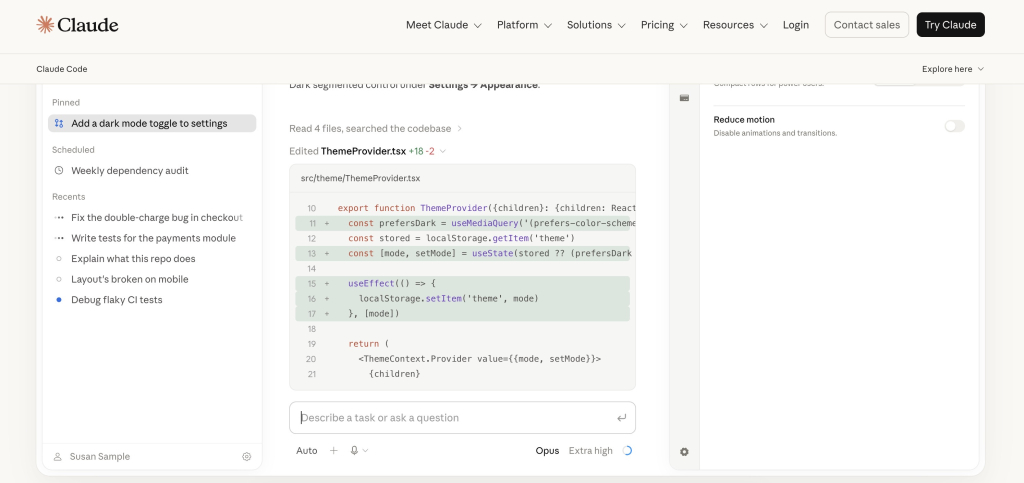
What Claude Code can do inside a codebase
Claude Code operates at the project level. It can read files across an entire codebase, make coordinated edits in multiple locations, run shell commands (instructions typed directly into your computer’s terminal), handle Git workflows (tracking and saving changes to code), and work through multi-step engineering tasks. It understands context that spans dozens or hundreds of files at once, which is what makes it useful for developers managing complex projects.
Where Claude Code runs: terminal, code editor, desktop app, and browser
Claude Code works in terminals, code editors, desktop apps, and developer platforms like GitHub. The terminal version has the most features and gets updates first. The underlying engine is the same across all of them, so settings you configure in one carry over to the others.
If none of those are part of your day-to-day workflow, that’s a good sign Claude Code isn’t the right starting point — and this article will help you find one that is.
If terms like terminal, CLI, or CI/CD are new, the vibe coding glossary covers the vocabulary beginners run into most.
Why Claude Code is different from a no-code AI builder
A no-code AI builder asks what the user wants to create. Claude Code asks what the developer wants to do inside a code project that already exists. The distinction matters: Claude Code doesn’t generate a finished website from a description. It helps technical users work faster inside a codebase they’re already managing or are prepared to manage.
How does Claude Code work for beginners?
Claude Code works for beginners who are willing to learn a development environment first. That means a terminal, a code project, and a connected account, none of which the tool creates for you.
What you need before using Claude Code
Anthropic’s quickstart lists three requirements before you start:
- A terminal or command prompt open
- A code project to work with
- A Claude subscription (Pro, Max, Team, or Enterprise), Claude Console account, or access through a supported cloud provider.
That’s before a single prompt is typed.
Why a terminal or command prompt can be a barrier
The terminal is a text-only screen on your computer where you type instructions instead of clicking buttons. There’s no visual interface, no drag-and-drop, and no menus. For users who’ve never opened one, figuring out how to find it, open it, and type the right commands is the first obstacle — and it comes up before any building begins.
Why having a code project matters
Claude Code is designed to work with an existing project. You open your terminal, go to the folder where your project lives, and run the tool from there. For beginners who don’t have a project folder, repository, or a codebase yet, Claude Code may feel like the wrong starting point.
Who is Claude Code actually for?
Claude Code is built for users who want to work inside a development environment.
Developers working with existing codebases
Claude Code’s primary use case is helping developers move faster inside projects they already own. It can read a large codebase, understand how the pieces connect, and make changes across multiple files simultaneously. That’s not useful until the codebase exists.
Technical founders and product teams
Technical founders who write code and product teams with engineering resources can use Claude Code to move faster on features, debug issues, and automate repetitive development tasks. The time savings are real, but they only show up for users who understand the technical context already; they know enough to check the AI’s work and point it in the right direction.
Teams that use GitHub, pull requests, or CI/CD
Claude Code integrates with GitHub Actions, supports pull request workflows, and can run inside CI/CD pipelines. For teams that already use these tools daily, Claude Code fits into the workflow they have. For beginners, those are new concepts to learn on top of the tool itself.
Users who want control over code and deployment
Some users specifically want to own their source code, manage their deployment pipeline, and have access to every file the project creates. Claude Code is built for that use case. It’s a code-control path, not a managed website or app publishing environment. If that level of control is the goal — and the technical fluency to exercise it is already there — Claude Code is well suited to the work.
Why can Claude Code feel difficult for beginners?
Claude Code might feel technical if you’re a beginner because it works inside development workflows. Each of its strengths assumes a layer of technical knowledge the user has already built.
It still uses developer tools and project files
Claude Code’s terminal CLI is its most capable interface. Working with it means being comfortable in a command-line environment, which requires knowing how to navigate directories, install packages, and run commands. Users who have never done those things won’t get far before hitting something unfamiliar.
It can require Git, repositories, and approvals
Git is a version control system that tracks changes in a codebase. Claude Code works with Git naturally: it can make commits, create branches, and generate pull requests. For a developer, those are routine tasks. For a beginner, Git is a separate system to learn, with its own terminology, setup steps, and ways to go wrong.
It does not remove hosting, DNS, SSL, or deployment decisions
Generating code and launching a website are two different things. Claude Code helps produce or modify code. Getting that code onto the internet still requires a hosting account, a deployment pipeline, DNS configuration (connecting your domain name to the server where your site lives), and SSL setup (the security certificate that makes your site load as https rather than http). None of that is simplified by the coding agent. A beginner who uses Claude Code to build something still has to solve the publishing problem afterward.
It may create a working project before the user knows how to launch it
This is a common experience for non-technical users who try Claude Code: they get working code faster than they expected, then find themselves stuck because they don’t know what to do with it. The code exists; the infrastructure to run it publicly still has to be chosen, configured, and maintained.
Cost is another reason beginners look beyond coding agents. Claude Code pricing and deployment costs after the project is built often come as a surprise, since hosting, domain registration, and any external services are separate expenses on top of the subscription.
What should beginners look for in a Claude Code alternative?
If you want to build a site without Claude Code, the right alternative depends on the goal. For most beginners, the goal isn’t “generate code” — it’s “get your website live.” That changes what the tool needs to do.
A plain-language building experience
A useful beginner-friendly Claude Code alternative lets users describe what they want in plain language without needing to translate it into technical instructions. “I want a booking form on the homepage” should be enough. The tool should handle the interpretation, not the user.
No terminal or local setup requirement
Any tool that requires installing software, running commands, or configuring a local development environment before the first page renders is adding friction the beginner doesn’t need. The building experience should start in the browser, not in a local terminal setup.
Built-in publishing and hosting
Building and publishing are usually treated as separate steps, but for most beginners they should be part of the same experience. An alternative that generates a project but leaves the user to figure out where to put it hasn’t solved the actual problem.
Custom domain, SSL, backend, and database support
A beginner-friendly tool should handle the infrastructure decisions that would otherwise require research, separate service accounts, and manual configuration. Custom domains, SSL certificates, form backends, and basic database functionality should be part of the managed environment, not add-ons.
Easy updates after the site or app goes live
Launching is only the beginning. A tool that makes it easy to build something but hard to change it later is a problem waiting to happen. Making changes after launch should be as easy as building in the first place and ideally through the same interface.
Why is Coderick AI a better fit for many non-technical users?
Coderick AI is a better fit for many beginners when the goal is not to manage a codebase, but to get a working website or web app live. Instead of starting with a terminal, repository, deployment pipeline, hosting account, DNS records, and database setup, users describe what they want and build it inside a managed AI website/app environment.
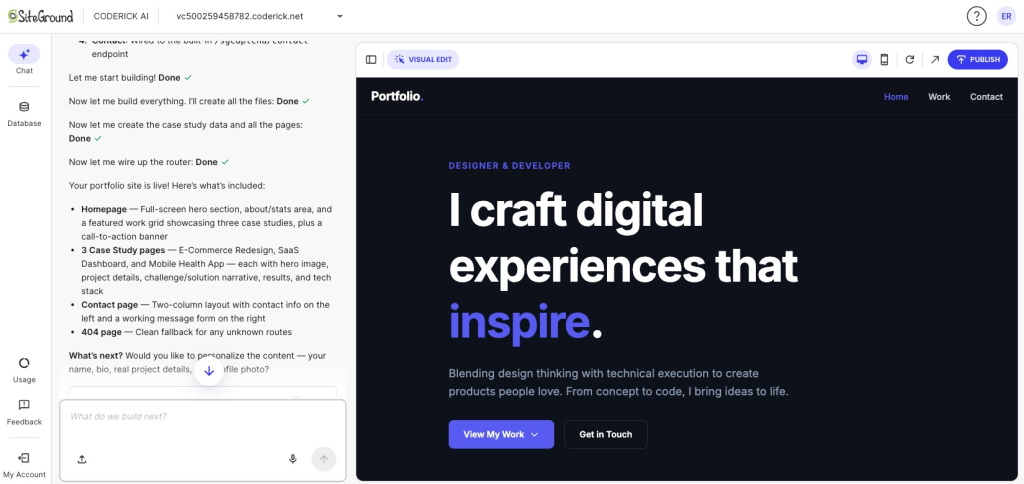
It starts with describing the website or app you want
Coderick AI is a web-based AI website and app builder that runs inside a SiteGround account. There’s no installation and no terminal. Users open it in a browser, describe the site or app they want to build, and Coderick AI generates the project from there. It’s designed for users with zero coding or design experience.
It creates structure, layout, pages, forms, and basic logic
Coderick AI doesn’t just produce code. It generates a working project: navigation structure, page layouts, form functionality, and basic application logic (things like a contact form that sends you an email, a booking system, or a price calculator). For more advanced starting points, it also accepts file uploads including .html, .css, .js, .jsx, .ts, .tsx, .scss, and .md files, so users who prototyped something in Claude Design or another tool can hand those files over and continue building from there. That’s the shorter path described in how to turn a Claude Design project into a real website. If the starting point is a prototype rather than a codebase, the broader AI prototype to published website workflow explains how to move from design output to live site.
It runs projects on managed hosting instead of a manual deployment pipeline
When a Coderick AI project is published, it goes live on SiteGround’s hosting immediately. SSL installs automatically once a custom domain points to SiteGround’s nameservers. There’s no separate hosting account to set up, no deployment pipeline to configure, and no server to manage. The infrastructure is part of the product, not an afterthought.
It lets users edit and expand the project through chat
After launch, the project is still editable through the same chat interface. Users can request layout changes, add new pages or forms, adjust content, and extend functionality without leaving the builder or touching any code. For small businesses and solopreneurs who need to manage a site on their own over time, that’s the part that matters most.
When is Claude Code still the better option?
There are cases where Claude Code is clearly the right tool. These are not edge cases — they’re the situations Claude Code was built for.
You need source-code control
If you need to own every file and track every change made to the project, Claude Code is the right path. It works directly with Git, keeps a full history of changes, and gives you visibility into what was modified and when.
You already have a codebase or development team
Claude Code can read and work across an entire existing codebase. If a project already has thousands of lines of code, an established directory structure, and a team of engineers collaborating on it, Claude Code fits into that workflow in a way a managed builder doesn’t.
You need custom integrations or complex engineering
Some projects need to connect to multiple external services, require users to log in with their own accounts, or run complex logic behind the scenes that a managed builder can’t handle. Claude Code gives technical users the control to direct that work precisely.
You want GitHub, pull requests, tests, and manual deployment
For teams that run their delivery process through GitHub, manage code reviews through pull requests, and deploy on their own schedule, Claude Code integrates directly with those tools. The full developer workflow remains available.
This isn’t unique to Claude Code. The same pattern shows up across coding agents and it’s why some users end up looking for OpenAI Codex alternatives for beginners for exactly the same reasons.
Which path should beginners choose?
The right tool depends on the goal, specifically, whether the goal is to work with code or to get something live.
| User situation | Better path | Why |
| You want to learn coding and work with files, commands, and Git | Claude Code | It gives developer control and works directly with codebases |
| You already have a project or repo | Claude Code | It can read, edit, run commands, and help across multiple files |
| You want a live website or a simple web app without technical setup | Coderick AI | It lets you describe the outcome and build in a managed environment |
| You need hosting, SSL, custom domains, backend, and updates handled together | Coderick AI | Those are part of the managed website/app-building path |
Ready to build without the developer setup?
If the real goal is not learning a coding-agent workflow but launching a site, the more direct path skips the terminal entirely. Coderick AI is a managed AI website builder for non-technical users that handles the build, the hosting, the domain connection, and the ongoing edits inside one managed environment. Describe what you want, publish when it’s ready, and update it through chat when it needs to change.
[96]
Frequently asked questions about Claude Code alternatives
Claude Code can work for motivated beginners, but it’s still a developer-oriented tool. Anthropic’s quickstart expects users to have a terminal or command prompt, a code project, and account access before starting. Beginners who don’t want to manage technical setup may prefer an AI website or app builder.
The best alternative depends on the goal. If the goal is to build and launch a website or simple web app without terminals, GitHub, hosting, DNS, SSL, or database setup, Coderick AI is a strong beginner-friendly option.
Claude Code feels technical because it works inside development workflows. It can read codebases, edit files, run commands, work with Git, and integrate with development tools. Those capabilities are powerful, but they can be unfamiliar to users who mainly want a finished website or app.
Non-technical users can use Claude Code, especially through web or desktop interfaces, but they still need to understand what files and folders their project uses, how the code is organized, and what needs to happen after changes are made. For users who don’t want to manage a codebase or deployment, a managed AI builder may be easier.
Coderick AI fits when the user wants the outcome of building with AI without managing the developer workflow. Instead of starting with files, commands, repositories, hosting, DNS, and deployment, users describe the website or app they want and build inside a managed environment.
Not exactly. Claude Code and Coderick AI solve different problems. Claude Code helps users work with codebases and development tasks. Coderick AI helps users create websites and web apps from descriptions, then edit, publish, and manage them in a hosted environment.
Yes. Coderick AI is designed for users with zero coding or design experience. Users describe what they want, and Coderick AI builds a working project that can be edited through chat and runs automatically on SiteGround hosting.
Yes. Every paid Coderick AI plan includes SiteGround hosting, and projects can be published without configuring servers or deploying manually.
Choose Claude Code if you want source-code control, Git workflows, pull requests, custom integrations, tests, and manual deployment. Choose Coderick AI if you want to describe a website or web app and build it inside a managed environment where hosting, publishing, responsive design, backend support, and updates are handled together.
Beginners should avoid choosing a tool only because it generates code. They should ask whether the tool also helps them publish, host, connect a domain, secure the site, update content, manage forms, and maintain the project after launch.