
If you’ve ever thought “I wish this tool just worked the way my business works”, that’s the problem this guide solves. Knowing how to build a web app used to require a developer, a budget, and a long wait. Now you can describe what you need and build it yourself with AI.
This guide covers the four types of web apps small businesses build, what each one does, real examples of each, and a practical walkthrough of how to build your own with Coderick AI on SiteGround.
Key takeaways:
- Small business web apps fall into four categories: run the business, sell and grow, deliver the service, or enable and automate.
- The most common starting points are CRMs, invoicing tools, booking systems, client portals, inventory trackers, and quote generators and are all buildable without a developer.
- Custom software is no longer out of reach. A clear description of what you need is enough to generate a working first version with an AI app builder.
- The prompt is the app brief. The clearer you describe what you need, the better the first version your AI app builder generates.
- A useful first version should solve one business problem well before you add extra features, integrations, or advanced workflows.
What is a web app and why does it matter for your business?
A web app is any software you access through a browser to complete an action: logging in, creating records, updating information, getting things done. You’ve used one when you logged into your accounting tool, checked a shipping dashboard, or filled out an online form that updated a database somewhere.
That’s what separates a web app from a regular website: a website is primarily something you read; a web app is something you use.
And anything you’re currently doing in a spreadsheet, an inbox, or a copy-pasted update? That’s a web app waiting to be built.
What kinds of web apps do small businesses use most?
Most web apps for small businesses fall into one of four categories, and knowing which one you need is half the battle. The simplest way to choose a small-business web app is to ask what job it does: run the business, sell and grow, deliver the service, or enable and automate work.
- The run the business web apps cover your operational backbone: CRM, invoicing, inventory, time tracking, and HR. The tools you’re probably managing in spreadsheets right now.
- The sell and grow web app group covers everything that turns interest into revenue: ecommerce stores, lead generation tools, quote generators, or a simple campaign tool.
- The service delivery web apps improve the customer-facing part of your operation: booking systems, client portals, and industry-specific tools built around how your business actually works.
- The enable and automate web app layer covers the lighter-weight tools: KPI dashboards, workflow systems, AI-powered generators, and internal calculators that cut friction from tasks you repeat every day.
Whatever’s eating most of your time right now, there’s almost certainly a web application for it. And now you can build it yourself.
Web apps that run the business
These are the small business internal tools holding your operation together: the ones you currently have open in four browser tabs, two spreadsheets, and a group chat you’ve stopped responding to.Here’s what that looks like: a full CRM dashboard, generated by Coderick AI from a single prompt.
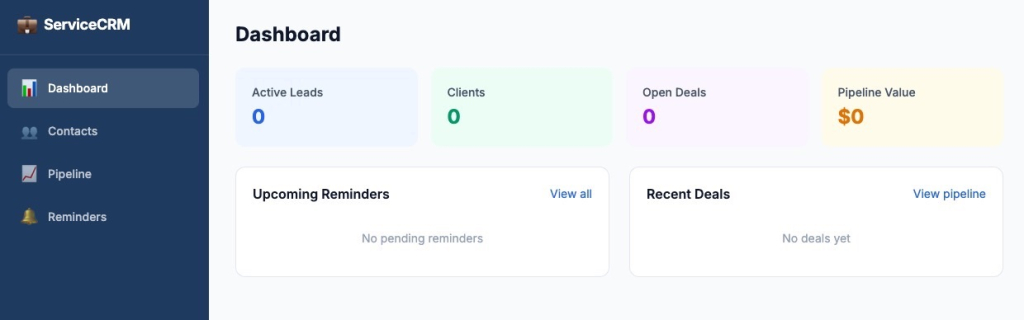
Get the prompt: “Build me a CRM for a small service business. I need to track leads and clients, log notes from calls and emails, set follow-up reminders, and see each deal’s stage in a pipeline view. I have around 50 active clients at any time.”
CRM and sales pipeline tracker
A CRM is the system that tracks every client and lead. Without one, that information lives across inboxes, notebooks, and someone’s memory, which works fine until it doesn’t.
Say you’re a freelance consultant with 15 active clients and 30 prospects at various stages. Describe a CRM with three pipeline stages, a follow-up reminder field, and a notes log — that’s exactly what Coderick AI builds. Need ten stages and a team view instead? Describe that. You get what you ask for, nothing more, nothing less.
💡 Tip: start with the pipeline, not the contact record. Get the deal stages working first — add, move, close.
Invoicing and billing tracker
An invoicing app handles the full billing cycle. No more PDF templates, saved-as copies, and calendar reminders to chase payments that may or may not have landed.
Take a web designer billing ten clients across different models; some per project, some on retainer. One custom invoicing app handles both, flags anything unpaid after 30 days, and auto-generates recurring invoices on the first of the month.
💡Тip: Don’t try to describe the whole app in the first prompt. Get the core flow working: create an invoice, send it, mark it paid. Anything else is a refinement, not a foundation.
Inventory control system
An inventory app tracks what you have, where it is, how fast it’s moving, and when you need to reorder. For product-based businesses, getting this wrong is expensive. Too much stock ties up cash, too little loses you sales.
If you’re running a homeware brand across two warehouses, a custom stock tracker shows live levels per location, fires a low-stock alert before you run out, and logs the supplier contact for each product. Restocking stops being something you remember at the worst possible moment.
💡 Tip: Build for one location first, even if you have several. Get the stock tracking and reorder alerts working cleanly, then add locations in a later iteration.
Time tracking and shift management
A time tracking and shift management app answers one question: who worked on what, and for how long. A shift management app answers another: who’s working when, and is every shift covered. Together, they replace the scheduling spreadsheet and the “can anyone cover Tuesday?” group chat.
Eight part-time café staff, a whiteboard, a group chat, and two spreadsheets that are never quite in sync — sound familiar? A custom shift scheduling app replaces all of it: the team sees their schedule, uncovered shifts get flagged, and hours are tracked without anyone having to chase anyone.
💡 Tip: Describe time tracking and shift scheduling as separate things in your prompt, even if you want them in one app. It gives Coderick AI a clearer structure to work from.
Compliance and document management
A document management app gives your business a single, structured place to store, version, and retrieve the files that matter: contracts, certifications, policies, audit records. The right document, findable by the right person, without digging through a shared drive that hasn’t been organized since 2021.
For a construction firm with subcontractors, a compliance tracker built in Coderick AI logs certification expiry dates for everyone on the roster, sends reminders 30 days before anything lapses, and keeps a full audit trail, replacing a folder system that only one person knew how to navigate.
💡 Tip: start with the document storage and access control. Get the right people seeing the right files before adding expiry dates, reminders, or audit trails.
Web apps that sell and grow
If the previous category keeps your business running, this one keeps it growing. These are the tools that sit between you and your next sale — and the ones where a poor fit costs you revenue, not just time.
Here’s the output: a quote and estimate dashboard for a construction business, generated by Coderick AI from the prompt above.
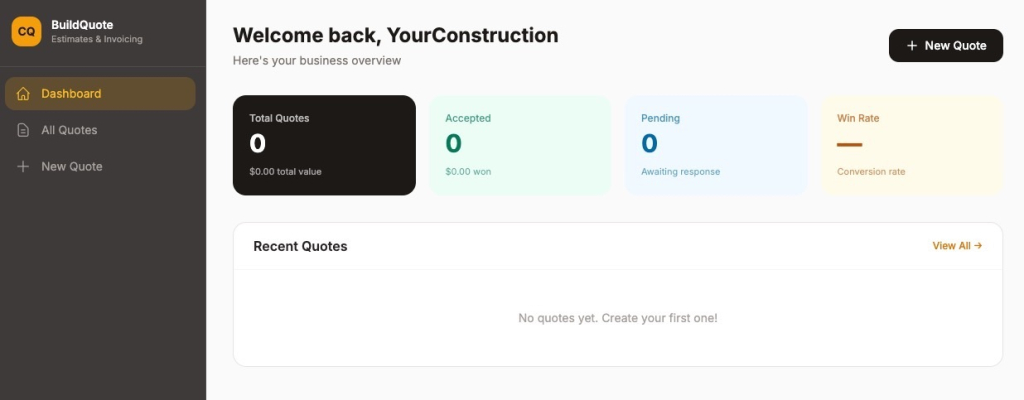
Get the prompt: “Build me a quote and estimate generator for a small construction business. I need to select from a list of standard services and materials, enter quantities, and have the app calculate a total automatically. It should generate a branded PDF quote I can send to clients, and log all quotes so I can track which ones were accepted.”
Ecommerce store and product catalog
An ecommerce app gives you a custom storefront: your catalog, your order flow, your rules without the transaction fees or the feature compromises of a standard platform.
If you need a standard storefront up and running fast, SiteGround Ecommerce is built for exactly that. For more custom flows, like specific pricing rules, a B2B catalog, a multi-vendor setup, Coderick AI lets you build for your exact model.
💡 Tip: Describe your catalog and order flow first. Don’t try to build the full store in one go — get the product listing and order management working, then refine from there.
Lead generation and campaign tools
A lead generation app captures prospect information: from forms, landing pages, or direct outreach, and gives you a structured place to manage what happens next. You can segment contacts by source or status, flag leads that have gone cold, and keep your pipeline organized without it living in a spreadsheet or an inbox.
For a small agency with enquiries coming in across multiple service pages, a custom lead capture app lands every enquiry in a pipeline, tags it by service type, and triggers a follow-up sequence. No more checking three inboxes to figure out who asked about what and when.
💡 Tip: Start with the capture form and the pipeline view. Know where leads land and what their statuses are before adding segmentation or follow-up logic.
Quote and estimate generator
If your business runs on custom pricing, the next one is probably your biggest time sink.
A quote generator lets you build and send professional estimates without starting from a word processor template every time. For businesses with variable pricing (construction, trades, consulting) quoting manually is usually the most time-consuming part of winning work, and the most error-prone.
Think of a landscaping company quoting jobs with variable materials, labor, and square footage. A quote web app built in Coderick AI pulls in standard services, calculates the total, and outputs a branded PDF estimate.
💡 Tip: List your most common line items before you write the prompt. The more specific you are about what goes into a quote, the more useful the first version will be.
Web apps that deliver the service
Running the business is internal. Delivering the service is what your clients actually see and the tools in this category shape that experience directly.
Here’s another example built in just a few clicks: this time a client portal with a personalized dashboard, project tracking, shared files, and meeting scheduling, all scoped to the logged-in client.
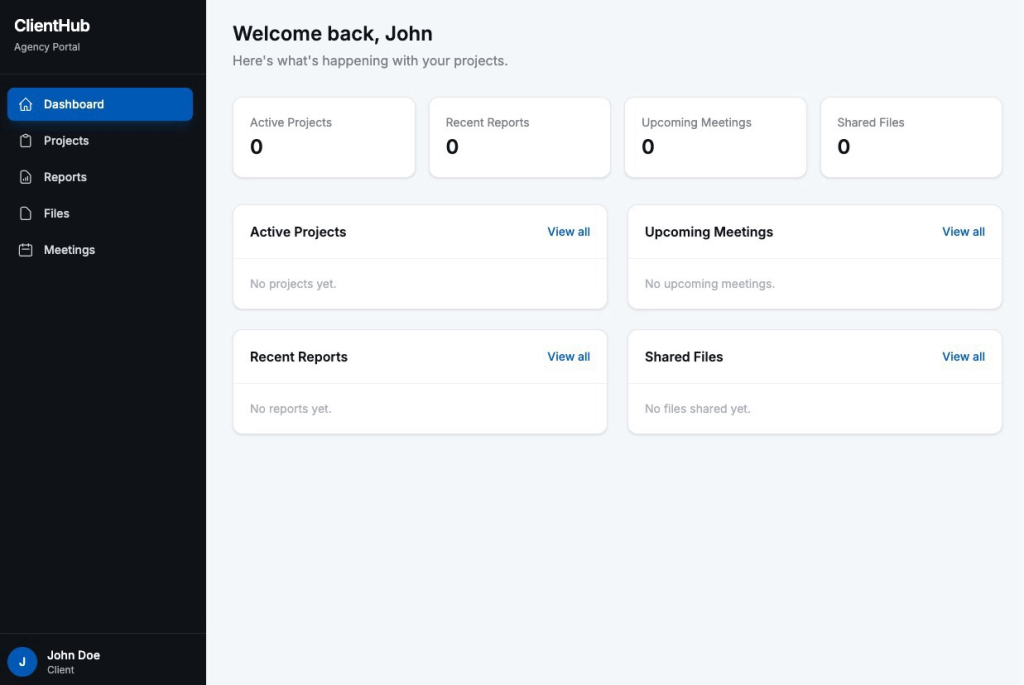
Get the prompt: “Build me a client portal for a small marketing agency. Each client should log in and see their own dashboard with campaign performance reports, a list of deliverables and their status, and a file upload section. Clients should only see their own data.”
Appointment booking and scheduling system
A booking app lets customers schedule time with you without a back-and-forth email thread. On your end, it manages availability, prevents double-bookings, and sends reminders.
A physiotherapy clinic with four practitioners and six appointment types is exactly where generic scheduling tools start showing their limits. Practitioner-specific availability, treatment length variations, cancellation rules: a custom booking system handles all of it without manual intervention every time something doesn’t fit the template.
💡 Tip: Describe your availability rules clearly — days, hours, appointment types, and whether different team members have different schedules. Booking logic gets complicated fast if the prompt is vague.
Client portal
A client portal gives each client a private space to log in and see what’s theirs: project status, reports, invoices, uploaded files. It replaces the “just checking in on progress” message and the twenty minutes it takes to respond to it.
If you’re managing 20 active clients across different projects, keeping each client’s view scoped to their own data is exactly the kind of thing that usually requires a development process. With Coderick AI, you can build and refine that logic yourself. It’ll take some iteration, but you won’t need anyone else to figure it out.
💡 Tip: Define who sees what before anything else. Write out the difference between what a client sees and what an admin sees — that access logic is the hardest part to retrofit later.
Industry-specific tools
Industry-specific apps are purpose-built for one type of business, shaped around how your industry actually operates. A clinic management system, a construction project tracker, a hospitality reservation system: each one is shaped around a workflow that a generic tool will never quite fit.
The more niche your workflow, the bigger the gap a generic tool leaves. A custom app fills it.
Web apps that enable and automate
Not every useful app needs to be a full system. Some of the best small business web apps do one thing well and save you an hour every time they do it.
This booking app is a good example: service tiers, scheduling, and a price estimator, built in Coderick AI and ready to use.
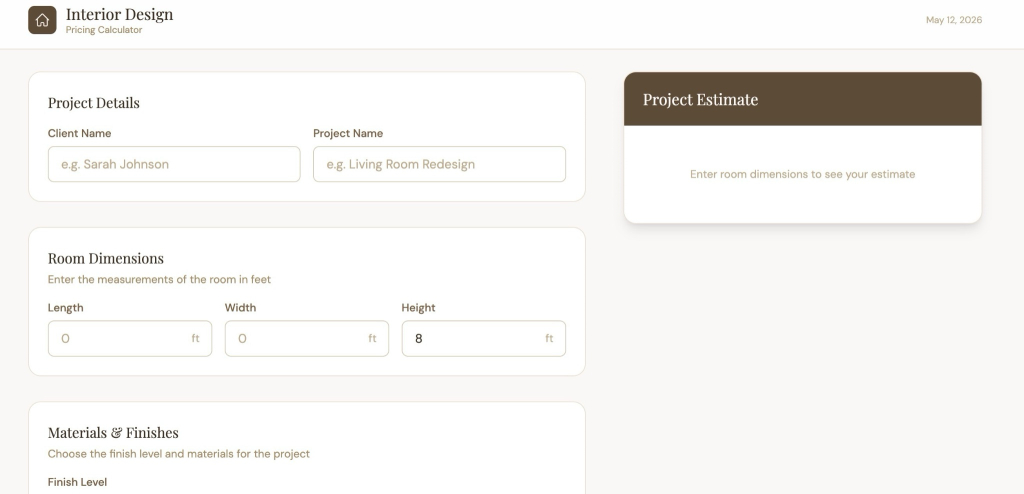
Get the prompt: “Build me a pricing calculator for a small interior design business. I need to enter room dimensions, select finish types and materials from a dropdown, and have the app calculate a project estimate automatically. The output should be a summary I can copy and send to a client.”
KPI dashboard and business metrics tracker
A KPI dashboard puts your most important business numbers into one view: revenue, orders, invoices, performance. You manage the data yourself, but the view is always there when you need it, without opening five different tools to piece it together.
If you’re opening four different tools every Monday just to know where revenue stands, how many orders came in, and what’s still unpaid, a custom dashboard built with Coderick AI pulls all of that into one screen.
💡 Tip: List the exact five to ten numbers you want on the screen before you open Coderick AI. A dashboard is only useful if it tracks the right things — and that decision is yours to make, not the app’s.
Workflow and task management system
A workflow and task management app gives your team a structured way to move work through a process: a kanban board for tasks, an approval flow for requests, a ticket tracker for support issues, or an SLA (service level agreement) tracker — a way to make sure time-sensitive requests are handled within an agreed timeframe.
A small team where everyone does a bit of everything tends to run on informal updates and group chats until something slips. A custom workflow app built in Coderick AI replaces the “what’s the status on this?” thread with a board that actually reflects how your team works: your stages, your rules, your escalation paths.
💡 Tip: Map your stages on paper first — what does a task move through from start to done? The clearer your workflow is before you prompt, the less you’ll need to rework later.
AI micro-tools and internal calculators
AI micro-tools and internal calculators are the smallest apps with some of the highest perceived value: a pricing calculator that applies your exact logic, an ROI estimator you can share with prospects, an FAQ chatbot trained on your own content, or an internal generator that produces something your team creates manually every week.
Think of a copywriter who prices every project differently. A custom calculator that factors in word count, research time, and revision rounds means a consistent, defensible quote in seconds instead of a back-of-the-envelope guess.
💡 Tip: Write out the calculation or logic manually before describing it to Coderick AI. If you can’t explain how the output is reached, the app won’t be able to replicate it accurately.
How to build a web app for your small business with Coderick AI
You don’t need a technical background to learn how to build a web app with Coderick AI. You need to know what problem the app solves, who uses it, what data it tracks, and what should happen when someone takes an action.
Step 1: Start with a brief
Before you open Coderick AI, spend five minutes writing a short app brief with three answers:
- What does the app need to do?
- Who uses it — just you, your team, your clients, or all three?
- And what information does it need to track?
You don’t need to know anything about databases or code. You just need to be specific about your problem. The clearer your picture, the more useful your first output will be.
For a small agency, that might look like this:
- App: client project management portal
- Users: team members, clients, and an admin
- Team members need to update task statuses, log hours, and upload files
- Clients need to see their own project progress, shared files, and invoices — nothing else
- Admin needs a full overview of all clients and projects
- Data to track: tasks, statuses, hours, uploaded files, invoices, client access rules
Step 2: Describe the app and Coderick AI builds the first version
Open Coderick AI and turn the app brief you wrote in step one into a plain-language prompt. The structure is simple:
- Start with the app type: what kind of tool it is, so Coderick AI has a clear frame to work from.
- Describe the main actions: what users can actually do inside the app: create, view, update, send, track.
- Specify who sees what: if admins, team members, and clients need different access, say so explicitly.
- Add the details that matter: specific fields, data points, or outputs your workflow depends on.
Using the agency example from step one, the prompt would look something like this:
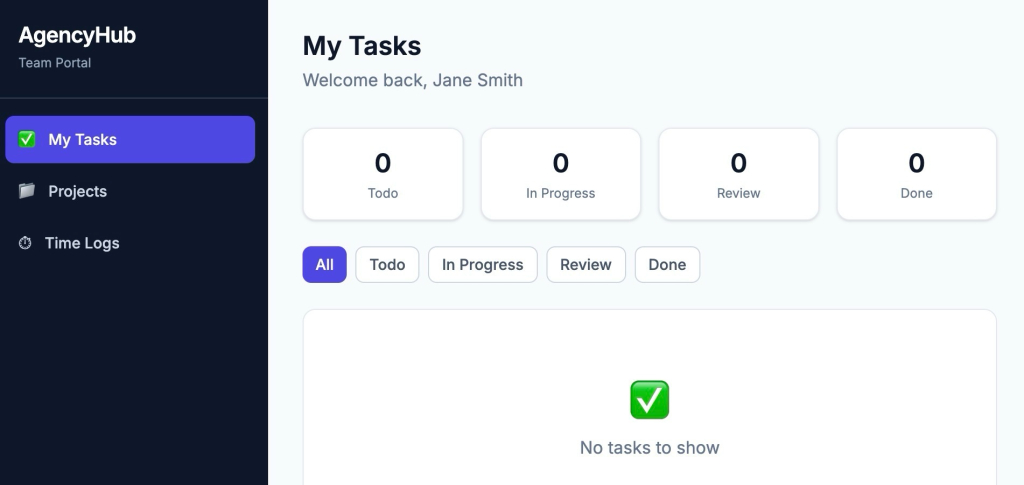
“Build me a project management portal for a small marketing agency. Team members log in to update task statuses, log hours, and upload deliverables. Clients log in to see their project progress, shared files, and invoices — they should only see their own data. I need an admin dashboard to manage all clients and projects in one view, with the ability to add new clients and assign team members to projects.”
That’s a complete first prompt. It tells Coderick AI what the app does, who uses it, what each person sees, and what the admin needs to manage. Hand it over and you’ll have a working first version to look at in minutes. Below is the first version you’d get.
Step 3: Refine, test, and make it yours
The first version is a draft, not the final app, and that is normal. Work through it the way a new user would, and check for four things:
- Does it complete the core workflow? The main actions you described in your prompt — can you actually complete them? Create a record, send something, update a status. Start here before anything else.
- Does the data go where you expect? Fill in a few test entries and check that information shows up in the right place, in the right view, for the right user.
- Does it match how you actually work? Generic field names, missing steps, or logic that almost-but-not-quite reflects your process — note everything that feels off.
- Does each user see the right things? If you have multiple user types, log in as each one and check that access is scoped correctly.
Then go back and refine. Adjust layouts, rename fields, add what’s missing, remove what isn’t useful. This back-and-forth is normal. Мost small business web apps get to a usable state in a few focused iterations. The goal at this stage isn’t perfection; it’s an app that fits well enough to start using, so real-world use can tell you what still needs adjusting.
In our case, such a prompt would be:
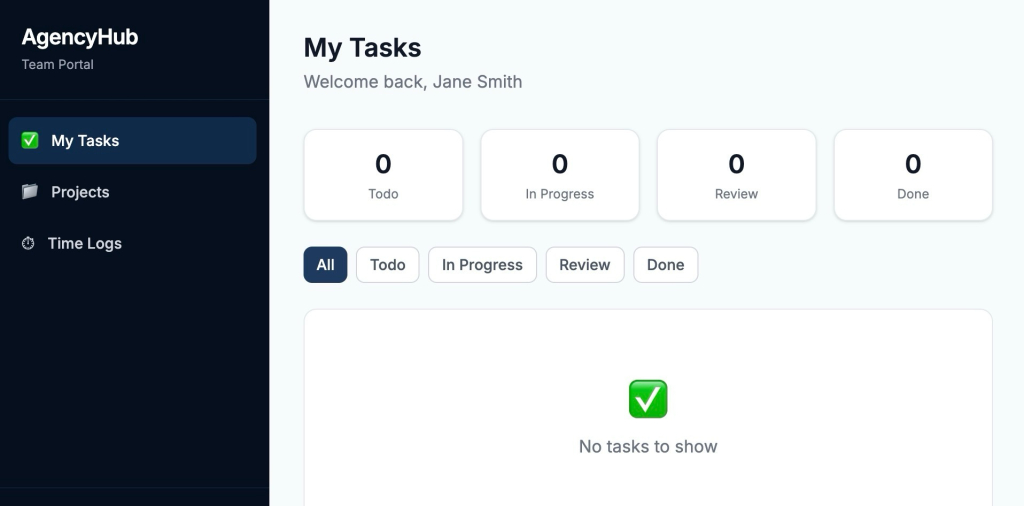
“Make a few changes to the task board. Add a priority field to each task with three options: High, Medium, and Low. Restrict the Review stage so only team leads can move tasks into it. Add a time logging option directly on each task so team members don’t have to navigate to a separate section. Highlight overdue tasks in red. Also update the color scheme — change the purple sidebar and buttons to a deep navy blue, and use a light grey-white for the background to match our brand colors.”
And here’s what happens:
Why does hosting matter for a web app?
Unlike a static website, a web app is doing things constantly: processing requests, storing data, managing user access. That means the hosting infrastructure it runs on directly affects how fast it loads, how reliably it works, and how securely it handles your data.
Coderick AI web apps are hosted on SiteGround’s own infrastructure by default, so performance, security, and uptime come with the build, not as an afterthought. Hosting setup, server configuration, and the separate hosting bill are all handled. You publish, and it’s live.
Start building the web app your business has been missing
Every web app in this guide started as a problem someone got tired of working around. A spreadsheet that got too complicated. A SaaS subscription that almost did the job. A process that worked fine until the business grew and suddenly didn’t.
Start with the thing that’s costing you the most time right now. Not a full spec, not a feature list, just that one problem. Describe it, build it with Coderick AI, and refine from there. The first version is ready in minutes. The friction point you’ve been working around is exactly where to start.
[96]
Frequently asked questions: How to build a web app
A website mainly presents information, while a web app lets users take action with data. Websites deliver information: blog posts, landing pages, company details. Web applications let you create, update, and act on data: booking appointments, tracking inventory, managing clients. The line between the two is blurring, but the distinction still holds: if you log in and do things, it’s a web app.
Yes. Tools like Coderick AI let you describe the web app you want in plain language and generate a working version without writing a single line of code. You’ll still need to know what you want to create and be able to test and refine the output — but none of that requires a technical background.
A simple app like an invoicing tool, a booking system, a client portal can go from prompt to working first version in minutes with Coderick AI. Getting it to a fully refined, launch-ready state typically takes a few hours of testing and iteration, depending on how complex your requirements are. A custom app that would have taken a developer weeks can now be built and refined in an afternoon.
Yes. If you’re new to SiteGround, Coderick AI offers a 14-day free trial of the Essential plan: full access, including publishing, with 100,000 credits included. You’ll need to enter a card to get started, but nothing is charged during the trial. If you don’t cancel before the 14 days are up, the plan renews automatically. Existing SiteGround or Coderick AI users can also start a free trial project directly, with up to five trial slots available at a time.
The most common small business web apps are CRMs, invoicing tools, booking and scheduling systems, inventory trackers, and client portals. These are the tools that replace the most spreadsheets and cover the most repeated daily friction. Dashboards, workflow managers, and quote generators are close behind — especially for service businesses and trades.
Small business web apps fall into four categories: apps that run the business (CRM, invoicing, inventory, HR), apps that sell and grow (ecommerce, lead generation, quote tools), apps that deliver the service (booking systems, client portals, industry-specific tools), and apps that enable and automate (dashboards, workflow managers, AI micro-tools).
Not anymore. Building a web app from scratch used to mean writing code, structuring a database, and figuring out hosting and deployment — a steep learning curve even for people with some technical background.
With Coderick AI, that layer is handled for you. You describe what you want in plain language, refine the output until it fits, and publish. The hard part now is being clear about what you need, not knowing how to build it.
Three things: what the app needs to do, who uses it, and what data it needs to track. You don’t need a technical spec or a wireframe — just a clear picture of the problem you’re solving and the main features that would solve it. The more specific you are in your description, the more useful your first output will be.