Valentine’s day email marketing: 6 campaign ideas that drive sales

Valentine's Day email marketing

Whether you sell products, services, or simply share your expertise online, Valentine’s Day is your opportunity to show your audience a little love and bring in more sales. 

February 14 is one of the few days in the calendar that comes pre‑loaded with positivity, emotion, and attention. People are in a good mood, more open to spending, and more willing to treat themselves or someone they care about. That makes it a natural moment to show up in their inbox and remind them why they love buying from you, booking you, or following your work.

In this guide, you’ll see why Valentine’s Day emails work for small businesses and personal brands, what types of emails you can send, and how to put together a simple campaign that fits your time and resources. By the end, you’ll know exactly what to send and how to turn this occasion into real results for your business.

Why Valentine’s Day is a sales opportunity you shouldn’t miss

When you run a small business, most of your time goes into serving clients, fulfilling orders, or keeping your website up and running. Anything extra you do for marketing has to be simple, quick to set up, and actually help you bring in more money or more loyal customers.

[87]

Valentine’s Day is one of the easiest moments in the year to do exactly that. It’s your opportunity to turn whatever you sell into something people feel good about buying.

A cleaning service becomes “give your home some love.” An online course becomes “invest in yourself this Valentine’s Day.” A skincare routine becomes “a little self-love for February 14.

Here’s what Valentine’s day gives you for free:

A reason to reach out

You don’t have to think hard about “why” you’re emailing. Valentine’s Day is already a known occasion, so an email from your business around that time feels normal, whether you’re sharing an offer, a reminder, or just saying thank you.

Built-in urgency

Because Valentine’s Day is on a fixed date, people know your offer or message won’t be around forever. You don’t need big countdowns or dramatic wording, the date itself pushes them to decide sooner.

People more open to buying

Around Valentine’s, many people are already looking for ideas: gifts, experiences, or little treats for themselves. Not everyone will be ready to buy, but enough of your subscribers are in “why not” mode that one well‑timed email can help turn that mode into a sale.

For small businesses, this combination makes Valentine’s Day one of the easiest moments to get extra orders from your list.

6 Valentine’s Day email ideas you can use

The ideas below are designed for busy businesses who are not full‑time marketers. Pick the one that feels closest to what you sell and what your subscribers need right now, then plug it into a ready‑made Valentine’s template in SiteGround Email Marketing. You’ll have a campaign ready to send in no time.

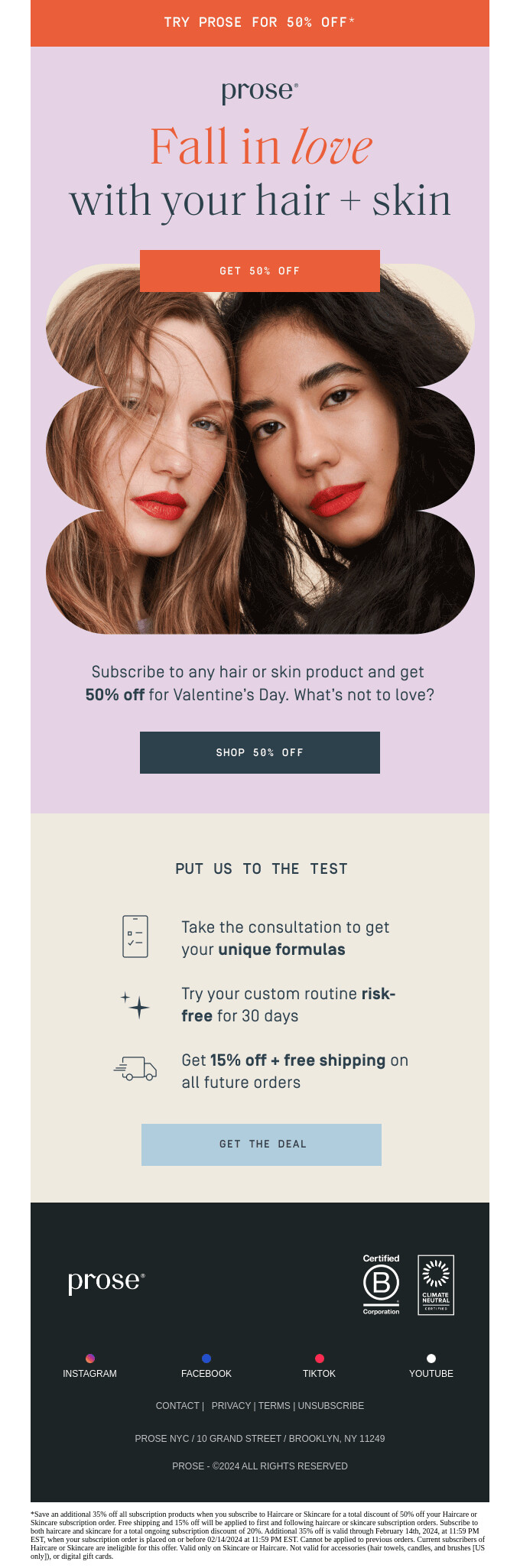
1. Create a limited-time Valentine’s offer

If you want to drive sales around Valentine’s Day, a short, clear offer built on what you already sell is often enough. You don’t need to redesign your whole website or create complicated bundles.

What you can do:

  • Choose 1–3 things you’d like to highlight: best-selling products, a popular service package, a course, a membership.
  • Add a simple Valentine’s perk for a limited time: a small discount, free shipping, an extra session, an extra lesson, or a bundle price when people buy two things together.
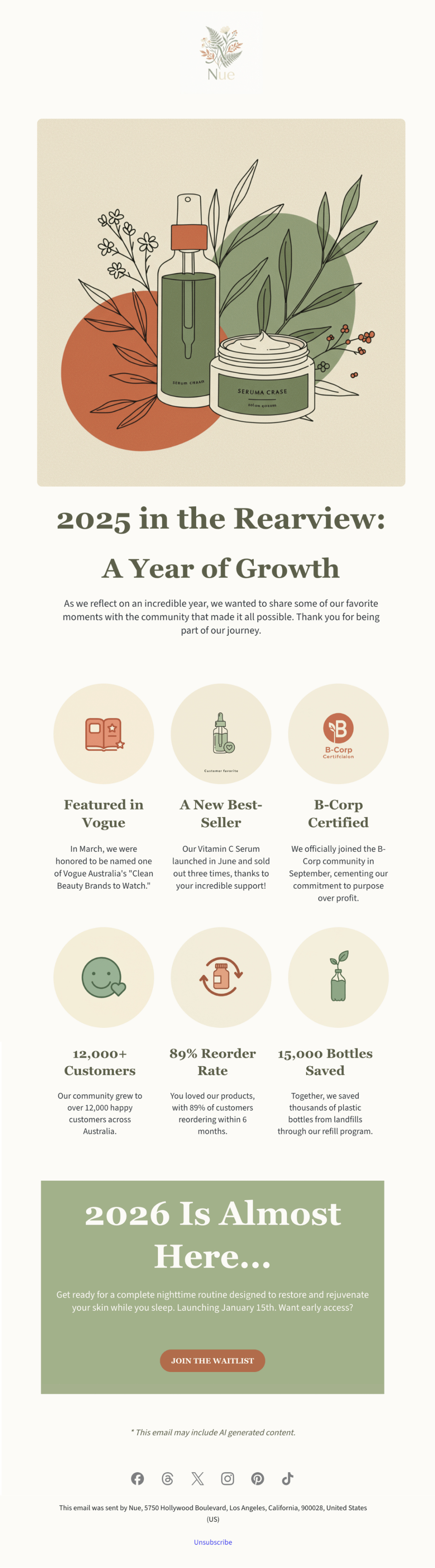
Source: Really Good Emails

If your website runs on WordPress or WooCommerce with SiteGround, setting your promotion up can be done quickly. Using SiteGround’s AI Agent for WordPress in AI Studio, you can describe the offer you want, such as a percentage discount, a fixed amount off, or a simple bundle, and the agent will apply it without you having to manually adjust multiple settings.

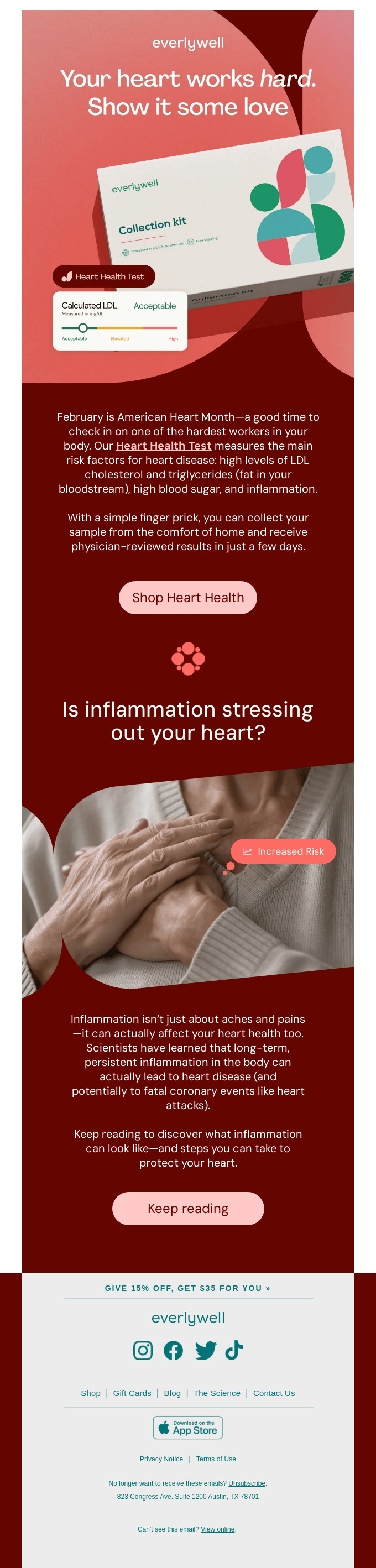
2. Use Valentine’s day to promote self-care

Many people use Valentine’s Day as a reason to slow down and do something kind for themselves. Your business can support that, whether you run a shop, offer services, teach online, or sell digital tools.

What you can do:

  • Think of one concrete way your service or product makes your customer’s life better: less stress, more clarity, feeling better in their body, business running smoother.
  • Write your email around that idea as a small act of self-care or self-investment.
  • Use simple, supportive language like “do something for yourself,” “make your day easier,” or “future-you will thank you for this.”
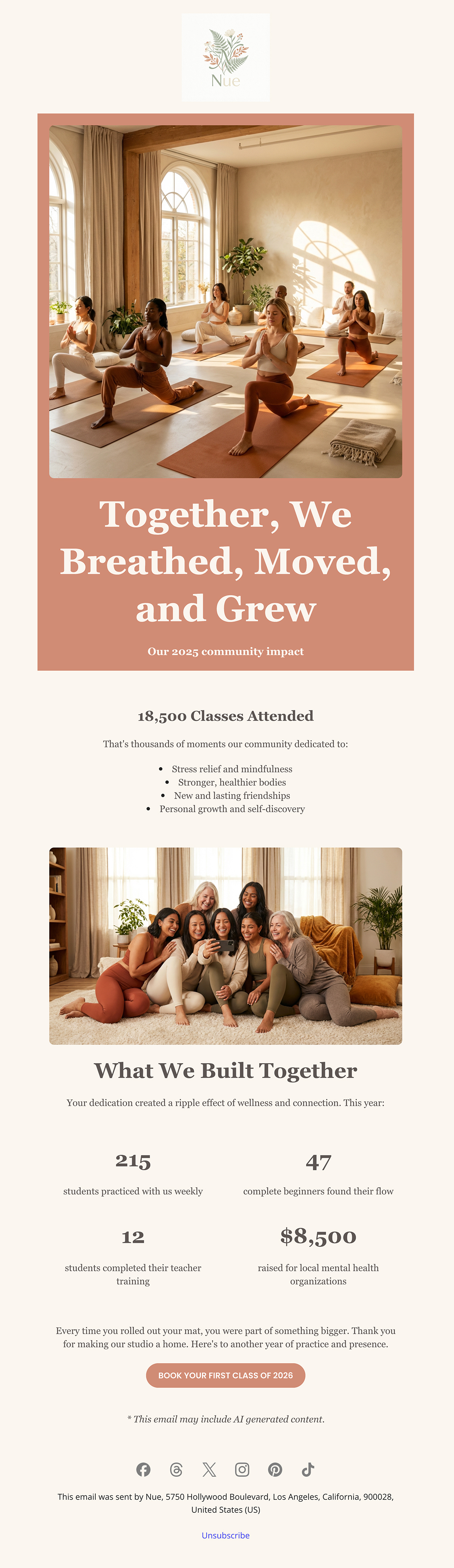
Source: Really Good Emails

3. Present your product or service as a gift to others

Many things small businesses sell can be bought for someone else: physical products, gift cards, sessions, courses, memberships, or digital resources. Often people just need you to show them that perspective.

What you can do:

  • Ask yourself: “Could someone buy this for a person they care about?” This often fits coaching, consultations, classes, wellness visits, memberships, and gift cards.
  • In your email, say clearly that this is something they can give and who it’s a good fit for: a friend starting a business, a parent who never has time for themselves, someone who loves learning, and so on.

Source: Really Good Emails

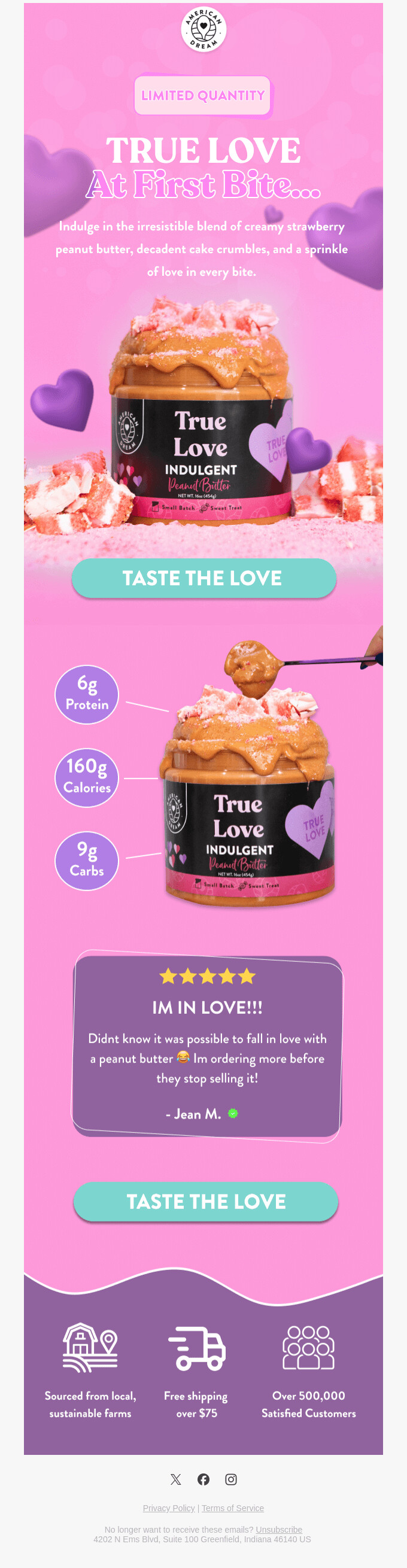
4. Make your product worth falling in love with

Valentine’s Day is the perfect time to remind your audience why your product is special. Whether you’re launching something new or simply sharing what you already offer, focus on the details that make people say, “this is exactly what I needed.”

What you can do:

  • Look at your product from your customer’s point of view. What’s the moment they realize they love using it? That’s your story.
  • Highlight what makes it unexpectedly delightful — maybe it saves time, simplifies a daily task, or just feels good to use.
  • Use warm, human language that captures genuine appreciation: “you might fall for this,” “we think you’ll love how it makes things easier,” or “this is one you’ll want to keep around.”
Source: Really Good Emails

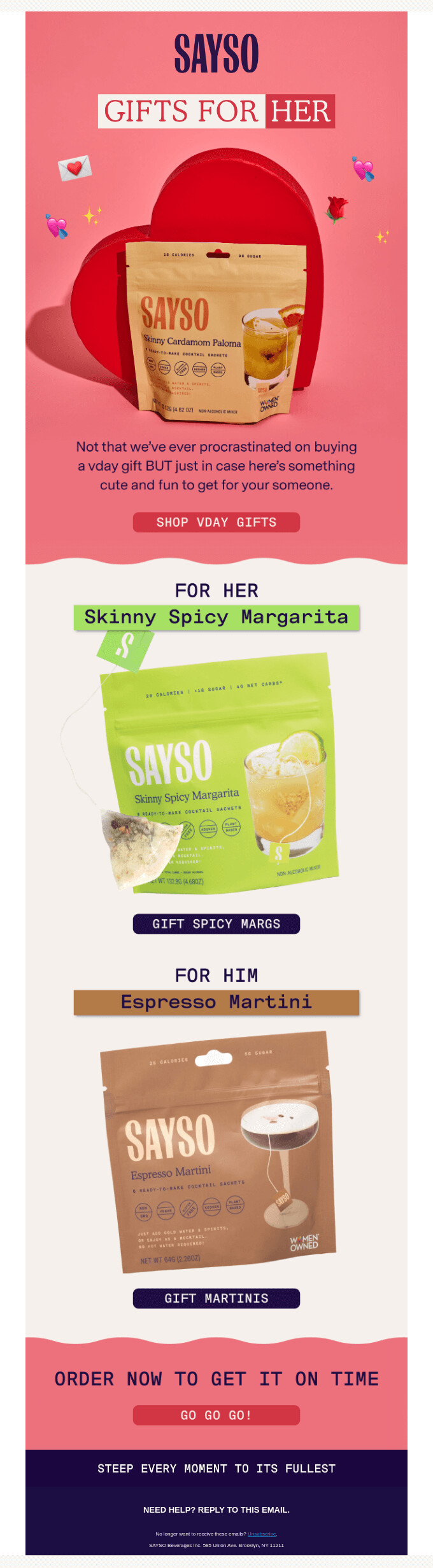
5. Help your subscribers decide what to buy with a gift guide

The classic Valentine’s gift guide approach works for a reason, it removes the pressure of figuring out what to buy. When people feel unsure, they often postpone the decision or abandon it altogether. A simple, well-organized gift guide makes choosing faster and easier.

What you can do:

  • Group your products or services in a way that feels intuitive: by recipient (for partners, for friends, for yourself), by price range, or by interests.
  • Keep the selection focused. Too many options can overwhelm people.
  • Add a short note under each item explaining why it makes a great gift. People appreciate guidance.
Source: Really Good Emails

6. Celebrate all kinds of love

You can also use Valentine’s Day to talk about more than just romantic relationships and connect it directly to what you offer. Think about the relationships your product or service already supports and build your email around those.

For example, if you sell pet products, you talk about “showing some love to your pets.” If you sell home goods, you talk about “showing your home some love.” If you sell business tools or services, you talk about “showing your business some love.”

Source: Really Good Emails

Valentine’s Day email subject lines, preview text, and CTAs

Subject lines that get opened

Your subject line competes with a lot of heart emojis and “Last chance!” copy. Specificity helps you stand out.

Formulas that work:

  • Benefit + logistics: “Gifts they’ll love, delivered by Feb 14”
  • Curiosity: “The Valentine’s gift they won’t see coming”
  • Self-love: “Treat yourself this Valentine’s Day”
  • Helpful urgency: “Still time to get it there”
  • Personal: “A little something for you 💌”

Examples to steal:

  • “Valentine’s gifts under $50 (that don’t look like it)”
  • “For your person, your bestie, or just you”
  • “The ‘I waited too long’ gift guide”
  • “Something sweet for your inbox 🍫”
  • “Don’t panic – eGift cards deliver instantly”
  • “What we love this Valentine’s Day”

Preview text that supports the subject line

The preview text (preheader) shows next to or below your subject line. Use it to add context, clarify what’s inside, or reinforce urgency.

Subject: “Valentine’s gifts they’ll actually use”
Preview: “Curated picks by budget. Free shipping over $50.”

Subject: “A little love for you”
Preview: “Thanks for being here. This one’s just to say hi. ❤️”

CTAs that get people to take action

Make your call-to-action specific. “Shop now” works, but “Browse gifts by budget,” “Find their perfect gift,” or “Treat yourself” tells readers exactly what they’re clicking into.

If you have multiple sections – gifts for partners, gifts for friends, gifts for self – give each its own CTA so readers can self-select.

Give your email the Valentine’s Day look

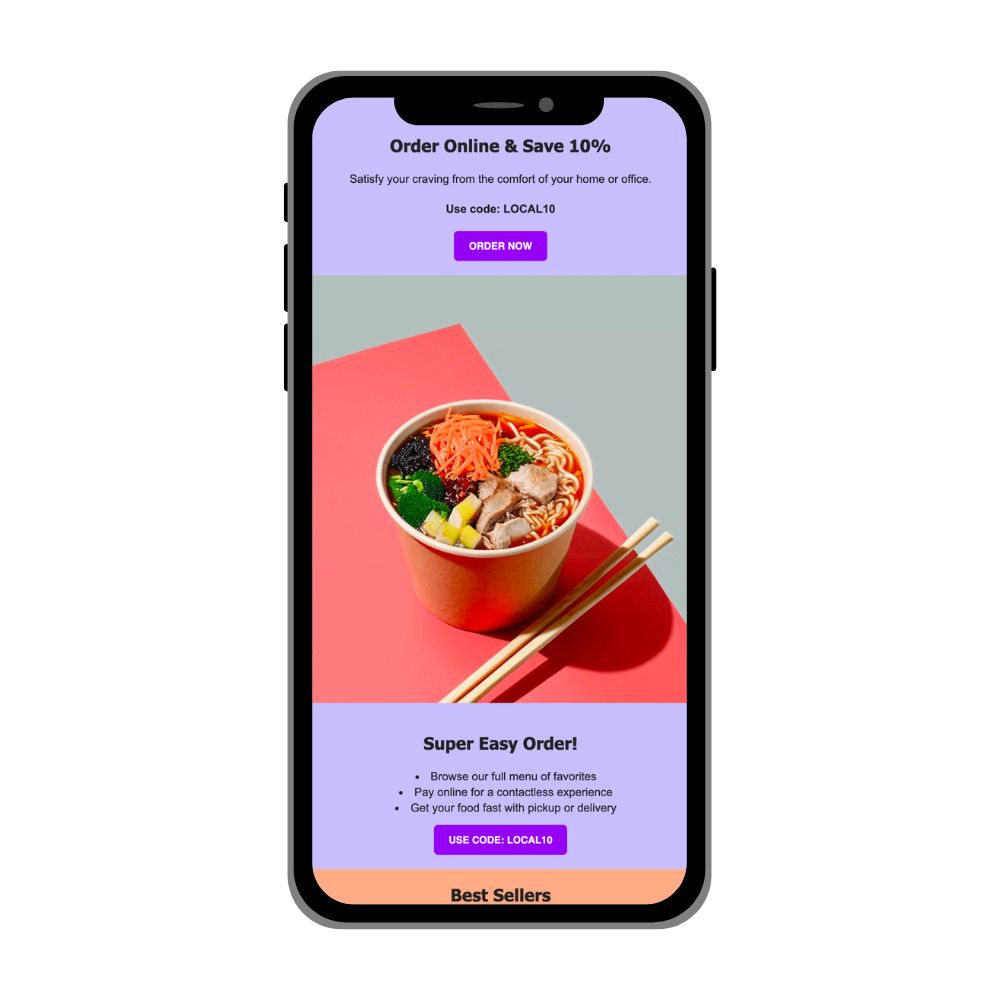
Valentine’s Day emails are easy to recognize because they use familiar visual cues. Hearts, flowers, chocolate, and a palette of red, pink, and white signal the occasion immediately.

When a subscriber opens the email, the connection to Valentine’s Day should be clear at a glance. That immediate context helps the reader understand why the message is being sent and what it relates to, without needing extra explanation. It also reduces friction, because the email fits into an expected moment rather than interrupting it.

If you want to save time or avoid layout decisions, starting from a template can help.
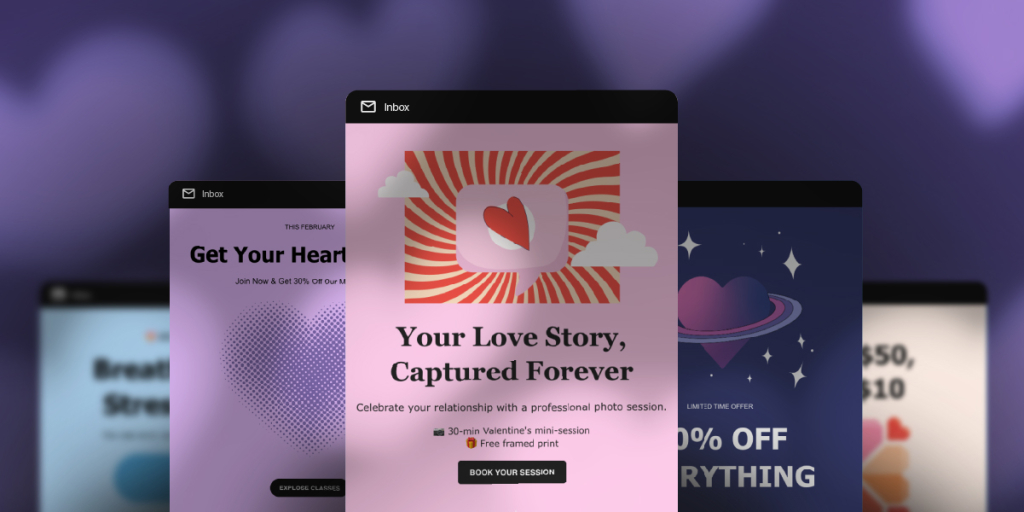
SiteGround Email Marketing includes Valentine’s Day–ready templates that already follow these principles: clear structure, and valentine-ready colors and graphics. You can adapt the content to match your message without designing an email from scratch.

If you’d rather skip writing and designing altogether, SiteGround clients can use the free AI Studio and the Email Marketing Agent (available on Plus plans) to generate a complete Valentine’s email campaign. That includes the subject line, email copy, and visuals, which you can import directly into SiteGround Email Marketing and send right away.

[87]

Your turn to show up this Valentine’s Day

Valentine’s Day has been a communication moment for over 700 years.

People have been sending love notes on February 14 since Geoffrey Chaucer wrote about it in the 1300s. By the 1800s, Valentine’s cards were a booming business. And since the early 2000s? The love letter has moved to the inbox.

What hasn’t changed? People respond to businesses that feel warm, personal, and human. Valentine’s Day gives you the perfect opportunity to show that side of your business without overthinking it.

So pick one idea from this guide, adapt a template, and send something that reminds your customers why they like doing business with you.

Will you send Valentine’s emails this year? We’d love to see what you create.
Email marketing ROI: Beyond the 42:1 rule

Professional email newsletter design that drives email marketing return on investment (ROI). Mobile inbox view shows "Weekly News" newsletter with heading "Your regular dose of ideas" and featured image of pastel geometric shapes - mint green and beige cylinders with small plant. Surrounding icons represent analytics and tracking capabilities for measuring ROI.

You’ve seen the stat. “$42 for every $1 spent on email marketing.” It’s everywhere: on LinkedIn, in case studies, probably tattooed on some growth hacker’s forearm.

And if you’re three months into building your email list with 287 subscribers, sending campaigns to crickets, and wondering if you’re doing something catastrophically wrong, that number feels like a personal attack.

Here’s what nobody mentions: That 42:1 average is just an average across thousands of businesses at different stages. It doesn’t tell you anything about where you should be in month 3 or year 1. You’re in year 1, trying to write a personalized subject line that doesn’t sound desperate.

This guide shows you what email marketing return on investment (ROI) actually measures, how to track the three numbers that matter for YOUR stage, and when your results are good enough to keep going versus when something needs fixing. You’ll learn why comparing your month 2 to someone else’s year 5 is pointless, and what to measure instead.

Let’s figure out what good ROI looks like for where you actually are.

Key takeaways:

  • The $42 for every $1 average is from year 5 businesses with massive lists – Stop comparing your early results to mature programs.
  • Track 3 numbers monthly: list growth rate, email-attributed revenue, and costs – ignore everything else until these are solid.
  • Realistic ROI by stage: Year 1 (100-200%), year 2 (300-500%), year 3+ (1000%+) – compare yourself to last quarter, not industry averages.
  • Even 2:1 ROI in year 1 means it’s working – if you’re making more than you’re spending, keep going.
  • 15-minute monthly check-in: track your numbers, calculate ROI, note what worked – consistency beats perfection.

What is email marketing return on investment + a formula for you

Email marketing ROI is a metric that measures how much revenue you generate compared to what you spend on email marketing campaigns. It’s expressed as a percentage, so 400% ROI means you made $4 for every $1 you spent.

The email marketing ROI formula: 


(Revenue from email − Email costs) ÷ Email costs × 100

  • Costs include: Your email platform subscription, time spent creating campaigns, design or content work, and any list management tools.
  • Revenue includes: Direct sales from email links, repeat purchases from lead nurturing email sequences, and retained customers who stay engaged through email.

Here’s how it works in practice: Let’s say you spend $200/month between your platform fee and the time you invest in creating campaigns. Your emails generate $1,200 in tracked sales that month.

ROI = ($1,200 − $200) ÷ $200 × 100 = 500%

That’s $5 back for every $1 spent. Not the famous 42:1, but profitable for a growing business.

Best practices for tracking email marketing ROI 

You’ve got the formula. Here’s how to use it without overcomplicating things or panicking at every dip you see in your email marketing platform’s analytics page.

1. Start with a baseline measurement

Before you can improve anything, you need to know where you’re starting. Pick a month (ideally your first full month of consistent emailing) and calculate your ROI using the formula above. Write it down. This becomes your baseline: the number you’ll compare future months against. It doesn’t matter if it’s negative or barely positive. You just need a starting point to measure progress.

Let’s say you run a small online store selling handmade jewelry. 

  • In your first full month, you spent $30 on your email platform and invested about 20 hours setting up your account, designing a template, creating a welcome email sequence, and sending your first few email marketing campaigns. At $25/hour, that’s $500 of your time. Total cost: $530. 
  • Your welcome sequence and product launch email generated $900 in tracked sales. Your baseline ROI: ($900 − $530) ÷ $530 × 100 = 70%. 

Not breaking records, but you’re building something. And now you have a number to beat next month as your systems get more efficient.

2. Track trends, not daily fluctuations 

Email marketing ROI isn’t like checking your stock portfolio every hour. One bad week doesn’t mean your email marketing strategy is failing, and one great campaign doesn’t mean you’ve cracked the code. Look at month-over-month trends instead. Is your ROI moving up over three months? Six months? That’s what matters. Daily or weekly swings are normal noise, especially for small businesses with smaller lists.

That jewelry store owner with 70% ROI in month 1? Month 2 drops to 45% (holiday slow season, only 8 hours of work needed). Month 3 jumps to 110% (Mother’s Day campaign, 10 hours invested). Month 4 lands at 95%. If you only looked at month 2, you’d panic and quit. But the three-month trend shows 70% → 45% → 110% → 95%, which is an overall movement up, and time investment is decreasing. That’s what matters.

3. Set realistic benchmarks for your stage 

If you’re three months into building your email list, comparing yourself to the “$42 for every $1” industry average is pointless. That number reflects mature, optimized email programs; not someone just starting out.

Email marketing ROI is like building a business: A new freelancer just landing their first customers won’t have the same revenue as someone with three years of repeat customers. A blogger with 200 subscribers won’t see the same results as one with 5,000 engaged readers. The metric is the same, but the expectations should match your own reality.

Here’s what realistic email marketing benchmarks look like by stage:

  • Year 1: Breaking even or slightly positive ROI (100-200%) is solid progress. You’re still learning what connects with your audience.
  • Year 2: 300-500% ROI becomes achievable as you refine your approach and your list matures.
  • Year 3+: This is when 1000%+ ROI (the famous 10:1 or higher) becomes realistic for well-run email programs.

Your real benchmark isn’t an industry average — it’s whether you’re improving quarter over quarter at your current stage.

4. Track the three metrics that matter

You don’t need to monitor 15 different metrics to know if email marketing is working. Email open rates, click rates, bounce rates, unsubscribe rates. Sure, they’re useful, but for ROI tracking, you need three numbers: 

1. List growth rate

How many new recipients you’re adding each month. If you started January with 500 subscribers and ended with 550, you added 50 people: that’s a 10% growth rate. A growing list means more potential revenue. If your list is shrinking or stagnant, your ROI will eventually plateau. Check your total subscribers on the first of each month in your email platform dashboard.

2. Email-attributed revenue

These are the sales generated after you send campaigns. This is the “revenue” part of your ROI formula. You’ll track this through your sales platform or website analytics. The simplest method: note when you send emails, then check for sales spikes in your store on those days. For more precision, use unique discount codes in each campaign (like JUNE10) and track how many times they’re redeemed. 

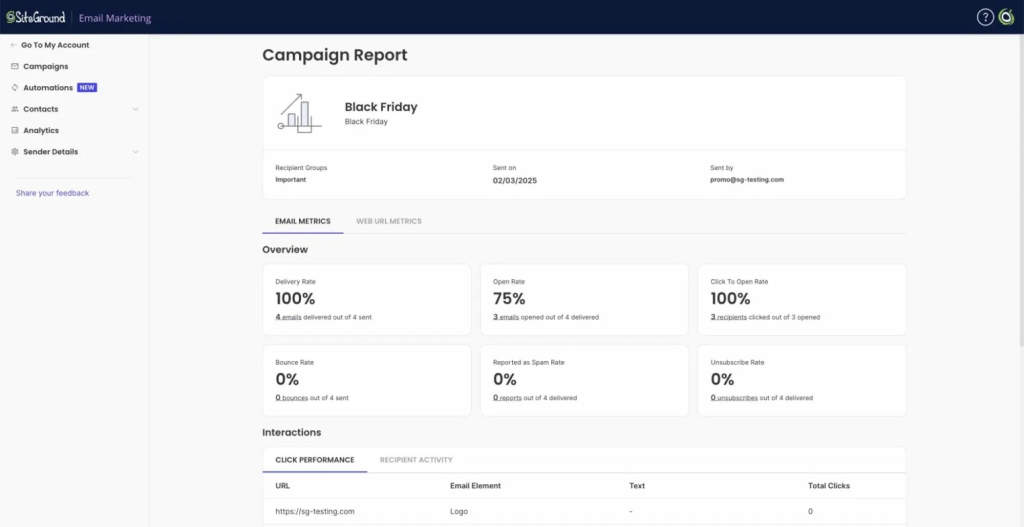
SiteGround Email Marketing shows you campaign performance metrics like which links people clicked, helping you track engagement—but connecting those clicks to actual sales happens in your ecommerce platform.

Email marketing return on investment (ROI) tracking dashboard showing Black Friday campaign performance: 100% delivery rate, 75% open rate, 100% click-to-open rate, with zero bounces, spam reports, and unsubscribes. Click performance data helps measure campaign ROI.

3. Monthly costs

Your email platform subscription plus a realistic estimate of the time you spend creating email marketing campaigns. If you pay someone to design or write emails, include that too. Most people underestimate their time investment, which makes their ROI look artificially high. 

When your platform is easier to use, you spend fewer hours creating campaigns—which directly lowers your monthly costs and improves your ROI. With SiteGround Email Marketing‘s no-code builder and AI text writer, you can cut your design time from 3 hours to 30 minutes. Over a year, that’s 30+ hours saved—worth $750+ if your time is valued at $25/hour.

That’s it. Three numbers, once a month, 15 minutes. Spending two hours every week analyzing micro-metrics won’t improve your ROI as much as spending that time writing better marketing emails.

How to improve your email marketing ROI at each stage

Remember those stages we just talked about? Each one requires a different approach. What improves ROI in year 1 won’t be the same as what works in year 3.

Year 1: Focus on list building and learning what connects

At this stage, you’re still figuring out what your audience responds to. Test different email subject lines to see what gets opens. Try various content formats: educational tips, behind-the-scenes stories, product showcases, and track which ones drive clicks. Find your voice. Don’t worry about advanced segmentation yet. 

Just send consistently, pay attention to what works, and grow your list. If you’re that freelancer landing your first customers or the blogger with 200 subscribers, this is where you build the foundation.

Year 2: Optimize based on patterns

Now you’ve got data. You know which emails people open, which links they click, and what type of content leads to sales. This is when you start segmenting your list: maybe by purchase history, email engagement level, or interests. 

With SiteGround Email Marketing, you can set up email automation triggered when contacts join specific groups. This is perfect for sending a welcome email series, onboarding sequence, or introducing your best content over several days. 

You’re refining what worked in year 1 and cutting what didn’t.

Year 3+: Scale what works

By now, you’ve got proven email marketing campaigns and a substantial list. Expand your successful campaigns. If a product launch email sequence worked once, use that template again. Refine your targeting based on years of behavior data.

This is when that 10:1 ROI becomes realistic because you’re running a system, not experimenting.

Why comparing your month 2 to someone else’s year 5 doesn’t help

Someone in year 5 has thousands of subscribers, proven email sequences, and refined targeting. You’re still testing subject lines. Their email ROI reflects years of compound growth: a larger list, repeat customers, and automated systems. Comparing your early results to their mature program just makes you feel behind when you’re actually right on track for your stage.

Your 15-minute monthly check-in

Set aside 15 minutes on the first of each month to track your progress:

TaskTimeWhat to do
Track your numbers2 minList growth rate: ___ 
Email-attributed revenue: $___ 
Monthly costs: $___
Calculate ROI2 min(Revenue − Costs) ÷ Costs × 100 = ___%
Compare to last month1 minTrending: ☐ Up ☐ Down ☐ Steady
Reflect and plan10 minWhat worked well this month:
One thing to test next month:

This simple habit keeps you focused on progress without getting lost in daily fluctuations or vanity metrics.

When to optimize vs when to keep going 

Not every dip in performance means your strategy is broken. Sometimes the best move is to stay the course. Here’s how to tell the difference.

Green flags: Signs your email campaigns are working ✅

If you’re seeing these patterns, keep doing what you’re doing:

  • Revenue is trending up – Even if it’s slow growth, upward movement over three to six months means your emails are contributing to sales. A $200 increase one month and $150 the next isn’t failure — it’s progress.
  • Your list is growing – New subscribers joining consistently (even if it’s just 10-20 per month for small businesses) signals that people want to hear from you. Growth doesn’t have to be explosive to be healthy.
  • Engagement is holding steady – Your open rates and click rates don’t need to climb every month. If they’re consistent, say, 20-25% open rate month after month, that’s a good sign. People are still interested in what you’re sending.

When you see these green flags, resist the urge to overhaul everything. Small tweaks are fine, but major changes can disrupt what’s already working.

Yellow flags: When to dig deeper ⚠️

These patterns suggest it’s time to investigate and adjust:

  • Stagnant open rates for 3+ months – If your opens have flatlined or dropped and stayed low, your subject lines might need work, or you’re sending at the wrong times. Test different approaches before assuming your audience lost interest.
  • No sales from recent campaigns – If you’ve sent five promotional emails in a row with zero conversions, something’s off. Maybe your offers don’t match what your target audience needs, or your email-to-landing-page experience has friction.
  • List growth has stopped – If you haven’t added new subscribers in weeks, your lead magnets or signup forms might need refreshing. Or you’ve stopped promoting them.

The “it’s working” threshold for small businesses

Here’s a simple test: Are you making more from email than you’re spending on it? If yes, it’s working. You don’t need 42:1 ROI to justify continuing. Even 2:1 or 3:1 ROI in year 1 means email is pulling its weight compared to other marketing channels. Keep going, keep learning, and let the compound effects build over time.

Start tracking your email marketing ROI (your way)

You’ve got the formula. You know what to track. You understand why month 3 looks nothing like year 3.

Now actually do it. Open a spreadsheet or note on your phone. Write down your current subscriber count, last month’s email revenue, and your costs. Calculate the percentage. That’s your baseline.

Next month, do it again. The month after that, do it again. Fifteen minutes of paying attention to whether things are moving in the right direction.

Good email marketing ROI isn’t about perfect campaigns or advanced tactics. It’s about sending emails consistently and tracking those three numbers every month to see if you’re improving. And here’s the part most people overlook: the less time you spend creating each campaign, the lower your costs—which directly increases your ROI. Cut your campaign creation time in half, and you’ve just improved your ROI without changing anything else.

The businesses that hit impressive numbers in year 3? They’re the ones who tracked their modest numbers in year 1, kept going anyway, and found ways to work more efficiently.

SiteGround Email Marketing is built exactly for this: the no-code builder and AI text writer reduce your time per campaign, the dashboard shows you engagement at a glance, and when you’re ready for year 2 optimization, you can set up automated sequences without technical skills. Less time spent = lower costs = better ROI, even if your revenue stays the same.

Your way works if you stick with it long enough to let it work.

[58]

Frequently asked questions about email marketing ROI

What is the average email marketing ROI? 

The commonly cited average ROI for email marketing is $42 for every $1 spent, but this reflects mature, optimized programs. Your email ROI depends on list size, industry, and how long you’ve been running campaigns. Compare your results to your own past performance, not industry averages.

How long until I see positive ROI? 

Most small businesses see positive ROI within 6-12 months. Year 1 typically brings 100-200% ROI as you build and learn. By year 2, 300-500% ROI becomes achievable with a larger list and refined approach.

What if my ROI is negative in the first few months? 

Negative ROI in months 1-3 is normal. You’re investing to build your list and test what works. If you’re still negative after 6 months, review your email frequency, content quality, and sales timing.

How much money can you make with email marketing?

It depends on the list size and what you sell. A rough estimate: 1,000 engaged subscribers might generate $1,000-$3,000 monthly for ecommerce, or $500-$2,000 for services. Larger lists (10,000+) with strong engagement can generate $10,000-$50,000+ monthly.

Seasonal marketing: The framework you’re missing

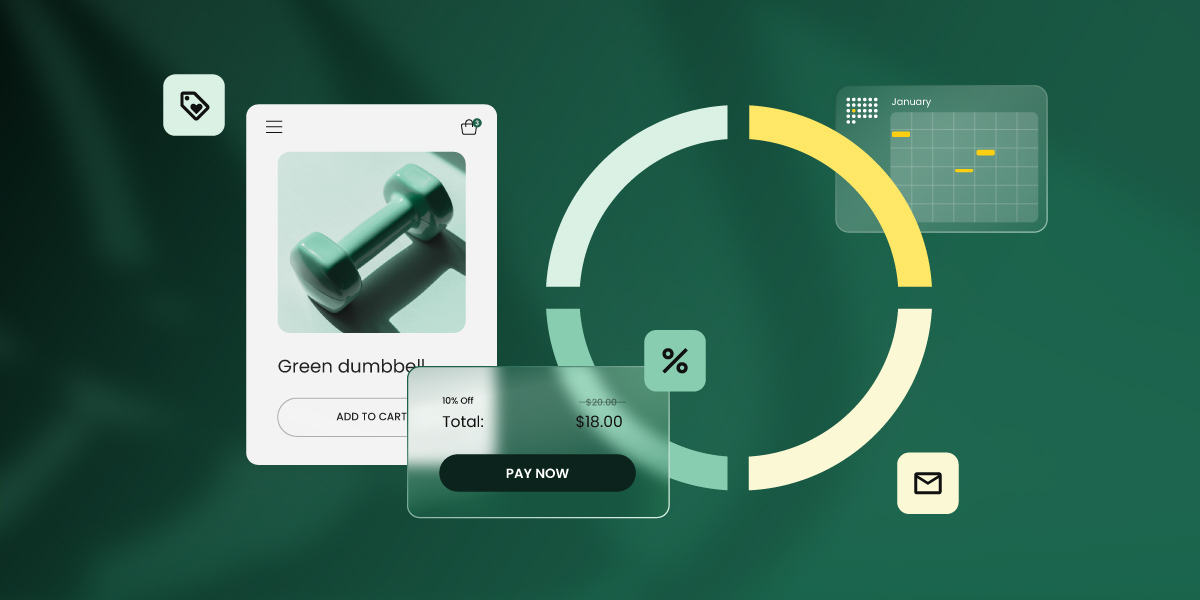
Ecommerce interface showing a green dumbbell product card with add to cart button, overlaid by a checkout popup displaying a 10% discount reducing the price from $20 to $18, surrounded by icons for pricing, analytics chart, calendar, and email marketing

Does your marketing feel a bit random right now? You post when you remember, send a promotion when things slow down, and never quite find a rhythm to any of it. Between running your business and actually doing the work, it’s hard to know when to reach out or what to say.

Seasonal marketing is like a moving train you can hop on. The schedule already exists: holidays, seasons, and annual events when your customers are primed to spend or take action. You just need to figure out which stops make sense for your business and get on board.

Which trains you board depends entirely on your audience. This guide will help you identify those moments, plan simple campaigns around them, and execute without overwhelm. Less random posting, more strategic showing up.

Key takeaways:

  • Show up when customers are already keen to buy – align with natural spending cycles, not every seasonal trend.
  • Match seasonal moments to your actual business – a wedding photographer’s calendar looks nothing like a tax accountant’s.
  • Start planning 4-6 weeks out – enough time to prepare without panic-writing emails at midnight. For high-stakes moments like Black Friday, picking the best tie to send your emails matters even more.
  • Build campaigns on email and your website – owned channels you control beat social media algorithms you don’t.
  • FTrack what works and skip what doesn’t – watch opens, clicks, and revenue to build a smarter calendar each year.

What is seasonal marketing?

Seasonal marketing is a strategy that aligns your campaigns with specific times of year when customer behavior naturally shifts. Instead of guessing when to reach out, you’re showing up during moments when people are already thinking about spending, planning, or taking action.

The obvious examples are retail holidays like Christmas, Black Friday, and Valentine’s Day. But “seasonal” goes way beyond shopping holidays and looks different depending on your business. An ecommerce store might focus on gift-giving holidays, while a B2B consultant targets January when companies have fresh budgets and less inbox noise. A wedding photographer’s “season” is completely different from a tax preparer’s.

These moments give you a ready-made reason to reach out, a clear theme for your campaigns, and customers who are already in the mindset to engage.

So which moments are actually yours?

Choose your seasonal marketing moments

Below, you’ll find the major seasons and the specific moments within each one. We’ll explain what each moment is and who benefits from it, plus quick campaign ideas.

Spring campaigns that bloom

Spring brings fresh starts, new budgets, and people ready to tackle projects they’ve been putting off all winter. Motivation is high, wallets are open, and everyone’s in planning mode.

  • Spring cleaning (March-April): People are finally dealing with the clutter they’ve ignored for months. If you sell storage solutions, offer cleaning services, help people get organized, or blog about decluttering, spring cleaning is your Super Bowl.
  • Mother’s Day (May): One of the biggest gift-giving holidays of the year, and people actually spend money here. Perfect if you run an online shop selling gifts, flowers, jewelry, or personalized items. Also great for restaurants offering brunch specials, spas, wellness services, and florists who are about to have their busiest week.
  • Easter (March-April): Religious holiday meets family gathering meets excuse to buy chocolate. Works well for online stores with seasonal products, bakeries going all-in on themed treats, event planners, and craft bloggers showing off DIY Easter basket ideas.
  • Tax season (January-April): The deadline everyone dreads, which means they desperately need help. If you’re an accountant, bookkeeper, financial planner, or business consultant, this is when your phone should be ringing. People are actively searching for you.
  • Wedding season kicks off (April-May): Engagement season wraps up and couples shift into serious planning mode. Prime time if you’re a wedding photographer, event planner, venue owner, caterer, florist, or invitation designer. They’re booking now for summer and fall weddings.

And if your audience cares about these, so should you:

  • 💐 International Women’s Day (March 8): If your audience skews female or you champion women-owned businesses, this is a natural fit for content and campaigns.
  • 🎭 April Fools’ Day (April 1): Risky but can pay off if your brand has personality. Works for playful businesses that can pull off a good joke without annoying their customers.
  • 🌱 Earth Day (April 22): If sustainability matters to your brand identity or customers, this is your moment to show it. Great for eco-friendly products, green services, or content about reducing impact.
  • 📍 Local and niche seasonal events: Got runners in your audience? Check the spring marathon calendar. Serve gardeners? Align with when planting season actually starts in your region. The more specific you get to your actual customers, the less competition you’ll face.

Quick campaign ideas for spring seasonal marketing:

Accountants: “Tax Prep Kickstart” email series in January offering early-bird consultation packages
Wedding photographers: January booking campaign with special pricing for newly engaged couples
Ecommerce (home goods): March spring cleaning sale featuring organization and storage products
Wellness coaches: Spring wellness refresh campaign in March with “reset your health” messaging

Summer campaigns to try: hot marketing ideas

Summer means vacations, slower inboxes, and for many businesses, a chance to stand out while everyone else is at the beach. Some industries hit peak season, others quiet down — both create opportunities.

  • Father’s Day (June): The often-forgotten gift-giving holiday that still drives serious spending. Great if you sell tools, tech, outdoor gear, grilling supplies, or personalized gifts. Also works for restaurants promoting Father’s Day meals and experience providers (think golf outings, fishing trips, sports events).
  • Summer camps and activities (June-August): School’s out and parents need solutions. Prime time if you run camps, offer tutoring, coordinate activities for kids, or create educational content that keeps children engaged during break.
  • Vacation and travel season (May-August): People are booking trips, planning getaways, and buying everything they need for travel. Perfect for travel bloggers, tour operators, anyone selling luggage or travel gear, and destination-based services.
  • Back to school prep (July-August): Starts earlier than you think. Parents and students are shopping for supplies, clothes, tech, and getting organized for the new school year. Works for online stores, tutors ramping up for fall, organizing services, and educational content creators.
  • Home improvement season (June-August): Good weather means people finally tackle those outdoor projects. Ideal if you offer landscaping, painting, deck building, pool services, or sell home improvement products.
  • Mid-year reviews and planning (June-July): Companies assess how the year’s going and adjust strategy for the second half. If you’re a B2B consultant, offer training, or sell software that helps with optimization, this is your window.
  • Summer learning (June-August): Decision-makers actually have bandwidth when the office slows down. Great time for course creators, professional development programs, and B2B content marketing when there’s less inbox competition.

More moments that might match your audience:

  • 🌈 Pride Month (June): If you serve or support the LGBTQ+ community, this is a natural time for visibility and campaigns that matter.
  • 🎆 Independence Day/national holidays (July 4 in the US, Canada Day July 1, etc.): Patriotic holidays drive sales for certain products and create natural content hooks if your audience celebrates them.
  • ☕ Back to school counterprogramming (August): While everyone’s focused on students, consider campaigns for adults who are kid-free and ready to focus on themselves again.
  • 🎪 Local summer events: Outdoor concerts, farmers markets, community festivals. If your business is local or serves a specific region, align with what’s actually happening where your customers are.

More campaign ideas for summer seasonal marketing: 

Tutors: July back-to-school enrollment campaign with sibling discounts for early registration
B2B consultants: June “mid-year strategy check-in” offering with downloadable planning guide
Freelancers: “Book your fall projects now” campaign in July while competitors are on vacation
Travel bloggers: May destination guides with affiliate links for summer travel gear
Home service providers: June outdoor project packages (landscaping, painting, deck building)

Fall tactics to harvest results

Fall brings everyone back to routine after summer, ramps up holiday prep, and for B2B, it’s the final budget push before year-end. Attention spans return and purchasing picks up.

  • Back-to-school (August–September): The return to routine means new schedules, supplies, and habits. Works for online stores selling supplies, clothing, and tech, tutors booking fall students, meal prep services for busy families, organizing experts helping people reset, and productivity tools.
  • Halloween (October): Costumes, decorations, parties, and candy. One of the biggest ecommerce moments outside of the winter holiday season. Perfect for costume retailers, party supply stores, event planners, craft bloggers doing DIY costume tutorials, and anyone selling treats or seasonal décor.
  • Fall home prep (September-October): Homeowners are getting ready for winter. Prime time if you offer HVAC services, landscaping, gutter cleaning, winterization, or sell seasonal home products like draft stoppers and cozy textiles.
  • Financial year-end planning (October-November): Individuals and businesses make final money moves before the calendar flips. If you’re a financial planner, accountant, investment advisor, or tax strategist, your clients need you now to optimize their year-end position.
  • Early holiday shopping (October-November): Smart shoppers start before the rush. Great for online stores offering early-bird deals, gift guide creators getting ahead of December chaos, and retailers who want to capture budget before Black Friday eats it all.
  • Black Friday/Cyber Monday (November): The shopping weekend that launches the holiday season. If you run an online store or retail business, this is unavoidable — your customers expect deals. Also works for deal aggregators, shopping content creators, and anyone who can tie their service to “end-of-year savings.”
  • Q4 budget cycles (October-December): Companies are racing to spend allocated budgets before they disappear. If you offer B2B services, sell software, provide consulting, or run training programs, this is when procurement gets urgent. Also prime time if you sell giftable items—companies, real estate agents, and service businesses buy employee and client gifts in Q4. Start pitching in October before budgets get locked up.
  • Holiday event planning (October-November): Businesses and individuals are booking venues, caterers, and services for holiday parties. Works for event planners, venues, caterers, photographers, and entertainment providers.

Beyond the obvious:

  • 🏪 Small Business Saturday (November, day after Black Friday): If you’re a small business competing with big retail, this is your counter-programming moment. Customers are actively looking to support small businesses.
  • 💝 Giving Tuesday (November, Tuesday after Thanksgiving): If you run a nonprofit, have a charitable component, or your audience cares about giving back, this day is built for you.
  • 🍂 Local fall festivals and events: Harvest festivals, Oktoberfests, Halloween events. If you’re local or regional, tie into what’s actually happening in your community.

And here come some campaign ideas for fall seasonal marketing:

Ecommerce stores: November holiday gift guide series with curated collections and bundle pricing
B2B service providers: October “Q4 budget reminder” email sequence with case studies
Event planners: September holiday party booking campaign before calendars fill
Retail stores: Small Business Saturday exclusive deals promoted via email to local customers
Non-profits: Giving Tuesday campaign with matching gifts and impact stories

Winter outreach to warm up your sales

Winter combines the biggest retail frenzy of the year with January’s fresh-start energy and new budget cycles. It’s chaos in December and opportunity in January.

  • BFCM (Black Friday/Cyber Monday) (November): The biggest shopping weekend of the year, dominated by major retailers with massive budgets. But that doesn’t mean small businesses should sit it out. Your customers still expect deals, and there are smart Black Friday ideas to compete without burning your profit margins. Works for online stores, retail businesses, deal aggregators, shopping content creators, and anyone who can tie their service to “end-of-year savings.”
  • Q1 planning and goal-setting (October-December): Businesses are finalizing strategies and setting goals for the year. Works for B2B consultants, strategic planning services, team development providers, and tools that help with execution and tracking.
  • Christmas and holiday season (November-December): The peak gift-giving period with massive consumer spending. Perfect for ecommerce, retailers (online and brick-and-mortar), restaurants doing holiday bookings, delivery services working overtime, and gift guide creators capturing search traffic.
  • Post-holiday sales (late December-January): Returns, exchanges, and “treat yourself” spending after the holidays. Great for online stores clearing inventory, retailers moving seasonal products, and services targeting people with gift cards burning holes in their pockets.
  • New Year wellness and organization (January): Resolution season. Everyone wants to get healthy, get organized, and get their life together. Prime time if you offer fitness services, wellness coaching, organizing expertise, productivity tools, planners, goal-setting products, or courses that promise transformation.
  • Tax prep season ramps up (January-February): Early birds are getting their documents together before the April rush. If you’re an accountant, bookkeeper, or sell tax software, starting your outreach in January means you’re not competing with the March panic.
  • January “fresh start” campaigns (January): Companies have new budgets and decision-makers are open to change. Way less inbox competition than December when everyone’s checked out. If you offer B2B services, sell software, provide consulting, or run training programs, January is often smarter than Q4.

Still more to consider:

  • 🎁 Boxing Day/December 26 sales: Huge in some regions (Canada, UK, Australia). If you serve international customers or are based outside the US, this rivals Black Friday.
  • 🎉 New Year’s Eve: If you’re in hospitality, events, or sell party supplies, this is obvious. Less obvious: it’s also good for “last chance” year-end holiday deals.
  • 🥤 Dry January: If you sell non-alcoholic beverages, wellness products, or create content about health, this month-long trend has real momentum.
  • 📅 Your industry’s actual season: Winter looks different if you’re a ski resort (peak season) versus a landscaper (planning season). Don’t force December campaigns if your customers aren’t buying then — own January instead.

Winter seasonal marketing ideas:

Wellness coaches: January “resolution rescue” campaign with realistic goal-setting packages
B2B consultants: December emails offering January Q1 planning sessions
Freelancers: Late December “planning Q1 projects?” outreach to past clients
Content creators: Early November holiday gift guides with affiliate links
Accountants: January tax prep email series with early-bird pricing

Think about your actual audience — when are they actively looking for what you offer? That’s your calendar, not every holiday that shows up on social media.

Plan and create a successful marketing campaign in five steps

You don’t need a massive budget or a marketing team to run a seasonal campaign. You need a plan, a timeline, and the discipline to start before you’re scrambling.

  1. Start 4–6 weeks early

Four to six weeks gives you enough time to write your marketing emails, update your website, and handle whatever goes wrong (something always does). It’s early enough that you’re not writing “Valentine’s Day sale” emails at 11 PM on February 13th.

This timeline depends on your resources and business type. A solo consultant needs less runway than an ecommerce store managing inventory. The point is breathing room without scrambling. Sometimes you’ll still do things last minute — we’ve all been there. Just don’t make it your default.

Quick timeline:

  • Weeks 1–2: Decide your offer, write emails, draft landing page
  • Weeks 3–4: Design graphics, set up email sequences, update website
  • Weeks 5–6: Schedule everything, test all links, brief your team
  • Launch week: Send your scheduled email campaigns, watch results, adjust if needed

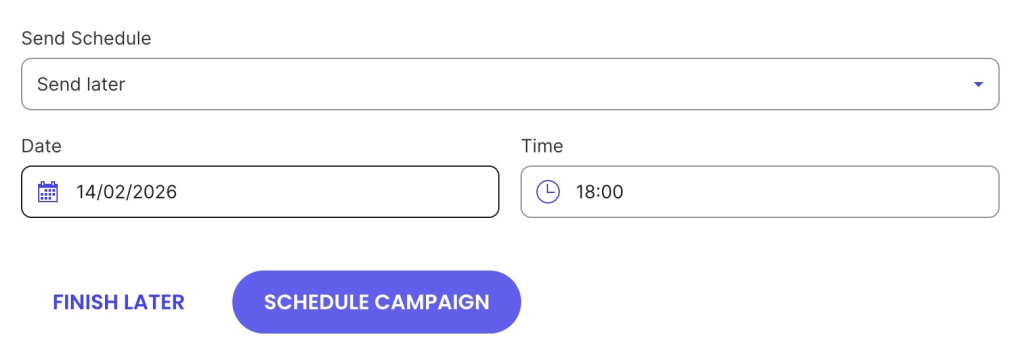
With SiteGround Email Marketing, you can write all your successful seasonal campaign emails in advance and schedule them to send on specific dates and times. Set up your entire sequence in one sitting — your welcome email, reminder, last-chance message — and the system handles delivery automatically. No more panic-writing “last chance!” emails at midnight or setting phone alarms to remember to hit send.

Email scheduling form with "Send later" dropdown selected, date picker set to February 14, 2026, time selector set to 18:00, and two action buttons: "Finish Later" in purple text and "Schedule Campaign" as a purple filled button
  1. Build one clear offer

Pick one thing. Make it obvious what people should do.

Your offer options:

  • Discount or promotion (20% off, buy-one-get-one)
  • Limited package (holiday portrait session, tax season bundle)
  • Helpful content series (5-day wedding planning course, spring cleaning checklist)
  • Resource guide (back-to-school survival guide, year-end tax checklist)

Match it to the moment:

  • Tax season = stress relief. 
  • Wedding season = planning help. 
  • Holiday season = gift solutions.
  1. Use owned channels first

Email and your website are marketing channels you control. Social media algorithms might bury your post. Email lands in inboxes.

Your campaign core:

  • 3–5 emails over the campaign period
  • Landing page with clear offer and call to action
  • Social posts to support (but don’t count on them to carry the campaign)

Email is your best owned channel to start with — you actually own the email list. Pair email with your website, and you’ve got an integrated marketing setup that doesn’t depend on anyone else’s algorithm or policy changes. SiteGround Email Marketing makes this simple: easy campaign management plus strong email deliverability that actually gets your emails into inboxes.

  1. Create honest urgency

Real deadlines work. Fake ones don’t. Here are examples of urgency you can use in your emails, landing pages, or social posts:

Real urgencyFake urgency
“Early bird pricing ends Sunday because that’s when I finalize the workshop materials”“Countdown timers that reset daily”
“Order by Dec 18 for Christmas delivery — that’s UPS’s cutoff, not mine”“Limited time” offers that never end
“I’m booking fall sessions now. Wait until September and you’re competing for leftover dates”“Only X spots left” when capacity is unlimited
  1. Gather insights and track what works

Don’t launch and forget. Track basics so you know what to repeat.

Some factors to keep in mind:

  • Email open rates (typical: 15-25%, seasonal campaigns often higher), click rates (typical: 2-5%, 10%+ means strong connection) and other relevant email marketing metrics
  • Landing page conversions (1-5% is common, but depends heavily on your offer and audience)
  • Which emails drove responses
  • Total revenue or bookings
  • Which channels performed best

Don’t obsess over industry email marketing benchmarks. Your first campaign is about establishing your baseline. Ideally, your second-year campaigns should beat your first-year numbers. That’s the only comparison that matters.

Seasonal campaign planner template

Now that you know the steps, here’s a template to keep your campaign organized:

Campaign elementYour planDeadline
Seasonal momentWhich holiday/season are you targeting?
Campaign datesStart date: _________ End date: _________
Target audienceWho is this campaign for?
The offerWhat are you promoting? (discount, package, content, resource)
ChannelsWhich channels will you use? (email, website, social, ads)
Team/help neededWho needs to be involved? (designer, writer, developer, support)
BudgetWhat will this cost? (tools, ads, design, time)
Urgency elementWhat’s the real deadline? (shipping cutoff, limited spots, offer expires)
Success metricsWhat are you tracking? (email opens, clicks, sales, bookings)

Choose your battles with seasonal marketing

You get to pick. Start with two or three seasonal moments that actually match when your customers are ready to buy. Test those, see what works, and add more as you get the rhythm down. Everyone else can chase every holiday that pops up on their feed while you show up strong for the seasons that matter to your business.Build seasonal campaigns in SiteGround Email Marketing, where high delivery rates mean your Black Friday sale actually reaches people instead of disappearing into spam folders. When you’re working with shipping cutoffs and real deadlines, an email that doesn’t land is a campaign that never happened. Schedule everything in advance, trust it’ll reach your customers, and move on with your day. That’s not missing out — that’s strategy.

[58]

Frequently asked questions about seasonal marketing

How many seasonal campaigns should I run in a year?

Start with 2–3 moments that match when your customers actually buy. Test those, track results, add more next year. Trying to hit every holiday in year one is how you burn out by March.

What is an example of a seasonal marketing campaign?

A tutoring service runs a back to school campaign in July. Three emails: fall sessions open, sibling discount for early registration, spots filling up. They update their website, post twice on social, set a real deadline (August 1st). Result: 12 families book before summer ends. That’s seasonal marketing: showing up when parents are already thinking about the school year.

What are the benefits of seasonal marketing?

You reach people at the right time: when they’re already prepared to buy. Sales increase because you’re tapping into predictable buying patterns and natural urgency. Campaigns feel timely, so engagement goes up. You build stronger connections by showing up at moments that matter. And while competitors scramble or sit out, you planned ahead and showed up prepared.

Do seasonal campaigns work for service businesses or just retail?

Seasonal marketing campaigns work for any business. You just need different seasons. Accountants have tax season. Wedding photographers have an engagement season. B2B consultants have Q1 budgets and Q4 spending cycles. Find when your customers are already thinking about what you offer.

Should I plan a discount every seasonal campaign?

No. Discounts work for retail, but service businesses can offer early-bird pricing, limited availability, or packages instead. Sometimes your offer is helpful content that leads to bookings later. Match your offer to what your customers actually value.

20 email closings that reinforce your brand + cheat sheet

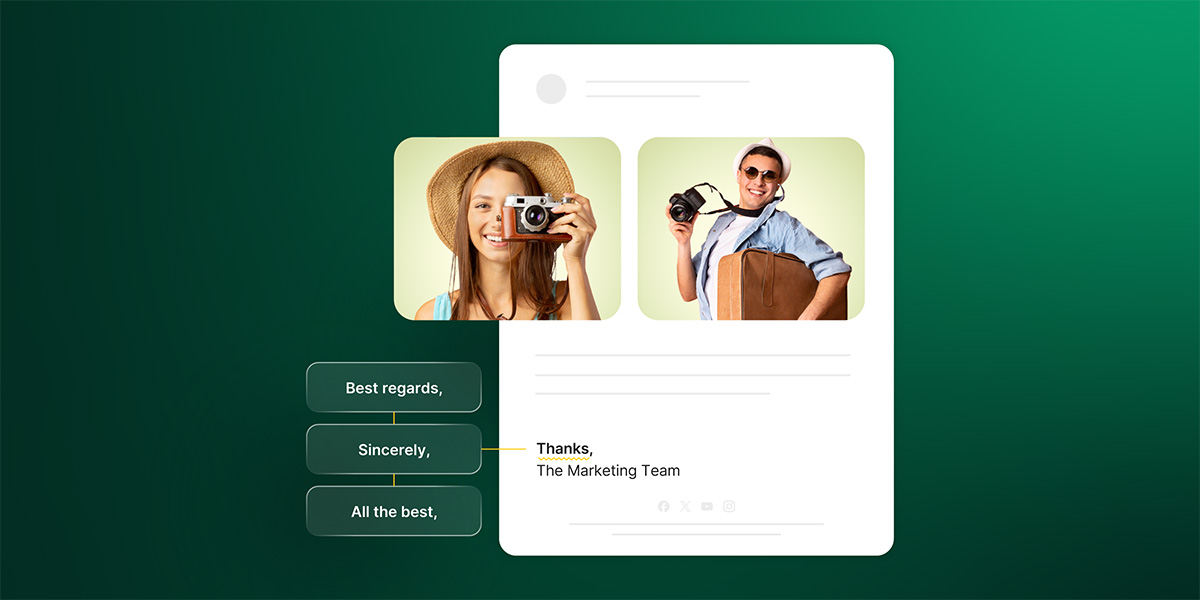
Split screen showing email closing signatures - left side displays three professional sign-off options (Best regards, Sincerely, All the best) and right side shows a complete email signature with team photos reading "Thanks, The Marketing Team"

Most small business owners treat email closings like an afterthought. You type “Best” or “Thanks,” hit send, done.

But that closing does more than fill space before your email signature. It reinforces your message, signals your brand voice, and influences whether people take action. It’s not just politeness—it’s a tool most people don’t use intentionally.

For solopreneurs and bloggers running email campaigns, this can make a difference. Your welcome email closing sets the tone for everything that follows. Your newsletter sign-off reminds people why they’re here. Your sales email closing can tip someone from “maybe” to “yes.”

Here’s what email closings actually do, how to use them strategically in your campaigns, and how to create one that reinforces your brand. Plus a cheat sheet for every email type, the psychology behind why certain closings work, and the 15 that quietly damage your credibility.

Key takeaways:

  • Your closing reinforces your message and influences action—it’s not just politeness.
  • Match closings to email type—welcome emails need different sign-offs than product launches.
  • Create a signature closing—”Keep creating,” “To better emails”—that reflects your brand.
  • Generation matters—Gen Z prefers casual, Boomers expect formal.
  • Personalize standard closings—add specificity to make them yours.

What is an email closing?

An email closing (also called an email sign-off) is the final phrase you write before your name at the end of an email message. It serves as the conclusion to your communication and is your opportunity to reinforce the right tone, reinforce your professionalism, and leave a lasting impression on the recipient before they move on to their next email.

Diagram showing the two components of email endings - the closing ("To better emails, The SiteGround Team") and the signature (company name "SiteGround Academy" with website URL "www.siteground.com")

Your closing gets less attention than other parts of your email like subject line or body copy, but it does just as much work. It signals respect, reinforces your tone, and tells recipients how formal or casual your relationship is. Skip it, and your email feels abrupt. Choose the wrong one, and you might seem off-brand or unprofessional.

Most closings are short—one to four words, a comma, then your name or brand name underneath. In marketing emails, this is often followed by your company name, website link, or social media handles.

Your closing can also be personal and brand-specific. If you’re a fitness coach, you might sign off with “Stay strong.” If you run a creative business, “Keep making things” reinforces what you’re about. In SiteGround Email Marketing’s case, “To better emails” captures what the platform helps you build. The best email marketers use closings that connect with their audience and reinforce their message—not just generic sign-offs.

Together, the closing phrase and email signature create the complete sign-off that ends your email.

The 4 types of email sign offs

Your email closing falls into one of four categories, depending on what you’re trying to do:

  • Formal: For first emails to potential customers or anytime you need to establish credibility. Honestly, you probably won’t use these much unless you’re in a more traditional industry.
  • Semi-formal: This is where most of your emails will land. Weekly You’ll use these the most. email newsletters, product updates, promotional email campaigns, and regular customer communication—semi-formal closings strike the right balance between professional and approachable.
  • Friendly: or subscribers who already know you. Use these in casual updates, personal stories, or behind-the-scenes content. If your brand voice is naturally laid-back or playful, you might stick to this category full-time and add humor or personality to your closings.
  • Action-focused: When you need a click, a reply, or a conversion. Perfect for (calls to action (CTAs) in your email campaigns, feedback requests, or emails driving specific actions.

Pick closings that feel authentic to how you actually talk. You know what they say—just be yourself. Forced formality sounds stiff, fake casual sounds try-hard.

20 email closings that work

These 20 closings cover the different types of emails you’ll send as a small business owner or blogger. The key is matching your closing to your audience and your message—if you’re welcoming new subscribers, your closing should feel different than when you’re launching a product or asking for feedback. Pick the one that fits who you’re talking to and what you’re asking them to do.

Formal email sign offs

Like we said, most solopreneurs and bloggers won’t need these often, but they’re useful when you’re reaching out to potential partners, established businesses, or anyone where formality matters.

  1. Sincerely: Works for formal partnership proposals or first contact with corporate clients. It’s universally understood as professional and respectful.
  2. Best wishes – Slightly warmer than “Sincerely” while staying professional. Good for congratulating customers on milestones or ending positive exchanges where you want to sound genuine.
  3. With appreciation – Use this when someone’s genuinely helped you—a mentor, an industry connection, or a customer who gave valuable feedback. It’s formal but feels sincere.

Semi-formal closings

These handle most of your email marketing and customer communication — professional enough to build trust, friendly enough to feel human.

  1. Best regards: The workhorse of business email. Ideal for welcome sequences, onboarding emails, and first-time customer outreach. Professional but not stiff.
  2. Kind regards: Slightly warmer than “Best regards” while staying professional. Good for customer service emails, survey emails, or when you want your brand to feel approachable.
  3. Warm regards: Use this with repeat customers or loyal subscribers who already know your brand. It’s friendly without being too casual for a business relationship.
  4. Regards: Shorter and more neutral than “Best regards.” Fine for transactional emails like order confirmations or routine updates, but can feel curt in promotional campaigns or sensitive customer service situations.
  5. Best: Clean and efficient for regular newsletters or update emails to subscribers who know your brand. Skip it for first-contact campaigns—it’s too casual. Make it more personal: “Best, [your name]” or “All the best from [location/team].”.
  6. All the best: Warmer than “Best” and works well for seasonal campaigns, end-of-year messages, or customer appreciation emails. Add specificity: “All the best with [their goal]” or “Wishing you all the best this [season].”
  7. Thank you: Perfect for post-purchase emails, feedback requests, or any message where you’re asking customers for something. Make it specific: “Thank you for [specific action]” or “Thanks for being part of [community/journey].”
  8. Appreciate it: Slightly more casual than “Thank you.” Works for customer loyalty emails, repeat buyer thank-yous, or acknowledging engagement with your emails. Personalize it: “Appreciate you” or “Really appreciate your [specific action].”

Add warmth to semi-formal closings:

Add gratitude: “Best regards and thank you for [specific thing]”
Reference your relationship: “All the best, and thanks for being a subscriber since [timeframe]”
Tie to your mission: “Best, and here’s to [shared goal or value]”
Add a human touch: “Warm regards from [your city]” or “Best from the [Your Business] team”

Casual email sign offs  

This is your home base. These closings work for most newsletters, product updates, and subscriber communication—professional enough to build trust, casual enough to sound human.

  1. Thanks: Works for post-purchase emails, feedback requests, or when subscribers take action (click, reply, share). Add specificity to make it stand out: “Thanks for being here,” “Thanks for reading,” “Thanks for trusting us with your inbox.”
  2. Cheers: Common outside the US (UK, Australia). Works for lifestyle brands, creative businesses, or anyone targeting international audiences. Feels friendly without being overly warm.
  3. Take care: Use this with long-term subscribers who feel like community members. Pairs well with personal story newsletters or behind-the-scenes updates where you’re sharing more than just promotions.
  4. Talk soon: Reserve this for emails with a clear next step: webinar reminders, consultation bookings, or event confirmations. You can make it more specific: “Talk soon about [topic]” or “See you Friday.”

Add personality:

Coaches/consultants: “To [transformation]” – “To your breakthrough,” “To clarity,” “To momentum”
Creators/makers: “Keep [core action]” – “Keep creating,” “Keep building,” “Keep shipping”
Service providers: “[Action] with [approach]” – “Grow with ease,” “Scale smart,” “Build with confidence”
Community builders: “Stay [identity]” – “Stay curious,” “Stay bold,” “Stay creative”

Action oriented closings

Use these when you need something to happen — a click, a reply, a conversion, or any specific next step in your email customer journey.

  1. Click here to get started: Direct call to action closing for product launches, limited-time offers, or sign-up campaigns. Gets straight to the action you want.
  2. Ready to [specific action]?: Works in sales emails when you’re asking for the close. Examples: “Ready to upgrade?” “Ready to join?” “Ready to see results?”
  3. Questions? Just reply to this email: Lowers barriers in welcome sequences, product announcements, or how-to emails. Makes you feel accessible, especially if you’re a solopreneur.
  4. Let us know if you need help: Good for post-purchase emails, onboarding sequences, or technical setup guides. Use “me” if you’re solo, “us” if you have a team.
  5. We’d love to hear from you: Softer ask for feedback emails, survey invitations, or community-building campaigns. Feels personal without being pushy.

Make it specific: 

For launches: “Grab your spot before [deadline]” or “Get [benefit] here”
For content/value emails: “Try this and let me know how it goes” or “Put this into action today”
For sales emails: “Book your [service] here” or “Start your [outcome] now”
For community building: “Hit reply and tell me [specific question]” or “Share your [relevant experience]”

Your go-to email closing cheat sheet

Match your closing to the type of email you’re sending—then make it yours.

Email typeStandard closingStand-out alternative
Welcome email to new subscribersBest regards, Thank you for joiningExcited to have you here, Let’s [achieve goal] together
Weekly newsletterBest, Until next timeKeep [your brand value], See you next [day]
Product launch or limited offerReady to [action]?, Get yours hereThis is for you if [pain point], Claim your [benefit]
Post-purchase thank youThank you, Appreciate your trustEnjoy! Tell me how it goes, You’re going to love this
Asking for product reviewI’d love to hear what you thinkYour experience helps others decide, Real feedback = better [product]
Re-engagement emails to inactive subscribersMiss you, Still want [benefit]?No hard feelings—want back in?, One click to stay / one to go
Educational/how-to contentTry this out, Let me know how it goesPut this into action today, Report back with your results
Community or behind-the-scenes updateThanks for being here, Stay [identity]You’re part of this, [Personal sign-off that reflects your journey]
Customer support or help emailHere to help, Just reply if you need anythingI’ve got you, Hit reply—I read every one
Event or webinar invitationSave your spot, See you thereDon’t miss this, Grab your seat before [deadline]
Sales email (warm lead)Ready to [outcome]?, Book your call hereLet’s make this happen, Ready to [specific transformation]?
Feedback or survey requestYour input matters, Hit reply and tell meI’m listening, Tell me what you really think

Pro tip: Use the standard closing when you’re starting out. Switch to the stand-out version once you know your brand voice and audience. The best closings feel like something only you would say.

The psychology behind your email closing

Your closing triggers psychological responses that shape how people perceive you and whether they’ll respond. For small business owners competing for attention in crowded inboxes, these signals matter.

  • The reciprocity trap: “Thanks in advance” assumes compliance, which can backfire. Use it only for straightforward requests, not for big asks where someone might say no.
  • The warmth-competence trade-off: Formal closings like “Sincerely” signal authority but create distance. Casual closings like “Thanks” feel friendly but less professional. Pick based on whether you need credibility or connection at that moment.
  • The mirroring effect: People respond better to styles that match their own. If someone uses “Best,” mirror it. If they’re formal with “Sincerely,” match that. Pay attention and adapt.
  • Last impression bias: People remember endings more than middles. Your closing carries disproportionate weight in how your entire email lands. A warm closing softens tough messages; a mismatched one undermines everything else.

Email closing lines preferences by generation

Your subscribers span different age groups, and they have different expectations for how email communication should sound.

  • Gen Z (born 1997-2012) – Prefers: “Thanks,” “Best,” brand-specific closings like “Keep creating” or “Stay curious,” or no closing at all in casual contexts. Avoids: “Regards” (too corporate), “Sincerely” (unnecessarily formal). They expect conversational, authentic communication.
  • Millennials (born 1981-1996) – Prefers: “Best,” “Thanks,” “Best regards,” “All the best,” or personalized closings like “To your success.” Avoids: “Sincerely” feels too stiff for most emails. They balance professionalism with personality.
  • Gen X (born 1965-1980) – Prefers: “Best regards,” “Thanks,” “Best”—direct closings that get to the point. Also comfortable with “Appreciate it.” Avoids: Overly warm closings like “Take care” with people they don’t know personally. They value straightforward communication.
  • Boomers (born 1946-1964) – Prefers: “Sincerely,” “Best regards,” “Kind regards,” “Thank you”—proper, complete closings. Avoids: No closing at all, abbreviations, or brand-specific closings that feel too casual. They expect traditional business conventions.

You can’t please every generation at once, but you can make smart defaults. If your audience skews younger (under 40), lean casual with “Thanks” or “Best.” If you’re targeting established businesses or older decision-makers, stick with “Best regards” or “Thank you.” When your audience is mixed or you’re not sure, “Best regards” is the safest bet across all age groups.

Write the best email sign offs for your brand

Your email closing is the last thing people read before they decide to reply, delete, or ignore you. Match it to your relationship and what you need from them. Stuck? “Best regards” works for most customer emails, “Thanks” handles everyday stuff.

Running email campaigns? SiteGround Email Marketing comes with professional templates you can customize with closings that match your brand voice—one less thing to overthink when you’re trying to hit send before midnight. And if you want to get better at the whole email marketing thing, our Email Marketing Course covers email deliverability, list building, crafting compelling content, and strategies that actually boost engagement and sales.

[58]

Email salutations: get it right in 10 seconds

Illustration of an email message window displaying "Hello," with a yellow waving hand emoji against a blue envelope background

You’ve been staring at that blank email for five minutes now. Should you write “Hi” or “Hello”? Is “Dear” too formal? Will “Hey” make you look unprofessional?

Stop right there.

You’re overthinking it. And while you’re sitting there debating greetings, your competitor just hit send and got the reply.

Email salutations matter—they set the tone and make the first impression. But picking the right one shouldn’t take five minutes. This guide shows you exactly what works, what doesn’t, and gives you a quick decision table so you can figure it out in 10 seconds and get back to running your business.

Key takeaways:

  • Email salutations set the tone: match your greeting to the situation and your email feels professional and consistent.
  • “Hi [First Name]” works for most business emails: you don’t need dozens of options, just a handful for common situations.
  • For email marketing, use personalization variables: so every recipient sees their actual name, not a generic greeting or placeholder.
  • Small mistakes kill credibility: misspelled names, copy-paste errors, and wrong tone levels make people delete your email.
  • Use the decision table when stuck: find your situation, pick what works, and send the email in 10 seconds.

What is an email salutation?

An email salutation is the greeting at the start of your email.

Diagram showing email salutation "Hi Jordan," followed by body text about an email marketing course, with a label pointing to the greeting indicating it as the salutation

Most people sit there wondering if “Hi” is too casual or if “Dear” sounds outdated.

Here’s the thing: your customers care whether your email solves their problem, not whether you wrote “Hi” or “Hello.” Get the salutation right for the situation, and you’re good.

This guide shows you what works in different business situations so you can stop second-guessing and send the email.

Where the salutation fits in your business email

Every business email has the same basic structure:

  • Salutation – The greeting that opens your email (“Hi [Name]”)
  • Email body – Your actual message
  • Email sign off – How you close (“Kind regards,” “Thanks”)
  • Professional email signature – Your name and contact information

The salutation sets the tone for the rest of the email parts that follow. If you open with a formal “Dear Mr. Smith,” then switch to a casual tone in your message, it feels off. If you start with “Hey!” but you’re pitching a corporate client, you’ve already lost credibility.

Your email greeting tells the recipient what kind of email this is and how they should read it. Match your salutation to your message, and the rest of your professional email will feel consistent.

Business salutations for customer communication

You don’t need to memorize 50 different greetings. You just need to know what works for the handful of email types you deal with every day—reaching out to customers, following up, responding to questions, working with vendors.

Here’s what to use and when.

Reaching out to new customers

This is cold emailing—your first contact with a potential customer. You don’t know them yet, and they don’t know you. Your salutation needs to feel professional enough to build trust, but friendly enough that they keep reading instead of hitting delete.

What works:

  • “Hi [First Name],”
  • “Hello [First Name],”

For example:

“Hi Sarah, 
I came across your website and noticed you’re looking for help with email marketing. I’d love to show you how our platform can help you reach more customers.”

Following up with customers

You’ve already made contact with an initial email, maybe sent a quote or had a conversation. Now you’re checking in without being pushy. The right greeting for your follow-up emails keeps things warm and reminds them you’re a real person, not just another sales email they ignored.

What works:

  • “Hi [Name],”
  • “Hope you’re well, [Name]”
  • No salutation at all if you’re in an active email thread

Here’s how that looks:

“Hi Sarah, 

Just following up on the quote I sent last week. Do you have any questions about the pricing or features?”

Email newsletters and customer updates

You’re sending updates, promotions, or valuable content to your email list—people who’ve signed up to hear from you. Your salutation needs to feel personal even though you’re emailing hundreds or thousands of people at once.

What works:

  • “Hi [First Name],” (personalized using email variables)
  • “Hello [First Name],”
  • No salutation for very casual brands (jump straight into content)

Here’s what that might look like: 

“Hi Sarah,

Our biggest sale of the year starts tomorrow—but you’re getting early access. Use code EARLY20 for 20% off everything through midnight Friday.”

The key difference: You’re not manually typing each person’s name. Tools like SiteGround’s Email Marketing use variables to automatically insert each recipient’s first name from your contact list—so “Hi [First Name]” becomes “Hi Sarah” for one person and “Hi David” for another, all in the same send.

Responding to inquiries

This is the ideal scenario—someone reached out to you. They’re already interested. Your salutation should acknowledge their message and make them feel like you’re ready to help, not brush them off with a generic response.

What works:

  • “Hi [Name],”
  • “Thanks for reaching out, [Name]”

Something like:

“Thanks for reaching out, Sarah. 

Yes, we can absolutely help with that. Our email marketing platform includes the automation features you’re looking for.”

Networking and partnership email etiquette

You’re reaching out to someone who could become a referral partner, collaborator, or strategic connection. This isn’t about making a sale; it’s about starting a business relationship with the recipient. Your salutation should display professional email etiquette and show you’ve actually looked at their work and aren’t just mass-emailing everyone in your industry.

What works:

  • “Hi [Name],”
  • “Hi [Name]—I’ve been following your work on [X]”

This could look like: 

“Hi Sarah,

I’ve been following your work on sustainable packaging. I think there’s a great opportunity for our businesses to collaborate. Would you be open to a quick call next week?”

Email salutations for other business scenarios

Beyond customer emails, you’ve got vendors to contact, teams to update, and situations where you’re reaching out cold with no name. Here’s how to handle those.

Email messages to vendors and suppliers

You need something—a quote, a delivery update, a fix for a problem. These emails need to be professional and clear, because you’re asking someone to do work for you. The salutation sets the tone: respectful but efficient.

What works:

  • “Hi [Name],”
  • “Hello [Name],”

A typical request might be:

“Hi Sarah, 

I’m looking for a printing vendor for our new product packaging. Can you send over your pricing and turnaround times?”

Group emails and team messages

You’re talking to multiple people at once—your team, a client’s team, or a group of stakeholders. The email salutation needs to include everyone without sounding generic or impersonal. Get it wrong and half the group tunes out before they even read your message.

What works:

  • “Hi everyone,” (when addressing the whole company or department)
  • “Hi team,” (for your direct team or project group)
  • “Hi [team name],” (for specific teams: “Hi marketing team,” “Hi design team”)

Here’s a quick team update:

“Hi team, 

Quick update on the website launch—we’re on track for Friday. I’ll send the final checklist tomorrow morning.”

When you don’t know their name

This happens more than it should. You’re trying to reach someone at a company, but there’s no name on the website, no one listed in the contact form confirmation, nothing. 

Before you default to a generic greeting, actually try to find the name—check LinkedIn, the company’s About us page, the Contact us page, or just call and ask. When you use someone’s name, they’re way more likely to respond because it shows you made an effort.

If you’ve genuinely tried everything and still can’t find a name, here’s what works:

  • “Hello,”
  • “Hi there,”
  • Department-specific: “Hi Support Team,” “Hi Sales Team,”

What doesn’t work:

  • “To Whom It May Concern” (sounds like a legal document)
  • “Dear Sir or Madam” (outdated and impersonal)

Try something like:

Hi Sales Team at [Company Name],

I run a small digital marketing agency and we’re evaluating new project management tools for our team. Who should I connect with to discuss pricing and whether your platform works for agencies our size?

Now that you know what works, let’s talk about what doesn’t. These are the mistakes that make people delete your email before they even finish reading it.

Email salutation mistakes to avoid

Getting the salutation wrong won’t just make your email feel off; it can cost you the response entirely. 

Some mistakes signal you’re lazy, others make you look unprofessional, and a few are just careless errors that tank your credibility. Here’s what to watch out for.

Greetings that feel impersonal

When you send a generic email greeting, you’re telling the recipient they’re just another name on your list. They can tell you didn’t put in the effort, and if you didn’t care enough to add a personal touch to the opening, why should they care enough to respond?

What to avoid:

  • “To Whom It May Concern” – This sounds like a legal notice, not business communication. It screams “I didn’t bother finding out who you are.”
  • “Dear Sir or Madam” – Outdated and impersonal. No one uses this unless they’re sending a formal complaint.
  • Generic “Hello” when you have their name – If you know their name and don’t use it, it feels like you’re mass-emailing and couldn’t be bothered to personalize.

People respond to emails that feel like they were written for them, not copied and pasted to a hundred other people. Personalization isn’t just an email marketing trend and extra effort—it’s the baseline.When you’re reaching out to a list of potential customers or sending regular updates to your audience, personalizing each salutation manually isn’t realistic. That’s where SiteGround’s Email Marketing handles personalization for you. Add variables to subject lines and email body so every recipient sees “Hi [Their Name]”—even when you’re sending to hundreds of people.

Screenshot of email marketing platform's content editor displaying a promotional email for SeaLife sunscreen with "Dear [First name]" salutation placeholder and toggle options for showing image, text, button, and separator elements

Greetings that are too casual

Being friendly is good. Being too casual makes you look unprofessional, especially when you’re reaching out for the first time or talking to someone in a more formal industry. You want to build trust, not make them wonder if you take your business seriously.

What to avoid:

  • “Hey” in first-time customer contact – “Hey” works with people you already know. In cold outreach, it reads as overly familiar or careless.
  • “Yo,” “What’s up,” “Hiya” – Save these for friends, not customers. Even in casual industries, this is too much.
  • Industry context matters – A creative agency might get away with “Hey” in some situations. An accounting firm or legal service? Not a chance.

Tone mismatch kills trust. If someone’s evaluating whether to hire you or buy from you, starting too casually makes them question your professionalism before they even read your pitch.

Greetings with careless mistakes

These are the mistakes that make recipients delete your email immediately. They signal you don’t pay attention to details, and if you’re careless with their name or basic information, why would they trust you with their business?

What to avoid:

  • Misspelling their name – “Dear John” when their name is spelled Jon. Instant credibility killer. Double-check every time.
  • Copy-paste fails – Using the wrong name because you forgot to update it from your last email. “Hi Sarah” when you’re actually emailing David.
  • Using nicknames without permission – If they sign their emails as “Robert,” don’t call them “Bob.” Let them set the tone.
  • Gender assumptions – “Dear Sir” when you’re emailing a woman, or making any assumption about titles or gender.
  • Time-based greetings that arrive hours later – “Good morning” sent at 4 PM just looks sloppy.

Small mistakes leave lasting impressions. One misspelled name, and you’ve gone from “potential partner” to “another spammer who doesn’t pay attention.” 

These errors are completely avoidable—just slow down and proofread.

Quick decision guide: choose your email salutation in 10 seconds

Here’s a quick reference table you can bookmark. Find your situation, use what works, skip what doesn’t.

SituationUse ThisSkip This
First contact with a new customer• “Hi [First Name],”• “Hello [First Name],”• “Dear [Name],”• “Hey”• “To Whom It May Concern”
Following up with existing customer• “Hi [Name],”• “Hope you’re well, [Name]”• Overly formal email salutations• “Dear”
Responding to their inquiry• “Thanks for reaching out, [Name]”• “Hi [Name],”• Generic “Hello” without their name
Networking or partnership email• “Hi [Name],”• “Hi [Name]—[personal connection]”• “Dear”• Overly formal language
Email to vendor or supplier• “Hi [Name],”• “Hello [Name],”• “Hey”• Overly casual greetings
Group or team email• “Hi everyone,”• “Hi team,”• “Morning all”• “Hey guys”• Individual names in group context
Don’t know their name• “Hello,”• “Hi there,”• Department-specific greeting• “To Whom It May Concern”• “Dear Sir or Madam”
Ongoing email thread (multiple exchanges)• No salutation needed• “Hi [Name],”• Repeating formal greetings every time

Email closings: how to sign off your email professionally

Your email closing (how you sign off, that is) matters just as much as your salutation. It’s the last thing your recipient reads before deciding whether to reply.

And just like with your opening, you don’t need to overcomplicate this. A handful of professional closings work for almost every business situation.

Professional email sign offs that work

These cover 90% of your business emails.

For most business emails:

  • “Best regards,” (professional, works everywhere)
  • “Thanks,” (when you’re asking for something or expressing gratitude)
  • “Best,” (slightly less formal, still professional)

For follow-ups:

  • “Looking forward to hearing from you,”
  • “Thanks again,”
  • “Talk soon,”

For formal situations:

  • “Sincerely,” (traditional industries, first contact with executives)
  • “Kind regards,” (slightly warmer than “sincerely”)

Email closing salutations to avoid

Below are some closings that either sound unprofessional or feel outdated.

Too casual for business:

  • “XOXO,” “Ciao,” “Later,” (save for friends)
  • No closing at all (feels abrupt in first contact)

Outdated or overly formal:

  • “Yours faithfully,” (sounds like a Victorian letter)
  • “Respectfully yours,” (too formal for modern business)

Mismatched tone: If you opened with “Hi Sarah,” don’t close with “Yours sincerely.” Keep your opening and closing at the same formality level.

Quick reference: match your email closing to your opening

If you opened with…Close with…
“Hi [Name],”“Best,” “Thanks,” “Best regards,”
“Hello [Name],”“Best regards,” “Kind regards,”
“Dear [Name],”“Sincerely,” “Kind regards,”
“Hi everyone,” / “Hi team,”“Thanks,” “Best,”

Stop overthinking, start sending emails

Look, you’re running a business. You don’t have time to agonize over whether “Hi” or “Hello” is the right move. Roughly right beats perfect every time—especially when “perfect” means your email sits in drafts for an hour.

Get the salutation close enough for the situation and hit send. Your customers care whether you can solve their problem, not whether your greeting was flawless.

Now, everything we’ve covered applies to your day-to-day one-on-one business emails. But when you’re emailing at scale—sending newsletters, promotions, or updates to your contact list—you need tools that handle personalization and delivery for hundreds or thousands of recipients at once. You need to make sure your emails actually land in inboxes and feel personal, not like mass spam.

That’s where SiteGround Email Marketing comes in. It handles the heavy lifting so you can focus on your message:

  • Automatic personalization – Add “Hi [First Name]” to hundreds of emails without manually typing each one
  • Reliable delivery – Your emails land in inboxes, not spam folders
  • Professional emails at scale – Send personalized messages to your entire customer list without losing that one-to-one feel

[58]

Email accessibility: reach everyone on your list

Diagram illustrating email accessibility best practices, including adjustable text size controls, proper image descriptions, and clear button design alongside a colorful bird photo demonstrating descriptive alt text implementation

Your email list is bigger than you think; you’re just not reaching all of it.

About 16% of people have disabilities that affect how they interact with emails. That’s roughly one in six subscribers who might struggle to read your tiny text, click your cramped buttons, or make sense of your “click here” links when a screen reader announces them out of context.

When you make your emails accessible, you’re not just reaching these subscribers, you’re improving results for everyone on your list. Let’s look at how to close this accessibility gap.

Key takeaways:

  • 16% of subscribers face accessibility barriers – One in six people have disabilities affecting email interaction.
  • Accessible design improves all metrics – Better readability, faster loading, and improved deliverability benefit everyone.
  • Use descriptive link text – Replace “click here” with specific phrases like “Download the 2025 marketing guide.”
  • Minimum 14px font size – Use readable sans-serif fonts; 16px is optimal for body text.
  • Add alt text and test without images – Describe images for screen readers and verify emails work when images are blocked.

What is email accessibility?

Email accessibility is the practice of designing email messages that all your subscribers can read, understand, and interact with, including people with visual, motor, or cognitive disabilities. This means people who use screen readers due to vision impairments, subscribers with physical disabilities who struggle with small buttons, and anyone with cognitive differences who find complex layouts hard to follow.

But accessible design isn’t only about disabilities. An accessible email also works better for someone squinting at their phone in bright sunlight, a busy professional skimming messages while multitasking, or anyone with a slow internet connection waiting for image files to load. Larger fonts reduce eye strain for everyone. Clear link text helps anyone decide what to click. Simple layouts load faster on any connection.

When you create emails that are accessible, you remove barriers that prevent people from reading your digital content and clicking your links. 

Why email accessibility matters

Email accessibility matters because it determines whether your subscribers (including people with disabilities) can actually read and interact with the messages you send them.

According to the World Health Organization, 1.3 billion people—about 16% of the global population—experience significant disability. Many of these disabilities affect how people interact with emails: vision impairments that require screen readers or other assistive technology, motor limitations that make small buttons hard to click, or cognitive differences that make busy layouts overwhelming. 

Plus, what works for people with disabilities typically works better for everyone: 

  • Clear email CTAs get more clicks from all subscribers. 
  • Accessible email fonts reduce eye strain whether someone has low vision or just tired eyes at the end of the day. 
  • Simple email layouts load faster and scan easier on any device. 

Most businesses see their email marketing metrics improve across the board when they prioritize accessibility. 

Accessible emails also increase email deliverability. Proper HTML structure, balanced text-to-image ratios, and mobile-friendly layouts are factors email providers use when deciding whether to deliver your messages to inboxes or spam folders. When you optimize for accessibility, you’re also optimizing for inbox placement.

Beyond performance, there’s a legal consideration: courts are increasingly applying the Americans with Disabilities Act (ADA) to digital communications, including email. While regulations like the ADA and European Accessibility Act vary by region, following basic accessibility practices protects your business from potential claims.

Email accessibility follows the same principles as accessible web design. Both focus on removing barriers so everyone can access your digital content, like adding alt text, using readable fonts, and structuring content clearly covers most legal requirements and protects your business from potential claims.

Each of these practices closes part of the gap between your emails and the subscribers who can’t read them.

Types of accessibility needs to consider

Accessibility isn’t one-size-fits-all. Your subscribers might face different challenges when reading emails:

  • Vision challenges range from total blindness (requiring screen readers) to low vision (needing larger text and zoom) to color blindness (where certain color combinations are impossible to distinguish).
  • Motor limitations like arthritis, tremors, or limited hand mobility make it hard to tap small buttons or cramped links, especially on mobile devices.
  • Cognitive differences including dyslexia, ADHD, and processing disorders mean dense layouts and complex language become overwhelming quickly.
  • Situational barriers might affect everyone at some point: a broken arm, reading in bright sunlight, or listening to emails while driving all create temporary accessibility needs that require the same design solutions as permanent disabilities.

When you understand these barriers, you can design emails that actually work for everyone on your email list.

Email accessibility best practices

Making your emails accessible doesn’t mean starting from scratch. The essentials break down into three areas: what you write, how it looks, and the technical setup behind the scenes. Let’s start with the part you already control: your content.

Write accessible email copy

Email copywriting and the structure of your content determines whether people can understand and act on your message. These practices directly address the most common barriers creating the accessibility gap.

  • Write clear email subject lines and preheaders. These are the first things subscribers see and the only things screen reader users might hear before deciding to open. Make them descriptive and specific. “Your order #12345 has shipped” works better than “Good news!”
Welcome email from The Key Rewards credit card program displaying the program logo, list of participating brands including Pottery Barn, Williams Sonoma, and West Elm, with a collage of home furnishing products including furniture, decor, and kitchenware
  • Use descriptive link text. Screen readers often jump from link to link, reading them out of context. “Download the 2025 marketing guide” tells people exactly what they’ll get. “Click here” or “Learn more” means nothing when read alone. Make every link meaningful on its own.

❌ “We’ve launched new features. Click here to learn more.” 

✅ “We’ve launched new features. Read about our updated dashboard.”

  • Keep language simple and direct. Skip the jargon and marketing speak. Short sentences and common words help everyone understand faster: people with cognitive differences, non-native speakers, and busy professionals skimming on their phones. If you need a specialized term, explain it.
  • Structure content in logical order. Start with the most important information. Use headings to break up sections. Put related ideas together. Screen readers navigate by headings, so a clear structure helps people find what they need without reading every word.

Design accessible emails

Email design choices affect readability for everyone on your list. These visual elements make the difference between an email people can read and one they’ll delete.

  • Use a minimum 14px font size. Anything smaller strains eyes and disappears on mobile screens. For body text, 16px works even better and is considered optimal for readability. Save smaller sizes only for fine print like footer text, and even then, don’t go below 12px.
  • Choose readable email fonts. Sans-serif fonts like Monsterrat, Roboto, Open Sans, or Poppins are excellent for email body text. For a more formal look, try serif fonts like Lora or PT Serif. Avoid decorative or script fonts for body copy—save those for headlines if you use them at all. Never use all caps for long passages since it’s harder to read. SiteGround Email Marketing, for example, offers both email-safe and web-safe fonts with automatic fallbacks, so your chosen fonts display consistently across all devices.
Image of email with top font pairings such a tahoma and verdana
  • Make email CTAs large and easy to click. Buttons should be at least 44×44 pixels so that they are large enough to tap accurately on mobile. Add enough space around them so people don’t accidentally click the wrong element. Use contrasting colors so they stand out from surrounding content.
Image of SiteGround email marketing course for beginners
  • Add space around elements. Cramming content together overwhelms readers and makes clicking harder. Give your text room to breathe. Add padding around buttons. Space out paragraphs. This negative space (often called “white space” regardless of color) improves readability for everyone and makes motor navigation easier.
  • Avoid putting text in images. Screen readers can’t read text that’s part of an image file. If you must include text in images (like promotional graphics), keep it minimal and always include that text in your alt description. Whenever possible, use your email editor’s text tools to create styled headlines and callouts instead of images with text.

Technical requirements

If you’re using SiteGround Email Marketing, the platform handles most technical accessibility requirements automatically: proper HTML structure, semantic markup, and clean email code all work behind the scenes. But understanding what’s happening (and why) helps you make better decisions about your content.Add alternative text to every image. Alt text describes images for screen reader users. Keep descriptions concise but informative: “Marketing team celebrating Q4 results” rather than “image123.jpg” or just “team photo.” For decorative images that don’t add meaning, use empty alt text (alt=””) so screen readers skip them. SiteGround Email Marketing makes this straightforward by prompting you to add alt text when you upload images.

Adding alt text to an image in the SiteGround Website Builder
  • Create a clear visual hierarchy. Use larger, bolder text for main headlines and progressively smaller sizes for subheadings and body text. This visual structure helps all readers – including those using screen readers – understand how your content is organized. Screen readers in email rely on reading order and text formatting rather than semantic heading tags, so keep your layout logical and use size and weight to show importance. SiteGround Email Marketing templates include preset text styles that create this hierarchy automatically.
Email composition interface displaying a dropdown menu with heading levels (Heading 1-4, Subheading, Paragraph, Caption) alongside a promotional email template for StoreCo offering 20% off with code WELCOME20
  • Test with images turned off. Before sending, preview your email without images (most email platforms include this option) or send yourself a test and view it with images disabled in your inbox. For instance, Gmail asks before displaying external images to protect users from tracking pixels and malicious content. Can people understand your message? Are your CTAs visible? If the email breaks without images, restructure it.
Gmail settings showing two options for handling external images: "Always display external images" and "Ask before displaying external images" with a note that the second option also disables dynamic email content

SiteGround applies accessibility standards to both the platform you use and the emails you send. The accessible Client Area and Site Tools dashboards include high-contrast themes, keyboard navigation, and screen reader support – so creating emails is accessible too. Email templates are tested with accessibility consultants to catch issues before they reach subscribers, meaning accessibility is built into the entire process, not added as an afterthought.

How to check your email accessibility

Once you’ve built your email with these practices in mind, run through a few quick checks before sending. You don’t need specialized software or technical expertise. These straightforward tests catch most accessibility issues.

  • Check your color contrast by squinting at your screen or viewing it in bright light. Dark text on light backgrounds (or vice versa) almost always works better than subtle shades. SiteGround Email Marketing also includes a built-in contrast checker that proactively alerts you when your color combo doesn’t mean accessibility standards.
Infographic demonstrating WCAG color contrast requirements with a 4.5:1 ratio standard. Left side shows two failing examples: dark blue button with purple text and yellow button with light yellow text, both marked "DIFFICULT TO READ" and "FAILS." Right side shows two passing examples: mint green button with dark green text and maroon button with white text, both marked "EASY TO READ" and "PASSES."
  • Read it out loud. This simple test catches confusing link text, unclear CTAs, and awkward phrasing. If something doesn’t make sense when you read it aloud, it won’t make sense to a screen reader either. Pay special attention to links. Do they make sense without the surrounding context?
  • Send a test to yourself. Check how your email looks in the email clients your subscribers actually use: Gmail, Outlook, Apple Mail, whatever your analytics show as most common. Some accessibility features (like alt text) display differently across clients, and you want to catch any surprises before your real send.
  • Preview on your phone. Since you’ve already sent these test emails, be sure to also check them on your actual phone, not just a desktop preview. Tap every button and link. Are they easy to hit without accidentally clicking something else? Can you read the text without zooming? Your phone preview shows you what mobile users experience and reveals accessibility issues that desktop testing misses.
Image of email fonts being adapted for mobile

Most email platforms, including SiteGround Email Marketing, let you send test emails to multiple addresses. Take advantage of this to review your message in different environments before it reaches the email list you’ve built.

Start making your emails accessible

You don’t need to overhaul everything at once. Start with three changes: 

  1. Add alt text to images 
  2. Use at least 14px font size 
  3. Replace “click here” with descriptive link text 

Each fix reaches more subscribers and improves performance for your entire list.

If you’re ready to make accessibility simpler, SiteGround Email Marketing handles the technical requirements automatically—proper HTML structure, accessibility prompts, and mobile-optimized templates. You also get automated email journeys to send welcome sequences or follow-ups without manual work, reliable inbox delivery backed by SiteGround’s infrastructure, and analytics that show what’s working. Less time wrestling with technical details means more time connecting with customers and growing your business.

[58]

Email Format Guide: How to Get the Response You Need

Email format template with composition tools, task checklist, mobile email display, and analytics dashboard showing campaign performance

You’ve probably googled “what is the format of an email” at least once—especially if you’re running a business without a full marketing team.

Not because you’ve never written an email before. But because you’re stuck writing one right now and can’t figure out how to structure it. Should the offer go first in your promotional email, or does it need context? Does a customer survey need the same format as a product announcement? What about that message to your team—how formal should it be?

Most people use the same structure for every email. A quick yes/no question gets the same treatment as a detailed project update. An urgent request looks identical to a casual check-in.

Then you wonder why people aren’t responding.

Email format isn’t about following rigid rules or sounding corporate. It’s about structuring your message so people actually read it and know what to do next. Different goals need different formats—and once you match them correctly, everything changes.

Key takeaways:

  • Email format should match your goal – a yes/no question needs different structure than a feedback request or project update
  • Keep emails under 125 words and subject lines under 50 characters for higher response rates
  • Lead with your request first, then add context – don’t bury what you need in paragraph three
  • Stick to one clear call to action per email – multiple requests split attention and kill responses
  • Include specific deadlines to create urgency – “by Thursday” gets action, “when you can” gets ignored

What is Email Format 

Email format is the structure of an email message, from subject line to signature. It’s the framework that holds your content together and helps your recipient quickly understand what you need and what action to take.

Different goals need different formats. A promotional email announcing a sale needs different structure than a welcome email to new subscribers. A product launch announcement differs from a weekly newsletter, just as a cold outreach to prospects differs from a re-engagement email to inactive customers. Whether you’re running marketing campaigns or handling business communications, matching your format to your goal gets better results.

Why Email Format Matters

Format directly affects whether people open, read, and respond to your emails because people make split-second decisions about which emails deserve their attention.

Every part of the email affects results in different ways:

  • Short email subject lines tend to get opened more. 
  • Emails with a single clear email call to action get more responses than emails asking for three different things. 
  • Even the length of your email, where you place key information, and how you break up paragraphs—all of it impacts results.

The numbers back this up. According to Mailmeteor, emails under 125 words get response rates around 50% higher than longer ones. Subject lines under 50 characters outperform wordy ones, as reported by Truelist. 

Tracking the right email marketing metrics (open rates, click rates, and response time) helps you understand which formats work best for your audience. But you need to measure the right things.

The problem? Most people use the same email format for everything. They write every email the same way, whether they’re scheduling a quick call, pitching a new client, or following up on a complex project. Same structure, same length, same approach.

That’s like using a sledgehammer for every job. Sometimes you need a scalpel.

Your format should change based on what you’re trying to accomplish. Match the structure to the goal, and you’ll see the difference in your inbox.

The Parts of an Email

Every email has the same basic building blocks. How you use them determines whether your message gets read and acted on. 

Here’s what a complete professional email format looks like, then we’ll focus on the parts that make the biggest difference in your response rates.

The different parts of an email

Email Subject Line

This determines if your email gets opened. People scan their inbox in seconds, deciding what deserves attention based almost entirely on subject lines.

Keep it short—under 50 characters works best. Be specific about what’s inside. Avoid vague lines like “Quick question” or “Following up.”

Something like “Your free trial expires Friday” or “New feature you requested is live” tells them exactly what’s inside before they even click.

Opening Line

This keeps them reading past the first sentence. If your opening doesn’t hook them immediately, they’ll skim or abandon the email.

Get to the point in the first sentence. Skip pleasantries unless you have an established relationship. State why you’re writing or what you need.

Compare “Your account now includes bulk scheduling” to “I hope this email finds you well. I wanted to reach out about something that might interest you.” The first one gets to the point.

Email Body

This is where you convey your actual message. The email body should give context, provide necessary details, and make your case without rambling.

  • Keep short paragraphs—2-3 sentences max. Use line breaks between ideas. 
  • When listing multiple items, use bullet points to make them scannable. 
  • Front-load important information since people skim. 
  • Cut anything that doesn’t directly support your purpose.
  • For a product announcement, lead with what changed, then explain the benefit, then include the call-to-action. Don’t bury the news in paragraph three.

Call to Action

This tells them what to do next. Without a clear call to action (CTA), people won’t take action—whether that’s clicking a link, making a purchase, replying to your message, or registering for an event.

Make it specific and easy to act on. One CTA per email usually works best. Make it obvious wherever you place it—sometimes that’s right after your opening line, sometimes at the end. Use direct language.

“Download your free guide here” works better than “Feel free to check it out when you have time.”

Email Signature

The best email signatures provide credibility and contact information. Your professional email signature confirms who you are and gives recipients other ways to reach you if needed.

Include your full name, job title, company name, and phone number. Keep it clean—no inspirational quotes or walls of text.

A simple format works: Sarah Chen, Marketing Director, Acme Corp, sarah@acmecorp.com, (555) 123-4567.

For email marketing campaigns, your approach is different. Sign off with your company or team name, skip the detailed contact info in your signature, and save that for your email footer instead. Marketing emails focus on driving action—your footer handles the legal requirements and contact details.

Each email part serves a specific function. When they work together with the right format for your goal, you get results. But there’s one more thing to address before we get to examples.

Formal vs Casual Emails

The one question people always ask is: should this be formal or casual?

The level of formality depends on your relationship with the recipient.

Formal emails are for first-time outreach or high-stakes communications—reaching out to potential clients you’ve never met, cold pitching prospects, or formal business proposals. Use formal greetings (“Dear Ms. Rodriguez”), complete sentences with no contractions, and formal closings (“Best regards” or “Sincerely”). The tone is respectful and professional. 

Casual emails work for regular customer communications, ongoing relationships, or your email subscriber list. You can use “Hi [Name],” write with contractions, keep it conversational, and sign off with “Thanks” or your team name. The tone is friendly but still professional—you’re building rapport, not writing a legal document.

Both follow the same structural principles: clear subject line, concise body, single call-to-action. The formality changes based on familiarity; the formatting effectiveness doesn’t.

Email Structure Best Practices + Email Format Examples

Whether you’re coordinating with your team, reaching out to prospects, or communicating with customers, the same formatting principles apply. Here are email format examples for the most common scenarios—internal and external. Think of these as templates you can adapt, not rigid rules to follow exactly.

# 1: Get a Yes/No Answer

Keep it to 3-5 sentences with a clear question.

Example:

Subject: Quick question about your subscription

Hi Sarah,

We’re updating our email preferences. Do you want to keep receiving our weekly newsletter, or would you prefer monthly digests instead?

Just reply “weekly” or “monthly” and we’ll update your account.

Thanks,
The [Company] Team

Short emails with binary choices get decided fast. Your recipient doesn’t need to think hard, gather information, or switch between tasks. They can answer in seconds and move on.

# 2: Schedule a Meeting

Aim for 50-75 words and include two specific time options.

Example:

Subject: 15-minute demo of our new features?

Hi Marcus,

I’d love to show you the new automation features we just launched—they could save you hours each week on campaign setup. Would either of these work for a quick demo?

Tuesday, Dec 17 at 2 PM
Thursday, Dec 19 at 10 AM

If neither fits, let me know what does.

Best,
Alex

Two specific options are easier to respond to than “when are you free?” You’ve already done the work of checking your calendar, so they can just pick one instead of hunting through their schedule.

 # 3: Follow Up After No Response

Write 75-100 words and reference your original message. 

Example:

Subject: Following up – free trial

Hi James,

I reached out last week about our 14-day free trial. Wanted to check if you’re still interested in testing out the platform, or if now’s not the right time?

If you’d like to get started, here’s your signup link: [link]

No pressure if it’s not a fit right now.

Best,
Sarah

Follow-up emails need context about what you’re following up on. Reference your previous message briefly, then make it easy for them to respond by repeating your request or offering new options.

# 4: Get Feedback

Write 100-150 words and ask specific questions about what you need.

Example:

Subject: How are we doing? 2-minute survey

Hi Priya,

We’d love to hear your thoughts on your experience with us so far. Quick 2-minute survey with three questions:

1. How satisfied are you with our product? (1-10)
2. What’s one feature you wish we had?
3. Would you recommend us to a colleague?

Take the survey: [link]

As a thank you, everyone who completes it gets early access to our new template library.

Thanks,
Jordan

General requests for “feedback” lead to vague responses or silence. Specific questions guide people to exactly what you need, so they know how to help. 

For more detailed strategies on gathering customer insights, check out our guide on survey emails.

# 5: Move Deal Forward

Structure it around 60-80 words with one clear next step.

Example:

Subject: Ready to upgrade your account?

Hi David,

Based on our call yesterday, the Pro plan sounds perfect for your team size and email volume. I can upgrade your account today and you’ll have access to all the advanced features immediately.

Should I go ahead and process the upgrade?

Best,
Taylor

Deals stall when the next step isn’t obvious. One clear action removes all guesswork and keeps momentum going.

# 6: Share Info (No Response Needed)

Use short paragraphs or bullets, and add “FYI” (For Your Information) in the subject line to signal no response is needed.

Example:

Subject: FYI – System maintenance this weekend

Hi team,

Quick heads up: we’re doing system maintenance this Saturday from 2-4 AM EST. Your campaigns won’t be affected, but you won’t be able to log in during that window.

Everything will be back to normal by 4 AM.

No action needed from you.

Thanks,
The [Company] Team

“FYI” tells people immediately that no response is needed. They can read it, note the information, and move on without inbox guilt.

Email Format Mistakes That Kill Responses 

Even when you understand proper email format, certain mistakes will kill your response rates. Looking at email marketing benchmarks across thousands of campaigns, here are the most common mistakes—and how to fix them.

Asking for Multiple Things at Once

Asking for three things in one email splits your recipient’s attention. Should they download the guide, register for the webinar, or reply to your question? Should they approve the budget, schedule the call, or review the document? When everything feels urgent, nothing gets done.

Stick to one action per email. If you need multiple things, send separate emails or clearly prioritize what matters most, and tell them exactly which action to take first.

Writing Vague Subject Lines

“Checking in” and “Quick question” tell your recipient nothing. They can’t prioritize your email against 50 others, so it sits unread.

Write subject lines that preview the content: “Your free trial expires Friday” or “New scheduling feature now live” for customer emails. “Design review needed by Friday” or “Budget approval for Q1 campaign” for internal requests.

Specific subject lines get opened because people know whether it’s urgent and relevant. Vague ones get skipped.

Sending Emails Without Deadlines

When you don’t include a timeframe, your email has no urgency. “Let me know your thoughts” could mean today or next month, so it gets pushed to the bottom of the list. Add a clear deadline: “Can you review this by Thursday?” or “I need your input before our Monday meeting.” Deadlines create action. Without them, your email becomes a “someday” task that never gets done.

Writing Long Emails That Bury Your Request

Nobody wants to scroll through six paragraphs to find out what you actually need. Long emails signal “this will take time,” so people save them for later—and later never comes.

Lead with your request first: “Claim your 20% discount” or “Register for the webinar” for customer emails. “Can you approve this budget?” or “Need your feedback by Thursday” for internal requests. Then add context if necessary.

If your email doesn’t fit on one screen without scrolling, it’s too long. Break complex topics into shorter messages, use bullet points, or link to a document for full details. Front-loading your ask respects your recipient’s time.

Start Using the Right Email Format Today

Getting email format right is half the battle. The other half? Having tools that support your customer outreach without adding complexity.

SiteGround Email Marketing comes with ready-made email templates designed for different goals—whether you’re announcing a product launch, sharing an update, or asking for action. You can customize these templates to match your brand, or build your own from scratch if you need something specific. Either way, you’re working with formats that are already structured to get responses, not starting with a blank page every time.

If you’re tired of hitting send and hearing nothing back, it’s time to match your format to your goal and use tools that make that easier.

[58]

Year-in-Review Email Templates: Make Your Customers the Star

Abstract of Year-in-review emails

Every December, Spotify’s Wrapped email reveals our listening habits, prompting millions to share it readily with friends and loved ones and screenshot it for Instagram. This is the strange magical effect of year-in-review data, and you and your business can utilize it for your end-of-year emails, as well.

Year-in-review emails are one of the very few examples of smart use of tracking data for the benefit of the customer. When brands do that, you’re not a data point. You’re the main character in a story shaped by your unique metrics. 

The best year-in-review emails go beyond numbers and tap into identity. You’re not just someone who bought stuff. You’re someone who did something worth celebrating this year. 

For small businesses, this is great news. And the best part is that you don’t need Spotify’s engineering team and algorithm. You just need to know what your customers did this year and make it interesting for them.

.post-page__colored-blocks.post-page__colored-blocks–update p { margin: 15px 0px; }

Key Takeaways:

Year-in-review emails are personalized messages, sent to customers at the end of the year. Those emails can summarize their interactions, achievements and/or milestones with the particular brand over the past 12 months. By utilizing these emails, you’re making your customers the main character in a story shaped by their unique metrics. Any small business can use this marketing tactic.

  • Make Your Customer the Hero: Shift the focus to the customer, turning their data and interactions with your business into a story that makes them feel celebrated and unique.
  • It’s Not Just for Big Tech: Any business, from a local arcade to a skincare brand, can use this strategy by translating customer behavior into a narrative about their identity and achievements.
  • Focus on Meaningful Data: Instead of generic numbers like the amount customers spent, highlight specific, positive actions like “you tried 8 new menu items” or “you’ve been a member for 3 years.”
  • Use a Soft Call to Action (CTA): The primary goal isn’t direct sales. Guide customers toward a natural next step, such as booking a session for the new year or leaving a review.
  • No Individual Data? No Problem: If you don’t track individual customer data, create a “community highlight” year-in-review email. Celebrate collective achievements (such as “Together, we donated…”) and make your audience feel like an important part of that success.
  • Find the Right Narrative: If you have customer data, adapt one of three smart approaches to tell a compelling story that fits your business.

Why Small Businesses Need Year-in-Review Emails

Year-in-review emails are one of the few marketing messages where you can celebrate your customers instead of asking them to buy something (and they actually work better because of it). For small businesses, this is a chance to stand out in December’s crowded inbox by making customers feel seen, appreciated, and genuinely part of your story.

You might think that wrapped emails are for tech companies with data scientists.

But that’s not true. 

Someone who runs a family events center can send a year-in-review email that says “You celebrated 4 birthday parties with us this year and your kids’ friends probably think you’re the cool parent now.” Another who makes skincare products, can say “You’ve been using the same face wash for 9 months, which means you finally found something that works and aren’t panic-buying new products every week.”

Both of these year-in-review emails do the same thing Spotify does. They take behavior and turn it into a story about identity.

  • The Psychology Angle
  • A Smart Re-Engagement Tactic
  • The Stats Say it Works

The Psychology Angle

People want to be the protagonist. Not of some grand epic fantasy, just of their own year. When you send someone a recap of what they did with your business, you’re basically saying “you had a story this year, and we were a part of it.”

The photographer who emails past clients with “You’ve been married for two years now and we still remember the reading of your vows in the rain” isn’t selling anything. They’re reminding someone of a moment. That’s relationship building that a discount code can’t beat.

A Smart Re-Engagement Tactic

Year-in-review email newsletters bring back people who forgot about you. Let’s say your business is a yoga studio, and someone joined your classes back in March, but then vanished. They get a December email that says “Remember us? You burned enough calories this year to climb Mount Everest (twice!).” Suddenly you’re back in their radar.

Now that it’s the end of the year, that email recipient is probably making plans and setting goals. And you’re now  top of mind. If your just-sent year-in-review email reminds them of what they accomplished with you in the past year, they’re way more likely to book with you again when they’re making plans for 2026.

Plus, these types of emails that share accomplishments get shared. People screenshot their stats and post them. Your business name is right there in the image. This is free word-of-mouth marketing from people who are excited to show off their year.

The Stats Say it Works

And let’s not forget that year-in-review emails are essentially highly personalized emails. And do you know what personalized emails are good at? They crush generic promotional emails on every email marketing metric that matters.

According to Litmus’s 2024 State of Email in Lifecycle Marketing report, automation and personalization remain the top priorities for email marketers, with consumers showing strong preference for personalized email elements. 64% value exclusive offers based on loyalty status and 63% value product recommendations based on past purchases. 

Birthday emails, which not only celebrate customer milestones but also act as re-engagement emails, generate click-to-open rates of 24.43%, the highest of any automated email type according to G2’s 2024 email marketing research.

In 2023, 60 million people shared their Spotify Wrapped graphics on social media. That’s 60 million free brand ambassadors.

These kinds of emails also get way fewer unsubscribes because you’re not asking for money. You’re celebrating your customer and it’s hard to be mad about that.

The Anatomy of a Great Year-in-Review Email

Okay, so what actually goes into a year-in-review email template? Let’s break it down. 

  • Personal Data Points and Design That Works
  • Tone of Voice: Somewhere Between Friendly and Professional
  • The CTA: What Do You Want Them to Do?

Personal Data Points and Design That Works

You need numbers that mean something. “You spent $472 with us this year” is technically true but also kind of depressing. “You tried 8 new menu items and the truffle fries became your regular order” is way better.

The digital marketing metrics you track depend entirely on what your business does:

If you’re an ecommerce site, you have a purchase history. How many products did they buy? Did they branch out into new categories? Did they come back for the same thing three times? That’s customer loyalty. Follow the whole customer journey to celebrate these touch points.

If you’re a service business, you have appointments. How many times did they book? What did they try? How long have they been coming? Did they hit any key milestones?

Entertainment venues can track the events guests attend, the types of gatherings they prefer, and the new experiences they try. “You came to 6 events this year and we’re pretty sure you’re single-handedly keeping the local music scene alive” might work.

Content creators have opens, reads, clicks. A line that feels personal is something like: “You opened 42 out of 52 newsletters which is honestly better attendance than most people’s gym memberships”.

Nonprofits can highlight impact. Try a message that connects the act of giving to the actual humans that helped like: “Your donations helped 12 students attend college this year”.

The trick is finding three to five things that feel meaningful without being weird. You want people to think “whoa, I didn’t realize I did that” and not “how do you know that and why are you watching me.”

As for the email marketing design, it’s good to take into account mobile devices. Most people open these emails on their phone while scrolling during a holiday break. Try using big numbers, short sentences, and clear hierarchy. You can also test the length of different email subject lines. While shorter is generally better, test variations to see what resonates most with your audience.

Tone of Voice: Somewhere Between Friendly and Professional

This is where one can easily mess up. You don’t want to go too formal (“We would like to express our gratitude for your patronage”) or too casual (“OMG you’re literally the best customer ever!!!”).

You want genuine enthusiasm without desperation. The mindset you need to settle in is that of someone who’s celebrating what your customers did and you happened to be there for it. Make sure the tone of voice is aligned with your brand, too. Here are some examples: 

Forgettable line: “Thank you for your continued support this year.”
Better line: “You booked with us 8 times this year, which makes you officially a regular. We know your coffee order now.”

Forgettable line: “We appreciate your loyalty to our brand.”
Better line: “Three years of Saturday morning classes. Remember when you couldn’t do a pushup and now you’re doing them on one arm just to show off?”

The difference is specificity. Generic praise sounds like a formal letter but specific observations sound like you actually noticed them.

The CTA: What Do You Want Them to Do?

Here’s the thing about year-in-review emails—they’re not sales pitches. The minute you turn this into selling, you’ve broken the spell.

But you can absolutely include an email call to action if it feels like a natural next step. 

Strong year-end CTAs:

  • Book your first session of 2026 
  • Share your year with friends 
  • Tell us what you want to see next year 
  • Get early access to our January launch 
  • Leave us a review 

Weak year-end CTAs:

  • Buy more right now (You just celebrated them. Don’t immediately ask for money.)
  • Don’t forget about our sale (Breaks the celebratory tone.)

What If You Don’t Have Individual Customer Data?

Not every business tracks customer behavior at the individual level—and that’s okay. You can still create compelling year-in-review emails using company-level data.

What you can celebrate without personalized data:

  • Company milestones (press coverage, awards, expansion)
  • Product launches and bestsellers
  • Community impact (total donations, collective achievements)
  • Store openings, partnerships, major announcements
  • Environmental/social impact metrics

The key difference:

Instead of “YOU did this,” it becomes “WE did this together, and you were part of it.”

Year-in-Review Email Examples: 3 Approaches That Work

Looking for year-in-review email newsletter inspiration? Here are three proven approaches you can adapt for your business. For the purpose of this article, we’ve built actual year-in-review email templates using SiteGround AI Studio  (available in your SiteGround Customer Area) and the SiteGround Email Marketing platform to show you exactly how each one works.

Whether you run an ecommerce shop, a service business, or a community platform, you can create the same templates to fit your data. These work for both personalized and company-level data and you’ll see how you can adapt each one based on what data you have. 

1. The Numbers Game (Spotify Style)

This is the approach everyone thinks of first because Spotify made it famous. You take user behavior, turn it into big bold numbers, and present it like a highlight reel.

Who it works for: Ecommerce, SaaS, content creators, anyone who has trackable user behavior.

What it looks like: Big typography and data points that sound impressive even if they’re not objectively huge. Pick numbers that make people feel like they accomplished something.

How to implement this:

  • If you track individual customer behavior: Pull your top 3-5 metrics per customer and format them with big numbers and short context. 

For example: “You discovered 12 new products this year”; “You invested 4.5 hours learning new skills with us.”

  • If you only have company-level data: Show impressive collective numbers and position customers as contributors. 

For example: “Together, we saved 62 million gallons of water. Every purchase counts, including yours.”;  “Our community ordered 2.4 million meals this year, and you were part of making that happen.” 

Watch out for: Numbers that don’t mean anything to the recipient. “You logged in 156 times” is just data, but “You logged in more than 87% of our users” or “You’ve been with us for 523 days straight” tells a story. 

Template example: Family Entertainment Center

year in review email template example celebrating collective achievements of a small business

We built this template for a bowling alley and arcade using SiteGround AI Studio. It celebrates collective achievements and makes every family feel like they were part of making 2025 unforgettable. The bold, playful design uses bright colors and game-style typography that feels celebratory without being overwhelming.

2. The Milestone Celebration

This approach focuses less on quantity and more on moments like first purchase, one-year anniversary, or a specific achievement unlocked. The email becomes a timeline of you and your customer’s relationship. 

Who it works for: Service businesses, restaurants, subscription models, membership organizations, any business where moments matter more than metrics.

What it looks like: Timeline-style email layouts highlighting 1-3 significant dates or achievements. It’s less about “how many times” and more about “remember when.” The design celebrates progression and specific memories rather than volume.

How to implement this:

  • If you track customer milestones: Look for natural milestones in your customer data like first purchase anniversaries or the moment they became a “regular.” Build the year-in-review email around 1-3 of these personal dates.

    For example: “One year ago today, you booked your first massage with us. Since then, you’ve become a regular every Thursday at 6pm—we always have your table ready.”
  • If you only track company milestones: Share YOUR big moments from the year and thank customers for being part of your brand story. Include photos from major moments and frame them as shared celebrations.

For example: “We opened 3 new locations, won Best Local Business, and celebrated 10 years, and you were with us through all of it.” 

Watch out for: Celebrating milestones the customer doesn’t care about like your company’s 10th birthday. Their personal first-time-using-you anniversary will resonate better. 

Template example: Natural Skincare Brand

year in review email template featuring a small business celebrating annual milestones

This template was created with SiteGround AI Studio for a clean beauty brand. It walks through the company’s major 2025 milestones, presented as a visual timeline. The design is clean, sophisticated, and visually appealing, matching the premium skincare aesthetic while making customers feel proud to support a growing brand.

3. The Community Highlight

This approach flips the script from “here’s what YOU did” to “here’s what WE did together as a community, and you were part of it.” It works when your value comes from being part of something bigger. 

Who it works for: Platforms with user-generated content, nonprofits, membership communities, marketplaces, fitness communities, anywhere collective impact matters.

What it looks like: Big collective numbers up front (total community achievement or customer participation), then a zoom-in showing how this individual contributed to that larger story. Visual elements often show scale like maps, crowd imagery, or data visualizations that make the community feel massive and meaningful.

How to implement this:

  • If you can show individual contribution within the collective: Start with the big number (“Together we explored 782M miles”) then zoom in (“You contributed 47 miles to that achievement”). Make their piece feel meaningful.
  • If you only have collective totals: Focus entirely on community pride without individual callouts.  The individual’s presence in the year-in-review email itself proves they’re part of it.

For example: “Together we explored 782M miles as a community. Every hike matters, including yours”; “Our members donated $5.8M this year. Thank you for being part of this movement.” 

Watch out for: Making someone feel insignificant. If you say “Our platform processed $10B in sales” and then “You sold $200,” you won’t inspire anybody. Frame it as being part of something bigger, not being small within something big. 

Template example: Local Yoga Studio

Year in review email template featuring collective community achievement

We used the SiteGround Email Marketing platform to build this community-focused template for a yoga studio. It leads with the collective achievement, 18,500 classes attended, then breaks down what that meant: stress relief, stronger bodies, new friendships, personal growth. The warm, calming design of the year-in-review email, with soft colors and organic shapes makes every student feel like they’re part of a supportive community, not just another number.

Build and Send Your Year-in-Review Email with SiteGround
Ready to create your own? Start with SiteGround AI Studio (available in your User Area) to generate your year-in-review email in minutes. Just describe your business and share your metrics. Then customize and send it through the SiteGround Email Marketing platform.

Start Building Your Year-in-Review Email

The Bottom Line on Year-in-Review Emails

Year-in-review emails work because they make your customers the main character. For once this year, it’s not about you trying to sell them something but about celebrating what they did, discovered, or accomplished. You just happened to be part of that story.

So, whether you’re creating a year-in-review newsletter or a simple recap email, the formula is the same: know what your customers did, make them feel good about it, and send it in December.

The worst thing that can happen is people ignore your year-in-review email. But the best scenario is they love it and once they love it, they’re gonna screenshot it, share it, and remember why they liked your brand in the first place. That’s not a bad outcome for one email. 

How to Write an Email Body People Actually Read

Digital illustration of an email marketing editor interface featuring product images of tropical plants, with design elements including buttons, text fields, and an email notification icon on a blue-green gradient background

You spent an hour crafting the perfect email. The subject line is a work of art. You hit “Send,” watch the open rate climb, and then… nothing. No clicks, no replies, no sales.

The subject line did its job, but the email failed. The problem isn’t your open rate; it’s what happens after the open. That’s where your email body comes in.

While most advice focuses on subject lines, the body is where conversions happen. This guide provides a strategic approach to writing email bodies that get results. You’ll learn the specific tactics that drive action and the common mistakes that kill engagement.

Key takeaways:

  • The email body drives action—subject lines only get opens
  • Lead with your point, not context—you have three seconds before they leave
  • Structure for mobile first—55% of emails are opened on phones
  • One clear CTA per email beats multiple competing asks
  • Fix one thing at a time—test it for 10 emails before changing anything else

What Is the Body of an Email?

The body of an email is the main content section where your actual message lives. It’s everything between your greeting (“Hi John”) and your closing (“Thanks, Sarah”).

This is where you explain why you’re writing, share the details that matter, and tell the recipient what you need from them. Text, images, links—whatever you’re trying to communicate goes in the body.

​​Where the body fits in the complete email structure:

Your email subject line and preview text get the email opened. Everything after that—from “Hi Sarah” to your signature—is the email body. That’s where your actual message lives.

Within the body, you have four components that each do specific work:

  • Greeting/salutation – “Hi,” “Hello,” or “Dear…” (sets your tone) 
  • Main message – Your core content and details (makes your case)
  • Email call to action (CTA) – What you need them to do (drives the response)
  • Closing and signature – “Thanks,” plus contact info (wraps it up)

When someone says “email body,” they might mean the whole thing from greeting to signature, or just the main message part. We’ll break down each of these components in detail later, including what goes wrong and how to fix it.

Creating effective email bodies doesn’t have to be complicated. SiteGround Email Marketing includes easy-to-use editors and pre-built templates that handle formatting automatically. And if you’re staring at a blank screen at 3pm wondering what to write, the built-in AI email writer can draft valuable content based on your campaign goals—then you just tweak it as you see fit.

Screenshot of SiteGround's Email Marketing AI text generation interface showing a prompt input for a Halloween sale announcement, tone of voice dropdown menu with options including Promotional, Professional, Neutral, and Social media, and a generate button

Why the Body Matters in Email Marketing

Your email body determines whether people take action. Here’s why it matters:

  • The body drives conversions (not just opens)
  • You have three seconds to hold attention
  • Mobile formatting makes or breaks readability
  • Body engagement affects future deliverability

Let’s break down each of these.

The Body Drives Conversions

Subject lines get opens, but the body is what motivates clicks, responses, and conversions.

You spent 20 minutes crafting the perfect subject line. Your email open rate is 35%. Success, right?

Not if nobody clicks, responds, or does what you asked them to do.

Think of it this way: Your body builds the argument for why someone should care. Your CTA tells them what to do about it. Without a compelling body, even the clearest CTA fails because you haven’t given them a reason to act. But without a clear CTA, even the best body goes nowhere because people don’t know what you need from them. They work together.

You Have Three Seconds Before They Leave

The body is where emails actually fail.

Someone opens your email. They scan the first few lines looking for one thing: “What does this person want from me, and why should I care?” They give you about three seconds to answer that question.

If your body buries the answer in paragraph three, or wraps it in unnecessary context, or makes them work to figure it out—they’re done. The email gets closed, archived, or sits unread.

Mobile Formatting Makes or Breaks Readability

This scanning behavior gets even more ruthless on mobile. And 55% of emails are opened on mobile devices, according to Growth-Onomics, so your carefully written paragraph turns into a wall of plain text on a small screen.

Mobile readers are standing in line, walking between meetings, or half-watching TV. If your email body doesn’t immediately make sense on that tiny screen, you’ve lost them.

Email Body Engagement Affects Whether Future Emails Get Seen

This matters beyond response rates. Email providers are watching.

When people consistently open your emails but never click, scroll, or respond, those providers notice. Low email engagement compared to standard email benchmarks signals “this sender’s emails aren’t valuable.” Your future emails start getting treated as spam or filtered to promotions tabs—meaning your subject line doesn’t even get a chance to work.

The email body isn’t just about whether this email gets a response. It’s about whether your next 50 emails even get seen.

The 4 Key Components of Every Email Body

Every email body follows the same basic structure, whether you’re writing to a colleague, a customer, or a prospect. Understanding these four parts helps you organize your message so people actually read it.

Here’s what every email body needs:

  1. Email greeting – How you start the email (Hi, Hello, Dear). It sets your tone and gets the recipient reading.
  2. Main message – This is where email copywriting actually happens—delivering your value and keeping the reader interested.
  3. Call to action – What you need them to do next. This moves them from reading to actually doing something.
  4. Closing – How you sign off (Thanks, Best) plus your signature with contact info. The closing wraps it up professionally and makes sure they can reach you if needed.

Each part has one job. When one part fails—say your core message buries the point or your CTA is vague—the whole email fails.

Email Body Best Practices

Now that you know what goes where, let’s talk about how to execute each part so people actually read and respond.

Write Email Messages for Skimmers

People scan emails looking for relevance. If your first sentence doesn’t tell them what’s in it for them, they’re gone.

Lead with the benefit—what this email does for them. Then explain how. Context comes last, if at all.

The structure that works:

Lead with the benefit—the specific result they’ll get. “This cuts your response time in half.”
Then explain how it delivers that benefit. “By automating your most common replies…”
Context comes last, and only if it adds credibility. “Based on analysis of 10,000 customer emails…” Most of the time, you can skip context entirely.

Most emails do this backward. They start with three paragraphs of context (“We’ve been in business for 15 years…”), then finally get to the benefit. By then, the reader is gone.

See the difference:

Before: “I hope this email finds you well. I wanted to reach out to discuss our Q4 partnership opportunities. As you know, we’ve been working in the industry for over 15 years and have helped companies like yours…”

After: “Quick question about your Q4 budget—do you have 10 minutes next week to discuss how we cut response times by 40% for companies like yours?”

When to adjust this approach:

  • Cold emails: Lead with value immediately. No context needed—they don’t know you yet.
  • Ongoing conversations: Reference your previous discussion first, then add new info. They already have context.
  • Email newsletters: Context matters here, but use clear section breaks and headlines so readers can scan and choose what to read.

Use Images and Links Strategically

Your email body isn’t just text—images and links play a role too. But both can work against you if you’re not strategic about how you use them.

Images

  • Use 2-3 strategic images maximum. More than that competes for attention and slows load time on mobile.
  • Always include alt text for accessibility and blocked images. So that means that you shouldn’t label your photo file as “image1.jpg”—explain what the image shows: “Product comparison chart showing 40% time savings.”
  • Optimize file size for mobile loading. Large images kill the experience on slower connections.
  • Never put your entire message in an image. When images don’t load (and they often don’t by default), your email is blank.

Need images but don’t have a designer on hand? SiteGround Email Marketing includes an AI Image Generator that turns text prompts into visuals. No more hunting through stock photo sites trying to find something that doesn’t look like every other professional email.

Screenshot of SiteGround's Email Marketing AI Image Generator modal window, displaying a generated image of hands typing on a laptop with floating email marketing icons and a coffee cup, with text prompt field and regenerate option visible

Links

  • Stick to 1-3 strategic links that support your primary CTA. Every link is a potential exit point. Too many options creates decision paralysis—people click nothing.
  • Use descriptive anchor text: “See the full case study” instead of “click here.” This helps accessibility and tells people what they’re clicking.
  • Add white space between links on mobile. If two links are stacked 2mm apart, people will tap the wrong one. Give them room.

Keep in mind: Each link you add dilutes the power of your main CTA. Be selective about what deserves a link in your email body.

Format for Mobile-First Readability

Remember how over half of all emails are opened on mobile? That mobile reality shows up most in your formatting. If your email body doesn’t work on a small screen, it doesn’t work.

Essential formatting practices:

  • Use short paragraphs with white space between them. What looks like a three-line paragraph on desktop turns into 8-10 lines of scrolling on mobile. Cut paragraphs in half.
  • Use bullet points for lists of 3-5 items—features, steps, options. Don’t use a single bullet point when a regular sentence would work better.
  • Stick to web-safe email fonts: Arial, Georgia, Helvetica. That custom brand font you love? It reverts to Arial in most email clients anyway. SiteGround Email Marketing lets you choose between font styles that work across all email clients without breaking.
  • Pick one thing per section to emphasize, then leave the rest alone. If everything is bold, nothing stands out.

The mobile preview test: Send yourself a test, open it on your phone, and try tapping the CTA with your thumb. If you can’t read and act on it one-handed while standing, fix it. 

Create One, Unmistakable Call to Action

Vague requests get vague (or no) results. Your CTA must be specific, action-oriented, and easy to find.

  • Use Action-Oriented Language: Start with a verb. “Schedule Your Demo” is better than “Demo.”
  • Place it Logically: Position your CTA immediately after you’ve made your case. Don’t bury it below your signature.
  • Avoid Vague Language: Replace passive phrases like “Let me know what you think” with a direct ask, such as “Can you reply with your feedback by Friday?”

7 Common Email Body Mistakes To Avoid

These common errors can ruin an otherwise strong email campaign.

  1. Wasting your opening line
  2. Burying your point
  3. Using vague CTAs
  4. Signature overload
  5. Desktop-only formatting
  6. Skipping proper proofreading
  7. Judging results too quickly

Here’s what each mistake looks like and how to fix it.

1. Wasting Your Opening Line

“I hope this finds you well” burns your most valuable real estate on nothing. Your reader decides whether to keep reading in the first two lines.

What to do instead: Lead with context (“Following up on our Q4 budget conversation…”) or lead with value (“I found three ways to cut your checkout time…”)

2. Burying Your Point

Three paragraphs of context before you say why you’re writing means most people never get to your actual message.

What to do instead: Most important information first (inverted pyramid). One idea per paragraph, 2-3 sentences maximum on mobile.

3. Vague Calls to Action 

“Let me know if you have questions” isn’t a CTA—it’s asking your reader to figure out the next step for you.

What to do instead: Specific action (“Reply with your available times this week”), one primary CTA (not five competing asks), place it after you’ve made your point (not buried below your signature).

4. Email Signature Overload

Eight lines of titles, social media links, legal disclaimers, and inspirational quotes. Your signature isn’t a LinkedIn profile.

What to do instead: Simple sign-off (“Thanks,” “Best”), name, title, company, phone number. That’s it. Bonus: SiteGround Email Marketing handles signature formatting automatically.

5. Desktop-Only Formatting

We covered mobile-first formatting in the best practices section, but this mistake is so common—and so costly—it’s worth calling out again. Your email looks perfect on your 27-inch monitor, unreadable on the phone where 55% of your recipients are reading it.

What to do instead: Preview on mobile before sending. Test that CTAs are thumb-friendly (44px minimum button size). Cut paragraphs in half for mobile readability.

6. Skipping Proofreading

Reading your email once before sending means your brain autocorrects what you meant to say, not what you actually typed.

What to do instead: Read backward (last sentence to first) to catch typos. Read out loud on mobile before sending important emails. Double-check CC/BCC fields (you can’t un-send). Watch for autocorrect disasters with client names.

7. Judging Too Quickly

Declaring something “doesn’t work” after one email tells you nothing.

What to do instead: Run at least 10 emails before making conclusions. Track email marketing metrics like click-through rate (not open rate)—clicks tell you the body worked. Test one element at a time: CTA placement, copy, length. Use email analytics to see where readers stop scrolling. Platforms like SiteGround Email Marketing show click rates by link and where engagement drops off.

Quick Reference Checklist for Your Next Email

Before you hit send, run through this quick checklist.

  • Delete the first paragraph. Does the email still make sense? If yes, that first paragraph was filler—cut it. The value to your reader should be obvious in the first two sentences.
  • Is the CTA a specific action? (e.g., “Reply with X” instead of “Let me know”).
  • Is there enough white space? Are paragraphs short (2-3 sentences)?
  • Did you preview it on mobile? Are the links easy to tap?

Build Better Emails with SiteGround

Fixing your email body doesn’t require becoming a world-class copywriter overnight. It’s about building better habits. Start with one fix from this guide—like shortening your paragraphs or clarifying your CTA—and apply it consistently.

That’s where SiteGround Email Marketing actually helps—from AI-assisted writing to automatic mobile formatting, it handles what takes you hours to figure out on your own.

Fix one thing at a time, and watch your engagement grow.

[58]

What Is Growth Marketing? 4 Strategies That Work

Illustration of a growth marketing funnel showing four customer journey stages represented by icons and descending colored bars: traffic acquisition (magnifying glass with website), product consideration (shopping cart with 3 items), conversion (person icon with dollar sign), and email engagement (envelope with notification), demonstrating how prospects move through the marketing funnel with decreasing volume at each stage

You’re doing marketing—posting on social media, running ads, maintaining a website. But you’re not sure what’s actually working. Instagram looks great, but are those likes paying your bills? You landed new customers last month, but three existing ones quietly disappeared. Growth feels random.

Most small businesses are stuck doing “hopeful marketing”—throw things at the wall, hope something sticks. Growth marketing is different. It tracks which efforts actually make you money, keeping customers around longer, and learning from every test so the next one performs better.

This isn’t about bigger budgets or marketing teams. It’s about working smarter with what you have. Here’s what you’ll learn: what growth marketing actually is, how it differs from traditional marketing, five principles that make it work, and four strategies to decide where to focus next.

Key takeaways:

  • Growth marketing optimizes the entire customer lifecycle (awareness, acquisition, activation, retention, referral, revenue), not just acquisition.
  • Тhe four marketing growth strategies are: Market Penetration, Market Development, Product Development, and Diversification—with risk increasing in that order.
  • Growth marketing runs continuous experiments with results in days, while traditional marketing uses campaign-based approaches evaluated over months.
  • Five core principles: Data-driven decisions, continuous experimentation, customer-centric focus, agile iterations, and retention = acquisition.
  • Start with market penetration for lowest risk—most small businesses have untapped potential in their existing customer base.

What Is Growth Marketing? 

Growth marketing is a data-driven strategy that optimizes the entire customer lifecycle to drive sustainable business growth. Growth marketing works across all stages of the entire marketing funnel—from awareness to turning customers into repeat buyers and advocates. Traditional marketing typically stops after acquisition.

This approach is built around the АAARRR funnel (also called Pirate Metrics), which maps out every stage of the entire customer journey. Instead of just focusing on getting people in the door, you’re thinking about what happens at each step:

  • Awareness: Making potential customers aware you exist
  • Acquisition: Turning awareness into actual website visitors or leads
  • Activation: Getting them to experience value quickly
  • Retention: Keeping them engaged and coming back
  • Referral: Turning them into promoters
  • Revenue: Maximizing customer lifetime value

Each stage is an opportunity to improve and grow.

Growth Marketing vs. Traditional Marketing

Traditional marketing and growth marketing aren’t opposites—they solve different problems. 

  • Traditional marketing builds brand awareness and reach. 
  • Growth marketing focuses on what happens next, turning that awareness into measurable, repeatable growth at every stage of the customer journey.

The smartest approach is often integrated marketing: using both together. Here’s how they compare in practice:

AspectTraditional MarketingGrowth Marketing
Primary GoalBrand awareness and reachSustainable growth across the full customer lifecycle
Customer FocusPrimarily top-of-funnel: awareness and acquisitionFull lifecycle: every stage from awareness to referral
ChannelsOffline & Non-digital mass media (TV, radio, print, billboards)Digital marketing channels (search engine optimization, email, social media, content)
TimelineCampaign-based with set start/end datesContinuous, always-on optimization
TacticsTV commercials, print ads, billboards, direct mail, trade show sponsorshipsA/B testing, email sequences, referral programs, content marketing, landing page optimization, retargeting
How You TestCommit to a full campaign, then evaluateTry small experiments, keep what works, drop what doesn’t
Key MetricsAwareness, reach, brand liftCustomer acquisition cost (CAC), lifetime value (LTV), customer retention rate, referral rate, conversion rates
What You KnowHard to tell which ad brought in which customerSee exactly which marketing efforts made you money
Starting BudgetNeed thousands to run a worthwhile campaignStart with a few hundred and scale up winners
Making ChangesWait for the next campaign cycle (often months)Adjust based on results within days or weeks

Core Principles of Growth Marketing

Growth marketing sounds complicated, but it comes down to five principles that work whether you’re a team of one or fifty.

1. Data-Driven Decisions

Growth marketing makes decisions based on what’s actually happening, not what you think should happen. But “data-driven” doesn’t mean you need expensive analytics tools from day one.

Track where your customers come from. When someone books a service or buys a product, ask how they found you. After three months, you’ll see patterns. Maybe 60% came from Google searches, 20% from Instagram, and 20% from referrals. Now you know where to focus your time.

Double down on Google, which means writing more content, and improving your SEO. Spend less time on Instagram if it’s eating your time for minimal return. Build a referral program to push that 20% higher. Without this data, you might waste hours on Instagram while Google quietly brings in most of your customers.

2. Continuous Experimentation

Growth marketing treats everything as a test. The question isn’t “Will this work?” It’s “What can we learn from trying this?”

Small businesses can test without big budgets. Send two versions of your follow-up email—one with a case study, one with client testimonials. See which gets more replies. Try offering a 10% referral discount one month, then a flat $50 the next. Track which brings in more referrals.These tests cost nothing but time, and each one teaches you something about what resonates with your customers. Over a year, dozens of small tests compound into real improvements.

SiteGround Email Marketing banner: Improve email campaigns with 98.8% inbox delivery rate. Features colorful icons of AI robot, greeting envelope, documents, and megaphone with "START TODAY" button on purple background.

3. Customer Focus

Your customers know what they want–ask them. Behavioral data shows what customers do. Direct feedback tells you why they do it—and what problems you’re not solving yet.

Before a web developer builds a new service package, they might send a survey email to their last 20 customers: “What’s the biggest website headache you’re still dealing with?” The answers might surprise them—customers don’t want fancy features, they want someone to handle updates so they don’t have to think about it. Now they know what service to create.

You can also see what questions people ask repeatedly. If five customers ask about the same thing, that’s a signal. Answer it on your website, in an FAQ, or with a new service.

4. Agile & Iterative Approach

Traditional marketing launches campaigns and waits months to see results. Growth marketing makes small changes constantly.

This might mean tweaking your homepage headline on Monday, testing a new email subject line on Wednesday, and adjusting your service description on Friday. Each change is small, but over weeks and months, you’re constantly improving based on real feedback.

A local bakery might notice their Instagram posts about “sourdough tips” get way more engagement than photos of finished loaves. They adjust their content strategy that same week, not six months later when they plan their next marketing push.

5. Retention = Acquisition

Here’s the principle most small businesses miss: keeping customers is just as valuable as finding new ones—often more valuable.

A fitness coach might celebrate landing 10 new customers but ignore that eight existing customers didn’t renew last month. That’s a net loss. Growth marketing would ask: Why didn’t they renew? What would make them stay? Can we check in before they decide to leave?

You can send a re-engagement email to customers you haven’t heard from in 60 days. Offer customers early access to new services. Ask for feedback at the 6-month mark, not after they’ve already left. Track your retention rate as closely as you track new customer acquisition.

The math is simple: if you keep 10% more customers each year, you need to acquire fewer new ones to hit the same growth targets. That means lower costs and more predictable revenue.

What Are the 4 Marketing Growth Strategies?

The principles we just covered tell you how to think about growth—track data, test constantly, listen to customers. The following strategies tell you what direction to grow. These four strategies come from the Ansoff Matrix, a framework that helps you decide where to focus based on your current business and appetite for risk.

Existing MarketNew Market
Existing ProductMarket PenetrationSell more of what you have to customers you already reachMarket DevelopmentSell what you have to new customer segments or locations
New ProductProduct DevelopmentCreate new offerings for your current customersDiversificationCreate new offerings for new customer segments

1. Market Penetration: Sell More to Your Current Market

Market penetration means increasing sales of your current products to your existing customer base. You’re not creating anything new or targeting new audiences—you’re getting better at converting and retaining the customers you already reach.

For a local bakery, this looks like: getting current customers to visit more often with a loyalty card, increasing average order size with combo deals, running email campaigns to promote weekly specials, creating an email customer journey for customers who haven’t visited in a month, or improving your checkout process so fewer people abandon their online orders.

This is the lowest-risk strategy because you already know your product works and your market wants it. You’re just optimizing what’s already there. Growth marketing tactics like retention campaigns, A/B testing your website, and referral programs all fall under market penetration.

How to start: Look at your existing customers. How often do they buy? Can you get them to buy more frequently or spend more per transaction? Test one change this month—maybe a “buy 5, get 1 free” loyalty program or a follow-up email to past customers.

2. Market Development: Take Your Current Product to New Markets

Market development means selling what you already have to new customer segments or geographic areas, which is a key part of scaling your business. Your product stays the same, but you’re reaching different people.

A freelance graphic designer who serves local restaurants might start targeting ecommerce brands. A web developer who works with solopreneurs might start pitching small marketing agencies. A photographer who does weddings might add corporate headshots for a completely different target audience.

The risk is moderate—you know your service works, but you’re learning a new market’s needs, budget, and buying behavior. What works for restaurants might not work for ecommerce brands. You’ll need to adjust your messaging, pricing, or even how you deliver the service.

First step: Identify one adjacent market that could use what you already offer. Research their pain points. Test your pitch with 5-10 prospects. If it resonates, scale up. If it doesn’t, adjust or try a different segment.

3. Product Development: Create New Offerings for Your Current Market

You already understand your customers’ problems—product development is about solving more of them. Instead of finding new audiences, you’re expanding what you offer to the people who already trust you.

For example, a web designer who builds sites might add monthly maintenance packages. A business consultant might create a group coaching program alongside their 1-on-1 services. A tax accountant might add bookkeeping services for existing customers who keep asking for help beyond tax season.

The risk is higher than penetration because you’re creating something new, but lower than entering new markets because you already understand your customers. The danger is building something nobody wants—which is why you ask customers what they need before you build it.

Getting started: Survey your last 20 customers. Ask what other problems they’re trying to solve. Look for patterns. If 10 people mention the same need, you’ve found your next product. Build a simple version, test with a few customers, refine based on feedback.

4. Diversification: New Products for New Markets

Diversification means creating new offerings for audiences you don’t currently serve. This is the highest-risk strategy because you’re making assumptions about both what to build and who wants it.

A wedding photographer branching into selling online courses teaching photography to beginners is diversification. A web designer launching a SaaS product for a completely different industry is diversification. You’re betting on unfamiliar territory on both sides.

This strategy works when you’ve maxed out the other three or when you see a huge opportunity you can’t ignore. But most small businesses should exhaust penetration, development, and product expansion before attempting diversification.

Our advice: Don’t start here unless you’ve mastered the first three. If you’re determined to diversify, treat it like a side experiment with a strict budget and timeline. Test the market demand first with a landing page or pre-sales before building anything.

Which Strategy Should You Pick?

Start with market penetration—it’s the lowest risk and often the highest return. Most small businesses have untapped potential in their existing customer base. Once you’ve optimized that, expand to market or product development based on what you learn. Save diversification for when you’ve truly exhausted closer-to-home growth opportunities.

The successful growth marketing approach: pick one strategy, test it with small experiments, measure results, and scale what works. Your customers, products, and data will tell you which direction makes the most sense.

Are Growth Marketing Strategies Right for Your Business?

Growth marketing works at different stages—you just need to know where you are and what makes sense to focus on first. 

Use our simple table to assess where you are now and what growth marketing tactics make sense for your stage:

Where You AreWhat This Means for Growth Marketing
You have 10-20+ customersYou have enough data to spot patterns and start optimizing
You know where customers find youDouble down on what’s working and test small improvements
You track digital marketing metricsYou’re ready—start with one strategy and build from there
You have a few hours per weekThat’s enough to run tests and see results
You’re pre-launch or brand newGet your first customers first, then add growth tactics
You don’t track anything yetStart simple: ask each new customer how they found you
You’re slammed with workTry retention tactics—they keep revenue flowing with less effort
You need fast resultsSome tactics (like referrals) work quickly, others build over time

You’ll know growth marketing is your next step when:

  • Customer acquisition is slowing down—what worked six months ago doesn’t work as well now
  • You’re spending more to get each new customer
  • Customers aren’t sticking around as long as they used to
  • Growth has plateaued and you want to understand why

What you’ll need to get started:

  • A website with reliable, fast hosting
  • An email marketing platform for retention and automation
  • Basic analytics to track where traffic and customers come from
  • A few hours per week to test, measure, and adjust

SiteGround gives you both web hosting and email marketing in one platform, which matters for growth marketing. When your website and email tools are connected, you’re not switching between multiple logins or wondering why your sign-up form isn’t syncing. Growth marketing works better when your tools work together instead of against you.

Start with what you have. Growth marketing scales with you—begin small and add strategies as you learn what works.

Beyond Growth Hacking: Build Sustainable Growth

Growth marketing isn’t one viral trick—it’s a system that improves every week. Test an email subject line. Check in with a quiet customer. Write one blog post answering a common question. Small improvements compound.

Pick one strategy from this article this week. Market penetration? Send a check-in email to past customers. Product development? Survey your last 20 clients about what else they need. Market development? Identify one adjacent market to test. Just start.

Most of these tactics run on email—re-engagement campaigns, customer surveys, welcome email sequences. SiteGround Email Marketing lets you set up these sequences and track what’s working, so you can focus on growth instead of wrestling with tools.

Start where you are. Test what resonates. Scale the winners. That’s how real growth happens.

Streamline your email marketing efforts with SiteGround Email Marketing