

Claude Opus 5 is Anthropic’s most recent Opus-tier model for complex work: long documents, detailed research, multi-step projects, and coding. It costs $5 per million input tokens and $25 per million output tokens, exactly what Opus 4.8 cost. It can hold 1 million tokens in a single conversation, and it sits below Claude Fable 5, Anthropic’s most powerful model, at half of its price.
Anthropic released Claude Opus 5 on July 24, 2026, and most of the coverage since has been benchmark scores and per-token rates. But if you run a small business rather than an engineering team, is it worth it for your daily workflow, and is it going to cost you more? This guide will tackle these questions, including how you can compare Claude Opus 5 to other leading models like Google’s Gemini 3.1 Pro and OpenAI’s ChatGPT 5.6 in SiteGround AI Studio, all under a single subscription.
Key takeaways:
- Claude Opus 5 costs exactly what the model it replaces did, $5 per million input tokens and $25 per million output, but it now thinks before it answers by default, and that thinking is billed as output, so the same job can still come out more expensive.
- Opus 5 earns its place on long, layered work: reading a full report and telling you what matters, cleaning up messy source material, or running a project through several stages without you restating the goal.
- Sonnet 5 still handles routine writing to the same standard for less, so the skill worth having is reaching for Opus 5 only on the long, layered jobs where you can see the difference.
- You can compare Opus 5 with Google’s Gemini 3.1 Pro, OpenAI’s GPT 5.6, and other leading models directly within SiteGround AI Studio on a single subscription, which is the best way to find out which model actually suits your work.
Claude Opus 5 vs Opus 4.8: what actually changed
Three things changed in Claude Opus 5 vs Opus 4.8, and the price was not one of them.
- It thinks before it answers. Opus 5 now works through a problem before responding, instead of doing that only when you ask it to.
- It holds far more at once. In paid Claude chat, Opus 5 expands the context window from Opus 4.8’s 500,000 to 1 million tokens (the small chunks of text that AI use is measured and billed in, each one roughly three-quarters of a word), so it can work across a large set of documents without you breaking them up.
- It knows more recent things. Its knowledge runs to May 2026, the most recent of any Claude model. That date is the knowledge cutoff, the point where the information it was trained on stops.
The rates stayed exactly where Opus 4.8 left them, which is the actual story of this release. Anthropic held the price of its mid-tier model steady while closing most of the gap to its flagship, so work that was only worth running on a cheaper model last month may be worth running on this one now.
Claude Opus 5 pricing: the same rates, but different real-world costs
Before the numbers, it helps to know which of them apply to you, because there are three quite different ways to pay for Claude.
- If you use the Claude chat app, you pay a flat monthly fee. Free gives you Sonnet 5 with daily limits. Pro is $20 a month (about $17 if you pay yearly) and gives you the full model menu including Opus 5, though Sonnet 5 stays the default until you change it. Max is $100 or $200 a month and makes Opus 5 the default. Choosing Opus 5 instead of Sonnet 5 on any of these plans costs you nothing extra. What it costs is headroom: usage limits run on rolling five-hour sessions with weekly caps on top, and a heavier model works through that allowance faster. Run out, and you can switch on usage credits, which bill at the per-token rates below.
- If you use a bundled AI workspace, you pay a flat plan fee and your usage is measured as an allowance. For example, SiteGround AI Studio works this way, with a monthly token allowance rather than a per-message limit. Here your model choice does show up, because heavier work draws down the allowance faster.
- If you use the API, you pay per token, the way you pay for electricity. You would only be here if you or someone you hired built something that talks to Claude directly, like a chatbot answering questions on your website or a tool that reads your emails. At the end of the month, you get a bill based on how much text went in and out.
The table below is that third route, the API rate card. You pay one rate for what you send the model, called the input, and a higher rate for what it sends back, the output, and as a rough guide 1,000 tokens is about 750 words. Even if you never touch the API, these rates are the way to see what different kinds of work weigh.
| Model | Input (per million tokens) | Output (per million tokens) |
| Claude Haiku 4.5 | $1 | $5 |
| Claude Sonnet 5 | $2 (rising to $3 in September) | $10 (rising to $15 in September) |
| Claude Opus 4.8 | $5 | $25 |
| Claude Opus 5 | $5 | $25 |
| Claude Fable 5 | $10 | $50 |
Opus 5 matches Opus 4.8 to the cent and undercuts Fable 5 by half. That is a real saving on paper, but it’s not a guarantee that your next invoice will look the same, for a reason most launch coverage files under specifications rather than costs.
Thinking is on by default now, and that is what moves your Claude Opus 5 bill
Opus 5 reasons through a request before it responds, and it now does this by default rather than only when you switch it on. That working out happens in the background, but it’s made of text like everything else, so it’s counted in tokens (these are usually called thinking tokens) and billed at the higher output rate. The same request that cost you a certain amount on Opus 4.8 can therefore cost more on Opus 5 at identical published prices, because the model is doing more work before it speaks.
This is not a hidden fee, it’s the reason the answers are better. It’s also the one thing to understand before you switch, because it explains an outcome that otherwise makes no sense: a model priced identically to its predecessor producing a larger bill.
What the Claude Opus 5 context window means in practice
A context window is how much text a model can hold in mind at one time, counting everything you have sent it and everything it has said back. The Claude Opus 5 context window is 1 million tokens, roughly 750,000 words, or a stack of documents a couple of thousand pages deep. It is both the default and the maximum, with no smaller version to choose from. You can hand it a whole contract set, a year of customer emails, or every page on your website and ask questions across all of it without breaking the material up.
The catch is that a big window is an option, not an instruction. Everything you put into it is input you pay for, so pasting your entire document library into every request is how a task that should cost pennies starts costing real money.
How much does Claude Opus 5 cost a small business?
Less than you would expect for ordinary writing work, and more than you would expect once you start feeding it long documents. The useful way to think about Claude Opus 5 cost is per month of real work, not per million tokens. The examples below are estimates at published API rates, worked out using the rule that 1,000 tokens is about 750 words, and assuming the model’s thinking roughly doubles the output you pay for.
Read them two ways. If you pay per token, this is roughly your bill. If you use Claude through a flat subscription, this is not your bill, since you already paid your $20, but it’s a fair picture of how much of your monthly allowance a given workload eats. Either way, the point is the same: it shows you which of your work is light and which is heavy.
Claude Opus 5 cost examples for content, products, and email
| A month of… | What that involves | Estimated cost |
| Blog content | Four posts of about 1,200 words, each written from a brief plus some reference material, with a few rounds of edits | About $1 |
| A product catalog rewrite | Two hundred product descriptions of about 150 words each, generated from your existing specifications | About $2.50 |
| Social and email copy | Twenty social posts and four email campaigns | Under $1 |
Run all three in the same month, and you are still under $5. But if you ask Opus 5 to read a 300-page report (about 200,000 tokens), that single request will cost a dollar in input before it writes a word. Do that twenty times in a month while you dig through a document set, and you have spent $20, which is more than everything in the table above combined, several times over.
So writing is cheap, and reading is what costs you. On a per-token bill, that’s money. On a subscription, it’s the reason you can spend all morning writing and hit no limits, then upload three long PDFs after lunch and find yourself capped. Either way, the number to watch is how much you are putting in, not how much comes back.
What changes the real cost of Claude Opus 5: caching, batching, and thinking tokens
Three things sit between the published rate and what you actually pay.
- Thinking tokens push it up. As mentioned above, the model’s working out is billed at the output rate, so a request costs more than the visible answer suggests.
- Prompt caching pulls it down, by up to 90%. This is a discount on material you send again and again, such as a style guide or a product list. On Opus 5, anything over 512 tokens qualifies, so even a short brief counts.
- Batch processing halves both rates. The trade is speed: you send work off to be answered within about a day rather than straight away.
If you reach Claude through a subscription or a bundled workspace rather than the API, you will never touch these settings. They are still worth knowing about, because they are why a monthly token allowance stretches further than the raw arithmetic suggests.
Pro tip: The simplest way to keep your costs down has nothing to do with which model you pick. It is to stop re-sending the same background. If you paste your brand guidelines, product list, or tone-of-voice rules into every new chat, you are paying for those words every single time, in money if you are billed per token and in usage allowance if you are not. Keep them somewhere the model can refer back to, in a saved project or a document you attach once, and you stop buying the same context over and over.
What is Claude Opus 5 best for?
Claude Opus 5 is best for work that is long, layered, or expensive to get wrong. The Claude Opus 5 benchmarks worth paying attention to are the ones about sustained, multi-step tasks, because that is where the gap over Opus 4.8 is widest.
Benchmarks are standardized tests that model makers run to compare one model against another. On one of them, FrontierBench v0.1, which measures how well a model handles long jobs made of many steps, Opus 5 scored 43.3% against 18.7% for Opus 4.8. Those are Anthropic’s own evaluations on tasks it chose, so treat them as a direction rather than a promise, but the direction is this: the further a job runs, the more the difference shows.
Long documents and multi-step work
Translated into work you actually have, that means jobs like these:
- Reading something long and telling you what matters. A research report, a set of contracts, a competitor’s whole website: hand over the lot and ask what you should take from it, and it can work across every page rather than the first few.
- Making sense of a pile of feedback. Hand it a year of reviews, survey responses, or support emails and ask what customers keep complaining about, and it works across the whole set rather than a sample.
- Cleaning up messy source material. Turning three inconsistent supplier spreadsheets into one usable catalog is the kind of long, fiddly job where cheaper models start well and drift.
- Projects with several stages. Auditing your existing content, deciding what to keep, and building a plan from it, without you restating the goal at every step.
- Anything involving code. Building, reviewing, or debugging something on your site or in a small internal tool. Debugging means finding and fixing the errors that stop code working, and it is a job where the model has to hold the whole picture to be any use.
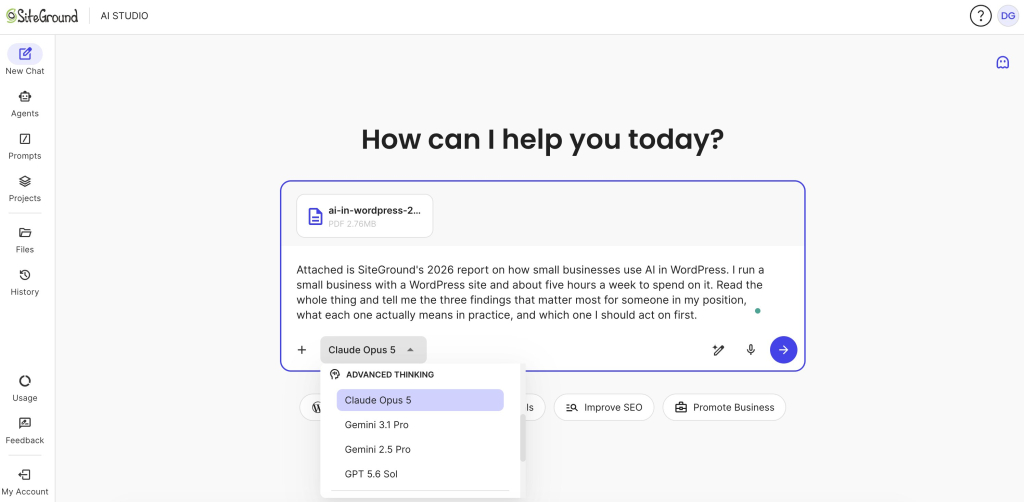
We tested it with a long document: we uploaded SiteGround’s 2026 report on AI in WordPress for small businesses in SiteGround AI Studio (where you can pick the leading models from providers such as Anthropic, OpenAI and Google under one subscription), we picked Opus 5 from the model list, and asked this:
“This is SiteGround’s 2026 report on how small businesses use AI in WordPress. I run a small business with a WordPress site and about five hours a week to spend on it. Read the whole thing and tell me the three findings that matter most for someone in my position, what each one actually means in practice, and which one I should act on first.”
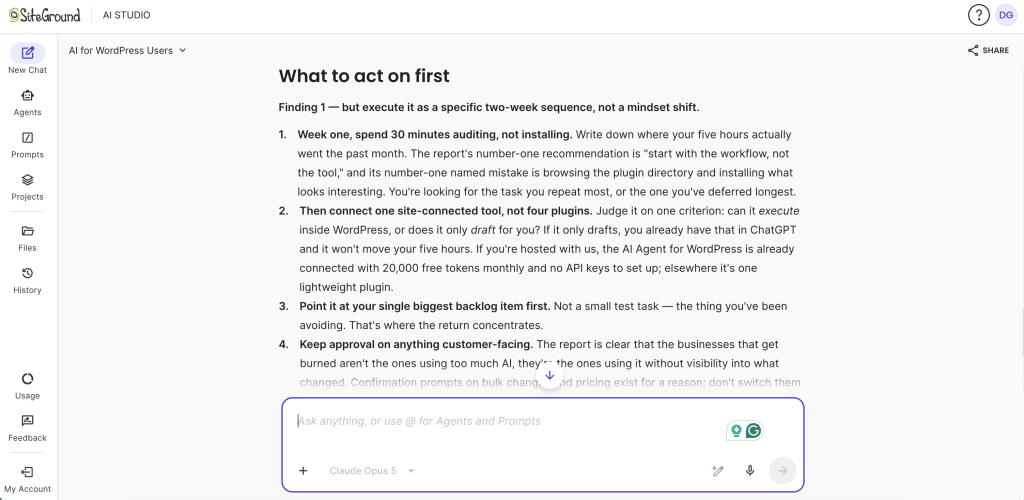
Opus 5 pulled figures from across the whole document rather than the opening pages, and built them into a single argument, at one point quoting a line from one of SiteGround’s product managers buried in section four and calling it the most useful sentence in the report. Asked which finding to act on first, it picked one, laid out a two-week sequence, and explained why it had not chosen the more obvious alternative.
Where a cheaper model does the same job
Plenty of the work you do every day does not require Claude Opus 5. Short marketing copy, routine customer replies, summarizing a meeting note, tagging and sorting, first drafts of the kind of thing you write every week: Sonnet 5 finishes all of that to a standard you will not be able to fault. If you cannot tell which model wrote it, you spent more than you needed to, whether that was money on a per-token bill or the session allowance you have left for the rest of the day. Reserve Opus 5 for the jobs where you can tell.
Claude Opus 5 vs Sonnet 5 vs Fable 5: which one fits your business?
Claude is a family rather than a single product, and the practical skill is matching the tier to the task. Here is where each one earns its place.
| If you need to… | Use this model |
| Sort, tag, or classify things in bulk | Haiku 4.5 |
| Draft blog posts, emails, and social copy | Sonnet 5 |
| Write straightforward product descriptions | Sonnet 5 |
| Analyze long documents or a year of customer feedback | Opus 5 |
| Run a project with several stages, or work with code | Opus 5 |
| Hand over a large job and let it run start to finish | Fable 5 |
On Claude Opus 5 vs Sonnet 5, the answer for most small businesses is that Sonnet 5 stays your daily driver and Opus 5 is what you switch to when the work gets hard. Sonnet 5 costs $2 and $10 per million tokens right now, rising to $3 and $15 in September, against Opus 5’s $5 and $25. If you are on the chat app, that gap is not money, since both models are included in the same subscription, and it shows up instead as how quickly you burn through your usage limits. Either way, across everyday writing, you will not see a difference in the output that justifies reaching for the heavier model.
On Claude Opus 5 vs Fable 5, the picture is more interesting than the positioning suggests. Anthropic places Fable 5 above Opus 5 in maximum capability and charges twice as much for it, $10 and $50, yet on several of its own published tests, including FrontierBench, Opus 5 scored higher. For small business work, the price gap is easier to feel than the capability gap. Fable 5 makes sense when you want to hand over a genuinely large job and leave it running unsupervised; short of that, Opus 5 is the sensible ceiling.
And if the question you are really asking is which company’s AI to use rather than which Claude tier, our guide to ChatGPT vs Claude vs Gemini covers that comparison.
Should you upgrade to Claude Opus 5?
- If you mostly write short marketing copy: Sonnet 5 handles this, and paying Opus rates for a social caption is spending with nothing to show for it.
- If you work with long documents, research, or analysis: Yes, and this is the release that makes it affordable. Work you were breaking into chunks to keep costs down can now run in one pass.
- If you build or look after a website or an app: Yes. Coding and debugging are where the gains over Opus 4.8 are clearest, and holding a whole project in context is the difference between help and noise.
- If you are paying for several AI subscriptions: Then Opus 5 is not really your question. Consolidating what you already pay for is, and it will save you more than any model choice.
The bottom line: is Claude Opus 5 worth it for your business?
For most small businesses, the sensible setup after this release is the same shape as before, with better economics: a cheaper model for the daily grind, and Claude Opus 5 for work that is long, messy, or consequential. What changed is that reaching for the better model no longer costs a premium, so whether Claude Opus 5 is worth it depends less on the model than on what you point it at.
And don’t take anyone’s word for it, including ours. The most useful Claude Opus 5 review is the one you run yourself. Take one real job you already do, run it on the model you use now and on Opus 5, and compare the finished result and what each run cost. Two tasks in, you will know which of your work belongs on which model, which beats any benchmark chart.
Claude Opus 5 is available in SiteGround AI Studio, where you can compare it to other leading models like Google’s Gemini and OpenAI’s ChatGPT, all under a single subscription. Instead of juggling multiple paid accounts for different providers, AI Studio gives you access to all these major models in one intuitive workspace. When you open a new chat, you can easily switch to Claude Opus 5—or any other available model—using a simple dropdown menu right in the interface. This makes it incredibly easy to run your own real-world comparison: just type your prompt, test it on your usual model, and then select Opus 5 from the dropdown to instantly compare the results.
[97]
FAQs
What Claude Opus 5 costs depends on how you reach it. Through the Claude chat app it costs nothing beyond your subscription, which is $20 a month on Pro or $100 to $200 on Max, and Opus 5 is included on both. Through the API you pay per token, at $5 per million input tokens and $25 per million output, the same rates as Opus 4.8, which works out to a few dollars a month for typical small-business content work.
Claude Opus 5 is the better-value choice for most small-business work, while Anthropic positions Claude Fable 5 as the higher-capability model for the largest autonomous jobs. Claude Opus 5 scored higher than Claude Fable 5 on several of Anthropic’s published tests, including FrontierBench, and costs half as much. Claude Fable 5 remains the stronger choice for very large projects that need to run unsupervised from start to finish.
Pricing did not change between Claude Opus 5 and Opus 4.8. What changed is that Opus 5 thinks through a request before answering by default, it can hold 1 million tokens of text at once as both the default and the maximum, it can write up to 128,000 tokens in one reply (around 96,000 words), and its knowledge now runs to May 2026.
You do need a paid plan to reach Claude Opus 5 through Anthropic’s own app, since the free tier runs Sonnet 5, but a paid Anthropic subscription is not the only route. Opus 5 is included on Claude Pro and Max, and you can also reach Claude models through a bundled workspace such as SiteGround AI Studio, which carries Claude alongside ChatGPT and Gemini on one subscription.
The Claude Opus 5 context window is 1 million tokens, roughly 750,000 words, and it is both the default and the maximum with no smaller version available. Long requests are billed at the same per-token rate as short ones, so there is no surcharge for using it, but everything you put in it is input you pay for.
Claude Opus 5 is worth it for a small business doing long documents, research, analysis, or anything involving code, where it now costs no more than the model it replaced. For short marketing copy and routine replies, a cheaper model such as Sonnet 5 usually produces the same result for less.
Most small businesses should use Claude Sonnet 5 as their everyday model and switch to Claude Opus 5 for long, complex, or multi-step work. Claude Haiku 4.5 is the better fit for high-volume sorting and tagging, while Claude Fable 5 is best reserved for large jobs that need to run on their own.