Starting an online store on a budget is simpler than it looks, as long as you make the right decisions early. Translation: this means choosing a platform that gets you up and running without stitching tools together, focusing your offer on a core product selection, and using built-in or low-cost tools to handle marketing, SEO, and automation from day one.
This guide covers 10 practical tips to help first-time store owners launch a professional, functional ecommerce site without overspending, from defining your audience and unique value proposition to choosing how to build your store, leveraging AI, and growing through testing and iteration.
Key takeaways
- Start focused, not broad: launch with a small, high-value product selection and expand once you know what resonates with customers.
- Choose a platform that does the heavy lifting: an all-in-one setup with hosting, ecommerce tools, and domain management saves time, money, and technical headaches from day one.
- Know your customer before you build: a clear audience profile shapes your product selection, store design, messaging, and marketing from the start.
- Build your email list early: email is the one marketing channel you own outright, and it consistently delivers one of the highest ROIs in digital marketing.
- Use AI and automation to stay lean: from writing product descriptions to running welcome sequences, the right tools let you do more without hiring or overspending.
- Treat launch as the starting line, not the finish line: test one thing at a time, learn from real data, and make small improvements that compound over time.
[24]
1. Start With a Clear Offer and a Problem Worth Solving
When launching an online store on a budget, starting with a small, focused product selection keeps costs low, makes your offer clear, and gives you real data to guide what you add next. Narrow your focus to the products that best showcase your brand’s strength and most clearly solve a problem for your customer.
A focused starting point also makes it easier to test your business model. You can gather real customer feedback, see which products resonate most, and gradually expand your offerings. It’s much easier, and cheaper, to add products later than to fix a cluttered, unfocused store.
Quick tips for focusing on core value:
- Launch with your best-selling or flagship products.
- Keep your product descriptions clear and benefit-oriented.
- Avoid adding unnecessary features or complicated checkout processes early on.
- Use simple, clean design to highlight your products and messaging.
2. Research Your Online Business’s Target Audience
Understanding your customer will help you focus not only on the right products, but also on the most effective ways to approach your marketing. Without a clear picture of who you’re selling to, or where they are in the customer journey, even the best and most brilliant products or marketing strategies can hit an unfortunate wall.
So start by defining your ideal customer profile:
- Demographics: Age, gender, location, income level.
- Behavior: How they shop online, which social platforms they use, and what influences their buying decisions.
- Pain points and desires: What does my customer struggle with and what is the benefit my product provides?
Knowing this helps you make smarter decisions about your product selection, store design, messaging, and promotions. For example, if your target audience values sustainability, market research might reveal that you should highlight eco-friendly packaging or sourcing in your product descriptions and marketing.
Quick tips to get clear on your customer:
- Create a simple customer persona to guide decisions.
- Study competitors to see who they’re targeting.
- Engage with potential customers and your target audience via survey emails, social media, or early testers.
3. Define Your Unique Value Proposition
Your Unique Value Proposition (UVP) is the reason customers choose you over everyone else, and defining it before you build shapes everything from your homepage to your product pages. A strong UVP gives your online store purpose, focus, and a story that invites people to buy.
We’ve already defined your product, what problem it solves, and for whom, so for the UVP, we’re putting it all together, including why your offering is different or better than others on the market.
Your UVP can be based on anything that adds real value: superior quality, unique design, faster shipping, excellent customer service, or even a creative brand story. Once you know it, your UVP should be clearly reflected in your online store’s homepage design, product and service pages, and marketing messages—so visitors instantly understand why they should buy from you.
Quick tips to define a strong UVP:
- Keep it concise: One or two sentences should be enough.
- Focus on benefits, not just features.
- Highlight what makes you different (don’t just copy competitors).
- Test your UVP with potential customers to see if it resonates.
4. Decide How to Build Your Website
Before you think about plugins, hosting plans, or advanced features, you need to make one foundational decision: how you’re going to build your online store. This choice affects your budget, the time it takes to launch, and how much ongoing effort your ecommerce business will require.
At a high level, there are two practical paths. Neither is inherently better—the right option is the one that matches your current skills, timeline, and budget.
The DIY route:
This approach typically involves using a CMS like WordPress and adding ecommerce functionality with tools such as WooCommerce. You’ll need to source and connect several components yourself: website hosting, your custom domain name, security, performance optimization, updates, and ongoing maintenance.
It’s flexible and powerful, especially if you’re comfortable working with websites or enjoy customizing your setup. That said, it usually requires more time, more decision-making, and more hands-on management—time you could otherwise spend on products, marketing, or customer experience.
The all-in-one route:
With an all-in-one ecommerce platform, everything is bundled together: website builder, ecommerce tools, hosting, performance optimization, security, and domain setup.
For first-time sellers on a budget, this approach often makes more sense. Fewer tools mean fewer costs, fewer technical issues, and a faster path from idea to launch.
Quick tip: Don’t forget your domain name
As part of setting up your ecommerce business, you’ll also need to choose a domain name—your store’s web address (for example, yourstore.com) that customers will use to find and remember your business.
When you sign up as a SiteGround client, you can get a new domain for free for the first year, and it’s automatically connected to your hosting. That means no purchasing a domain separately and no manual configuration; everything is handled in one streamlined setup.
Pick your domain name now>>
Why choosing the right setup keeps your store lean
Starting with a platform that already includes the essentials helps you avoid hidden costs later on. Instead of paying for extra plugins, third-party services, or technical fixes, you begin with a foundation designed for ecommerce from day one.
An all-in-one platform also reduces complexity as you grow. You manage your website, store, domain, and performance from a single dashboard, with one support team if you need help—saving both time and money over the long term.
What to look for when deciding how to build
No matter which route you choose, make sure your setup covers the fundamentals without unnecessary complexity:
- Professional, ecommerce-ready templates that help build trust from the first visit
- Ease of use, so you can add products, update content, and manage orders without technical friction
- Built-in ecommerce features, including secure checkout, inventory management, and order tracking
- Room to grow, so you don’t need to rebuild your store as your business expands
Quick tip: The best platform is the one that gets out of your way. If setup feels overwhelming or time-consuming, that’s a sign the tool—not your idea—is slowing you down.
A simpler way to get started
If you want an easier path from idea to launch, SiteGround Ecommerce brings all of these essentials together in one place. It combines ecommerce-ready templates, built-in store functionality, fast and secure hosting, and domain setup—so you can focus on building your store, not stitching tools together.
For first-time sellers especially, this kind of setup helps avoid common ecommerce website mistakes, reduce upfront complexity, and get your store online faster with fewer decisions to make.
Get started with SiteGround Ecommerce now>>
5. Set Up the Pages and Features Your Online Store Needs to Launch
Whether you’re building your site with WordPress or going with an easy-to-use platform like SiteGround Ecommerce, every online store needs a few essentials in place before launch. This doesn’t mean designing everything from scratch. In most cases, the smartest approach is to start with a template, make a few basic branding updates, and focus on creating only the pages your ecommerce business actually needs to function.
Think of this stage as setting a solid foundation. Your goal isn’t perfection; it’s clarity, usability, and consistency.
Before you start building out individual pages, take care of the basic store setup. These are the foundational steps that ensure your ecommerce site looks cohesive and can actually process orders once it goes live.
- Choose a template that fits your business type and products.
- Apply branding basics, including your logo, brand colors, fonts, and tone of voice.
- Set up core ecommerce functionality, such as accepting payments online, as well as shipping options (both of which are especially easy to do with an all-in-one ecommerce platform).
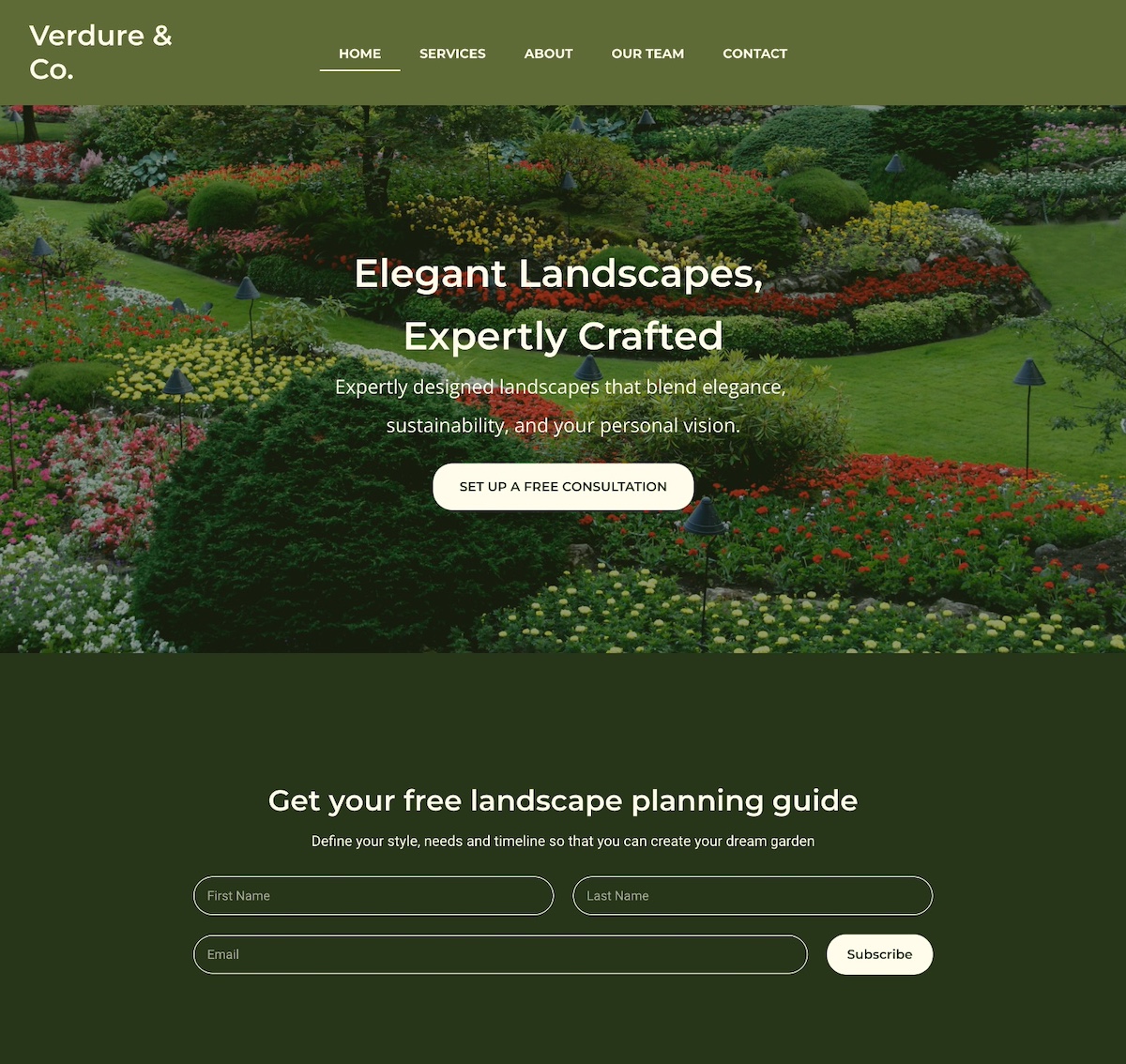
Essential website pages to include:
- Homepage: Highlight your core offerings and your UVP with a strong call to action.
- Product or Service Pages: Whatever you sell online, whether that’s products, services, or both, these pages are where you explain what you offer, how it works, and why customers should choose you. Include clear descriptions, benefits, pricing, and high-quality visuals.
- About Page: Share your story and what makes your brand unique.
- Contact Page: Make it easy for customers to reach you.
- Policy Pages: Include shipping, returns, and privacy policies—they increase credibility and reduce disputes.
Quick tips for essential pages:
- Keep website navigation simple so visitors can find your offerings and information easily.
- Use a clear, scalable website structure that makes it easy to expand your store over time.
- Include trust signals like having an SSL certificate, and including customer testimonials.
- Start with the basics, then expand to include other pages, such as an FAQ page or partner page.
6. Integrate Email Marketing From the Start
One of the smartest, most budget-friendly ways to grow a successful online store is by building an email list early. Unlike social media followers, your email list is an owned channel—you’re not at the frustrating mercy of algorithms or ads. And because email marketing consistently delivers one of the highest ROIs in digital marketing, it’s a lean but powerful way to drive online sales.
Start small by adding email signup forms to your homepage, product pages, or even your checkout process. Focus on attracting quality subscribers rather than chasing large numbers—people genuinely interested in your products are far more likely to convert into paying customers.
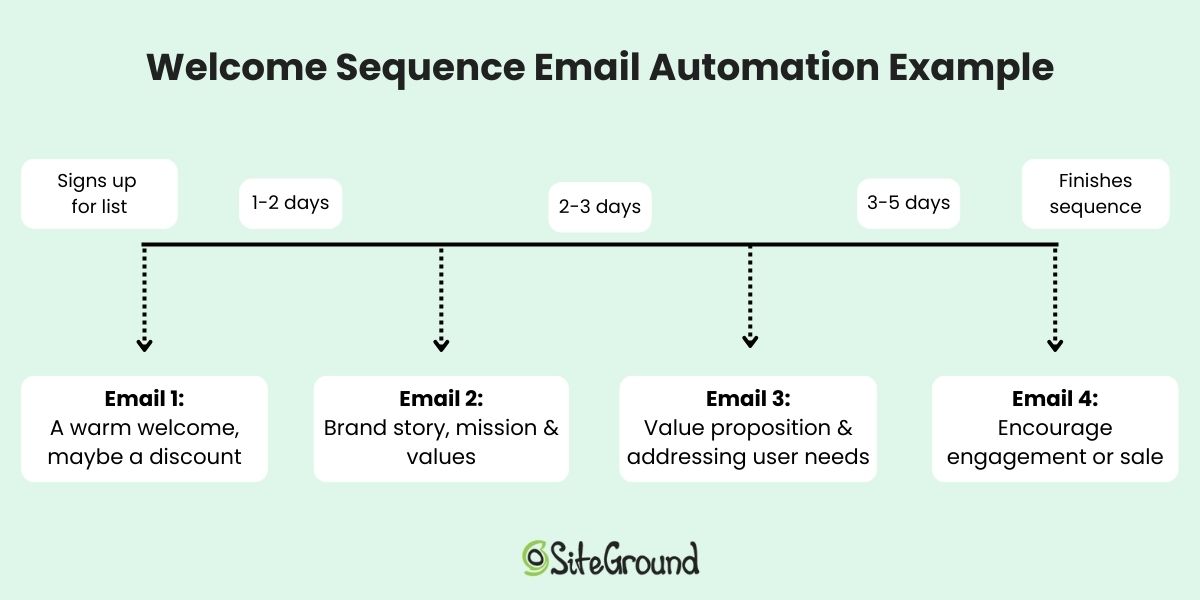
Even better, you can set up email automations, like welcome emails, lead nurturing campaigns, or a product launch series. These run in the background, meaning you get more done with less effort while creating a consistent customer experience.
Quick tips for email marketing on a budget:
- Place signup forms in key locations (homepage, footer, and checkout).
- Offer value for signing up—like tips, exclusive content, or early access to new products.
- Go a step further with lead magnets: offer something small but valuable in exchange for an email address, like a discount code, a free guide, or a checklist.
- Keep your list clean: focus on engaged subscribers rather than bloating your list with uninterested contacts. Including a double opt-in can help accomplish this.
With SiteGround Email Marketing, you can handle all of this in one place—from creating branded signup forms to setting up automated workflows and even using AI tools (like a built-in AI writer) to speed up content creation—helping you launch smarter while keeping costs low.
7. Use AI Tools When Starting Your Online Store
AI tools give small online stores a practical way to move faster and spend less—from drafting product descriptions and marketing copy to analyzing performance data and automating customer communication. You can even use tools like the best ChatGPT prompts to generate polished subject lines, social media captions, and campaign ideas in minutes.
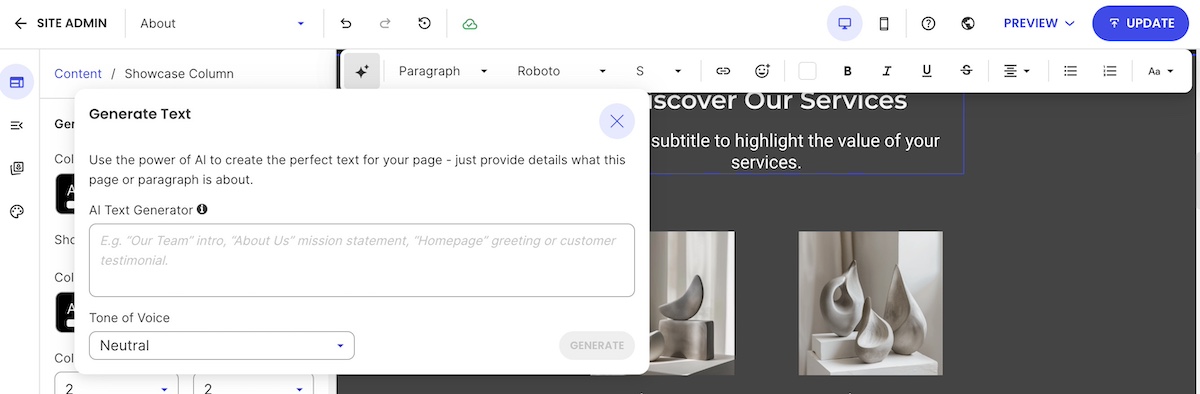
Quick tips for using AI effectively:
- Start with areas where AI saves you the most time, like drafting content for emails, your website, or campaigns.
- Explore AI business tools to help with everything from recruiting, to meeting overviews, and video creation.
- Prioritize AI ethics in marketing: stay transparent, review outputs for bias, and keep authenticity front and center.
- Treat AI as a partner in testing and optimization, helping you iterate faster.
If you want one place to access and experiment with AI tools, SiteGround AI Studio brings together leading AI models so you can put them to work for your ecommerce business without juggling multiple subscriptions.
8. Use Lean Marketing for Your New Online Business
The most effective marketing strategies for a new online store on a budget are the ones that build real audience ownership (email, social media, user-generated content, and collaborations) before you spend a cent on ads.
Lean marketing strategies to try for your online store:
- Social media marketing: Share engaging content, behind-the-scenes updates, or tips related to your products or services.
- Collaborations: Partner with complementary brands or influencers to reach your target audiences through new channels.
- User-generated content: Encourage existing customers to share photos, reviews, or testimonials—they act as authentic endorsements.
- Email marketing: As we discussed above, email marketing is one of the best ways to get the most bang for your buck. It allows you to reach your most interested audience with targeted messages and minimal effort.
Quick tips for lean marketing:
- Focus on channels your customers actually use.
- Repurpose content across social media, email, and your website.
- Encourage customers to leave reviews or share their experiences.
- Track results and tweak your campaigns based on what works best.
9. Make Your Store Discoverable Online through Search
Customers today find products through a mix of channels: Google search, AI tools like ChatGPT and Perplexity, and marketplace search. In fact, according to Adobe Analytics, traffic to retail sites from generative AI sources grew 1,200% year-over-year as of October 2025, making it more important than ever to ensure your store is structured for discovery across all of them.
Start with search basics:
- Keyword research: Identify the words and phrases your potential customers use when searching for products like yours, and include them naturally in your product titles, descriptions, and page content. This helps both search engines and AI tools understand what your store offers.
- On-page SEO: Make sure each page has a clear title, meta description, headings, and alt text for images. These help search engines index your content and give AI tools the structured information they need to surface your store in recommendations.
- Technical SEO: Fast-loading pages, mobile-friendly web design, and clean URLs are essential for any discoverable online store. They affect your search engine rankings, your user experience, and how confidently AI tools recommend your ecommerce site.
Quick tips for SEO on a budget:
- Focus on long-tail keywords to reach customers with strong purchase intent.
- Use internal linking to guide visitors and search engines to related products or pages.
- Monitor performance with free tools like Google Search Console to see how search engines view your ecommerce site. Also keep an eye on referral traffic sources to see if AI tools are starting to send visitors your way.
With SiteGround Ecommerce, the discoverability basics are built into the store-building process. You can add meta titles, descriptions, and image alt text as you build, so your pages are structured for Google, AI search, and beyond (and without extra tools or technical setup).
10. Grow Your Online Store: Test, Learn, Iterate
The fastest way to grow an online store on a budget is to treat launch as an experiment. Test one thing at a time, measure what works, and make small improvements that add up over time.
Ways to test and iterate your online store:
- Website performance: Track digital marketing metrics like website traffic, page views, and conversions.
- Product offerings: Experiment with different products, bundles, or promotions to see what resonates.
- Email marketing campaigns: Test subject lines, email content, calls to action, etc. to optimize engagement.
- Social media marketing: Analyze your social media metrics so that you can get the most out of your presence on each platform.
- Customer feedback: Collect reviews, send survey emails, or ask for direct feedback to understand what’s working and what needs improvement.
Quick tips for testing your online store effectively:
- Make one change at a time so you can measure impact.
- Track results over a meaningful period before drawing conclusions.
- Use data to guide decisions instead of assumptions.
- Celebrate small wins and iterate gradually—even tiny improvements can add up over time.
Get Your Online Store Started Now
Launching a successful online store on a budget is all about focusing on what matters: start with a clear offer, understand your customers, create essential pages, use automation and AI where it helps, prioritize mobile, and test, learn, and iterate as you grow. Following these steps will help you build a professional, functional online store without overspending.
And don’t overlook the foundation of your online store: the platform you build it on. With SiteGround Ecommerce, setup is straightforward and everything works together from day one. You get a fast, secure ecommerce-ready setup without technical complexity, so you can spend less time configuring your store and more time focusing on marketing efforts, product development, and delivering a great customer experience, helping you run your ecommerce store lean, smart, and efficiently.
FAQs for starting an online business
The cost of starting an online store varies depending on the platform and tools you choose. An all-in-one platform that bundles hosting, marketing tools, ecommerce, and a domain in one plan is typically the most cost-effective starting point—you avoid paying separately for each component. Costs rise quickly when you piece together multiple tools, so the leaner your setup, the lower your starting costs.
Definitely not. All-in-one platforms like SiteGround Ecommerce are designed for first-time online sellers and require no coding knowledge. However, if you go the DIY route with WordPress and WooCommerce, you’ll want a basic comfort level with figuring out some of the more technical elements of putting together an online store.
The best platform is the one that matches your skills, timeline, and budget. For most first-time sellers, an all-in-one platform is the faster, simpler choice. Everything works together out of the box and there are fewer decisions to make before launch.
You don’t need a large catalog to start. Launching with a small, focused selection of your best products (or, simply, your best product) is often the smarter move. It’s easier to manage, cheaper to maintain, and gives you real customer data to guide what you add next.
Requirements vary by country, region, and what you’re selling. It’s worth checking your local regulations before launch, as some jurisdictions require a business registration even for small online stores. When in doubt, consult a local accountant or business advisor.
Start with the channels your target audience already uses—whether that’s social media, email, or search. Building an email list from day one gives you a direct line to interested buyers, while basic SEO helps customers find your store organically over time.
This article was originally published in November 2019 and then updated in May 2026.