Best colors for email marketing: The psychology behind every shade

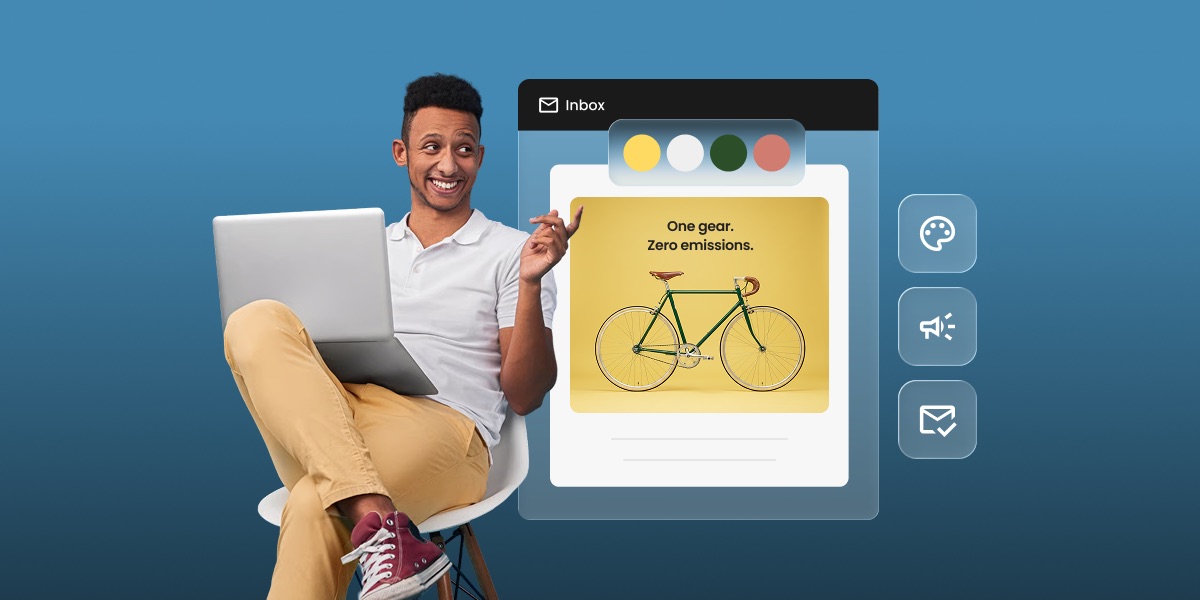
Illustration of an email inbox showing a marketing email with a yellow, white, green, and coral color palette, next to a person smiling at a laptop.

The best colors for email marketing depend on your brand and the action you want a reader to take: red and orange for urgency, blue for trust, green for growth, and black or white for a clean, versatile look. Color shapes how a message is read before the text does, so getting it right means matching your palette to your brand identity and the emotion you’re aiming for. Here’s the psychology behind each color, and how to put it to work in your own campaigns.

Key takeaways:

  • Color influences how a message is read before the text does; it sets mood and creates bias toward or against a brand, sometimes unconsciously.
  • Each color carries its own associations: red for urgency, blue for trust, green for growth or sustainability, purple for curiosity, orange for friendliness, black for sophistication.
  • Match your email colors to your existing brand palette first, then adjust for context (holidays, promotions) without abandoning your core identity.
  • Keep contrast in mind: a minimum 4.5:1 ratio for body text keeps emails readable for subscribers with visual impairments.
  • Limit your palette to one primary color plus one or two secondary accents — too many colors compete for attention instead of guiding it.

Why do colors matter in email marketing?

In email marketing, alongside all web and on-site marketing efforts, colors have a psychological power that goes beyond practical applications, quietly shaping your subscribers’ mood and perception of your message. Here are key reasons why the choice of email color really matters:

Colors help reinforce brand recognition

Colors help in establishing and reinforcing brand identity. Consistent use of specific color palettes makes a brand more recognizable and memorable to consumers. A study from the Pantone Color Institute shows that colors increase brand recognition by 87%! That is why best marketing practices advise using your brand colors consistently across all your marketing communications, and emails are no exception.  A great starting point for choosing consistent colors in your emails is to use the ones from your logo or ones that complement them. Apply these colors to the header, footer, and body of your emails to create a professional look that reinforces your brand identity.

Impact readability & accessibility of your emails

The right email color combinations can improve the readability of your marketing emails, making it easier for consumers to digest the information. Always remember that there are 1.3 billion visually impaired people, according to the WHO, many of whom are challenged to consume low contrast color combinations. This means that if you do not consider serving these people with the adequate use of colors in your emails, you are missing out on a significant percentage of your audience. We’ll talk about accessibility standards later in this article.

Create response triggers,attract attention & encourage actions

Because different colors evoke different emotions, marketers and business owners use email colors to influence how consumers feel about a product or brand and how they respond to it. Part of this color potential lies in past associations, established throughout the years by various institutions and accepted conventions. 

For example, over the years green has often represented eco-friendliness and has been used by many brands producing organic, natural products. So if you wish to talk about corporate responsibility and sustainability, you would include the green color in your messages by association.

At the same time, it is known that bright and contrasting colors can make your marketing emails stand out, grab attention, and make a strong visual impact. Or, that the red color in ‘Buy Now’ buttons creates a sense of urgency and excitement and tends to trigger higher click rates under similar circumstances. 

We’ll first deep-dive into the psychology behind each color to see what emotions and associations it comes with and then talk about how to best use these colors in emails.

The psychology of colors in email marketing

Color psychology can be a game changer in email marketing since each color has a unique effect on people’s emotions and can lead them to take different actions. By picking the right email colors, you can trigger emotions that resonate with your audience, driving engagement and encouraging the desired response to your message. 

🔴 Red

Use red when you want a CTA button or a promotional email to be the first thing a reader’s eye catches. It’s tied to urgency and excitement — the classic “Buy Now” button color — and tends to outperform quieter shades on click-through.

Reach for it for CTAs, flash sales, and festive campaigns like Black Friday or Christmas, where grabbing attention fast matters more than subtlety. Just pick a shade that still fits your existing palette; a red that clashes with your logo works against the brand recognition you’re trying to build. 

🟡 Yellow

Use yellow to highlight one key message or draw the eye to a single element — it’s one of the most visible colors against a dark background, and it reads as upbeat rather than aggressive the way red can.

It works well as a badge, a highlighted line, or an accent against a darker header. It’s rarely a good choice as a dominant background, though as too much yellow reads as loud rather than cheerful. Save it for the one thing you want noticed first.

🔵 Blue

Use blue when trust is the point. It’s the default choice for finance, healthcare, SaaS, and any brand that needs to read as dependable before anything else.

Darker navy blues lean more corporate and authoritative; lighter blues feel calmer and more approachable. Pick the shade based on which side of that line your brand sits on, not just on what looks good in isolation.

🟢 Green

Green splits two ways: use it for sustainability, wellness, or organic products to lean into its nature and health associations, or use it for finance and growth messaging to lean into its money and prosperity associations. Decide which one your brand needs before picking a shade.

Brighter greens read as fresh and energetic; darker greens read as stable and secure. Match the shade to the message you’re sending, not just to your logo.

⚫ Black

Use black when you want an email to read as premium or modern — it pairs cleanly with almost any accent color and creates instant contrast for whatever sits on top of it.

It also works as a safe default: if you’re not sure which color fits your brand yet, black as a base with one accent color rarely goes wrong. Just don’t rely on it alone for CTAs — a black button doesn’t stand out against a mostly-black layout.

🟣 Purple

Use purple when you want to signal innovation or ambition — it’s the go-to color for tech and forward-thinking brands because it reads as curious and a little unconventional, unlike the calm of blue.

It also carries softer, caring associations, which is why it shows up often in wellness and beauty brands too. Either way, it’s a distinctive choice: purple stands out in most inboxes simply because so few brands use it as a primary color.

⚪ White

Use white space deliberately, not as a default — it’s what gives your other colors room to work and keeps a busy email from feeling cluttered.

Every brand ends up using some white, but the difference is in how much: minimalist brands lean into open, spacious layouts, while promotional emails often use less of it to pack in more content. Too little white and the email feels crowded; too much and it can read as cold rather than clean.

🟠 Orange

Use orange when you want red’s energy without red’s intensity — it’s a common pick for brands targeting a younger, creative audience that still want a CTA or badge to stand out.

Brighter shades feel more urgent and can double as a caution signal; softer, muted oranges feel more relaxed and approachable. Choose based on whether the email is meant to feel exciting or easygoing.

🟤 Brown

Use brown for brands built around natural materials, craftsmanship, or organic products — it reads as grounded and reliable in a way brighter colors don’t.

It works well as a background or an accent, but it’s rarely a strong CTA color since it doesn’t create much contrast against typical email backgrounds. Pair it with a brighter accent if you need a button to stand out.

🩷 Pink

Use pink for a youthful, playful tone rather than assuming it only speaks to one audience — its associations have broadened well beyond traditionally feminine branding.

Soft pinks feel gentle and approachable; hot pinks feel bold and attention-grabbing. Pick the shade based on the mood you’re going for, not just the audience you’re picturing.

Best practices for ssing colors in email marketing

Incorporating color effectively in your email marketing isn’t just about making things look pretty – it’s a strategic move that can pay off in reader engagement and campaign performance. Let’s dive into some best practices that can help you harness the full potential of your email colors:

1. Align email colors with your brand identity

When going into email marketing, it’s essential to select your email colors based on your existing brand palette (if you have such already). Consider the primary colors used in your logo, website, and existing marketing materials. These colors are most likely part of an established palette that should be used in your email marketing campaigns in order to make your email a natural extension of your brand’s visual identity. Assuming your website has two primary colors – mustard yellow and navy blue, use those colors in your marketing emails so that your recipients can quickly recognize your brand. 

It’s important to know that it is acceptable to change your email colors for a particular event, such as using red around Christmas, but keep in mind that the essential colors of your brand should always be present. Maintaining consistency in your brand colors strengthens awareness and delivers a consistent experience for your subscribers throughout your email marketing campaigns.

2. Prioritize accessibility and readability

Ensuring color accessibility is crucial for making your emails readable and understandable for all subscribers, including those with disabilities. Email accessibility is the practice of ensuring that your emails can be read and understood even by subscribers who have some visual impairment. 

A fundamental principle in email design accessibility is to use font colors that contrast with the background, similar to the clarity of black text on a white canvas. Avoid using too bright colors, as they might be irritating to the eye. 

It is important to know that not all contrasts are created equal – combinations such as green and red may provide difficulties for people who are colorblind. In cases like this, we recommend using a color contrast checker tool to ensure that the color shades you’ve picked are appropriate. 

According to the guidelines set by the Web Content Accessibility Guidelines (WCAG), a minimum contrast ratio of 4.5:1 is recommended for standard-sized text, while larger or bold text should have a ratio of at least 3:1. While striving for effective contrast, simplicity is key. Opting for a single text color with a contrasting background can make your message accessible and readable to those with color vision deficiencies.
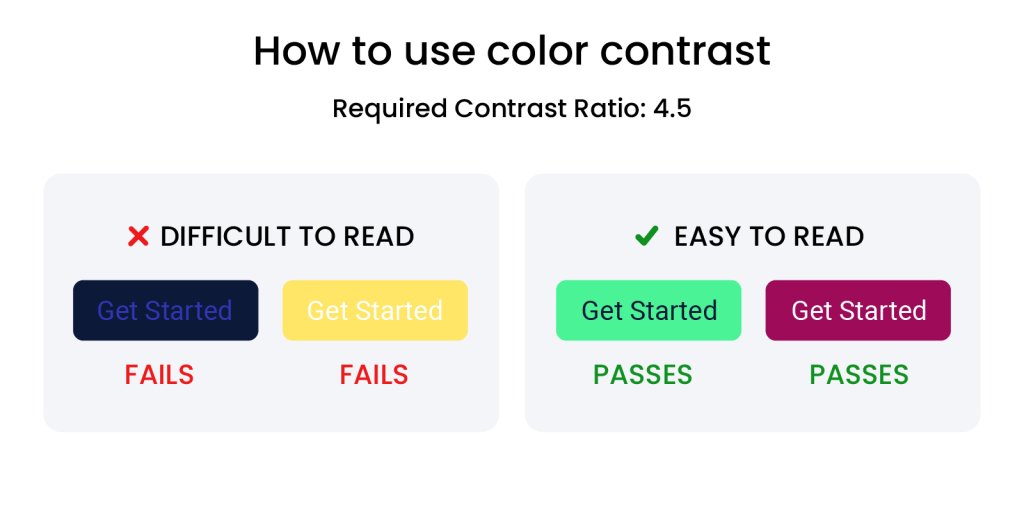
Comparison graphic showing four "Get Started" buttons — two with poor color contrast labeled "difficult to read, fails," and two with strong contrast labeled "easy to read, passes."

A thoughtful color scheme can make the difference between an email that is easily digested and one that is quickly ignored. High-contrast email colors ensure that text stands out against the background, significantly improving readability.

3. Avoid using too many colors

Introducing too many colors into your email design can result in a cluttered and overwhelming visual experience for the recipient, detracting from the message you want them to engage with. To avoid this, it’s advisable to select a primary color that is closely associated with your brand identity. This primary email color should serve as the dominant hue within your emails, ensuring immediate brand recognition. Complement this with one or two secondary colors that harmonize with your primary color. These additional colors can be used strategically to accentuate important elements such as calls to action buttons, links, or key information, thereby guiding your subscribers’ attention to the most important parts of your message. The goal is to create a balanced and aesthetically pleasing color scheme that enhances readability and engagement without overwhelming the senses.

4. Make your call to actions stand out

The call-to-action is the most important part of your email. Choose a contrasting color that stands out against the rest of the email colors, prompting recipients to click.

By sticking to these color principles, you can craft emails that not only captivate your audience visually but also guide them smoothly towards the actions you desire. Email colors are more than visual features – they’re a communication tool that, when used wisely, can significantly enhance the effectiveness of your email marketing efforts.

5. Blend with the mood of the Holidays & other special occasions

As you develop your email marketing strategy, it’s common to plan for a variety of special occasions like Black Friday, Christmas, Halloween, and others. For each of these events, you may want to choose a unique color combination that aligns with the Holiday’s vibe.

🎄 Christmas

Christmas is strong on associations. During Christmas and New Year season, you will see traditional reds and greens everywhere. You may consider adding them to your email messages during this period.

🛍️ Black Friday

The use of Black is typical for Black Friday, usually combined with red, but also yellow and orange, and other powerful, strong accent colors. The aim is to create a sense of urgency, highlight exclusive deals, and provoke action.

🏖️ Summer Sale

During the summer, bright yellows, blue and turquoise, oranges, and vibrant greens are commonly used in marketing since they create associations with beaches, deep blue waters, and sunny skies, invoking energy, vibrancy, and playfulness.

💖 Valentine’s Day

Consider the use of pink and red to blend with the prevalent holiday feelings of love, passion, and warmth.

When selecting email colors for special occasions, don’t forget that you have a lot of flexibility and you should not feel constrained by one shade of red or green or else. It is still important to stay true to your brand’s core colors, including them in your color scheme to maintain brand identity. 


When in doubt, or you feel overwhelmed, using a color scheme generator can help you harmoniously blend colors. In the broader context of design, there are established principles of color combinations that are equally applicable to email marketing and you could safely rely on those for assistance, when in need.

Free holiday marketing guide download

Download our free Holiday Marketing Guide featuring content from SiteGround and our partner experts in ecommerce, email marketing, web design and code optimization to help your business in any holiday season.

6. Create visual balance

Achieving a visually balanced layout is key to designing emails that are both aesthetically pleasing and easy to navigate. To create this balance, play with color placement throughout your layout. For instance, if you’ve chosen blue for your email’s header, mirror this by using the same shade of blue in the footer. This creates a sense of unity and frames your content neatly. Similarly, if there’s a vibrant orange call-to-action button situated on the right, consider placing an orange icon or highlight on the left to maintain visual balance. 

The objective here is to guide the reader’s eye through the email in a way that feels natural and intuitive, encouraging them to engage with the content without feeling overwhelmed or lost. A well-balanced email design not only looks professional but also enhances the overall user experience, making it more likely that subscribers will take the desired action.

How to select color combinations for your marketing emails

All this color science and best practices can be overwhelming to people who are just starting out with email marketing. Let’s get a few more tips on how more effectively to select and pair colors for your emails, following scientific principles.
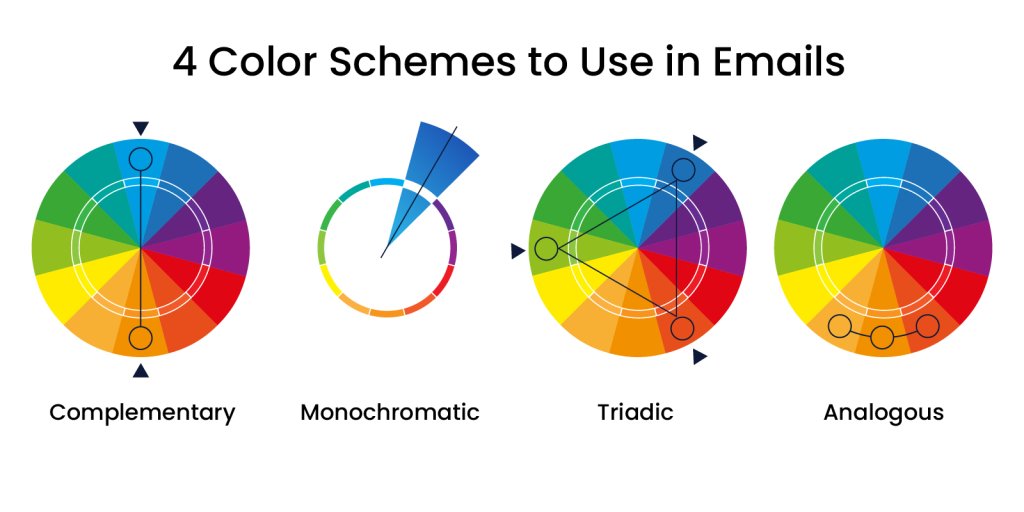
Four color wheels illustrating complementary, monochromatic, triadic, and analogous color schemes for email design.

1. Complementary colors 

Complementary email colors sit directly across from each other on the color wheel, typically pairing a primary color with a secondary color. Classic combinations include:

  • yellow with purple
  • blue with orange
  • red with green

These combinations can be adapted to the right hue and shade to suit the theme of your email marketing campaigns. Use these complementary email colors thoughtfully to draw attention to key parts of your emails, like call-to-action buttons, links, or the headings of your emails.
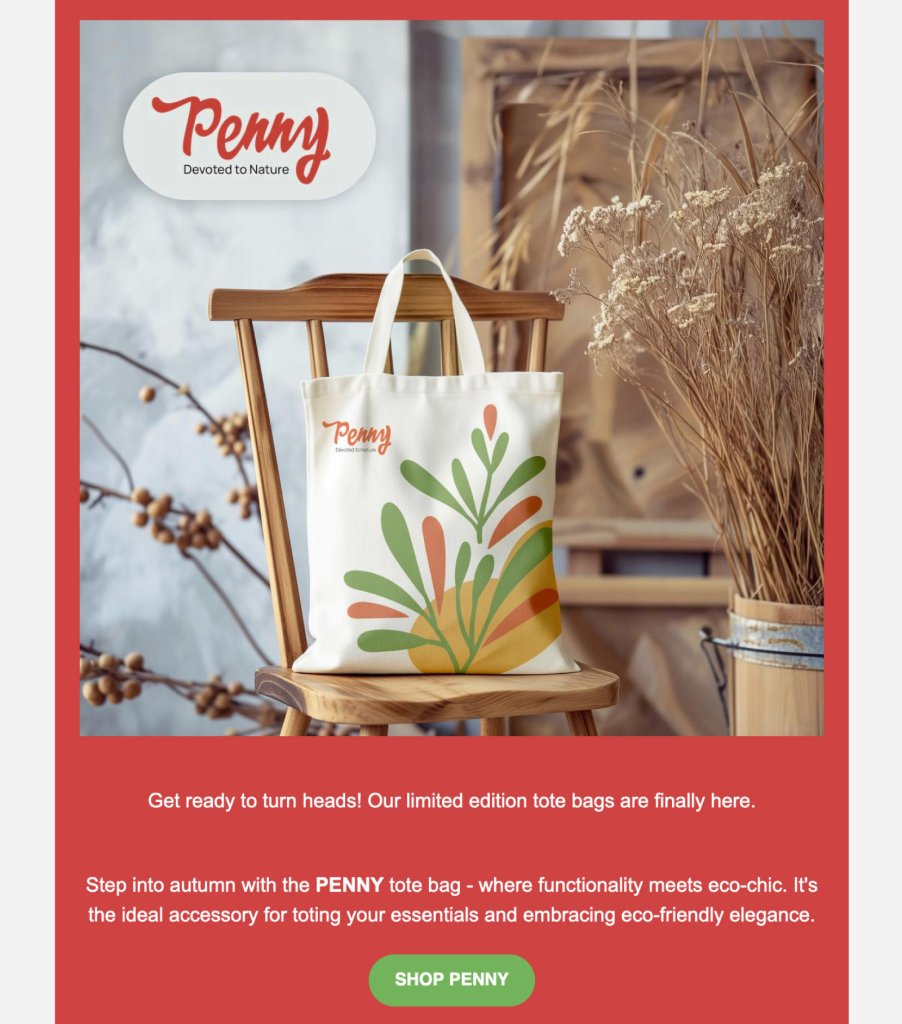
Email mockup for a "Penny" tote bag brand using a red background with a photo of a canvas tote bag on a wooden chair, surrounded by dried flowers.

2. Monochromatic

A monochrome palette is a color combination based on a single color or hue. It simply uses various shades and tints of that one color to create a visually appealing email look. Shades are created by adding black to the hue, making it darker, while tints are made by adding white, making it lighter. This approach to color coordination is often used for its simplicity and aesthetic appeal, creating a harmonious and balanced visual experience.

Email mockup for "Stanga" drinkware in a green and mint color scheme, showing a metal mug on a mossy log in a forest setting.

3. Triadic

A triadic color scheme is a color combination of three that are evenly spaced on the color wheel, creating a vibrant yet balanced palette. This trio often includes colors that contrast and complement each other, for instance, a blend of red-violet, yellow-orange, and blue-green. 

Typically, a triadic palette will mix two shades of either a warm or cool temperament with one from the opposite spectrum, achieving visual balance. The beauty of triadic email colors lies in their collective strength – the supporting colors enhance the primary hue, amplifying the overall impact and message. To capture attention and encourage interaction in your design, use the primary triadic color on essential elements such as call-to-action CTA buttons.

Email mockup for "Splash2Art" pottery painting studio using purple and yellow color-blocked sections with photos of painted plates and hands at work.

4. Analogous

An analogous color scheme is a harmonious blend of three colors positioned side by side on the color wheel, such as the trio of orange, violet, and purple, crafting a visually soothing array. Depending on the hues used, this trio adds delicate or essential depth to the dominant color in your template. Perfect for capturing the essence of the seasons or natural events, analogous colors can enhance the thematic consistency of your email designs. For instance, a gradation from red to red-orange to yellow can evoke a fall vibe when used thoughtfully throughout your email layout.
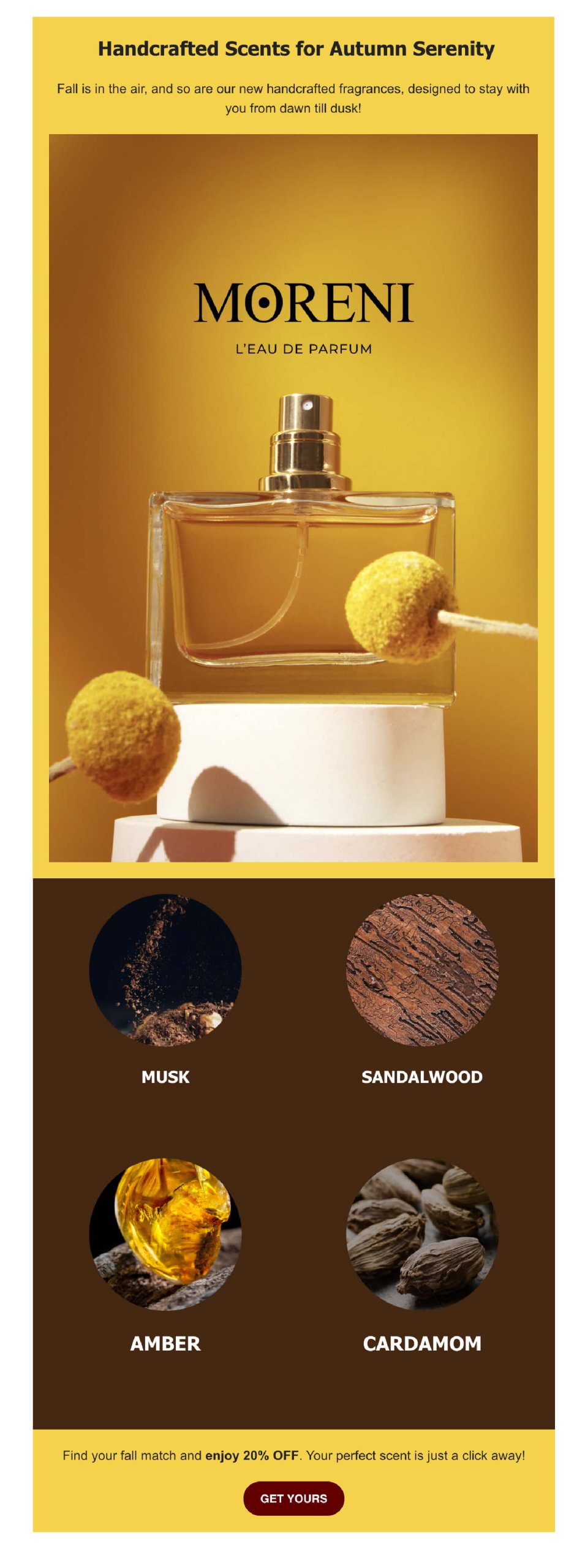
Email mockup for "Moreni" perfume in gold and brown tones, showing a perfume bottle and four scent notes: musk, sandalwood, amber, and cardamom.

Color trends in email marketing

Two forces are shaping palettes this year: a pull toward calm, spacious neutrals, and a handful of high-energy accents used sparingly to cut through a crowded inbox.

Pantone’s 2026 Color of the Year, Cloud Dancer, is a soft off-white built around calm and clarity. It’s the first time in the program’s history that a white tone has taken the top spot. For email, that means swapping stark white backgrounds for warmer, gentler off-whites, paired with earthy neutrals like beige and taupe instead of high-contrast black-and-white layouts.

Pinterest’s 2026 Palette pulls in the other direction with five bold accents: persimmon, a warm orange-red; wasabi, an electric chartreuse; plum noir, a deep, moody purple; jade; and cool blue. Used as a dominant palette, they’re a lot. Used in small bursts on a CTA button or a highlight strip, persimmon or wasabi does exactly what red has always done in email: grab attention fast.

Pro tip: 
Dark mode is worth planning around too, not treating as an edge case. Roughly a third of email opens now happen in dark mode, according to Stripo. And that share keeps climbing. Pure black and pure white backgrounds are the two most likely to get inverted or distorted by a client’s dark mode rendering, so a soft off-white or dark gray background holds up more reliably than either extreme. Test any logo as a transparent PNG with a subtle outline; without one, a dark logo can vanish entirely against an inverted background.

Turn color into action

Color isn’t decoration; it’s one of the fastest levers you have for changing how a subscriber reacts to an email, and it costs nothing to test. Start with what you already have: pull your brand’s primary shade, pick one accent color for your CTA, and run the combination through a contrast checker before your next send.

From there, treat color like any other campaign variable. Test it. Try a warmer CTA against a cooler one, or a seasonal accent against your usual palette, and let your open and click data tell you which one actually works for your list.

Adjust colors with SiteGround Email Marketing: background, sections, buttons, and see the change instantly. If you pick a combination with low contrast, the tool flags it before you send, so accessibility isn’t something you have to check by hand.

[58]

This article was originally posted in May 2024 and updated in September 2026.

Frequently asked questions: Best colors for email marketing

What is the best color for emails?

There’s no single best color. It depends on your brand and your goal. Blue tends to perform well for trust-driven messages (finance, professional services), red and orange work for urgency and promotions, and green suits sustainability or finance-related content. The consistent factor across high-performing emails isn’t one specific color; it’s alignment with your existing brand palette.

What is the most attractive color for marketing?

Studies on attention and marketing point to red and yellow as the most attention-grabbing colors, since both stand out against most backgrounds and are associated with energy and optimism. “Attractive” and “effective” aren’t the same thing, though — a color that grabs attention but clashes with your brand can hurt recognition rather than help it.

Does the 3-color rule apply to email marketing?

Yes, the same principle used in web and graphic design applies well to email: one primary color for brand recognition, one secondary color to support it, and one accent color reserved for calls to action. Sticking to three keeps an email visually balanced instead of cluttered.

How to write a marketing email: the structure that gets it opened, read, and clicked

Man holding a laptop next to a graphic showing an email template with open rate and click rate metrics

A marketing email succeeds or fails on three decisions: the subject line, the opening line, and the call to action. Get any one of those wrong and the other two rarely save it. Here’s the structure that gets all three right, plus the mistakes that quietly sink otherwise good emails.

Key takeaways:

  • A subject line only has to do one job: earn the open. Save the persuading for the body.
  • The first line of the body has to work whether or not anyone read the subject line closely, since preview panes show it before the email is even opened.
  • One CTA outperforms two. A second link doesn’t add a second chance, it splits the reader’s attention and cuts the click rate on both.
  • A/B testing your own subject lines beats following anyone’s universal best practice, because your list’s behavior is the only data that actually applies to your list.
  • Open rate, click-through rate, and conversion rate each measure a different part of the email. A weak number in one doesn’t mean the whole email failed, it tells you which part to fix.
  • Bounce rate and spam complaints aren’t performance metrics, but ignoring them will eventually tank every metric that is.

What actually makes an email a “marketing” email

A marketing email is any message sent with a commercial goal behind it: driving a sale, pulling traffic to new content, keeping a customer engaged, or announcing something new. The label isn’t about tone or format, a plain-text note and a fully designed newsletter can both qualify, it’s about intent.

What separates a good one from a forgettable one isn’t the design budget behind it. It’s whether the email hits a specific, measurable goal: an open, a click, a reply, a purchase. An email that reads beautifully but doesn’t move the reader toward that goal hasn’t done its job, no matter how polished the layout looks. That’s the standard every section below is built around, starting with the four parts every marketing email needs to have in place before you touch tone or design. Learn more about how email marketing works as a channel before optimizing individual sends.

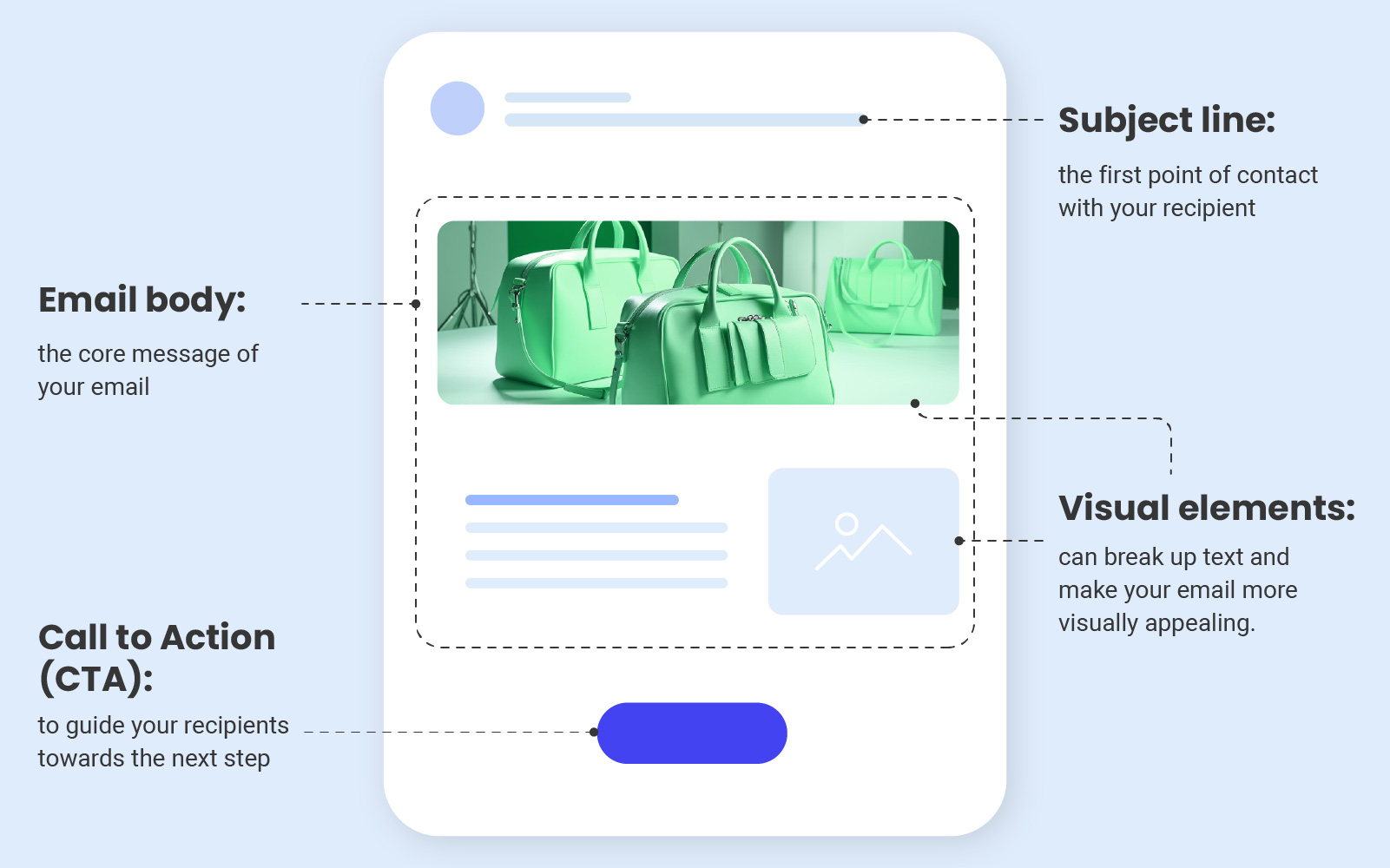
The four parts every marketing email needs

Every marketing email, regardless of topic or industry, is built from four working parts. Skip one and the email underperforms even if the other three are excellent.

Diagram of a marketing email labeling the subject line, email body, visual elements, and call to action button

Now let’s dive into each one and explore strategies that will encourage your recipients to open, read, and interact with your marketing emails, ultimately driving conversions and customer engagement:

Subject line

The first thing your readers see when your email lands is the subject line, and it’s often the deciding factor between an email that gets opened and one that gets scrolled past. A half-hearted line can undo hours of work on a genuinely good email underneath it.

Aim for a subject line that teases what’s inside rather than trying to say everything at once. A verb and a concrete payoff, “Get 20% off your next order,” tends to work better than a vague tease, and keeping it under about 40 characters means the point lands before it gets cut off on a phone lock screen.

Email body 

The email body is where the actual substance lives, the offer, the update, the story you’re telling. A well-crafted one states its point early and keeps the momentum going rather than building up to a reveal a few paragraphs in, and every element, from the greeting to the closing line, should point toward the action you want the reader to take. 

The email copywriting guide is a good place to see that kind of tightening done well, line by line.

Visual elements

Bullet points, images, and graphics aren’t decoration, they’re what makes an email easy to skim rather than a wall of text to wade through:

  • Bullet points break information into digestible pieces, ideal for listing benefits, summarizing features, or laying out anything with more than a couple of comparable items.
  • Images do work words alone can’t, showing the offer itself rather than just describing it, and tend to stick in a reader’s memory longer than plain text does.
  • Graphics, like infographics and simple charts, make data or multi-step processes easier to take in at a glance. The email marketing design guide walks through building a layout that balances all three well.
  • Preview by sending yourself a test copy before the real one goes out. Images are blocked by default in a lot of inboxes, so check that your email still makes sense with them switched off.

Call to action 

A call to action tells the reader exactly what to do next, whether that’s completing a purchase, signing up, downloading something, or visiting a page. It’s the moment your email’s whole purpose comes together, and it works best when it’s clear, compelling, and easy to spot, usually a button or a hyperlink built around direct, action-first phrasing rather than something passive. Keep the wording tight: a verb and the payoff is usually all it needs.

Now that you know what each part is supposed to do, there’s a way to skip straight to a working draft. SiteGround Email Marketing’s Generate with AI feature builds all four for you at once, just pick a campaign type like promotional, newsletter, announcement, welcome, or event invitation, and it hands back a subject line, preheader, and body ready to edit in the builder.

How do you write subject lines that get opened?

Four things make the biggest difference in whether a subject line gets opened, and you don’t have to guess at any of them if you’re willing to test against your own list.

Lead with a verb and a clear promise.

A subject line built around a specific benefit tells the reader exactly what they’ll get before they even open it, something like “Boost your productivity: 5 proven time-management techniques inside.” Vague curiosity-bait (“You won’t believe this…”) gets opened once and then ignored forever once the reader learns it never delivers.

Example:
Your cart expires at midnight, save 20% before it does

Personalize where it’s genuine

A first name or a reference to a past interaction works because it signals the email wasn’t blasted to everyone, even when, technically, it was. “Julia, your opinion matters” reads differently than “We want your feedback.”

Example:
Maria, your usual order is 10% off this week only

Avoid spam-trigger language

Words like “risk-free,” “urgent,” and “make money,” plus excessive punctuation or all-caps, are the kind of pattern spam filters are built to catch. Straightforward, specific language clears filters more reliably than clever wording does.

Skip: FREE MONEY!!! Act NOW, 100% risk-free
Try instead: Your first month’s on us, no catch

Test instead of guessing

Two versions of the same email, sent to two segments of the same list, will tell you more about what your specific audience responds to than any general subject-line formula. Run this consistently and you’ll build a pattern of what actually works for your readers, not readers in general. Pull the exact wording that performs into future sends, and check it against your open rate and click-through data before calling a winner.

Version A: Boost your productivity: 5 time-saving tricks inside
Version B: Maria, here’s what’s eating your afternoon

How do you structure the body so people keep reading?

Getting the email opened is half the job. Keeping the reader in it past the first line is the other half, and it depends on how the body is built.

Open with the payoff, not the setup 

The first line has to work whether or not the reader paid close attention to the subject line, since most email clients show a preview of that first line before the email is even opened. A friendly greeting followed by a question, a surprising fact, or a direct value statement gets read further than a slow warm-up.

A few ways this looks depending on what you’re sending:

  • Product update: Ready for the update you’ve been asking about? Here’s what’s new.
  • Newsletter: This month’s roundup is here, and it’s mostly good news.
  • Win-back: It’s been a while. Here’s 15% off to come back and see what changed.
  • Event invite: Save your spot, the webinar’s Thursday and space is limited.

Write like you’re talking to one person 

Contractions, direct address, and a conversational rhythm read as human. Formal, corporate phrasing reads as automated, even when a person wrote every word of it.

Use storytelling and social proof sparingly but specifically 

A short customer story does more to build trust than a list of features, because it shows the product working rather than describing it in the abstract, like SiteGround’s success stories, which pair one clear result with a real customer’s name attached. A one-line testimonial with a name on it outperforms an unattributed claim every time.

How do you structure the body so people keep reading?

Getting the email opened is half the job. Keeping the reader in it past the first line is the other half, and it depends on how the body is built.

Open with the payoff, not the setup 

The first line has to work whether or not the reader paid close attention to the subject line, since most email clients show a preview of that first line before the email is even opened. A friendly greeting followed by a question, a surprising fact, or a direct value statement gets read further than a slow warm-up.

A few ways this looks depending on what you’re sending:

  • Product update: Ready for the update you’ve been asking about? Here’s what’s new.
  • Newsletter: This month’s roundup is here, and it’s mostly good news.
  • Win-back: It’s been a while. Here’s 15% off to come back and see what changed.
  • Event invite: Save your spot, the webinar’s Thursday and space is limited.

Write like you’re talking to one person 

Contractions, direct address, and a conversational rhythm read as human. Formal, corporate phrasing reads as automated, even when a person wrote every word of it.

Use storytelling and social proof sparingly but specifically 

A short customer story does more to build trust than a list of features, because it shows the product working rather than describing it in the abstract, like SiteGround’s success stories, which pair one clear result with a real customer’s name attached. A one-line testimonial with a name on it outperforms an unattributed claim every time.

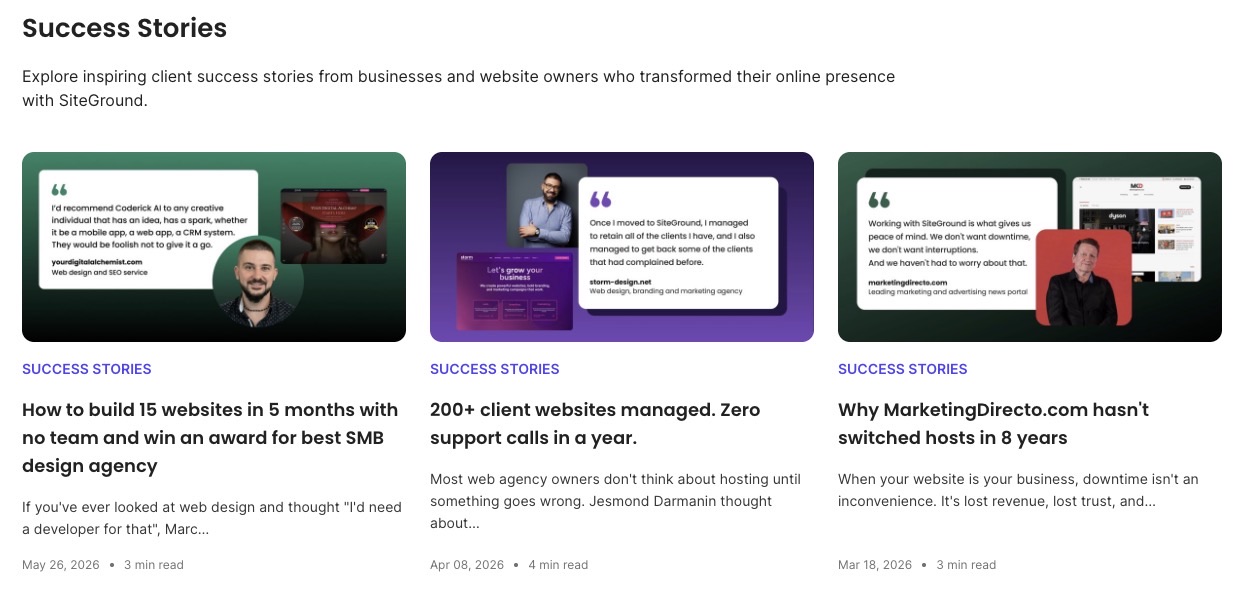
Success Stories page listing showing three client testimonial cards for Coderick AI, Storm Design, and Marketing Directo, each with a headshot, quote, and website preview

Pro tip: “Swap the adjectives for a number and a name:

“Customers love us!” convinces nobody, not even the person who wrote it.

“Maria cut her onboarding time from three weeks to four days” does more work in one sentence than a whole paragraph of enthusiasm ever will. If your testimonial could be pasted into any email for any brand and still make sense, it’s not specific enough to trust yet.

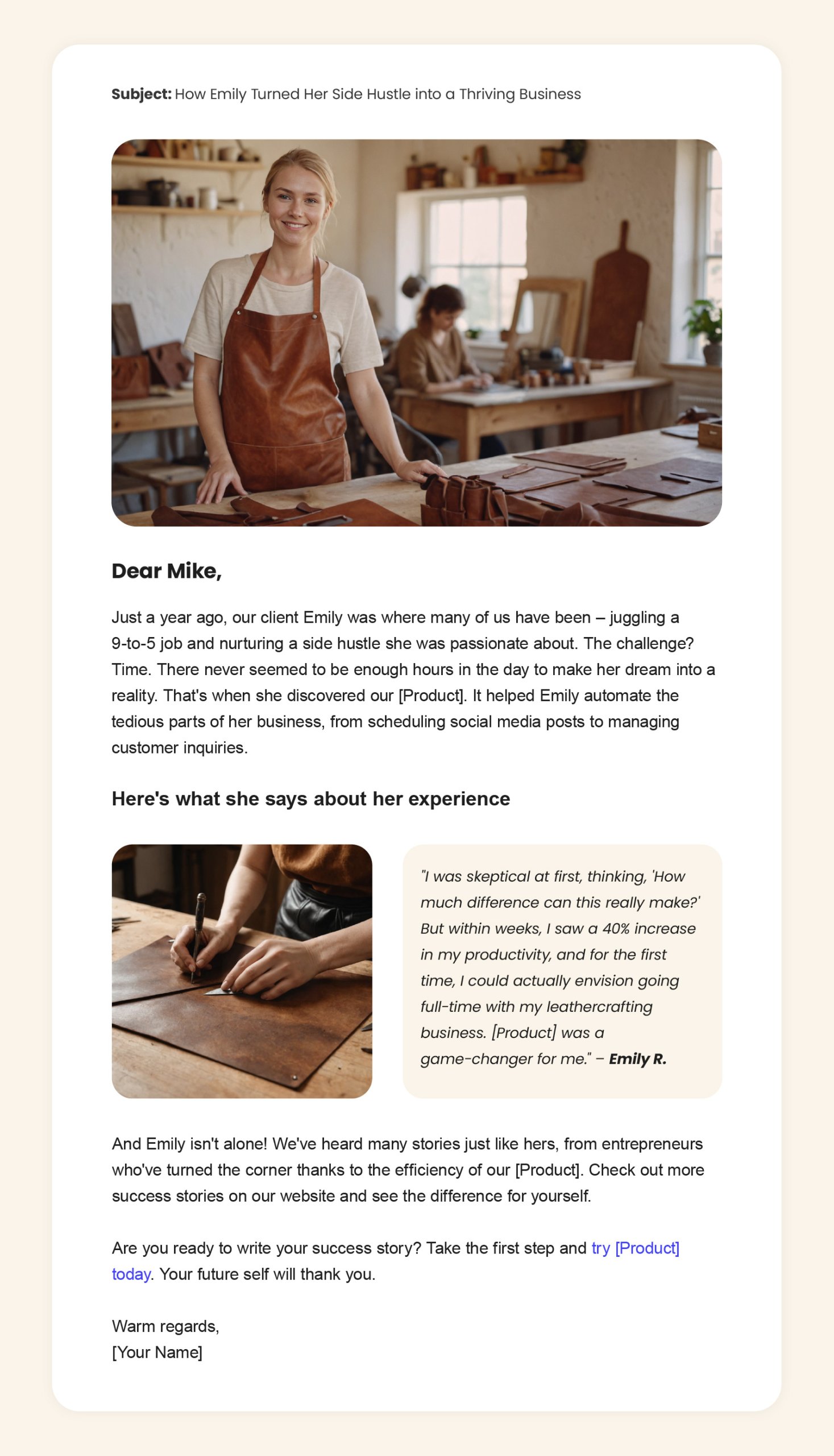
Example marketing email featuring a leather goods maker in her workshop with a customer testimonial about productivity gains

Cut anything that isn’t earning its place 

Every sentence should inform, entertain, or move the reader toward the CTA. If a sentence does none of those three, it’s filler, and filler is the fastest way to lose a reader mid-email.

Give every send a reason to exist

A discount code, a genuinely useful how-to, an industry update they’d have missed otherwise, a first look at something new before anyone else gets it, the specific form matters less than whether it’s actually worth the five seconds it takes to open.

Readers run a quick cost-benefit calculation on every subject line whether they realize it or not, and “another email from this brand” is not, on its own, a good enough reason to click. Do this consistently and you buy yourself patience on the sends that undersell themselves. Skip it too often and no clever subject line brings people back, they just get faster at deleting.

Example email newsletter for a gardening brand showing tips, a subscriber discount code, and a seasonal trends section

How do you make one CTA do all the work?

A call to action needs to be unambiguous and visually easy to spot, using action-oriented phrasing like “Buy now” or “Register today” rather than something passive like “Learn more.” Place it where a reader naturally lands after finishing the body, typically at the end, though a second placement near the top works for time-sensitive offers.

The single-CTA rule matters more than most senders expect: two competing links don’t double the chances of a click, they split attention and often lower the click rate on both. If an email genuinely needs to offer two paths (say, “shop men’s” and “shop women’s”), frame them as one decision with two options rather than two separate asks. Building a full email marketing strategy around a single, consistent CTA style across a campaign makes each individual email’s ask feel familiar rather than another thing to figure out.

How do you measure whether an email actually worked?

Four metrics tell four different parts of the story, and none of them substitute for the others.

MetricWhat it measuresWhat a weak number is telling youWhat to aim for
Open ratePercentage of delivered emails that got openedThe subject line, and only the subject line, needs workAround 36% for small businesses 
Click-to-open ratePercentage of openers who then clicked a linkThe body or the CTA didn’t earn the action once the email was actually openedAround 6.4% for small businesses
Conversion ratePercentage of recipients who completed the goal action after clicking, a purchase, a signup, a downloadThe click happened but the landing page didn’t deliver on what the email promisedAround 3%, though this varies more by industry than the other rows
Bounce ratePercentage of emails rejected outright by the recipient’s serverList quality has slipped, or something’s off with your sending setupUnder 2%
Spam complaint ratePercentage of delivered emails marked as spam by recipientsNot a quality signal for one send, but a rising number here will quietly drag down every metric above it over timeUnder 0.1%

If you want to go a step further, A/B testing can tie all four numbers together, and you don’t need a dedicated split-testing feature to try it. Split your list into two groups, send each one a version that differs in a single element, subject line, CTA, or body structure, then compare the results side by side in your analytics. That one-variable-at-a-time approach is what isolates which change actually moved which number. 

And keep an eye on the sender reputation either way. That’s how trustworthy mailbox providers consider your sending domain, and it’s not just bounces and spam complaints they’re watching. Replies and forwards count in your favor too, so a real reply-to address that someone actually checks does more for your reputation than it looks like it should. A quick check of your bounce, spam, and reply numbers each month is enough to track it.

What mistakes kill otherwise good emails?

A few problems show up often enough to call out directly, because each one is easy to miss from the inside.

  • Misleading subject lines. A subject line that overpromises earns one open and loses trust for every send after it.
  • Two CTAs competing for the same click. Covered above, but worth repeating: it’s one of the most common self-inflicted drops in click-through rate.
  • Skipping the proofread pass. Spelling errors and broken links are the fastest way to undercut an otherwise well-written email, and they’re avoidable with a second set of eyes or a test send to a few different email clients before the real send goes out.
  • Ignoring sender reputation until it’s a problem. A domain or IP address that ends up on an email blacklist will see every metric on this page collapse at once, regardless of how good the individual email is. Reputation is a background factor worth checking before assuming a bad send is a copywriting problem.
  • Overlooking the legal basics. Consent, unsubscribe links, and honest subject lines aren’t just good practice, they’re legal requirements under laws like CAN-SPAM, and getting them wrong carries real financial risk on top of the reputational one.

Put it into practice

None of this requires a copywriting background, it requires a structure, and the structure above is repeatable for every send. Start with a clear subject line promise, open the body with the payoff, keep one CTA, and check your metrics against what actually happened rather than what you expected.

If writing every subject line and body from scratch is the bottleneck, SiteGround Email Marketing includes a built-in AI email writer that can draft a first pass in your brand’s tone, so you’re editing rather than starting from a blank page.

[58]

Frequently asked questions about writing marketing emails

How long should a marketing email be?

Long enough to make the point and no longer. A promotional email with a single offer often works in three to five short paragraphs, while a newsletter with multiple stories needs more room. The test isn’t a word count, it’s whether every paragraph earns its place.

How often should you send marketing emails?

Frequency depends on the list and the offer, but the more useful question is consistency: readers who know roughly when to expect an email from you open more reliably than readers getting sends on no predictable schedule.

What’s a good open rate for a marketing email?

Open rates vary widely by industry and list quality, which is why comparing your own email against your own past sends is more useful than chasing an industry benchmark. A steady upward trend from your own baseline matters more than hitting someone else’s number.

Should you use emojis in subject lines?

Used sparingly and where they fit the brand voice, an emoji can help a subject line stand out in a crowded inbox. Used in every send, they lose the novelty that made them work in the first place.

What’s the difference between a marketing email and a transactional email?

A marketing email has a commercial goal behind it, a sale, a click, engagement. A transactional email confirms something the recipient already did, like an order or a password reset, and typically isn’t subject to the same opt-in rules

This article was originally published in April 2024, and then updated in August 2026.

Email Deliverability Guide: Reach Every Inbox

A joyful young woman with curly hair and a blue blazer smiles widely while holding a laptop and raising her fist in celebration of email deliverability. Surrounding her are modern UI elements: a white paper plane icon, a mobile ad mockup featuring purple cosmetic products with a yellow discount badge, and a circular progress indicator showing "93%" with upward-trending bars, all set against a vibrant purple-to-blue gradient background.

Here’s the hard truth about email marketing: your beautifully crafted campaign means absolutely nothing if it lands in the spam folder. You can have the perfect subject line, gorgeous design, and compelling offer, but none of it matters if your subscribers never see it.

But here’s what matters: email deliverability isn’t magic—it’s a system you can control. Once you understand the technical and strategic elements that mailbox providers use to separate legitimate emails from spam, you can consistently land in the inbox instead of getting filtered out.

This guide breaks down how email deliverability actually works, what you can control, and the steps you need to take to consistently land in the inbox.

What Is Email Deliverability?

Email deliverability is the measure of how successfully your emails reach subscribers’ inboxes rather than being filtered into spam, promotions, or getting blocked entirely. It’s how you do successful email marketing—without it, even your best campaigns may go unseen.

Email Deliverability vs. Email Delivery

Here’s where it gets tricky—delivery and deliverability aren’t the same thing:

  • Delivery means your email reached the recipient’s mail server. 
  • Deliverability means it reached their inbox.

Email delivery is binary: your email either got accepted by the receiving server or it didn’t. Email deliverability is about whether your email reaches the inbox, gets filtered to spam or promotions, or bounces back before delivery.

Why Email Deliverability Matters

Poor deliverability wastes your marketing budget and damages your email sender reputation, making future campaigns even harder to deliver.

Imagine you’ve spent hours perfecting an email campaign: polished subject line, tailored message, smart contacts segmentation, compelling email CTA. But all that effort depends on one critical factor—whether your email actually reaches inboxes. An undelivered email is like a billboard in the desert: it might be a masterpiece, but if no one sees it, you get zero engagement and zero results.

Here’s the critical distinction: you can have 100% delivery (every email accepted by recipient servers) but terrible deliverability if all those emails land in spam. That’s why deliverability is what actually matters for campaign success.

When an email gets stuck in spam or bounces back, you get zero engagement and zero conversions. But the damage doesn’t stop there. Email service providers track how recipients interact with your emails, and each ignored, deleted, or spam-marked message signals that your content isn’t wanted. Over time, providers learn to automatically filter your future emails based on this pattern.

Without solid deliverability, you’re essentially wasting your marketing budget on messages nobody will ever see.

What Factors Affect Your Email Deliverability?

The good news about email deliverability is that most of it is within your control. While you can’t force mailbox providers to deliver your emails, you can influence their decision by managing these key factors:

  • Sender Reputation
  • Email Infrastructure
  • Email Authentication
  • Email List Quality
  • Recipient Engagement
  • Email Content

We’ll dive deep into each of these factors throughout this guide and show you exactly how to optimize them.

Sender Reputation

Your sender reputation is a score mailbox providers assign based on your sending behavior. Low reputation means spam folder placement, while high reputation means inbox delivery.

Mailbox providers track everything: email bounce rates, spam complaints, email engagement levels, sending patterns, and authentication setup. This data determines whether your emails deserve inbox placement.

What is Sender Score?

Sender Score is a specific metric (ranging from 0-100) that indicates how good or bad your sender reputation is. It’s calculated by tracking your IP address’s email sending behavior over time. A score above 80 is considered good, while anything below 70 can hurt your deliverability. 

Your reputation has two key components: IP reputation and domain reputation. Both matter, but they work differently and require different management strategies, so let’s break it down.

IP Reputation

IP reputation tracks the behavior of your sending server’s IP address.

If you’re on a shared IP, you share reputation with other senders using that IP. On a dedicated IP, the reputation is yours alone to build or destroy. Businesses typically use a dedicated IP when they send high volumes of email or want full control over their deliverability, but that also means you must build a positive reputation from scratch. We’ll explain the differences between shared and dedicated IPs in more detail later in this guide.

When your IP is brand new, you have to build trust gradually—which is why new IP addresses need a slow ramp-up in sending volume over 4–6 weeks. Mailbox providers have no data about you yet, so sending thousands of emails immediately matches classic spammer patterns and triggers blacklisting or heavy filtering.

IP Warming Schedule:

  • Week 1: Send to your most engaged subscribers only, low volume
  • Week 2-3: Gradually increase volume by 50-100% weekly
  • Week 4-6: Continue scaling until you reach target volume

Monitor email marketing metrics closely and slow down if you see deliverability drops

What are IP Address Blacklists?

IP blacklists are databases maintained by various organizations that track IP addresses suspected of sending spam or malicious content. If your IP address gets listed, mailbox providers will either block your emails completely or send them straight to spam, severely damaging your deliverability.

Common causes of blacklisting:

  • High bounce rates, especially hard bounces (we’ll cover bounces in detail in the Email List Quality section)
  • Excessive spam complaints
  • Hitting spam traps
  • Sending to purchased or scraped email lists
  • Sudden unexplained volume spikes

Now, with all this said, most businesses don’t need their own dedicated IP because their email platform handles IP reputation on their behalf. So one of the main goals of email service providers is to maintain a good sender reputation for their servers and IP addresses to guarantee high email deliverability for their clients. 

Reputable email service providers do this by monitoring networks continuously to keep IP addresses clear of activities that could lead to blacklisting. They manage pools of multiple sending IP addresses, building reputation carefully for each one. If a blacklisting event occurs, the problematic IP is removed and replaced with a clean one—without affecting sender scores or raising red flags with mailbox providers.

This proactive approach to managing mail servers and keeping IP addresses clear of spam-related behavior increases the likelihood that mailbox providers will accept your emails, helping your messages reach subscribers’ inboxes and supporting your campaign success.

At SiteGround, system administrators monitor the network 24/7 using this shared IP management approach. Multiple sending IP addresses are managed in a pool, with reputation carefully built and maintained for each one. If any IP faces issues, it’s immediately rotated out for a clean one—all happening behind the scenes without disrupting your campaigns.

Domain Reputation

Domain reputation tracks the behavior of your sending domain and has become increasingly important as authentication has improved.

Unlike IP reputation, domain reputation follows your sending domain regardless of which IP or email service provider you use. Even if you switch providers or IPs, your domain reputation travels with you—making it both more stable and harder to escape if damaged.

What Affects Domain Reputation:

  • Authentication setup: Proper SPF, DKIM, and DMARC configuration
  • Sending history: How long your domain has been sending emails
  • Engagement patterns: How recipients interact with emails from your domain
  • Spam complaints: Reports tied to your domain across all IPs
  • Consistency: Stable sending patterns over time

Why domain reputation matters even more now:

Mailbox providers increasingly weight domain reputation over IP reputation because:

  • Authentication protocols tie emails to domains, not just IPs
  • Spammers frequently switch IPs but can’t easily switch established domains
  • Domain reputation provides a longer-term view of sender trustworthiness

The key difference between IP reputation and domain reputation is that a bad IP reputation can be fixed by switching IPs (which your email service provider can manage). A bad domain reputation is harder to recover from because it’s tied to your business identity. This is why maintaining proper authentication, list hygiene, and engagement is critical.

Email Authentication

Authentication protocols prove your emails are legitimately from your domain and haven’t been tampered with. Without them, mailbox providers will filter or reject your emails.

Mailbox providers need to verify you’re not a spammer or phisher—it’s how they protect users from fraud, prevent unauthorized access to information, and maintain service integrity. They check authentication records in your DNS, which act as your digital credentials confirming your identity and sending authorization.

Quick Authentication Overview

Let’s break down the four main authentication protocols, what each one does, and why you need them. We’ll dive into the details of how each works right after this.

ProtocolWhat It DoesWhy You Need It
SPFLists which servers can send from your domainPrevents email spoofing
DKIMAdds a digital signature to verify authenticityProves emails weren’t tampered with
DMARCCombines SPF + DKIM and sets policy rulesTells providers what to do with failed emails
TLSEncrypts the connection between mail serversProtects content during transmission

Next, let’s break down exactly how each protocol works.

SPF (Sender Policy Framework)

SPF is like a guest list for your domain—it tells receiving servers which mail servers are allowed to send emails on your behalf.

When someone receives an email claiming to be from your domain, their server checks your SPF record (stored in your DNS settings) to see if the sending server is on your approved list. If it’s not listed, the email gets rejected or sent to spam.

This prevents spammers from pretending to send emails from your domain. However, SPF alone isn’t enough anymore—it’s the oldest authentication protocol and mailbox providers now require additional layers of verification. That’s where DKIM comes in.

DKIM (DomainKeys Identified Mail)

DKIM adds a digital signature to your emails that proves they came from your domain and weren’t altered in transit.

DKIM works like a tamper-proof seal on your emails. You create two digital keys: a public key that goes in your DNS records where anyone can see it, and a private key that stays with your email server to “sign” outgoing messages.

When you send an email, DKIM stamps it with an encrypted signature (a unique digital code that can’t be forged). Receiving servers check that signature against your public key to confirm everything matches. If it does, they know the email is authentic and unmodified.

This digital signature is a powerful trust signal that significantly improves inbox placement rates.

DMARC (Domain-Based Message Authentication)

DMARC combines SPF and DKIM, then tells receiving servers what to do with emails that fail authentication checks.

DMARC creates a policy layer on top of SPF and DKIM. You specify whether failing emails should be quarantined (sent to spam), rejected entirely, or delivered with a warning. You also get reports showing who’s sending emails from your domain and whether they’re passing authentication.

Think of DMARC as the security guard who knows exactly how to handle uninvited guests based on your specific instructions.

TLS Encryption

TLS (Transport Layer Security) encrypts the connection between sending and receiving mail servers, protecting email content from interception.

When your mail server connects to a recipient’s server, TLS creates an encrypted tunnel for your email to travel through. This prevents anyone from reading or tampering with your message during transmission.

While TLS doesn’t directly authenticate your domain, mailbox providers increasingly favor senders who use encryption. It’s a trust signal that you take email security seriously.

Setting Up Authentication at SiteGround

To help you in this process and make sure your sender reputation and email deliverability do not get hurt we do two things:

Every new client who signs up for our email marketing service and whose DNS zone is managed by SiteGround gets all these records automatically set.

And for everyone using the service with or without your DNS being managed by SiteGround, we block the sending of email campaigns from domains that are missing any or all of these records, saving you from hurting your domain and sender reputation until you set them up.

Why Authentication Matters: Gmail & Yahoo Requirements

In February 2024, Gmail and Yahoo made authentication mandatory for bulk senders (5,000+ emails daily). Without proper SPF, DKIM, and DMARC setup, your emails won’t reach Gmail or Yahoo inboxes—regardless of content quality.

SiteGround handles the technical setup automatically for managed DNS users. However, you’re responsible for maintaining list quality and keeping spam complaint rates below 0.3%. Learn more about Gmail and Yahoo sender requirements.

Bottom line: All four of these protocols work together to prove you’re a legitimate sender. Set them up once, and they run automatically in the background.

Email infrastructure

Email infrastructure is the technical foundation that sends your emails—including mail servers, IP addresses, DNS configurations, and network systems.

It determines whether your emails can be sent reliably and how mailbox providers perceive your sending servers.

Server failures, downtime, or poorly managed IP addresses will kill your deliverability before content or design ever comes into play. This is why partnering with an experienced email service provider—one that handles high volumes daily and has backup systems in place—is so important.

Did you know that campaigns sent through SiteGround Email Marketing achieved a 98.80% delivery rate and 36% average open rate? Those numbers don’t happen by accident—they’re the result of infrastructure designed specifically for reliability and inbox placement. Here’s how SiteGround makes that happen:

SiteGround’s Unmatched Infrastructure Redundancy

SiteGround offers both email marketing and email hosting services. Over 20 years, this has built expertise in managing email servers from both perspectives—the sender side (what email marketing platforms do) and the recipient side (what hosting companies and email service providers do).

SiteGround processes 6+ million outgoing emails daily while receiving millions more through hosting services. This dual perspective has led to infrastructure customizations and software solutions that increase deliverability for outgoing emails and reduce spam on both sides. This expertise has made SiteGround a leader in email deliverability.

Multiple Redundant Infrastructures

SiteGround maintains several fully functional email infrastructures across different data centers. If one system hits technical issues, another takes over within minutes with zero disruption to your campaigns. This eliminates single points of failure from power outages, connectivity issues, or data center problems.

What does this mean for you? No waiting around for servers to come back online, no rescheduling sends, no wondering why the promotional email never went out.

Managed IP Pool with 24/7 Monitoring

SiteGround’s team monitors IP address pools around the clock, building and maintaining reputation for each one. If an IP gets blacklisted, we swap it out immediately for a clean one—no impact to sender scores, no red flags with mailbox providers.

In other words, you don’t have to worry about IP reputation management. SiteGround handles it so your emails keep getting delivered even if something goes wrong behind the scenes.

SiteGround Email Marketing banner: Improve email campaigns with 98.8% inbox delivery rate. Features colorful icons of AI robot, greeting envelope, documents, and megaphone with "START TODAY" button on purple background.

Dedicated IP Addresses vs. Shared IP Addresses

Shared IPs are IP addresses used by multiple senders to send their emails. They work well for most businesses sending under 50,000 emails monthly. With shared IP addresses, you benefit from the established reputation that IP has built, assuming your provider manages it well. This works perfectly for smaller senders because building IP reputation requires consistent, high sending volume.

Dedicated IPs are IP addresses used exclusively by you—no other senders share them. They’re best for high-volume senders (typically 100,000+ emails monthly) who need full control over their reputation. You control your reputation completely, but you start from zero. 

So how do you choose?

If you’re sending under 50,000 emails monthly, stick with shared IPs. If you’re consistently sending 100,000+ monthly and need full control, go dedicated.

Email List Quality

List quality determines whether you’re sending to real, engaged people who want your emails—or to invalid addresses, spam traps, and uninterested recipients who’ll hurt your reputation.

Building a clean email list of permission-based subscribers is your most valuable deliverability asset. A dirty list full of old, invalid, or non-consenting addresses will destroy your sender reputation no matter how good your infrastructure or content is.

Building and Cleaning Your List

Only add people who explicitly opted in to receive your emails. Never buy lists, scrape websites, or add people without permission.

Building Permission-Based Lists:

Use double opt-in whenever possible. This requires new subscribers to confirm their email address before being added to your list. It filters out typos, spam traps, and fake addresses while ensuring only genuinely interested people join your list.

Single opt-in, on the other hand, is faster but riskier—you’ll capture more addresses but also more invalid ones and people who didn’t fully understand what they were signing up for.

Regular List Cleaning:

Inactive subscribers tank your engagement metrics, which mailbox providers track closely. A smaller list of engaged subscribers delivers better results than a large list full of inactive addresses.

  • Remove subscribers who haven’t opened emails in 6+ months
  • Delete obviously invalid addresses (missing @ symbol, no domain extension)
  • Suppress hard bounces immediately
  • Remove spam complainers permanently

Understanding Bounces and Spam Traps

Two major threats to list quality are bounces and spam traps:

  • Bounces signal deliverability problems. 
  • Spam traps are email addresses designed to catch senders with poor list practices.

Hard Bounces

Hard bounces occur when the recipient email address doesn’t exist or is invalid. The receiving server permanently rejects delivery.

High hard bounce rates scream “spammer” to mailbox providers because spammers typically guess email addresses or use old, unverified lists. If you consistently hit hard bounces, providers assume you’re not managing your list responsibly.

At SiteGround, hard bounced addresses are immediately suppressed—they’ll never receive another email. If a campaign generates too many hard bounces, it’s paused automatically to protect sender reputation.

Soft Bounces

Soft bounces are temporary delivery failures, which can happen for reasons such as:

  • The recipient’s inbox is full
  • The email message too large
  • The recipient’s server is temporarily down or overloaded
  • Temporary blocks or maintenance

Soft bounces aren’t as damaging as hard bounces, but persistent soft bounces to the same address should eventually be treated as hard bounces.

When soft bounces occur, different email service providers take different approaches. SiteGround doesn’t give up—the platform makes multiple resend attempts, starting with frequent retries in the first few hours and then tapering off. This retry system is designed to successfully deliver email campaigns as soon as possible, keeping them on track to reach subscribers’ inboxes in a timely manner while optimizing email deliverability.

Spam Traps

Spam traps are email addresses that look real but exist only to catch senders with bad list practices. They come in three types:

  1. Recycled spam traps: Previously active addresses that were abandoned, then repurposed as traps after a dormancy period
  2. Typo traps: Common misspellings of popular domains (gmial.com instead of gmail.com)
  3. Pristine spam traps: Addresses created specifically as traps, embedded in websites to catch scrapers

Hitting spam traps can blacklist your IP instantly because it proves you either bought a list, scraped websites, or haven’t cleaned your list in years.

How to Avoid Spam Traps

  • Never buy or scrape email lists
  • Use double opt-in to verify addresses
  • Remove subscribers who haven’t engaged in 3-4 months
  • Check for obvious typos in email domains

Managing Unsubscribes and Complaints

Not all negative responses are created equal:

  • Unsubscribes are healthy—they remove uninterested people from your list. 
  • Spam complaints are dangerous—they severely damage your reputation.

Unsubscribes

When someone unsubscribes, they’re telling you they don’t want your emails anymore. That’s valuable information. Keeping them on your list only generates poor engagement metrics and potential spam complaints.

At SiteGround, for example, unsubscribed contacts are automatically suppressed and won’t receive future emails.

Regardless of how your email marketing platform treats unsubscribes, it’s still important to monitor your unsubscribe rate per campaign. That’s because spikes indicate content problems or audience mismatch, so you can use this data to refine your email marketing strategy or segment your list better.

Make Unsubscribing Easy

Every email must have a clear, one-click unsubscribe option. Making it hard to unsubscribe frustrates people into clicking “Report Spam” instead—which is far worse for your reputation.

Spam Complaints

When recipients mark your email as spam, it sends a severe negative signal to mailbox providers. Too many complaints and your emails will be filtered automatically.

Common reasons for spam complaints:

  • Recipient never agreed to receive your emails
  • They forgot they signed up (poor welcome email, long gap before first campaign)
  • No clear unsubscribe option visible
  • Content doesn’t match what they expected when signing up

At SiteGround, anyone who marks emails as spam is automatically suppressed. If a campaign triggers excessive complaints, it’s halted mid-send to prevent further damage. Repeat offenses may result in account suspension.

Compliance Requirements

Different regions have laws requiring explicit consent for email marketing:

  • GDPR (EU): Requires clear, unambiguous consent before adding anyone to your list
  • CAN-SPAM (US): Requires clear sender identification, honest subject lines, and easy opt-out
  • CASL (Canada): Requires express consent with specific documentation

Compliance isn’t just legal protection—it’s good for deliverability. Lists built with proper consent have higher engagement and lower complaint rates.

Recipient Engagement

Recipient engagement measures how subscribers interact with your emails—whether they open, click, reply, delete, or mark as spam.

  • High engagement signals your emails are wanted, improving future deliverability. 
  • Low engagement signals they’re unwanted, triggering spam filtering.

Opens, clicks, replies, and time spent reading all factors into deliverability algorithms. 

On the other hand, immediate deletes, spam reports, and consistent non-engagement tell providers your emails aren’t valuable.

Why Engagement Matters

Email providers use engagement as a primary signal for inbox placement because it reveals whether recipients actually want your emails.

Traditional spam filtering looked at content and sender authentication. Modern filtering uses AI and machine learning to analyze behavior patterns across millions of emails. 

Gmail, Yahoo, and Outlook, for example, use modern filtering. Their algorithms track:

  • Open rates: Apple’s Mail Privacy Protection (2021) makes this less reliable for iOS/Mac users, but it’s still tracked for other email clients
  • Click-through rates: Whether recipients click links in your emails
  • Deletion speed: How quickly emails are deleted without being read
  • Replies: Whether recipients reply to your emails
  • Folder movements: Whether recipients move emails from spam to inbox (or vice versa)
  • Engagement over time: Whether recipients consistently interact with your emails or ignore them

These metrics give mailbox providers an overall view of engagement. High engagement tells providers: “People want these emails, prioritize them.” Low engagement says: “Nobody cares about these, filter them out.”

This is why bought lists never work—those recipients didn’t ask for your emails and won’t engage, tanking your reputation immediately.

What to Do About Low Engagement

Monitor your engagement metrics regularly to identify warning signs:

  • Declining open rates campaign over campaign
  • Low click-through rates (under 2-3%)
  • High delete rates without opens
  • Increasing unsubscribe or spam complaint rates

If you’re seeing low engagement, adjust your approach:

Sending less often can actually improve engagement. If weekly emails aren’t working, try bi-weekly or monthly for less engaged subscribers.

Focus your higher-frequency campaigns on subscribers who consistently open and click. They’re your deliverability champions and the ones who actually want to hear from you more often.

The goal isn’t to email everyone constantly—it’s to email the right people with relevant and personalized content that they actually want at a frequency they appreciate.

Segmentation and Re-Engagement Strategies

Send different content to different audience segments based on interests, behavior, and engagement level. This increases relevance and engagement for everyone.

This is the core principle of STP marketing (Segmentation, Targeting, Positioning)—you divide your audience into meaningful groups, target each with relevant content, and position your message to resonate with their specific needs. In email marketing, this approach directly impacts deliverability because more relevant emails generate better engagement signals.

Segmentation Strategies:

Don’t send every email to your entire list. Segment by:

  • Interests/preferences: Send product-specific content only to people interested in those products
  • Engagement level: Send more frequently to highly engaged subscribers, less to occasional openers
  • Purchase behavior: Different messaging for customers versus. prospects
  • Demographics or firmographics: Tailor content to different audience characteristics

Better targeting means better engagement, which directly improves deliverability.

Re-Engagement Campaigns:

Identify subscribers who haven’t opened emails in 3-6 months and send targeted re-engagement email campaigns:

  • “We miss you” messaging
  • Special offers or incentives
  • Preference center to update interests
  • Simple “Do you still want to hear from us?” question

If they don’t respond to re-engagement attempts, remove them from your list. Continuing to email unengaged subscribers damages your metrics and reputation for zero benefit.

Sunset Policies:

Create a systematic process to remove chronically unengaged subscribers:

  • 90 days no opens: Tag as “low engagement”
  • 120 days: Send re-engagement campaign
  • 150 days: Final re-engagement attempt
  • 180 days: Remove from active list

This keeps your list healthy and your engagement metrics strong.

Email Content Best Practices

Your content determines whether recipients engage with your emails or mark them as spam. Even a perfect technical setup won’t save poorly crafted content.

Content quality affects deliverability in two ways: directly through spam filter algorithms that scan for trigger patterns, and indirectly through recipient behavior that signals engagement or annoyance.

AI-Generated Content

With AI tools making it easy to generate email content at scale, mailbox providers have gotten smarter about detecting generic, mass-produced messages. In 2025, spam filters analyze:

  • Whether your content sounds templated or formulaic
  • If multiple email senders are using identical or near-identical phrasing
  • Whether your emails show genuine personalization or just token customization

The solution isn’t to avoid AI tools—it’s to use them thoughtfully while considering AI ethics in your marketing practices:

  • Edit AI-generated content to add your unique voice and specific examples
  • Include genuine customer stories, real data from your business, or personal insights
  • Avoid sending AI-generated emails without substantial human editing
  • Use effective ChatGPT prompts for targeted content, not generic templates
  • Test your content to ensure it doesn’t read like every other promotional email

Authenticity wins in 2025. Subscribers (and spam filters) can spot generic content instantly.

Subject Lines and Avoiding Spam Triggers

Subject lines should be clear, honest, and relevant. Misleading or gimmicky subjects trigger both spam filters and recipient complaints.

Subject Line Best Practices:

  • Keep under 50 characters for mobile readability
  • Be specific about email content—no clickbait
  • Avoid ALL CAPS and excessive punctuation!!!
  • Personalize when relevant (use names or company names)
  • Test different approaches to see what resonates

Spammy Subject Lines Triggers to Avoid:

  • Excessive use of “free,” “guarantee,” “no obligation”
  • Heavy promotional language: “act now,” “limited time,” “urgent”
  • Financial terms: “credit card,” “cash,” “income”
  • Sensationalist phrases: “amazing,” “incredible deal”

Using these words occasionally won’t destroy you, but stacking them makes you look like spam. Keep language natural and conversational.

Email Body Content:

  • Avoid too many images with little text (high image-to-text ratio)
  • No hidden text or deceptive formatting
  • Include proper grammar and spelling—errors trigger filters
  • Don’t use URL shorteners excessively (masks destination, looks suspicious)
  • Test all links before sending

Not sure how to nail your email content? Follow these email copywriting best practices to avoid spam filters and keep readers engaged:

Design and Personalization

Clean, mobile-friendly design with personalized, relevant content drives engagement and avoids spam filters.

Design Best Practices:

  • Mobile optimization is non-negotiable: Over 50% of emails are opened on mobile devices. Use responsive design that adapts to screen size. Test on multiple devices before sending.
  • Keep it clean: Avoid cluttered designs with too many fonts, colors, or competing calls to action. Simple, professional layouts perform better and avoid overwhelming recipients.
  • Balance images and text: Too many images with little text looks like spam. Aim for at least 60% text content. Always include alt text for images.
  • Include plain-text versions: Some email clients don’t render HTML well, and some spam filters prefer seeing a plain-text alternative included.

Personalization:

Basic personalization (using recipient’s name) is table stakes. Go deeper:

  • Use recipient names: Basic personalization is table stakes, but it’s still essential.
  • Reference past behavior: Mention past purchases or browsing activity to show you’re paying attention.
  • Acknowledge lifecycle stage: Treat new subscribers differently than loyal customers.
  • Tailor recommendations: Use their interests and preferences to suggest relevant products or content.

Personalized emails generate higher engagement, which improves deliverability for future campaigns.

Consistency:

Maintain consistent sending schedules so subscribers know when to expect your emails. Random, unpredictable sending patterns lower engagement and can trigger filters if volume suddenly spikes.

General frequency guidelines:

  • Daily emails: Only works for news/media companies or if subscribers explicitly opted in for daily content. High risk of fatigue.
  • 2-3 times per week: Suitable for ecommerce with frequent promotions or content-heavy businesses. Requires strong segmentation.
  • Weekly: The sweet spot for most businesses. Predictable, manageable, and maintains engagement without overwhelming.
  • Bi-weekly: Works for B2B, consulting, or businesses with less frequent updates. Lower fatigue risk.
  • Monthly: Minimum recommended frequency to maintain list warmth and recognition. Less than this and subscribers forget who you are.

Warning signs you’re sending too often:

  • Unsubscribe rate increases with each send
  • Open rates declining campaign over campaign
  • Spam complaint rate rising above 0.1%

SiteGround’s Preventive Campaign Checks

Before sending any campaign, SiteGround’s AI examines it for spam signals, phishing patterns, and policy violations, stopping problematic campaigns before they hurt your reputation.

Navigating spam filters and deliverability rules is complex. SiteGround’s advanced AI scans every campaign pre-send, evaluating:

  • Likelihood of spam folder placement
  • Content that violates usage policies
  • Phishing or malicious patterns
  • Authentication and technical setup issues

If issues are detected, the team manually reviews and alerts senders before the campaign goes out, giving them the chance to fix problems that would damage reputation.

For new Email Marketing users, SiteGround manually reviews the first three campaigns to help start with strong deliverability and avoid common mistakes.

Monitoring Your Deliverability

Track key metrics to identify deliverability problems early, before they become reputation-damaging crises.

Reactive deliverability management means waiting until campaigns fail. Proactive management means monitoring trends and fixing small issues before they escalate.

Key Metrics and Troubleshooting

What to Track and What the Numbers Mean:

  • Bounce Rate: Total bounces divided by emails sent. Hard bounces over 2% indicate list quality problems. Soft bounces over 5% may indicate technical issues or content size problems.
  • Spam Complaint Rate: Complaints divided by emails delivered. Anything over 0.1% (1 complaint per 1,000 emails) is concerning. Over 0.3% and you’re risking serious reputation damage.
  • Unsubscribe Rate: Unsubscribes divided by emails delivered. 0.2-0.5% is normal. Sudden spikes indicate content or targeting problems.
  • Open Rate: Opens divided by emails delivered. While less reliable post-iOS privacy changes, declining trends still signal engagement problems.
  • Click-Through Rate: Clicks divided by emails delivered. Low CTR means your content isn’t resonating or your targeting is off.

Inbox Placement Rate: Percentage of delivered emails that reached the inbox versus spam folder. This requires specialized testing tools. Aim for 95%+.

[47]

Common Deliverability Problems and Solutions:

  • Sudden deliverability drop: Check if your IP was blacklisted, authentication records broke, or a recent campaign triggered high complaints.
  • Consistently low open rates: List is stale or disengaged. Implement re-engagement campaigns and sunset policies.
  • High bounce rates: List needs cleaning. Remove invalid addresses and verify your acquisition sources.
  • Emails going to spam folder: Check content for spam triggers, verify authentication is set up correctly, improve engagement through better targeting.
  • Increasing spam complaints: Review whether you have proper consent, make unsubscribe more visible, ensure content matches subscriber expectations.

Set up automated alerts for metric thresholds so you catch problems immediately rather than discovering them after multiple campaigns fail.

Your Deliverability Action Plan

Mastering email deliverability requires ongoing attention to infrastructure, authentication, list quality, and content. 

Follow this roadmap to build and maintain strong deliverability:

Immediate Actions (Do Now):Set up SPF, DKIM, and DMARC authentication recordsImplement double opt-in for new subscribersAdd clear one-click unsubscribe to all emails Clean your list of obvious invalid addresses and hard bounces
Monthly Maintenance:Review engagement metrics and identify declining trendsClean inactive subscribers (6+ months no opens)Test email campaigns before sending to full listMonitor blacklist status of your sending IPsAnalyze spam complaint rates and adjust content/targeting
Quarterly Deep-Dive:Audit your entire email list healthReview and update audience segmentsTest inbox placement rates with deliverability toolsEvaluate and refresh email templates for mobile optimizationRun re-engagement campaigns for inactive segments
Best Practices Always:Never buy or scrape email listsSend consistently—no sudden volume spikesKeep content relevant through segmentationMake unsubscribing easyMonitor recipient engagement patternsWork with reputable email service providers

Ready to Maximize Your Email Deliverability?

Email deliverability isn’t something you set up once and forget—it requires ongoing attention to infrastructure, authentication, list quality, and content. But you don’t have to manage it all alone.

What SiteGround handles for you:

  • 98.80% delivery rate with redundant infrastructure across multiple data centers
  • Automatic SPF, DKIM, and DMARC setup for domains we manage
  • 24/7 IP reputation monitoring and blacklist management
  • AI-powered campaign scanning before every send
  • Gmail and Yahoo 2024 compliance built-in
  • One-click unsubscribe functionality included automatically

Whether you’re sending your first campaign or your ten-thousandth, deliverability is the foundation that makes everything else possible. The difference between a message that reaches the inbox and one that disappears into spam can be the difference between a sale and a missed opportunity.

Start sending emails that actually get delivered.

This article was originally published in March 2024, and then updated in October 2025.