Year-in-Review Email Templates: Make Your Customers the Star

Abstract of Year-in-review emails

Every December, Spotify’s Wrapped email reveals our listening habits, prompting millions to share it readily with friends and loved ones and screenshot it for Instagram. This is the strange magical effect of year-in-review data, and you and your business can utilize it for your end-of-year emails, as well.

Year-in-review emails are one of the very few examples of smart use of tracking data for the benefit of the customer. When brands do that, you’re not a data point. You’re the main character in a story shaped by your unique metrics. 

The best year-in-review emails go beyond numbers and tap into identity. You’re not just someone who bought stuff. You’re someone who did something worth celebrating this year. 

For small businesses, this is great news. And the best part is that you don’t need Spotify’s engineering team and algorithm. You just need to know what your customers did this year and make it interesting for them.

.post-page__colored-blocks.post-page__colored-blocks–update p { margin: 15px 0px; }

Key Takeaways:

Year-in-review emails are personalized messages, sent to customers at the end of the year. Those emails can summarize their interactions, achievements and/or milestones with the particular brand over the past 12 months. By utilizing these emails, you’re making your customers the main character in a story shaped by their unique metrics. Any small business can use this marketing tactic.

  • Make Your Customer the Hero: Shift the focus to the customer, turning their data and interactions with your business into a story that makes them feel celebrated and unique.
  • It’s Not Just for Big Tech: Any business, from a local arcade to a skincare brand, can use this strategy by translating customer behavior into a narrative about their identity and achievements.
  • Focus on Meaningful Data: Instead of generic numbers like the amount customers spent, highlight specific, positive actions like “you tried 8 new menu items” or “you’ve been a member for 3 years.”
  • Use a Soft Call to Action (CTA): The primary goal isn’t direct sales. Guide customers toward a natural next step, such as booking a session for the new year or leaving a review.
  • No Individual Data? No Problem: If you don’t track individual customer data, create a “community highlight” year-in-review email. Celebrate collective achievements (such as “Together, we donated…”) and make your audience feel like an important part of that success.
  • Find the Right Narrative: If you have customer data, adapt one of three smart approaches to tell a compelling story that fits your business.

Why Small Businesses Need Year-in-Review Emails

Year-in-review emails are one of the few marketing messages where you can celebrate your customers instead of asking them to buy something (and they actually work better because of it). For small businesses, this is a chance to stand out in December’s crowded inbox by making customers feel seen, appreciated, and genuinely part of your story.

You might think that wrapped emails are for tech companies with data scientists.

But that’s not true. 

Someone who runs a family events center can send a year-in-review email that says “You celebrated 4 birthday parties with us this year and your kids’ friends probably think you’re the cool parent now.” Another who makes skincare products, can say “You’ve been using the same face wash for 9 months, which means you finally found something that works and aren’t panic-buying new products every week.”

Both of these year-in-review emails do the same thing Spotify does. They take behavior and turn it into a story about identity.

  • The Psychology Angle
  • A Smart Re-Engagement Tactic
  • The Stats Say it Works

The Psychology Angle

People want to be the protagonist. Not of some grand epic fantasy, just of their own year. When you send someone a recap of what they did with your business, you’re basically saying “you had a story this year, and we were a part of it.”

The photographer who emails past clients with “You’ve been married for two years now and we still remember the reading of your vows in the rain” isn’t selling anything. They’re reminding someone of a moment. That’s relationship building that a discount code can’t beat.

A Smart Re-Engagement Tactic

Year-in-review email newsletters bring back people who forgot about you. Let’s say your business is a yoga studio, and someone joined your classes back in March, but then vanished. They get a December email that says “Remember us? You burned enough calories this year to climb Mount Everest (twice!).” Suddenly you’re back in their radar.

Now that it’s the end of the year, that email recipient is probably making plans and setting goals. And you’re now  top of mind. If your just-sent year-in-review email reminds them of what they accomplished with you in the past year, they’re way more likely to book with you again when they’re making plans for 2026.

Plus, these types of emails that share accomplishments get shared. People screenshot their stats and post them. Your business name is right there in the image. This is free word-of-mouth marketing from people who are excited to show off their year.

The Stats Say it Works

And let’s not forget that year-in-review emails are essentially highly personalized emails. And do you know what personalized emails are good at? They crush generic promotional emails on every email marketing metric that matters.

According to Litmus’s 2024 State of Email in Lifecycle Marketing report, automation and personalization remain the top priorities for email marketers, with consumers showing strong preference for personalized email elements. 64% value exclusive offers based on loyalty status and 63% value product recommendations based on past purchases. 

Birthday emails, which not only celebrate customer milestones but also act as re-engagement emails, generate click-to-open rates of 24.43%, the highest of any automated email type according to G2’s 2024 email marketing research.

In 2023, 60 million people shared their Spotify Wrapped graphics on social media. That’s 60 million free brand ambassadors.

These kinds of emails also get way fewer unsubscribes because you’re not asking for money. You’re celebrating your customer and it’s hard to be mad about that.

The Anatomy of a Great Year-in-Review Email

Okay, so what actually goes into a year-in-review email template? Let’s break it down. 

  • Personal Data Points and Design That Works
  • Tone of Voice: Somewhere Between Friendly and Professional
  • The CTA: What Do You Want Them to Do?

Personal Data Points and Design That Works

You need numbers that mean something. “You spent $472 with us this year” is technically true but also kind of depressing. “You tried 8 new menu items and the truffle fries became your regular order” is way better.

The digital marketing metrics you track depend entirely on what your business does:

If you’re an ecommerce site, you have a purchase history. How many products did they buy? Did they branch out into new categories? Did they come back for the same thing three times? That’s customer loyalty. Follow the whole customer journey to celebrate these touch points.

If you’re a service business, you have appointments. How many times did they book? What did they try? How long have they been coming? Did they hit any key milestones?

Entertainment venues can track the events guests attend, the types of gatherings they prefer, and the new experiences they try. “You came to 6 events this year and we’re pretty sure you’re single-handedly keeping the local music scene alive” might work.

Content creators have opens, reads, clicks. A line that feels personal is something like: “You opened 42 out of 52 newsletters which is honestly better attendance than most people’s gym memberships”.

Nonprofits can highlight impact. Try a message that connects the act of giving to the actual humans that helped like: “Your donations helped 12 students attend college this year”.

The trick is finding three to five things that feel meaningful without being weird. You want people to think “whoa, I didn’t realize I did that” and not “how do you know that and why are you watching me.”

As for the email marketing design, it’s good to take into account mobile devices. Most people open these emails on their phone while scrolling during a holiday break. Try using big numbers, short sentences, and clear hierarchy. You can also test the length of different email subject lines. While shorter is generally better, test variations to see what resonates most with your audience.

Tone of Voice: Somewhere Between Friendly and Professional

This is where one can easily mess up. You don’t want to go too formal (“We would like to express our gratitude for your patronage”) or too casual (“OMG you’re literally the best customer ever!!!”).

You want genuine enthusiasm without desperation. The mindset you need to settle in is that of someone who’s celebrating what your customers did and you happened to be there for it. Make sure the tone of voice is aligned with your brand, too. Here are some examples: 

Forgettable line: “Thank you for your continued support this year.”
Better line: “You booked with us 8 times this year, which makes you officially a regular. We know your coffee order now.”

Forgettable line: “We appreciate your loyalty to our brand.”
Better line: “Three years of Saturday morning classes. Remember when you couldn’t do a pushup and now you’re doing them on one arm just to show off?”

The difference is specificity. Generic praise sounds like a formal letter but specific observations sound like you actually noticed them.

The CTA: What Do You Want Them to Do?

Here’s the thing about year-in-review emails—they’re not sales pitches. The minute you turn this into selling, you’ve broken the spell.

But you can absolutely include an email call to action if it feels like a natural next step. 

Strong year-end CTAs:

  • Book your first session of 2026 
  • Share your year with friends 
  • Tell us what you want to see next year 
  • Get early access to our January launch 
  • Leave us a review 

Weak year-end CTAs:

  • Buy more right now (You just celebrated them. Don’t immediately ask for money.)
  • Don’t forget about our sale (Breaks the celebratory tone.)

What If You Don’t Have Individual Customer Data?

Not every business tracks customer behavior at the individual level—and that’s okay. You can still create compelling year-in-review emails using company-level data.

What you can celebrate without personalized data:

  • Company milestones (press coverage, awards, expansion)
  • Product launches and bestsellers
  • Community impact (total donations, collective achievements)
  • Store openings, partnerships, major announcements
  • Environmental/social impact metrics

The key difference:

Instead of “YOU did this,” it becomes “WE did this together, and you were part of it.”

Year-in-Review Email Examples: 3 Approaches That Work

Looking for year-in-review email newsletter inspiration? Here are three proven approaches you can adapt for your business. For the purpose of this article, we’ve built actual year-in-review email templates using SiteGround AI Studio  (available in your SiteGround Customer Area) and the SiteGround Email Marketing platform to show you exactly how each one works.

Whether you run an ecommerce shop, a service business, or a community platform, you can create the same templates to fit your data. These work for both personalized and company-level data and you’ll see how you can adapt each one based on what data you have. 

1. The Numbers Game (Spotify Style)

This is the approach everyone thinks of first because Spotify made it famous. You take user behavior, turn it into big bold numbers, and present it like a highlight reel.

Who it works for: Ecommerce, SaaS, content creators, anyone who has trackable user behavior.

What it looks like: Big typography and data points that sound impressive even if they’re not objectively huge. Pick numbers that make people feel like they accomplished something.

How to implement this:

  • If you track individual customer behavior: Pull your top 3-5 metrics per customer and format them with big numbers and short context. 

For example: “You discovered 12 new products this year”; “You invested 4.5 hours learning new skills with us.”

  • If you only have company-level data: Show impressive collective numbers and position customers as contributors. 

For example: “Together, we saved 62 million gallons of water. Every purchase counts, including yours.”;  “Our community ordered 2.4 million meals this year, and you were part of making that happen.” 

Watch out for: Numbers that don’t mean anything to the recipient. “You logged in 156 times” is just data, but “You logged in more than 87% of our users” or “You’ve been with us for 523 days straight” tells a story. 

Template example: Family Entertainment Center
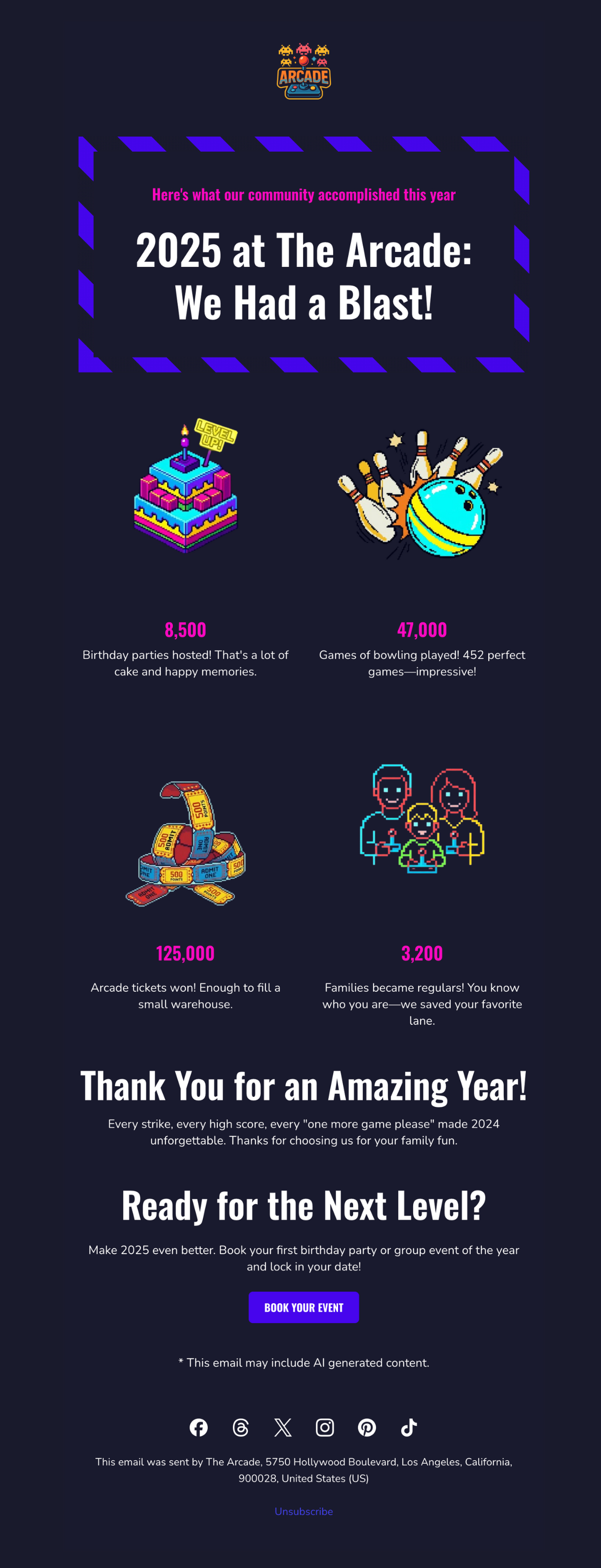
year in review email template example celebrating collective achievements of a small business

We built this template for a bowling alley and arcade using SiteGround AI Studio. It celebrates collective achievements and makes every family feel like they were part of making 2025 unforgettable. The bold, playful design uses bright colors and game-style typography that feels celebratory without being overwhelming.

2. The Milestone Celebration

This approach focuses less on quantity and more on moments like first purchase, one-year anniversary, or a specific achievement unlocked. The email becomes a timeline of you and your customer’s relationship. 

Who it works for: Service businesses, restaurants, subscription models, membership organizations, any business where moments matter more than metrics.

What it looks like: Timeline-style email layouts highlighting 1-3 significant dates or achievements. It’s less about “how many times” and more about “remember when.” The design celebrates progression and specific memories rather than volume.

How to implement this:

  • If you track customer milestones: Look for natural milestones in your customer data like first purchase anniversaries or the moment they became a “regular.” Build the year-in-review email around 1-3 of these personal dates.

    For example: “One year ago today, you booked your first massage with us. Since then, you’ve become a regular every Thursday at 6pm—we always have your table ready.”
  • If you only track company milestones: Share YOUR big moments from the year and thank customers for being part of your brand story. Include photos from major moments and frame them as shared celebrations.

For example: “We opened 3 new locations, won Best Local Business, and celebrated 10 years, and you were with us through all of it.” 

Watch out for: Celebrating milestones the customer doesn’t care about like your company’s 10th birthday. Their personal first-time-using-you anniversary will resonate better. 

Template example: Natural Skincare Brand
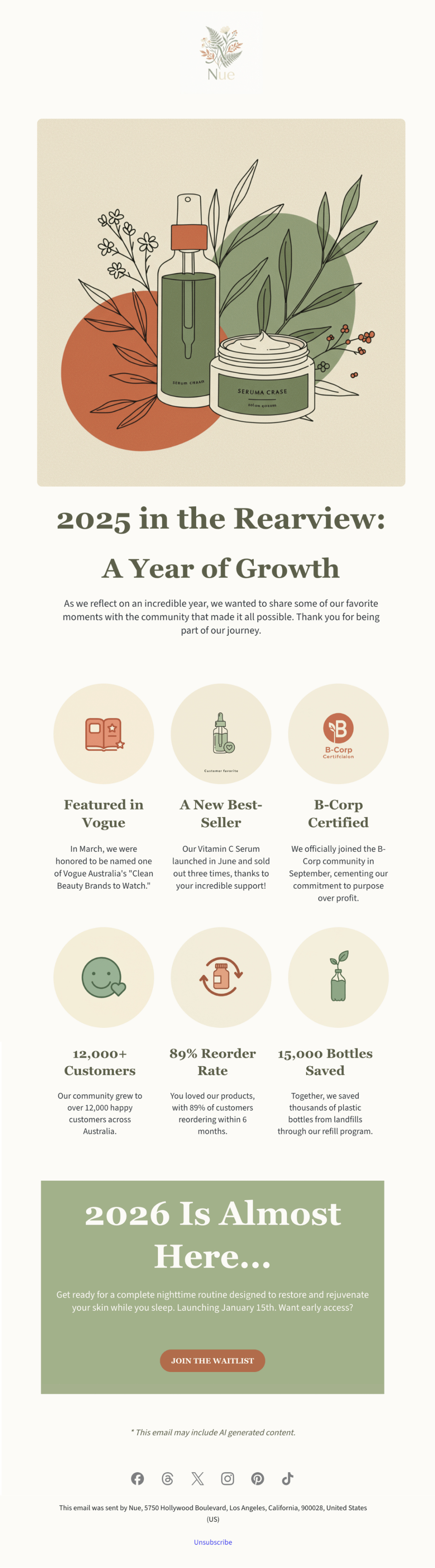
year in review email template featuring a small business celebrating annual milestones

This template was created with SiteGround AI Studio for a clean beauty brand. It walks through the company’s major 2025 milestones, presented as a visual timeline. The design is clean, sophisticated, and visually appealing, matching the premium skincare aesthetic while making customers feel proud to support a growing brand.

3. The Community Highlight

This approach flips the script from “here’s what YOU did” to “here’s what WE did together as a community, and you were part of it.” It works when your value comes from being part of something bigger. 

Who it works for: Platforms with user-generated content, nonprofits, membership communities, marketplaces, fitness communities, anywhere collective impact matters.

What it looks like: Big collective numbers up front (total community achievement or customer participation), then a zoom-in showing how this individual contributed to that larger story. Visual elements often show scale like maps, crowd imagery, or data visualizations that make the community feel massive and meaningful.

How to implement this:

  • If you can show individual contribution within the collective: Start with the big number (“Together we explored 782M miles”) then zoom in (“You contributed 47 miles to that achievement”). Make their piece feel meaningful.
  • If you only have collective totals: Focus entirely on community pride without individual callouts.  The individual’s presence in the year-in-review email itself proves they’re part of it.

For example: “Together we explored 782M miles as a community. Every hike matters, including yours”; “Our members donated $5.8M this year. Thank you for being part of this movement.” 

Watch out for: Making someone feel insignificant. If you say “Our platform processed $10B in sales” and then “You sold $200,” you won’t inspire anybody. Frame it as being part of something bigger, not being small within something big. 

Template example: Local Yoga Studio

Year in review email template featuring collective community achievement

We used the SiteGround Email Marketing platform to build this community-focused template for a yoga studio. It leads with the collective achievement, 18,500 classes attended, then breaks down what that meant: stress relief, stronger bodies, new friendships, personal growth. The warm, calming design of the year-in-review email, with soft colors and organic shapes makes every student feel like they’re part of a supportive community, not just another number.

Build and Send Your Year-in-Review Email with SiteGround
Ready to create your own? Start with SiteGround AI Studio (available in your User Area) to generate your year-in-review email in minutes. Just describe your business and share your metrics. Then customize and send it through the SiteGround Email Marketing platform.

Start Building Your Year-in-Review Email

The Bottom Line on Year-in-Review Emails

Year-in-review emails work because they make your customers the main character. For once this year, it’s not about you trying to sell them something but about celebrating what they did, discovered, or accomplished. You just happened to be part of that story.

So, whether you’re creating a year-in-review newsletter or a simple recap email, the formula is the same: know what your customers did, make them feel good about it, and send it in December.

The worst thing that can happen is people ignore your year-in-review email. But the best scenario is they love it and once they love it, they’re gonna screenshot it, share it, and remember why they liked your brand in the first place. That’s not a bad outcome for one email. 
Email Marketing Benchmarks: What Matters (And What Doesn’t)

I’ve been running email campaigns for seven years. Product launches, educational series, engagement campaigns for passive subscribers, you name it. And I’m here to tell you something that might surprise you: email marketing benchmarks don’t always tell the whole story.

Not because the numbers are wrong. They’re not. But because they’re missing the context that actually matters.

Think of email marketing benchmarks as helpful guidelines rather than strict rules. Understanding when to pay attention to industry standards and when to trust your own data can transform your email marketing from stressful to strategic.

Let’s dive into what really matters for your email success—and what you can simply stop worrying about. 

[35]

The Smart Way to Use Email Marketing Benchmarks

Email marketing benchmarks serve an important purpose: they give you context. When you’re just starting out or launching a new campaign, it’s normal to wonder if a 25% open rate deserves high fives or if it’s just plain concerning. Industry benchmarks help answer that question. 

Most marketing emails will see open rates between 20-30%, with click-through rates typically ranging from 3-5%. But these email marketing benchmarks vary significantly based on industry, audience size, and email frequency.  

So you shouldn’t panic if your open rate is “below industry average.” You should focus on what actually matters for you. For example, an email newsletter with a 42% open rate might generate only three sales, while promotional emails with no higher than a 28% open rate bring in 15 times more. Which campaign is more successful? The math is obvious, isn’t it?  

What the Numbers Actually Tell You

When you realize how much revenue a well-executed email strategy can generate compared to its cost, it’s clear why so many businesses prioritize it. But the real value lies in understanding what makes it so effective.

Companies seeing the highest returns, share some common traits:

  • They dedicate substantial resources to email
  • They send emails consistently
  • They use segmentation to target their messages
  • They measure revenue per email, not just vanity metrics like open rates

The takeaway here is that it’s not about hitting a magic number. It’s about understanding the relationship between investment, strategy, and results. And that’s where metrics come, and especially understanding which benchmarks you should really pay attention to.

9 Email Marketing Metrics + the Benchmarks that Matter

1. Open Rate


Formula: (number of opens / number of delivered emails) x 100

Let’s start with a metric that can easily get more attention than it probably should: the open rate. Quite simply, it represents the percentage of email recipients who actually opened your email. 

But here’s the thing: open rates just aren’t as reliable as they used to be. Thanks to Apple’s Mail Privacy Protection and security bots from Gmail and Yahoo, many opens are now false or inflated. That doesn’t make them useless—they’re still helpful for spotting deliverability issues and comparing subject line performance—but they’re no longer the gold standard.

  • Good Open Rate: 20-30% (varies significantly by industry)
  • Red flag: Below 15% or sudden drops of more than 10% points from your normal performance

Now, instead of obsessing over potentially inflated open rates, successful email marketers focus on metrics that show real engagement. Let’s move on to those metrics that reveal the most.  

2. Click-Through Rate (CTR) 


Formula: (clicks / delivered emails) x 100

This metric shows actual engagement, as it tells you what percentage of people clicked on a link in your email after receiving it. And while bots could inflate clicks, it’s not as excessive as with open rates. This is one of the metrics that best measures campaign effectiveness.

  • Good CTR: 2-5% (varies significantly by industry)
  • Excellent CTR: 5%+
  • Red flag: Below 1%

3. Click-to-Open Rate (CTOR)


Formula: (clicks / opens) x 100

This metric shows how effective your email content is at driving clicks after someone opens the email—in other words, it reflects the percentage of true email engagement with your content. It’s one of the best indicators of whether your email delivers on the promise made by your subject line. A high click-to-open rate means you set the right expectations from the start, and that you followed through. 

  • Good CTOR: 10-15%
  • Excellent CTOR: 20%+
  • Industry leaders: Professional Services (27%), Consulting (26.5%)

4. Conversion Rate


Formula: (conversions / delivered emails) x 100

Did your email achieve its goal? Maybe your goal was to make a sale, encourage a download, or get someone to sign up—each email can have its own goal, and it can be whatever objective you choose. At the end of the day, it’s the metric that truly matters for your business. 

  • Typical range: 2-5% (highly dependent on industry and goal)

5. Revenue Per Email


Formula: (revenue generated / emails sent) 

This is the metric that pays the bills—the one that justifies your entire email program. After all, it shows how much revenue your emails generate, directly connecting your email efforts to the bottom line of your marketing funnel.

  • Ecommerce average: $0.10 – $0.50 per email
  • SaaS average: $0.20 – $1.00 per email 
  • Strong performance: $1.00+ per email 

Having reviewed all the metrics thus far, it’s important to keep in mind that the above benchmarks vary dramatically by industry, product price, and audience size.  And while engagement metrics—like the ones we’ve just covered—can be debated, deliverability benchmarks are non-negotiable. These are the foundation of any successful email program. So let’s move on to the deliverability benchmarks you must keep an eye on.

6. Delivery Rate 


Formula: (delivered emails / total emails sent) x 100

This metric measures email deliverability via percentage of emails that are successfully delivered to recipients’ inboxes (not bounced or blocked). It’s the foundation of email performance because if your emails aren’t being delivered, nothing else matters. A strong delivery rate signals healthy list hygiene and good sender reputation.

  • Aim for 98% or higher  
Email deliverability you at trust - SiteGround

7. Bounce Rate


Formula: (bounced emails / total emails sent) x 100

The bounce rate represents the percentage of emails that couldn’t be delivered to recipients—either because the address is invalid (hard bounce) or there’s a temporary issue (soft bounce). A low bounce rate is a good indicator of email list quality, whereas a high one can damage your sender reputation with inbox providers, making it harder for future emails to land in the inbox.

  • Keep it under 2% 

8. Spam Complaint Rate 


Formula: (spam complaints / delivered emails) x 100

When recipients mark your email as spam, it signals to inbox providers that your messages may be unwanted. Even a small number of complaints can harm your sender reputation and drastically reduce deliverability. ISPs take this metric seriously—consistently high rates can land your emails in the spam folder or block them altogether.

  • Stay within 0.1-0.2%

9. Unsubscribe Rate 


Formula: (unsubscribes / delivered emails) x 100

When someone chooses to stop receiving your emails, it’s recorded as an unsubscribe. While it might feel like a loss, it’s actually a sign that your list is getting more focused—and that’s a good thing. Unsubscribes are far less harmful than spam complaints, and making it easy for people to opt out shows respect for your audience and supports long-term deliverability.

  • A rate between 1–2% is typical

Pro tip: Want to reduce your bounce rate and number of unsubscribes? Add a double opt-in to your sign up process, as it ensures the people who sign up genuinely want to be on your list.

Top Email Benchmarks By Industry

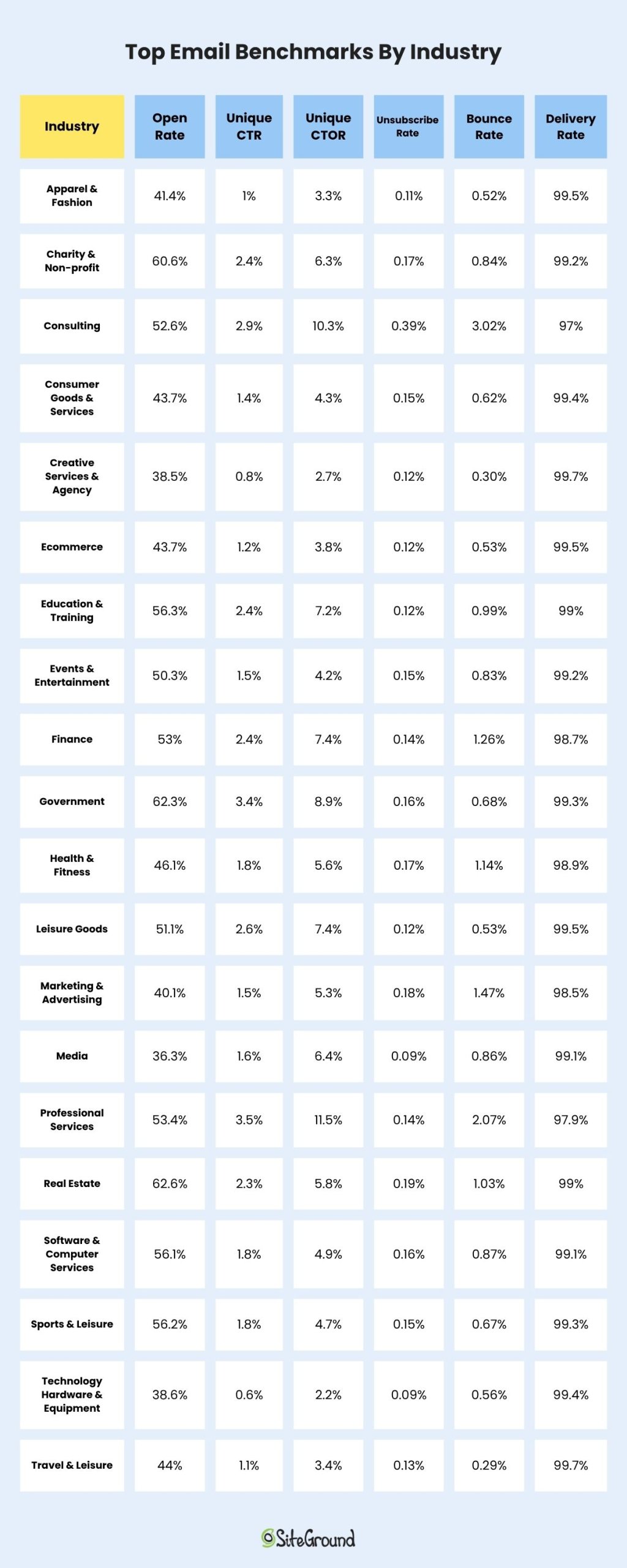
Now that we know the statistics that actually matter, here’s what typical email marketing benchmarks look like, according to DotDigital’s Global Benchmark Report 2025. 

These email marketing benchmarks by industry represent comprehensive email marketing statistics from real campaigns, showing how average email open rates and click rates vary significantly across sectors.

Average Performance:

  • Unique Open Rate: 32.8%
  • Unique Click Rate: 1.3%
  • Unique CTOR: 4% 
  • Unsubscribe Rate: 0.13%
  • Bounce Rate: 0.73%
  • Delivery Rate: 99.28%
Top Email Benchmarks By Industry

You can see the full list here. 

But there’s a lot these numbers don’t tell you. The benchmarks above lack context about audience size, demographics, send frequency, email client (Gmail, Apple, Yahoo, Outlook, etc.) breakdown, or content type. Your specific situation might be completely different. 

Case Study: When Lower Metrics Lead to Higher Success

Here’s a case study that might surprise you. In the near past, our team created a four-day email course, called “Grow Your Business Online,” which educated subscribers on practical marketing tactics like content audits, SEO optimization, landing page creation, and email marketing fundamentals. Each day of the course delivered pure value with actionable steps and checklists.

The course had only a small hosting banner at the bottom of each email. No hard sell. No pushy CTAs. Just valuable education with a subtle mention of our services.

The results? Click rates were lower than our sales emails. But the course subscribers became our highest-converting customers. Why? Because we built trust through consistent value delivery. When they needed hosting, we were the obvious choice.

The lesson: relationship-building emails might underperform on immediate metrics but overperform on lifetime value. Sometimes the best sales strategy is not selling at all.

Not sure where you are in the relationship-building process with your customers? Pay special attention to the email customer journey. Sometimes customers might be in an educational stage, while others are more likely on the brink of decision. Knowing this can also change the lens through which you evaluate your metrics.

Complex Metrics Made Simple

You don’t need to constantly compare against industry standard email open rates or get overwhelmed by email marketing statistics. You also don’t need a mathematics degree to track what matters.

Here are some basic email marketing metrics and approaches that you can easily start with. Ask these questions below and find the answers in the metrics:

For every campaign:

  • Did people engage? Check CTR. 
  • Did we deliver on our promise? Check CTOR. 
  • Did we achieve our goal? Check conversions. 

Review monthly:

  • Are we reaching inboxes? Check delivery rate. 
  • Is our list healthy? Check bounce rate. 
  • Are people happy? Check unsubscribe and spam rates. 

Evaluate quarterly:

  • What’s our revenue per email? 
  • Which segments perform best?
  • What content drives action?

While email marketing benchmarks by industry provide useful context, your email performance metrics should be measured against your own baseline rather than just average email open rates across your sector.

Build Your Own Benchmarks

Experienced email marketers build their own benchmarks, but honestly anyone can do it. Below, I’m summarizing in four steps how you can easily build your own email marketing benchmarks:

  1. Establish YOUR baseline: Track your metrics for 3-6 months without major changes
  2. Separate by type of email: Educational emails perform differently than promotional ones
  3. Note your patterns: Understand your audience’s unique behavior
  4. Improve gradually: Aim to beat your own records, not industry averages

Once you know your normal performance, you can run meaningful tests and actually know if they worked.

An Action Plan To Begin With

In order to move beyond the benchmark expectations, I suggest you follow the below roadmap. This action plan has proven successful for me in every email marketing project I’ve worked on. 

Week 1-2: Audit Your Current State

  • Check your deliverability metrics first (they’re fundamental)
  • Note your current CTR and conversion rates
  • Don’t change anything yet, just observe

Week 3-4: Pick One Metric to Improve

  • Start with CTR (it’s easiest to impact)
  • Test one element per email only: subject lines, send times, or CTAs
  • Compare to YOUR own baseline, not industry standards

Month 2: Scale What Works

  • Continue with the changes that were successful
  • Begin basic segmentation (engaged vs. unengaged is a great start)
  • Keep tracking against your own benchmarks

Ongoing: Build Relationships, Not Just Lists

  • Focus on value-first content
  • Make unsubscribing easy 
  • Remember that trust drives long-term results

Relationships Beat Email Marketing Benchmarks

What really matters in email marketing is building genuine connections with your subscribers, providing value, and always respecting their inbox. 

A 22% open rate that builds trust and drives revenue beats a 40% open rate achieved through misleading subject lines—every single time.

And try to remember:

  • Open rates are inflated and are getting less reliable
  • CTR shows real engagement
  • Your best benchmark is your own past performance
  • Deliverability metrics are non-negotiable
  • Strategies that prioritize value for your subscribers always win long-term

The most successful email marketers I know barely talk about industry benchmarks. They talk about their subscribers, their content strategy, and their continuous improvements. 

Great email marketing really happens not by chasing someone else’s average, but by consistently delivering value to the people who chose to hear from you.

After all, behind every click is a real person who trusted you with their inbox. Honor that trust, and the metrics will follow.

FAQs about Email Marketing Benchmarks

What are average email open rates by industry?

Average email open rates vary significantly by industry. Nonprofits see around 40% open rates, while ecommerce averages 30%. Education and training industries typically achieve 35-36% open rates, and business & finance sectors average 31%. These email marketing benchmarks by industry provide context, but your specific audience behavior matters more than hitting these averages.

What is a good click-through rate for email marketing?

A good click-through rate typically ranges from 2% to 5%, but this can vary depending on the industry and the type of content being sent.

How can I improve my email open rates?

Use compelling email subject lines with personalization, test different variations through A/B testing, and send emails at optimal times based on your audience’s behavior.

How do privacy changes impact email marketing metrics?

With enhanced email privacy features, open rate accuracy can be affected. It’s important to adapt your strategies and focus on other metrics like CTR and CTOR for a comprehensive view.

What email marketing metrics should I track instead of just open rates?

Focus on metrics that show real engagement: Click-through rate (CTR), click-to-open rate (CTOR), conversion rate, and revenue per email. These email performance metrics provide more reliable insights than open rates, which can be inflated by privacy features and email bots.

How often should I compare my metrics to email marketing benchmarks?

Check email marketing benchmarks by industry quarterly for context, but track your own performance monthly. Your email marketing statistics should improve against your own baseline rather than constantly chasing industry standard email open rates. Build your own benchmarks based on 3-6 months of consistent data.

Email marketing campaigns: how to create and run them

A woman in a yellow sweater smiling while using her phone, surrounded by email campaign analytics — including a progress chart and a bar graph showing growing performance metrics.

An email marketing campaign is a series of targeted emails sent to a specific audience with one clear goal, whether that’s driving sales, nurturing leads, or winning back inactive subscribers. Email marketing widely considered one of the most cost-effective marketing channels available — with an average ROI of $36 for every $1 spent cited across most industry reports.

This guide covers everything you need to build one: what email campaigns are, which types exist, how to set one up, and what to track to know if it’s working. Whether you’re sending your first campaign or improving an existing one, here’s how to do it right.

Key takeaways:

  • Email campaigns are sequences of targeted emails built around one goal — a sale, a sign-up, a re-engagement
  • The five main types are promotional, welcome, nurture, re-engagement, and transactional — each serves a different purpose
  • Before you write a single word, define who you’re sending to and what you want them to do
  • The three numbers to watch: open rate (are they opening?), CTR (are they clicking?), conversion rate (are they doing the thing?)
  • A well-timed email to the right segment will outperform a perfect email sent to the wrong people

What is an email campaign?

An email campaign is a sequence of marketing emails sent to your subscribers with a single goal in mind. This could be encouraging engagement, nurturing leads, promoting a new product or driving sales. 

Each email points readers toward one specific action: signing up for a webinar, claiming an offer, booking a call. That’s your call to action, and everything in the email should be built around it.

Types of email marketing campaigns

Different goals call for different campaign types. Here are the five most common ones and when to use each.

Promotional campaigns

Sales announcements, product launches, seasonal offers, and discount emails. The goal is direct: get the reader to buy, claim an offer, or act before a deadline. These work best when they’re specific — a clear offer sent to an audience that’s already shown interest in what you’re promoting.

Welcome campaigns

A series of emails triggered when someone joins your list. It’s your first real conversation with a new subscriber, and it sets the tone for everything that follows. A good welcome sequence introduces your brand, sets expectations, and ideally leads the subscriber toward their first meaningful action.

Nurture campaigns

Also called drip campaigns, these are sequences designed to build a relationship with leads who aren’t ready to buy yet. They deliver value over time — educational content, case studies, product comparisons — moving subscribers closer to a decision. Particularly effective for products or services with a longer buying cycle.

Re-engagement campaigns

Some subscribers go quiet: no opens, no clicks, sometimes for months. A re-engagement email campaign is how you find out whether they’re still interested or ready to move on. Two to three emails is usually enough: a “we’ve missed you” opener, a follow-up with a reason to come back (a discount, an update, something new worth seeing), and a final “stay or go” email that makes unsubscribing easy. Letting go of uninterested subscribers isn’t a loss. A smaller, engaged email list outperforms a bloated one every time.

Transactional emails

Order confirmations, shipping notifications, password resets, and receipts. They’re triggered by a user action rather than a marketing schedule, and they consistently get high open rates because recipients expect them. They’re worth optimizing; they’re often the most-read emails your brand sends.

How to run an email marketing campaign

Now let’s get into the nitty gritty of email campaigns. Email is not an exact science but there are a certain number of tips you can follow to create some of the best email marketing campaigns and improve your email marketing strategy. 

Identify Your Audience

Start by defining who you’re sending to: their demographics, buying behavior, and what problem they need solved. That’s the foundation of any campaign that performs. Here are the steps you need to follow:

  • Analyze current customers: Start by examining your existing customer base. Identify common characteristics such as demographics, buying behaviors, and preferences. This information forms the foundation of understanding your audience.
  • Use surveys: If you lack detailed information about your audience, consider launching survey email campaigns. These can provide valuable insights into what your audience wants and expects from your brand.
  • Monitor engagement: Pay attention to who is actively engaging with your brand, both online and offline. This can include social media interactions, website analytics, or in-store behaviors.
  • Segment your audience: Divide your target audience into smaller, more manageable groups based on shared traits, needs, or behaviors. Consider creating segments for existing customers and prospective ones.
  • Personalize communication: Email marketing thrives on personalization. By understanding and segmenting your audience, you can tailor messages that resonate with each group. This ensures that you’re sending the right message to the people most likely to engage with it, maximizing the impact of your campaign. This is where email is the strongest – sending the right message to the audience most likely to engage with it.

[58]

Set goals for your campaign

Every successful email campaign begins with a clear email marketing goal. This could be increasing website traffic, boosting product sales, or improving customer engagement. Align your goals with your overall strategy and audience to create a focused and actionable roadmap for your email campaign. This will provide a clear framework for evaluation success and learning from each campaign.

Have in mind that for a goal to be as effective as you need it to be, it should be SMART. This stands for:

  • Specific: Clearly define what you want to achieve. Avoid vague or general statements.
  • Measurable: Set quantifiable metrics to track progress and success.
  • Achievable: Ensure that the goal is realistic and attainable with the resources available.
  • Relevant: Align the goal with your overall business objectives and target audience’s needs.
  • Time-bound: Establish a timeframe for achieving the goal to maintain focus and urgency.

An example for a SMART email marketing campaign goal could be: increase website visits by 20% over the next month. 

Choose your email campaign type

Your campaign type should align with your set goals. If you’re looking to promote a new product, a promotional email campaign would be fitting. If you’re seeking customer feedback, opt for a survey email campaign. 

So, to further improve our SMART goal from before, we can phrase it like this: increase website visits by 20% over the next month using a promotional email campaign.

Write a subject line worth opening

Now that we’ve identified our target audience, and set our goals, let’s dive into one of the most important parts of our campaign — the subject line. 

The subject line is one of the first things your audience sees, making it a crucial element. Based on just this one little detail of your email, subscribers can choose whether to open it or not. And it can cut the number of people who see your message by more than half of your recipients. In addition, it can also affect the deliverability of your emails.

That’s why it should be engaging, relevant, and give a hint of what’s inside. Here are some examples of compelling subject lines (that you can steal): 

For Black Friday campaigns: 

  • 🚨 45% off our bestsellers — today only
  • You’re early. Black Friday isn’t. (Up to 79% off inside)
  • ⚡️ Our biggest sale ever. No, really. 25% off everything.
  • Go on, treat yourself. 40% off, just because.

For Christmas: 

  • Order by [date] and it’ll be there under the tree
  • 🎁 Santa called. He left something for you.
  • We asked the elves. They said to grab it before it’s gone.
  • Your Christmas list just got a lot cheaper.

For win-back campaigns: 

  • It’s been a while. Here’s $10 to catch up.
  • We’ve been busy since you left — come see what’s new.
  • Did we do something wrong? Here’s $10, no questions asked.
  • You’re missed. (And so is your cart.)

Write email copy that sells

Now let’s write a memorable copy for your audience. Crafting email copy that sells is both an art and a science. It’s about delivering the right message in a way that resonates with your recipients and prompts them to take action. 

Before we dive into email copywriting, here’s the most important thing you need to have in mind before you start writing:the content of your campaign email should meet the expectation set by your sender name, subject line, and preview text. This is not only important for your subscribers, but also for email clients, such as Google and Outlook. 

First, consider the tone of voice of your email. Generally speaking, this is your brand voice. But you need to decide how you’re going to speak to the different segments of your audience. Here are some examples of tone of voice that you can step on, or even combine: 

  • Conversational 
  • Professional
  • Humorous
  • Friendly
  • Inspiring
  • Formal
  • Informal
  • Witty
  • Serious
  • Optimistic

After you’ve decided on a tone of voice for your emails, you need to think about the email’s structure. Similarly to the website layouts, there are different email structures and each one can serve the goals you’ve set for your campaign:

  • Inverted Pyramid: Heading, image, subheading, call-to-action button. This structure aims to lead your subscribers’ eyes to the call-to-action. 
  • Z-pattern: Heading, image right, text left, image left, text right. This structure is great for newsletters as it leads the eye of the subscribers left and right and keeps them engaged.
  • F-pattern: Heading, text left, image right, text left, image right. Similar to the Z-pattern, this structure also keeps subscribers engaged but might be easier for some to read as the text is only left-aligned. 

If you want to use the Z-pattern or the F-pattern, we recommend A/B testing what your audience prefers. 

Then, let’s move to the actual copy of your email. You should deliver your main message in a clear and concise way. Don’t confuse the recipients of your email with too much information.

You have only a few seconds to grab the readers’ attention. How to keep them engaged? Personalize your message. Use a friendly and conversational tone, and focus on the benefits for the reader. Ask yourselves “What’s in it for them?”. Then answer this question in your copy. 

And don’t underestimate the power of short sentences. Write sentences that are easy to read and avoid using jargon or difficult words. 

Email accessibility is also key. Make sure your email is readable on all devices. Use headings, bullet points, and short paragraphs to make it scannable, and provide alt text for images to support readers with visual impairments.

Create call to actions that people want to click

Email call to actions (CTAs) are pivotal in guiding your audience towards the desired action, be it making a purchase, signing up for a webinar, or downloading a resource. Creating CTAs that people want to click is essential.

For a CTA to work, be specific about what happens when someone clicks. “Buy Now” and “Sign Up” are fine, but “Get my free plan,” “Reserve my spot,” or “Start my 30-day trial” tell readers exactly what they’re getting — and make the action feel like their choice, not your ask.

Urgency works when it’s honest. “Sale ends Friday” or “Only 4 spots left in the webinar” pushes people to act because the reason is concrete. A button that says “Limited Time Offer” with no deadline attached doesn’t create urgency — it just sounds like every other email in the inbox.

Before you finalize your CTA copy, ask yourself: what does my reader actually get by clicking this? “Download” tells them nothing. “Get the free email checklist” tells them exactly what’s waiting on the other side. The more specific the benefit, the easier the click.

And last but not least, make your CTAs stand out visually. Use contrasting colors, larger fonts, or eye-catching buttons to draw attention to them.

Timе your emails right

Another thing that can significantly impact your email open rates is timing. According to many online researches, including Bika.ai, emails sent in the mid-morning during the workweek tend to have higher open rates. 

The best send time depends on your audience, so test before you commit. If you’re reaching new parents, early morning might catch them before the day kicks off. If your list is full of business managers, weekends tend to work better. That’s when they actually have time to read.

Sending intervals between your emails are also important. Sometimes a very engaged audience would like to receive emails sooner rather than later while disengaged subscribers might prefer to hear from you less often. 

Key metrics to track for email campaigns

Sending the campaign is only half the job. These are the benchmarks that tell you whether it worked and where to improve next time.

MetricWhat it tells youBenchmark
Open rateAre people opening your emails?20–30% depending on industry
Click-through rate (CTR)Are people clicking your links or CTA?2–5%
Click-to-open rate (CTOR)Of those who opened, how many clicked? A sharper signal of content relevance than CTR alone.10–20%
Conversion rateHow many completed the action you wanted: a purchase, sign-up, or download?Varies by goal
Unsubscribe rateA signal your content, frequency, or targeting is off.Below 0.5% 
Bounce rateHard bounces mean invalid addresses that hurt your sender reputation. Clean your list if this climbs.Below 2%

Track these after every campaign and look for patterns over time, not just one-off results. A single campaign with a low open rate might mean a bad subject line. Three in a row is a segmentation or deliverability problem worth digging into.

Common email campaign mistakes

Most underperforming campaigns come down to the same recurring issues. Here are the ones worth watching out for:

  • Sending to your full list unsegmented. Not everyone needs the same email. Segment first, even if it’s just two groups.
  • A vague or misleading subject line. If the subject line doesn’t reflect what’s in the email, you’ll get opens but no clicks — and frustrated subscribers.
  • Multiple competing CTAs. One email, one action. If you ask readers to do three things, they’ll often do none.
  • Ignoring mobile. Over half of emails are opened on a phone. An email that breaks on mobile loses those readers immediately.
  • Never testing anything. Subject lines, send times, CTA copy — all of these can be A/B tested. Skipping this means leaving improvements on the table with every send.
  • Never cleaning your list. A large list with low engagement hurts your deliverability. Remove or re-engage inactive subscribers regularly.

Start sending campaigns that actually work

Despite the constant shifts in the digital landscape, email remains one of the most personal and direct channels available. It builds loyalty in a way that social media rarely does — because it lands in someone’s inbox, not their feed.

But strategy and content only get you so far. You also need the right tools to put it all into practice.
SiteGround Email Marketing gives you everything covered in this guide in one place: easy audience segmentation, a no-code editor with ready-made templates, built-in AI tools for copy and images, and campaign analytics to track opens, clicks, and conversions.

This article was originally published in September 2023, and then updated in May 2026.

Frequently asked questions about email campaigns

How much does an email marketing campaign cost?

Most email marketing platforms charge between $10 and $20/month for small lists, scaling up with your subscriber count. SiteGround Email Marketing starts at $11.99/month for up to 500 contacts.

What is the most effective email marketing campaign strategy

Welcome sequences consistently outperform every other campaign type because subscribers are most engaged right after they sign up. Beyond that, the strategies that work share three things: a segmented audience, a specific and relevant offer, and one clear CTA.

What makes an email campaign effective?

A specific goal, a segmented audience, a subject line that earns the open, copy that leads with what’s in it for the reader, one strong CTA, and consistent tracking. The biggest difference between campaigns that perform and ones that don’t usually comes down to segmentation and specificity.

What is the 30/30/50 rule for cold emails?

It’s a cold outreach framework where 30% of your effort goes to identifying the right prospect, 30% to personalizing the opening line, and 50% to crafting a compelling offer. It’s specific to cold email rather than standard email marketing, but the core principle — relevance over volume — applies to any campaign.