Master B2B Email Marketing Tools + Examples

B2B email marketing tools

Picture this: you’re having your morning coffee, and with just a few clicks, you’re connecting with key decision-makers across industries. That’s the power of B2B email marketing.

But simply hitting “send” isn’t enough. The need for smart, effective tools to optimize and improve these email efforts is more important than ever. 

B2B email marketing tools assist you in creating personalized messages that connect, making sure your emails don’t just arrive in inboxes, but truly make an impact, prompting readers to take the desired action, such as responding to the email, clicking on a link, or considering a business proposal.

Understanding B2B Email Marketing

B2B email marketing is the strategic use of email to connect with other businesses, building relationships that lead to increased collaboration and sales. Unlike B2C email marketing, which targets individual consumers with often broad and emotional appeals, B2B email marketing requires a more professional and personalized approach. It focuses on addressing the specific needs and challenges businesses face, using detailed information and logical arguments to clearly demonstrate the value and benefits of a product or service.

What Are B2B Email Marketing Tools and Why Are They Important?
what are b2b email marketing tools

B2B email marketing tools are specialized software solutions designed to help businesses efficiently manage their email campaigns targeted at other businesses. These tools are key players in helping businesses achieve their marketing goals. With features like automating routine tasks, personalizing content for different audience groups, and offering insightful analytics, they take care of a lot of the heavy lifting, making sure that each message speaks directly to the needs of its recipient.

Features to Look Out For in B2B Email Marketing Tools

When choosing B2B email marketing tools, several key features should be on your radar. 

1. A user-friendly interface is a great help. It ensures that your team can easily navigate the tool, making it more accessible and efficient to use. For example, SiteGround offers a simple, no-code builder that lets you quickly change layouts and colors with free templates for different needs, making it easy for everyone. Plus, built-in AI assistance makes content creation easier, allowing you to create engaging emails with minimal effort.

2. Personalization and segmentation features are also important, enabling you to deliver messages that connect with specific audience groups. Segmenting your audience based on their unique interests or interactions with your brand helps you target them better and send personalized emails to the right people. This approach keeps your content relevant and engaging, ultimately increasing conversions.

3. Automation capabilities, like setting up email sequences or scheduling emails, are vital as they handle repetitive tasks, allowing your team to focus on more strategic initiatives

SiteGround Email Marketing simplifies automations, enabling effortless setup of essential email sequences like welcome series and lead nurturing, increasing engagement and driving business growth.

4. Analytics and reporting functionalities offer valuable insights into how your campaigns are performing, allowing you to make data-driven decisions to improve future efforts. They track email marketing metrics like clicks and open rates, showing you exactly who opened and clicked on your emails. This detailed information helps you refine your strategies for better engagement.

5. Finally, strong support is equally important. Having reliable assistance available when needed helps address any issues quickly, ensuring that the tool remains effective in achieving your marketing goals. When it comes to support, SiteGround is king, offering responsive and knowledgeable in-house experts who are there to resolve any challenge.
Email Marketing course SiteGround

How Do You Pick the Right B2B Email Marketing Tool?

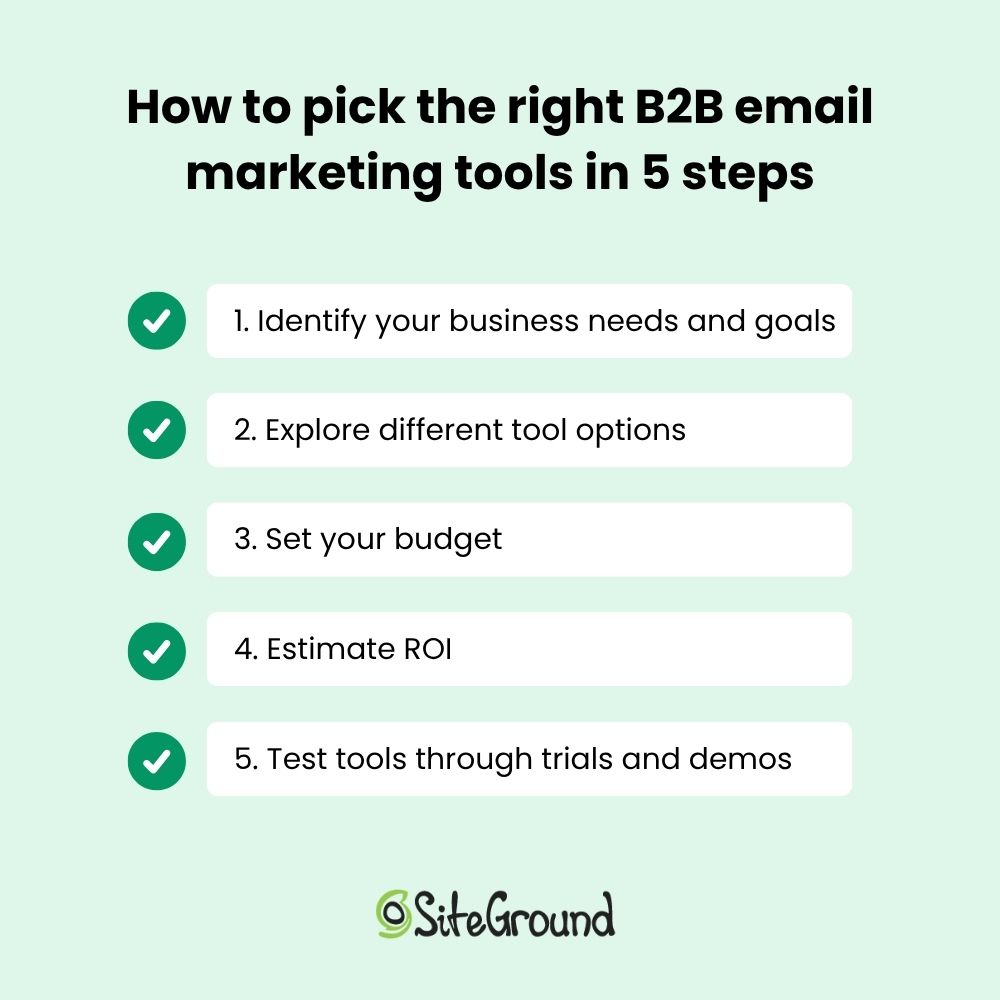
Choosing the right B2B email marketing tool can feel like a big decision. With the features mentioned above in mind, your next step is to select the right tool for you. Start with a clear understanding of your business needs and goals, and know what you want to achieve—this will steer you in the right direction. Determining your priorities will help you clarify what to look for in a B2B email marketing tool, such as automation features, analytics, or integration capabilities.

Next, explore the different tools out there. Compare their unique features to find the ones that best match your specific needs and offer the functionalities that matter most to you. Take note of their pricing and terms to better assess the financial commitment required.

And speaking of finances, budget is always a consideration, so take a moment to evaluate your financial constraints and the potential return on investment (ROI). Begin by comparing the pricing models and features of various tools to see which ones fit within your financial plan at the same time they meet your needs. 

To assess ROI, consider how the tool’s features can contribute to achieving your marketing goals, such as increasing lead conversions or improving campaign efficiency. Calculate the potential revenue or savings these improvements could bring to your business. Estimating both cost and potential benefits helps verify the tool you choose is worth the investment and aligns with your financial goals.

Lastly, trial periods and demos are your best friends. They give you a chance to test the waters and see if the tool feels right for your business before making a commitment. It’s like taking a car for a test drive before buying—always a smart move!
How to pick the right b2b email marketing tools

Getting the Most from B2B Email Software: Tips and Real-Life Examples

Discover practical tips and real-life examples below to help you maximize your B2B email software and achieve great results.

Build a Targeted Email List

Segmentation and personalization are musts in email marketing. They allow businesses to customize messages for specific audience groups. For example, Oasis Real Estate, a client of SiteGround, used SiteGround’s Lead Generation plugin to grow their contact list easily. By placing sign-up forms on all their pages, they automated lead synchronization. This saved them time and improved the personalization of their communications.

Create Catchy Subject Lines and Engaging Content

Coming up with catchy subject lines and writing engaging content is crucial for grabbing your audience’s attention. Using the right tools can make this process easier and more effective. These tools help you craft messages that connect with your audience, which increases engagement and makes your content stand out.

In the case of Oasis Real Estate, they utilized SiteGround’s template feature to simplify the creation of consistent and high-quality campaigns. This approach not only saved time but also ensured that their emails were engaging and professional, connecting effectively with their audience.

Time and Optimize

Optimizing the timing and frequency of emails can significantly improve engagement rates. Using the right scheduling capabilities ensures your emails reach recipients at the most opportune moments.

Apply A/B Testing and Optimization Techniques

A/B testing allows businesses to experiment with different elements of their emails to determine what appeals most to their audience. 

To conduct A/B testing with SiteGround, create different email versions to test various elements like subject lines or images, and send them to segmented audience groups by dividing your email lists. Be sure to test one variable at a time to accurately determine which changes impact performance. Use SiteGround’s analytics to track performance metrics, compare results, and apply insights to optimize future campaigns.

Make the Most of B2B Email Marketing Automation

Automation can improve your email marketing by making workflows easier and more efficient. Streamlining tasks like lead synchronization and campaign scheduling lets companies focus on other important areas, increasing overall efficiency.

Get started with email automations today! Try email automation via SiteGround Email Marketing!
SiteGround Email Marketing Platform

Learn from B2B Email Marketing Success Stories

Learning from B2B email marketing success stories can provide valuable insights for improving your own campaigns. In the case of Oasis Real Estate, they effectively used email marketing tools to achieve remarkable results. They simplified their processes by using automation features for lead synchronization and campaign scheduling, which allowed them to focus on creating engaging content.

Additionally, they conducted A/B testing to refine their strategies, using analytics to drive smarter, data-backed decisions.. This approach led to a 30% increase in open and click-through rates, demonstrating the power of well-executed email marketing. 

This case study shows how using the right tools and methods can make all the difference in succeeding with B2B email marketing.

Key Takeaways for Choosing B2B Email Marketing Tools

In wrapping up our exploration of B2B email marketing, let’s highlight some key takeaways to keep your campaigns buzzing with success. 

First, making informed decisions about the tools you use is key—think of it as picking the perfect partner for a dance. This means choosing tools that align with your business goals, strengthen efficiency, and offer features that cater to your specific needs.

Top features to consider include automation, analytics, and customization options that can help you waltz through your email marketing tasks. Remember, the world of email marketing is ever-evolving, so keep those strategies fresh by continuously evaluating and adapting for the best results. 

Selecting the right tools and tactics lets your email marketing shine and truly connect with your audience. So, don’t hesitate to explore and experiment with different tools until you find the perfect fit for your business needs. Happy emailing!
13 Great Email Header Design Ideas + Best Practices

Email Header Design Ideas and Best practices

Your email header is prime real estate—it’s the first thing people see, and it sets the tone for everything that follows. When the design looks sharp and on-brand, with your colors, logo, and fonts, it instantly tells people you mean business. You don’t have much space, so make it count: be clear, be bold, and make sure your message lands at a glance.

This article will explore exactly how to create an email header design and provide 13 great email header design examples to inspire you.

SiteGround email marketing

The Role of Email Headers in Marketing

Email headers are often the first thing readers notice when they open an email, and that’s what makes them such an important marketing asset. It’s the place to position your company logo and other key elements that encourage readers to dive into the email content. 

Additionally, keeping a consistent brand look across email headers helps build familiarity and trust with your audience, which can lead to more conversions and sales.

What Is a Good Email Header?

A good email header captures attention by using the right visuals and effectively communicates your brand’s identity through elements like logos and colors. 

Essential Elements of Email Headers

Creating a professional email involves several key components that work together to strengthen brand recognition and engagement. Let’s review the essential elements of an email header to help you get a better understanding and knowledge of what to look for in your designs.

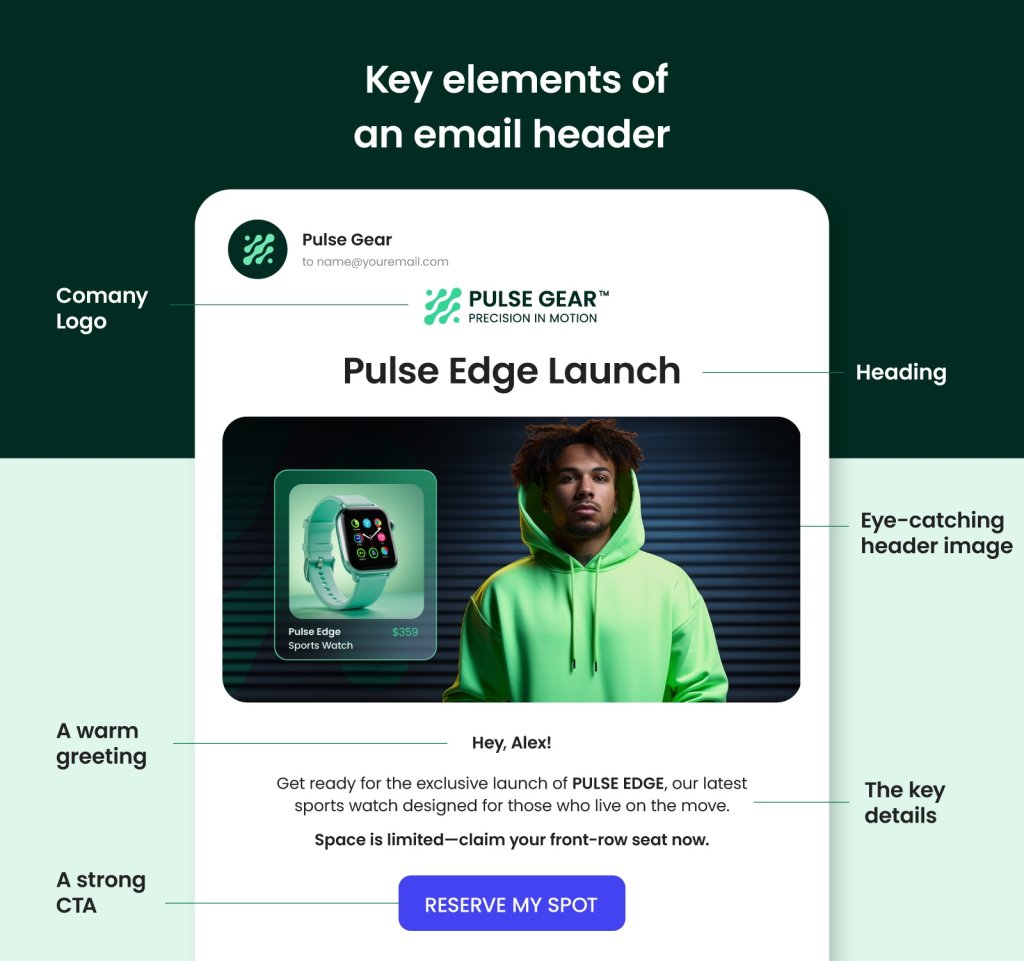
key elements of email header

An email header usually starts with the company name and logo, which helps you instantly recognize who the message is from. A clear heading follows, letting you know what the email is about right away. Adding a personal touch, like a tagline saying “Hey, Alex,” makes you feel appreciated and part of the conversation. Sometimes, there’s even a CTA inviting you to click a link or explore an offer.

Altogether, these elements create a welcoming start that grabs your attention and makes you want to read more.

The Importance of Email Header Design

Email headers can really make a difference in how well your emails perform. Headers help your emails stand out and become familiar to your subscribers. This can significantly impact email marketing metrics like open rates and engagement.

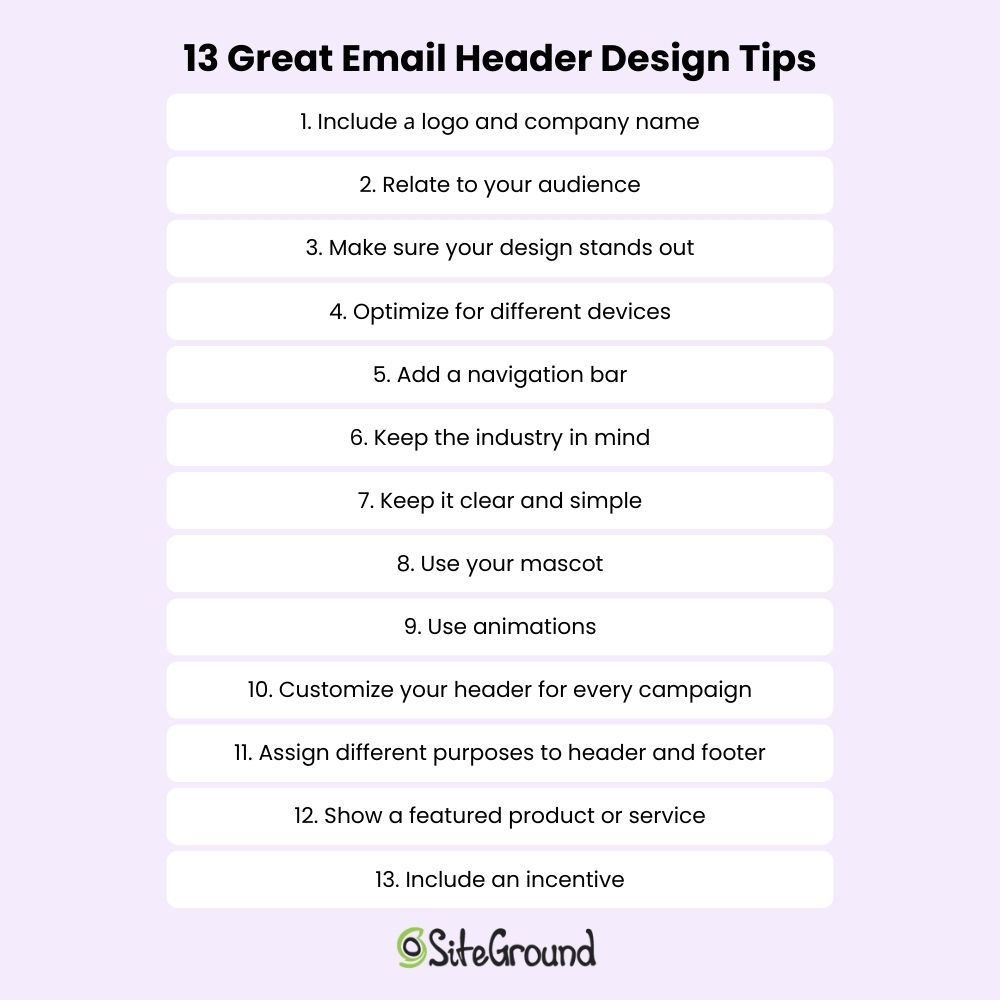
13 Tips for Great Email Header Designs + Examples

Capturing your audience’s attention from the start begins with designing an effective email header. It not only sets the tone for your email but also reinforces your brand’s identity. Using creative layouts and personalized elements can make your emails more engaging and memorable. Consistency in design helps maintain brand recognition, while incorporating links and calls to action can improve user experience. Here are 13 tips with examples to guide you in creating standout email headers:

email header design tips

1. Include a Logo and Company Name

Featuring your logo and company name in the email header is an excellent way to emphasize your brand identity.

⭐Yelp provides a good illustration prominently featuring their logo and company name.

email header design yelp
Source: Really Good Emails

✅ Why It’s Effective: Placing Yelp’s logo and company name at the beginning of the email immediately strengthens brand recognition and trust. The straightforward design keeps the focus on Yelp, making it easy for customers to identify and remember their trusted source for local business reviews.

2. Relate to Your Audience

Connecting with your audience on a personal level can make all the difference in how they perceive your brand.

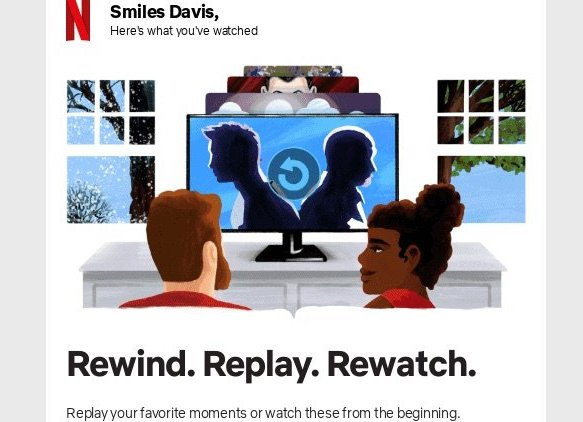
⭐A noteworthy example of this approach comes from Netflix. The brand uses personalized messages like “Here’s what you’ve watched” with user-specific recommendations.

email header design netflix
Source: Really Good Emails

✅ Why It’s Effective: Talking directly to the user about their interests makes them feel special and understood, which strengthens engagement.

3. Make Sure Your Design Stands Out

To make your email headers stand out in busy inboxes, use images, animations, and colors to catch attention and establish your visual identity. A simple design with the right font ensures readability and focuses on key information, guiding readers toward desired actions while conveying your brand’s message effectively.

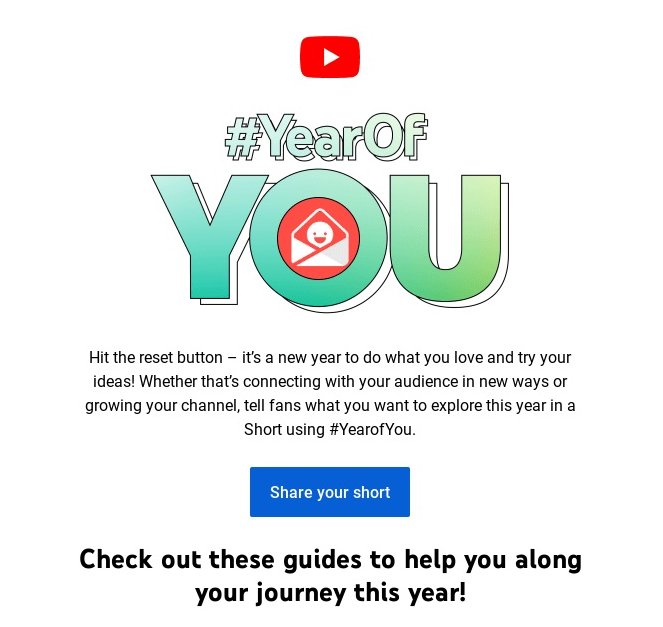
⭐YouTube stands out as a great example of including striking visuals in their “Year of YOU” campaign.

email header design youtube
Source: Really Good Emails

✅ Why It’s Effective: Eye-catching images draw people in and match YouTube’s creative vibe, making the email visually appealing and consistent with the brand’s identity.

4. Optimize Your Email Header Size for Different Devices

The email header size is key for design and reader engagement. With most emails opened on mobile, a responsive design is a must. Use HTML header templates and test headers on various devices to ensure they display correctly. For desktops, aim for 600 pixels wide and 150-200 pixels high; for mobiles, 320-480 pixels wide and 100-150 pixels high.

Make sure logos and CTAs are clear and readable. A well-sized header maintains a professional look, enhancing readability and interest. Focus on a balanced design to highlight key elements without overwhelming the viewer.

⭐ Grammarly uses a clean, responsive header design that looks good on all devices.

email header design grammarly
Source: Really Good Emails

✅ Why It’s Effective: Grammarly’s design keeps the text and images centered, regardless of the device the reader is using. Both the text and images are fully readable and strategically positioned, ensuring nothing distracts the eye while reading on either mobile or desktop.

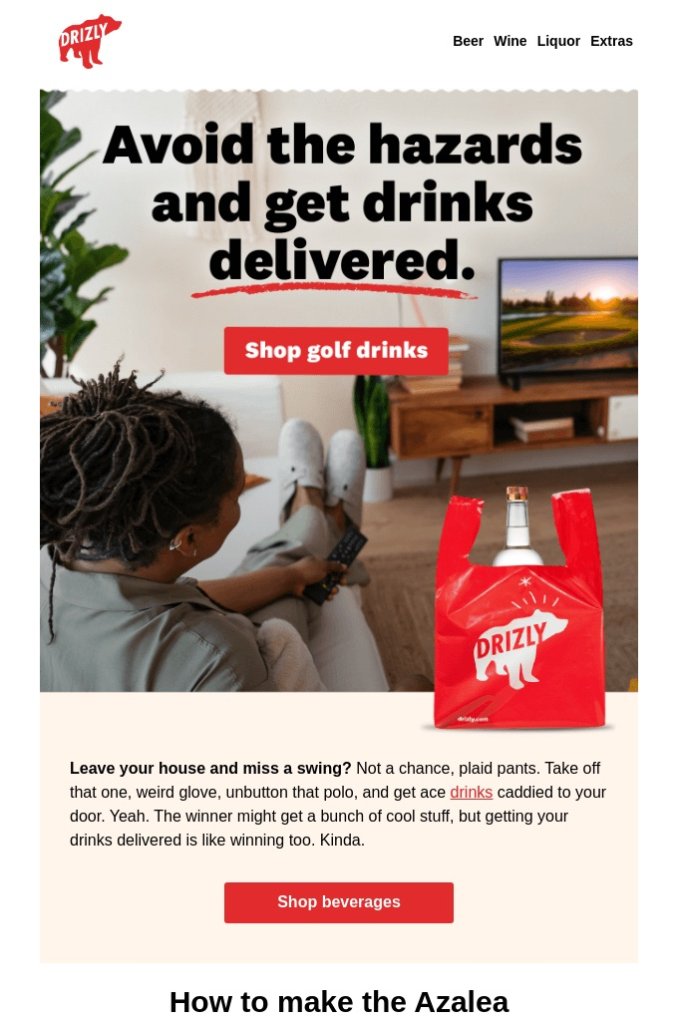
5. Add a Navigation Bar

Some brands incorporate a navigation bar at the top of their email headers to make it easier for readers to explore the content.
⭐ Drizzly serves as a great example for including a navigation bar for seamless browsing.

email header design drizzly
Source: Really Good Emails

✅ Why It’s Effective: This approach allows users to easily click through your content, making the experience more visually appealing and intuitive for navigation.

6. Keep the Industry in Mind

Your design reflects the industry in which your company operates, so customize email headers for the respective industry. Creative businesses might use bold colors, while financial firms may opt for classic styles. Understanding your audience and adding elements like logos and social media links can make your emails more engaging and true to your brand.


⭐ Koala Eco utilizes simple visuals with eco-friendly colors and a bee image to emphasize their commitment to natural products.

email header design koala eco
Source: Really Good Emails

✅ Why It’s Effective: Koala Eco is a great example of keeping the industry in mind because their simple visuals and eco-friendly colors, paired with a bee image, perfectly convey their commitment to natural and sustainable products.

7. Keep It Clear and Simple

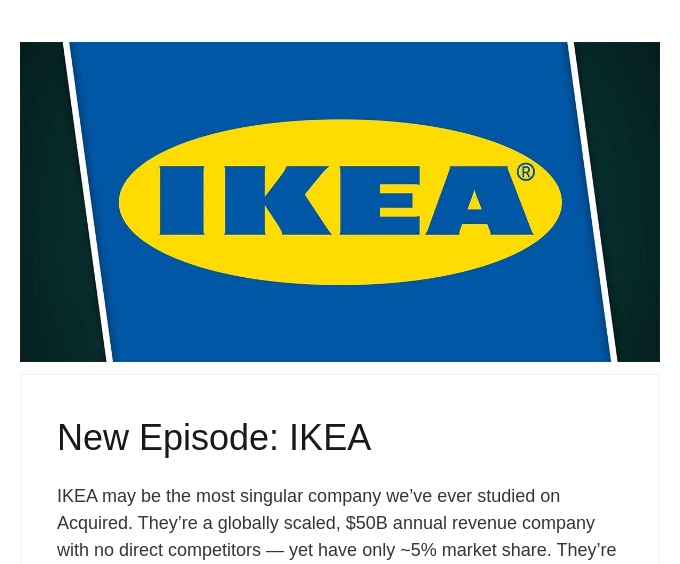
Keeping your header clear and simple ensures that your message is immediately recognizable and easy to understand.

⭐ When it comes to minimalism and simplicity, IKEA is king. The brand features minimalist header designs with just the logo and a sleek image.

email header design ikea
Source: Really Good Emails

✅ Why It’s Effective: The clean design lets the brand stand out, appealing to IKEA fans who love simple and functional style.

8. Use Your Mascot

Incorporating a mascot, such as an animal or other character that represents your brand, into your email header can create a memorable and personable connection with your readers, making your brand more relatable and recognizable.

⭐ Tradegecko uses the Gecko in their email headers, which is a great example of how incorporating a mascot can make the brand more relatable and memorable, helping to establish a friendly connection with readers.

email header design tradegcko
Source: Really Good Emails

✅ Why It’s Effective: The mascot is instantly recognizable and adds a friendly touch, which helps build a loyal audience.

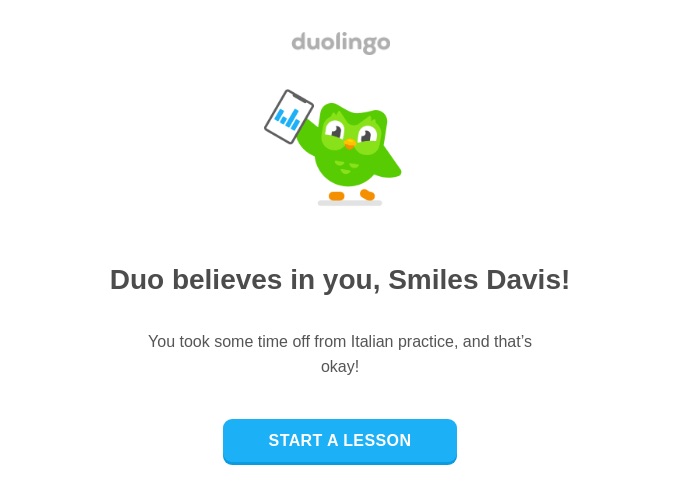
9. Use Animations

Using animations in your email header can capture attention and add a dynamic element to your message, making your brand more engaging and lively.

⭐ Known for their playful approach, Duolingo exemplifies how subtle animations, like their owl mascot flapping its wings, can capture attention and add a dynamic element to your message.

email header design duolingo
Source: Really Good Emails

✅ Why It’s Effective: Fun animations are engaging without being too much, reflecting Duolingo’s playful approach to language learning.

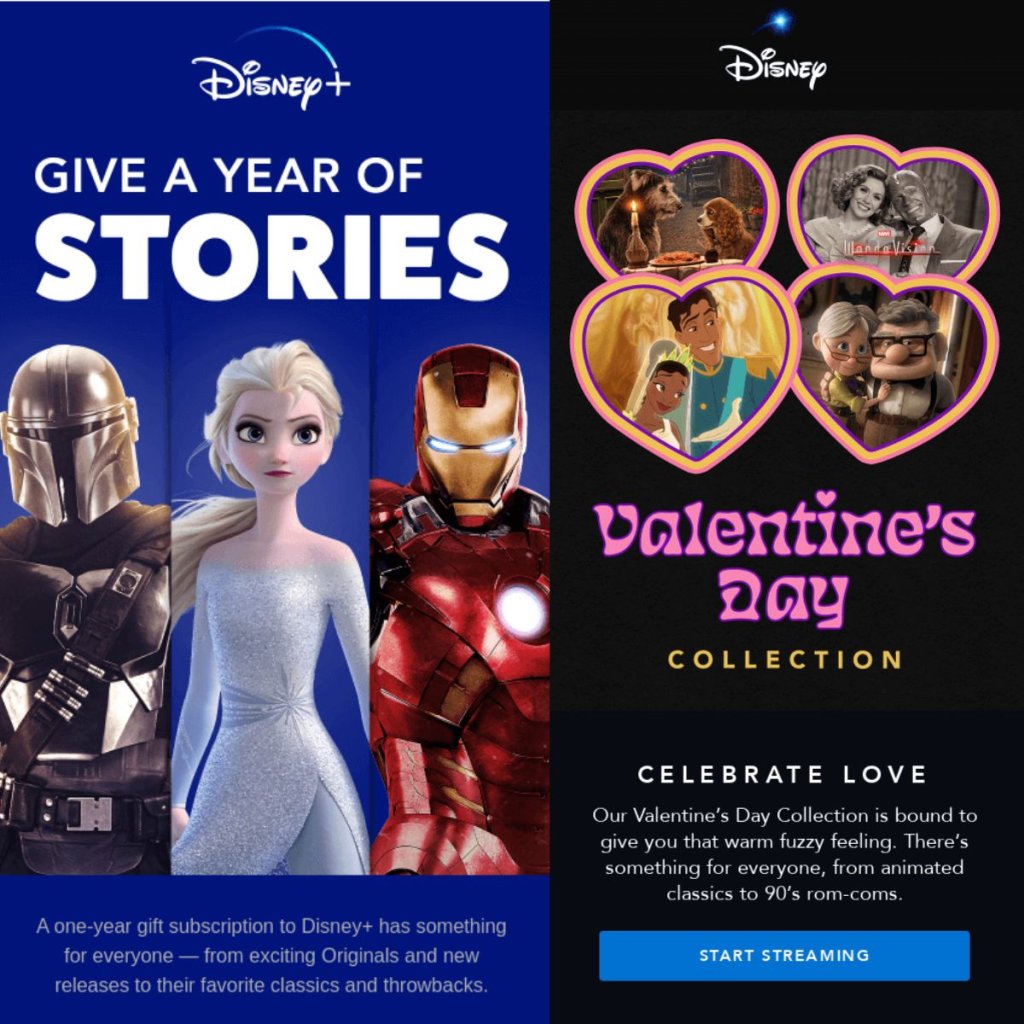
10. Customize Your Header for Every Campaign

Your email header isn’t just a static space for your logo or navigation—it’s valuable space for driving home your message. Adapting it for each campaign can make a big difference. From seasonal visuals to campaign-specific taglines, customizing your header keeps your emails cohesive, timely, and more engaging.

⭐ Disney updates their headers to match each campaign—not just with branding elements, but with visuals and messaging that reflect the theme.

email header design disney
Source: Really Good Emails

✅ Why It’s Effective: By customizing headers to fit different themes, you keep your content fresh and engaging. It shows off your brand’s creativity and adaptability, ensuring each email feels relevant and exciting—just like how Disney keeps its audience captivated with imaginative storytelling.

Assigning different purposes to your header and footer can strategically guide your audience’s actions, maximizing engagement and enhancing user experience by offering clear calls to action in distinct areas of your email.

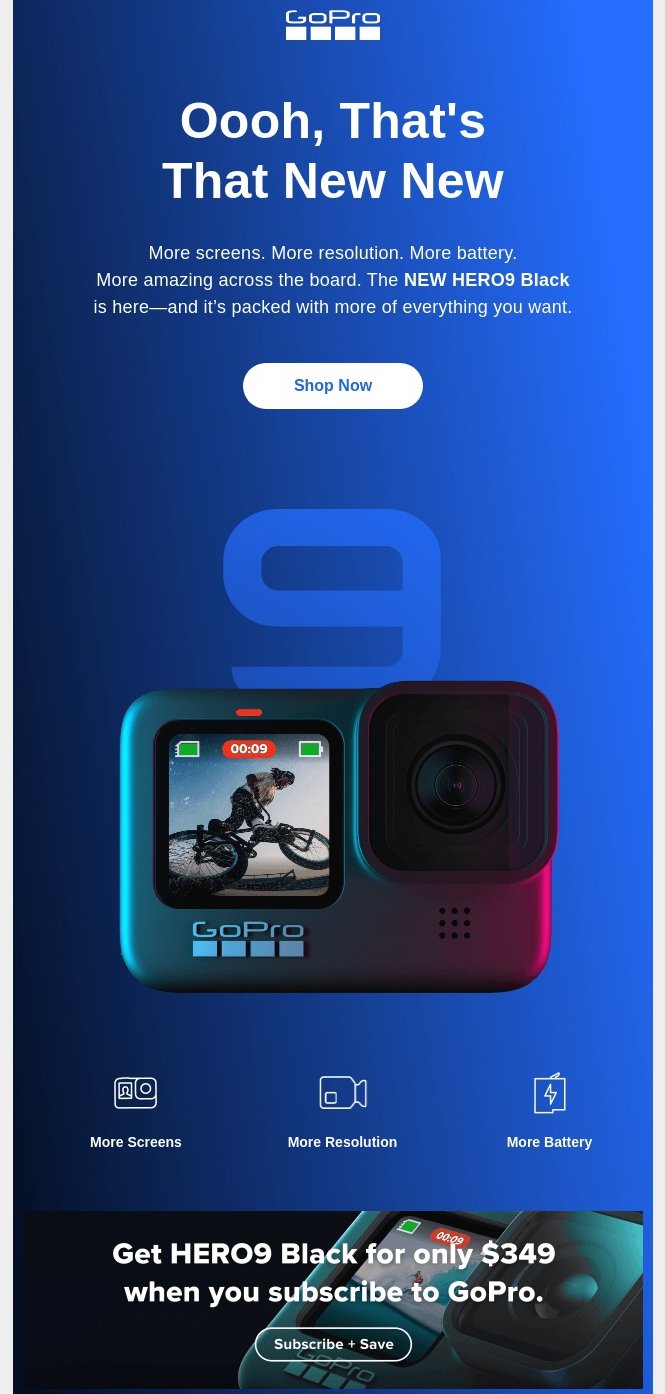
⭐ GoPro uses a “Shop Now” CTA in the header and a “Subscribe” CTA in the footer, effectively guiding users towards immediate action while also encouraging ongoing engagement, making it a strong example of strategic CTA placement.

email header design gopro
Source: Really Good Emails

✅ Why It’s Effective: Clearly distinguishing between the header and footer with specific CTAs helps guide the reader’s journey, encouraging immediate action while also nurturing ongoing engagement with GoPro’s community.

Featuring a specific product or service in your email header can draw immediate attention and attract your audience. This technique effectively promotes key offers or highlights that align with your marketing goals.

⭐ Nike features free shipping offers in their email headers, effectively drawing attention to a key incentive. This encourages customers to complete their purchases, demonstrating a smart use of promotional messaging.

email header design nike
Source: Really Good Emails

✅ Why It’s Effective: Putting a product or offer front and center catches the eye and gives readers a reason to click and explore more.

13. Include an Incentive

An incentive placed in your email header can quickly engage your audience, providing a persuasive reason for them to interact with your content.

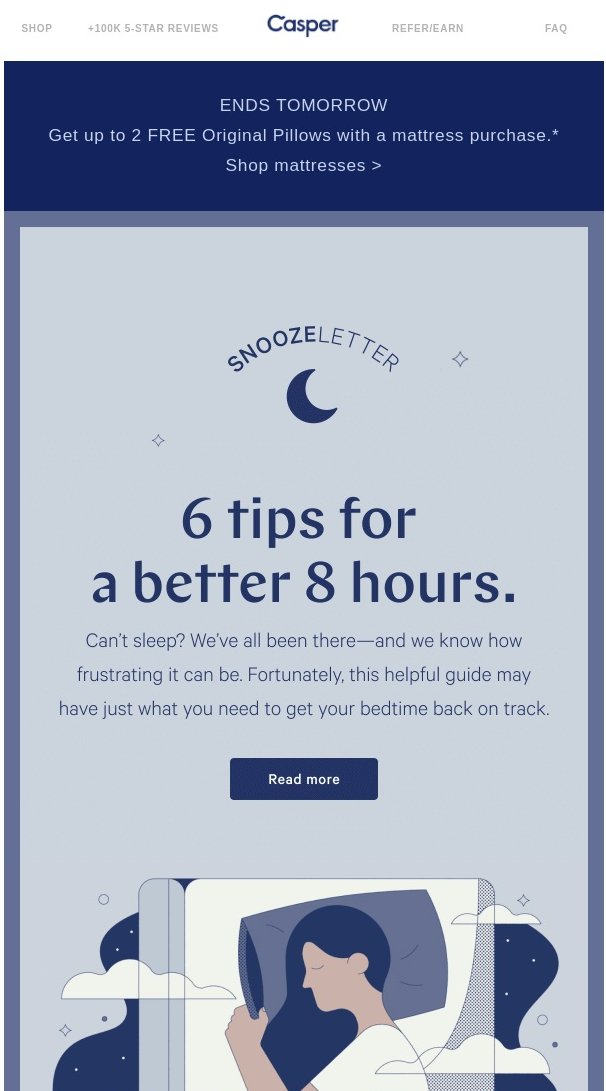
⭐ Casper places incentives in the header, grabbing attention and encouraging customers to act, which is a smart way to increase engagement.

email header design
Source: Really Good Emails

✅ Why It’s Effective: An enticing offer immediately grabs attention and encourages readers to dive deeper into the email, increasing sales and engagement.

SiteGround Email Marketing

An email header is key to shaping a brand’s identity and building trust with readers. The right visuals and tone encourage readers to explore the content further. Crafting engaging email headers with visually appealing elements, like graphics and concise text, can effectively draw the reader in and increase interaction with the audience.

But don’t forget: it’s important to optimize headers for different screen sizes to ensure they connect with various audience segments and work well across devices. Encourage readers to follow best practices and look for inspiration from examples. Highlight how versatile email header makers can be in creating graphics not just for emails but also for social media. 

A simple, well-designed header can improve user experience and guide readers toward desired actions, making it a powerful tool for capturing attention and communicating the brand’s message. To take your email marketing to the next level, explore SiteGround Email Marketing, which can help you create and manage effective email campaigns effortlessly.

Email Engagement: Data-Driven Strategies for Success

Email Engagement

Email engagement is the foundation of a successful email marketing strategy. It’s all about how your audience interacts with the emails you send. 

In this article, we’ll explore why email engagement matters so much and share practical tips to make your emails more appealing. From adding a personal touch to figuring out the best time to hit send, we’ll explore ways to keep your subscribers hooked. We’ll also address common challenges and offer simple solutions to strengthen your email campaigns. 

Let’s dive in and discover how to make your emails an awesome part of your marketing toolkit!

What Is Email Engagement?

what is email engagement

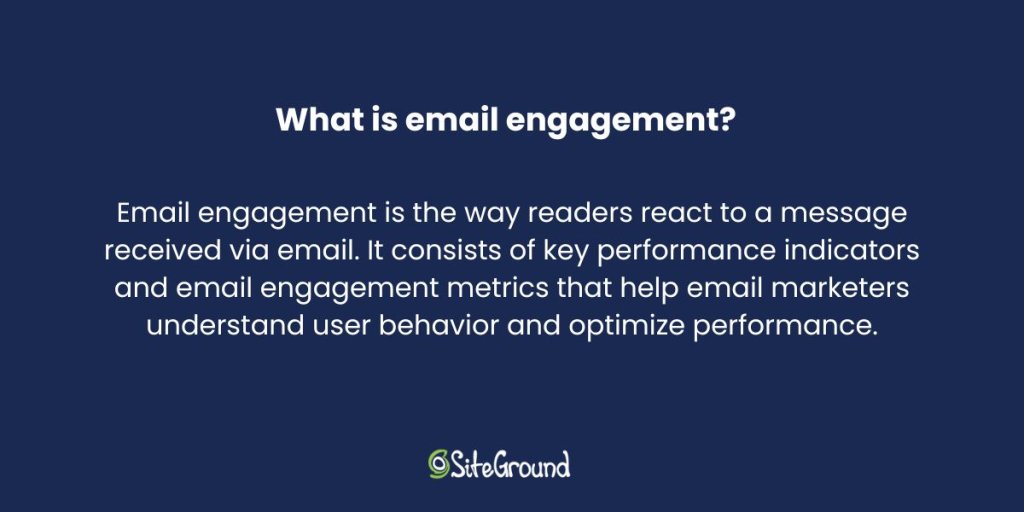
Email engagement is the way readers react to a message received via email. It consists of KPIs and engagement metrics that help email marketers understand user behavior and optimize performance. It measures actions such as opening the email, clicking links inside the email, replying to the email, forwarding or sharing it, and marking it as important (or, negatively, marking it as spam). With these foundational strategies in place, you can now delve into the specific email metrics that will help you measure and optimize your email engagement!

Elevate your email engagement with SiteGround’s Advanced Email Marketing! Use unlimited sign-up forms, automated journeys, a no-code email builder, and an AI email writer to craft engaging emails, monitor metrics, and refine your strategy for impressive results. Try it today!
Email Engagement Metrics to Keep Track of

Engagement levels reflect how well your emails communicate with your audience, which is why measuring them is important. Email analytics go beyond just the basic numbers; they give you a deeper look into how people are interacting with your emails and what they do afterward on your website. This helps in improving deliverability and allows you to fine-tune your overall email marketing strategy and its components.

To get a good understanding of how well your emails are doing, focus on specific key performance indicators (KPIs) that show how your audience is interacting with them. These metrics are important for gaining insights into how your subscribers behave, improving your email campaigns, and increasing your marketing return on investment (ROI).

Open Rate

Open rate measures the percentage of recipients who open your email. It’s a key indicator of how effectively your subject line and preview text capture attention.

High open rates suggest that your emails are engaging at first glance, indicating that your subject lines and preview text are compelling enough to prompt recipients to open the email. This is essential for getting your subscribers to interact and engage with you. 

However, with various industries, email types, and email lists, how do you know if your open rate is good? Based on data reported by SiteGround, an average open rate for small businesses using email marketing is around 36%.

To improve open rates, craft eye-catching and personalized subject lines that your audience can relate to, reflecting their interests and preferences. Personalization and segmentation can further improve relevance, while A/B testing helps identify the most effective approaches.

Click-to-Open Rate (CTOR)

The Click-to-Open Rate (CTOR) measures the percentage of recipients who click on a link within your email after opening it. This metric provides a deeper understanding of how compelling and relevant your content is to those who have shown initial interest by opening the email. A high CTOR suggests that your email content and calls to action (CTAs) are successfully engaging recipients and prompting further interaction. 

To improve CTOR, focus on delivering high-quality, relevant content and crafting clear, compelling CTAs. Personalization and segmentation can also improve the relevance of your email content, while A/B testing can help identify the most effective strategies.

Click-Through Rate (CTR)

The Click-Through Rate (CTR) measures the percentage of recipients who click on one or more links within an email, whether they opened the email or not. This metric provides insights into subscriber interest and engagement. The main difference between CTOR and CTR is that CTOR is calculated based on the number of opens, while CTR is calculated based on the total number of emails delivered.

CTR is a vital metric in email marketing, serving as a key indicator of how well your content connects with subscribers. It helps assess the effectiveness of your messaging and content, and email marketing strategy. 

Again, to improve CTR, create engaging content with clear and persuasive calls to action. Just like with CTOR, personalizing and segmenting your emails can make a big difference, and trying out different CTA placements with A/B testing can help you get better results.

Bounce Rate

Bounce rate refers to the percentage of sent emails that cannot be delivered to the recipient’s inbox due to reasons like invalid addresses or server issues.

High bounce rates can negatively impact your reputation as a sender and email deliverability, affecting overall metrics such as unsubscribe rates and click-to-open rates (CTOR).
To minimize bounce rates, regularly clean your email list by removing invalid addresses and use email verification tools to ensure higher delivery success. Monitoring engagement metrics helps identify and address factors contributing to high bounce rates.

Try SiteGround Email Marketing

Reply Rate

The reply rate measures the percentage of recipients who respond to your email, providing insight into the level of engagement and interest in your content. A high reply rate indicates that your emails are sparking meaningful conversations and fostering a sense of connection with your audience. 

To improve reply rates, encourage interaction by asking open-ended questions and inviting feedback. Personalizing your emails and making them relevant to the recipient’s interests can further increase the likelihood of receiving replies.

Forwarding Rate

The forwarding rate tracks the percentage of recipients who share your email with others, either by forwarding it directly or using social sharing buttons. This metric provides insight into how shareable and valuable your recipients find your content. A high forwarding rate suggests that your emails contain content worth sharing with others. 

To increase forwarding rates, create compelling and shareable content, and include easy-to-use sharing options. Encourage subscribers to pass along your emails to friends or colleagues who might find them useful.

Marking as Important Rate

This metric measures the percentage of recipients who mark your email as important. When emails are marked as important, they become more visible in recipients’ inboxes. 

To encourage this, make sure your content is relevant, valuable, and personalized for your audience. Additionally, you might ask subscribers to add your email to their contacts or whitelist to increase importance.

Spam Rate

The spam rate measures the percentage of recipients who mark your email as spam. Being marked as spam can damage your sender reputation and affect email deliverability. 

To avoid this, stay clear of spammy language and follow best practices in email marketing. Regularly clean your email list to remove inactive subscribers and reduce the chance of being marked as spam.

Unsubscribe Rate

The unsubscribe rate measures the percentage of recipients who opt out of receiving future emails from you. This metric provides insight into how well your content aligns with subscriber expectations and interests. A low unsubscribe rate indicates that your emails are meeting the needs of your audience, while a high rate may suggest dissatisfaction. 

To reduce unsubscribe rates, offer subscribers control over their email preferences and ensure your content remains relevant and valuable. Regularly seek feedback to understand and address any concerns.

Improve Your Email Engagement: A Step-by-Step Guide

The following steps will help you personalize your content, choose the best timing, and create compelling calls to action, all aimed at improving your email marketing efforts and building lasting relationships with your audience. Let’s dive in!

1. Personalize Your Email Content and Offers

Personalizing subject lines and email content can make them more relevant and engaging for the recipient and build stronger customer relationships. Including the recipient’s name in the subject line is a good start, but going beyond that can improve open rates. Use subscriber data to customize content and create a personal connection. Offering exclusive discounts is another effective way to attract attention and keep subscribers interested in your brand. This approach makes subscribers feel valued and appreciated.

2. Time It Right and Keep It Consistent

Finding the right timing and frequency for sending re-engagement emails is important. According to The Marketing Eye’s research, mornings (9 AM to 12 PM) are effective on weekdays, especially Mondays and Fridays. Midday (12 PM to 3 PM) is ideal for midweek emails, while afternoons (6 AM to 3 PM) are best for Sundays.

Consistent sending helps keep your audience engaged and avoids fluctuations that can hurt email engagement. Analyze when your audience is most active and likely to open emails. By segmenting your audience, you can send emails at times that work best for different groups, making it more likely that they’ll open and engage with your messages.

3. Make Clear Calls to Action

Defining the desired action is key to measuring conversion rates and enhancing email engagement. A well-designed landing page is also vital in analyzing email marketing effectiveness, as it can significantly impact conversion rates by ensuring recipients complete the desired actions.

Having a clear email message helps motivate people to take action and makes sure your message really connects with them.

4. Encourage Sharing and Forwarding

Sharing with friends is a big deal these days! To increase engagement, include social sharing buttons and encourage subscribers to forward the email to friends who might find it useful. Create content that’s interesting and shareable, and make it easy for people to share with just a click.

5. Put Re-Engagement Strategies into Action

Over time, some subscribers might become inactive, but you can spark their interest again with thoughtful re-engagement strategies. Try sending targeted campaigns that include personalized messages, special offers, or surveys to get a better sense of their preferences and focus on lead-nurturing relationships. Share one-of-a-kind content and host fun giveaways to remind them of the special value you bring and encourage them to reconnect. Adding dynamic elements like animations and interactive features can also make your emails more exciting and encourage them to dive back in.

Follow Through on Your Email Engagement

Regular check-ins help keep your emails relevant and impactful. By understanding your engagement rates, you can see what your subscribers love. Using dynamic and personalized content helps tailor your messages to what really matters to them, making your emails more appealing. Simple touches like exclusive discounts and interactive elements can make a big difference in keeping your audience engaged and happy. 

We hope these insights spark new ideas to improve your email marketing. Give them a try today and see how your engagement takes off!

Creating About Us Pages in 2026: 12 Examples and Guide

About us page header

The About Us page serves as the heart of your brand’s story. No matter the size of your business, when someone wants to learn more about you, the About Us page is likely where they’ll turn—and it’s what will help earn their trust. That’s why it’s one of the top priorities for your website.

In this post, we’ll guide you step-by-step through creating an outstanding About Us page and share some of the best page design examples to inspire you.

What is an About Us Page?

what-is-an-about-us-page

An About Us page is a section on your website designed to tell your business’s story and showcase your company, brand, product, or service. It aims to give visitors a memorable first impression and create a deeper connection with them. It provides an opportunity to share your mission, vision, team members, and the context in which the business operates. The About Us page typically includes various visual elements to communicate the brand’s identity and values effectively.

Additionally, this page provides an opportunity to share the journey of your brand, including its origins, the challenges it has overcome, and the milestones it has achieved. By doing so, you create a narrative that speaks volumes to your audience, developing a stronger connection and building trust.

The About Us page is also a platform to highlight what sets your brand apart from competitors. To show what makes your brand distinct, tell a story that highlights your unique selling point, innovative approach, or commitment to sustainability. Ultimately, the goal is to provide visitors with a thorough idea of who you are as a company and why they should choose to work with you.

How to Write an About Us Page for Your Business?

To write an effective About Us page, it’s essential to focus primarily on your brand identity. In contrast to homepages, the About Us page is dedicated to telling the story behind your business. It’s where you share your journey, values, and what makes your brand unique, helping to build a personal connection with your audience.

1. Use a Compelling Headline

A compelling headline is key to grabbing visitors’ attention on your About Us page. It’s the first thing they see, so it’s important to create a headline that not only catches their eye but also reflects what your brand is all about. By effectively communicating what your brand stands for, the headline helps visitors immediately understand your business’s mission, vision, or unique selling proposition.

The tone set by the headline is equally important, as it should align with your brand’s voice and personality, whether formal, friendly, or playful. This alignment ensures that the headline resonates with your target audience, engaging their interest and encouraging them to read further.

Additionally, a well-crafted headline can support your SEO strategy by including relevant keywords, improving your page’s discoverability in search engine results. In short, a compelling headline is a strategic element that plays a vital role in engaging visitors and setting the stage for the rest of your About Us page content.

✅ Do:

Be authentic and transparent in your headline to set the tone for the page.

❌ Don’t:

Use generic or vague language that doesn’t convey your brand’s unique identity.

⭐ Example: Nike

about us page nike

Nike’s About Us page starts with the headline “WE SERVE KIDS/ PROS/ DREAMERS/ WOMEN/ TEAMS/ COACHES/ MEN/ BEGINNERS/ GIRLS/REBELS/ ATHLETES*

*If you have a body, you are an athlete.” 

This is a great example of a message that is specific, authentic, catchy, and inclusive. It perfectly sums up what the brand is all about: welcoming everyone, from experienced athletes to those who simply dream of becoming one, to join in on their exciting and inspiring journey.

2. Share Your Unique Brand Story

This is where you define your company’s story, and highlight your unique selling proposition.

Your About Us page is a powerful place to share your company’s history and core values, helping you connect with your audience and clearly express your mission. For ecommerce websites, this connection can be particularly important, as it helps build trust with potential online customers who may not interact with your brand in person.

Ultimately, your About Us page should tell a captivating story that will appeal to your site visitors. Additionally, sharing a unique story can help you connect with your audience on a personal level, showcasing your individuality and creativity.

✅ Do:

Share genuine stories and insights about your brand to build trust and credibility.

❌ Don’t:

Overload with text. Keep your story concise and engaging.

⭐ Example: Burt’s Bees

about us page burts bees

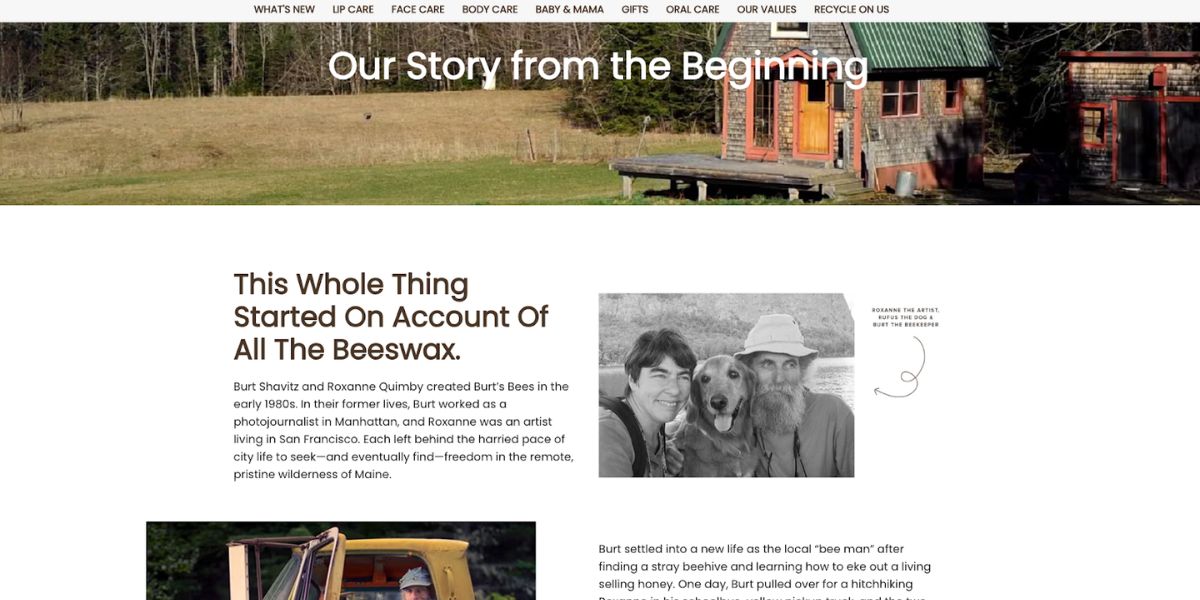
Burt’s Bees’ About Us page shares their unique story of how the brand started from humble beginnings with homemade beeswax candles sold at local craft fairs. They highlight their dedication to using natural ingredients and promoting sustainability, which appeals to environmentally conscious consumers. By sharing their authentic brand story, they create a strong connection with their audience.

3. Understand Your Audience

Who are you talking to, and how do you want them to perceive you? Answering these questions will help you position your brand effectively.

Be authentic and transparent. Add elements like the company’s origin story, an anecdote, or anything that will spark the reader’s curiosity. 

Presenting the brand owner as a real person creates a sense of transparency and down-to-earth storytelling. Sharing a personal story not only highlights the individual’s credentials but also engages the audience and potential customers by making them feel like part of the narrative. This approach helps build a connection and trust with your readers.

✅ Do:

Identify your audience. Clearly define who your target audience is and tailor your content to speak directly to their interests and needs.

Highlight personal stories. Present the brand owner and team as real people to create relatability and engage readers on a personal level.

❌ Don’t:

Assume one-size-fits-all. Avoid creating content that is too generic or broad, which may not resonate with your specific audience.

Overwhelm with details. While sharing stories, keep them concise and relevant to maintain the reader’s interest.

⭐ Example: Glossier

about us page glossier

Glossier’s About Us page speaks directly to beauty enthusiasts by emphasizing their commitment to creating products inspired by real-life consumer feedback. They share personal insights from their founder, aligning their content with the interests and needs of their target audience. The use of close-up photographs on the page adds a personal and intimate touch, making visitors feel more connected to the brand.

4. Introduce Your Team and Culture

Introduce key team members by sharing their bios and photos, highlighting their unique contributions to the team. Not only does this showcase their expertise, but it also provides insights into your company culture and work environment. By doing so, you help your audience understand what makes your team stand out. 

Including authentic images that genuinely represent your team or company culture can strengthen the sense of community and make your About Us page more relatable to viewers. This personal touch allows potential customers to connect with the people behind the brand, building a sense of trust and familiarity.

✅ Do:

Use real stories and visuals to provide insights into your work environment and what makes your team unique.

❌ Don’t:

Neglect updates. Don’t forget to update team information regularly to reflect current team members and roles, ensuring accuracy and relevance.

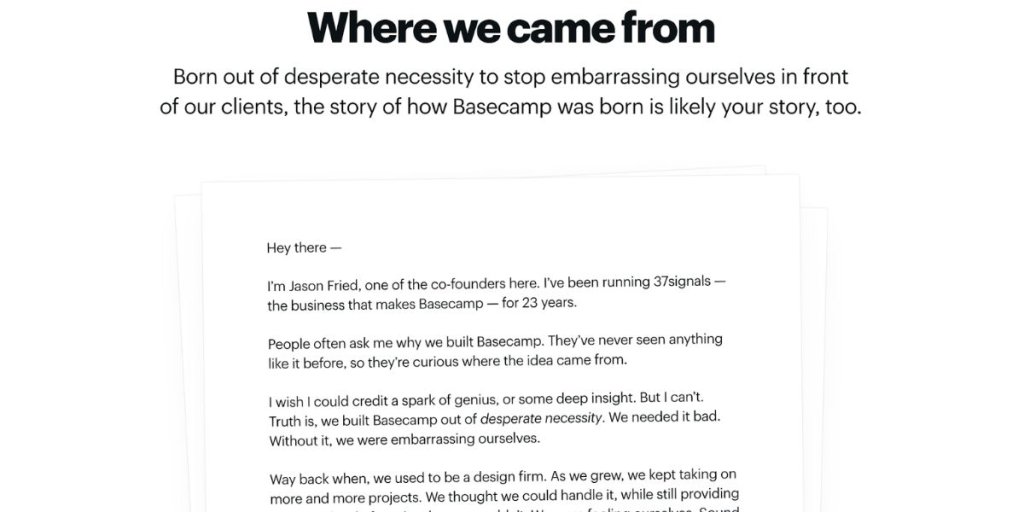
⭐ Example: Basecamp

about us page basecamp

Basecamp’s About Us page offers a glimpse into their team and culture by providing personal insights and stories about their team members. They share photos and anecdotes that highlight their remote work philosophy and commitment to work-life balance, which makes the team feel approachable and relatable. This openness helps build trust and a sense of connection with their audience.

5. Incorporate Engaging Visuals and Multimedia

Use images and videos on your About Us page to enhance storytelling and illustrate the brand’s evolution.

Visual elements such as images and videos are great attention-grabbing tools for the web design of your About Us page. Use them to enhance storytelling. Incorporating a hero image can engage website visitors immediately, establish a personal connection, and effectively communicate key company values and business model. Show the evolution of your business from its first creation to its current state. 

Consider using a clean and organized layout to ensure that your visuals complement the text without overwhelming it. This balance helps maintain a smooth flow and ensures that your audience can easily navigate through your brand’s story.

✅ Do:

Use visuals to enhance storytelling and create a more engaging experience.

❌ Don’t:

Use generic stock photos that don’t represent your brand authentically.

Let visuals overwhelm the text; maintain a balanced and organized layout.

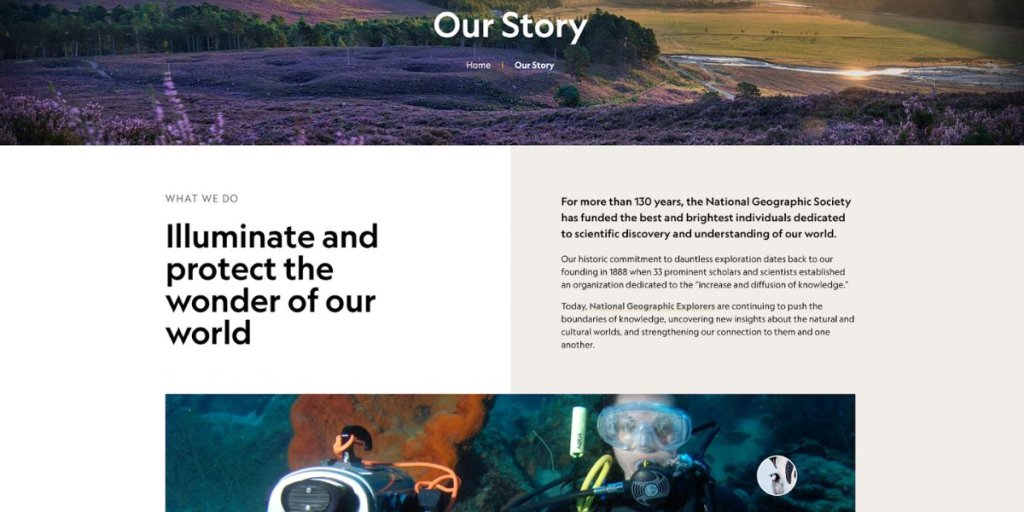
⭐ Example: National Geographic

about us page national geographic

National Geographic’s About Us page captivates visitors by using stunning visuals and multimedia to share their brand’s dedication to exploration and education. Breathtaking photography and engaging videos highlight their commitment to documenting and preserving the world’s natural and cultural wonders. This approach draws in visitors and effectively communicates their mission and impact.

6. Add Clear Calls to Action

Clear calls to action (CTAs) direct visitors toward desired actions, such as exploring products or making contact. Create a clear and logical structure for your web page design. This will make navigation easier, increase readability, and generate more traffic. Make sure to organize your content into separate sections, and keep your paragraphs short and easy on the eye.


Include relevant links and CTA where necessary. Once they know more about you, encourage them to take the next step—whether it’s reaching out, signing up, or exploring your offerings further. This engagement helps visitors find relevant content quickly, build awareness, and move on to the next step of their customer journey.

✅ Do:

Use clear and direct language. Craft calls to action that are straightforward and clearly communicate the desired action, such as “Contact Us” or “Learn More.”

Strategically position CTAs in areas of the page where they are easily visible and logically fit within the content flow.

Incorporate relevant links that direct visitors to relevant content or actions, enhancing their journey and engagement with your brand.

❌ Don’t:

Avoid cluttering the page with too many CTAs, which can confuse visitors and dilute the focus of your message.

Ignore mobile responsiveness. Avoid designing CTAs that are not optimized for mobile devices, as this can hinder user experience for visitors accessing your site on smartphones or tablets.

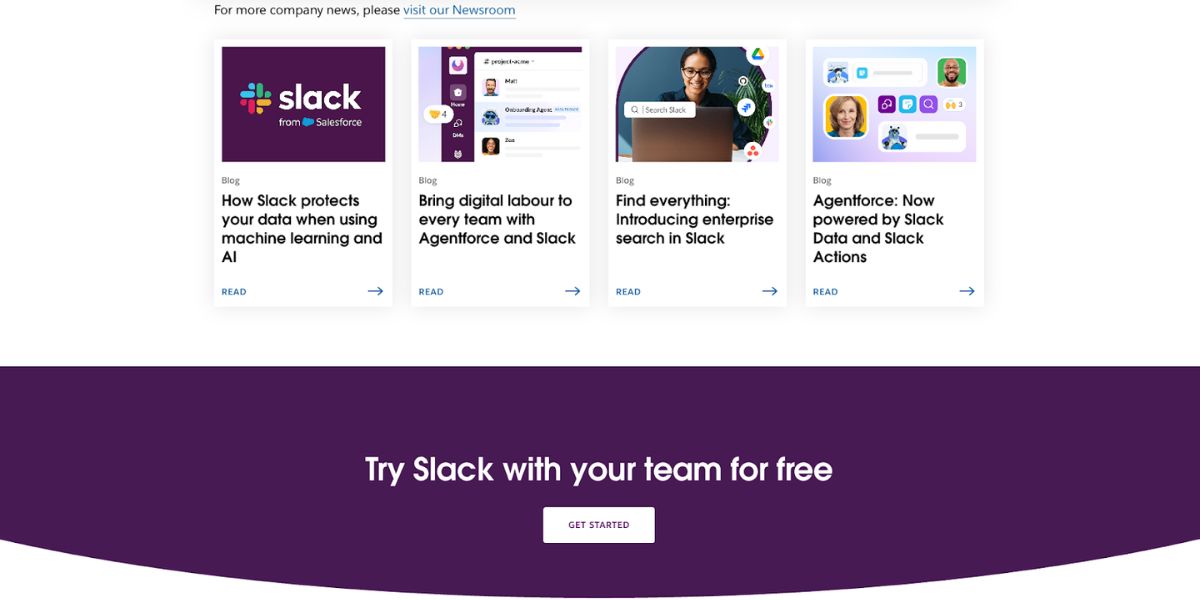
⭐ Example: Slack

about us page slack

Slack’s About Us page includes clear calls to action that guide visitors to explore their platform. They use direct language like “Try Slack for Free,”, “Get a Demo” or “Get Started” and strategically position these CTAs throughout the page to encourage users to engage with their product, discover its benefit, and progress through the customer journey steps.

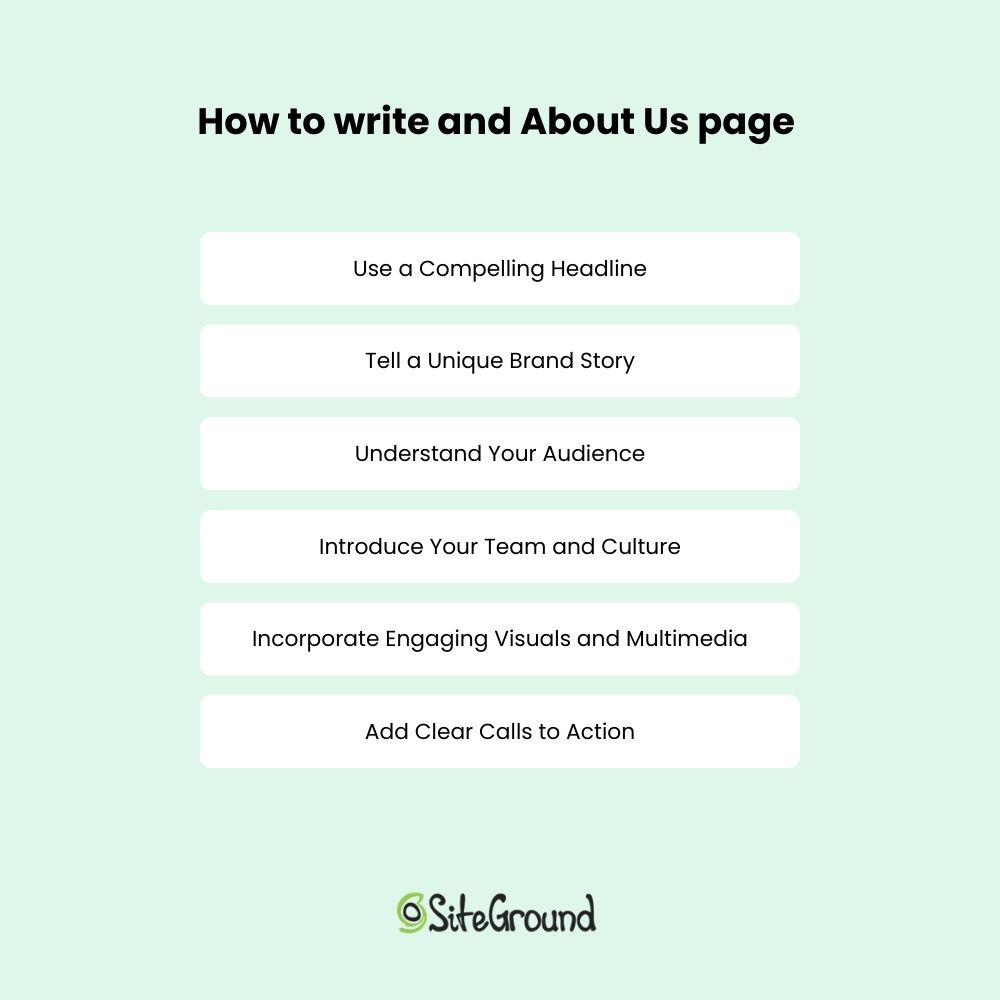
how to write an about us page

About Us Page Templates and Tools

Creating an About Us page that effectively communicates your brand’s story and values doesn’t have to be overwhelming. With the right templates and tools, you can streamline the design process and focus on crafting compelling content. Whether you’re looking for a starting point or seeking to customize every detail, there are resources available to help you build a professional and engaging page that reflects your brand’s unique identity.

Discover how SiteGround Website Builder can streamline the creation of your About Us page. With customizable templates, user-friendly design tools, and drag-and-drop functionality, SiteGround helps you craft a page that’s both professional and visually stunning, and reflects your brand’s unique identity and style. Start building your standout page today!

Great About Us Page Examples

Crafting an About Us page that truly connects with your audience can make a big difference. Here are some standout examples from different companies. You can find inspiration and ideas for your page. 

Canva

about us page canva

Canva’s About Us page is a vibrant and visually engaging experience that mirrors the creative essence of the brand. Through the use of colorful visuals and a clear narrative, Canva effectively communicates its mission to empower everyone to design anything, anywhere. The page resonates with its creative audience and future clients by highlighting the company’s journey, values, and the impact of its design tools, making it relatable and inspiring.

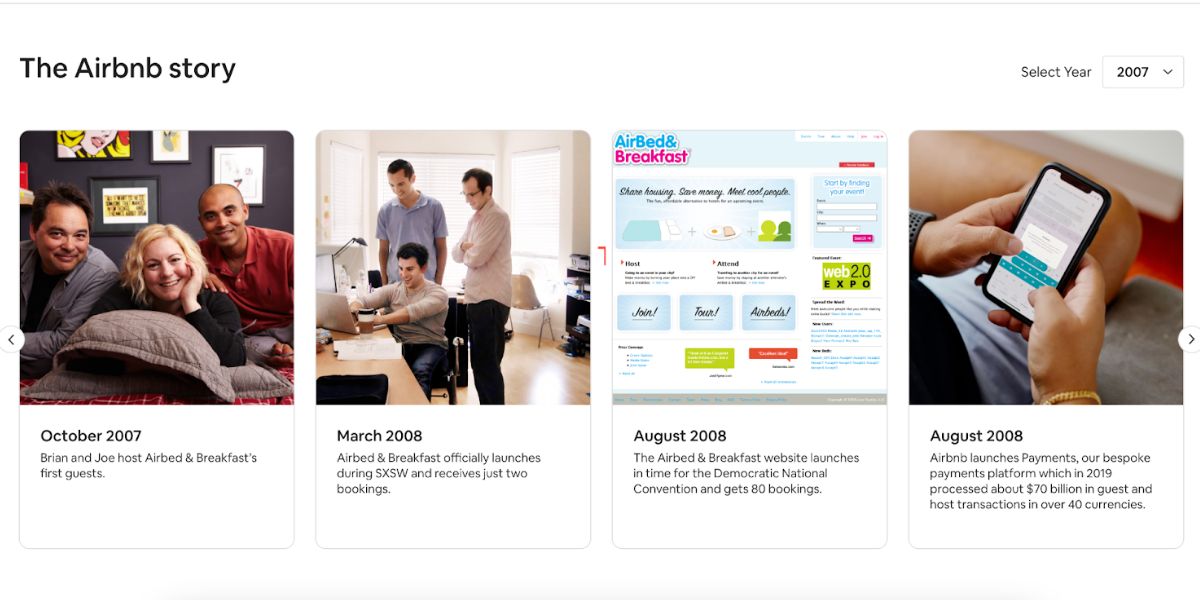
Airbnb

about us page airbnb

Airbnb’s About Us page tells a personal and heartfelt narrative that connects deeply with its audience. By sharing stories of community, belonging, and unique travel experiences, Airbnb creates an emotional bond with visitors. Authentic imagery and testimonials from hosts and guests enhance this connection, illustrating how Airbnb fosters a sense of belonging and community around the world.

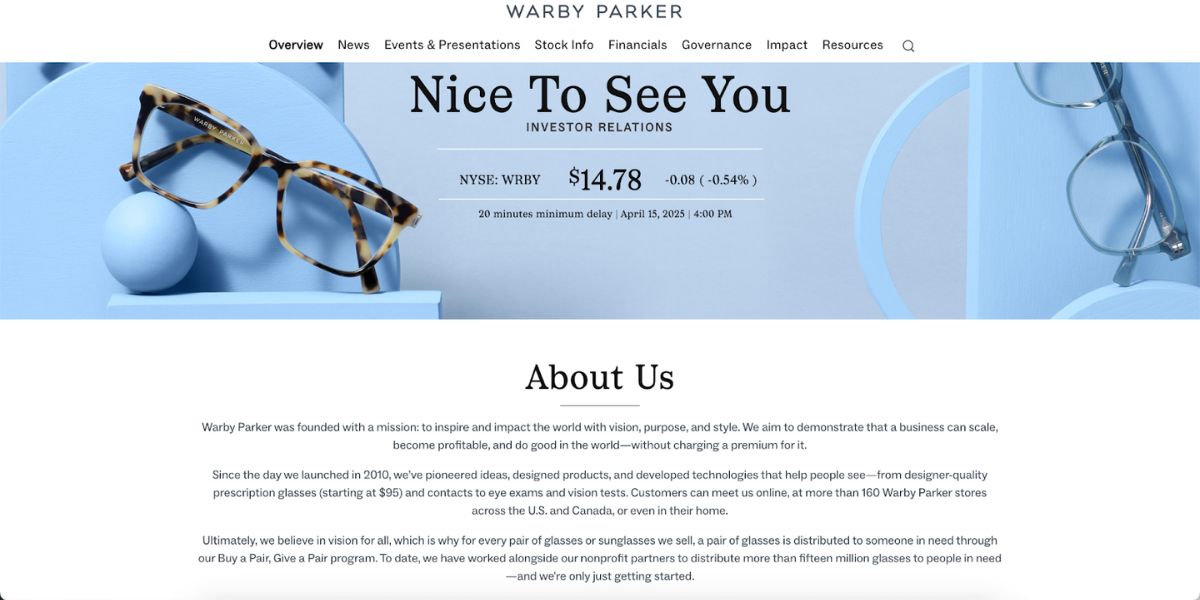
Warby Parker

about us page warby parker

Warby Parker’s About Us page is straightforward yet engaging, focusing on the company’s mission to provide affordable eyewear while making a positive social impact. The page highlights Warby Parker’s values and commitment to social responsibility through a combination of engaging visuals and a concise narrative. This approach effectively communicates the brand’s dedication to both quality products and ethical practices.

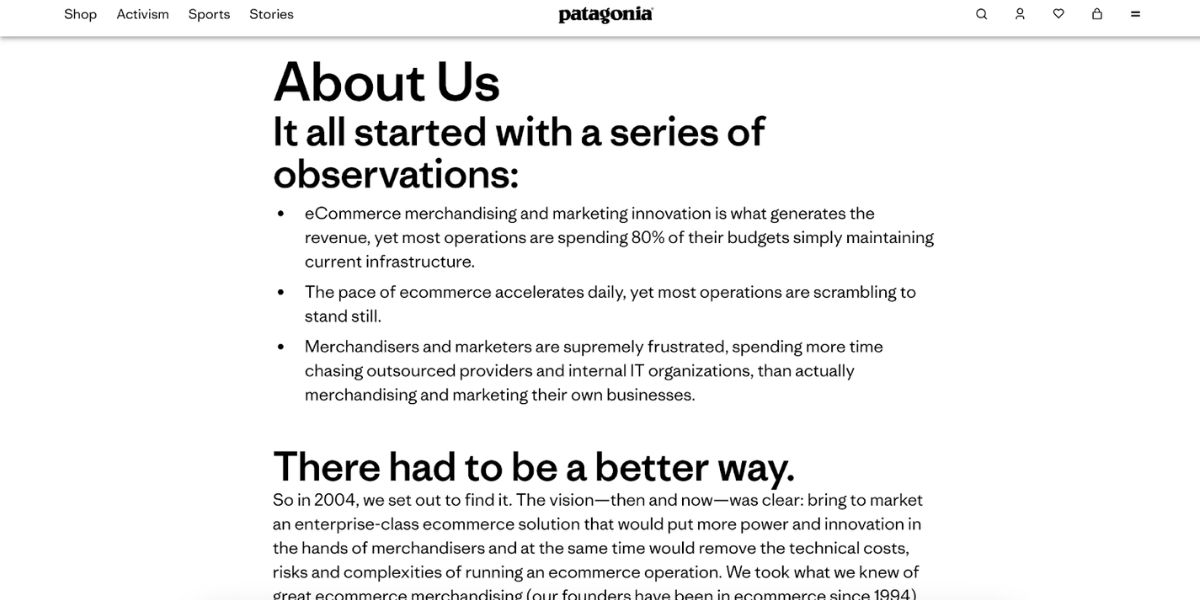
Patagonia

about us page patagonia

Patagonia emphasizes the company’s commitment to environmental sustainability and ethical practices. The page shares Patagonia’s dedication to conservation efforts and its mission to use business as a force for environmental good. Through compelling storytelling and imagery, Patagonia highlights its role as a leader in sustainability, appealing to environmentally conscious consumers.

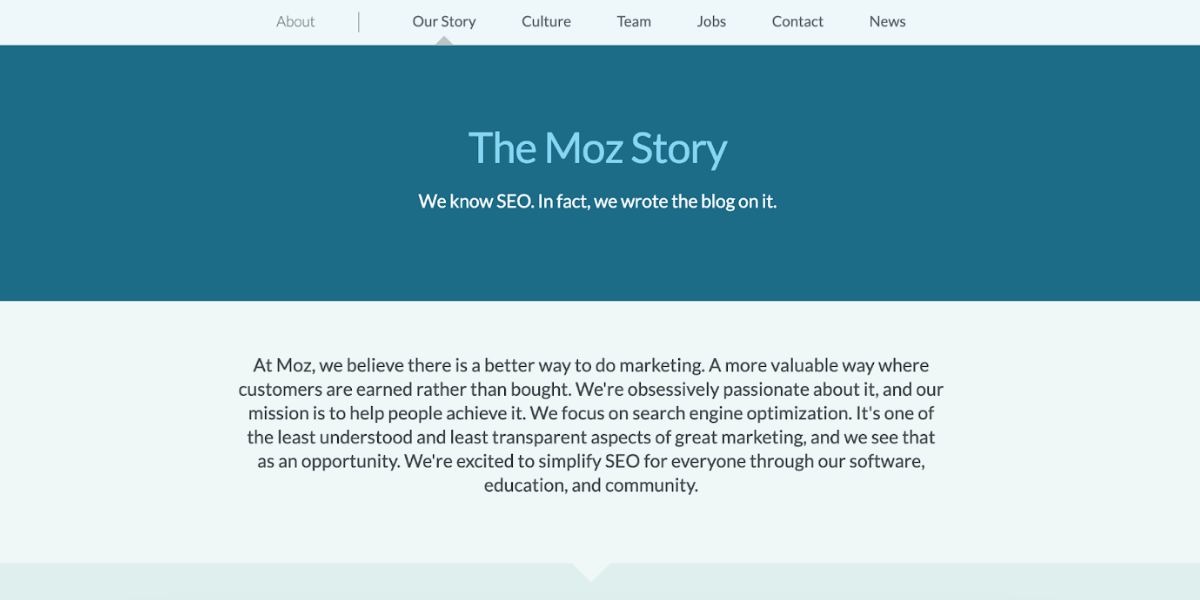
Moz

about us page moz

Combining technical expertise with a friendly, approachable tone, Moz’s About Us page effectively communicates its authority in the SEO industry while remaining accessible to their target audience. By showcasing the company’s team, mission statement, core values, and the impact of its tools, Moz creates an inviting and knowledgeable presence that resonates with both industry professionals and newcomers.

Ben & Jerry’s

about us page ben and jerrys

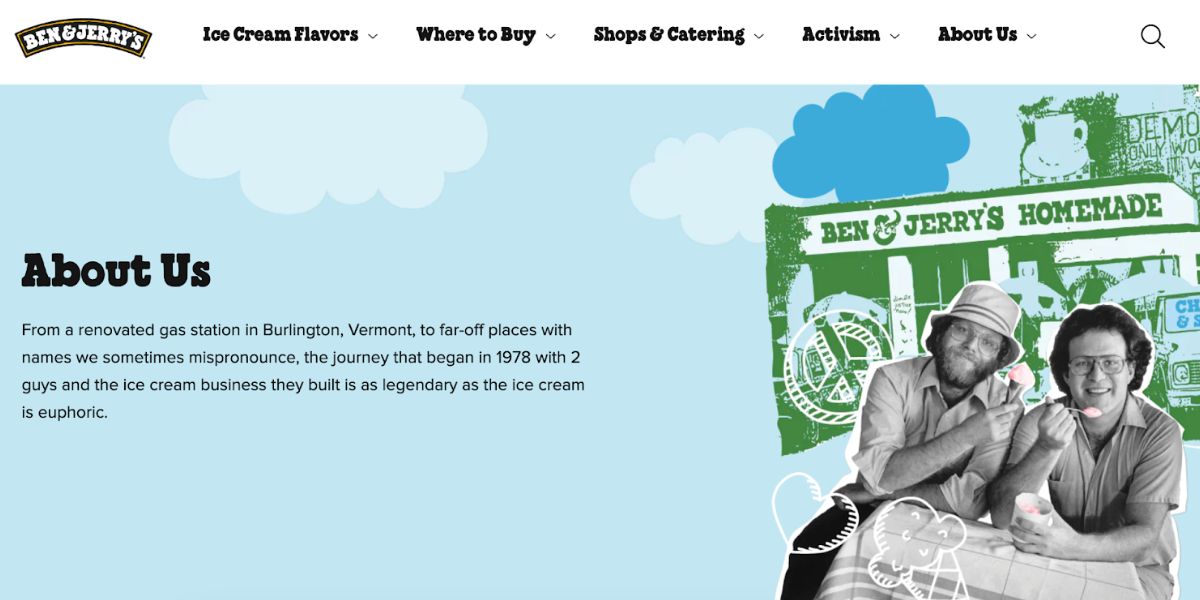
Ben & Jerry’s About Us page is rich with engaging narrative and visuals that convey the brand’s history, values, and commitment to social justice. Known for its social mission, Ben & Jerry provides a great page example to share stories about its dedication to environmental sustainability, fair trade practices, and community involvement. The combination of text and visuals creates an immersive experience that captures the essence of the brand and its commitment to making a positive impact.

Takeaways for Your About Us Page

Your About Us page is more than just a part of your website – it’s your chance to share your brand’s story and build trust with your audience. By learning from some great examples and following a few key tips, you can create a page that really captures what makes your brand unique and keeps visitors interested.

Think of your About Us page as a story that grows with your business. Keep it fresh and updated to reflect your latest achievements and milestones, so it always feels relevant and true to who you are.

Putting effort into a great About Us page is like investing in a lasting relationship with your audience. It’s your chance to leave a memorable impression and invite people to connect with your brand on a deeper level.


If you’re ready to tell your story, check out SiteGround Website Builder. It offers easy-to-use tools and templates to help you create an About Us page that’s both professional and personal. Give it a try and see how you can bring your brand’s unique story to life!