

Count the WordPress AI plugins on your site. If there are more than two, you probably didn’t plan it that way. One arrived to write meta descriptions, another to answer visitor questions, a third because the first couldn’t do images. Each install solved the problem in front of you.
What comes next is AI plugin fragmentation in WordPress: the AI capabilities you need spread across several narrow tools, none of them aware of the others, and the work of holding it all together left to you. Our 2026 report on AI in WordPress for small businesses found 67% of small business owners doing that work alone, wasting time they could use to run their actual business.
Key takeaways:
- AI plugin fragmentation in WordPress is a supply problem before it’s your problem. A new AI plugin joins the WordPress directory roughly every 1.8 hours.
- The cost is never the sticker price. Each plugin adds a settings screen to learn, an update cycle to keep up with, and a share of your security exposure. Many also add an account, a key, and a subscription of their own.
- Plugins are where the security risk sits. Most of the WordPress vulnerabilities disclosed most recently were in plugins.
- WordPress 7 fixed part of this and moved the rest. Developers got one standard way to reach AI providers. Site owners still create accounts, generate keys, and watch token bills.
- The goal is fewer connections, not fewer capabilities. Consolidation is about reducing the number of things you maintain, not giving up what they do.
What AI plugin fragmentation in WordPress means
Fragmentation is what happens when a job gets divided across tools that were never designed to work together. In WordPress, it means one AI plugin writes your content, a second handles SEO metadata, a third runs a chatbot, and a fourth generates images, with no shared account, no shared settings, and no shared idea of what your site is for. You’re the only thing connecting them.
This isn’t a failure of judgment on your part, but rather the shape of the supply. An independent count of the entire WordPress plugin directory, published in July 2026 by WordPress consultant Casey Burridge, found 3,163 AI plugins among 68,651 listings, with 17.4% of everything added in 2026 being AI-related. That’s roughly one in six new plugins.
The first 1,000 AI plugins took WordPress.org 18.3 years to accumulate. The second thousand took 9.4 months, and the third took 88 days. Two-thirds of every AI plugin ever listed arrived in the last twelve months. Our own 2026 report on AI in WordPress for small businesses puts the growth rate at roughly three times faster than the wider plugin economy.
More supply isn’t the same as more help. As the author of that count puts it, one in six being AI-related is a supply signal rather than a quality signal, spot checks suggest plenty are thin wrappers around somebody else’s API key, and discovery in the directory was already hard before this. Meanwhile, 44.4% of the small business owners in our report already name finding and configuring plugins as one of their biggest difficulties. The shelf got fuller for people who were already struggling to choose from it.
What stacking narrow WordPress AI plugins actually costs you
Listicles price WordPress AI tools for small business one at a time, which is exactly how the total escapes notice. Here’s what each one adds, beyond its monthly fee.
| Cost | What it looks like in practice | Why it compounds |
| Credentials | An API key to generate, paste in, and keep track of for each AI plugin that talks to a provider | Every key is a credential to store, rotate, and eventually lose track of. Losing track is the normal outcome, not the unusual one |
| Subscriptions | Separate billing for each narrow tool, with token charges underneath | Four tools at typical plugin subscription prices is not a small line, and token spend moves on top of it every month |
| Interfaces | A different settings screen and a different mental model per plugin | Someone already finding the WordPress dashboard difficult now has five more dashboards inside it |
| Update cycles | Each plugin ships on its own schedule with its own breaking changes | More update surface means more weekly maintenance and more chances that a conflict takes the site down |
| Security surface | Each plugin is code with permissions, often handling API tokens and exposing endpoints | Plugins accounted for 91% of WordPress vulnerabilities disclosed in 2025. Every addition widens the surface |
| Overlap | Two plugins doing similar work, neither doing it completely | You pay twice and still have a gap, which is usually what prompts installing the sixth |
The overlap described in the last row happens for a reason that has nothing to do with choosing carelessly. The plugins you already run are adding AI of their own. For example, Rank Math and Yoast added AI writing to their SEO panels, Elementor added it to the page builder, and the translation plugins added AI translation. So the AI plugin you install to write product descriptions may duplicate something the SEO plugin you’ve had for three years gained in an update you never read the notes for.
Keep in mind: The directory’s search is showing you tags, not capabilities. Plugin authors choose their own tags, and many carry several. A tool tagged for chatbots, SEO, ecommerce, and content will surface for all four searches while doing one of them well. Before installing, read the changelog rather than the description. The description is marketing; the changelog shows what has actually been built and when anyone last touched it.
Did WordPress 7 solve AI plugin fragmentation?
WordPress 7.0 partly solved AI plugin fragmentation, and this is the part most coverage gets wrong in one direction or the other. It was built to address exactly this problem, and WordPress 7.1 continued the work at the same layer. It succeeded there, but it just wasn’t the layer where you live.
What the AI Client and Connectors screen fixed
Before WordPress 7, every plugin that wanted to use AI wrote its own connection code for every service it supported. Dozens of plugins each maintained their own integrations, and credentials ended up scattered across as many settings screens as you had plugins.
WordPress 7 replaced that with a shared foundation. The AI Client gives plugins one standard way to ask for what they need, and WordPress routes the request to whichever provider you’ve connected. The Connectors screen puts provider credentials in one place instead of many. Within months, more than 70 plugins had registered with the new layer. If you want the details, our explainer on how AI works in WordPress 7.0 covers it.
One condition decides whether any of that reaches you. The sharing only applies to plugins built to use Connectors. A plugin that predates WordPress 7, or that simply keeps its own settings screen, still stores its own key exactly as before. And if you’re still on WordPress 6.x, none of it applies yet, because the Connectors screen isn’t there: every AI plugin carries its own key. Adoption is early, so on most sites today the answer is mixed: some tools share a provider connection, others carry their own.
Why the AI plugin fragmentation moved to the provider level
What WordPress 7 standardized was how plugins reach AI providers. What it didn’t change is the WordPress AI plugin setup complexity you face before any of that helps. You still open the Connectors screen, choose a provider, install that provider’s plugin, create an account on the provider’s website, find your way into its developer dashboard, generate an API key, come back and paste it in, and then install a separate features plugin before anything visible appears. After that you track spending in the provider’s own billing dashboard.
Then there’s the catch that turns one setup into two. Providers don’t all do everything. For instance, Anthropic’s models generate text but not images, so an owner who needs both connects a second provider, which means a second account, a second key, and a second billing dashboard to watch.
So WordPress 7 solved fragmentation for developers and moved it to the provider layer for everyone else. The count genuinely improved: instead of entering the same key into five plugin settings screens, you enter it once, and every plugin sharing that connector uses it. What didn’t improve is the work in front of that. You still create the account, generate the key, install two plugins, and watch a billing dashboard, and needing both text and images means doing all of it twice.
When multiple WordPress AI plugins are the right answer
Consolidation arguments can read as sales copy when they pretend there’s never a reason to run several tools. There are actually three cases when it’s worth it to choose multiple WordPress AI plugins:
- If a specialized AI plugin genuinely beats a more general one. Things like industry-specific compliance are deep problems, and a tool built for one of them will do it better than a broad platform. If your business depends on that depth, pay for it.
- If you already rely on the tool and it works. If your trusted SEO plugin added AI features and your whole workflow runs through it, replacing it to reduce a count isn’t a saving. There can be switching costs, and consolidation for its own sake isn’t a goal.
- If the requirement is genuinely narrow. One small job, one small plugin, no ongoing cost, no credential: if this is what you use your AI plugin for, then there’s no need to replace it.
The test is whether each one of your AI plugins is there because you chose it for a job, or because it was the fastest answer to a problem you had on a random Tuesday.
Pro tip: Sort your list by last updated, not by name. In your Plugins screen, the useful question isn’t what each tool does but whether anyone is still maintaining it. A plugin that hasn’t shipped an update in a year is carrying whatever security issues it had a year ago, and abandoned AI plugins are especially common because many were built quickly during the rush described above. Anything unmaintained that also holds an API key is the first thing to remove, because it combines the two risks in this article into one line on your site.
How to reduce WordPress AI tool sprawl
To avoid AI plugin fragmentation in WordPress, consolidate by reducing connections, not capabilities: one place that reaches your site, one set of credentials, one interface to learn, one record of what changed.
A site-connected AI agent can reduce WordPress AI tool sprawl this way. For example, SiteGround’s AI Agent for WordPress connects once and then handles content, media, plugins, users, and WooCommerce through the same conversation, with no provider account to create and no key for you to store.
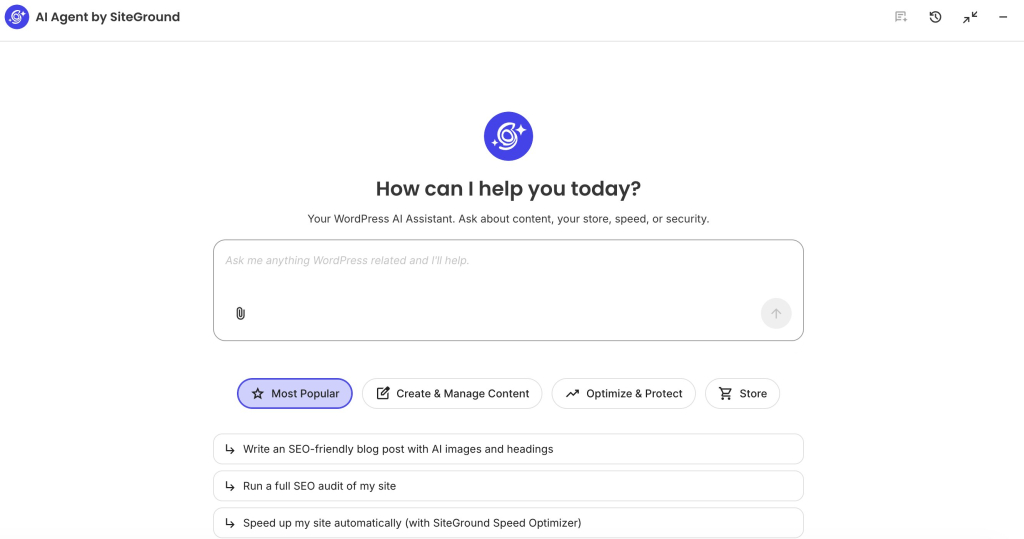
You don’t have to replace everything at once, and it’s usually a mistake to try. Stop the stack growing first, then replace the tools whose jobs already overlap, and keep the specialists that earn their place. Our guide to AI plugins and AI agents covers that choice in more detail.
Whichever route you take, count the things you maintain rather than the AI features you have.
The problem was never a shortage of WordPress AI plugins
AI plugin fragmentation in WordPress isn’t caused by bad plugins or by careless site owners, but rather by a directory adding a new AI plugin every 1.8 hours, aimed at people who mostly manage their sites alone, in a market where each tool solves one slice and none of them can see the others.
So before the next install, ask what it adds to the list of things you now have to keep working: another screen, another update, and often another account, key, and bill. Answer that, and the right number of WordPress AI plugins usually turns out to be smaller than the number you have. And you might also be surprised by how much of your AI needs you can consolidate with a single AI Agent.
FAQs
AI plugin fragmentation in WordPress is when the AI capability a site needs ends up spread across several narrow plugins, each with its own settings screen and update cycle, and often its own account, API key, and subscription, with none of them aware of the others. The work of holding them together falls to the site owner.
Multiple WordPress AI plugins are hard to manage because each one adds a separate interface and update schedule, and often its own credential and billing relationship. The features add up, but so does the maintenance, and 44.4% of small business owners already report difficulty finding and configuring plugins.
The risks of stacking multiple AI plugins are a wider security surface, conflicting code, duplicated spending, and credentials nobody is tracking. Plugins accounted for 91% of WordPress vulnerabilities disclosed in 2025, and AI plugins often hold API keys that can spend money.
WordPress AI plugins need API keys and can add subscription complexity because most do not include the AI itself. They connect to an outside provider through an account you create and pay for separately, so each plugin can mean another key to store and another bill to watch.
WordPress 7.0 solved AI plugin fragmentation partly. It standardized how plugins reach AI providers and centralized credentials in the Connectors screen, which fixed the problem for developers. Site owners still create provider accounts, generate keys, install a features plugin, and monitor token billing, so the fragmentation moved to the provider layer rather than disappearing.
Site-connected AI agents reduce WordPress AI tool sprawl by replacing several narrow plugins with one connection, one set of credentials, and one interface. Instead of maintaining separate tools for content, media, and store tasks, you work through a single agent connected to the site.