
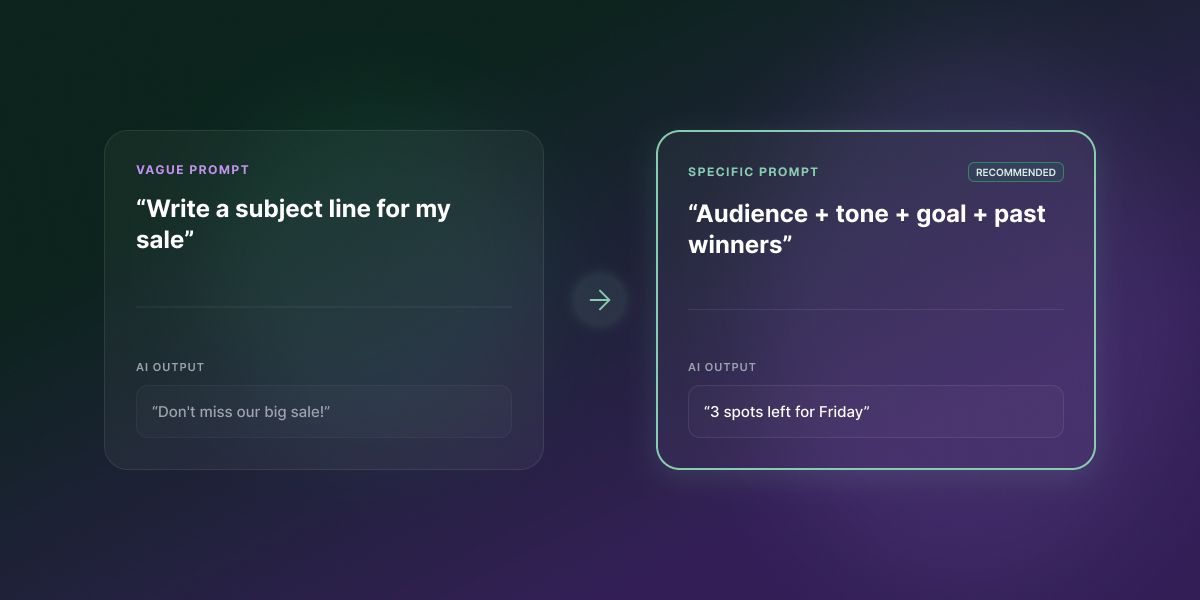
Give AI the right inputs, and it’ll write a subject line good enough to make your best draft nervous. Skip them, and it defaults to the safest, most forgettable pattern it knows. The fix isn’t a different tool. It’s a better prompt, and that holds whether you’re using ChatGPT, Claude, Gemini, or the generator built into your email platform.
Key takeaways:
- AI email subject lines only sound generic when the prompt behind them is generic; the tool isn’t the bottleneck.
- A structured prompt (audience, tone, goal, and a few real examples) consistently outperforms a one-line request, in any AI tool.
- ChatGPT, Claude, and Gemini can produce noticeably different subject lines from the identical prompt, so it’s worth testing more than one.
- Treat every AI-generated subject line as a first draft to test, not a finished answer.
- SiteGround Email Marketing’s built-in AI generator uses the same inputs this framework covers: tone, email type, and a short description.
Why your AI email subject lines all sound the same
AI-generated subject lines sound interchangeable because most prompts only give the model one piece of information: the topic. Ask any tool to “write a subject line for my sale” and it has to invent the audience, the tone, and the goal on its own, so it defaults to the safest, most generic pattern it knows.
What generic prompts leave out
A one-line prompt skips four things a human copywriter would be less likely to skip: who’s reading it, what tone fits the brand, what the reader should do next, and what similar lines have worked before. Without those, the AI fills the gaps with whatever’s statistically common: urgency words, vague benefit claims, and a tone that could belong to any brand. That’s why five different tools, given the same bare-bones prompt, tend to hand back five versions of the same line.
What AI tools for email subject lines actually do
An AI email subject line generator is only as good as what you feed it. The tool isn’t the problem; the input is, and that’s true whether you’re using a dedicated generator or typing straight into ChatGPT.
Most tools take one input (a topic or a pasted email) and return five to ten options in seconds. That’s genuinely useful for speed, but it comes at a cost.
What they don’t know unless you tell them
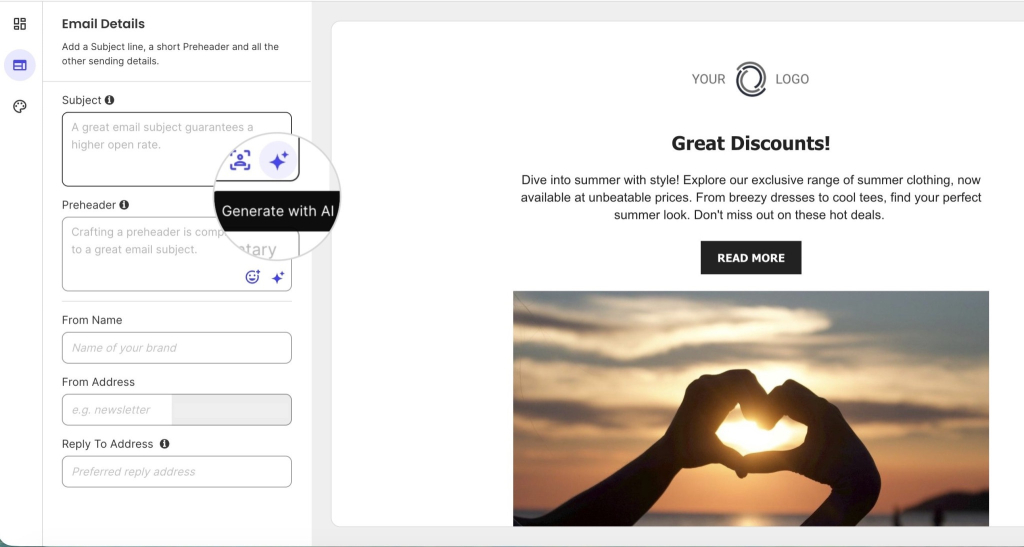
Speed doesn’t buy you relevance. A generic prompt means the tool doesn’t know your audience, your brand voice, or what’s worked before, unless you tell it. Here’s what telling it looks like in practice: SiteGround Email Marketing’s AI subject and preheader generator has a sparkle icon on the Subject field. Click it, choose “Describe your email” instead of just scanning your draft, and add a tone and email type before you generate.
Using an AI tool to optimize subject lines you’re not sold on
If you’ve drafted a subject line and it feels flat, vague, or too long, don’t ask an AI tool to write a new one from scratch. Paste in the line you have and ask it to fix a specific weakness: “This subject line is too vague. Rewrite it to name the specific offer, still under 50 characters.” Targeted edits like this outperform a fresh generation, because you’re pointing the model at exactly what’s wrong instead of hoping it guesses right.
This also works after the fact, but for your next similar campaign rather than the one that already went out. That is, if last month’s newsletter subject line got a weak open rate, paste that line in and ask the AI to fix the specific issue (too generic, too long, buried the offer) before you draft this month’s version.
The AI email subject line prompt framework: what actually changes the output
Four inputs consistently separate a sharp AI-generated subject line from a flat one: audience, tone, goal, and a few real examples to anchor the pattern. These aren’t specific to subject lines — they’re the same dos and don’ts that make any ChatGPT prompt sharper; this section applies them to one specific, high-stakes line of copy.
Audience and segment context
Name a real segment, not a generic description. “Write for our customers” tells the AI nothing useful. “Write for subscribers in the VIP group” or “for people who clicked but didn’t buy in our last campaign” gives it a specific reader to write for, and both are segments you can actually build: the first from a group you’ve already set up, the second by filtering that campaign’s Recipient Activity by action and assigning those contacts to a group.
Brand voice and tone
State the tone explicitly, and say what to avoid as clearly as what to include. “Warm, a little playful, no corporate language” works better than “professional,” which every brand claims and none of them mean the same way. Naming what you don’t want (no fake urgency, no exclamation marks, no clickbait) closes off the model’s default fallback patterns.
Campaign goal and desired emotion
Tell the AI what you want the reader to feel and do, not just what the email is about. “Get them to open out of curiosity” produces different output than “get them to open because they’re worried they’ll miss the deadline.” The goal shapes word choice more than the topic does.
Why AI puns in email subject lines fall flat
AI-generated puns read as generic more often than they read as clever, because the model reaches for the most statistically common wordplay for a given topic, and so does every other brand asking for the same thing.
A few you’ll see constantly, because every AI tool reaches for the same ones:
- Coffee sale: “Brew-tiful savings,” “Perk up your day”
- Summer sale: “Hot deals, cool prices,” “Sun’s out, savings out”
If a prompt calls for humor, ask for specificity instead. It lands better and reads less like a template:
- Generic pun: “Don’t let your cart get cold”
- Specific detail: “That candle’s been in your cart since Tuesday. We’re not judging, but we did notice.”
Show, don’t just tell, examples of what you want
Once the other three inputs are set, give the AI three to five proven subject-line patterns as examples of the shape you want, not just descriptions of a shape. Here’s what that looks like for three reliable patterns:
- Curiosity gap: “Why your neighbor’s WiFi is faster than yours” — names a gap, doesn’t close it, and it’s specific enough to feel like it’s about you.
- Specific number: “7 people just grabbed the last size in navy” — a real number reads as true; “almost sold out” reads as filler.
- Direct benefit: “Your package skipped the line, arrives Thursday” — states the outcome and makes it feel a little lucky, no framing needed.
Paste three to five lines like these into the prompt (your own past lines if you have strong ones, or examples like these if you don’t) and ask the AI to write new subject lines “in this style.” This is a few-shot prompting: showing the model real examples of the pattern, rather than describing the pattern in the abstract, gets it to copy the structure instead of guessing at it.
Before and after: a staged prompt, from vague to fully structured
Watching a prompt evolve makes the mechanism visible. Start with the vague version, then add one variable at a time:
- Vague: “Write a subject line for our summer sale.”
- Add audience: “Write a subject line for our summer sale. The audience is returning customers who bought last summer.”
- Add tone: “…Keep the tone confident and a little playful, not salesy.”
- Add goal and constraint: “…The goal is to get them to shop the new collection before it sells out. No exclamation marks, no ‘don’t miss out.'”
Each stage narrows what the AI can guess at, so the output gets sharper. By stage four, the model has almost nothing left to invent.
Here’s how the results look in practice with different models:
| Stage | Prompt | ChatGPT (direct, benefit-led) | Claude (conversational, natural) | Gemini (concise, structured) |
| 1. Vague | “Write a subject line for our summer sale.” | ☀️ Summer sale: Hot deals, cool prices! | Summer sale: up to 40% off, ends Sunday | ☀️ Summer Sale is LIVE: Grab your favorites before they’re gone! |
| 2. + Audience | “…The audience is returning customers who bought last summer.” | ☀️ Summer’s back—and so are your favorite deals | You’re back for round two? Summer sale starts now | Just like last year, but better: Your exclusive summer deals are here! |
| 3. + Tone | “…Keep the tone confident and a little playful, not salesy.” | ☀️ You’re back. Summer is too. | You again? Good. We saved you the good stuff. | 😎 Ready for round two? Let’s make this summer even better than the last. |
| 4. + Goal and constraint | “…Get them to shop the new collection before it sells out. No exclamation marks, no ‘don’t miss out.'” | ☀️ Your summer favorites just got a refresh | You again? Good. The new collection won’t wait. | Your favorite pieces from last year are back, along with what is next. |
Why ChatGPT, Claude, and Gemini don’t give you the same email subject line
As you just saw, giving ChatGPT, Claude, and Gemini the exact same structured prompt still produced three different subject lines, not because one of them failed to follow the prompt, but because each model weighs instructions and word choice differently. A thin prompt makes any tool sound generic, but even a strong prompt won’t make every tool sound identical.
What changes between models, and why
Every large language model is trained on different data and tuned with different priorities, so identical instructions land differently, as the table above shows. ChatGPT kept its emoji through every stage and leaned toward tighter, benefit-forward phrasing. Claude never used an emoji or an exclamation point, even at stage 1, and wrote the most conversational lines of the three. Gemini ran the longest, most descriptive lines and was the only one to add urgency language before the constraint told it not to.
None of these are wrong. They’re different defaults, and the only way to know which fits your brand is to test more than one.
| Model | Tends toward | Best for |
| ChatGPT | Direct, benefit-led phrasing | Fast iteration, high volume of options |
| Claude | Conversational, natural tone | Brand voice that leans personal |
| Gemini | Longer, descriptive phrasing | Detailed context, though watch for added urgency language |
Testing one prompt across models without juggling logins
Running the same prompt through multiple models used to mean separate logins and separate subscriptions. SiteGround AI Studio gives access to Gemini, Claude, and ChatGPT from one workspace, so you can run the identical prompt across all three and compare results side by side instead of settling for whichever tool you happened to open first.
How to test which AI subject line gets the most opens
There’s no subject line that wins for every list. The fastest way to find out which one wins for yours is a same-audience A/B test, not a best guess.
- Start with the options you already have. Most AI tools return three to five subject lines from a single prompt anyway, so you don’t need a separate step to generate variety; it’s already sitting there.
- Pick your two strongest. Look for the ones that feel most specific to your brand, not the most generic-sounding “safe” choice.
- Split a small percentage of your list (5 to 10%, if your platform allows it) and send each version to one half.
- Wait for a real read on opens, not just the first hour. Most lists show a meaningful open-rate gap within 2 to 4 hours.
- Send the winner to the rest of the list. Whichever line pulled a higher open rate on the test group is the one to trust, not the one that sounded best in the moment.
Better AI email subject lines start with a better prompt
Name the audience, state the tone, give it a goal, show it what’s worked before. Do that consistently, and the subject lines stop sounding like everyone else’s inbox and start sounding like something worth actually testing.
SiteGround Email Marketing’s built-in AI generator already runs on this logic, whether you knew it or not. Add a tone and an email type before you hit generate, then lean on “Improve Writing” instead of starting from scratch. You’ve been prompting like a pro since before you finished this article.
And if you want the framework to go further than just the subject line, SiteGround Email Marketing’s AI email generator now builds the whole email around it. Pick a campaign type, describe your business and goal the same way you’d write a good prompt, and it hands back a subject line, preheader, and body ready to edit in the builder you already use.
[58]
Frequently asked questions about AI email subject lines
A catchy subject line gives the reader a specific reason to open the email right now, through curiosity, a clear benefit, or urgency, rather than a generic description of what’s inside. The best ones read like a message from a person, not an announcement from a brand.
There’s no single subject line that wins across every list; open rates depend on the audience, the sender’s relationship with them, and past engagement. What consistently performs is specificity: naming the actual benefit, offer, or update instead of a vague teaser.
Yes, AI can help write better email subject lines, but only if the prompt gives it something to work with: audience, tone, and goal. A one-line prompt like “write a subject line for my sale” produces the same generic output every generator tool already gives you.
Give the AI four things: who the email is for, what it’s about, the tone you want, and what you don’t want (no fake urgency, no clickbait, no exclamation marks, whatever applies). The more specific the input, the less generic the output.
A strong subject line names a specific, real detail instead of a general claim: “Your order ships Thursday” instead of “Update on your order,” or “3 spots left for Friday’s webinar” instead of “Don’t miss out.” Specificity is what separates a strong line from a forgettable one.
Each model was trained differently and weighs instructions differently, so identical prompts can produce noticeably different tone, length, and structure. Testing the same prompt across models, which SiteGround’s AI Studio makes possible without separate logins, is the fastest way to see which one fits your brand voice.