

Using AI for email marketing comes down to six moves: pick a goal, research the message, generate the content, send it, test it, and read the results back into the next one. Follow them, and AI does real work at each stage instead of just window dressing the send.
Key takeaways:
- Run AI for email marketing as six steps, in order: goal, research, content, execution, testing, measurement.
- Set one measurable goal before you generate any content, not after.
- Generate 10 to 15 subject line variants, then pick and edit rather than send the first draft.
- Never send an AI copy without a human edit pass first.
- Test two or three variants on a small segment before a full send.
- Feed each campaign’s results into the next one’s goal and research step.
What is AI for email marketing?
AI for email marketing means AI tools handle specific tasks inside a campaign: research, drafts, send times, or performance data.
A person still sets the goal, picks the audience, and checks that the copy sounds like the brand. AI handles what sits around those decisions: faster research, more draft variants than one person could write alone, and patterns in the past send data that would otherwise take hours to spot.
That distinction matters because AI works best as an assistant at each stage of a campaign, not a replacement for it.
The 6 steps to run AI for email marketing
Here’s the order that actually works, start to finish.
Step 1. Set your goal and audience
Every campaign starts with one measurable email marketing goal, not “increase awareness,” but something like “get 50 newsletter sign-ups from a landing page by month’s end.” Vague goals produce vague AI output, since the model has nothing specific to write toward.
Use a structured prompt to lock in the goal and audience before you generate a single line of copy:
| Prompt | What it’s for |
| “List the top 3 pain points for [audience description], specific to [product or offer].” | Surfaces the pain point your content should lead with |
| “Write a one to two sentence positioning statement for [offer], aimed at [audience].” | Gives every later prompt a consistent angle |
| “Based on [audience] and [pain point], what funnel stage is this campaign for: awareness, consideration, or decision?” | Sets the tone and CTA strength for content generation |
Run all three prompts before moving to Step 2. Skipping this step is the single most common reason later drafts read generically: the AI never learned who it was writing for.
Step 2. Research your audience and message with AI
With a goal in hand, use AI to widen the research, not start it. Ask for objections a skeptical reader would raise, competing messages they’ve already seen, and language patterns from your own past campaigns that worked. This produces raw material, not final copy.
Don’t skip the old-fashioned part either: picture an actual person on your list, how they talk, what they’d roll their eyes at, what would actually get them to click. AI can widen your research, but it still doesn’t know your audience the way you do.
Match the research to the funnel stage from Step 1. Awareness-stage needs objection handling and category education; decision-stage needs pricing objections and comparisons.
For instance, a welcome email to a brand-new subscriber needs research on “why should I care about this brand at all,” while a follow-up email to someone who already asked about pricing needs research on “why buy now instead of waiting.” One generic prompt for every campaign is how AI output ends up sounding the same across all of them.
Step 3. Create content and creative assets with AI
This is where AI drafts the actual assets: subject lines, body copy, and first-pass visuals. Ask for more options than you need so you actually have a range to pick from, say 10 to 15 subject lines, rather than accepting the first one AI hands you.
Not every part of an email needs AI, or editing, the same way. Working through a campaign in the order you’d actually build it:
| Email part | AI’s role | Human’s role |
| Subject line | Generate 10 to 15 variants | Pick the best one, tighten the wording |
| Preheader | Draft a version that matches the chosen subject line | Confirm it doesn’t just repeat the subject |
| Body copy | Write the first full draft | Pass for brand voice and factual accuracy |
| Visuals | Generate or suggest a first option | Check it fits the brand and the message |
| CTA | Skip | Write directly; this is where conversion nuance lives |
Treating this table as a fixed rule, not a suggestion, is what keeps an AI-assisted campaign from reading like it wasn’t edited at all.
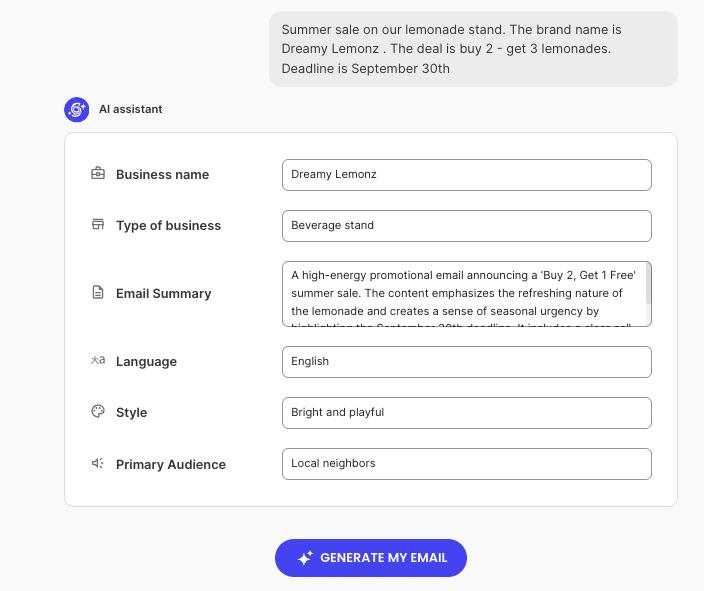
SiteGround Email Marketing’s new “Generate with AI” option makes working through this table even easier. An interviewer agent asks for a business name, industry, audience, a summary of the email, look and feel, and tone. It reflects those answers back to you in a short summary, and once you hit Generate, it hands you a draft with the subject line, preheader, and body already filled in, ready for the edit pass each row above calls for.
Step 4. Send the campaign
By this point you have your edited copy ready to send. Whether it came from the AI generation flow in Step 3 or a template you built by hand, the send itself works the same way: review the final draft, confirm it against your goal and audience, and send once a person has signed off.
Most email platforms let you schedule that release for a specific date and time instead of sending immediately (including SiteGround Email Marketing with the Send later option in Campaign Builder), separate from anything an AI generation flow does.
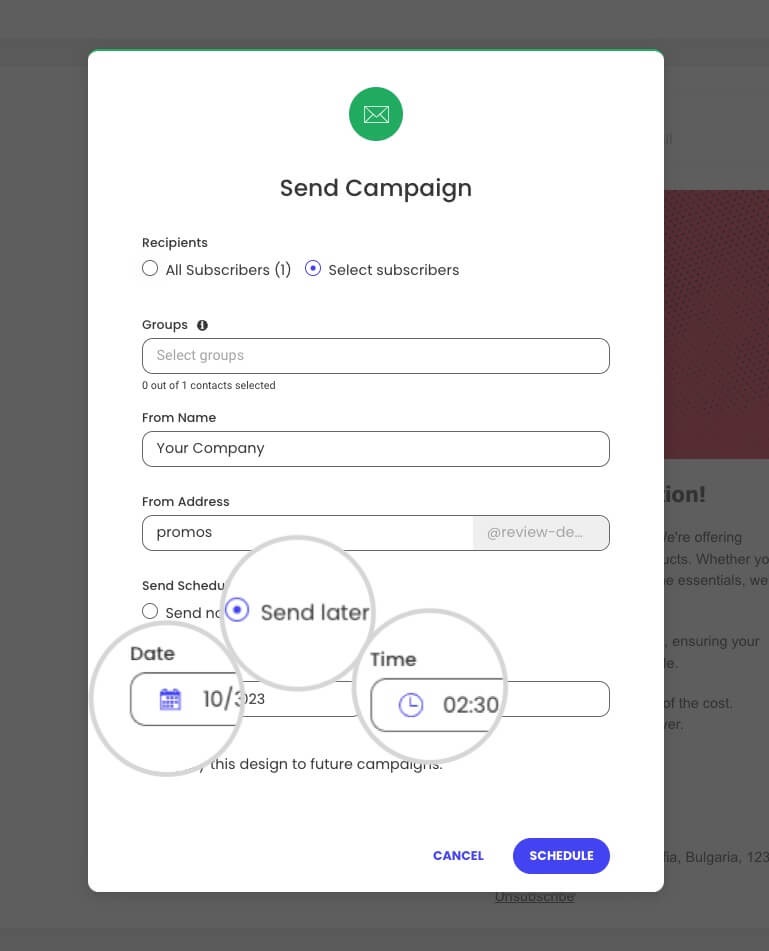
That review moment in Campaign Builder is the right point to catch what’s easy to miss under a deadline:
- Every link in the email has been clicked and tested, not just visually checked
- Sender name and reply-to address are set correctly
- A test send to yourself looks right on both desktop and mobile
- Unsubscribe link and compliance basics are in place
SiteGround Email Marketing handles unsubscribe links and email authentication automatically, so this checklist is about what’s still on you.
Step 5. Test before you launch
If you want to be even more data-driven about it, ask AI to generate two or three variants of your subject line or opening line, then send each to a small segment of your list before you commit to a full send.
Take a summer sale email, for example.
- Variant A, “20% off everything this weekend,” leads with the discount.
- Variant B, “Only 6 hours left,” leads with urgency.
- Variant C, “Our summer picks are here,” leads with no framing at all.
A small segment split, say 500 people out of a 10,000-person list, shows which one actually gets opened before the rest of the list gets whichever one wins.
AI’s job here stops at generating the options; which one wins gets decided by actual opens and clicks, not a prediction.
Step 6. Measure and optimize
Match the metric to the goal you set in Step 1:
- Sign-up or download goal → track conversions on the landing page itself, not just clicks to it
- Sales goal → track click-through to the product or checkout page, then check your store’s own sales data for that window, since email tools don’t always tie revenue directly to a specific send
- Engagement or re-activation goal → track open rate and click rate, since that’s what re-activation actually looks like
Open rate and click rate are useful as diagnostics either way: a low open rate points back to the subject line from Step 3, a low click rate with a decent open rate points back to the body copy or the offer itself. But neither should be the goal unless the goal in Step 1 actually was engagement.
Feed the results back into the next campaign’s Step 1 and Step 2 prompts: which subject line pattern won, which pain point got the most clicks. This is what makes six steps a repeatable process instead of a one-off and it’s exactly what turns individual campaigns into an actual email marketing strategy rather than a series of unconnected sends.
Types of AI email marketing tools to know before you pick one
Most “best AI email marketing tools” lists are vendor roundups. The categories underneath them matter more than any single name, since tools inside each category are largely interchangeable for the job:
| Category | What it does | When you’d use it |
| Generative content tools | Drafts subject lines, body copy, and visuals | Step 3, content creation |
| Predictive and analytics tools | Scores likely engagement or churn, flags send-time patterns | Step 2 research and Step 6 measurement |
| List segmentation tools | Groups subscribers by behavior or attributes for targeted sends | Step 1 audience definition and Step 5 testing |
| Email-specific automation tools | Subject-line testing, scheduling, send-time logic built into the sending platform | Step 4 and Step 5, email specifically |
What to consider before you start
AI output is only as good as the data behind it. If your past campaign data is incomplete or your audience research is stale, AI will confidently generate content based on the wrong assumptions rather than flag the gap itself.
Keep a person in the loop at these points specifically:
- Does the draft actually reflect your brand voice, or just a generic version of it? (Step 3)
- Would you send this exact subject line to your own inbox? (Step 5)
- Does the pattern you’re feeding back into the next campaign hold up, or is it one good result being read as a rule? (Step 6)
AI ethics in marketing covers where automated decision-making needs a person in the loop in more depth, particularly around targeting and personalization choices.
Common mistakes to avoid
Three mistakes account for most underperforming AI email campaigns:
- Publishing AI drafts unedited. The table in Step 3 exists specifically to prevent this: some tasks need a human finishing pass every time.
- Skipping goal-setting and jumping straight to content generation. Without Step 1’s specific goal, AI has nothing concrete to write toward, and the output reads generically as a result.
- Ignoring data quality. Feeding AI incomplete or outdated audience data produces confident, wrong output rather than a flagged gap.
Put these 6 AI marketing campaign steps to work
Whether you’re creating a single email or a full campaign, the process is the same: start with your goal, let AI do the heavy lifting, and keep a human reviewing the parts that matter. SiteGround Email Marketing hands you the segments and scheduling for Steps 4 and 5, so you’re not duct-taping three different tools together to send one campaign.
Now go write down that one measurable goal, before you let any AI near a subject line.
[58]
Frequently asked questions about AI for email marketing
Generative AI for email marketing campaigns works best for drafting, not deciding: subject line options, first-pass body copy, and creative variants that a person then edits and approves before anything goes out.
The best AI email marketing tools fall into four categories: generative content tools, predictive and analytics tools, list segmentation tools, and email-specific automation tools, with the right choice depending on which stage of the campaign you’re working on.
AI-generated emails don’t hurt deliverability on their own; spammy patterns do, generic subject lines, no personalization, and unedited copy that reads like a template. The human edit pass in Step 3 and the checklist in Step 4 exist to catch exactly that before you send.
AI email marketing is worth it for a small business specifically because it removes the time cost of research and first drafts, not because it replaces strategy or judgment, both of which still need a person setting the goal and reviewing the output.