
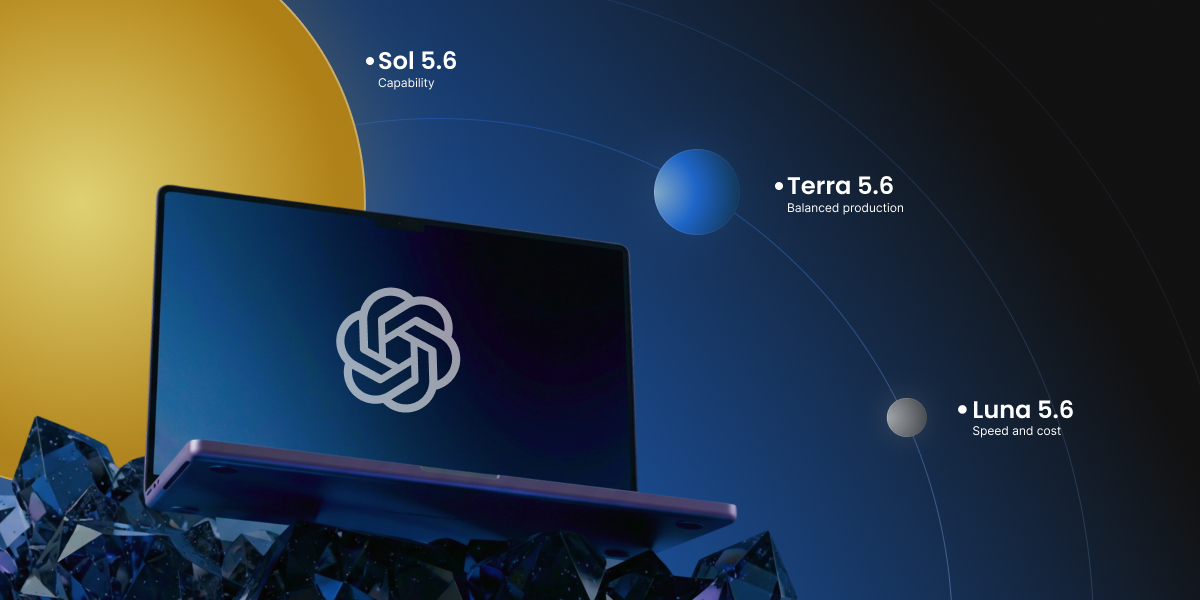
OpenAI just released two AI updates at once: the latest OpenAI models in the GPT-5.6 family, which come in three versions named Sol, Terra, and Luna, and a new voice model called GPT-Live. But what does that all mean, and are all those models useful for you? This guide explains what each one is, where you actually run into it, and whether any of it matters for your business.
Key takeaways:
- OpenAI’s latest launch has two parts: the GPT-5.6 text models (Sol, Terra, and Luna) and GPT-Live, a new voice model for ChatGPT.
- In the ChatGPT app you don’t pick a version: paid plans use Sol, while free and Go plans stay on the previous model in regular chat. Choosing between Sol, Terra, and Luna only happens on OpenAI’s developer and business tools.
- GPT-Live is the change you’ll most likely notice: ChatGPT’s voice can now hold a natural, back-and-forth conversation.
- If you build with OpenAI’s developer tools, the three tiers are mostly about cost: Sol is the priciest and most capable, Terra is the balanced middle, and Luna is the cheapest.
Is GPT-5.6 available in ChatGPT, and how do you use it?
Whether you can use GPT-5.6, and how, comes down to two things: which plan you’re on, and where in ChatGPT you are. There are two places these models show up, and they follow different rules.
If you use the regular ChatGPT chat
If you use ChatGPT for things like marketing, you usually use the app. When you open it on your phone, computer, or the web, you don’t pick Sol, Terra, or Luna by name.
- On a paid plan (Plus and up), you get GPT-5.6 Sol. It’s the flagship, and it sits behind the reasoning settings (the Medium, High, and Extra High options). So when you open the app, you can choose GPT-5.6 Sol and then choose how hard you want it to think.
- On the Free or Go plan, you don’t get GPT-5.6 in regular chat. You stay on the previous model, GPT-5.5.
One thing that’s true on every plan: for quick, everyday questions, ChatGPT uses a fast default (GPT-5.5 Instant) unless you turn up the reasoning. So even on Plus, you’re only using GPT-5.6 when a task calls for it or you ask for it.
If you use the API, Codex, or ChatGPT Work
These are separate spaces inside ChatGPT: Work is a business workspace, and Codex is OpenAI’s coding tool. Here the picture flips, because this is where free users can reach GPT-5.6:
- Free and Go plans get GPT-5.6 Terra here, at no cost, even though their regular chat stays on the old model.
- Paid plans can pick between Sol, Terra, and Luna.
This is also the world developers work in through the API (the connection that wires a model straight into their own software, billed by how much they use). If you run a website chatbot or an automation, this is where the Sol, Terra, or Luna choice actually gets made, usually by your provider, not by you.
In short: the names Sol, Terra, and Luna matter most to developers. As an app user, all you really need to know is that GPT-5.6 starts at Plus in regular chat, and free plans get Terra inside Work and Codex.
What are OpenAI’s GPT-5.6 Sol, Terra, and Luna models?
OpenAI GPT-5.6 Sol, Terra, and Luna are three versions of the same new model family. The number 5.6 is the generation, and the names are the tiers, from most powerful to cheapest. Here’s what each one is and where you’d come across it.
GPT-5.6 Sol, the flagship (and the one in your app)
Sol is the most capable of the three, built for the hardest work like complex coding, deep research, and careful reasoning. It’s also the model you’re already using when you use GPT-5.6 in the ChatGPT app, so for most people Sol isn’t a decision, it’s just what you get. On the developer side, Sol is the most expensive by a wide margin, which is why developers save it for genuinely hard jobs instead of everyday ones.
GPT-5.6 Terra, the balanced middle (developer side only)
Terra is the sensible middle option: close to the previous flagship, GPT-5.5, in quality, at roughly half the cost. You can’t select Terra in the standard ChatGPT app. It lives on the developer side, where it’s the practical default for most business tools, chatbots, and automations that need good quality without paying top rates.
GPT-5.6 Luna, the fast and cheap one (developer side only)
Luna is the cheapest and fastest, meant for simple, high-volume jobs like sorting messages, tagging content, or first-draft summaries. Like Terra, it isn’t something you pick in the ChatGPT app. It’s a tool for developers keeping costs down when they run the same task thousands of times.
What’s genuinely new in this generation
Compared with the last version, GPT-5.6 is mainly better at coding, reasoning, and multi-step tasks. That’s a real gain if you build software or complex automations, and barely noticeable for everyday writing or questions. If you’d rather compare whole assistants than tiers, which is a more useful question for most owners, read our guide on ChatGPT vs Claude vs Gemini.
| Model | Where you’ll meet it | What it’s best for |
| Sol | The GPT-5.6 you use in the ChatGPT app (for Plus and up), and the developer side | Hard reasoning, coding, research |
| Terra | API, Codex, ChatGPT Work | Most everyday business tools, at lower cost |
| Luna | API, Codex, ChatGPT Work | Simple, high-volume tasks, the cheapest option |
How much does GPT-5.6 cost?
It depends entirely on which of the two worlds you’re in.
If you use the ChatGPT app
You pay your normal subscription and nothing per token (roughly a word or a part of a word). The free plan costs nothing, Plus is about $20 a month, and higher tiers cost more and raise the usage limits. GPT-5.6 (as Sol) is included in Plus and up, so using the newer model doesn’t cost you anything extra. The newest models do tend to reach paid plans first as the rollout continues.
If you build on the developer side
Here you pay per use, measured per roughly a million tokens of input and output. Input is everything you send the model (your question plus any background text or documents), and output is everything it writes back; you’re billed for both, and output usually costs more. These are API rates (what developers pay to plug a model into their own software, billed by how much they use rather than a flat monthly fee). Most small business owners never see these directly, since you meet them folded into the price of the AI tools you already pay for.
| Model | Cost per ~1M tokens input | Cost per ~1M tokens output |
| Sol | $5.00 | $30.00 |
| Terra | $2.50 | $15.00 |
| Luna | $1.00 | $6.00 |
What is GPT-Live?
GPT-Live is OpenAI’s new real-time voice model for ChatGPT, and it became the default voice experience on July 8, 2026, replacing Advanced Voice Mode. Unlike the text tiers, there’s nothing to choose and no developer side, it just shows up in the ChatGPT app. The difference is that it can listen and speak at the same time, so talking to it feels less like trading voice memos and more like a phone call.
A voice that talks more like a person
GPT-Live can be interrupted mid-sentence, pause while you think, and drop in a quick “mhmm” or “got it” the way a person does. This back-and-forth style, listening and speaking at once, is the main upgrade over the old take-turns voice.
Two versions, free and paid
GPT-Live-1 is the default voice on Go, Plus, and Pro plans, and GPT-Live-1 mini is the default on the free tier. Both are rolling out now on iOS, Android, and the web.
Smart when it needs to be
For harder questions, GPT-Live hands off to a more powerful model in the background, GPT-5.5 at launch, and keeps talking to you while it works. You can set how much it thinks before answering, and it can show visual cards for things like weather, stocks, and sports.
What it means for your business
GPT-Live suits the moments when typing gets in the way. The practical uses for a small business owner include:
- Hands-free help while you’re doing something else
- Dictating notes or emails
- Practicing a sales pitch out loud
- Getting quick answers without stopping to type
Good to know: If you already used ChatGPT’s voice feature, you don’t have to switch anything on. GPT-Live is now the default, so the upgrade arrives on its own. The older Advanced Voice Mode is still there if you need video or screen sharing.
Why GPT-5.6 launched in stages
GPT-5.6 didn’t go public the day it was announced. OpenAI previewed the models on June 26, 2026, then, at the US government’s request, limited access to about 20 vetted organizations for roughly two weeks before opening it to everyone on July 9. The reason given was the flagship’s strong cybersecurity capabilities.
OpenAI also shipped these models with its strongest safety controls yet, and reviewers rated the family high-risk for cybersecurity and biology. For normal business use, none of this changes anything you’ll notice.
This is becoming a pattern for the most capable AI. Anthropic’s Claude Fable 5 went through a similar restriction earlier in 2026 before its access was restored. For a small business owner, the practical takeaway is small: the most powerful new tools may now arrive a little later than the headlines, and that’s about it.
A sign of that pattern came a month later. On August 10, 2026, OpenAI expanded a program called Daybreak, which gives vetted security professionals access to its models with fewer restrictions, and released GPT-5.6-Cyber, a version built on Sol and trained specifically for security work. The difference is large: on OpenAI’s own test of advanced cybersecurity requests, the gated model answers 95% of them against 1.5% for standard Sol. Access requires identity checks, monitoring, legal attestations, and from September 2026 a hardware security key. The reassuring part for everyone else is what that implies about the app. The Sol you use in ChatGPT is the same underlying model with its guardrails left on, and the capabilities that needed gating now sit behind a separate door.
The bottom line
So if your plan is Plus or above, the GPT-5.6 model you use in the ChatGPT app is Sol. You can pick it yourself in the model picker (the Medium, High, and Extra High options are all Sol, at increasing levels of effort), and on paid plans the app can also switch to Sol automatically when a question looks complex, leaving quicker messages on the faster GPT-5.5. So you feel the upgrade on harder tasks, whether you select Sol yourself or let the app decide.
With that in mind, the gains show up in three specific places:
- Research that digs through the web. Ask ChatGPT to look something up and pull it together (compare three suppliers’ pricing, summarize what changed in your industry this quarter, or check what competitors are claiming), and Sol is noticeably better than the old model at going out, reading several sources, and turning them into one clear answer. This is probably the improvement a ChatGPT app user is most likely to feel.
- Making things, not just describing them. The generation’s biggest leap is building, and you get that through Sol in the app. A spreadsheet formula you can paste straight in, a working script to rename a folder of files, a simple web page, a fix for an automation that broke, these are far more likely to just work on the first try. If you’ve ever asked ChatGPT for a formula and then spent twenty minutes debugging it, that’s the gap that closed.
- Long, multi-step jobs. Ask it to take a messy list, clean it, sort it into categories, and draft a follow-up for each, and Sol holds the thread where the previous model tended to lose it partway through. The more steps a task has, the more the upgrade shows.
The test: To see whether GPT-5.6’s research is actually a step up, we gave the same task to Sol and to GPT-5.5: “Compare the fees for taking online card payments with Stripe, PayPal, and Square. For each, give the per-transaction rate, any fixed per-transaction fee, monthly cost, and standard payout timing, and link your sources.” Both models got the rates right, but GPT-5.5 left us to line them up and total them ourselves. Sol fixed a scope first (each provider’s standard pay-as-you-go online checkout), put the three side by side, and worked a real example on a $100 sale. It also caught the part that actually costs you money: that Square’s cheaper online rate needs a paid plan. That level of detail is the research upgrade a ChatGPT app user is most likely to feel.
Everything else like drafting emails, replies, social posts, quick facts, or brainstorming, is essentially unchanged, and often still handled by the faster GPT-5.5 anyway. That work was already strong, so if it’s most of your day, you won’t notice the new generation much, and that’s fine.
GPT-Live is the one to actually try. The obvious part is that it sounds natural. The less obvious part is what makes it useful:
- It can look things up mid-conversation, searching the web or thinking harder in the background and coming back with the answer, so it handles real questions, not just small talk.
- It does live translation, a genuine sleeper feature if you ever deal with customers, suppliers, or staff who speak another language.
- It copes with interruptions and background noise, so it actually works on the move, in the car, on the shop floor, mid-task, instead of only in a quiet room.
It’s free to try, so it’s worth ten minutes even if the text models change nothing for you.
| Task | What actually changed | Worth acting on? |
| Everyday writing, emails, replies | Little; GPT-5.5 Instant still strong | No |
| Quick facts and brainstorming | Little | No |
| Research that digs through the web | Sol reads deeper and synthesizes better | Yes, if you do this often |
| Formulas, code, simple tools | Sol’s biggest jump; more likely to just work | Yes, if you make things |
| Long, multi-step tasks | Sol holds the thread where the old model drifted | Yes, for complex jobs |
| Voice and hands-free | GPT-Live: natural, looks things up, live translation | Yes, try it (free) |
The rule that holds up: match the tool to the job, and change your routine only when there’s a real reason to. For most owners, that means trying GPT-Live, reaching for GPT-5.6 when you research or build something, and otherwise carrying on exactly as you are, without chasing every release for its own sake.
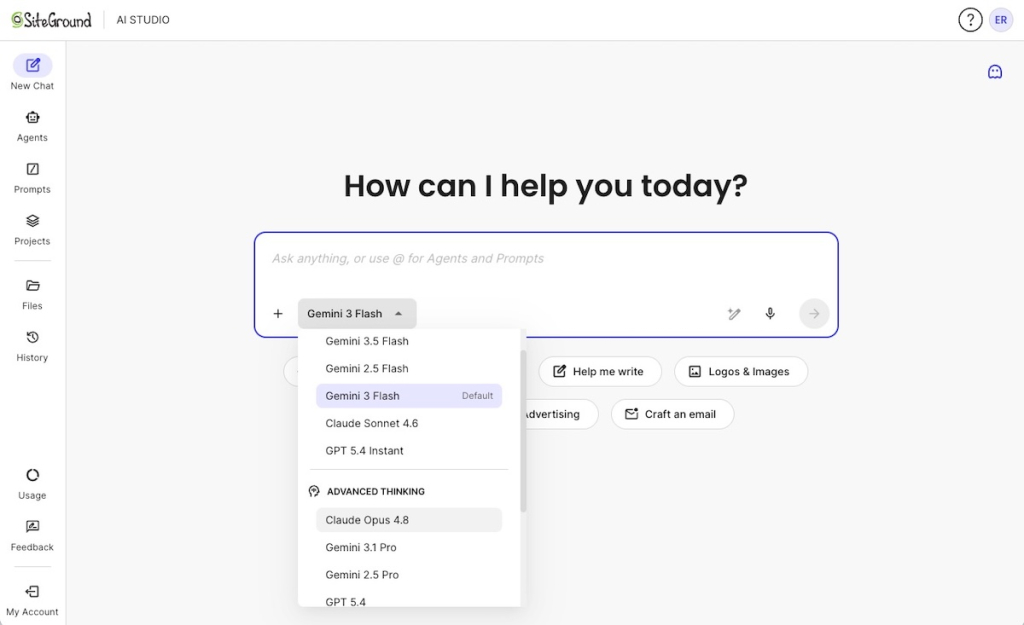
The simplest way to use models like these is inside a workspace that keeps the leading AI tools in one place. SiteGround AI Studio gives you access to top models by OpenAI, Anthropic, and Google (including ChatGPT, Claude, and Gemini) without requiring separate subscriptions for each provider.
[97]
The article was updated on 8/11/2026.
FAQs
OpenAI GPT-5.6 Sol, Terra, and Luna are three versions of OpenAI’s newest text models, and GPT-Live is its new voice model for ChatGPT. Sol is the most powerful, Terra is the balanced middle, and Luna is the fastest and cheapest. All became publicly available in early July 2026.
On a paid plan like Plus, the GPT-5.6 model in the ChatGPT app is Sol, the most capable one. You don’t pick it by name, it sits behind the reasoning options, and ChatGPT uses a faster model for quick questions unless you choose otherwise.
Not in the standard ChatGPT app. GPT-5.6 Terra and Luna are only available on the developer side, through the API, Codex, or ChatGPT Work. If you use a tool or app built on OpenAI, its makers may have chosen Terra or Luna for you behind the scenes.
They differ by power and price. Sol is the most capable and most expensive, Terra is a balanced middle option at about half Sol’s cost, and Luna is the fastest and cheapest. For developers, most everyday work runs fine on Terra or Luna.
GPT-Live is OpenAI’s new voice model for ChatGPT, and it became the default voice experience on July 8, 2026, replacing Advanced Voice Mode. Unlike the old take-turns voice, it can listen and speak at the same time, so you can interrupt it and it responds more naturally.
Yes, a version is free. GPT-Live-1 mini is the default voice on the free ChatGPT plan, and GPT-Live-1 is the default on paid plans. You use it through ChatGPT’s voice feature on iOS, Android, or the web, with nothing new to install.
In the ChatGPT app, nothing beyond your normal subscription, the newer model is included in your plan’s limits. On the developer side you pay per use: roughly $5 to $30 per million tokens on Sol, $2.50 to $15 on Terra, and $1 to $6 on Luna.
If you use the ChatGPT app, the main change worth trying is GPT-Live, the new voice. The GPT-5.6 tiers matter mostly to developers and the tools you already use. Upgrade or switch only when you hit a real need, not because of the launch.