
Your website can be hacked whether it gets 50 visitors a day or 50,000. That’s because hackers use automated tools that scan for vulnerabilities at scale, so size offers no protection. The good news is that most attacks exploit basic weaknesses you can fix without any technical background. Indeed, strong passwords, updated software, a security plugin, and a reliable host go a long way. This guide walks you through each step so that your site is as secure as can be.
Key Takeaways:
- Every website is a target. Automated tools scan for vulnerabilities at scale — size offers no protection.
- Most breaches exploit basic weaknesses. Outdated software and weak passwords are behind the majority of attacks.
- Two-factor authentication is one of the highest-impact changes you can make. A stolen password alone won’t be enough to get in.
- Your hosting provider is part of your security. Built-in firewalls, daily backups, and proactive monitoring do a lot of the heavy lifting.
- A hacked site has a recovery checklist. Back up, scan for malware, and review user access before anything else.
- Regular audits matter more than one-time fixes. Security is a moving target.
Understanding the Threat Landscape
As businesses become more reliant on the internet, their websites play an ever more important role—and so does the need to protect them from growing security threats.
Hackers are on the hunt to ruin your reputation or take your website down to hurt your business. This is why understanding the website security landscape is the first step in fortifying your website against potential attacks.
What Are Common Website Security Issues?
The most common threats range from automated attacks that scan for vulnerabilities to techniques that manipulate users directly. Understanding each of these is the first step to defending against them.
- SQL injection — attackers exploit website security vulnerabilities in your site’s code to execute malicious database commands, gaining access to sensitive data like user credentials and financial information.
- Cross-site scripting (XSS) — harmful scripts are injected into web pages viewed by other users, allowing attackers to steal cookies, session tokens, or other sensitive information without the user’s knowledge.
- Automated tools — scanners probe thousands of sites at once looking for weaknesses in code, outdated software, or misconfigured servers. Any vulnerability they find becomes an entry point.
- Brute force attacks — automated tools cycle through password combinations until they find the right one. Simple or reused passwords make this significantly easier.
- Phishing — attackers trick users into handing over login credentials through deceptive emails or fake login pages designed to look legitimate.
DDoS attacks — a site is flooded with fraudulent traffic until it becomes inaccessible to real users, often used for extortion or deliberate disruption.
By staying informed and vigilant, you can proactively secure your website and protect your data. Implement strong security measures like a password manager and two-factor authentication to add an extra layer of protection against potential threats.
What Do You Do If Your Website Has Been Hacked?
Start by confirming your website has truly been hacked, then take your site offline or into maintenance mode before doing anything else. Acting quickly limits the damage, and here’s the action plan that matters.
1. Confirm the Hack: Start by verifying the hack. Look for telltale signs such as defaced pages, unexpected redirects, or notifications from your hosting provider. This confirmation is essential before taking further action.
2. Back Up Your Site: Before making any changes, back up your current site. This backup serves as a record of the incident and can be invaluable for forensic analysis. Make sure you don’t overwrite any existing backups, though.
3. Put Your Site in Maintenance Mode: Protect your visitors by putting your site in maintenance mode. This not only prevents further damage but also reassures your users that you are addressing the issue.
4. Scan for Malware: Use a reliable malware scanner, such as SiteGround’s Site Scanner, to identify any malicious code. This step is crucial in understanding the extent of the breach and what needs to be cleaned up.
5. Clean Up and Secure: Remove any malicious code and reinstall plugins to ensure they are free of vulnerabilities.
6. Review and Revise User Access: Take this opportunity to review who has access to your site. Make sure that only trusted individuals have administrative permissions, and enforce strong, unique passwords for all accounts.
7. Implement Regular Security Scans: Set up regular security scans to monitor your site for vulnerabilities and prevent future attacks. This proactive approach helps you stay one step ahead of potential threats.
8. Consult a Professional: If the hack is beyond your expertise or if issues persist, don’t hesitate to consult a cybersecurity professional. They can provide a thorough cleanup and help reinforce your site’s defenses.
By following these steps, you can effectively manage the aftermath of a hack and bolster your website’s security for the future. Remember, swift action and vigilance are your best allies in recovering from a cyberattack.
[74]
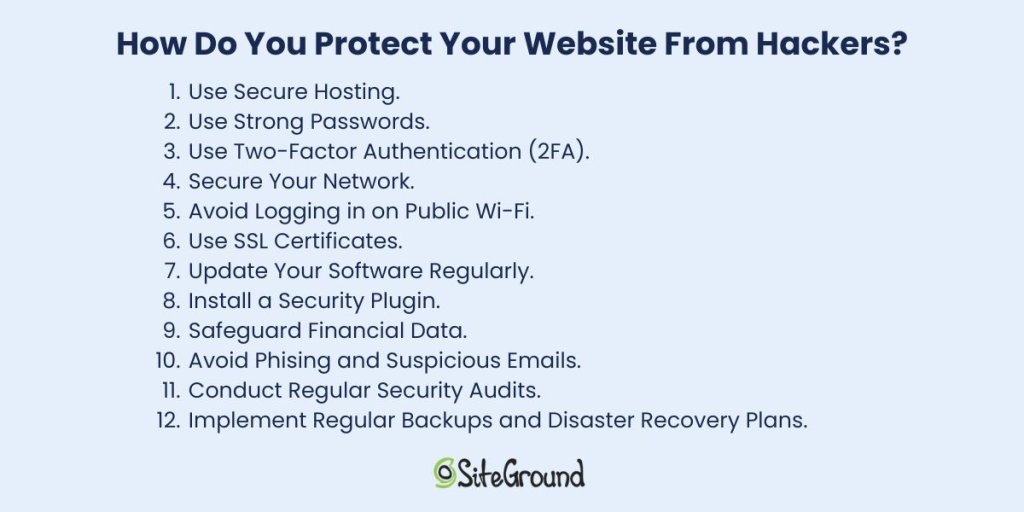
How Do You Protect Your Website from Hackers?
The most effective approach combines secure hosting, strong passwords, two-factor authentication, and up-to-date software. No single measure is enough but together, these steps close the vulnerabilities most attacks rely on.
1. Use Secure Hosting
Selecting a secure hosting provider is one of the most important choices you’ll make when it comes to defending your website against cyber threats. A reliable host not only keeps your site running smoothly but also offers strong security features to protect your data. Consider hosting services that include automatic updates, regular backups, advanced firewalls to enhance your site’s safety, and expert support.
SiteGround in practice: In spring 2026, security researchers disclosed five critical Linux kernel vulnerabilities in the space of three weeks—each one capable of giving an attacker with any foothold on a server full root access. SiteGround patched all five across its entire infrastructure within 48 hours of each disclosure, using live kernel patching so no customer site experienced downtime. Read the full story →
2. Use Strong Passwords
The foundation of any secure system is a strong password. Despite being one of the most basic security measures strong passwords are often overlooked. A robust password should be complex, unique, and difficult for hackers to guess.
With that in mind, avoid using easily guessable information like birthdays or common words. Opt for a mix of uppercase and lowercase letters, numbers, and special characters instead. Additionally, consider a password manager to generate and securely store your passwords, so you don’t have to remember each one.
3. Use Two-Factor Authentication (2FA)
Implementing two-factor authentication is one of the easiest and most effective ways to build strong website security. It requires users to verify their identity using two methods. Typically, this involves entering a password and then confirming a code sent to a mobile device or email.
What this means is that even if a password is compromised, 2FA significantly reduces the risk of unauthorized access.
4. Secure Your Network
Network security is another critical aspect of protecting your website. Start by ensuring that your network is secure and that all software is up to date. Regularly update your firewall and antivirus software to protect against malware and other threats. Furthermore, consider using a virtual private network (VPN) when accessing your website from remote locations.
What’s a VPN? It encrypts your internet connection, making it more difficult for hackers to intercept data. It also masks your IP address, adding an extra layer of privacy and security while you browse.
5. Avoid Logging in on Public Wi-Fi
Public Wi-Fi networks, such as those found in coffee shops or airports, are convenient but often lack the necessary security measures to protect your data. If you must access your website while on the go, use a secure network or a VPN to encrypt your connection and protect your website and sensitive data.
6. Use SSL Certificates
An SSL (Secure Sockets Layer) certificate is a must-have for any website that handles sensitive information. It encrypts the data transmitted between a user’s browser and your website, ensuring that sensitive data, such as login credentials and financial data, remains secure.
The encryption it offers is key to protecting your website from hackers looking to exploit vulnerabilities in data transmission. An SSL certificate not only enhances security but also boosts your website’s credibility. Plus, secure websites often rank better in search engine results, giving you an added advantage.
7. Update Your Software Regularly
Keeping your website’s software up to date is vital for security. Developers frequently release updates to fix vulnerabilities and improve performance—ignoring them can leave your site exposed to hackers who target outdated software. This is why it’s important to stay current to keep your defenses strong.
To stay protected, make sure that your content management system (CMS), plugins, and any other software components are always up to date. Also, consider enabling automatic updates where possible to minimize the risk of missing critical patches.
8. Install a Security Plugin
Security plugins and tools can not only help you get an extra layer of protection but also with performing regular security check-ups. Generally, they’re a good starting point for your website security, as they can make your website more secure automatically.
The SiteGround Security Optimizer, for example, provides a range of features, from scanning for malware to blocking malicious traffic. It also offers real-time monitoring, alerting you to potential threats and allowing you to act quickly. On top of that, you can rely on firewall protection and brute force attack prevention, further securing your website against unauthorized access.
Implementing these advanced security techniques can significantly enhance your website’s defenses and provide peace of mind. As we move forward, let’s explore how to protect sensitive information, and help your data remain secure and confidential.
9. Safeguard Financial Data
Financial data is a prime target for hackers, so it pays to be deliberate about how you handle it:
- Use a reputable payment gateway — services like Stripe or PayPal handle card data on their own secured servers, meaning sensitive numbers never touch yours.
- Never store card details unnecessarily — most breaches involving financial data happen because it was retained when it didn’t need to be.
- Comply with PCI DSS — if you process payments directly, this standard sets the baseline for encrypted transmission, access controls, and regular audits. Your payment provider will usually guide you through what’s required.
Monitor transactions for anomalies — unusual purchase patterns or multiple failed payments can flag fraud early. Most payment platforms have this built in; make sure it’s enabled.
10. Avoid Phishing and Suspicious Emails
Phishing involves hackers tricking users into revealing sensitive information. To combat these threats you can:
- Prioritize building a culture of vigilance among your users and employees.
- Perform regular training sessions that can help them recognize unexpected requests for personal information and other red flags.
- Encourage users to always question the legitimacy of emails and verify the sender’s identity through alternative means.
- Foster an environment of caution and verification, so that you can protect sensitive information and maintain user trust.
As we continue, let’s delve into the importance of monitoring and maintenance to ensure your website remains resilient against evolving threats.
11. Conduct Regular Security Audits
Conducting regular security audits is essential for identifying potential weaknesses in your website’s security framework. These audits involve systematically reviewing your website’s code, configurations, and access controls to ensure they meet current security standards.
It might also help to engage with cybersecurity professionals or use automated security assessment tools to uncover vulnerabilities that may otherwise go unnoticed. By performing security audits regularly, you can stay ahead of potential threats and ensure your website remains secure.
12. Implement Regular Backups and Disaster Recovery Plans
Even with the best security measures in place, no system is entirely immune to attacks or unexpected failures. That’s why it’s a good idea to have a robust backup and disaster recovery plan. Regularly backing up your website’s data ensures a quick restore in the event of a breach or data loss.
Store backups in a secure, off-site location, and test your recovery process periodically to ensure it functions correctly. A well-executed disaster recovery plan minimizes downtime and helps maintain business continuity, even in the face of unforeseen challenges.
Protect Your Website from Hackers Today
Most attacks exploit basic weaknesses, and the steps in this guide are enough to stop the majority of them.
Strong passwords, two-factor authentication, SSL certificates, regular updates, and a security plugin all work together to close the gaps hackers rely on. And it starts with choosing a host that takes security as seriously as you do—one with built-in firewalls, proactive monitoring, and a team that patches vulnerabilities before most people have heard about them. That’s the foundation SiteGround Web Hosting is built on.
Do the basics well, stay consistent, and your site will be a much harder target than most.
FAQs: Protecting Your Website From Hackers
Look for defaced pages, unexpected redirects, unfamiliar admin accounts, or a sudden drop in search rankings. Your hosting provider may flag it before you do. When in doubt, run a malware scan. A tool like the SiteGround Security Optimizer can help here—its activity log monitors visits, login attempts, and suspicious behavior in real time, so you’re more likely to catch a breach early rather than after the damage is done.
Yes, visiting a compromised website can expose you to malicious scripts that steal cookies, session data, or login credentials without you doing anything wrong. It works the other way too: if your own site is hacked, it can be used to attack your visitors.
Layered security. When a site has two-factor authentication, a web application firewall, updated software, and strong passwords all in place, the effort required to break in usually isn’t worth it. Hackers rely on easy wins, thus removing the easy wins is the most effective deterrent.
This article was originally published in May 2025 and then updated in May 2026