The SiteGround academy provides a wide variety of tips, tools, and resources related to WordPress, web performance, website optimization and site security.
Congrats – you’ve purchased a domain! But now you’re thinking, “ok, I have a domain name, now what?” Indeed, owning a domain is a great first step in establishing an online presence for your business, project, or personal brand. But now that you have one, the question is how to use a domain name? What comes next? This guide will walk you through eight essential steps to help you get your domain up and running, ensuring that you’re set up for success online.
What to Do With Your Purchased Domain
Choosing a domain name is exciting, but turning that purchased domain into a fully functional and professional online presence requires several key steps. Below, we’ll explore what you need to do after purchasing a domain, starting with simple-but-essential steps – like securing social media handles – and then getting into the nitty gritty of creating a website, and more. Let’s get started!
1. Secure Social Media Handles
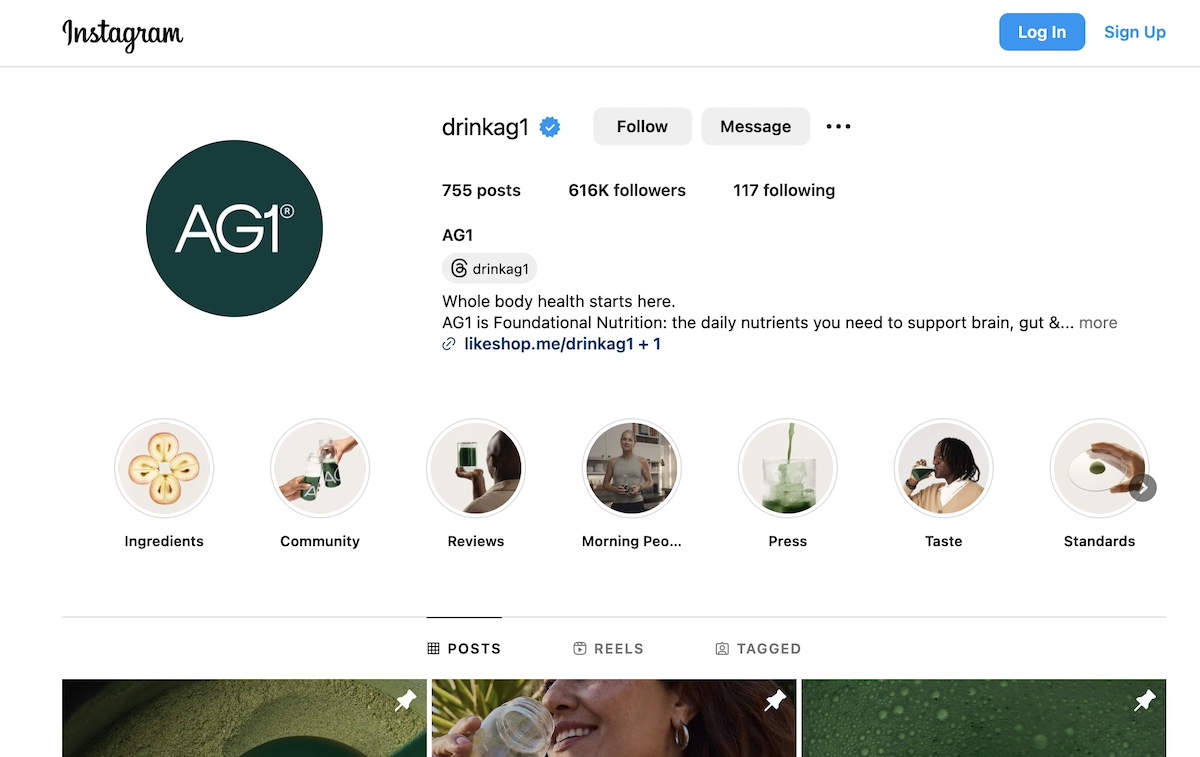
You’ve got a domain, and social media may not be on your radar just yet – but it should be. Even if you don’t plan on actively using social media right away, securing social media handles that match your domain name is a smart move. Consistent branding across platforms helps maintain a cohesive identity, making it easier for customers to find, recognize, and remember you.
Check availability for your domain name on popular social media sites like Facebook, Instagram, Twitter, and LinkedIn. You can use tools like Namechk or KnowEm to quickly see which handles are available across multiple platforms. Once reserved, these social media accounts will be ready for use whenever you decide to start promoting your brand.
If, however, you find that your name isn’t available, consider getting creative by adding an extra word to the handle name. For example, you could add words like “hello,” “get” or “shop” to the beginning of your brand name. Or, if your business is regionally based, you might consider adding your city or region to the social media handle. By adding an extra word, you’ll have more name options at your disposal. This, by the way, is also a great strategy for choosing a domain name if you find that your first choices aren’t available.
2. Register and Trademark Your Business
If you haven’t already, registering and/or trademarking your business name is a good step to protect your brand legally and reduce the risk of litigation. This process helps prevent others from using your name in ways that could create confusion or harm your reputation, and it also safeguards you from potential legal issues with other businesses that might later claim rights to your brand name. Trademarking and registration requirements vary by country, so it’s best to consult local government resources or legal guidance for accurate information.
3. Plan Your Website
Now it’s time to start thinking about how exactly you want to build your site. You can choose various methods, ranging from website builders to content management systems (like WordPress), and custom coding. Which route you go with will depend on various factors, including your budget, customization needs, and level of tech savviness.
Website builders, for example, typically offer a user-friendly, drag-and-drop approach that simplifies website creation without needing much technical knowledge. Also, many site builders often host your site for you, which means you don’t have to think about web hosting (which we’ll get to in a moment).
All this said, you typically have to pay a monthly fee to publish and use your site, and there are often ongoing costs for extra features. Plus, they typically don’t offer extensive customization unless you pay for added plugins or custom coding.
Alternatively, a content management system (CMS) like WordPress enables users to easily create and customize sites of all kinds – from blogs to online stores – given its vast array of themes, plugins, and tools. While it may require a bit more technical skill, WordPress offers flexibility and scalability, making it a cost-effective choice for a customizable website.
Meanwhile, a custom-built site offers the most unique functionality and design options but comes with higher upfront and ongoing costs, especially if external developers are involved. In both these latter two cases – a CMS and a custom-built site – you would likely need to make a decision around web hosting, which brings us to step 4!
4. Get a Web Hosting Plan
If you don’t use a web-hosted sitebuilder, then you’ll need a web hosting plan in order to bring your website and domain name to life. Hosting provides the servers, storage, and infrastructure required to keep your website files online and accessible to users. Essentially, hosting acts as the foundation for your website, allowing your domain to connect with the servers where your site data is stored so that visitors can view it on the web.
There are several types and combinations of hosting available, including shared hosting, cloud hosting, managed WordPress hosting, and more – each suited to different levels of website traffic, control, and technical needs.
For example, SiteGround offers managed WordPress hosting, which is particularly beneficial for WordPress users seeking ease of use with optimized security, performance, and automatic updates.
Ready to launch your online presence effortlessly? Get started easily with SiteGround web hosting. Enjoy famously fast web speed and performance, backed by multi-level security, and top-rated support. Explore plans now>>
5. Ensure Your Purchased Domain Points to the Right Hosting Servers
Whether you’ve chosen to use a web-hosted sitebuilder, or to buy your own hosting and create a site with a CMS, you’ll need to make sure that your domain directs to your actual site. If you’ve purchased your domain and hosting from the same provider, the setup may already be done for you.
However, if you’ve bought your domain from one provider and your hosting from another, you’ll need to point your domain to your hosting provider. This process, known as “domain pointing,” involves updating your domain’s DNS (Domain Name System) settings to connect it to your website’s files on your hosting server.
To do this, you will need to consult your domain and hosting providers for exact instructions, but the process is generally pretty simple.
Moving a domain is really quite easy – nevermind that the benefits of having a truly top-notch hosting provider make the few minutes it takes to correctly point your domain absolutely worth it.
6. Build a Website
Now to finally put that domain name to work: by building your website! Start by defining your goals – both short-term (like lead generation) and long-term (like brand awareness) – and determine the actions you want visitors to take, as well as how you’ll measure success.
Another important step to take during this process is to spend time identifying your target audience so that you can build your website content to speak directly to them. You’ll also want to establish and round up branding elements, such as your logo, color scheme, typography, etc.
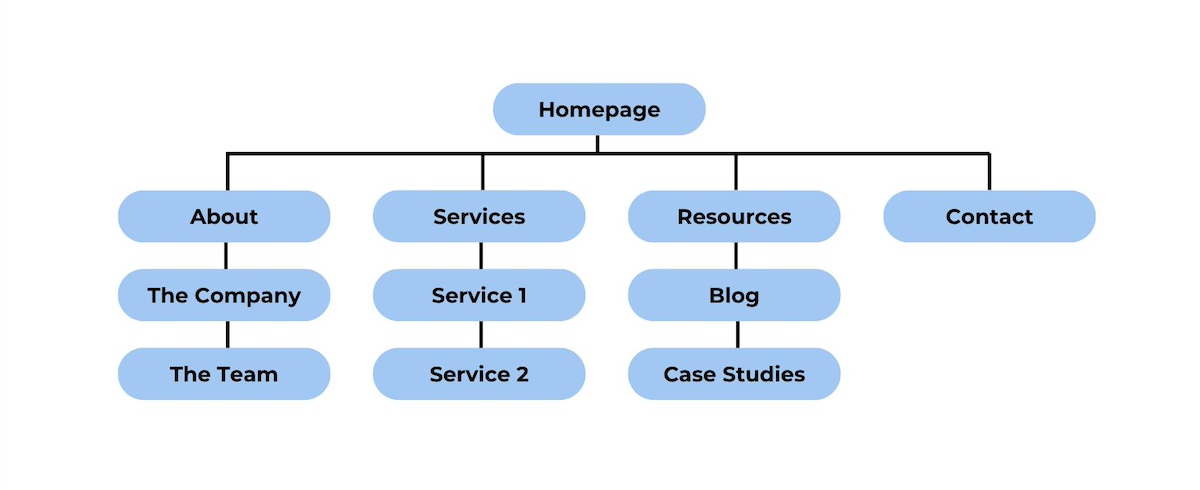
It will also be helpful to map out your website architecture so that you know exactly what content you need to round up – from copy to imagery and other design elements. From there, you can start putting everything together and bringing your website to life!
The process is of course a bit more elaborate than what we can cover here. For a detailed breakdown of the process of creating a website, check out our comprehensive guide on website planning. It covers everything you need to get started and get a website up and running.
7. Submit Your New Website to Search Engines
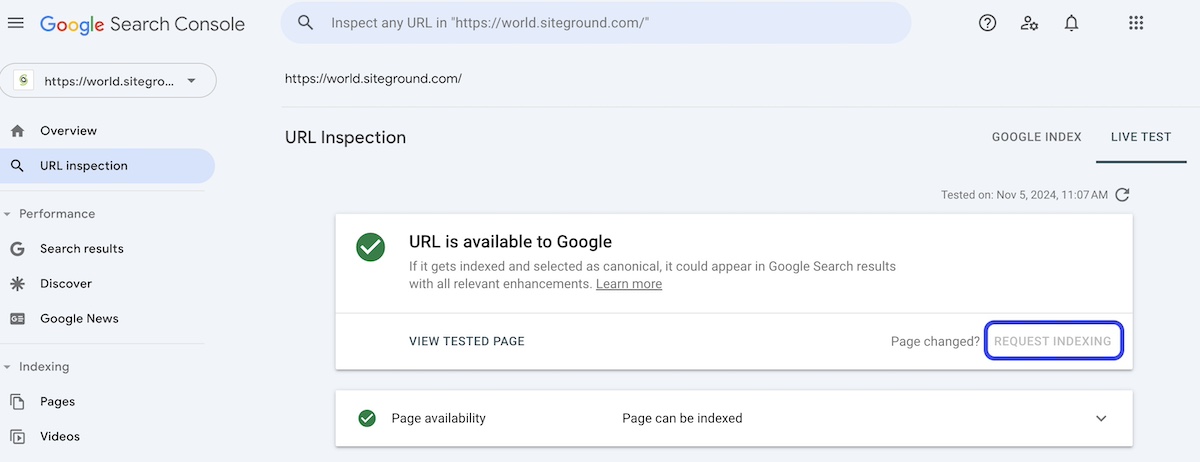
Once your website is live, you’ll want search engines to start indexing it so that people can find it. Google Search Console, for example, allows you to submit your website and sitemap, which helps search engines crawl your site more efficiently.
Submitting your site to search engines gives it the best chance to appear in search results and drive organic traffic. While search engines may eventually find your site on their own, submitting it directly can speed up the process so that people can start seeing the fruits of your labor sooner rather than later.
8. Create a Personalized Email Address Using Your Domain Name
A professional email address using your domain (such as yourname@yourdomain.com) adds credibility and strengthens your brand’s identity – and it’s also more memorable. Most hosting providers include email services, allowing you to create domain-based email addresses directly from their control panel.
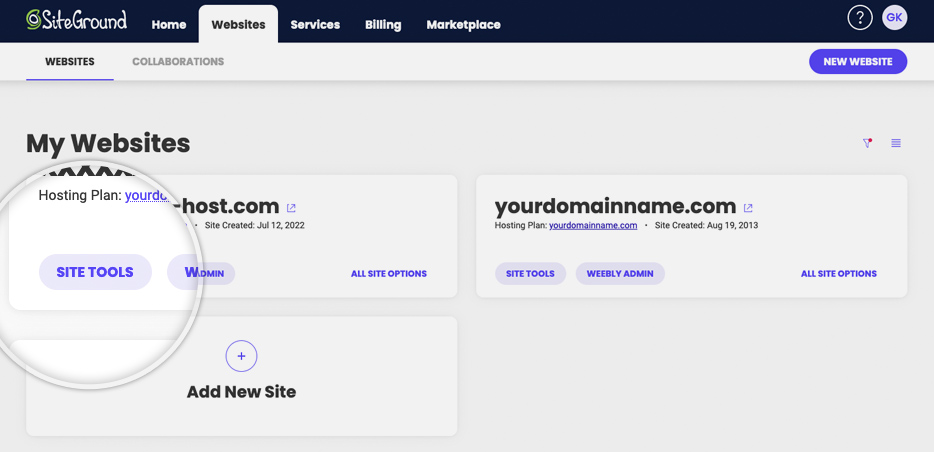
For example, it’s super easy to create an email account with Site Tools at SiteGround. You just go to your account in your Site Tools control panel, choose your domain, type the desired email address, create a secure password, and click “Create.” And there you have it: an email account is set up and ready to use!
After this step, you can set up your email on a computer by configuring it to work with popular email clients like Outlook, Gmail, or Apple Mail. A personalized email address is a small but impactful way to present a professional image to your audience and potential customers.
Takeaways on What to Do After Buying a Domain Name
Purchasing a domain name is just the first step in building a strong online presence. Following these eight steps will help you transform your domain into a fully functioning, professional website (and email!) that’s ready to serve your audience and grow your brand. From securing social media handles, to selecting hosting, and building a website, each step ensures your online setup is optimized for success.
Get the most out of your domain name by choosing SiteGround. Benefit from a faster, better-performing, and lower-maintenance website, all which translate to more conversions for your business. Plus, SiteGround hosting is bolstered by unparalleled security, and live 24/7 customer support that’s there to help you every step of the way.
When you buy a domain, you don’t technically “own” it outright. Instead, you’re registering the rights to use it for a specific period (typically one year, which is renewable). As long as you continue renewing it, you retain control of the domain and can use it as your online address. If you haven’t yet registered a domain name, note that usually there is an annual cost – that said, some domain sellers, like SiteGround, offer the domain for free for the first year when you sign up for web hosting.
Can I Move My Domain to a Different Hosting Provider?
Yes, you can transfer your domain from one hosting provider to another if you choose. The basic steps for this process include unlocking the domain and requesting an authorization (EPP) code from your current registrar (likely a current or previous hosting provider). Then, initiate the transfer with your new provider by entering the domain name and EPP code. Note that you may need to update your DNS settings as well. If you choose to transfer an existing domain to SiteGround, 24/7 live support is available to assist you with any questions or doubts that you might have during the process.
What is Domain Privacy Protection and Do I Need It?
Domain privacy protection, also known as WHOIS privacy, is a service that keeps your personal information – such as your name, address, phone number, and email – confidential when you register a domain name. Without this protection, your details become publicly accessible through the WHOIS database, which can lead to unwanted solicitations, spam, and even identity theft.
How do you hide your personal information in the domain name WHOIS details? You can usually select domain privacy protection during the registration process with your hosting provider or domain registrar. Many web hosts and registrars, including SiteGround, offer this service, ensuring your personal information is replaced with their contact details in the WHOIS database.
When you’re building your online presence, one of the first decisions you’ll face is choosing the right type of web hosting for your website. With so many options available, it’s easy to get overwhelmed by the technical jargon and differences between hosting services. What are the different types of web hosting, and more importantly, how do you know which one is best for your website?
There are plenty of resources online about web hosting, but many of these terms may be confusing, as the limits between the different types of hosting are blurred. In this article, we’ll break them down clearly and explain the differences, so you can easily choose the right one for your specific needs and use case. Whether you’re launching a small business site, an ecommerce store, or a personal blog, this guide will help you confidently decide what hosting you need – without the stress!
Why Choosing the Right Hosting Type Is Crucial
There are several types of web hosting, but before we dive into the specifics, it’s important to understand just how crucial your hosting choice is for your website. Hosting isn’t just the “place where your site lives.”
Choosing the right hosting can do more than just boost your website’s speed and stability. It can streamline your workflow and also reduce costs thanks to many automated features. One-click setups and auto-updates, for example, simplify the process of creating your site and keeping it up to date.
Security tools like daily backups and built-in protection solutions safeguard your data and provide peace of mind, helping you avoid costly downtime or data loss. Solutions such as a CDN and caching tools can help improve user experience by reducing website load times and speeding it up.
There are many, many other additional solutions and services a web host can equip you with, so choosing a reliable provider is key. If you’re just starting out, it’s worth looking into hosting options carefully, as it can influence the success of your site and, in turn, your business.
Types of Web Hosting Based On the Server Setup
When discussing types of web hosting, it’s helpful first to understand that hosting services can be categorized based on two main factors: the server setup (how the resources are allocated) and theadditional services you receive on top by the hosting provider. Let’s first take a look at the web hosting types, based on the server setup.
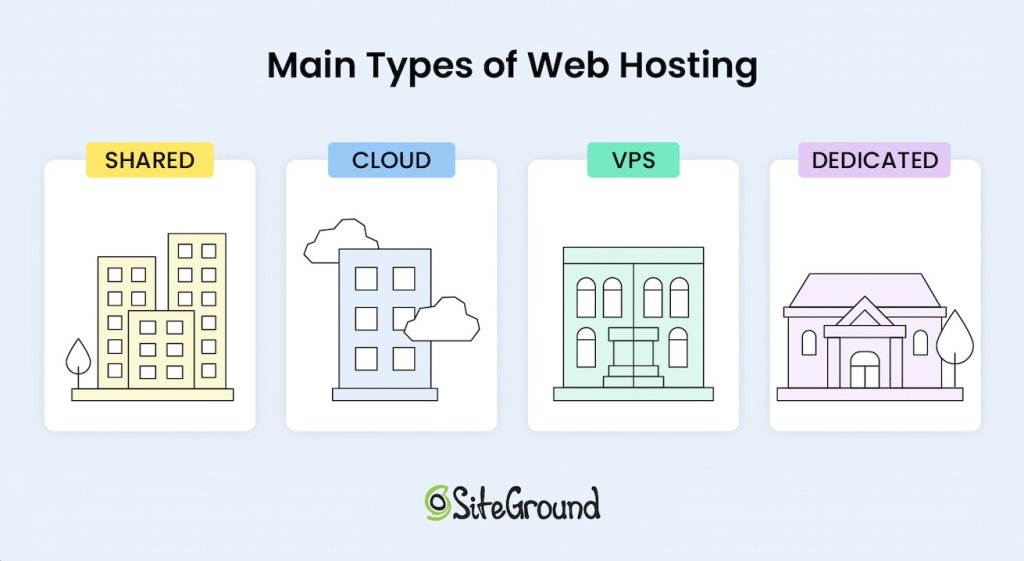
Generally speaking, there are four main types of hosting:
Shared hosting, often referred to as “web hosting,” is one of the most popular types of hosting because it’s affordable, easy to use, and includes some level of managed service to assist the user. With shared hosting, multiple websites are hosted on the same physical server, sharing resources like CPU, RAM, and disk space.
Typically, shared hosting is considered the cheapest form of hosting, which is why it also is the most widely used, but as you will see later in this article, the price of the hosting solution mostly depends on the service added to it. So don’t hurry to judge yet.
One of the biggest advantages of the shared service is that you don’t need much technical knowledge to use it. The servers are preconfigured by the hosting provider with all the software needed to run the server and tools that let you access your space and resources allocated on the machine.
One of the main disadvantages of shared hosting is the fact that your website does not get a dedicated share of the server’s resources. This means that if you have 100 sites on the same machine, and one of them gets very busy (or falls under a DDOS or other attack), that busy site might consume all of the server resources for some time and leave nothing for the rest.
That means your site would become unresponsive, or even go down, just because one of your co-tenants abused the CPU or RAM of the machine. Naturally, good hosting providers would never let that happen to such an extreme, but the fact is the availability of your site depends on the way the other sites use the shared hosting service.
Shared hosting is typically an excellent choice for businesses or individuals just starting their websites, or for more static sites that don’t require extensive server resources, even as their traffic and popularity grow. That said, as you’ll see later, shared hosting can also work well for dynamic online shops and high-traffic sites if the included managed services offer built-in performance and optimization solutions.
For example, SiteGround offers shared hosting plans that vary in terms of features and server resources dedicated to them and the fact is, on the GrowBig and especially the GoGeek plans, SiteGround successfully hosts many online shops thanks to the higher server resources allocated to the accounts, the smart caching technology applied to shops, and the performance optimizations offered out of the box.
2. Virtual Private Server Hosting (VPS)
Virtual Private Server (VPS) is another type of hosting where you share a physical server with other users, but have your own dedicated share of space, CPU, and RAM resources. Using virtualization technology, VPS hosting divides a server into multiple virtual environments, giving each client their own dedicated portion of resources, such as CPU, RAM, and disk space.
This setup means that while you share the server hardware with other users, your hosting remains isolated and your resources are guaranteed, making it generally a more costly option compared to shared hosting, yet more affordable than a dedicated server. With the appearance of mass-market cloud hosting solutions which offer scalable and flexible resources, the VPS server technology is becoming obsolete.
3. Cloud Hosting
When you think of “cloud” you probably think of Google Cloud and Amazon – these big names with huge data centers and complex service configurators. Well, cloud hosting is no longer a privilege for the technically savvy DevOps and huge enterprises that pay big bucks for infrastructure. Cloud hosting has become a very commoditized service that even small websites without an engineering team could comfortably sign up for.
What is cloud hosting? Cloud hosting utilizes a network of interconnected servers, virtually sharing their CPU, RAM, and space, creating a high level of redundancy of the service and resource scalability. With cloud hosting, resources can be quickly adjusted, meaning you can easily scale up or down based on your website’s needs in seconds. Such an upgrade does not require the physical addition of a hard drive or memory card, and there is no rebooting of the machines – you just claim more of what’s already in the cloud.
The main benefit on top of scalability is the redundancy. Even if one of the machines in the cloud goes down (it happens more often than you think), the other machines take over and continue to deliver the service. This means that your website will not experience downtime and you get the highest level of redundancy and availability compared to all other standard hosting setups.
The downside of signing up for cloud hosting or VPS is that you need to know in advance how much CPU, RAM, and space you need so that your site gets properly served. While cloud hosting has a remedy for this with the option for very quick scaling or even automatic scaling, VPS does not offer that.
In contrast to shared hosting, on VPS or cloud hosting without automatic scaling, a sudden traffic spike could make your site unresponsive if it temporarily needs more CPU or RAM, as it would hit its hard limits. On shared hosting, however, your site can tap into the larger pool of server resources, meaning someone else’s site might slow down instead – allowing yours to stay online.
4. Dedicated Hosting
Another main type of hosting is dedicated hosting, which involves renting an entire server exclusively for you, and thus providing you with access to all of the server’s resources.
Unlike virtual servers, with this type of hosting you get the performance of a dedicated machine, making them suitable for specific high-demand scenarios. This type of hosting is designed for websites that require significant computing power. Clearly, dedicated hosting is the priciest option of all, with or without managed service on top.
Dedicated servers come managed or unmanaged. Many technical experts and enterprises would rent dedicated servers as bare metal (a dedicated physical server with direct access to the hardware) in order to add the software of their choice, often experimenting with the setup and settings to get specific performance. For smaller companies and less tech-savvy clients, you should be looking for a managed dedicated server.
Types of Hosting Based On The Services Added
Beyond choosing the right server setup, hosting can also vary significantly in the level of additional services you get on top (features, tools, management interfaces, support). Every main type of hosting – whether shared, VPS, cloud, or dedicated – usually comes with maintenance and support services, depending on the hosting provider and their hosting packages.
Managed vs Unmanaged Hosting
In terms of services, hosting generally falls into two main categories: managed and unmanaged hosting. With managed hosting, the provider installs and manages essential server software, such as Apache web server, Linux OS, MySQL, PHP, and cPanel, and also handles server setup and maintenance. Additional services like application installations, backups, security and performance solutions, and tailored support for specific CMS applications like WordPress or Joomla are also available, but may vary depending on the host and the selected price package.
Using a managed service relieves you of much of the technical responsibility, making managed hosting a good fit for users without specialized tech knowledge or those who want to focus on other aspects of their website.
In contrast, unmanaged hosting leaves all of these responsibilities in the user’s hands, offering greater control and flexibility, but requiring technical expertise. This option is often suitable for developers or businesses with dedicated IT staff to manage and optimize the server themselves.
Shared hosting is the one exception, as it always comes with a managed service layer by default. This is because shared environments require consistent oversight from the provider to ensure stability and security among all users on the server.
❗ Important Remember that each hosting plan, whether managed or unmanaged, is designed to suit different use cases – from simplicity and ease of use to full control and customization. That’s why it’s crucial to choose a hosting type that best suits your needs.
Now, let’s take a closer look at the types of web hosting options, based on the additional services offered on top of the server setup, as well as the specific needs, and use cases.
Hosting Optimized for Specific Applications (Managed WordPress Hosting)
Hosting for specific content management applications like the popular WordPress, Joomla, Drupal, Moodle, and others means that the hosting environment is optimized to support the specific technical requirements and performance needs of the chosen application. With this type of hosting, you can be sure that your provider fully supports the application, often enhancing it with unique, tailored features and tools.
With managed hosting for specific applications, you’re also getting a hosting environment designed to help your chosen platform thrive. Whether you’re using WordPress, Joomla, or another platform, managed hosting for specific applications offers convenience, reliability, and performance optimized for your CMS.
Managed WordPress Hosting
For instance, managed WordPress hosting handles the full scope of server and application management so you can focus on your website content and business growth rather than application maintenance. This means the hosting provider handles essential tasks such as server maintenance, WordPress core and plugin updates, security patches in case of exploits, performance improvement solutions, and offers tools facilitating the workflow for WordPress users.
At SiteGround, we provide full-featured and ultrafast managed WordPress hosting – the best-value solution for WordPress sites. In addition to features like free WordPress auto-installation, automated migrations, and auto-updates, we offer performance optimizations out of the box, security hardening with a click, and a range of advanced tools for effortless WordPress management.
WooCommerce hosting is designed specifically for online stores built with WordPress and its WooCommerce plugin. WooCommerce hosting provides a range of specialized tools and user-friendly interfaces geared toward managing the needs of clients using WooCommerce for their shops.
What is specific for online shops is that they are very dynamic – every site visitor and each order they attempt to submit calls for database and PHP queries that are unique and cannot be cached, which normally can be done with more static sites. This makes e-stores more resource-heavy and in need of additional optimizations on server and application levels. Without these optimizations, the site can become significantly slower, leading to a poor user experience and potentially resulting in lost conversions.
As your store grows, this type of web hosting often provides options to handle increased traffic seamlessly, allowing you to focus on expanding your business without worrying about performance issues.
🛍️ With SiteGround’s easy-to-use WooCommerce Hosting, you can get everything you need for a successful store. Designed for simplicity and speed, it comes fully equipped with WordPress, the WooCommerce plugin, and the Storefront theme pre-installed, so you can start selling right away. Enjoy automatic updates, speed-boosting technology, and essential security features – all crafted to keep your store running smoothly and securely.
Email Hosting
Email hosting is another specialized type of hosting where the focus is on the email service you get on top of your core server setup for the needs of your business. Email hosting dedicates server resources solely to managing email accounts, communications, storage, and features.
In addition to the basic server setup, email hosting packages include services like SMTPfor sending emails, POP which allows users to download emails from the server to their local device for offline access, and IMAP, a protocol used for receiving emails that allows users to access and manage their emails from multiple devices. These protocols ensure that your email service is accessible – whether you’re on a computer, phone, or other device – and can synchronize across platforms.
One of the key features of email hosting is the enhanced security and anti-spam measures included to protect your inbox and reputation. Email hosting providers usually implement advanced filtering and scanning tools to block spam, detect malware, and prevent phishing attacks. These security layers help ensure that both incoming and outgoing communications are secure and that sensitive business information is protected.
Email hosting can be a stand-alone service, or it can be part of a bundle. For example, SiteGround offers complimentary email service in all its hosting plans, including the managed WordPress plans, which gives you the chance to create unlimited email accounts (addresses) at your site’s domain, use a webmail from any device, set autoresponders, and more. The good thing is, it comes at no extra cost but is included in the bundle.
Reseller Hosting
Reseller hosting is a type of hosting with additional services, designed for individuals or businesses that need to manage multiple websites while providing hosting services as part of a broader offering. This type of hosting is popular mainly among developers, freelancers, and web agencies.
Essentially, reseller hosting operates on top of shared, VPS, cloud, or dedicated setups, allowing you to create multiple hosting accounts for your clients, using standard configurations or custom resource packages tailored to their needs. Naturally, it depends on what kind of reselling you wish to do and how much flexibility you need.
Some hosts offer volume discounts for clients who prepay or create multiple shared hosting accounts, which the client then resells at regular or custom price to their end clients – a very standard form of reselling. The more sophisticated solutions, however, allow the reseller to create multiple client accounts within the same hosting plan. This usually happens on VPS, cloud, or dedicated server setups.
One of the main advantages of reseller hosting is that it empowers you to purchase hosting resources from a provider and then resell them under your own brand – this is usually called “white-label” reselling. This model enables you to build a hosting business without the need to manage servers, but only taking over the client-facing support. You benefit from the hosting provider’s technical expertise while creating a unique brand experience for your clients.
While you’re responsible for providing customer support to your clients, the backend management, including server maintenance, security updates, and performance optimization is handled by your host. Note that it’s important to choose a reliable hosting provider, as the performance, security, and reliability of your service will directly impact your clients’ satisfaction.
SiteGround offers reselling service on top of its GoGeek (shared web hosting plan) and its cloud plans, where resellers can create unlimited websites and provide white-label access to these sites to their end clients. This means that the end client will not know that SiteGround is the original service provider, but will contact the reseller on all hosting matters.
In our cloud plans, we have included an additional reseller convenience – the option to create custom hosting plans that are tailored to the specific needs of the end clients. Each plan includes a different share of resources and tools, giving you the flexibility to cater to various client requirements.
How to Choose the Right Type of Hosting for Your Site?
To make a smart decision, look for a hosting provider that offers a robust array of value-added services that align with your specific needs. Ultimately, the combination of your server setup and the additional services included in your hosting plan determines the real benefits you will receive.
When evaluating hosting options, it’s essential to look beyond just the server type, whether shared, VPS, cloud, or dedicated, and consider the complete hosting package. It’s always beneficial to have essential extras like SSL certificates, automated backups, CDN, and email that can enhance your website’s security, performance, and usability. These features are crucial for creating a reliable and professional online presence.
It’s also critical to consider your specific usage needs. For instance, if you are planning to host a WordPress site and prioritize ease of use, a managed WordPress hosting service is ideal for you, as it offers specialized tools and support tailored for WordPress users. On the other hand, if you have a developer on your team, consider a hosting provider that offers collaboration tools so that you can easily give them controlled access to your websites.
If you want to make the best choice, another important factor in your decision should also be the balance between price and value-added services. Shared hosting is typically the most affordable option, making it an excellent choice for those just starting out. However, depending on the additional features you need, the overall cost can vary.
Be cautious of opting for the cheapest solution, as well as for what seemingly looks “premium,” as the lack of essential extras could lead to higher expenses down the line due to performance issues and the premium claim is often a marketing bubble.
To help you navigate the selection process, here’s a quick overview of some key points to remember and consider:
✅ Understand your needs: Evaluate your website’s goals. The type of site you’re creating will influence your hosting requirements. Start by asking yourself a few questions:
What is the application you plan to use? Filter providers that are focused on offering services for it. If you are not sure, look for providers that offer a free “sitebuilder” in their bundles.
Does the host offer security and performance solutions? You might not need these right now, but eventually one of the two or even both issues could arise. You may look for terms like caching, WAF, custom PHP and MySQL setups, and more.
Do you need email services? Look at the features list and choose only those providers that offer email services in their plans.
What other services do you want and are they paid extra? Maybe SSL (everyone needs that!), CDN (mostly sites with geographically dispersed traffic), backups (an absolute must), domain (a free domain might be a good value if added to the mix), collaboration access (so your developer can get access without compromising yours), or others? When you prioritize these, then you start comparing which host on the shortlist is giving better value in their plans for the price asked.
✅ Consider your budget: Determine your budget for hosting. Generally, shared hosting is a popular, cost-effective option, while cloud and dedicated hosting may incur higher costs. Remember, though, to look for the balance between price and value-added services. A managed shared hosting plan with a variety of features may serve you better than a cloud option that lacks proper management tools or flexibility.
The most important advice when it comes to budget: Don’t spare a few bucks per month just because it feels like you can compromise a few tools or features and they don’t seem so important. Paying $20, even $40 per month could be a game-changer and a business savior when things go bad.
✅ Assess your tech expertise: If you’re not particularly tech-savvy or you simply wish to focus on your business rather than server and website maintenance, opt for managed hosting options that come with an intuitive client dashboard and comprehensive site tools, along with reliable 24/7 customer support.
✅ Read reviews: Research recommendations from trusted sources, online communities, or groups related to your niche. User experiences can provide valuable insights into the quality and reliability of different hosting providers.
We hope this guide has equipped you with the insights you need to choose a hosting type that aligns with your website’s goals and needs.
Ready to take the next step?
Choose SiteGround, where you’ll get more than just fast and reliable hosting – you get a complete solution. Enjoy a robust managed hosting solution with essential features like easy website setup and management, automated backups, SSL certificate, caching, one-click CDN, an intuitive Client Area, and much more. Whether you’re just starting out or scaling your business, we give you the tools, flexibility, and support you need to thrive!
For beginners, shared hosting is often the most suitable option. It’s affordable, user-friendly, typically packed with useful features, requires little to no technical knowledge, and includes customer support. Most hosting providers offer easy-to-use control panels and one-click installations for popular content management systems (CMS) like WordPress, making it simple to get started. SiteGround, for example, leverages cloud infrastructure even for their shared hosting plans, offering an added layer of redundancy and performance that can be beneficial.
Which Type of Hosting Is Best for an Ecommerce Website?
Ecommerce hosting is often the best choice due to its specialized features. This type of hosting typically includes integrated shopping cart systems, payment processing features, and enhanced security to protect sensitive customer data. Plus, most ecommerce hosting providers offer scalability, which is vital for growing online stores. As your business expands, you may experience spikes in traffic, especially during sales or promotions, so it’s beneficial to have this feature out of the box.
What Is the Best Type of Hosting?
The best type of hosting greatly depends on your specific needs, goals, usage, and technical expertise. For most personal projects and online businesses starting out, shared hosting is a great starting point due to its ease of use, variety of tools, and affordability.
Email marketing keeps evolving, but here’s what hasn’t changed: the right tactics can turn your campaigns from “meh” to “wow, that actually worked.”
Whether you’re crafting your first campaign or fine-tuning your hundredth, these email marketing tips & strategies will help you cut through the noise, land in inboxes, and actually get people to click—without the trial-and-error headaches.
From building a quality subscriber list to keeping your emails out of spam folders, this guide covers everything you need to connect with your audience and drive real results.
Ready? Let’s dive into the email marketing tips that actually move the needle for small businesses.
What Are the Best Practices for Email Marketing Success?
Build and Maintain a Quality Email List
Write Catchy Subject Line and Preview Text
Craft Compelling, Scannable Copy
Have Clear Calls to Action
Design Beautiful Emails with Appealing Images
Design Beautiful Emails with Appealing Images
Apply Smart Segmentation and Personalization
Utilize Email Automation
Optimize Your Send Times
Track and Analyze Performance Statistics
Perform A/B Testing
Maintain Strong Email Deliverability
Let’s break down each of these strategies to help you create emails that convert.
1. Build and Maintain a Quality Email List
Your email list is the foundation of successful email marketing. A quality list filled with engaged subscribers will always outperform a large list of uninterested contacts.
How to build your email list the right way:
Create valuable signup incentives
People need a reason to share their email address. So offer something specific and relevant, like a discount code, free guide, exclusive content, or early access to sales. Make the value clear upfront. Generic promises like “stay updated” rarely convert as well as concrete offers like “Get 15% off your first order” or “Download our free social media calendar.”
Use double opt-in
While it adds an extra step, double opt-in confirms that subscribers genuinely want to hear from you. That’s because after someone fills out your signup form, they receive an email asking them to confirm their subscription. This simple practice improves engagement rates and protects your sender reputation by filtering out fake or mistyped email addresses. Yes, you might lose a few signups, but the subscribers you keep will be far more engaged.
Never buy email lists
Purchased lists violate most email marketing regulations and damage your deliverability. These contacts haven’t agreed to hear from you, which leads to high spam complaints, low engagement, and potential legal issues under laws like GDPR and CAN-SPAM. Beyond the legal risks, bought lists simply don’t work—people who didn’t ask to hear from you won’t engage with your emails.
Clean your list regularly
Remove inactive subscribers every few months. If someone hasn’t opened your emails in six months, send a re-engagement email campaign with a compelling subject like “We miss you! Here’s 20% off to come back.” If they still don’t respond, remove them. A smaller, engaged list of 500 active subscribers will always outperform 5,000 inactive ones. Clean lists improve your deliverability, open rates, and overall campaign performance.
Make signup forms easy to find
Place signup forms on your homepage, at the end of blog posts, on your checkout page, and in your website footer. Or even consider adding a popup or slide-in form for visitors who spend time on your site. The easier you make it for interested people to join your list, the faster it will grow.
That said, be patient with growth. Building a quality email list from scratch takes time. Focus on placing consistent signup opportunities across your website rather than expecting overnight results. If growth feels slow, remember: 500 engaged subscribers who open and click are far more valuable than 5,000 people who ignore your emails. Quality always beats quantity in email marketing.
2. Write Catchy Email Subject Lines and Preview Text
Your email subject line and preview text are your first – and often only – chance to grab attention in a crowded inbox. Together, they determine whether recipients open your email or scroll past.
Spark curiosity and show value
Your subject line should be clickable, but not spammy. It should make recipients want to learn more about what’s inside, without misleading them about what to expect. Address your audience’s pain points and state the benefit clearly. This builds trust and credibility. For example, “3 ways to cut your email workload in half” is specific and valuable, while “Amazing email tips inside!” is vague and forgettable.
Use personalization strategically
While adding a recipient’s first name helps (“Hi Sarah”), go further with location, past purchases, or interests: “Sarah, your Chicago store favorites are 20% off” outperforms generic subject lines. Use the data you have about your subscribers to make subject lines feel relevant to their specific situation.
Personalized subject lines consistently outperform generic ones—making this one of the highest-impact tactics for improving email performance. Industry studies regularly show double-digit percentage improvements in open rates from personalization alone. Keep it concise and actionable
Use action verbs and benefit-focused language. “Get your free guide” outperforms “Our guide is available.” And keep in mind that it’s best to produce subject lines that are 50 characters or less to ensure full visibility on most devices—mobile users will only see the first 30-40 characters before deciding whether to open.
Quick note: If adding a recipient’s name pushes your subject line over 50 characters, the personalization wins—it matters more than length. Personalized subject lines on mobile (even if truncated) still outperform generic subject lines that display fully.
Create urgency carefully
For promotional and sales emails, create a sense of urgency to encourage immediate action. Use phrases like “last chance,” “ends tonight,” or “only a few hours left.” Meanwhile, avoid spam triggers that combine urgency with money words like “Free cash now” or “Urgent—act now for free money.” Write naturally rather than desperately. Instead of “FREE MONEY – ACT NOW!!!,” try “Your exclusive offer expires Friday.” Same urgency, but professional and trustworthy. Avoid using all caps for your entire subject line.
Don’t use default preview text
Many businesses forget to customize preview text, leaving recipients with “View this email in your browser” or random body copy from the email. This wastes valuable inbox real estate. Preview text (also known as preheader text) appears alongside your subject line in the inbox, offering a sneak peek at your email’s content. It’s your last chance to make a convincing argument that your email should be opened.
Write preview text that complements—not repeats—your subject line, giving readers another compelling reason to open. Use it to provide a bit more detail about what readers can expect inside your email. While this text can be up to 90 characters, the ideal length is between 35 and 40 characters to ensure it displays fully across most devices.
3. Craft Compelling, Scannable Copy
One of the most important email marketing tips is to thoughtfully craft your email content. After all, it’s the relevant content that captures your readers’ attention and keeps them engaged with your message.
Whether you’re writing an informational, educational, or promotional email, rule #1 is to make your content relevant to your audience. Your content should address your subscribers’ needs and pain points, offering them value that motivates them to take action—whether it’s making a purchase or subscribing to your newsletter. Having a strong value proposition will get you one step closer to increasing your conversion rates.
How long should your emails be?
Keep promotional messages between 150-300 words and email newsletters between 300-500 words. Readers decide within seconds whether to engage, so front-load your most important message—put the key benefit or offer in the first two sentences.
Make your content scannable
Most people don’t read emails word-for-word; they scan in seconds. Structure your content accordingly: use short paragraphs (2-3 sentences max), clear headings, bullet points, and plenty of white space. Don’t overstuff your content with unnecessary words—get straight to the point. Readers should grasp your main message within 10 seconds of opening. If they have to work to understand your point, they’ll simply move on to the next email.
For example, here’s an email from YouTube Studio. See how scannable it is? That’s because of the bigger, bold email font in the title, followed by a catchy image, and a short paragraph. Then, it naturally flows to the blue call-to-action (CTA) button, which stands out well against the white background—a great example of how strategic colors in email marketing can guide reader attention. What’s more, the content is broken down into bullet points that are easy to scan because of the small icons at the beginning of each row.
AI can also help with content creation, but knowing how to write effective ChatGPT prompts is key to getting useful results. We’ve compiled an extensive guide on how to write email prompts to help you get better output from AI tools.
[ai_prompts_download]
4. Have Clear Calls to Action
Your next crucial step is having clear calls to action. Here’s how to achieve that:
Since the main purpose of an email CTA is to drive readers to take a specific action, your first goal should be to define what you want them to do. Do you want your readers to make a purchase, sign up for your newsletter, download an eBook, or visit a sales landing page of your new product or service?
Equally important is the design and wording of your CTA buttons, as both play a vital role in driving user action. Make sure to include short and actionable words on your CTA buttons, preferably verbs. Use phrases like “Buy now,” “Read more,” or “Get started.”
The visual design of your buttons is also essential—they need to stand out and grab attention. Use contrasting colors that differentiate them from your email’s background, and opt for bold, clear fonts to ensure they are easily visible and clickable.
Last but not least, instead of a button, you can also use an image as a CTA. In this case, one of the most notable email marketing hacks is to include an alt text for that image. Since some email providers might not display your image, your alt text will “show” people what the image was all about. Make your alt text short, yet descriptive and actionable—just as you would with regular CTA button copy.
Limit CTAs per email
Too many calls to action confuse readers and dilute your message. Stick to one primary CTA. If you absolutely need a secondary action (like “Read our blog” after a “Shop now” button), make the visual hierarchy clear through size, placement, and color. Your primary CTA should be impossible to miss.
Position your primary CTA within the first scroll—readers shouldn’t need to hunt for it. If your email is longer than 300 words (common for newsletters), repeat your CTA at the bottom so people who read through don’t have to scroll back up to take action.
Optional: Add social sharing buttons
While not essential for most promotional emails, social sharing buttons (Facebook, X, LinkedIn) can extend your reach when subscribers share your content. This works best for newsletters, blog roundups, or educational content—skip them for sales-focused emails where you want readers taking one action (buying, not sharing). Keep buttons small and place them in your footer so they don’t compete with your primary CTA.
5. Design Beautiful Emails with Appealing Images
No matter how closely you follow the best email marketing techniques, if your email doesn’t have an appealing design and compelling visuals, your engagement will suffer. Beautiful emails combine smart templates, relevant images, and strong brand consistency.
Start with responsive templates
If you’re just starting with email marketing, one of the best email marketing tips you can embrace is to consider using an email marketing platform. It will not only make your life much easier, but it will also help your email campaigns become measurable, optimizable, and ultimately more successful.
Most email marketing platforms will provide you with ready-to-use templates or easily customizable layouts. With SiteGround Email Marketing, you can create stunning emails fast with our free email templates, which leverage expert best practices. We have a template for every need—promotional, newsletter, welcome emails, or seasonal (such as Black Friday emails and Cyber Monday emails).
You can also lean on layouts for building your email campaigns. Layouts allow you to play around with the different elements of your email and customize them based on your own preferences and brand criteria.
What’s the difference? Templates are pre-designed emails you can customize (colors, text, images). Layouts are structural frameworks that show where images and text blocks go, which you build from scratch. New to email marketing? Start with templates. Want complete brand consistency? Create a custom layout once and reuse it. To help you create engaging email campaigns, we’ve also compiled a list of email layout examples.
Choose compelling visuals
Whether you’re using an email template or email layout, you must complement it with appealing images. This is one of the best email marketing tips, as most people interact with your emails primarily through visuals. You need to grab their attention with the images in your email campaign.
Images should be relevant to your content and value proposition, whether you’re using individual images or creating engaging photo collages to enhance your message. They should correspond with your brand guidelines, so that readers can recognize right away that the email is coming from your brand (even if they don’t notice your logo immediately).
Appealing images are hard to find, though. That means you either need to use free stock images, invest in paid images, or even hire a professional photographer.
Another way to address this is by using SiteGround’s Email Marketing platform, which offers a free built-in AI image gallery, and provides you with a wide range of photographs and illustrations in a variety of categories.
Include alt text for all images
Just like with CTA images, the rest of your images should also include alt text. Some email clients block images by default, so alt text describes what’s in the image so readers understand your message even when images don’t load. Keep alt text short, descriptive, and actionable—especially for CTA images.
Make images clickable
You should also make sure to have your images linked to whatever page you want your readers to visit, whether that’s your sales page, downloadable assets page, or otherwise. If you decide to include a button on the image, ensure that the whole image is a link, not just the button, as users tend to pay more attention to images rather than text. People tap images more often than small text links.
6. Ensure Mobile Responsiveness
More people check email on their phones every day, and poorly formatted emails drive subscribers to delete messages or unsubscribe. If your emails don’t work well on mobile devices, you’re losing potential customers before they even read your content.
Here are some strategies to verify your emails are optimized for mobile devices:
Use responsive email templates
Start with a responsive email template that automatically adjusts to different screen sizes. Many email marketing platforms offer pre-designed templates that are mobile-ready, saving you time and ensuring consistency across devices.
Optimize image sizes
Large images can slow down load times, particularly on mobile devices without fast internet connections. Compress images without losing quality and use formats like JPEG or PNG. Additionally, consider using CSS for background images to further improve load speed.
Design clickable CTA buttons
Make sure your call-to-action buttons are easily clickable on small screens. Use a minimum size of 44×44 pixels for touch-friendly buttons, and ensure they are visually distinct with ample spacing between other elements to prevent accidental clicks.
Ensure adequate sizing of links and text
Text links should be large enough to tap easily. Avoid placing links too close together, and use a font size of at least 14 pixels for body text to maintain readability without zooming.
Prioritize key content at the top
Place the most important content and CTAs at the top of your email. This approach works because even if recipients don’t scroll, they will see the key message and action you want them to take. This is increasingly important with features like AI email summaries, which can push your content further down the screen—making that first visible section even more critical for engagement.
Test across devices
Before sending out your email, test it on various devices and email clients to catch any display issues. By implementing these email marketing tips for mobile, you can improve the mobile responsiveness of your emails, leading to higher engagement rates and improved customer interactions.
Don’t have access to multiple devices? Use your email platform’s preview feature or free tools for basic testing. Most email platforms show how your email renders on different devices before you send.
7. Apply Smart Segmentation and Personalization
One of the best tips for effective email marketing is to apply segmentation and personalization in your email campaigns.
When you segment contacts based on criteria like subscriber activity and engagement levels, you can deliver messages that are more relevant and valuable to each recipient. This targeted approach transforms generic broadcasts into personalized communications that resonate with specific audience groups.
When customers receive content that feels personal, they are more likely to feel valued and understood. This creates a stronger connection with your brand, leading to increased loyalty and long-term customer relationships, as well as higher conversions.
Here’s how to implement smart email segmentation and personalization:
Start with basic segments
If you’re new to segmentation or have a small list, start simple. With SiteGround Email Marketing, you can segment contacts based on how they interact with your campaigns—who opens your emails, who clicks through, or who hasn’t engaged recently.
After sending a campaign, check your Analytics to see who performed specific actions, then assign those contacts to groups. For example, create one group for subscribers who opened your last few campaigns and another for those who haven’t engaged in months. This lets you send re-engagement offers to inactive subscribers while rewarding engaged ones with exclusive content.
Even basic segmentation like this significantly outperforms sending the same message to everyone. Start with simple engagement-based groups and refine your approach over time. The key is to treat your subscribers as individuals with different engagement levels, not just email addresses.
8. Utilize Email Automation
Your next step in the field of email marketing best practices is automations. By leveraging email automations, you can streamline your marketing efforts, deliver personalized experiences, and achieve better results with less manual effort.
Automations not only save time but also make certain that every subscriber receives the right message at the right time, improving their journey with your brand.
Here’s how to implement email automation:
Identify key opportunities
Start by identifying opportunities within your email customer journey where automation can add value. Welcome emails for new subscribers and re-engagement campaigns for inactive contacts are two high-impact automations that save time while keeping your audience engaged.
Choose the right tools
Select an email marketing platform that supports automation features. SiteGround Email Marketing offers automated welcome emails and allows you to create email sequences based on specific triggers—making it easy to nurture new subscribers and maintain consistent communication automatically.
Map out the email customer journey and design workflows that align with your marketing goals. Determine the triggers (such as signing up for a newsletter or reaching a certain engagement milestone) and the corresponding email sequence.
For example, a three-email welcome sequence might include:
Immediate: Deliver your promised lead magnet or discount
Day 2-3: Share your story, best content, or customer success stories
Day 7: Introduce your products or services with a special new-subscriber offer
This works for most small businesses. B2B companies or higher-ticket services often extend this to 5-7 emails over 2-3 weeks, adding educational content and case studies.
The welcome sequence runs automatically when someone subscribes, separate from your regular broadcast campaigns. So if you send weekly newsletters every Tuesday, a subscriber who joins on Wednesday would get the welcome sequence (three emails that week) PLUS your regular Tuesday newsletter. This doesn’t violate the frequency guidelines—new subscribers expect to hear from you more often initially.
Create personalized content
Develop email templates and content that are tailored to each stage of the workflow. Personalize messages using dynamic content and segmentation for maximum relevance.
9. Optimize Your Send Times
Timing matters more than many businesses realize. Sending your email when your audience is most likely to check their inbox can significantly improve open and engagement rates.
Test different days and times
While email marketing benchmarks suggest Tuesday through Thursday mornings perform well, your audience might behave differently. Test various send times and track which gets the best response. B2B audiences often engage during work hours (9 AM – 3 PM), while B2C audiences may respond better in evenings (6 PM – 9 PM) or weekends. Don’t assume—test with your specific subscribers.
Consider time zones
If your subscriber list spans multiple time zones, segment by location and schedule sends so emails arrive at optimal local times. Sending at 10 AM EST might work for New York subscribers, but means 7 AM for your West Coast audience—and most people don’t want marketing emails with their morning coffee.
This matters most for time-sensitive emails like flash sales or event invitations. For weekly newsletters, time zone optimization is less critical.
Watch for inbox competition
Avoid sending when your subscribers’ inboxes are flooded. Monday mornings often see heavy email volume as businesses catch up from the weekend. Similarly, sending right before major holidays when people are traveling or away from work can hurt your metrics.
Pay attention to your industry’s patterns—for example, retailers need to strategically time campaigns like finding the best time to send Black Friday emails, since inboxes become extremely crowded during major shopping events. Many successful retailers send early Thursday evening or very early Friday morning to stand out before the inbox flood begins.
Maintain consistency
Once you find a schedule that works, stick with it. But what’s the right frequency? Start with weekly emails if you have regular, valuable content to share. Many small businesses find success with one email per week, while others thrive with 2-3 monthly emails for higher-value content.
Here’s how to decide:
Send your welcome email immediately when someone subscribes
For regular campaigns, weekly works for most ecommerce and content-driven businesses
B2B service businesses often succeed with 2-4 emails per month
Watch your unsubscribe rate—if it spikes after increasing frequency, pull back
Whatever you choose, consistency matters more than frequency. If subscribers expect your newsletter every Tuesday at 10 AM, that consistency builds anticipation and habit. They’ll start looking for your email at that time. Breaking this pattern without warning can confuse subscribers and reduce engagement.
10. Track and Analyze Performance Statistics
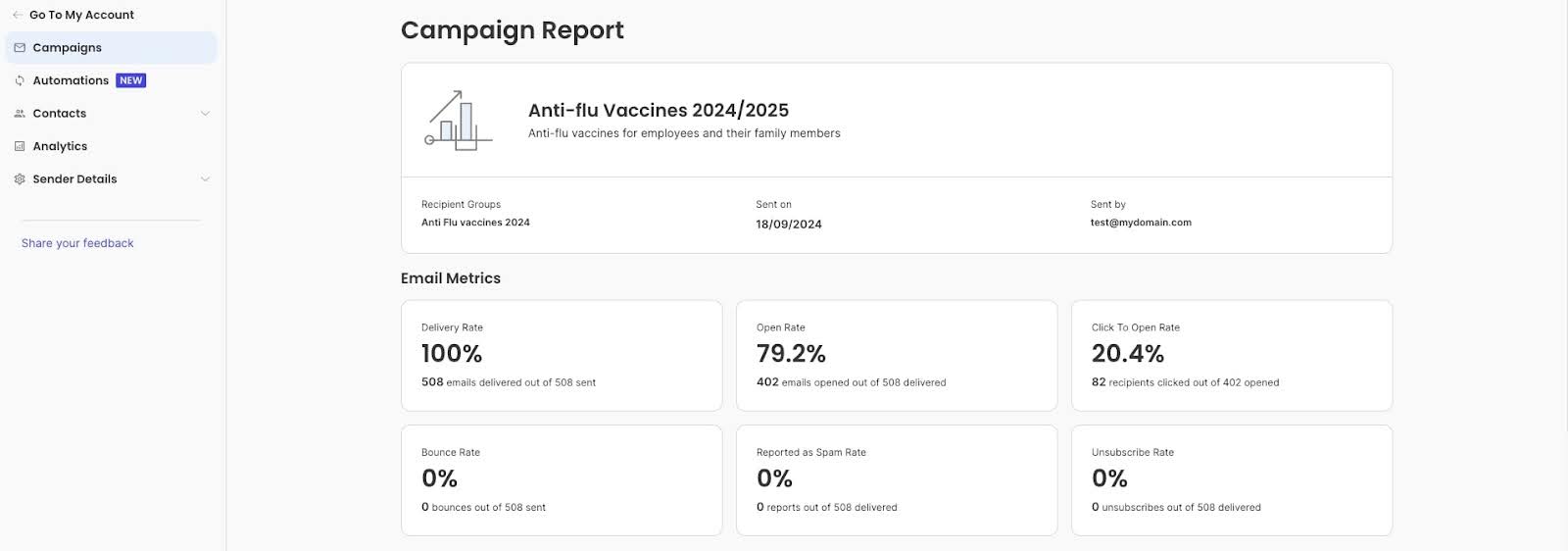
Tracking and analyzing your email marketing metrics and KPIs is crucial for understanding the effectiveness of your campaigns and making data-driven decisions. Without tracking, you can’t accurately measure the success of your email campaigns.
Understanding how your emails perform helps you gauge whether you’re meeting your marketing goals. Analyzing data over time also allows you to spot trends and patterns in your audience’s behavior, helping you tailor future campaigns to their preferences and habits. By pinpointing what works and what doesn’t, you can make informed adjustments to your content, design, and email marketing strategy to improve engagement and conversion rates.
Focus on metrics that matter
Open rates and click-through rates are useful, but go deeper.
Compare your performance against your own past campaigns first—that’s more valuable than generic industry benchmarks. Then look at industry averages and email marketing benchmarks to see if there are areas where you’re significantly underperforming.
Track conversion rates (the percentage of recipients who complete your desired action), revenue per email, and unsubscribe rates. These metrics tie directly to business results, not just email activity. A 50% open rate means nothing if nobody buys. Conversely, a 15% open rate that generates $5,000 in sales is excellent.
How to track and analyze email marketing statistics
Before diving into analytics, establish clear objectives for your email campaigns. Whether it’s increasing open rates, boosting click-through rates, or driving conversions, having defined goals will guide your analysis.
Next, leverage the analytics features of your email marketing platform to track these metrics. SiteGround Email Marketing, for example, offers detailed reports and insights into your email performance.
Compare performance across various campaigns to determine what the most effective marketing strategies are.
What numbers should you aim for?
Rather than chasing arbitrary email marketing benchmarks, focus on improving your own baseline. Track your averages over 3-6 months, then work to beat them.
Small business ranges typically fall around 20-25% for open rates, 2-5% for click-through rates, and under 0.5% for unsubscribe rates (according to email platform industry reports)—but these vary significantly by sector, audience size, and business model.
11. Perform A/B Testing
Another of our email marketing recommendations is to perform A/B testing to optimize your email campaigns. A/B testing, also known as split testing, is a powerful technique that allows you to compare two versions of an email to determine which one performs better.
Here’s how you can implement A/B testing effectively:
Start by identifying what you want to achieve with your A/B test. Are you looking to improve open rates, increase click-through rates, or boost conversions? Having a clear goal will guide your testing strategy.
Then, select one element to test at a time to ensure clear results. Some common variables include: subject lines, email content, calls to action, and send times.
As a next step, divide your email list into two random, equal-sized groups. Send version A to one group and version B to the other. Ensure the sample size is large enough to yield statistically significant results.
Send out your emails and allow enough time to gather data—typically 24 hours minimum to account for different checking habits. If you send weekly, wait until your full subscriber base has had a chance to open before declaring a winner.
When you get the results, compare the performance of the two versions based on your chosen metric (including open rate, click-through rate, etc.). Use statistical significance to determine if the results are due to chance. Once you’ve identified the better-performing version, roll it out to your entire audience. Use the insights gained to inform future campaigns and continue testing new variables.
When A/B testing makes sense
You need sufficient volume for reliable results. If your list is small (under 200 subscribers), focus on testing subject lines only—they require smaller sample sizes than testing content or design changes.
With very small lists, manual observation often works better than formal A/B tests—send an email, see what happens, try something different next time.
However, remember that A/B testing is an ongoing process. Continuously test new ideas and refine your approach to keep improving your email marketing strategy.
12. Maintain Strong Email Deliverability
You can craft the perfect email, but if it lands in spam folders, your efforts are wasted. Strong email deliverability gets your messages into inboxes where they belong.
Set up SPF, DKIM, and DMARC authentication protocols. These technical standards verify you’re a legitimate sender, not a spammer impersonating your domain. Think of them as digital signatures proving your emails are really from you. Most email platforms provide step-by-step guides for setting these up with your DNS provider. While the setup requires a bit of technical work (or IT support), it’s necessary for maintaining high deliverability rates.
Avoid spam trigger words
We touched on this earlier when discussing subject lines, but spam trigger words don’t just affect whether people open your emails—they also determine whether your emails reach inboxes at all. Phrases like “100% free,” “Act now!!!,” “Limited time only,” “Cash bonus,” and excessive punctuation can trigger spam filters. Write naturally and avoid language that sounds overly salesy or desperate. Instead of “CLICK HERE FOR $$$,” try “Limited spots available this weekend.” You create urgency while maintaining credibility.Retry
Monitor your sender reputation
Your sender reputation is like a credit score for your email domain. High spam complaints, bounce rates, or low engagement damage this score, making it harder to reach inboxes. Email providers like Gmail and Outlook watch how recipients interact with your emails. If lots of people delete without opening, mark as spam, or never engage, your reputation drops. Monitor your reputation using tools like Google Postmaster or your email platform’s deliverability reports.
Make unsubscribing easy
It sounds counterintuitive, but a clear, easy-to-find unsubscribe link actually helps deliverability. If people can’t unsubscribe easily, they’ll mark you as spam instead—which seriously damages your sender reputation. Include an obvious unsubscribe link in every email footer. Losing an uninterested subscriber is far better than getting spam complaints.
Stay compliant with regulations
Follow email marketing laws like CAN-SPAM (US), GDPR (EU), and CASL (Canada). Key requirements include: adding your physical business address to every email, honoring opt-out requests immediately (within 10 business days), and only emailing people who’ve given permission.
SiteGround Email Marketing handles key compliance requirements automatically—every email includes an unsubscribe link and opt-outs are processed immediately. You’ll need to add your business address to your template, but the platform takes care of the technical requirements. Beyond avoiding legal penalties, compliance builds trust with subscribers and improves deliverability.
Implement These Email Marketing Tips in Your Next Campaign
These 12 tips provide a complete framework for successful email marketing campaigns. Start with the fundamentals—building a quality list and maintaining strong deliverability—then layer in personalization, automation, and continuous testing. Track your results, learn what resonates with your audience, and refine your approach over time.
The businesses that succeed with email marketing aren’t necessarily the ones with the biggest lists or fanciest designs. They’re the ones who consistently apply these proven strategies, pay attention to their metrics, and keep improving.
Let us know in the comments below how your email marketing efforts go, and which of these tips was new and most useful for you.