How to Start an Online Business on a Budget? Learn from the experts.

Starting and maintaining a business online has always been a hot topic, but recently it’s become crucial, rather than a side income. In this business-critical moment, we reached out to five established online entrepreneurs for their advice on how to get started even if you don’t necessarily have a large capital to kick things off. Whether you’re still exploring the possibility of launching your online project or looking to grow your existing online business, you will be sure to find lots of relative advice in their stories.

Start Your Online Business With Something You’re Good At

Since you are reading this article you may already be playing with the idea to start your own business one way or another. You may even have a few ideas wondering which way to go. So the first phase about doing it is deciding on what service or product you’re going to launch. According to our experts, it’s best if you get started with something you know well and feel confident about, or something that you are passionate about and you want to learn to do well. Confidence and passion are the two strongest drivers to success so just ride on their wave.

Ferdy Korpershoek is an online entrepreneur dedicated to helping people grow their online business. He spent years building his amazing resource center on www.ferdykorpershoek.com and in his Youtube channel, where he has over 150 000 dedicated followers. When starting his business he went through the very same thought process as all of us do. 

“If I take a look at the time we live in, it has become so easy to start to share things with the world through the internet. So let’s become practical: Is there something you are already good at or something you would like to learn? Well, there you have it! Start practicing it and start sharing it with others, for instance, through a video, blog post, or a course.

Maybe you think: ‘I could never do that.’ And that is why you have not done it yet. I had the same thought a few years ago. Let me tell you a story:

Through the years, I made a lot of websites with WordPress. Sometimes I had to struggle to find a solution to a problem, or I could not create the thing my client wanted me to make. It was so hard. When I learned how to solve WordPress problems and make beautiful websites, I started to think about sharing my knowledge through video tutorials. In that way, others could easily learn what I had learned the hard way.

But I saw that others were already better at doing that. They were better at English and presenting. So I hesitated. Until I was so fed up with how things were in my life that I did it anyway. And guess what. I became better at it and gained more followers. Now I can do it full time and earn nice money with it while I am helping people.

You can do the same by just starting! So, how can you start today by helping other people?”

Don’t hold back From Establishing Your Online Business!

As Ferdy mentioned in his story, the biggest challenge when starting a new business is fear. There are too many unknowns, the budget is never enough, the self-doubt and perceived risk seem higher. It gets even worse when you start looking for advice from others who would often make you feel even more unprepared. So when you are getting ready to go along that path, your number one task is to mute that inner voice telling you you’re gonna fail. 

We asked Darrell Wilson, an online entrepreneur and owner of www.darrelwilson.com and a YouTube channel with over 200 000 followers who teaches people how to build successful and effective websites, what would be his advice for overcoming that fear and uncertainty.

“I find that comparing yourself to others is a crutch and will only hinder your own work and set you back.

So you can start right now. Create a website for your blog or business and just write whatever comes to mind,  and you’ll be amazed how far you get with the small ideas.  Remember, be consistent, don’t worry about others, and start small. You are a new entrepreneur stretching your legs.  Well, that’s my story and how I got started.  And like Stan Lee said, “If you’ve got an idea that you generally think it’s good don’t let some idiot talk you out of it.”

Research shows that contrary to what you may think, the main reason why many people fail isn’t a bad launch or a bad product: it’s the lack of launching altogether. Jumping in at the deep end is the only practical way to overcome your fear of failure. 

Free Ideas For Small Business

Since starting a new business can be approached from too many angles and diffusing efforts only adds expenses to the budget needed, it becomes really important to stay focused and try to simplify this complex task.  “Starting an online business can be a broad topic, but there still are only two main paths one can take: you can sell products, or you can sell services,” says Ionut Neagu, the founder of CodeinWP, one of the most successful hubs for online WordPress entrepreneurs, and CEO of Themeisle, a company producing premium WordPress themes and plugins. “Both can be done on a budget, but you need to be careful when it comes to picking your market and angle. Here are two strategies that I think will work best if your funds are limited:

1. If you want to sell products.

Dropship. Start a store on a platform like Shopify or WooCommerce. Get product listings directly from suppliers and make them available in your store. Then, whenever you make a sale, it’s the supplier who is responsible for fulfilling the order.

Promote this business via Facebook ads. Facebook ads will still give you the most bang for your buck compared to any other advertising platform. As long as you “niche down” enough, the ads shouldn’t be too expensive.

We have a detailed article on how to start a dropshipping business, or alternatively, you can check our webinar: How to Start a Dropshipping store. 

2. If you want to sell services.

Start on Fiverr. Fiverr is a huge marketplace where people can offer all types of services as long as they can be carried out remotely.

Fiverr is also easy to get started with: find a niche → see what sells already → offer a similar service. Granted, earning big bucks on Fiverr can be tough, but it’s a great place to start nonetheless. We have a post on CodeinWP on how our friend went from $0 to $3k a month doing Fiverr gigs.

Build a site on a budget with WordPress

All good, but we obviously need a website to sell our products or services. If the COVID-19 pandemic taught us anything, it was that any business needs a virtual presence. But building a site might actually be one of the most costly items on your business agenda. We asked Syed Balkhi, the founder of the incredibly popular platform www.wpbeginner.com where tens of thousands of WordPress users from all over the world go every day to find everything WordPress-related, how to overcome the challenge of creating a website on a budget: 

“One of the biggest things that hold people back is “not having enough resources”, but I believe that entrepreneurs can easily solve that by being “resourceful”. WordPress is an amazing platform because there are 55,000+ free plugins that can help you make your website on a budget, so you can start earning money online.

For example, you can add WPForms lite to create a “Request a quote” form or even an advertising inquiry form. You can use WP Advanced Ads plugin to easily sell ads on your site. There are tons of other plugins that help you do more like MonsterInsights for analytics, AIOSEO for SEO optimization, SiteGround Optimizer for speeding up your site, and more.

Once you have your website live, you can start promoting it on social media using low-cost methods such as answering questions in Facebook groups, LinkedIn groups, and on Quora which helps boost your credibility/brand recognition. This also helps you get more targeted traffic that will convert into customers/clients.

Outside of WordPress, there are also tons of other tools that can help you improve your site without any money. Such as Canva for creating beautiful images, Grammarly for writing better, and a whole suite of free tools that Google offers to help you grow your business.

The key to online success is being resourceful and consistently improving each day.“

Good SEO is still the cheapest form of marketing

Now that you have the idea, you have overcome the fear, you’ve got the website to feature your service, you’ve defined your audience, it’s time to find out that it all ties around marketing. As of now, your most important question will be how to get new clients? 

Years ago when SiteGround was a small hosting company and we were running on a tight budget, we discovered the power of good SEO that brought us the greater part of our business. Back then it wasn’t that hard to crack. It was about content and meta data. Adding useful content and optimizing the meta data of the pages got us the first positions of most of the keywords we were targeting and a Google Page Rank 9, which was unbelievable at the time. The only cost we had was having to learn how to do it, cause back then, information was scarce and we had to learn by trying stuff out. Over time, our efforts shifted to other channels and our marketing budget significantly increased, but we still believe in the power of SEO for a solid business start. 

That is why we turned to Marieke van de Rakt, the CEO of the most well-known WordPress SEO plugin – Yoast SEO. Before taking her role as a CEO she helped grow the company as their Chief Strategy Officer and she knows the ins-and-outs of good SEO. Here is what she thinks is important nowadays:

“Write amazing and SEO-friendly content. If you start a website for your online business, you’ll need to attract an audience. The quickest and cheapest way to attract that audience is by getting visitors from Google. But how do you make sure that you rank high in the search engines?

An SEO plugin like Yoast SEO will take care of most of the technical aspects of optimizing your website for the search engines. In addition to that, you should make sure that the content on your website is of the highest quality! But how do you write awesome and SEO-friendly content?

Before you can start writing you have to do keyword research. If you want to dominate the search results, you’ll just have to figure out which words your audience actually searches for. These are the topics you should write about and the words you should use in your text.

The second thing you should do is to make sure that your text is nice and easy to read. Write short paragraphs and use headings, which will help the reader to understand your text. 

In order to make sure that your text ranks in the search engines, make sure that Google understands what it is about too. Use the words you want to be found for and make sure to use them in heading and subheadings as well. Also write texts that are at least 300 words long, that’ll help with the ranking as well. 

Don’t forget to link to previous content. It will make your post stronger because you show some authority on the subject. As well as that, your link structure is also important for your Google rank. “

If you want to know more about how to optimize the text on your website for the search engines, you can check out the Ultimate Guide to content SEO by Marieke van de Rakt on Yoast.com.  Alternatively, make sure to read our SEO Blog series with our guest-writer and SEO expert Rebecca Gill. 

So that’s it from us and our experts. We hope we managed to simplify the complex task of starting a new business online and mitigate some of the fears you may have at this early stage. Now it’s your turn – good luck!

[subscribe_cta]

10 Best Tips for Starting an Online Store on a Budget

abstract of tips for online store

Starting an online store on a budget is simpler than it looks, as long as you make the right decisions early. Translation: this means choosing a platform that gets you up and running without stitching tools together, focusing your offer on a core product selection, and using built-in or low-cost tools to handle marketing, SEO, and automation from day one.

This guide covers 10 practical tips to help first-time store owners launch a professional, functional ecommerce site without overspending, from defining your audience and unique value proposition to choosing how to build your store, leveraging AI, and growing through testing and iteration.

Key takeaways

  • Start focused, not broad: launch with a small, high-value product selection and expand once you know what resonates with customers.
  • Choose a platform that does the heavy lifting: an all-in-one setup with hosting, ecommerce tools, and domain management saves time, money, and technical headaches from day one.
  • Know your customer before you build: a clear audience profile shapes your product selection, store design, messaging, and marketing from the start.
  • Build your email list early: email is the one marketing channel you own outright, and it consistently delivers one of the highest ROIs in digital marketing.
  • Use AI and automation to stay lean: from writing product descriptions to running welcome sequences, the right tools let you do more without hiring or overspending.
  • Treat launch as the starting line, not the finish line: test one thing at a time, learn from real data, and make small improvements that compound over time.

[24]

1. Start With a Clear Offer and a Problem Worth Solving

When launching an online store on a budget, starting with a small, focused product selection keeps costs low, makes your offer clear, and gives you real data to guide what you add next. Narrow your focus to the products that best showcase your brand’s strength and most clearly solve a problem for your customer.

A focused starting point also makes it easier to test your business model. You can gather real customer feedback, see which products resonate most, and gradually expand your offerings.  It’s much easier, and cheaper, to add products later than to fix a cluttered, unfocused store.

Quick tips for focusing on core value:

  • Launch with your best-selling or flagship products.
  • Keep your product descriptions clear and benefit-oriented.
  • Avoid adding unnecessary features or complicated checkout processes early on.
  • Use simple, clean design to highlight your products and messaging.

2. Research Your Online Business’s Target Audience 

Understanding your customer will help you focus not only on the right products, but also on the most effective ways to approach your marketing. Without a clear picture of who you’re selling to, or where they are in the customer journey, even the best and most brilliant products or marketing strategies can hit an unfortunate wall.

So start by defining your ideal customer profile:

  • Demographics: Age, gender, location, income level.
  • Behavior: How they shop online, which social platforms they use, and what influences their buying decisions.
  • Pain points and desires: What does my customer struggle with and what is the benefit my product provides? 

Knowing this helps you make smarter decisions about your product selection, store design, messaging, and promotions. For example, if your target audience values sustainability, market research might reveal that you should highlight eco-friendly packaging or sourcing in your product descriptions and marketing.

Quick tips to get clear on your customer:

  • Create a simple customer persona to guide decisions.
  • Study competitors to see who they’re targeting.
  • Engage with potential customers and your target audience via survey emails, social media, or early testers.

3. Define Your Unique Value Proposition

Your Unique Value Proposition (UVP) is the reason customers choose you over everyone else,  and defining it before you build shapes everything from your homepage to your product pages. A strong UVP gives your online store purpose, focus, and a story that invites people to buy.

We’ve already defined your product, what problem it solves, and for whom, so for the UVP, we’re putting it all together, including why your offering is different or better than others on the market.

Your UVP can be based on anything that adds real value: superior quality, unique design, faster shipping, excellent customer service, or even a creative brand story. Once you know it, your UVP should be clearly reflected in your online store’s homepage design, product and service pages, and marketing messages—so visitors instantly understand why they should buy from you.

Quick tips to define a strong UVP:

  • Keep it concise: One or two sentences should be enough.
  • Focus on benefits, not just features.
  • Highlight what makes you different (don’t just copy competitors).
  • Test your UVP with potential customers to see if it resonates.

4. Decide How to Build Your Website

Before you think about plugins, hosting plans, or advanced features, you need to make one foundational decision: how you’re going to build your online store. This choice affects your budget, the time it takes to launch, and how much ongoing effort your ecommerce business will require.

At a high level, there are two practical paths. Neither is inherently better—the right option is the one that matches your current skills, timeline, and budget.

The DIY route:

This approach typically involves using a CMS like WordPress and adding ecommerce functionality with tools such as WooCommerce. You’ll need to source and connect several components yourself: website hosting, your custom domain name, security, performance optimization, updates, and ongoing maintenance.

It’s flexible and powerful, especially if you’re comfortable working with websites or enjoy customizing your setup. That said, it usually requires more time, more decision-making, and more hands-on management—time you could otherwise spend on products, marketing, or customer experience.

The all-in-one route:

With an all-in-one ecommerce platform, everything is bundled together: website builder, ecommerce tools, hosting, performance optimization, security, and domain setup. 

For first-time sellers on a budget, this approach often makes more sense. Fewer tools mean fewer costs, fewer technical issues, and a faster path from idea to launch.

Quick tip: Don’t forget your domain name

As part of setting up your ecommerce business, you’ll also need to choose a domain name—your store’s web address (for example, yourstore.com) that customers will use to find and remember your business.

When you sign up as a SiteGround client, you can get a new domain for free for the first year, and it’s automatically connected to your hosting. That means no purchasing a domain separately and no manual configuration; everything is handled in one streamlined setup.

Pick your domain name now>>

Why choosing the right setup keeps your store lean

Starting with a platform that already includes the essentials helps you avoid hidden costs later on. Instead of paying for extra plugins, third-party services, or technical fixes, you begin with a foundation designed for ecommerce from day one.

An all-in-one platform also reduces complexity as you grow. You manage your website, store, domain, and performance from a single dashboard, with one support team if you need help—saving both time and money over the long term.

What to look for when deciding how to build

No matter which route you choose, make sure your setup covers the fundamentals without unnecessary complexity:

  • Professional, ecommerce-ready templates that help build trust from the first visit
  • Ease of use, so you can add products, update content, and manage orders without technical friction
  • Built-in ecommerce features, including secure checkout, inventory management, and order tracking
  • Room to grow, so you don’t need to rebuild your store as your business expands

Quick tip: The best platform is the one that gets out of your way. If setup feels overwhelming or time-consuming, that’s a sign the tool—not your idea—is slowing you down.

A simpler way to get started

If you want an easier path from idea to launch, SiteGround Ecommerce brings all of these essentials together in one place. It combines ecommerce-ready templates, built-in store functionality, fast and secure hosting, and domain setup—so you can focus on building your store, not stitching tools together.

For first-time sellers especially, this kind of setup helps avoid common ecommerce website mistakes, reduce upfront complexity, and get your store online faster with fewer decisions to make.

Get started with SiteGround Ecommerce now>>

5. Set Up the Pages and Features Your Online Store Needs to Launch

Whether you’re building your site with WordPress or going with an easy-to-use platform like SiteGround Ecommerce, every online store needs a few essentials in place before launch. This doesn’t mean designing everything from scratch. In most cases, the smartest approach is to start with a template, make a few basic branding updates, and focus on creating only the pages your ecommerce business actually needs to function.

Think of this stage as setting a solid foundation. Your goal isn’t perfection; it’s clarity, usability, and consistency.

Before you start building out individual pages, take care of the basic store setup. These are the foundational steps that ensure your ecommerce site looks cohesive and can actually process orders once it goes live.

  • Choose a template that fits your business type and products.
  • Apply branding basics, including your logo, brand colors, fonts, and tone of voice.
  • Set up core ecommerce functionality, such as accepting payments online, as well as shipping options (both of which are especially easy to do with an all-in-one ecommerce platform).

Essential website pages to include:

  • Homepage: Highlight your core offerings and your UVP with a strong call to action.
  • Product or Service Pages: Whatever you sell online, whether that’s products, services, or both, these pages are where you explain what you offer, how it works, and why customers should choose you. Include clear descriptions, benefits, pricing, and high-quality visuals.
  • About Page: Share your story and what makes your brand unique.
  • Contact Page: Make it easy for customers to reach you.
  • Policy Pages: Include shipping, returns, and privacy policies—they increase credibility and reduce disputes.
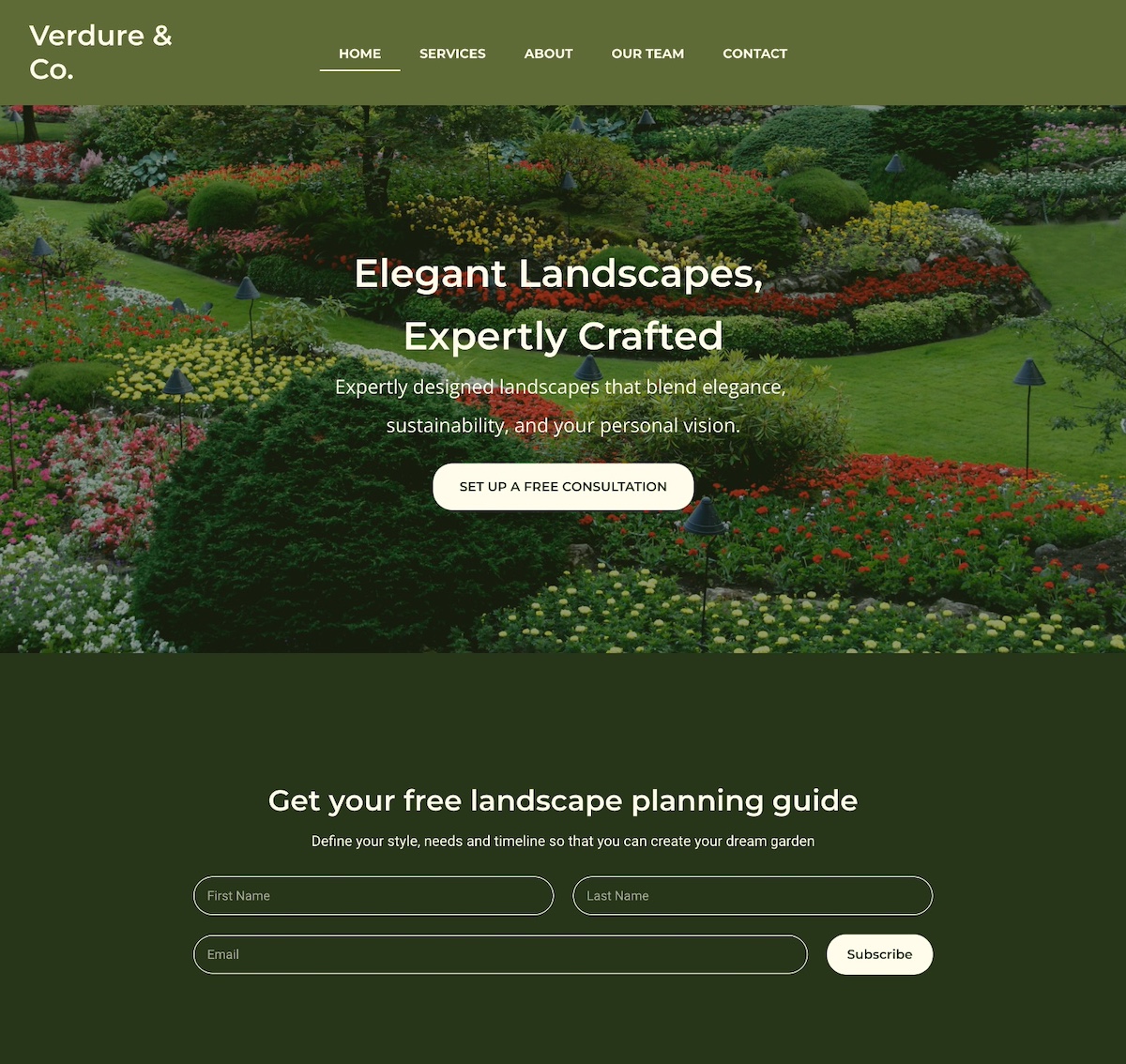
Homepage design example

Quick tips for essential pages:

  • Keep website navigation simple so visitors can find your offerings and information easily.
  • Use a clear, scalable website structure that makes it easy to expand your store over time.
  • Include trust signals like having an SSL certificate, and including customer testimonials.
  • Start with the basics, then expand to include other pages, such as an FAQ page or partner page.

6. Integrate Email Marketing From the Start

One of the smartest, most budget-friendly ways to grow a successful online store is by building an email list early. Unlike social media followers, your email list is an owned channel—you’re not at the frustrating mercy of algorithms or ads. And because email marketing consistently delivers one of the highest ROIs in digital marketing, it’s a lean but powerful way to drive online sales.

Start small by adding email signup forms to your homepage, product pages, or even your checkout process. Focus on attracting quality subscribers rather than chasing large numbers—people genuinely interested in your products are far more likely to convert into paying customers.

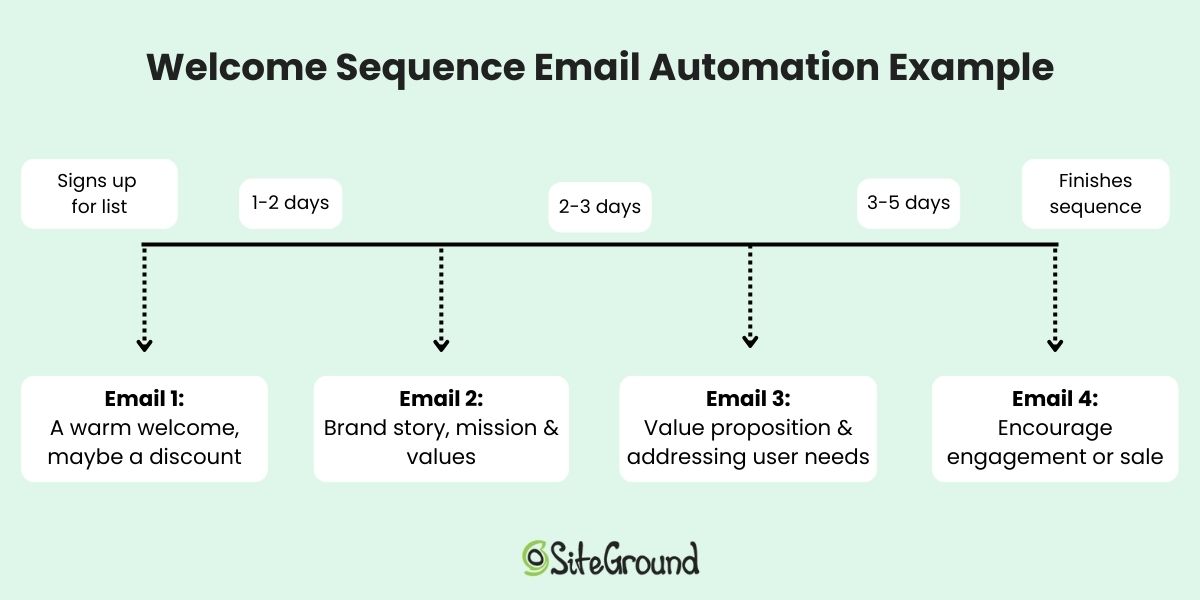
Even better, you can set up email automations, like welcome emails, lead nurturing campaigns, or a product launch series. These run in the background, meaning you get more done with less effort while creating a consistent customer experience.

Welcome sequence email automation diagram

Quick tips for email marketing on a budget:

  • Place signup forms in key locations (homepage, footer, and checkout).
  • Offer value for signing up—like tips, exclusive content, or early access to new products.
  • Go a step further with lead magnets: offer something small but valuable in exchange for an email address, like a discount code, a free guide, or a checklist.
  • Keep your list clean: focus on engaged subscribers rather than bloating your list with uninterested contacts. Including a double opt-in can help accomplish this.

With SiteGround Email Marketing, you can handle all of this in one place—from creating branded signup forms to setting up automated workflows and even using AI tools (like a built-in AI writer) to speed up content creation—helping you launch smarter while keeping costs low.

7. Use AI Tools When Starting Your Online Store

AI tools give small online stores a practical way to move faster and spend less—from drafting product descriptions and marketing copy to analyzing performance data and automating customer communication. You can even use tools like the best ChatGPT prompts to generate polished subject lines, social media captions, and campaign ideas in minutes.

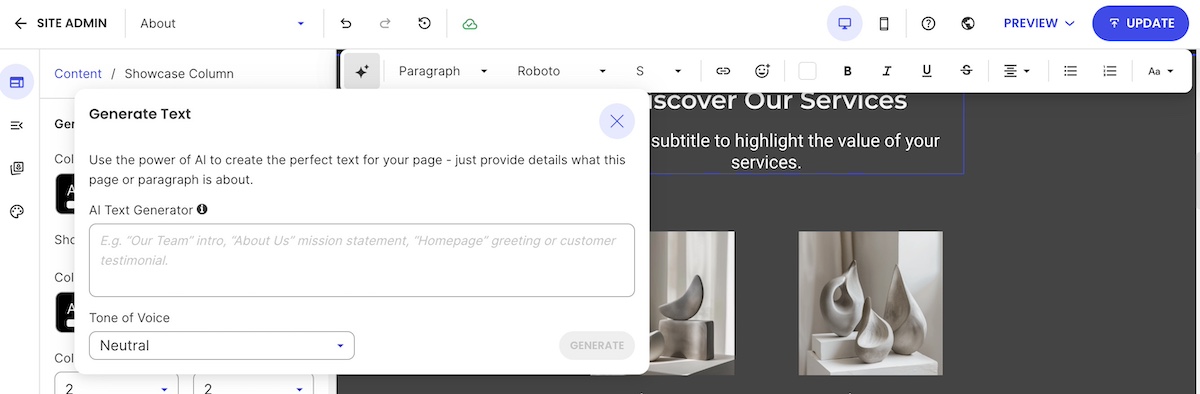
AI writing assistant to help to produce copy for an ecommerce website

Quick tips for using AI effectively:

  • Start with areas where AI saves you the most time, like drafting content for emails, your website, or campaigns.
  • Explore AI business tools to help with everything from recruiting, to meeting overviews, and video creation. 
  • Prioritize AI ethics in marketing: stay transparent, review outputs for bias, and keep authenticity front and center.
  • Treat AI as a partner in testing and optimization, helping you iterate faster.

If you want one place to access and experiment with AI tools, SiteGround AI Studio brings together leading AI models so you can put them to work for your ecommerce business without juggling multiple subscriptions.

8. Use Lean Marketing for Your New Online Business

The most effective marketing strategies for a new online store on a budget are the ones that build real audience ownership (email, social media, user-generated content, and collaborations) before you spend a cent on ads. 

Lean marketing strategies to try for your online store:

  • Social media marketing: Share engaging content, behind-the-scenes updates, or tips related to your products or services. 
  • Collaborations: Partner with complementary brands or influencers to reach your target audiences through new channels.
  • User-generated content: Encourage existing customers to share photos, reviews, or testimonials—they act as authentic endorsements.
  • Email marketing: As we discussed above, email marketing is one of the best ways to get the most bang for your buck. It allows you to reach your most interested audience with targeted messages and minimal effort. 

Quick tips for lean marketing:

  • Focus on channels your customers actually use.
  • Repurpose content across social media, email, and your website.
  • Encourage customers to leave reviews or share their experiences.
  • Track results and tweak your campaigns based on what works best.

Customers today find products through a mix of channels: Google search, AI tools like ChatGPT and Perplexity, and marketplace search. In fact, according to Adobe Analytics, traffic to retail sites from generative AI sources grew 1,200% year-over-year as of October 2025, making it more important than ever to ensure your store is structured for discovery across all of them.

Start with search basics:

  • Keyword research: Identify the words and phrases your potential customers use when searching for products like yours, and include them naturally in your product titles, descriptions, and page content. This helps both search engines and AI tools understand what your store offers.
  • On-page SEO: Make sure each page has a clear title, meta description, headings, and alt text for images. These help search engines index your content and give AI tools the structured information they need to surface your store in recommendations.
  • Technical SEO: Fast-loading pages, mobile-friendly web design, and clean URLs are essential for any discoverable online store. They affect your search engine rankings, your user experience, and how confidently AI tools recommend your ecommerce site.

Quick tips for SEO on a budget:

  • Focus on long-tail keywords to reach customers with strong purchase intent.
  • Use internal linking to guide visitors and search engines to related products or pages.
  • Monitor performance with free tools like Google Search Console to see how search engines view your ecommerce site. Also keep an eye on referral traffic sources to see if AI tools are starting to send visitors your way.

With SiteGround Ecommerce, the discoverability basics are built into the store-building process. You can add meta titles, descriptions, and image alt text as you build, so your pages are structured for Google, AI search, and beyond (and without extra tools or technical setup).

10. Grow Your Online Store: Test, Learn, Iterate

The fastest way to grow an online store on a budget is to treat launch as an experiment. Test one thing at a time, measure what works, and make small improvements that add up over time.

Ways to test and iterate your online store:

  • Website performance: Track digital marketing metrics like website traffic, page views, and conversions.
  • Product offerings: Experiment with different products, bundles, or promotions to see what resonates.
  • Email marketing campaigns: Test subject lines, email content, calls to action, etc. to optimize engagement.
  • Social media marketing: Analyze your social media metrics so that you can get the most out of your presence on each platform.
  • Customer feedback: Collect reviews, send survey emails, or ask for direct feedback to understand what’s working and what needs improvement.

Quick tips for testing your online store effectively:

  • Make one change at a time so you can measure impact.
  • Track results over a meaningful period before drawing conclusions.
  • Use data to guide decisions instead of assumptions.
  • Celebrate small wins and iterate gradually—even tiny improvements can add up over time.

Get Your Online Store Started Now

Launching a successful online store on a budget is all about focusing on what matters: start with a clear offer, understand your customers, create essential pages, use automation and AI where it helps, prioritize mobile, and test, learn, and iterate as you grow. Following these steps will help you build a professional, functional online store without overspending.

And don’t overlook the foundation of your online store: the platform you build it on. With SiteGround Ecommerce, setup is straightforward and everything works together from day one. You get a fast, secure ecommerce-ready setup without technical complexity, so you can spend less time configuring your store and more time focusing on marketing efforts, product development, and delivering a great customer experience, helping you run your ecommerce store lean, smart, and efficiently.

FAQs for starting an online business

How much does it cost to start an online store?

The cost of starting an online store varies depending on the platform and tools you choose. An all-in-one platform that bundles hosting, marketing tools, ecommerce, and a domain in one plan is typically the most cost-effective starting point—you avoid paying separately for each component. Costs rise quickly when you piece together multiple tools, so the leaner your setup, the lower your starting costs.

Do I need technical skills to build an online store?

Definitely not. All-in-one platforms like SiteGround Ecommerce are designed for first-time online sellers and require no coding knowledge. However, if you go the DIY route with WordPress and WooCommerce, you’ll want a basic comfort level with figuring out some of the more technical elements of putting together an online store.

What’s the best platform for a first online store?

The best platform is the one that matches your skills, timeline, and budget. For most first-time sellers, an all-in-one platform is the faster, simpler choice. Everything works together out of the box and there are fewer decisions to make before launch.

How many products do I need to launch my online store?

You don’t need a large catalog to start. Launching with a small, focused selection of your best products (or, simply, your best product) is often the smarter move. It’s easier to manage, cheaper to maintain, and gives you real customer data to guide what you add next.

Do I need a business license to sell online?

Requirements vary by country, region, and what you’re selling. It’s worth checking your local regulations before launch, as some jurisdictions require a business registration even for small online stores. When in doubt, consult a local accountant or business advisor.

How do I get my first customers for a new online store?

Start with the channels your target audience already uses—whether that’s social media, email, or search. Building an email list from day one gives you a direct line to interested buyers, while basic SEO helps customers find your store organically over time.

This article was originally published in November 2019 and then updated in May 2026.

Creating Holiday-Themed Landing Pages

It’s never too early to start thinking about the holidays. If you are planning to offer website visitors seasonally-themed promotions or just want to add a festive landing page, now is the time to start.

The goal of a holiday landing page for your organization or business website is typically to convert. This is even more important for eCommerce sites. To boost your conversions, start with a focus for a holiday landing page that aligns with popular search terms for the season that fit the context of what you do. Use that page to help drive conversions that match your goals.

Free Holiday Marketing Guide Download

Download our free Holiday Marketing Guide featuring content from SiteGround and our partner experts in ecommerce, email marketing, web design and code optimization to help your business in any holiday season.

What is a landing page?

Landing pages are targeted standalone web pages, designed to convert customers for a specific offer. They serve various purposes, such as generating leads, collecting email addresses, conducting market research, or capturing direct sales. The key to their effectiveness lies in eliminating barriers to conversion. By removing distracting elements like navigation menus, visual clutter, and competing offers, landing pages guide visitors toward a quick and seamless checkout.

What is the Difference Between Landing Pages and Product Pages

Product pages are part of a larger catalog on your website and offer dynamic features like sorting, filtering, and various interaction options. They usually display the site’s header, footer, and navigation, allowing access to multiple areas of the site. Additionally, product pages may showcase related products or suggestions for items frequently bought together.

On the other hand, landing pages are static, devoid of header and footer navigation, and free from sidebars promoting other products. They focus primarily on a single offer and aim to simplify checkout processes. Often, the offer and checkout are consolidated on the same page or streamlined through a single checkout page.

For businesses with a limited number of service-based packages, landing pages can replace product pages entirely. However, stores offering a vast array of shippable products or digital downloads should reserve landing pages for targeted advertising campaigns.

Not sure how to turn that idea into a great landing page for the holidays? We at Design Shack have a few tips to help you get started and make the most of the upcoming season.

Continue reading “Creating Holiday-Themed Landing Pages”

Understanding Site Speed: The Time to First Byte (TTFB)

When troubleshooting a slow website, there are a few helpful metrics to determine the causes and solutions. One of those metrics is the Time To First Byte (TTFB), a measurement used by all site performance benchmarking tools. It’s an important metric to measure how fast your website starts loading in a specific location or with a particular combination of settings. Understanding TTFB can help you get a better grasp of how website speed works, what’s slowing down your site, and how to fix it.

What is Time To First Byte (TTFB)?

TTFB measures the time elapsed between the moment a web user makes an HTTP request, like loading a webpage, to the time the first byte is received by the client’s browser. Many use this reading as a rudimentary way to test server speed and while this works, it’s only half the story. If the website you’re trying to load uses a Content Management System (CMS) like WordPress, the server must do all the CMS computations required to produce content. The PHP service must load your MySQL database, get the content, calculate the appropriate HTML output, and return it to the website visitor.

If you have a slow CMS, all those steps can take time and you may receive bad TTFB results like 1-3 seconds or more. That doesn’t necessarily mean your hosting server is slow or experiencing issues. More often than not, it means you have too many plugins or extensions, you’re not using a caching system, or you’re using an old PHP version. Of course, it is a totally different story if you are measuring a static HTML page with a slow TTFB. Then, you may want to start your investigation from the server itself, as there are no other factors impacting the performance of your site.

How Does Dynamic Caching Affect TTFB?

Dynamic Caching is like having your local barista remember your order instead of having to repeat it every time. Because they already know your drink, they can start making it as soon as you walk in, serving it to you that much faster. Caching works in a similar way by storing the data required to serve a webpage for the next time.

Our Dynamic Caching uses NGINX as a reverse proxy. This means that all the computing from your PHP and MySQL services is stored in the server’s RAM. When a visitor gets a cached response from us, it’s like they’re loading a static HTML page — only faster! It’s faster because the content is served from memory and not from the server’s hard drive. Although SSDs are super fast, nothing compares to the server RAM when it comes to speed.

If you have the Dynamic Caching on and still have slow TTFB, there are two things to check:

  • Are you measuring a cached result? The easiest way to check is to perform your test more than once. It is normal to get a slower first result and much faster consecutive ones. By performing multiple tests, you can guarantee you’re measuring cached results.
  • Are you measuring from a close geographical location? If you’re testing from a remote location, it is normal that you have high networking latency. If you want your site to be fast from a variety of locations, consider implementing a CDN.

Can All Pages be Cached?

Not all pages can be fully cached. Checkout pages, carts, and logged in users have special circumstances. That doesn’t mean the TTFB has to be slow. The first step is making sure you’re using PHP 7.1 or above. We have opcache enabled by default for it and WordPress and other CMS apps work dramatically faster. Next, you can use our Memcached service to improve the time your app takes to get data from the MySQL server. Last but not least, check the plugins you’re using. How many are you using, are they high-quality, and what load do they cause to your page rendering process?

Caching tends to camouflage poorly built websites by masking development problems. If your site loads quickly without cache, this means it has good code and is “healthy”. You shouldn’t rely solely on our Dynamic Caching or your own caching plugins to have a fast website.

How Does a Content Delivery Network (CDN) Affect the TTFB?

As mentioned above, TTFB is seriously affected by the networking speed between the server and your browser (or the tool you’re using to test your speed). Using a CDN can improve your site speed if it has endpoints near your geographic location. Note, however, that if you have a CDN like CloudFlare enabled, you’re measuring the TTFB between your browser and the particular CDN endpoint serving your request and not between you and the SiteGround server. If the CDN hasn’t cached your content yet, it has to call the SiteGround server first, get the data, distribute it and then serve it to you. That may cause further delay before the first byte is received.

To get around this, make sure you have caching enabled for your CDN and check whether it has an endpoint close to your geographic target. It’s worth experimenting with different CDN providers in case your visitors are in a part of the world that’s not covered by your current one.