Web Hosting vs. Cloud Hosting: How to Choose the Right Solution

Web Hosting vs. Cloud Hosting Featured Image

Are you deciding between web hosting and cloud hosting? Both solutions have their own strengths and weaknesses. But, with terms like “web hosting” and “cloud hosting” thrown around, it’s easy to get confused. That’s why understanding them is key to making the right choice to meet your needs.

In this article, we’ll break down web hosting vs. cloud hosting in simple terms. We’ll also examine their differences, help you identify the best fit for your project, and cover everything you need to make an informed decision.

Web Hosting vs. Cloud Hosting – Key Takeaways

  • Web Hosting: Traditional, often more affordable, but with limited scalability.
  • Cloud Hosting: Flexible, scalable, and reliable, but can be more expensive.
  • Performance: Cloud hosting generally offers better performance and uptime.
  • Security: Both have robust security options. But, cloud hosting often provides more advanced features.
  • Scalability: Cloud hosting excels in scalability, adapting to traffic changes seamlessly.
  • Cost: Web hosting is typically cheaper; cloud hosting can vary based on usage.

Understanding Web Hosting

Web hosting is the foundation of getting your website online. Let’s begin by clarifying what web hosting is and the different web hosting services it encompasses.

Definition of Web Hosting

Web hosting is a service that allows individuals and organizations to make their websites accessible on the internet. When someone visits a website, their browser communicates with a web server to deliver the necessary content.

This is the most common type of hosting, in which your website’s files and data are stored on a single physical server.
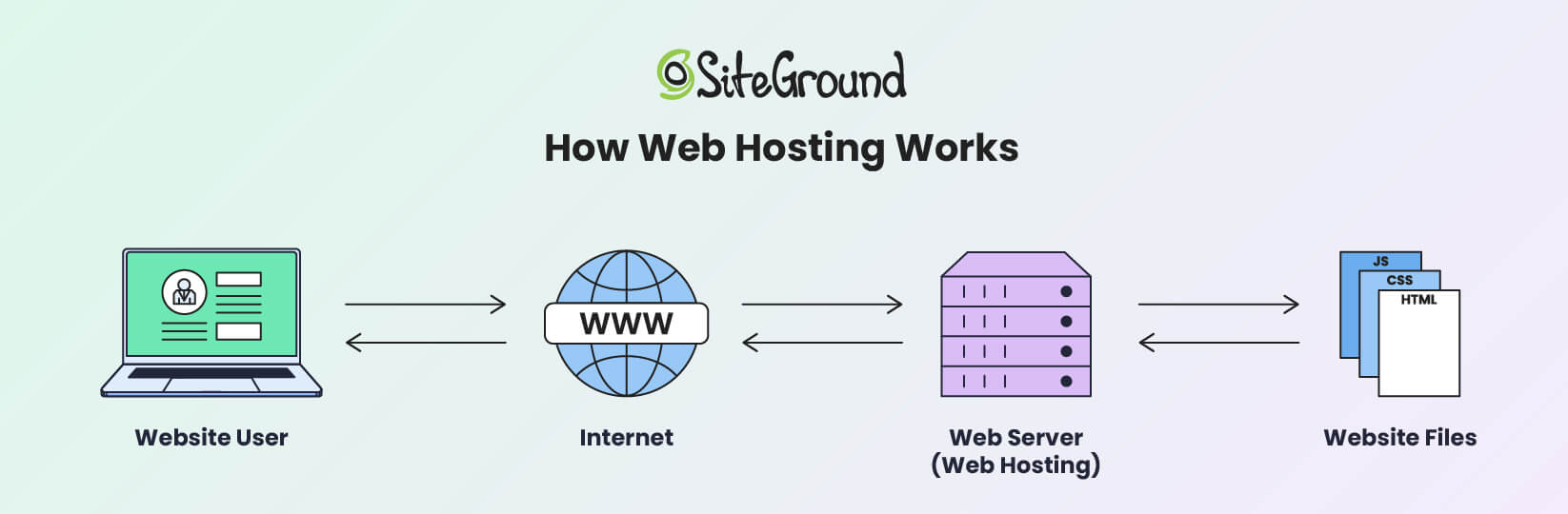
An infographic depicting how web hosting works

Essentially, traditional web hosting is like renting a specific amount of space on a single server to house your website. This server handles all the requests for your website, and its resources are divided among all the websites it hosts.

Depending on the type of web hosting service you choose, your website gets a portion or all of the server’s resources. A hosting service provider runs websites using specialized web server software.

Hosting providers offer the necessary network infrastructure, so users don’t need to manage server complexities or worry about port accessibility. That facilitates constant uptime and 24/7 monitoring to handle traffic and technical issues.
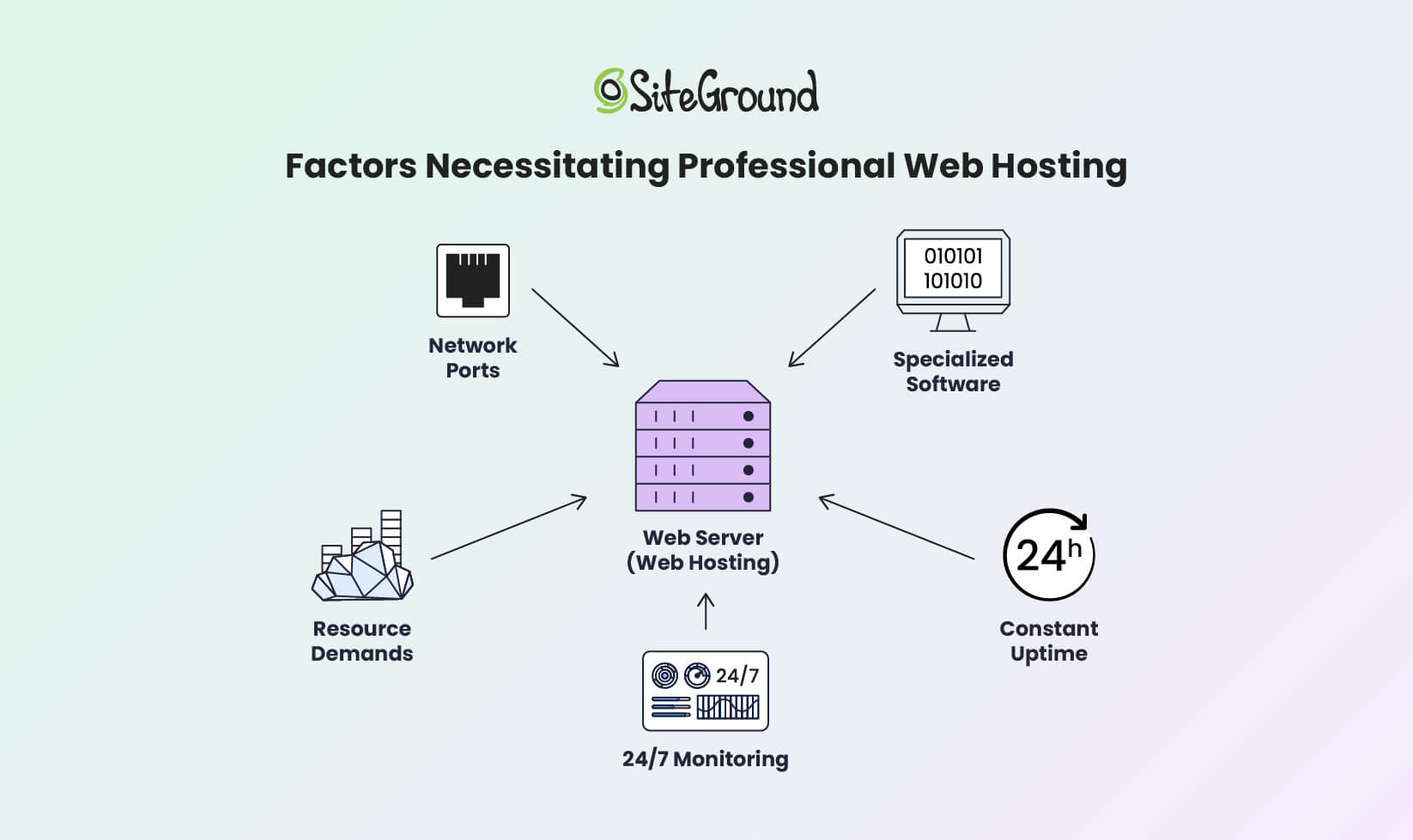
An infographic depicting the factors necessitating the use of professional web hosting services

A web hosting provider offers multiple servers and web hosting options to host various websites. This allows service providers to deliver different hosting solutions, like shared, dedicated, VPS, or cloud hosting. Each type offers different levels of cost, control, and performance.

Types of Traditional Web Hosting

Traditional web hosting includes shared, dedicated, and VPS options. Here’s a closer look at each type and what they bring to the table.
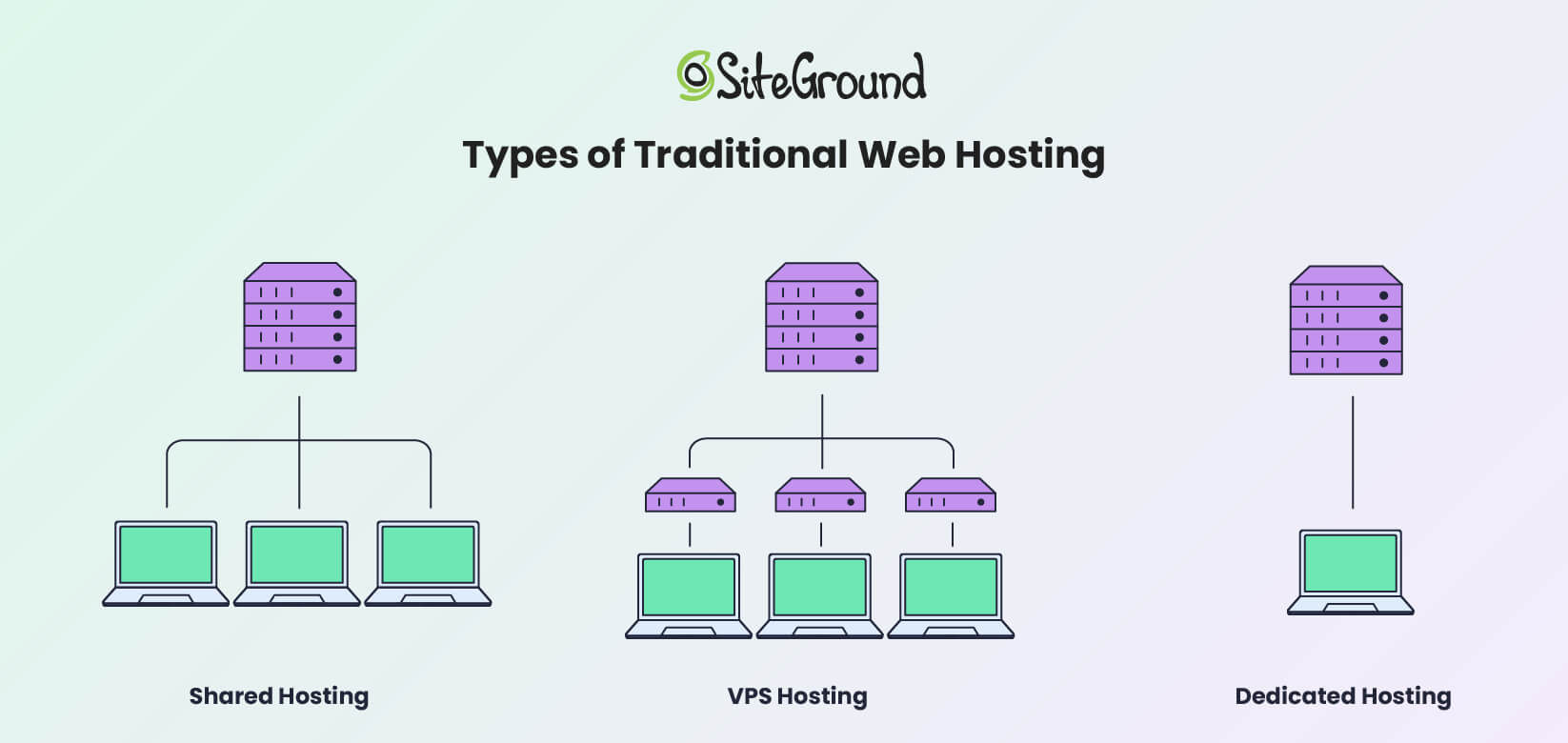
An infographic showing the main types of web hosting solutions

Shared Hosting

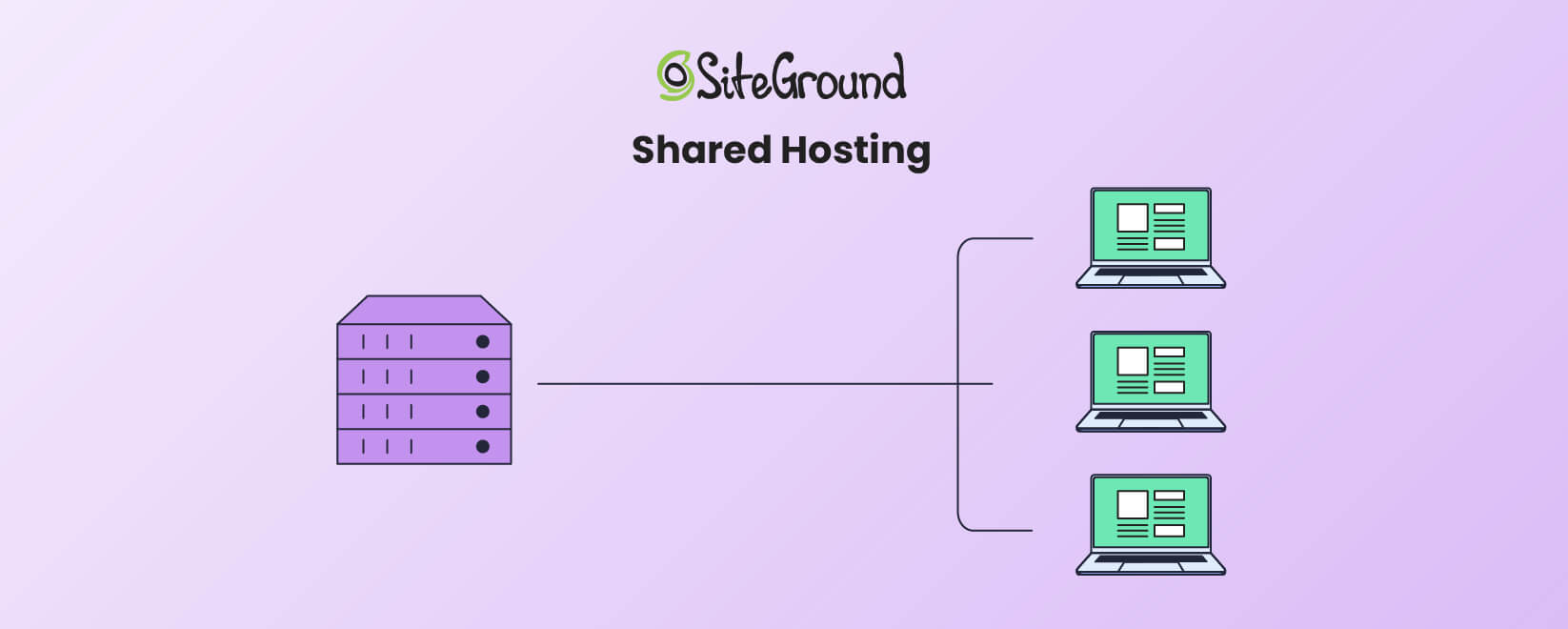
An infographic showing how Shared hosting works

Shared hosting is the most affordable and beginner-friendly option. It allows multiple websites to share a single server’s resources, reducing costs for everyone. However, sharing resources also means that if one website experiences a web traffic surge, others on the same server may suffer slower performance.

Shared hosting is ideal for small websites or businesses with limited traffic. For instance, if you’re running a personal blog or a portfolio site, shared web hosting vs. cloud hosting comparisons lean heavily toward shared hosting for its affordability and simplicity.

Dedicated Hosting
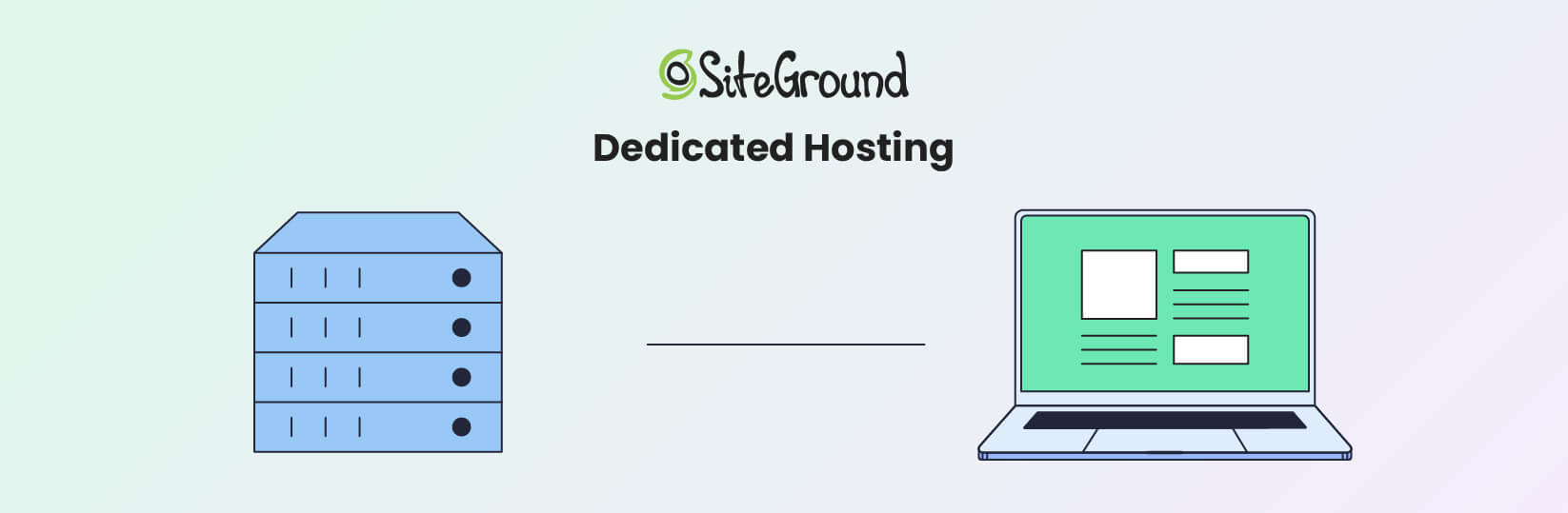
An infographic showing how Dedicated hosting works

Dedicated hosting provides an entire server exclusively for your website. This gives you full control over server settings, performance, and security on a fully dedicated server. It’s ideal for high-traffic websites or businesses handling sensitive data.

However, dedicated hosting is expensive and requires technical skills for server management. Dedicated hosting might be the right choice if your website demands the highest level of control and performance.

VPS Hosting
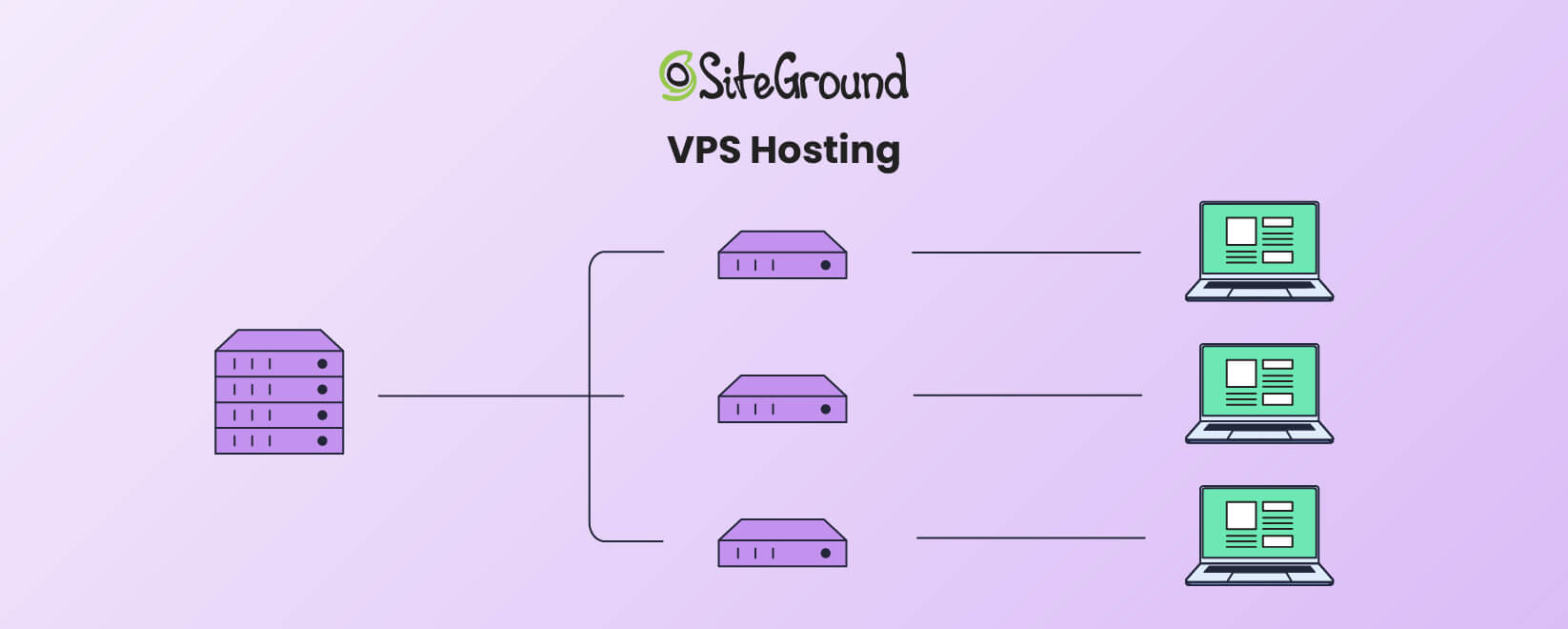
An infographic showing how VPS hosting works

VPS hosting splits a physical server into several virtual servers. Each virtual private server acts independently. This gives you more control and dedicated resources than shared hosting. It’s a middle-ground solution for businesses that need more scalability and higher performance than shared hosting but don’t want the full expense of dedicated hosting.

When comparing web hosting versus cloud hosting versus VPS hosting, VPS is a solid option for medium-sized businesses looking for better performance without the complexity of cloud hosting. However, it’s more costly than a shared hosting service.

Benefits of Traditional Web Hosting

The traditional hosting model offers several advantages that make it a popular choice for many users.

  • Affordability – Shared hosting is one of the most cost-effective ways to get a website online.
  • Ease of Use – Most traditional hosting providers include intuitive control panels like cPanel or custom control panels like SiteGround’s SiteTools, which are easy for beginners to navigate.
  • Predictable Pricing – With fixed plans, it’s easy to know your hosting costs upfront.

Disadvantages of Traditional Web Hosting

Traditional web hosting also has its drawbacks that are important to consider.

  • Resource Limitations – Since your server resources are capped, sudden traffic spikes can cause slowdowns or downtime.
  • Downtime Risks – If the server experiences issues, your website will go offline until the problem is resolved.
  • Lack of Flexibility – Upgrading to a higher-tier plan or migrating to a new server can be a time-consuming process.

Despite its simplicity and affordability, traditional web hosting may fall short for websites that require high scalability, consistent uptime, or robust performance during traffic spikes.

This is where cloud hosting comes into play, offering a modern, flexible alternative to meet the demands of growing or dynamic online projects.

What is Cloud Hosting?
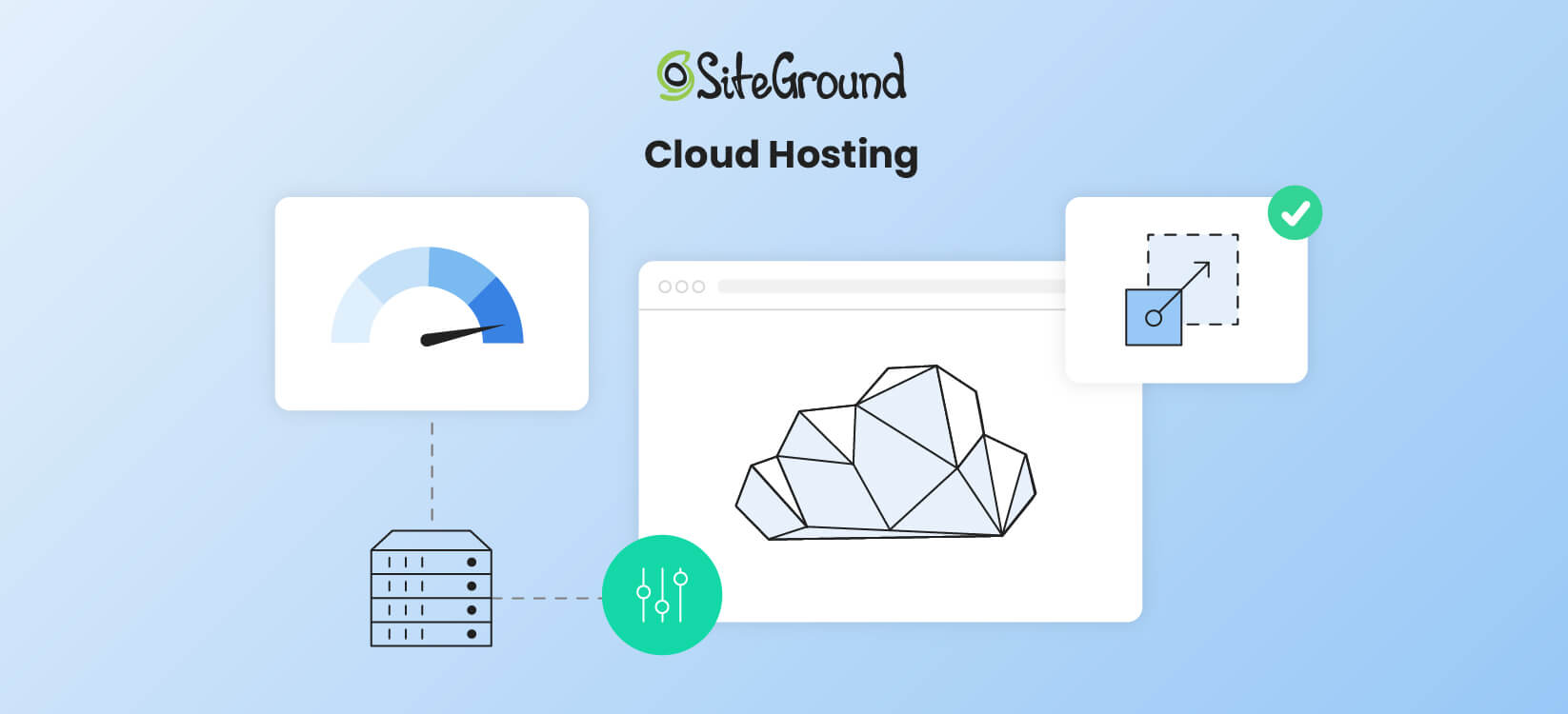
An infographic showing how Cloud hosting works

Unlike traditional web hosting, cloud hosting uses a network of multiple interconnected servers to deliver high performance, scalability, and reliability. This flexibility makes it an increasingly popular choice among businesses of all sizes.

Below, we’ll look into the basics of cloud hosting, its benefits, and potential drawbacks to help you better understand how it compares to traditional hosting.

Cloud Hosting Basics

At its core, cloud hosting uses a network of virtual servers hosted across multiple physical machines. This interconnected infrastructure, often referred to as the “cloud,” ensures that resources such as CPU, RAM, and storage can be dynamically allocated as needed.

In essence, this means your website isn’t tied to the limitations of a single server, and thus it offers unmatched scalability and uptime.

One of the key advantages of cloud hosting is its reliance on cloud hosting providers like Google Cloud.

Siteground, for example, leverages Google Cloud‘s robust and scalable infrastructure. This way, you benefit from Google’s global network, advanced security features, and reliable performance. This integration allows SiteGround to offer managed cloud hosting services backed by Google’s power and reliability.

In contrast to traditional hosting, where resources are fixed, cloud hosting allows you to scale resources up or down on demand. This is particularly beneficial for businesses experiencing seasonal traffic spikes or rapid growth.

Additionally, cloud hosting comes with features like load balancing and automatic failover. If one server in the network goes down, the workload is immediately shifted to another server. This makes cloud hosting a reliable and superior solution.

Benefits of Cloud Computing

Cloud hosting offers several key advantages that set it apart from traditional web hosting. These include improved performance, reliability, scalability, and cost efficiency.

  • Scalability and Flexibility. One of the biggest advantages of cloud hosting vs. web hosting is its dynamic resource allocation, which allows you to adjust resources instantly. If your website experiences a sudden spike in visitors during a promotional campaign, cloud hosting allows you to scale up instantly to meet demand.

When traffic decreases, you can scale back down, ensuring that you’re not overpaying for unused resources.

  • Uptime and Reliability. Cloud hosting minimizes downtime because data is stored across multiple servers. If one server fails, another seamlessly takes over.This built-in redundancy makes cloud hosting a reliable option for mission-critical websites or businesses that cannot afford downtime.
  • Cost Efficiency. Unlike traditional hosting, where you pay a fixed monthly rate, cloud hosting operates on a pay-as-you-go model. You’re only charged for the resources you actually use.

Disadvantages of Cloud Computing

While cloud hosting has many advantages, it’s not without its drawbacks. Understanding these limitations is crucial to making an informed decision.

  • Complexity – Setting up and managing a cloud hosting environment often requires technical expertise. For beginners, this can be a steep learning curve.Many hosting providers (like SiteGround) offer managed cloud hosting services. Still, businesses need to understand the basics to fully make use of their hosting solution.
  • Higher and Variable Costs – While cloud hosting can be cost-effective, unexpected traffic spikes could lead to higher-than-expected bills.For those with predictable traffic, traditional hosting may offer more cost stability.
  • Limited Control Over Customization – While managed cloud hosting simplifies technical aspects, it limits advanced user control. Certain configurations or customizations may not be possible without contacting the hosting provider’s support team.

Web Hosting vs. Cloud Hosting – Comparison & Differences

When deciding between web hosting and cloud hosting, it’s important to understand their key differences. This section will compare their performance, security, scalability, and cost to help you choose the best option for your needs.

In this section, we’ll take a closer look at how these hosting solutions stack up against each other.

Feature Web Hosting Cloud Hosting
Performance & Reliability Dependent on a single server, which can result in downtime. High availability due to interconnected servers.
Scalability Fixed resources, requires manual upgrades for higher plans. Dynamic scaling to handle traffic changes.
Cost Predictable pricing, generally lower for shared hosting. Pay-as-you-go model, can fluctuate based on usage.
Security Basic security measures, shared hosting may share resource vulnerabilities. Advanced measures, including redundancy and backups.

Performance & Reliability

Cloud hosting generally outperforms traditional web hosting in terms of speed and uptime. By leveraging multiple servers, it ensures your website remains accessible even if one server fails. Traditional hosting can suffer from performance issues if other sites on the same server experience high traffic.

Scalability & Flexibility

Cloud hosting is the clear winner when it comes to scalability and flexibility. It allows you to easily adjust resources based on demand, making it ideal for websites with fluctuating traffic. Traditional hosting is more rigid. Plus, certain server constraints can make upgrading plans time-consuming and limited.

Security

Both web hosting and cloud hosting offer robust security features. Still, cloud hosting often provides more advanced options. With cloud hosting, you can implement additional security measures like firewalls and DDoS protection. However, traditional hosting can still be secure if you choose a reputable provider and follow best practices.

Cost

Traditional web hosting is typically more affordable, with fixed pricing plans that make budgeting easier. Cloud hosting costs can vary based on usage, which can be a disadvantage if you’re not careful. However, the scalability and performance benefits can justify the higher cost for many businesses.

Choosing the Right Hosting Solution

Choosing between web hosting and cloud hosting will be easier once you’ve addressed the questions below.

What kind of traffic do you expect?

  • Normal & steady traffic: Web Hosting
  • Traffic spikes & rapid growth: Cloud Hosting

What’s your budget?

  • Low, fixed budget: Web Hosting
  • Flexible budget for growth: Cloud Hosting

Do you need scalability?

  • Limited scalability needed: Web Hosting
  • High, on-demand scalability: Cloud Hosting

Web Hosting vs. Cloud Hosting: Final Verdict

Traditional web hosting remains a reliable and affordable solution for small, static websites or users on a tight budget. However, cloud hosting is the superior choice for businesses that need flexibility, high uptime, and the ability to scale on demand.

Ultimately, the decision between web hosting vs. cloud hosting depends on your specific requirements. Evaluate your traffic, budget, and growth expectations to choose the solution that best aligns with your goals.

How to start email marketing: What it is and why it works

What is Email Marketing

Email marketing sends targeted messages to promote products, nurture leads, and turn subscribers into customers. It remains one of the most cost-effective channels available, and launching your first campaign takes five steps: strategy, platform, list, design, and deliverability.

Key takeaways:

  • Email marketing sends targeted, personalized messages that turn subscribers into customers and keep them coming back.
  • It’s one of the most cost-effective channels available, since the main cost is a flat platform fee, not a per-click or per-impression rate.
  • Five steps get a first campaign live: strategy, platform, list, design, and deliverability setup.
  • Segmented, personalized sends consistently outperform one-size-fits-all blasts.
  • Deliverability basics, like domain authentication and a working unsubscribe link, decide whether your emails reach the inbox at all.

What is email marketing? A quick definition

Email marketing is a form of digital marketing that sends targeted emails to promote products, share updates, or nurture leads. It works by building a list of people who’ve opted in, then sending content matched to their behavior, interests, or place in the customer journey. That’s what separates it from a broadcast channel: every message can be different depending on who’s reading it.

Why is email marketing important? Cost, ROI, and reach

Email marketing matters because it’s the one channel where you control the cost, own your audience outright, and can measure the return on every single send. The channel earns its reputation on cost. You’re not paying per impression or per click; you’re paying a flat monthly fee for your contact tier, no matter how many emails you send within that plan’s limit. That’s different from paid social or search, where spend scales with reach. The often-cited $42-for-$1 figure is a mature-program average, not a first-year one: realistic email marketing ROI in year one is closer to 100–200%, climbing to 300–500% by year two.

Email also stays useful as other channels get noisier. There’s no algorithm deciding who sees your message, and a list you’ve built is yours to keep even if a platform changes its rules or shuts down. Combined with segmentation and personalization, that direct line to your audience is why email keeps outperforming channels with a higher sticker price.

How to get start email marketinged in 5 steps

Five steps take you from no list to a sent campaign, and none of them need a developer or a design background. Work through them in order: platform and list come before design, so you’re not redoing work once you’ve already built something.

1. Plan your email strategy

Start with a goal. A campaign might aim to generate leads, convert existing leads, re-engage inactive subscribers, or promote a new product; the goal decides everything else about the send. Once you know the goal, define your audience, decide what format and tone will land with them, and pick which metrics you’ll use to judge whether it worked.

2. Choose a platform

An email service provider handles sending, list management, templates, and analytics, so the real decision is which features you need at your budget. SiteGround Email Marketing, for example, comes with a no-code builder, an AI email writer, and AI image generation on every plan, plus automation, segmentation, and built-in analytics, backed by a 98.80% delivery rate. That removes the need for separate design, copywriting, or list-building tools on a first campaign.

3. Build your email list

If you’re emailing existing clients, build your list by importing your contacts directly into the platform. If you’re starting from zero, use SiteGround Email Marketing’s built-in signup forms and subscribe pages to start collecting subscribers right away; on WordPress, the SiteGround Email Marketing plugin adds custom signup forms to your site and connects automatically with form plugins you might already use, like Contact Form 7, WPForms, or Gravity Forms. Then segment your list using the custom fields you collect, such as location, interests, or birthday, so you’re not sending the same email to everyone regardless of what they’ve told you about themselves.

4. Create the campaign

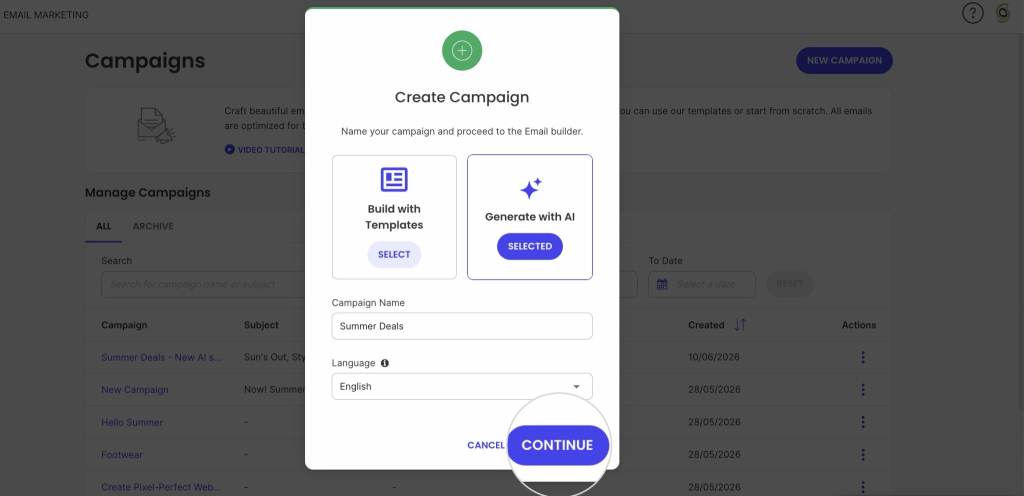
Most platforms include premade templates, so building an email doesn’t require HTML or a designer. SiteGround Email Marketing gives you a library of these to start from, then lets you customize colors, layout, and images in the no-code builder. The Generate with AI feature makes this even easier: describe what you want in a short prompt, and it builds the whole email for you, layout, copy, and images included, so you’re editing a finished draft instead of starting from a blank page.

Create Campaign modal with 'Generate with AI' option selected, a campaign named Summer Deals, and a highlighted Continue button

5. Get deliverability right before you send

None of the above matters if the email lands in spam. Skipping domain authentication is the single most common reason a new sender’s first campaign never reaches the inbox, not a weak subject line. Before you send anything, walk through our full email deliverability guide, which covers the technical setup that protects your sender reputation from day one.

Main types of marketing emails

There are more than a dozen specific types of marketing emails, but most fall under a few core categories:

  • Welcome emails. The first message a new subscriber or customer gets, timed to arrive immediately after signup.
  • Promotional emails. Built around a specific offer or sale, with one clear call to action.
  • Informational and retention emails. Newsletters, how-to content, and updates that keep subscribers engaged between purchases.
  • Event-triggered and transactional emails. Automated sends tied to a specific action, like an abandoned cart, an order confirmation, or a password reset.

For the full breakdown, including subtypes and when to use each one, see The 13 essential types of emails explained simply.

What drives email engagement

Three things decide whether a campaign performs: permission, relevance, and frequency. 

  1. Permission comes first. A double opt-in signup (built into SiteGround Email Marketing, so you don’t have to set it up separately), where a subscriber confirms via a follow-up email, keeps your list built from people who actually want to hear from you, which matters more for deliverability than any subject line trick. Buying a list skips this step entirely and usually costs more in bounce and spam complaint rates than it saves in time.
  2. Relevance is where segmentation and personalization pay off. Messages built around a subscriber’s actual behavior consistently outperform generic blasts, and something as simple as using a name or referencing a past purchase raises the odds an email gets read. This is also where the email customer journey matters: a welcome email, a re-engagement email, and a win-back email are solving different problems for the same subscriber at different points in time.
  3. Frequency is the one most businesses get wrong in both directions. Too many sends and unsubscribe rates climb; too few and subscribers forget who you are. Test a schedule, watch the results, and adjust; there’s no universal right number, only the one that fits your audience.

Common email marketing mistakes to avoid

A few mistakes come up more than the rest, out of the worst email marketing mistakes beginners tend to make:

  • No plan after the welcome email. The mistake isn’t a bad signup form. It’s collecting emails with nothing lined up to send next, so the list goes cold within weeks and engagement quietly drops on every send that follows.
  • Treating every subscriber the same. A customer who bought last week and a lead who signed up for a discount code are in completely different stages, and sending them identical content wastes the segmentation data you already have.
  • Skipping list maintenance. Inactive subscribers and invalid addresses drag down your open and click-through rates over time, which can hurt deliverability for your entire list, not just the inactive portion of it.

None of these are hard to fix once you know to look for them; the damage comes from not noticing until the numbers have already dropped.

What email marketing metrics to check after you hit send

Your first campaign doesn’t need an A/B test. It needs four numbers checked within a day or two of sending, so you know whether to change anything before campaign two.

MetricWhat it tells you
Open rateWhether the subject line got attention
Click-through rateWhether the content and call to action worked once people opened it
Conversion rateWhether the send hit the goal you set in step one, a sale, a signup, or a download
Bounce rateList health. A high bounce rate on a first send usually means the list was built or imported carelessly, not that the email itself was weak

A weak open rate points at the subject line. A weak click-through rate with a healthy open rate points at the content or the CTA, not the subject line. Reading the two numbers together is what tells you which part to fix first, instead of rewriting the whole email and guessing again. These four are the starting point; once you have a handful of sends to compare, the rest of the email marketing metrics worth tracking will tell you more than any single campaign can on its own.

Ship it, check the numbers, improve campaign two

Your first campaign won’t be your best one, and that’s fine. The four numbers above exist to tell you what to fix, not to grade you on effort. Send it, check the numbers, and let campaign two be the one that’s actually optimized.

SiteGround Email Marketing keeps the whole loop, sending, tracking, and fixing, in one place, so you’re not piecing it together across separate tools.

[58]

This article was originally posted in December 2024 and updated in September 2026.

Frequently asked questions about getting started with email marketing

How do I start email marketing?

Define your goals and audience, choose an email marketing platform, build your subscriber list with a signup form, design your first campaign using a template, and track open rate, click-through rate, and conversions to refine future sends.

How much is a 1,000-person email list worth?

The value depends on your list’s engagement rate, your average order value, and how well the list is segmented. A smaller, actively engaged list of 1,000 subscribers might outperform a much larger, disengaged one.

Is email marketing still worth it in 2026?

Yes. It remains one of the few channels you fully own, unaffected by algorithm changes or rising ad costs, and it still delivers a strong return when lists are built ethically and messages are personalized.

How do I become an email marketer?

Most email marketers start by managing campaigns for a single business or client, learning platform tools, segmentation, and copywriting along the way. From there, they build expertise in deliverability, automation, and analytics. Certifications from providers exist, but hands-on campaign experience matters most.

Email Bounce Rate: What Is It & How to Reduce It?

Image depicting emails bouncing from an inbox

Email bounce rate is a key metric in email marketing. If it’s too high, it could cause serious damage to your email campaigns and even your sender reputation. In this blog post, we’ll help you understand what email bounce rate is, what causes it, and how to keep it in check so you can enjoy high email deliverability.

What is Email Bounce Rate?

Еmail bounce rate refers to the percentage of emails that were sent, but not successfully delivered to recipients’ inboxes. More specifically, this rate tracks messages that were rejected by the recipients’ email servers but returned with an automated bounce message to the sender indicating a delivery error.

Note: The bounce rate will not take into account email messages that got flagged as SPAM and rejected at network level without any feedback being sent to the sending server. You may check out our article on How to Avoid Your Emails Going to Spam for more information on the topic of spam.

In email marketing, bounces aren’t just minor hiccups. They’re more like signals, telling you that something is not okay. It could be anything from a typo in the email address to an issue with the email content or the recipient’s mail server. 

Hence, recognizing and understanding your email bounce rate is crucial. It goes beyond just making sure your messages are getting through. More importantly, it helps maintain your reputation as a sender, moving your business communications up the ladder. 

Now, keep in mind that not all of your marketing messages will be delivered or bring conversions, and that is normal. (You may check out our article on email deliverability for an in-depth understanding of the email journey and the different obstacles on its way.) However, if the percentage of bounced emails is too high, your business will suffer.

How does the email bounce rate affect your business?

A high bounce rate blocks your marketing efforts and can damage your sender reputation with email service providers. That can even spiral into more delivery challenges and further lower your email campaigns’ reach.

As a provider of email hosting services, throughout the years, we’ve had clients contacting us in search of the reason for their messages coming back undelivered. And, we know how frustrating this may be as it affects their operations as a business. Sometimes, the reason for the bounce is simply a mistyped recipient’s address. On other occasions, the reason may be more complex.

Let’s first clarify how high email bounce rates can affect your business so you know what you may have to deal with if you do not take corrective actions.

Lowered Engagement & Conversion Rates 

When your email messages bounce back, they don’t reach the intended recipients and this naturally leads to lower open and click-through rates, which means reduced engagement with your content. If your emails aren’t getting through, this means that fewer people are seeing and interacting with your content. Consequently, this drop in engagement leads to fewer conversions, which in turn, impacts your bottom line. 

Wasted Resources 

Each email that bounces back is a waste of your time, effort, and money. You should know that even if you’re following all the best practices, there will still be messages that come back, so be prepared. Yet, you should strive to keep that count as low as possible. Practically, high bounce rates mean you are not maximizing the return on investment of your marketing efforts because a portion of your audience is not even receiving your messages. It’s essentially pouring your costly business efforts down the drain. 

Biased Analytics 

Bounce rates can distort the accuracy of your campaign’s analytical data. That happens because metrics like open rates and conversions can’t accurately reflect your audience’s behavior if a high number of emails never reach their destinations. Even if your other metrics look great, you must not leave the bounce rates unattended. 

If you ignore the bounce rate, that can lead to incorrect interpretations of the performance of your email campaigns. That, in turn, could lead you to make misinformed business decisions – not seeing the full picture can cause you to invest in the wrong areas.

Damaged Sender Reputation

Internet Service Providers (ISPs) track the number of bounces you generate in an attempt to prevent spam. The higher your bounces are, the more ISPs and ESPs would assume that you are buying email lists or scraping emails. Thus, they would start punishing you by flagging your emails as spam, and this can harm your reputation as a sender. That eventually results in reduced email deliverability.

To gain a better understanding of how spam filters take email bounce rate into consideration, read our blog post on How to avoid your emails from going to spam. 

Restoring a good sender reputation is hard, so, you better put your thoughts into preventing such an outcome.

Potential for Blacklisting 

Continuing to send messages to email addresses that consistently bounce can not just trigger spam filters with email service providers, but eventually get your domain and/or IP on a denylist. This means that recipient email servers will start rejecting all your messages as spam at network level, further plummeting your email deliverability. 

As you can see, keeping your eyes on the prize without considering the potential negative outcomes and not taking measures can cause lots of damage to your business. Thus, to take actions to minimize bounce rates, you must understand their nuances better.  

Types of Email Bounces

When it comes to email marketing, not all bounces are equal. You’ve got two main types to keep an eye on – hard bounces and soft bounces. Understanding the difference between these can help you improve your overall campaign results.

Hard Bounces

A hard bounce is a permanent delivery failure. Hard bounces occur when you send marketing emails to:

  • Inactive contacts – these are emails that are no longer in use. They were once active, valid addresses, but no more.
  • Non-existent (mistyped) emails – these are addresses that are not registered. 
  • Invalid email addresses – these include both inactive and wrong addresses, the two groups above.

If you think about it – why would you have such addresses on your email list? Maybe you have users who signed up too long ago and their addresses are no longer in use? Or, your subscribers left “fake” email addresses in your signup form contacts to make sure you won’t bother them? Like when you give the wrong phone number to a guy who you don’t like and want to get rid of. Or, you got your email list from somewhere and you didn’t know how these users got on the list in the first place, so maybe they tricked you with a bad list? 

Each hard bounce is a clear signal to remove the problematic address from your list ASAP. Email service providers would flag you if you get too many hard bounces since they would recognize a “spam pattern” – they would think you bought or scraped emails, or you are trying to “guess” emails within an organization, or else. Hence, failing to remove such emails immediately can harm your sending reputation with mail providers.

SiteGround Email Marketig users can safely rely on us to take immediate action and “suppress” hard bounce email addresses so you can never send emails to them again and thus avoid penalties. If we see an abnormally high rate of bounced emails while sending out a campaign for you, we would pause it in order to prevent any bad consequences. 

Soft Bounces

Soft bounces are temporary delivery failures due to issues that don’t necessarily indicate a problem with your mailing list, but usually result from full inboxes, messages exceeding mailbox limits, server problems and downtime, autoresponders, and others.

When these soft bounces occur, different email service providers may take different actions. At SiteGround we do not give up, but have a strategy to make multiple attempts to resend the email, starting with more frequent tries in the first few hours and then tapering off. This retry system is designed to deliver successfully your email campaign as soon as possible, ensuring it stays on track and reaches your subscribers’ inboxes in a timely manner. We aim to optimize email deliverability while maintaining the momentum of your email marketing efforts.

How to measure your email bounce rate?

Monitoring this metric is essential for a healthy email marketing strategy. To measure your bounce rate, count the number of bounced emails, divide it by the total number of sent emails and multiply by 100. Sounds like too much math, doesn’t it?

That is why our friendly Email Marketing platform does the math for you. We calculate the average email bounce rate that each of your email marketing campaigns generates, so we can help you with your campaign results analytics.

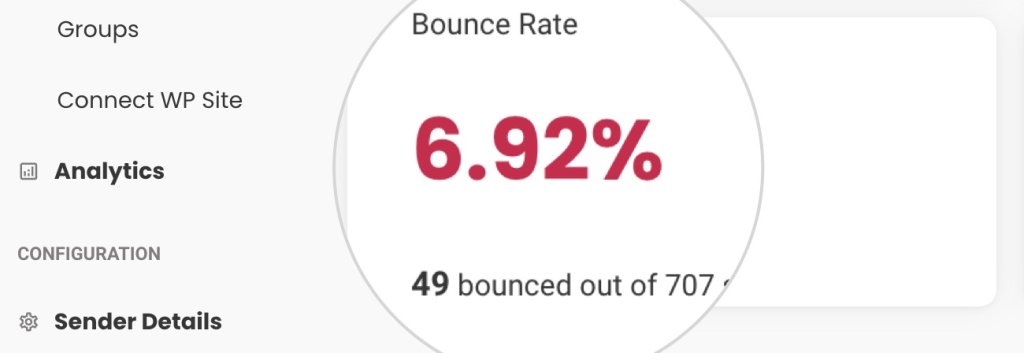
Screenshot from the Analytics section in SiteGround Email Marketing showing a very high bounce rate

The email bounce rate, calculated in the Analytics section of the Email Marketing platform shows the percentage of bounced email addresses. The Bounce rate in the Analytics section is an average bounce rate that consists of both soft and hard bounces. 

How to reduce your email bounce rate?

After analyzing the negative impact of a high bounce rate on your business operations, we give you the strategies for reducing it effectively. ​​Follow these best email practices diligently, and you will get better results. 

Remove unengaged and inactive emails

Clean your email list from inactive and unengaged subscribers every few months. Users who do not open your emails are not simply unengaged, they are likely to soon become “inactive” accounts. 

Do not buy email lists or scrape sites for emails

Maintaining fresh and clean mailing lists is a key practice for achieving a low email bounce rate and ensuring list quality. Avoid purchasing mailing lists at any cost, since they will not bring you the desired results if the users in it have not consented to receive your messages.

Implement Double Opt-In

With double opt-in, subscribers confirm their email address after the initial sign-up by clicking on a verification link sent to their inbox. Double opt-in allows you to enroll only valid email addresses in your list and ensures that the owner of the email is genuinely interested in your content and willing to engage. It’s a powerful way to protect your reputation as a sender and keep your email bounce rate on the low end.

Avoid Spammy Practices

Steer clear of tactics that trigger spam filters and rack up spam complaints. If you’re too aggressive or irrelevant, your emails might end up in the spam folder. Obviously, that is not your goal, so you must pay attention to what you include in your campaigns.

Sending emails with misleading subject lines or stuffing your content with excessive trigger keywords and salesy language are classic spammy practices. 

Monitor and Analyze All Campaign Performance Data

Keeping tabs on how your bounce rate and other email metrics isn’t just smart—it’s essential. As you have already seen in this article, bounce rates and spam rates and all engagement metrics are correlated and work together to assist email marketers in creating better content and keeping engaged email list. 

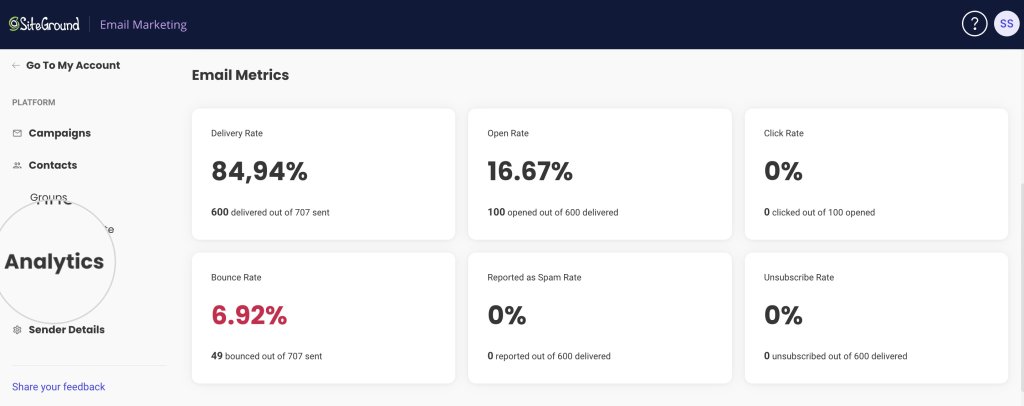
SiteGround Email Marketing tool gives you a clear view of your campaign’s performance. Access the Analytics section to review key metrics like open rates and click-through rates, which help you understand audience engagement.

A screenshot displaying the SiteGround Email Marketing Analytics page

That is where you get to check what works, what doesn’t, and how your audience is really feeling about your emails.

Conclusion

To wrap things up, remember that keeping your email bounce rate low is crucial for robust email marketing. Understanding the why and how of bounces empowers you to maintain a healthy sender reputation and ensures your emails effectively reach your audience.

Stay on top of cleaning your lists and avoid anything that might trigger spam filters. With these practices in place, paired with consistent monitoring, you’ll keep your bounce rate low and your engagement high.

So, take these insights, put them into practice, and watch as your email marketing efforts yield better results. 

Email Bounce Rates FAQs

1. What’s an acceptable email bounce rate?

An acceptable bounce rate is typically below 2%. Rates higher than this may indicate issues that need to be addressed.

2. How often should I clean my email list?

List hygiene should be an ongoing process, but a thorough cleaning every 3 to 6 months is a good practice.

3. Can a high email bounce rate affect my entire email marketing strategy? 

Yes, a consistently high bounce rate can lower your sender reputation. Especially if you get many hard bounces. That can potentially cause more of your emails to be sent to the spam folder.

4. Is there a difference between cleaning an email list and segmenting it? 

Yes, cleaning involves removing invalid or inactive subscribers. On the other hand, segmenting organizes active subscribers into specific groups for targeted campaigns.

5. How do I fix a high email bounce rate? 

To fix a high email bounce rate, start by cleaning your email list to remove invalid or inactive addresses. Implement a double opt-in process to ensure subscribers emails are valid, and adjust your email content to avoid triggering spam filters. Finally, monitor your campaigns to identify which emails bounce back and why, then make data-driven adjustments to your strategy.