

If you use AI to generate code for your site or web app, whether you’re a developer working with a coding agent (AI that writes code) or a vibe coder building with AI builders like Coderick AI, getting an app feature to run is only half the battle. Just because a new button clicks or a form submits doesn’t mean the underlying code belongs in your codebase for the long haul.
An AI-generated code review checklist is a short set of checks for deciding whether one working change is structurally healthy enough to keep. It covers what the change was meant to touch against what it touched, what code was added, how it fits the project, and whether to keep, refactor (rework its structure), revert (undo) or escalate it.
Key takeaways:
- Visual previews and tests can confirm that a new AI-generated feature works on screen, but an AI-generated code review checklist determines whether the underlying code is worth building on.
- Start with scope: define what the change was supposed to touch before prompting, then compare that boundary directly against the files that were modified.
- AI-generated code red flags include unprompted edits, duplicate logic, over-engineering, fragile workarounds, unneeded dependencies, and code nobody can explain.
- Conclude every review by choosing to keep, refactor, revert, or escalate the change before moving on to the next prompt.
Why a change that works still needs a review
To answer a prompt quickly, a coding agent sometimes takes shortcuts: it can duplicate code the project already has, create extra files the job didn’t need, or patch a symptom instead of fixing its cause. None of that shows in a working preview, and all of it stays in the project for the next change to build on.
Developers call the result technical debt (the extra work you pay later for a shortcut taken today). Left in place, it tends to show up in three ways:
- Changes that break other things. A small update on one page can break a feature elsewhere that shared code with it, even though nothing about the two looked connected.
- More back-and-forth for each change. The agent needs more attempts to change code that’s duplicated or tangled, which costs you time and, in tools that charge per request, more credits.
- Slower progress. Simple edits, like changing a layout or a form field, start needing troubleshooting before they work.
GitClear and GitKraken’s analysis of 623 million code changes found that as AI-written code spread between 2023 and 2026, developers reorganized existing code 70% less often than in 2022, so that kind of cleanup now depends more and more on someone reviewing a change before more is built on it. Reviewing each change right after it’s made, before you stack more features on top, keeps that debt from piling up.
Good to know: Tests written by the same AI can share its blind spots. If the coding agent writes both a feature and the tests for it, the tests often confirm what the code does rather than what it should do. A green result then tells you the code matches itself, so write down what the feature is meant to do before you trust the tests that came with it.
The AI-generated code review checklist
This is how to review AI-generated code in practice: work through this AI code review checklist from top to bottom, on one change at a time, since each check relies on the ones above it.
| Check | The question to ask | The red flag that fails it |
|---|---|---|
| Intended scope | What was this change supposed to do, and which parts of the app should it touch? | Nobody wrote it down before the change was made |
| Actual scope | Which files and parts of the app did the change touch? | Files outside the intended area changed |
| Unrelated edits | Did the change rename, reformat, delete or fix anything you didn’t ask about? | Edits with no link to the request |
| Duplication | Does the project already have code that does what this change added? | A second version of existing logic |
| Complexity | Would a smaller change have done the same job? | New layers, settings or unused code for a small request |
| Workarounds and assumptions | Does the change fix the cause, or only hide the symptom? | Hard-coded values, one-off special cases, or errors that are caught and ignored |
| New dependencies | Did the change add outside code, and does the project need it? | A package nobody asked for, or one that can’t be found |
| Fit with project patterns | Does it name, place and handle things the way the rest of the project does? | A second way of doing something the project already does |
| Structural drift | Did it change how the project is organized? | A new folder layout or data field nobody decided on |
| Explainability | Can you or the AI explain why it was built this way? | An explanation that’s missing or changes each time you ask |
Start with scope
Every step in your AI code review process depends on one question: What was this prompt supposed to accomplish? That is why defining scope always comes first.
Define what was supposed to change
Before opening any files or looking at generated code, write down a single sentence describing the intended change and the exact parts of your app it should touch. For example:
“Add a phone number field to the booking form and save it with each new booking.”
This sentence sets a clear boundary: it names the booking form, the database, and nothing else. That boundary gives you a benchmark to measure the AI’s output against.
Pro tip: Write your scope sentence before you send your prompt to the AI. If you write it after seeing the preview, you’ll naturally describe whatever the AI happened to create. Defining your scope first keeps you focused, and you can paste that exact sentence directly into your prompt so both you and the AI are aligned on the same goal.
How to review AI code changes without a pull request
Traditional software development relies on pull requests (proposed changes reviewed by teammates) and diffs (visual, line-by-line comparisons showing every line added, modified, or deleted). In most AI web app builders, however, you don’t review code line by line before merging it. Instead, each prompt generates a new, self-contained version of your application.
Without a standard diff tool built into chat-based AI platforms, reviewing a change comes down to tracing modified files and comparing project states. For example, in Coderick AI, each new prompt creates a new version of the project, while the chat card dynamically lists the exact file paths being created or modified in real time.
To review an AI-generated code change without a traditional diff view, you can rely on a few practical approaches:
- Watch the build in real time: Pay attention to the dynamic file list displayed while the AI processes your prompt to see which files are being created or updated.
- Ask the AI for a plain-language trace: Prompt the AI directly to list every file it touched and explain what changed and why.
- Compare project downloads: Download .zip archives of your project before and after the prompt, then compare the two folders using an external file comparison tool.
- Rely on version checkpoints: If your review reveals problematic code, use timestamped version cards to restore your project back to a clean, working state with a single click.
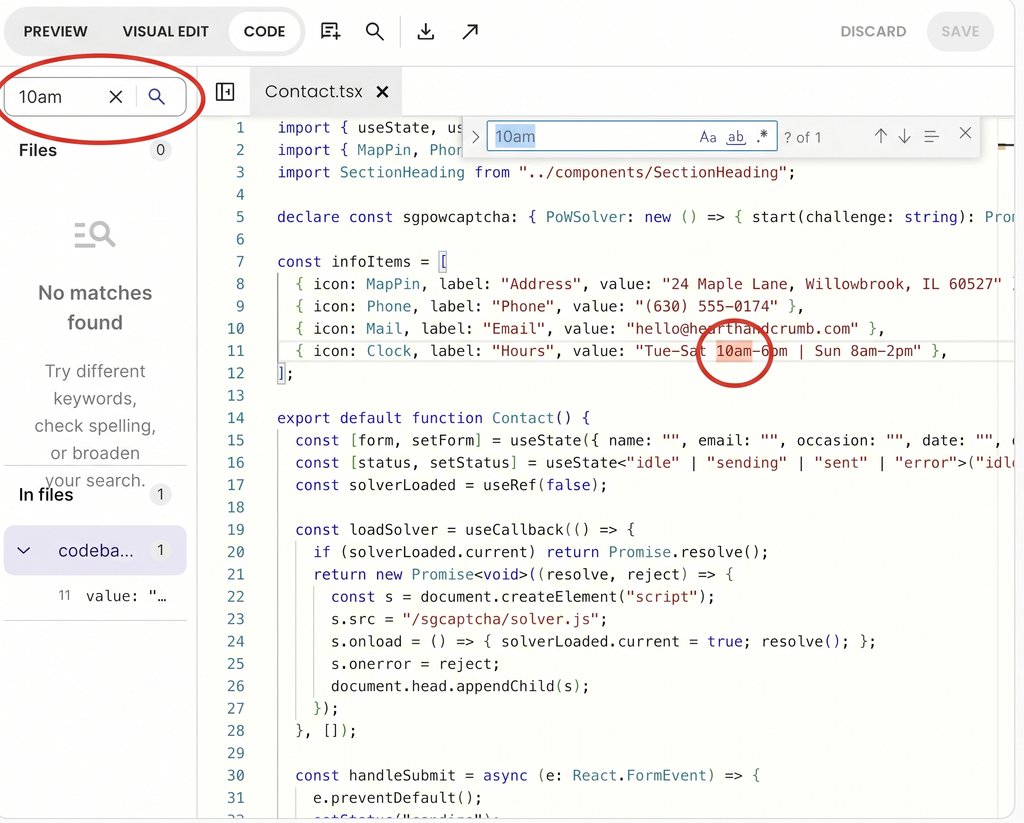
- Inspect the codebase directly: Use the AI builder’s code view (such as Coderick AI’s Code tab) to search file contents, verify changes, or make manual adjustments.
For example, to inspect Coderick project code, open the Code tab to switch from the live preview to your project’s complete file tree and code editor. From here, you can search file names and contents simultaneously to locate modified files, inspect the exact lines the AI touched, or make manual tweaks completely credit-free.
Flag edits nobody asked for
Coding agents often attempt to “tidy up” or optimize surrounding code while working on your prompt. However, much of that automatic tidying has nothing to do with your original request and can introduce unexpected side effects into your project.
To spot unrelated AI code changes, scan your project updates with these red flags in mind:
- Unexplained renames: Look for variables (named values in the code) or entire files that were renamed without a clear reason. A single renamed item can ripple across your app and break connections in other files that rely on the old name.
- Full-file reformatting: Watch out for files reformatted from top to bottom. Massive spacing or indentation shifts hide the few lines that actually changed inside hundreds of lines that just moved around.
- Deleted code in untouched areas: Check for missing code in parts of the application your prompt never mentioned.
- Unprompted “fixes”: Question edits to unrelated features, no matter how helpful they might seem at first glance. Unasked-for fixes can alter how those features behave.
If you spot any of these unprompted edits, treat it as a signal to ask the AI why it made the change (or revert to your previous version) before keeping the update.
Check what the change added
Once your scope is defined, the next step is inspecting what the AI added to your project. AI code changes frequently bloat beyond their intended job in four common ways. And left unchecked, that extra baggage carries forward into every future update.
Duplicate logic (reinventing the wheel)
Coding agents frequently write a brand-new function (a named set of code instructions) for something your project can already do, such as creating a second price-formatting tool or a duplicate date helper. In fact, the research by GitClear found that duplicated code blocks surged by 81% as AI tool usage grew.
Having two separate pieces of code doing the exact same job is dangerous because they inevitably drift apart over time. If you update a tax calculation or fix a bug in one function, the duplicate version remains untouched, causing conflicting behavior across your app.
Pro tip: Search your codebase for key terms related to the new feature (like “price” or “format”), or ask the AI directly: “Does anything in our existing project already do what you just wrote?”
Consider how this plays out in a typical e-commerce app:
- The scenario: You prompt the AI to add a delivery fee at checkout, and it creates a new function called calculateTotal().
- The hidden issue: A quick code search for “total” reveals an existing function called getOrderTotal() used on your invoice page. Now checkout and invoices calculate totals using entirely separate logic. If your tax rules change next month, the two pages will display different prices.
- The fix: Instruct the AI to remove the new calculateTotal() function and reuse getOrderTotal() instead.
Overcomplicated AI-generated code (more machinery than necessary)
AI coding tools often over-solve a prompt. Instead of writing a five-line fix, an AI agent might build general-purpose helper functions, multi-layered file structures, or custom configuration settings for hypothetical edge cases you never asked for.
Every unnecessary layer adds hidden weight to your codebase. Extra files and over-complicated structures force the AI to process more code context on every future prompt, burning through your prompt credits faster while making future edits harder to manage. To spot over-engineering, ask yourself one simple question: Would a much smaller, direct change have accomplished the exact same goal? If a minor button update generated three new files and a complex config object, instruct the AI to simplify its approach.
Workarounds and fragile assumptions
A workaround patches the visible symptom of a problem while leaving the underlying cause intact. Rather than fixing a structural issue, an AI might apply a temporary patch that breaks the moment your data or user flow changes. In fact, the research from GitClear found that code that hides unexpected errors instead of reporting them surged by 47% with the rise of AI tools. Silent error handling lets broken data pass through unnoticed during visual testing, only to surface later as mysterious, hard-to-trace bugs.
When reviewing a change, watch out for three common fragile patterns:
- Hard-coded values: Fixed numbers, test names, or URLs typed directly into code where dynamic variables or settings belong.
- Brittle timing assumptions: Code that assumes a database query or network request will always finish instantly before the next step runs.
- Silent error handling: Error blocks (catch {}) that suppress bugs without logging them or alerting the user.
Unnecessary new dependencies
A dependency is an external code library installed into your project to perform specific tasks, such as formatting dates or rendering icons. AI models frequently install new packages out of habit, even when built-in browser tools or code already in your project could handle the job just as easily.
Every extra package increases your app’s overall size and adds another piece of software that could break during future updates. In some cases, AI models can even hallucinate package names that don’t exist, causing server build errors. Whenever an AI change installs a new package, check three things before keeping it:
- Existence: Does the package exist under that exact name, or is it a hallucinated library?
- Necessity: Could code already present in your project handle this task without installing something new?
- Weight: Is adding an entire external library worth it for a minor feature?
Check how it fits the project
The final group of checks evaluates whether a change belongs in your application as it exists today. Code doesn’t live in a vacuum: it has to coexist with every other feature, file, and database table in your project.
Does it follow your existing patterns?
Every software project naturally develops its own habits over time, from how variables are named and where files live, to how data is fetched and saved. When an AI builder solves a problem using an entirely new approach, it introduces a competing pattern. The next time you prompt the AI, it will have to guess which of the two patterns it should follow.
AI-generated code often tends to stand alone in a silo instead of properly connecting to existing project structures. When reviewing code, make sure the AI reuses existing helper functions, follows your established file naming conventions, and connects cleanly with the rest of your app.
Does it alter the project’s core architecture?
Some AI prompts can inadvertently reshape your app under the hood. Common structural shifts include reorganizing folder hierarchies, moving core logic from one component to another, or modifying your database schema (the underlying tables and relationships that store your data).
A structural change isn’t inherently wrong, but it should always be a deliberate decision you requested, never accidental collateral damage from a routine feature prompt. If an AI prompt meant for a visual update unexpectedly alters your database fields or folder structure, pause and review that change before moving forward.
Can the change be clearly explained?
If neither you nor the AI model can explain why a change was built a certain way (or if the AI gives contradictory explanations when questioned), the code is not ready to keep. Healthy code is readable, predictable, and easy to justify.
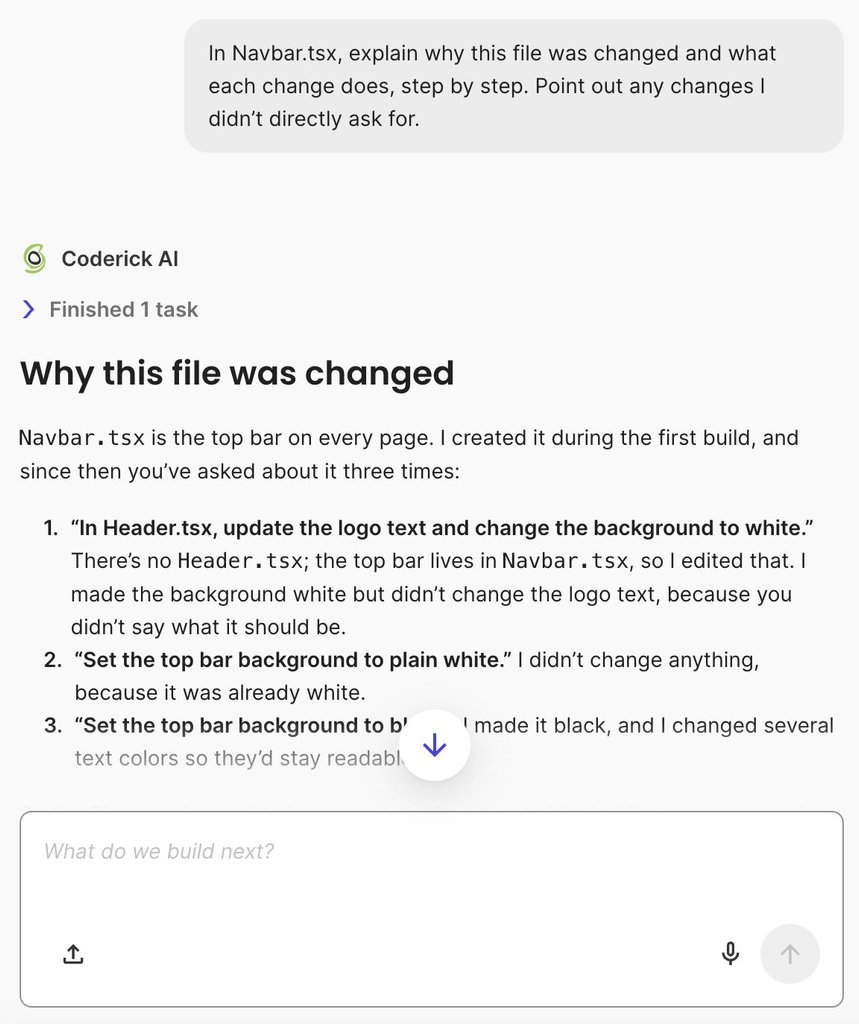
If you’re building with an AI builder like Coderick AI and you’re unsure why a specific file was modified, you can reference that file directly inside the Coderick AI chat box. Scoping the prompt to that individual file allows the AI to provide a focused, step-by-step breakdown of its exact purpose and logic.
Here’s an example prompt you can adapt:
“In [file name], explain why this file was changed and what each change does, step by step. Point out any changes I didn’t directly ask for.”
For example, when explaining updates to Navbar.tsx (the top navigation bar component displayed across every page), Coderick AI provides a step-by-step breakdown of why the file was modified, detailing each change made and explicitly highlighting unrequested adjustments (such as tweaking text and icon contrast) to keep your design readable and consistent.
Keep, refactor, revert or escalate
Once you have completed your review checks, you need a clear action plan for the AI’s work. Every review leads to one of four outcomes: accepting the change as-is, polishing the code, rolling back to a clean state, or getting expert help.
Use the matrix below to decide which path to take based on your findings:
| Decision | When it applies | What to do next |
| Keep | The change stayed strictly within scope, with no major red flags or messy shortcuts. | Accept the change and start building your next feature on top of it. |
| Refactor | The feature works, but it duplicated existing logic, added unnecessary bloat, or ignored your app’s established coding patterns. | Clean up the code in a focused follow-up step before building further. Choose between sending a targeted fix prompt or making credit-free manual edits in the Code tab. |
| Revert | The change introduced unprompted edits you cannot isolate, altered core project architecture without permission, or cannot be explained clearly. | Roll back to your previous version. Re-issue a smaller prompt with stricter scope boundaries. |
| Escalate | The update touches high-risk areas like user authentication, payment processing, database schemas, or complex dependencies you cannot assess. | Pause development and bring in an experienced developer to inspect the code before you keep building. |
When you choose to revert a change, keep in mind how version restoration works in chat-based AI builders. Rolling back to an earlier version resets your project’s source code files, but it generally doesn’t alter stored database records or automatically undo a live deployment.
For example, in Coderick AI, clicking Restore on a version card rolls back your project’s file codebase to that clean checkpoint. However, any records created or altered in your database remain intact, and your live site stays unchanged until you explicitly publish again. If the change you’re reverting touched stored data, make sure to inspect your Database dashboard separately after restoring your files.
Every change you keep becomes the next one’s foundation
An AI-generated code review checklist protects your project because every prompt you accept becomes the base for the next feature you build.
Ending every review with a firm decision (to keep, refactor, revert, or escalate) stops a working but weak change from turning into structural debt beneath your app. Making this review habit part of your workflow ensures your project stays fast, clean, and easy to maintain as it grows.
[96]
FAQs
An AI-generated code review checklist should cover the change’s intended and actual scope, unrelated edits, duplicated logic, unnecessary complexity, workarounds, new dependencies, fit with the project’s patterns, and whether the change can be explained. It should end with a decision to keep, refactor, revert or escalate.
Review AI-generated code by writing down what the change was supposed to do, comparing that with what it touched, and then checking what it added and how it fits the project. Decide what to do with the change before you build on it.
To review an AI-generated code change that already works, compare the original request with what the change touched, look for unrelated edits, and check duplication, complexity, dependencies and fit with the project. Then decide whether to keep it, refactor it, revert it or have an expert review it.
Red flags in AI-generated code that works include edits nobody asked for, logic that already exists elsewhere, hard-coded values, error handling that hides problems, new packages the project doesn’t need, and changes nobody can explain.
Keep AI-generated code when it stays in scope with no red flags, refactor it when it works but duplicates or overcomplicates, revert it when it made changes nobody asked for or can’t be explained, and escalate it when it touches sign-in, payments or the data model.
No. Passing tests mean an AI-generated change behaves as tested, not that it’s one you want to build on. A review checks scope, duplication, complexity and fit, which tests don’t measure.