Vibe coding MVPs for startups: Build faster with a small team

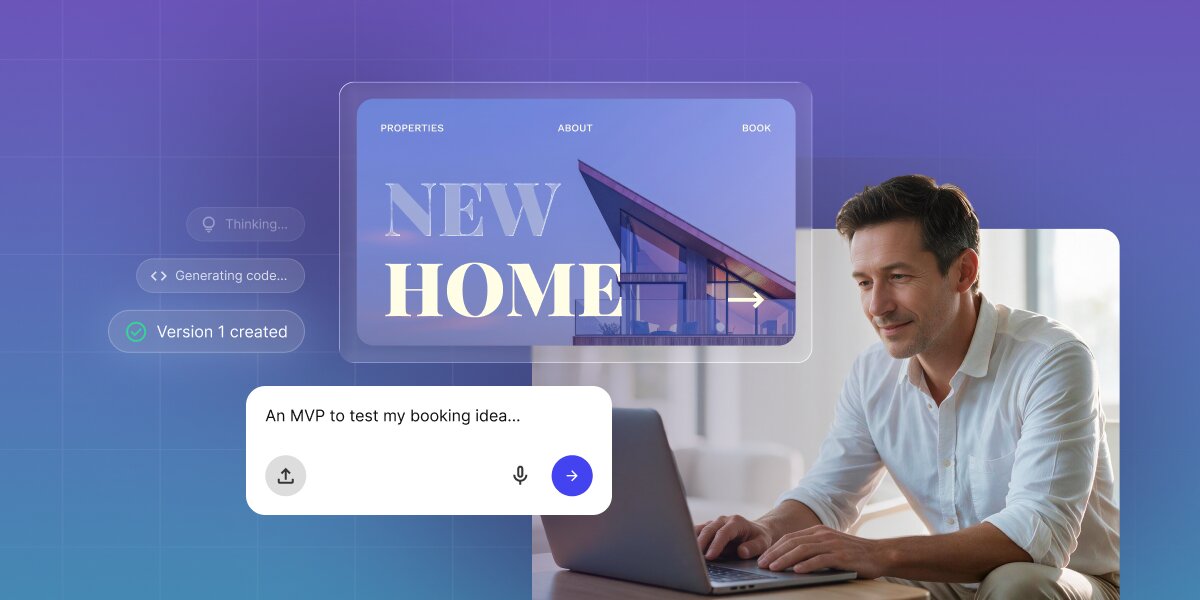
A digital graphic depicting AI-driven website development against a purple-to-blue gradient grid background. On the right, a man works on a laptop while a floating glassmorphism UI panel displays a real estate website mockup titled "NEW HOME" with navigation links for "PROPERTIES", "ABOUT", and "BOOK". On the left, a white prompt box displays the user command "An MVP to test my booking idea..." accompanied by floating AI status badges reading "Thinking...", "Generating code...", and "Version 1 created".

If you’re part of a startup, there has never been a better time to get a first version of your product in front of real people. You no longer need a technical co-founder or a budget for developers. You can build a vibe coding MVP instead: a first working version of your product, created by describing it to an AI tool in plain language rather than writing the code by hand. It exists to test one business assumption with real customers, so you find out whether the idea works before you spend more time on it.

All-in-one tools like Coderick AI have made it fast enough to go from an idea to working software in days, so building is no longer the part that holds you up. This frees you up to focus on everything around it: deciding what your MVP should test, keeping the first version small, reading what early users actually do, and knowing when to bring in a developer.

Key takeaways:

  • A vibe coding MVP is a working first version of your product, built by describing it to AI, and it exists to answer one business question rather than to launch your company.
  • Name the assumption that would sink your idea if it turned out to be wrong, then build only what puts that assumption in front of real customers.
  • Building the MVP is one job out of several, and deciding what to test, onboarding your first users, and reading the results all matter just as much.
  • Unlike AI builders that hand you a finished project and leave hosting, databases, and deployment for you to work out, Coderick AI includes all three, so your MVP can go live and reach real users the same day you build it.

What a vibe coding MVP is, and what it’s not

A vibe coding minimum viable product (MVP) is the smallest working version of your product that real customers can actually use, built by describing it to an AI tool instead of writing code or hiring a developer. What you get is a web app you can preview privately and publish at its own address, which is why you need an AI web app builder that takes you from idea to something testable in days.

Say you had a cool idea to build a SaaS MVP with AI that solved a real problem for a specific industry. Until a couple of years ago, this meant finding a budget for software development, a technical co-founder, or a year of learning to code, all of which required committing before you had any evidence that people wanted it. Vibe coding removed that step: you can now build the first version yourself, in days, and let real customers tell you whether the idea holds before you spend anything you would miss.

Prototype, MVP, and production product are three different things

These three get used interchangeably, and the confusion can be expensive, because each one answers a different question and takes a different amount of work to build.

  • A prototype is something you show your team or a few friends. It can be screens with nothing behind them. It tells you whether the idea makes sense on paper, and nothing more. It’s usually disposable.
  • A production product has to work for real clients, keep running when something breaks, handle many people arriving at once, and protect other people’s data. It is built to last, and it costs accordingly.
  • An MVP sits between the two. It’s more than a prototype, because a stranger has to be able to use it without you there: someone works through it on their own, with their own data, to do something they genuinely needed to do, and that is how you test your idea. But unlike a prototype, it’s not disposable: if your idea holds up, this is what you keep building on to get to the production product.
What it isWho uses itWhat it gives you
PrototypeYou and your teamA sense of whether the idea hangs together. It can be clickable screens with nothing behind them.
MVPReal customers, doing real workEvidence. This is the only one of the three that can tell you whether people want the thing.
Production productEveryone, at scaleA business you can run, built to handle load, failure, and other people’s data.

What the MVP is for: answering one question, not launching a company

An MVP is a research instrument that happens to look like a product. The question it answers is about user behavior: will people switch from the way they do this now, will they trust software to do the job instead of doing it themselves, will they come back a second time without being reminded, will they pay anything at all.

What makes a question worth building for is that a “no” would change your plans. If you would carry on the same way whatever the answer, you are not really asking anything. And once you have the question, it settles the build: only the features a user has to touch on the way to answering it earn a place. Everything else, however obvious it seems, is a decision you are making before you have the information to make it.

Start with the risky assumption, not the feature list

Before you decide what to build, decide what has to be true for the business to work. Every startup rests on a handful of assumptions, and one of them is load-bearing: if it turns out to be false, nothing else you build matters. That is the one the MVP exists to test.

Naming the one assumption the MVP has to test

Write down everything that has to be true for your idea to work, then look for the one that is both unproven and fatal. Say you want to build a tool that automatically sorts bank transactions into expense categories for freelance bookkeepers. Your idea depends on at least three things:

  1. Bookkeepers find manual sorting tedious. Almost certainly true, and you can confirm it in a few conversations without building anything.
  2. They would pay a monthly fee for software that helps. Worth testing, but it only matters if the next one is true.
  3. They would trust automatic sorting enough to work from it, instead of redoing it by hand. This is the risky one. If bookkeepers check every line anyway, your tool saves nobody any time and the business does not work.

The third assumption decides whether you have a product, and you cannot settle it by asking people. Everyone says they would trust it, right up until they see their own client’s messy data come back with mistakes in it. Assumptions like that can only be tested by letting people use something real, which is exactly what an MVP is for.

Deciding in advance what user behavior counts as evidence

Once you know what you are testing, write down what result would convince you, and do it before anyone touches the product. For the bookkeeping example, that might be: “I will believe bookkeepers trust this if at least half of the people who try it upload a second bank statement within a week, without me asking them to.”

Early results are almost always mixed, and after two weeks of building you will be strongly inclined to read them as good news. A number you committed to in advance is much harder to argue with than a feeling you form afterwards.

How to scope a vibe coding MVP

Scope your MVP to the shortest path a user can take to reach the moment that tests your assumption. Anything sitting off that path can wait. The easiest way to hold that line is to keep two separate lists instead of one.

Build scope and launch scope are two different lists

Build scope is what tests your assumption. Launch scope is the minimum that has to exist before you can responsibly let real people in. They serve different purposes, and merging them into a single to-do list is one of the most common reasons a small MVP can turn into a three-month project. Here’s how to tell the difference between the two:

Build scope: the path to your answerLaunch scope: what every real user needs
The first step a user takes toward the thing they came forA way to sign in
The one thing your product promises to doA privacy notice saying what you do with their data
Whatever lets them judge whether it workedA way to reach a human when something breaks
The point where they get the result and use itA way to delete their data on request

The launch scope is short, but it is not optional. If you are handling other people’s financial records, a privacy notice and a way to delete data are not polish you add later. In most countries, they are a legal requirement the moment a real customer uses your product.

What to leave out on purpose

The list of things to skip is longer than the list of things to build, and every item on it is something a reasonable person would argue for:

  • Accounts for a second type of user. Team access, client logins, admin roles. Build for one person doing one job, and add the rest when you know the job is worth doing.
  • Settings and customization. Every option you offer is a guess about what people will want to change, made before you have watched anyone use the product.
  • Integrations with other software. Connecting to the accounting tool everyone uses sounds essential and typically takes weeks. It also tests nothing, because nobody refuses a product they like over a missing integration at this stage.
  • Billing systems. You can take payment with an invoice or a payment link long before you build subscriptions, and doing it by hand teaches you more about how people buy.

How small startup teams divide the vibe coding work

Building an MVP for non-technical founders roughly splits into six tasks that can be completed by a startup team of two or three people, and only one of these tasks involves the actual vibe coding. Someone has to stay close to customers, someone has to decide what the MVP is testing and what result would count, someone runs the build, the whole team has to try the thing, someone onboards the first users by hand, and someone brings in technical help when the risk calls for it.

ResponsibilityWho owns it in a small team
Problem and customer evidenceFounder or whoever talks to customers most
MVP scope and success signalFounder or product owner
The vibe coding buildFounder, operator, or the most product-minded generalist
Workflow and usability testingThe whole team, on the real product
Early-user onboardingFounder or growth lead, by hand
Technical escalationAn experienced reviewer or developer, when risk requires it

If you are on your own, you still own all six. The value of the split is that it stops the build from swallowing the rest, which is the standard failure: the founder disappears into the tool for two weeks, comes back with something impressive, and has not spoken to a customer since. Do the six jobs in sequence, not as one blur, and note that only one of them requires the AI at all.

How to build an MVP with AI using Coderick AI

The build is the most straightforward part of the vibe coding MVP process. You describe the product in plain language, look at what the AI produces, and refine it over a few rounds until it does what you need. (Our guide to the vibe coding workflow walks through that loop in more detail.)

What varies between one AI MVP builder and another is mostly what happens after the MVP gets built. Many tools generate a project and then leave you to work out hosting, databases, and deployment on your own (see our vibe coding glossary to learn all about these), which is where founders building an MVP without coding usually get stuck. With Coderick AI, those pieces are handled inside the platform:

  • Hosting is included and optimized: You build safely on a private preview domain, and there is no separate hosting account to set up or pay for.
  • The database and user accounts come with it: If your MVP needs to store information or let people sign in, it works without you configuring anything, though you also get full access to a database admin dashboard to manage your data directly if needed
  • Publishing is one step: When the product is ready on your private staging environment, you simply click Publish. This automatically copies the current state of your app to your live, public web address (and paid plans fully support custom domains).

Start with one prompt

Your first AI MVP prompt should describe your build scope and say explicitly what to leave out. That second part matters more than people expect: asked simply for “a tool for bookkeepers,” an AI builder will helpfully add an admin dashboard and a settings page you never wanted and now have to maintain. It’s highly recommended to provide clear business requirements and add functionalities step-by-step, rather than dumping 5-6 features into a single prompt. You can even upload an image of a layout you like and ask the AI to use it as design inspiration.

A simple prompt you can start with:

“Build a web app for [Target Audience] that allows them to [Core Functionality]. Do not build [Features to Exclude].”

Using this prompt for the bookkeeping example, here’s how it looks:

“Build a web app for freelance bookkeepers that allows them to upload a CSV bank statement and automatically sort transactions into expense categories. Do not build an admin panel or user settings.”

After submitting this prompt, Coderick AI will generate a functional web application tailored for freelance bookkeepers to upload and categorize CSV bank statements, excluding an admin dashboard or user settings as instructed. To support these file uploads and data sorting features, the platform will automatically provision a database under the hood. You will immediately see the results in a split-screen interface, which features a text summary of the AI’s implementation plan on the left and a live, interactive preview of your new application hosted on a private staging domain on the right:
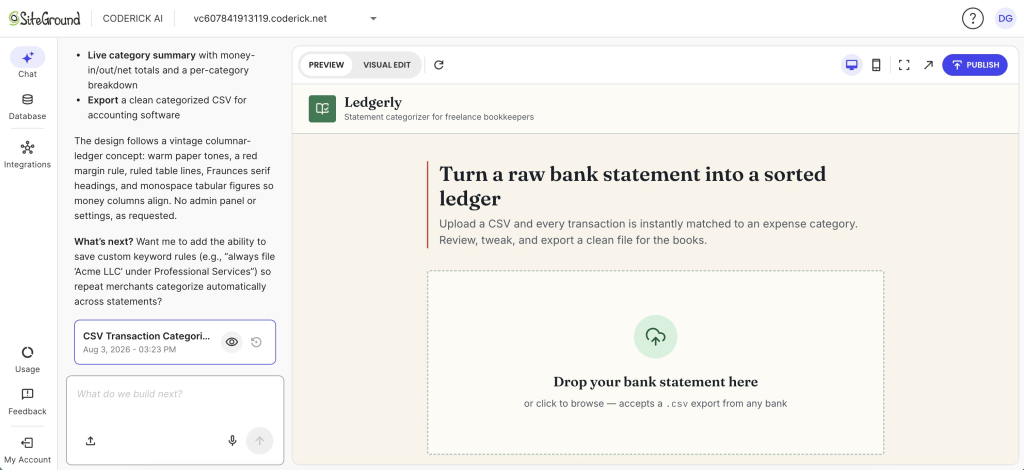
A screenshot of the SiteGround Coderick AI web development interface showing a split view with an AI assistant on the left and a live app preview on the right. The left panel details design notes and features for a financial app, alongside a prompt history tab and a text input asking "What do we build next?" The right panel displays the preview of a web application titled "Ledgerly — Statement categorizer for freelance bookkeepers," featuring the main headline "Turn a raw bank statement into a sorted ledger" and a dashed upload box reading "Drop your bank statement here."

Then iterate

It’s possible that the first AI-built MVP version will get something wrong, and your job is to describe the difference between what you see and what you meant, then run it again. Two or three rounds are normal for a narrowly scoped MVP. For quick visual tweaks, you can use Coderick AI’s “Visual Edit” mode to click directly on an element and apply AI-powered changes in place, saving you from writing lengthy chat prompts.

Remember to treat the AI like a real developer: back-and-forth testing and debugging are natural parts of the software lifecycle. If you find yourself on the twelfth round, it usually means the scope grew while you were working, not that the tool is failing you.

For more prompts you can copy and adapt, see our guide to vibe coding prompts.

How to test an AI-built MVP with early users

Testing an MVP means picking a small group of people who have the problem, getting them to do a real task with it, and watching what happens. Before you start, decide what the finish line is. Every MVP has one moment where the user gets the thing they came for. In the case of the bookkeeping tool, it is not signing up or uploading a file, it is exporting a corrected list they then actually use with a client. Everything before that moment is setup, and everything you measure is measured against it.

Ten or 15 people is enough, as long as they are the right ten or 15. People who respond because they know you will be kind, and kindness is not data. Go to wherever your users already are and recruit individually.

With that group, three things are worth measuring, and each one answers a different question.

  • Do they get there at all? Count how many reach that finish line the first time. If eight of 15 sign up and only three export a file, the problem is in the middle, and you can go and find out exactly where they stopped.
  • Do they come back and do it again? For an MVP, coming back means repeating the core action, not logging in. A second bank statement uploaded a week later means the first one was worth their trouble. One to two weeks is a long enough window to tell, and this is usually the strongest signal you can get this early.
  • Will they hand over money? This is where most founders fool themselves. Asking “would you pay for this?” tests nothing, because saying yes is free. Testing it means asking for the payment itself, before the product is really ready: an early-access price for the next three months, a paid pilot, a deposit, or, for business customers, a written commitment to buy. The honest version of this bar is a handful of paying customers who are not friends of yours.

Which of the three matters most depends on what you decided to test. If your risky assumption is that people will trust the output, repeat use is your answer and payment can wait. If the assumption is that anyone will pay for this at all, then you need to ask for money in week one, even if the product is held together with tape.

What early behavior tells you, and what it does not

Some signals are worth acting on. Others feel good but mean nothing.

This is evidenceThis is not
They come back and use it again without a nudgeThey signed up
They pay, even a small amountThey said they would definitely pay
They complete the task without asking you for helpThey said it looks great
They ask you for the next thingTraffic, impressions, and waitlist numbers
They complain about something specificNobody complained

The most useful thing to watch is where people stop. If four of your first ten users upload a file and never look at the results, you have learned something precise and slightly painful, which is exactly the sort of thing an MVP exists to produce. An MVP that produces a clear “no” has done its job as well as one that produces a “yes,” and it has done it for a fraction of what finding out later would have cost.

When you spot these drop-offs or receive specific complaints, you don’t need to start over. You can simply jump back into the Coderick AI chat, describe the necessary workflow changes to the AI, and iterate on your existing app to quickly deploy a better version.

A realistic timeline. Deciding what you are testing and what would count as evidence takes an afternoon, not a week, and it is the step most worth not rushing. The build is usually two to five days, including the rounds where you fix what the AI got wrong. Recruiting your first 15 users often takes longer than building, so start on it while you build. Then give the test one to two weeks, which is long enough to see whether anyone comes back. From decision to answer, three to four weeks is normal.

When to bring in a developer for a vibe-coded MVP

Most of the advice you will find on this question is published by companies that sell development services. Their answer to “when do you need a developer” is structurally likely to be “now.” However, a vibe-coded MVP can carry real users for longer than most people admit. What it should not do is carry them past a specific set of lines:

  • Complex business and application logic: AI builders are excellent at standard features, but if your app needs to follow highly specific, multi-step rules or complicated math, the AI can get confused. If you find the AI constantly breaking one feature while trying to fix another, a developer can step in to write those specific rules.
  • Connecting to outside services (integrations): While many AI tools have built-in connections for popular services (for example, Coderick AI can automatically connect to Stripe to take payments), asking the AI to connect to something like a custom stock market feed is often restricted. A developer is needed to securely set up those custom bridges.
  • Outgrowing the built-in database: Some vibe coding tools automatically set up a simple storage system in the background to hold your MVP’s information, like user passwords or a list of items for sale. Coderick AI, for example, gives you a beginner-friendly database that requires zero manual setup. However, if your MVP evolves into a massively popular product and requires a highly customized, heavy-duty data system to handle millions of records, you will eventually need a developer to upgrade it.
  • Highly custom designs and animations: AI MVP builders are fantastic for generating clean, modern, and standard website layouts. But if your brand requires deeply interactive visual effects, complex 3D animations, or highly specific custom designs that break standard grid layouts, the AI will likely struggle to get it exactly right. Human developers and designers are still needed for intricate visual work.

Build the smallest vibe coding MVP that can teach you something

Vibe coding has not removed the discipline that startups have always needed. It has removed enough of the build friction that a small team can get to a real answer sooner, which is a different and better thing than shipping sooner. The founders who get value out of vibe coding are the ones who decided what they were testing before they decided what they were building.

So start from the question. Name the assumption that would sink you if it were wrong, work out what behavior would settle it, build only the path that gets someone to that moment, and put it in front of 15 real people. Whether the answer is yes or no, you will have it in weeks and will have spent almost nothing to get it. That is the case for a vibe coding MVP, and it holds whether you build a SaaS MVP with AI, an internal tool, or something nobody has a name for yet.

[96]

FAQs

What is a vibe coding MVP?

A vibe coding MVP is a first working version of a product built by describing it to an AI tool in natural language rather than writing the code by hand. Its job is to test one business assumption with real users, not to be the finished product.

What is the difference between a prototype and an MVP?

The difference between a prototype and an MVP is who it is for. A prototype demonstrates an idea to you and your team, and can be screens with nothing behind them. An MVP is used by real customers doing real tasks, which is the only way it can produce evidence.

Can a non-technical founder build an MVP with AI?

Yes. A non-technical founder can build an MVP with AI by describing the product in plain language and refining the result over several rounds. The hard parts stay human: choosing what to test, deciding what counts as evidence, and reading what the result means.

What should a startup MVP include?

A startup MVP should include only the path a user takes to reach the moment that tests your assumption, plus whatever is legally or practically required before real people use it, such as sign-in, a privacy notice, and a way to reach you. Features that do not affect the test belong in later versions, not launch scope.

How should I test an AI-built MVP?

You should test an AI-built MVP by deciding what user behavior would count as evidence before anyone touches it, then watching whether that behavior happens. Sign-ups are not evidence. Repeat use and payment usually are, and where people stop tells you more than where they finish.

When should a startup bring in a developer?

A startup should bring in a developer when specific triggers appear: you are handling payments or personal data, a second paying cohort has arrived, a compliance obligation applies, the data model would be expensive to change, or something breaks that you cannot diagnose.

Can Coderick AI help a startup build an MVP?

Yes. Coderick AI can help a startup build an MVP by turning a written description of the product into a working first version that the team can refine, test with early users, and host without setting up infrastructure separately, since hosting is included in every paid plan.
Ecommerce sales tax: How to know if you owe it, register, and collect correctly

Abstract of ecommerce sales tax

Too often, online sellers discover their US sales tax obligations the same way: a notice from a state revenue department, or a tax season conversation that turns uncomfortable fast. It doesn’t help that the rules changed significantly in 2018. Now you can owe in states where you’ve never set foot, based purely on how much you sell there. Here’s how to figure out where you owe, what to do about it, and how to get your store set up before it becomes a problem.

Key takeaways:

  • Sales tax obligation is triggered by nexus — either a physical presence or sufficient sales volume in a state. You don’t have to be physically located there to owe it.
  • The rate you charge depends on what you sell and where your customer is — except in origin-based nexus states, where it depends on where your store is instead. It’s not a flat number — rates vary by state, county, and city, and some product categories are exempt entirely.
  • Whether you sell through a marketplace or your own store changes who’s responsible for collecting. Marketplaces typically handle tax collection for their platform under marketplace facilitator laws, but at the cost of margin, customer ownership, and control (though exceptions exist). Your own store puts the responsibility on you, but keeps everything else in your hands.
  • Filing and remittance is ongoing — but most of it can be automated or handed off. Stripe Tax handles calculation and nexus monitoring. An accountant can take care of the rest. The upfront setup is the part that needs your attention.

A note before we start
We’re about to unpack a lot of tax info, and it can easily feel like a lot. But before the overwhelm, keep in mind that SO much of this can easily be managed by your ecommerce platform, payment gateway, and a reliable accountant. Jump ahead to the “How to configure sales tax in your ecommerce store” section if you want quick answers on how to make this all a lot easier.

Do you need to collect online sales tax for your store?

The answer depends on whether your store has “nexus” in a given state. If you do, you’re required to register there, collect the correct rate on every applicable sale, and file periodic returns. Stay below the threshold and you have no obligation.

Before 2018, nexus almost always meant a physical presence. Since then, selling enough to customers in a state is enough, regardless of physical presence. If you run an online business that ships across the US, you may very well have obligations in more than one state.

Based outside the US, or selling to international customers?
This article covers US sales tax specifically. If you’re doing ecommerce in the EU, UK, Canada, or Australia, those markets operate under VAT and GST — different systems with their own rules, registration thresholds and filing requirements. SiteGround Ecommerce, for example, handles VAT and GST through the same tax management tools, but the rules themselves are outside the scope of this guide.

What is sales tax nexus?

Nexus is the legal connection between your business and a state. It’s the threshold that determines whether a state can require you to collect sales tax. Once you have it, you must register, collect the correct rate, and remit what you’ve collected on a regular schedule. There are two types:

Physical nexus

Physical nexus has existed as long as sales tax has. If your business has a warehouse, office, store, or employees in a state, you generally have nexus there, though the exact rules vary, so verify with the relevant state’s tax authority. This can include remote employees and third-party fulfillment centers, so check where your inventory is physically stored, especially if you use fulfillment services. Nexus often follows the inventory, not just the address on your business registration. For example, if you use Amazon FBA and your stock sits in an Amazon warehouse in Texas — surprise! — you may have physical nexus in Texas.

Economic nexus — what changed after South Dakota v. Wayfair

In 2018, the US Supreme Court ruled in South Dakota v. Wayfair that states could require out-of-state sellers to collect sales tax based on sales volume alone, without physical presence. Within two years, every US state with a sales tax had enacted economic nexus laws.

Before Wayfair, an online seller based in California could ship to customers in New York, Texas, and Florida and owe nothing in any of those states unless they had a physical footprint there. That’s no longer the case. Cross a state’s threshold and you’re obligated, even if your entire operation runs out of a spare bedroom in a different state.

Economic nexus thresholds by state

The most common threshold is $100,000 in sales or 200 transactions to customers in a state during the current/previous calendar year or a 12-month period. In most states, hitting either trigger creates nexus — you don’t have to hit both. A handful of states require both thresholds to be met, so check the specific rules for each state you sell into.

Some states have moved away from the transaction count and now use sales-only thresholds, and a few set significantly higher bars. For current figures, the Sales Tax Institute’s state-by-state guide is updated regularly. States vary in how they measure the threshold period — some use a rolling 12 months, others look at the current or previous calendar year. Check your specific state’s rules to know when your obligation kicks in.

States with no sales tax

Currently five states have no statewide sales tax: Alaska, Delaware, Montana, New Hampshire, and Oregon. Sellers who only ship to customers in those states have no state-level sales tax obligation, though tax laws change — confirm current rules before drawing conclusions. Worth noting: some Alaskan localities do charge local taxes even without a state-level one, so Alaska isn’t entirely off the hook for every transaction. Also highly probable you aren’t selling extensively to a random locality in Alaska.

How to check if you have nexus in a state right now

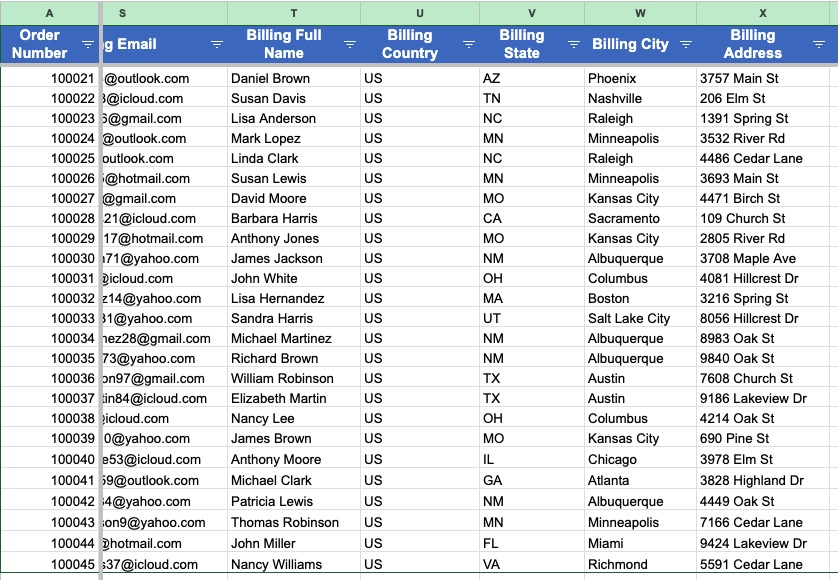
Export order data from the last 12 months (or current/prior calendar year, depending on the state’s rules) and group it by the state the order shipped to. For each state, calculate your total sales and transaction count, then compare to that state’s threshold — keeping in mind that states differ on whether gross sales, taxable sales, or exempt sales count toward nexus. Check the state’s Department of Revenue for the exact definition before drawing conclusions.

example list of exported orders for ecommerce sales tax

If either number exceeds the threshold, you likely have economic nexus there and should consult your tax advisor about next steps. If you’re close to the threshold in a few states, monitor those going forward, as you can cross mid-year without realizing it until later.

States to pay particular attention to: any state where you’ve recently started selling more aggressively. New ecommerce marketing campaigns, wholesale accounts, or marketplace listings can push your sales into nexus territory in a state faster than you’d expect.

How to register for a sales tax permit

Once you’ve confirmed nexus in a state, you need to register for a sales tax permit in that state (the name varies by state — seller’s permit, vendor’s license, and others). Indeed, collecting without a permit is generally considered a compliance violation. 

Where and how to register

Every state lets you register online through its Department of Revenue or Department of Taxation. The process varies, but you’ll typically need:

  • Your business’s legal name and address
  • Federal Employer Identification Number (EIN), or Social Security Number for sole proprietors
  • Business structure (LLC, corporation, sole proprietor)
  • A description of what you sell
  • Your projected monthly or annual sales volume to that state

Even better, the Streamlined Sales Tax Registration System (SSTRS) lets you register in multiple states simultaneously, which is particularly useful if you’ve crossed thresholds in several states at once. Not every state participates, but many do, making it considerably less of a pain than doing each state individually.

Also good news: registration is usually free (although a few states charge a small fee).

What happens after you register

Once you’re registered, you’ll receive a sales tax permit number and a start date for collection. From that date forward, you’ll generally be required to collect sales tax on applicable sales in that state, so check your permit documentation for the exact terms.

Most states also assign a filing frequency at registration (monthly, quarterly, or annually) based on your projected sales volume. Higher volume means more frequent filings. You can usually request a change if your volume shifts significantly after registration. Make note of your assigned frequency: missing a filing deadline triggers penalties and interest in most states, even if the tax was already collected.

Pro tip: If this is starting to feel like a part-time job, that’s because for multi-state sellers it can be. Most small business accountants are comfortable handling sales tax registration, filing, and remittance — and handing it off is often worth it so you can focus on actually running your business rather than avoiding possible tax nightmares. 

What determines how much tax you owe

Sales tax isn’t a flat percentage (if only it were so easy!). The rate that applies to a given sale depends on which state’s rules govern the transaction and what you’re selling: some products are fully taxable, some are exempt, and some qualify for reduced rates.

Origin-based vs. destination-based states

Nexus tells you whether you’re required to collect in a state. Origin vs. destination tells you which rate to charge once you are.

Origin-based states apply the rate from where the seller is located. If your business is in Arizona and you sell to a buyer anywhere in Arizona, you charge your business address’s rate.

Destination-based states apply the rate based on where the buyer is. This is most US states. A sale to a customer in a given city might be subject to the state rate plus a county rate plus a local rate, all stacked together. The rate changes with every order based on the buyer’s exact address.

For out-of-state sales, destination-based sales tax rules almost always apply. That means the effective rate is different for every order, which is one of the main reasons automated tax tools exist.

Product taxability — what is and isn’t taxable

Even once you have nexus in a state and know the rate, not every product you sell is taxable. Taxability rules vary significantly by state and product category, so what’s exempt in one state may be fully taxable in another, and rules change over time. Common categories that often have exemptions or special treatment include groceries, medications, clothing, and resale goods, but the specifics differ by jurisdiction and can shift with new legislation.

Check the current taxability rules in each state where you have nexus, no matter what you sell. This is especially important for the categories above, since taxability differs the most there.  Getting this wrong in either direction is a problem: under-collecting leaves you liable, over-collecting creates refund obligations you may not even know you have.

How your platform affects tax collection

Whether your ecommerce store lives on a marketplace or your own domain changes who’s responsible for collecting tax, and by how much.

Selling through a marketplace

If you sell through Amazon, Etsy, eBay, or similar marketplaces, those platforms are required by law to collect and remit sales tax on your behalf. Every US state with a sales tax has enacted marketplace facilitator laws since 2019. That said, the specifics of marketplace facilitator laws vary by state and evolve over time, so verify the current rules in each state where you have nexus.

Sounds like an easy solve, but a few caveats exist:

  • Sales through your own website are not covered. Marketplace facilitator laws apply to sales made through the marketplace, and not if you’ve created your own ecommerce website. Those are always your responsibility.
  • Marketplace sales can still count toward your nexus threshold. In many states, your Amazon or Etsy sales count toward the economic nexus calculation even though the marketplace handled the tax. Marketplace sales pushing you over a state’s threshold means you need to register and collect for your direct store there too.
  • You may still need to report marketplace sales on your state returns. Some states require marketplace-facilitated sales as a line item on your return, even as zero-tax transactions. Check the specific state’s requirements when you register.
  • The convenience comes with tradeoffs. The tax handling is one of several things a marketplace manages for you, alongside fees that cut into your margin, a customer relationship that belongs to the platform, and policies you don’t control. For some sellers that’s the right trade. For others, a direct store is worth the added responsibility because it means keeping the margin and owning the customer.

Running your own store

If you run your own store, there’s no platform absorbing the tax obligation. You need to configure collection yourself. Thankfully, though, this is a whole lot more straightforward than it sounds.

There are three main approaches:

Manual rate configuration is the baseline. You add each state where you’re registered, enter the applicable rates, and the platform applies them at checkout. It works, but requires you to stay current as rates change. Fine for a small number of states; increasingly fragile as you scale.

Stripe Tax is a paid service from Stripe — one of the most widely used payment processors for online businesses, alongside PayPal. While both handle accepting payments, Stripe Tax calculates the correct rate in real time, monitors your sales volume by state, and alerts you when you’re approaching a nexus threshold.

Dedicated compliance services go further. In addition to calculation, they handle filing and remittance on your behalf. Worth evaluating if you want to fully hand off the periodic returns.

How to configure sales tax in your ecommerce store

How you set this up depends on how your store is built.

If you’re on an ecommerce platform, you’ll typically have two built-in options.

1. With SiteGround, for example, the Basic Tax Setup uses predefined rates (that may also be customized) for the US, Canada, the EU, the UK, and Australia, with tax applied at checkout. For any other countries, you set rates manually. Functionality varies by platform, though, so be sure to check what your platform includes and whether the rates can be customized.

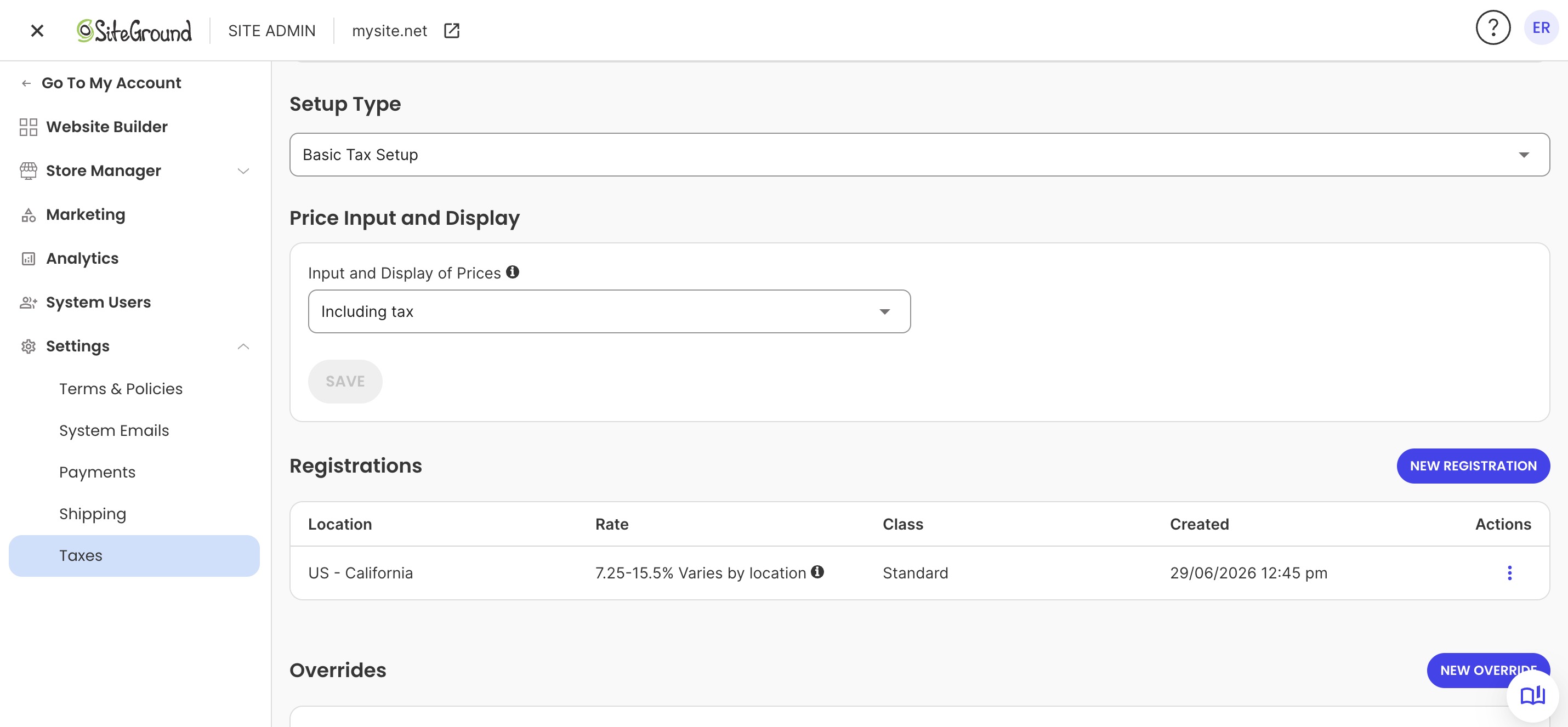
Choosing configuration of the Basic Tax Setup with SiteGround Ecommerce

2. The Advanced Tax Setup with Stripe, on the other hand, connects directly to your store and handles real-time rate calculation, nexus threshold monitoring, and automatic alerts when you’re approaching a new state obligation.

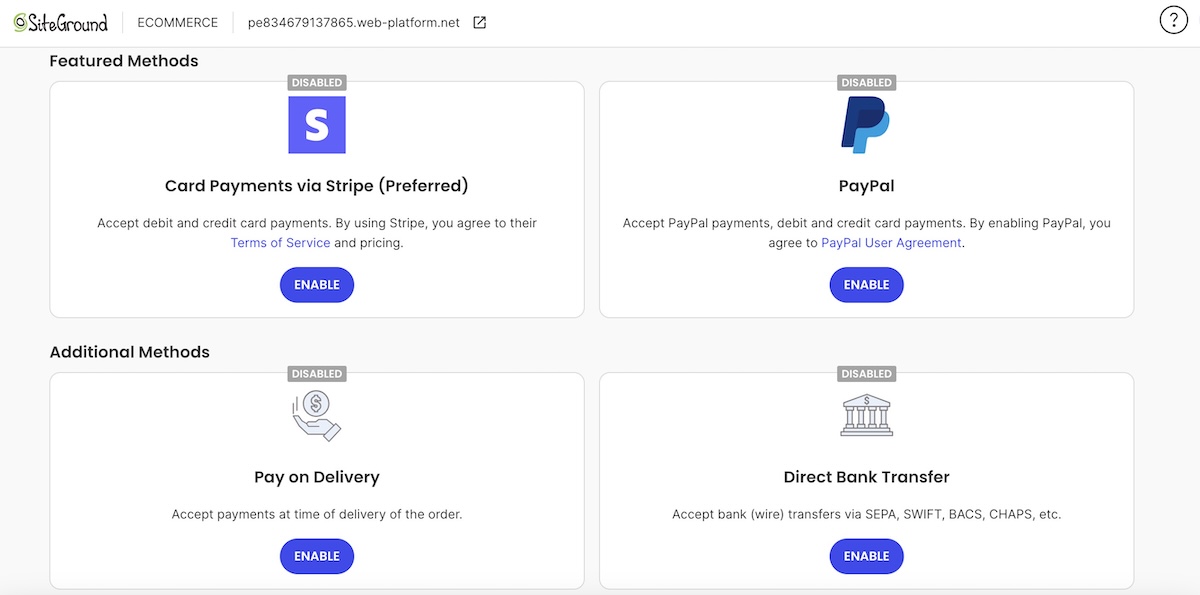
Backend of SiteGround Ecommerce where you can connect different payment methods for your customers including Stripe which offers Advanced Tax Setup

If your store is custom-built, Stripe Tax is the most common path. It integrates directly and doesn’t require an ecommerce platform.

Either way, product tax codes are where most configuration errors happen. A miscategorized product gets taxed incorrectly on every order in every state: assign the correct tax code to each product before you go live, and manage any overrides for category exemptions.

Want tax configuration handled out of the box?
SiteGround Ecommerce includes Basic Tax Setup free on all plans, with predefined rates for the US, Canada, the EU, the UK, and Australia, with no per-transaction fees or monthly caps. For more complex needs, the Advanced Tax Setup with Stripe is a few clicks away. Trusted by 3 million domain owners, rated 4.9/5 on Trustpilot. Try it free for 14 days — no credit card required.

Online business sales tax compliance: how to file and remit

Registering and collecting is only part of the picture: there’s that finicky part of actually paying sales tax. Sigh. That translates to filing returns and remitting the tax you’ve collected to each state on a regular schedule. If you’re selling online in multiple states, this is where compliance can get administratively intense.

Filing frequency by state

Your filing frequency is assigned at registration based on your sales volume in that state. Most small sellers file sales tax quarterly or annually. Higher-volume sellers may be required to file monthly. The frequency can be found in your registration confirmation, online tax portal, or seller tax account information.

Missing a deadline carries penalties in most states, plus interest that accrues over time. Note that missing the filing is penalized separately from missing the payment, so don’t assume that paying sales tax without filing satisfies the requirement.

Keep a filing calendar…or hand this piece off to your accountant. List every state where you’re registered, your assigned frequency, and each state’s deadline. The deadlines are not uniform: some states require returns by the 20th of the month following the period, others by the last day, and some by the first. One missed deadline in a state with a monthly filing schedule can turn into a multi-penalty situation quickly. If you’re already working with a bookkeeper or accountant, this is exactly the kind of ongoing administrative work worth delegating.

How to avoid common filing mistakes

The most common errors in online business sales tax compliance:

  • Reporting the wrong period. Make sure you’re reporting the taxes collected in the current return period, not the current calendar month.
  • Using outdated rates. States and localities update sales tax rates regularly. If your store’s configured rates are stale, you’re collecting the wrong amount. Check rates against current state publications at each filing period.
  • Missing a nexus state. If you crossed a threshold mid-year and didn’t register, you may owe back taxes for that period, so consult a tax professional to understand your specific exposure. A nexus review at the start of each year catches most of these before they become delinquencies, but ongoing monitoring throughout the year is the best practice to identify new obligations as they arise rather than waiting until year-end.
  • Skipping marketplace sales on your return. Some states require marketplace-facilitated sales to appear on your return as a separate, non-taxable line item. Filing without them can trigger discrepancies.

For stores registered in more than three or four states, sales tax software that integrates with your store and pre-populates returns is worth evaluating. The cost is almost always less than the time (and the mistakes) you’d otherwise spend on it.

Note: Where an accountant is less likely to help proactively is nexus monitoring. They’ll catch new threshold crossings at year end, not necessarily mid-year when you’ve already crossed them. That’s the piece that benefits most from automation.

What to do if you’ve already been selling without collecting

Oops: you’ve been selling for a year or more, crossed nexus thresholds in a few states, and never registered or collected. Deep breath: here’s what to do.

Start by not ignoring it. States can and do audit online sellers, and the longer the gap, the larger the exposure. Coming forward voluntarily almost always produces a better outcome than being discovered, but voluntary disclosure procedures have their own specifics by state, so consult a tax professional before deciding on next steps.

Ecommerce sales tax checklist: what to do first

Use this as your starting point if you’re setting up sales tax from scratch, or getting compliant after a gap.

  1. Pull your order data by shipping state (covering whatever period your states require, whether that’s a rolling 12 months, the previous calendar year, or the current one) and compare against each state’s nexus threshold. Identify every state where you’ve crossed, or are close to, the limit. Using Stripe Tax? It monitors your sales volume by state and flags threshold crossings automatically — skip the manual review once it’s set up.
  2. Register for a sales tax permit in each nexus state before you start collecting. This step is always manual — there’s no way around it. The Streamlined Sales Tax Registration System (SSTRS) lets you register in multiple states at once if you’ve crossed several thresholds simultaneously.
  3. Check product taxability rules in each registered state for every category you sell. Categories like clothing, groceries, and digital products often have state-specific exemptions or special treatment, though the rules vary. If you’re using Stripe Tax, assign the correct tax code to each product and Stripe handles the rest.
  4. Configure your store to collect the correct rate. Use a basic tax setup for straightforward setups, or Stripe Tax for automated calculation and nexus monitoring. On SiteGround Ecommerce, both the Basic Tax Setup and Advanced Tax Setup with Stripe are built in.
  5. Build a filing calendar with each state’s assigned frequency and deadline — or hand this off to your accountant. Either way, don’t skip it: missing a filing deadline triggers penalties even if the tax was already collected.
  6. If you’ve been selling without collecting: consult a tax professional about options before you file anything.

For first-time sellers planning to start an online store, the best time to handle this is before your first sale (or at least before you cross any thresholds). Do it now.

Get your store collecting correctly from day one

This is a lot of information, and you do want to get it right. But it’s more manageable than it looks. Run your nexus check, get registered in the states where you owe, and configure your store to collect automatically. For the ongoing filing and remittance, lean on capable partners: an accountant who knows multi-state compliance, Stripe Tax for automated calculation and monitoring, and a platform that makes setup straightforward from day one.

SiteGround Ecommerce gets you compliant quickly and easily, with a Basic Tax Setup or Advanced Setup with Stripe, no plugins required. But tax is just one piece of what the platform handles out of the box. You also get a conversion-optimized checkout, built-in SEO tools, AI-powered product management, email marketing, and enterprise-grade hosting — all from one dashboard, without stitching together third-party tools.

[103]

Frequently asked questions

Do I need to collect ecommerce sales tax for online sales?

Yes, if you have nexus in a state and the product that you sell is taxable. Nexus can be physical (a warehouse, employees, or inventory stored there) or economic, meaning you’ve crossed that state’s sales or transaction threshold. You’re not required to collect in states where you have no nexus, or in states that have no sales tax — though note that even in some of those states, local jurisdictions may still impose their own taxes.

What is economic nexus and how does it affect my online store?

Economic nexus is the standard that lets states require out-of-state online sellers to collect sales tax once they cross a sales threshold, even without physical presence. It was established by the 2018 Supreme Court ruling in South Dakota v. Wayfair. The most common threshold is $100,000 in annual sales or 200 transactions to customers in that state, but thresholds and measurement periods vary by state, so check each state’s specific rules. Cross either, and you’re required to register and collect.

How do I know which states I owe sales tax in?

Run a sales report covering whatever period the states require (a rolling 12 months, the previous calendar year, or the current one) grouped by the state each order shipped to. Total up your sales and transaction count for each state, then compare against that state’s current nexus threshold. Any state where you’ve exceeded either figure is a state where you likely have an obligation. Note that some states only count taxable sales toward the threshold, so check the state’s specific rule before totaling.

What happens if I don’t collect sales tax?

You’re still liable for the uncollected tax, and it will come out of your pocket rather than your customers’. Consult a tax professional to understand your specific situation and options. A state audit can result in the full back tax amount, plus interest and penalties. Most states also penalize late or missing registrations separately.

Do marketplaces like Amazon or Etsy collect sales tax for me?

Yes, for sales made through those platforms. Under marketplace facilitator laws, Amazon, Etsy, eBay, and similar platforms are generally required to collect and remit sales tax on sales they facilitate, though specifics vary by state, so verify the rules where you have nexus.. But those sales can still count toward your economic nexus threshold in many states, meaning you may still need to register and collect for sales made through your own store, even if the marketplace has your third-party sales covered.