How to start email marketing: What it is and why it works

What is Email Marketing

Email marketing sends targeted messages to promote products, nurture leads, and turn subscribers into customers. It remains one of the most cost-effective channels available, and launching your first campaign takes five steps: strategy, platform, list, design, and deliverability.

Key takeaways:

  • Email marketing sends targeted, personalized messages that turn subscribers into customers and keep them coming back.
  • It’s one of the most cost-effective channels available, since the main cost is a flat platform fee, not a per-click or per-impression rate.
  • Five steps get a first campaign live: strategy, platform, list, design, and deliverability setup.
  • Segmented, personalized sends consistently outperform one-size-fits-all blasts.
  • Deliverability basics, like domain authentication and a working unsubscribe link, decide whether your emails reach the inbox at all.

What is email marketing? A quick definition

Email marketing is a form of digital marketing that sends targeted emails to promote products, share updates, or nurture leads. It works by building a list of people who’ve opted in, then sending content matched to their behavior, interests, or place in the customer journey. That’s what separates it from a broadcast channel: every message can be different depending on who’s reading it.

Why is email marketing important? Cost, ROI, and reach

Email marketing matters because it’s the one channel where you control the cost, own your audience outright, and can measure the return on every single send. The channel earns its reputation on cost. You’re not paying per impression or per click; you’re paying a flat monthly fee for your contact tier, no matter how many emails you send within that plan’s limit. That’s different from paid social or search, where spend scales with reach. The often-cited $42-for-$1 figure is a mature-program average, not a first-year one: realistic email marketing ROI in year one is closer to 100–200%, climbing to 300–500% by year two.

Email also stays useful as other channels get noisier. There’s no algorithm deciding who sees your message, and a list you’ve built is yours to keep even if a platform changes its rules or shuts down. Combined with segmentation and personalization, that direct line to your audience is why email keeps outperforming channels with a higher sticker price.

How to get start email marketinged in 5 steps

Five steps take you from no list to a sent campaign, and none of them need a developer or a design background. Work through them in order: platform and list come before design, so you’re not redoing work once you’ve already built something.

1. Plan your email strategy

Start with a goal. A campaign might aim to generate leads, convert existing leads, re-engage inactive subscribers, or promote a new product; the goal decides everything else about the send. Once you know the goal, define your audience, decide what format and tone will land with them, and pick which metrics you’ll use to judge whether it worked.

2. Choose a platform

An email service provider handles sending, list management, templates, and analytics, so the real decision is which features you need at your budget. SiteGround Email Marketing, for example, comes with a no-code builder, an AI email writer, and AI image generation on every plan, plus automation, segmentation, and built-in analytics, backed by a 98.80% delivery rate. That removes the need for separate design, copywriting, or list-building tools on a first campaign.

3. Build your email list

If you’re emailing existing clients, build your list by importing your contacts directly into the platform. If you’re starting from zero, use SiteGround Email Marketing’s built-in signup forms and subscribe pages to start collecting subscribers right away; on WordPress, the SiteGround Email Marketing plugin adds custom signup forms to your site and connects automatically with form plugins you might already use, like Contact Form 7, WPForms, or Gravity Forms. Then segment your list using the custom fields you collect, such as location, interests, or birthday, so you’re not sending the same email to everyone regardless of what they’ve told you about themselves.

4. Create the campaign

Most platforms include premade templates, so building an email doesn’t require HTML or a designer. SiteGround Email Marketing gives you a library of these to start from, then lets you customize colors, layout, and images in the no-code builder. The Generate with AI feature makes this even easier: describe what you want in a short prompt, and it builds the whole email for you, layout, copy, and images included, so you’re editing a finished draft instead of starting from a blank page.
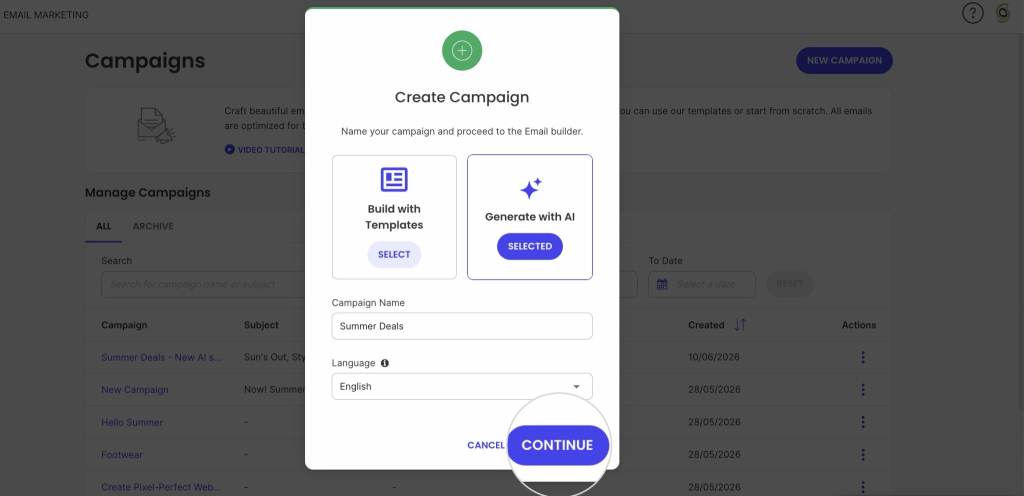
Create Campaign modal with 'Generate with AI' option selected, a campaign named Summer Deals, and a highlighted Continue button

5. Get deliverability right before you send

None of the above matters if the email lands in spam. Skipping domain authentication is the single most common reason a new sender’s first campaign never reaches the inbox, not a weak subject line. Before you send anything, walk through our full email deliverability guide, which covers the technical setup that protects your sender reputation from day one.

Main types of marketing emails

There are more than a dozen specific types of marketing emails, but most fall under a few core categories:

  • Welcome emails. The first message a new subscriber or customer gets, timed to arrive immediately after signup.
  • Promotional emails. Built around a specific offer or sale, with one clear call to action.
  • Informational and retention emails. Newsletters, how-to content, and updates that keep subscribers engaged between purchases.
  • Event-triggered and transactional emails. Automated sends tied to a specific action, like an abandoned cart, an order confirmation, or a password reset.

For the full breakdown, including subtypes and when to use each one, see The 13 essential types of emails explained simply.

What drives email engagement

Three things decide whether a campaign performs: permission, relevance, and frequency. 

  1. Permission comes first. A double opt-in signup (built into SiteGround Email Marketing, so you don’t have to set it up separately), where a subscriber confirms via a follow-up email, keeps your list built from people who actually want to hear from you, which matters more for deliverability than any subject line trick. Buying a list skips this step entirely and usually costs more in bounce and spam complaint rates than it saves in time.
  2. Relevance is where segmentation and personalization pay off. Messages built around a subscriber’s actual behavior consistently outperform generic blasts, and something as simple as using a name or referencing a past purchase raises the odds an email gets read. This is also where the email customer journey matters: a welcome email, a re-engagement email, and a win-back email are solving different problems for the same subscriber at different points in time.
  3. Frequency is the one most businesses get wrong in both directions. Too many sends and unsubscribe rates climb; too few and subscribers forget who you are. Test a schedule, watch the results, and adjust; there’s no universal right number, only the one that fits your audience.

Common email marketing mistakes to avoid

A few mistakes come up more than the rest, out of the worst email marketing mistakes beginners tend to make:

  • No plan after the welcome email. The mistake isn’t a bad signup form. It’s collecting emails with nothing lined up to send next, so the list goes cold within weeks and engagement quietly drops on every send that follows.
  • Treating every subscriber the same. A customer who bought last week and a lead who signed up for a discount code are in completely different stages, and sending them identical content wastes the segmentation data you already have.
  • Skipping list maintenance. Inactive subscribers and invalid addresses drag down your open and click-through rates over time, which can hurt deliverability for your entire list, not just the inactive portion of it.

None of these are hard to fix once you know to look for them; the damage comes from not noticing until the numbers have already dropped.

What email marketing metrics to check after you hit send

Your first campaign doesn’t need an A/B test. It needs four numbers checked within a day or two of sending, so you know whether to change anything before campaign two.

MetricWhat it tells you
Open rateWhether the subject line got attention
Click-through rateWhether the content and call to action worked once people opened it
Conversion rateWhether the send hit the goal you set in step one, a sale, a signup, or a download
Bounce rateList health. A high bounce rate on a first send usually means the list was built or imported carelessly, not that the email itself was weak

A weak open rate points at the subject line. A weak click-through rate with a healthy open rate points at the content or the CTA, not the subject line. Reading the two numbers together is what tells you which part to fix first, instead of rewriting the whole email and guessing again. These four are the starting point; once you have a handful of sends to compare, the rest of the email marketing metrics worth tracking will tell you more than any single campaign can on its own.

Ship it, check the numbers, improve campaign two

Your first campaign won’t be your best one, and that’s fine. The four numbers above exist to tell you what to fix, not to grade you on effort. Send it, check the numbers, and let campaign two be the one that’s actually optimized.

SiteGround Email Marketing keeps the whole loop, sending, tracking, and fixing, in one place, so you’re not piecing it together across separate tools.

[58]

This article was originally posted in December 2024 and updated in September 2026.

Frequently asked questions about getting started with email marketing

How do I start email marketing?

Define your goals and audience, choose an email marketing platform, build your subscriber list with a signup form, design your first campaign using a template, and track open rate, click-through rate, and conversions to refine future sends.

How much is a 1,000-person email list worth?

The value depends on your list’s engagement rate, your average order value, and how well the list is segmented. A smaller, actively engaged list of 1,000 subscribers might outperform a much larger, disengaged one.

Is email marketing still worth it in 2026?

Yes. It remains one of the few channels you fully own, unaffected by algorithm changes or rising ad costs, and it still delivers a strong return when lists are built ethically and messages are personalized.

How do I become an email marketer?

Most email marketers start by managing campaigns for a single business or client, learning platform tools, segmentation, and copywriting along the way. From there, they build expertise in deliverability, automation, and analytics. Certifications from providers exist, but hands-on campaign experience matters most.

What Is a VPS, and Does It Fit Your Hosting Needs?

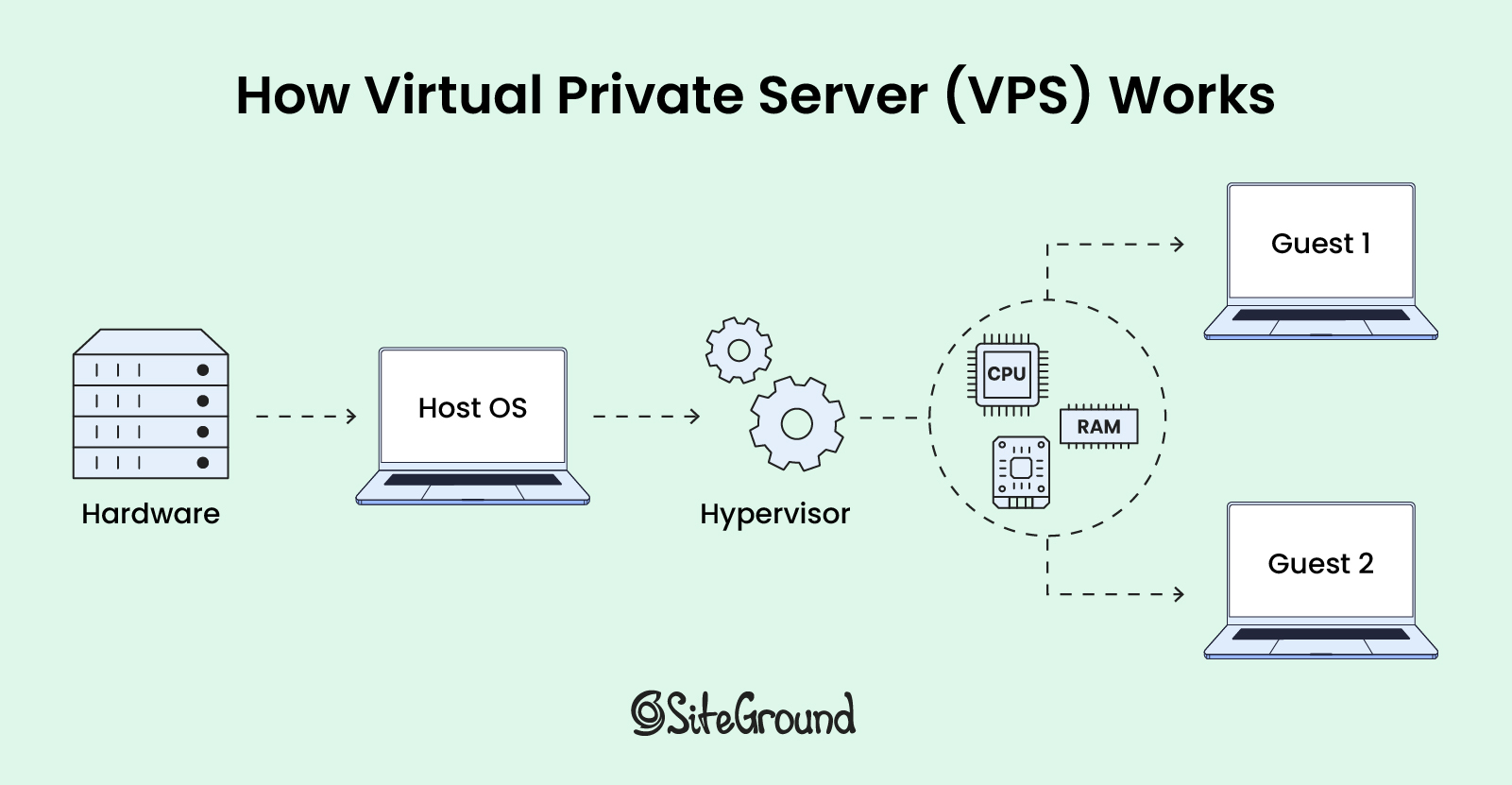
This is an illustration of a physical server divided into multiple virtual private servers (VPS)

Selecting the right web hosting can be overwhelming, especially if you’re not tech-savvy. As a small business owner or freelancer with a tight budget, you want to maximize your resources.

You might have heard that VPS hosting surpasses the limits of shared hosting while offering comparable performance to a dedicated server, all at an affordable price. But is this true?

In this article, we’ll explain what a VPS is, how it works, and what you can expect when using it as your hosting environment. 

What Is a VPS?

A Virtual Private Server (VPS) is a virtualized server that provides dedicated resources within a shared physical server. It offers more control and isolation than shared hosting, ensuring users have private access to allocated computing power.

How Does VPS Work?  

Virtualization technology allows one physical server to be divided into several virtual private servers using special software called a hypervisor. The hypervisor creates and manages these virtual servers (guest 1 and 2), distributing a portion of the host physical server’s resources, such as memory and processing power, to each one.

This process allows each virtual server to function as an independent computer, enabling users to install their own software and operating system (OS) on top of the host OS.

Illustration of virtualization technology: a single physical server is divided into multiple virtual private servers using a hypervisor software

What VPS Is Used For?

Beyond traditional web hosting, a virtual private server (VPS) is best for more complex and resource-intensive operations and programs, such as:  

  • development and testing, where isolated environments are crucial for accurate results;
  • artificial intelligence and machine learning, providing the necessary computational power and flexibility;
  • software as a service (SaaS) platforms, offering the scalability and security needed to support multiple users;
  • web applications that have custom software requirements, providing the customization and control required to meet specific needs.

What Is VPS Hosting?

Virtual private server (VPS) hosting is a type of hosting where you share a physical server with other users but have your own dedicated share of server resources, such as space, CPU, and RAM. 

This setup means that while you share the server hardware with other users, your hosting remains isolated and your resources are guaranteed, making it generally a more costly option compared to shared hosting, yet more affordable than a dedicated server. 

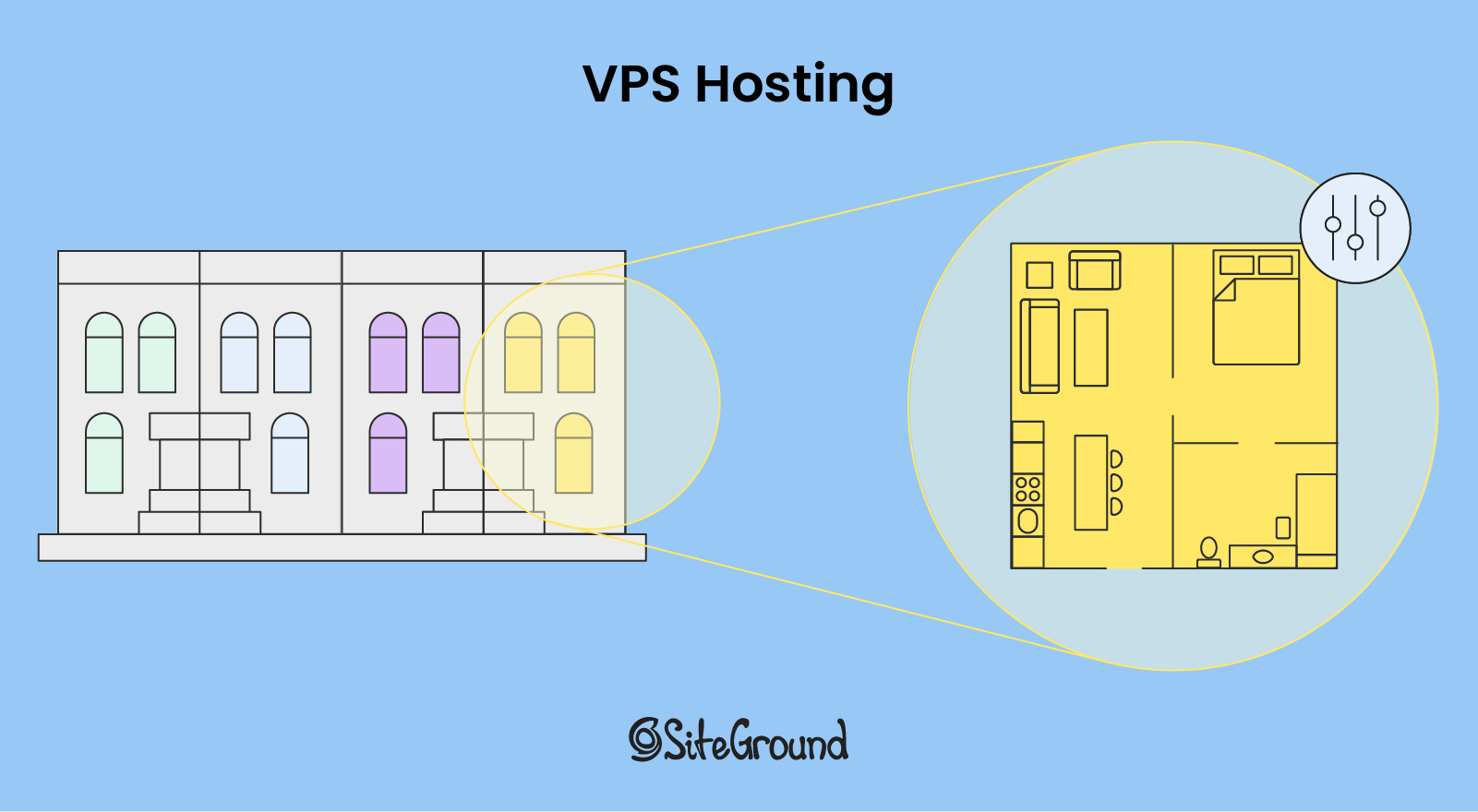
Conceptual analogy: Renting an apartment with private space and control, while sharing building infrastructure with others

Think of VPS hosting as renting an apartment in a building. Unlike sharing a room in a dormitory, you have your own private space that you can furnish and decorate as you like. You have control over your apartment’s utilities and layout, but you still share the building’s infrastructure, like the elevators and hallways, with other tenants.

Types of VPS Hosting

VPS hosting can be categorized as either managed or unmanaged, depending on the level of additional services provided beyond the basic server setup.

With unmanaged VPS hosting, you need to have expertise in server configuration, troubleshooting software, and managing the apps and services installed on your VPS. In contrast, managed VPS hosting takes care of all these complex tasks for you, allowing clients to focus on their core business while experts handle the technical details. However, it can be on the pricier side.

Who Is VPS Hosting For?

VPS hosting is best for website owners whose medium-level traffic exceeds the limits of shared hosting plans but doesn’t yet require the extensive resources of a dedicated server. It is often chosen by developers and those with advanced technical knowledge who need direct access to the server for greater control and customization. 

Key Features and Limitations of VPS Hosting

VPS strikes an optimal balance between affordability, customization, and guaranteed performance for many growing websites and web applications. However, it does come with some limitations.

Let’s explore the pros and cons of VPS hosting in more detail below.

1. Customization and Control

In general, with VPS hosting you gain full admin and root access to your virtual server. That means you can change the server settings and install any software. This level of access is beneficial for advanced users who need to configure server applications, manage files directly, and install software. 

🚩 Limitations: Keep in mind that if you lack the technical knowledge, installing the operating system (OS) on your own can be risky and may lead to configuration issues. While some managed hosting providers can handle this for you, be sure to double check this with the particular provider. 

However, if you’re confident in your technical capabilities to install your OS, make sure that the provider supports the OS you need, as all providers support both Linux and Microsoft. 

2. Scalability          

Whenever you need additional resources like storage or memory, you can easily add or borrow from another virtual private server if needed. This easy scalability is thanks to the hypervisor, which we mentioned at the beginning, as it enables the host computer to support other virtual machines by sharing its resources.       

🚩 Limitations: While VPS hosting involves multiple virtual servers, the scalability is limited to the resources of the single physical server on which they reside, unlike cloud hosting, which can dynamically allocate resources across a broader network of physical servers.

3. Uptime and Reliability

The dedicated resources of a VPS help ensure that your website’s performance is generally more stable and less influenced by other sites on the same physical server, leading to faster loading times and a better user experience. 

🚩 Limitations: It’s important, however, to note that performance can still be affected if the physical server is heavily loaded, particularly if other VPS instances are consuming a lot of resources. This issue can occur when the web host oversells its server space, assuming that not all accounts will use their full allocation of resources.

4. Enhanced Security

VPS hosting provides enhanced security due to the isolation of resources for each virtual server. This prevents one compromised account from affecting others on the same server. 

🚩 Limitations: There are potential security risks associated with virtualization, particularly if there are vulnerabilities in the hypervisor software. These vulnerabilities could, in theory, allow a guest OS to “escape” its isolation and affect other virtual machines.

VPS Hosting Compared to Other Types of Hosting 

While many articles attempt to compare different hosting solutions, they might not give the full picture. It’s important to remember that each type – whether VPS, dedicated, cloud, or shared – excels in different use cases and has its own set of advantages and limitations.

Some hosting providers address this by developing in-house tools and features to enhance server performance, ensuring your website runs smoothly. Therefore, it’s essential to consider these add-ons when evaluating your hosting options.

1. Shared Hosting vs. VPS Hosting

One of the main differences between VPS and shared hosting is the use of virtualization technology. Shared hosting involves multiple websites being hosted on a single physical server, where resources are shared among all users. This setup is generally more cost-effective than VPS hosting but offers fewer scalability options.

Therefore, shared hosting is suitable for individuals, bloggers, and small businesses, whose websites don’t require large-scale operations or custom configurations. 

SiteGround offers managed shared hosting plans for up to 400,000 monthly visits. These plans include easy website setup and management, as well as ultrafast PHP, custom MySQL, SSL certificates, and three-layer caching. Such features enhance your hosting by improving performance, capacity, and security, addressing common shared hosting challenges.

2. Dedicated Hosting vs. VPS Hosting

The primary differences between a virtual private server (VPS) and a dedicated server are price and computing power. While both can run the same operating system, dedicated servers typically provide greater computing power at a more expensive cost.

Dedicated hosting is suitable for large-scale corporations that require high levels of customization and control over their hosting environment, such as financial institutions and healthcare organizations.

3. Cloud Hosting vs. VPS Hosting

One of the main differences between VPS and cloud hosting is how they use servers. In cloud hosting, your website draws resources from a network of interconnected physical servers, forming what’s known as the “cloud.” This setup allows resources to scale dynamically based on demand, whereas VPS is confined to the resources of a single physical server and cannot scale across multiple servers.

Therefore, cloud hosting is suitable for high-traffic websites, web development agencies, and enterprise applications. 

SiteGround offers managed cloud hosting plans that are built on top of GCP’s infrastructure. This means that while clients benefit from the scalability and reliability of Google Cloud Platform, they also receive additional support, custom features, and management tools from SiteGround.

Does VPS Fit Your Web Hosting Needs?

If you’re managing a high-traffic website or developing a resource-intensive application, VPS hosting solutions provide the necessary control, computing power, and scalability.

However, if you don’t want to deal with server configuration and technical tasks, other hosting options might be more suitable for you. Reach out to our sales team if you wish to learn more. 


Virtual Private Server (VPS) FAQs

Is There a Difference Between VPS, Virtual Machine, and Cloud Instances?

These terms all involve the same underlying technology  – they describe a virtual environment created using a hypervisor, where virtual servers run on top of a physical server.

Is VPS Better than VPN?

You can’t directly compare a VPN and a VPS to determine which is better, as they serve different purposes. A Virtual Private Network (VPN) is a technology that allows users to establish a secure and encrypted connection between two remote computers over the internet. However, while a VPS itself doesn’t inherently provide VPN features, it serves as a secure environment where you can implement those by setting up a VPN.

Is VPS Free?

No, VPS is not free, just like any other hosting plan, regardless of the server setup. Website hosting costs are a necessary consideration, though some providers may offer a free trial period. It’s important to check with them directly to understand the pricing details and any trial offers they might have.

WordPress Hosting vs. Web Hosting – Everything You Need to Know

Creating a successful website starts with choosing the right hosting solution. When choosing between WordPress hosting and general web hosting, many users struggle to understand the differences and determine which option best suits their needs.

Each type of hosting comes with unique features and is better suited for specific types of websites. This blog post will explain the different web hosting options and clarify any confusion around choosing the right one for your website.

What Is Web Hosting?

Web hosting is a broad term that refers to all services designed to make websites accessible on the Internet. 

All web hosting providers offer server space to store a website’s files, images, databases, and other assets.

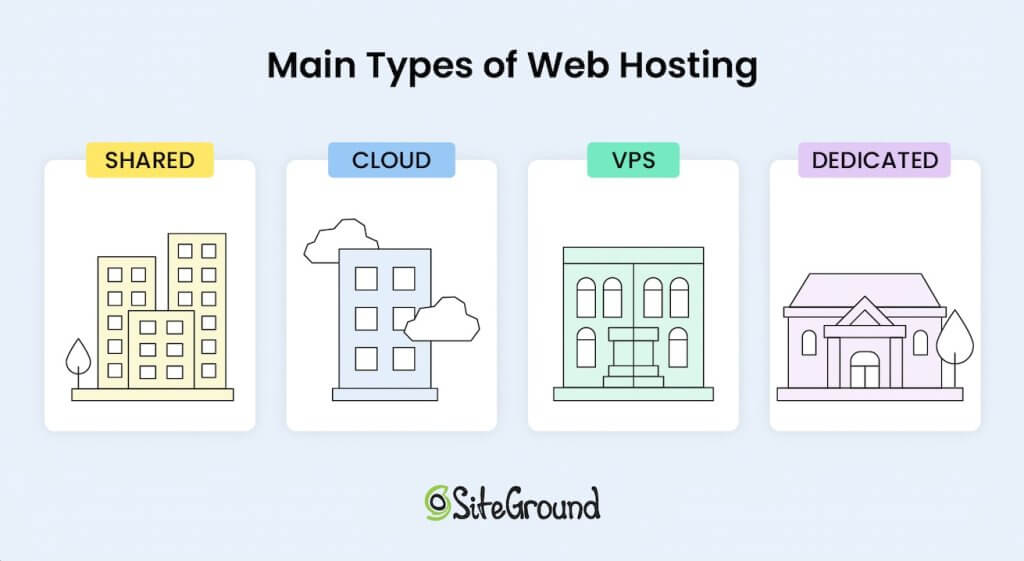
There are various types of web hosting. The most common way to classify them is in four main categories:

  • Shared Hosting: Multiple websites share a single server’s resources, making it a cost-effective option for small sites.
  • VPS Hosting: Users share a physical server, but each website operates in its isolated environment. It provides more control and scalability than shared hosting.
  • Dedicated Hosting: Users have access to an entire server for their website, giving them full control over performance and security. This is suitable for large or high-traffic websites that are maintained by experienced web developers.
  • Cloud Hosting: Websites are hosted across a network of virtual servers, providing high reliability, scalability, and flexibility.

As you can see, this distinction refers to the technology that web hosting providers use to distribute their services. 

An illustration depicting the main types of web hosting: Shared Hosting, Cloud Hosting, VPS Hosting, and Dedicated Hosting, represented by stylized buildings with distinct labels and colors.

Web hosting is an umbrella term that can also refer to specialized web hosting services, such as WordPress hosting. 

Hosting can be specifically configured for content management applications like WordPress, Joomla, Drupal, Moodle, etc. This means that the hosting environment is optimized to support the technical requirements and performance needs of the chosen application.

With managed hosting for specific applications, you’re getting a hosting environment designed to help your chosen platform thrive. Whether you’re using WordPress, Joomla, or another platform, specialized managed hosting offers convenience, reliability, and performance optimized for your content management system (CMS).

Whether it’s shared, cloud, VPS, or dedicated hosting, all the main types mentioned above can be considered WordPress hosting if they’re tailored for WordPress websites.

What Is WordPress Hosting?

WordPress hosting refers to web hosting that is specifically optimized for WordPress websites. These hosting environments are configured to enhance WordPress performance, security, and compatibility. 

This specialized hosting option often includes features like pre-installed WordPress, automatic updates, and built-in caching mechanisms. All these features are designed to make WordPress websites faster and more secure.

Frequently Asked Questions

1. Is WordPress a Web Host?

No, WordPress itself is not a web host. WordPress is a content management system (CMS) used to create and manage websites. It is open-source and free to use. 

WordPress users need to choose a hosting provider, whether it’s general web hosting or a specialized WordPress hosting provider, to make their website accessible on the internet.

2. Does WordPress Include Hosting?

No, WordPress.org doesn’t include hosting and you will need a hosting service for it.

That said, there is an important distinction between WordPress.org and WordPress.com. 

WordPress.org is the official site where anyone can download the free, open-source WordPress software.

On the other hand, WordPress.com is a hosted platform managed by Automattic (the main company behind WordPress). It includes a custom site builder that is based on the free, open-source WordPress.org project.

If you use WordPress.com, hosting is included as part of the platform. If you choose to use WordPress.org, the self-hosted version, you will need to arrange for hosting separately. 

There are certain benefits of using WordPress.com, such as ease of use and access to additional proprietary features and tools. However, WordPress.org is significantly more popular due to its flexibility and open-source nature, powering over 40% of today’s internet. 

3. Do I Need WordPress Hosting? Is WordPress Hosting Worth It?

WordPress hosting is worth it if you’re running a WordPress site and want the best possible performance, speed, and security. 

Managed WordPress hosting offers benefits such as automatic updates, staging environments, and enhanced support, which can be a significant advantage. This is especially true for non-technical users or businesses aiming for scalability.


Key Differences Between WordPress Hosting and Web Hosting

Understanding the key distinctions between WordPress hosting and general web hosting is essential to choosing the right service for your website.

1. Infrastructure and Server Environment

The server infrastructure in WordPress hosting is specifically designed to support WordPress. 

This includes server configurations, caching mechanisms, and sometimes even specific hardware optimized for running WordPress smoothly. 

General web hosting servers, on the other hand, have a more versatile setup to support various types of websites and CMS applications. However, this also means they lack the performance and security of specialized hosting plans. 

2. Tools

WordPress hosting dashboards are optimized for managing WordPress websites. 

A good WordPress hosting service includes additional features such as automated updates, WordPress plugins, and migration services. 

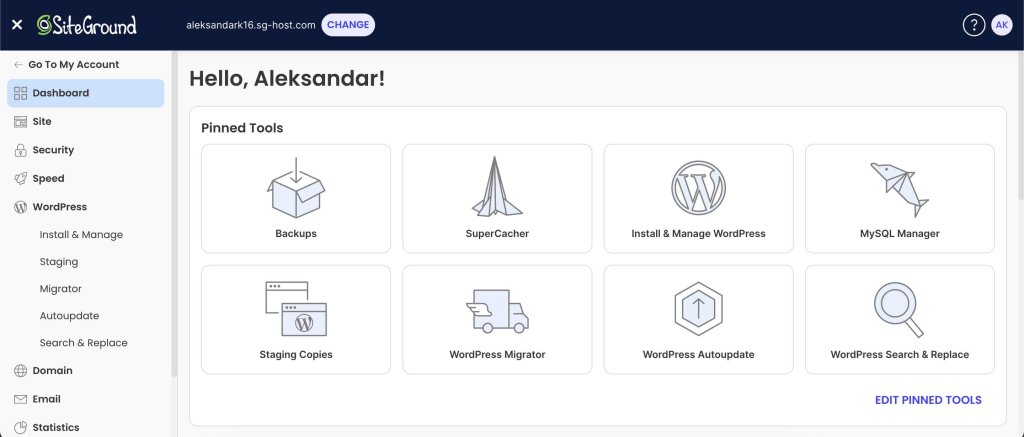
For example, our custom Site Tools dashboard has a site-centric design and offers multiple tools to make your WordPress site management easier.

A screenshot of SiteGround's custom Site Tools dashboard with pinned WordPress management tools.

With regular web hosting, users have access to a more generic dashboard and need more technical expertise to manage their website.

Differences Between Web Hosting and WordPress Hosting

FeatureWeb HostingWordPress Hosting
DefinitionAn umbrella term for various hosting types (shared, VPS, dedicated, cloud) supporting all website types.A specialized hosting type optimized exclusively for WordPress sites.
Supported PlatformsDifferent CMS applications and custom-built sites.Optimized for WordPress.
Server OptimizationGeneral optimizations suitable for different CMSs; may require manual setup for caching and performance.Specifically optimized for WordPress, with built-in caching and faster database connections.
SecurityGeneral security features, like firewalls and malware scanning.WordPress-specific security enhancements, including plugin vulnerability scans and CMS-targeted firewalls.
Updates and MaintenanceManual updates.Automatic updates for WordPress. 
SupportGeneral technical support.Specialized WordPress support.
Performance ToolsBasic performance tools; additional caching or performance optimizations may need to be installed manually.Often includes advanced performance tools like server-side caching controllers and image optimization.
Ease of UseManual setup and configuration based on the site.Pre-configured settings optimized for WordPress.
CostAffordable.Can be more costly due to additional specialized features.
Staging EnvironmentsRarely included; usually available only on higher-end plans.Frequently included in managed WordPress plans for testing changes safely.
When to UseIf you need to host a different CMS or a custom-coded site.If you have WordPress and want to optimize for speed and security.

Advantages of WordPress Hosting 

WordPress hosting offers distinct advantages. Here are some of the most notable benefits:

  • Enhanced Security: WordPress hosting environments often come with WordPress-specific security features, such as web application firewalls, malware scanning, and protection against vulnerabilities commonly associated with WordPress plugins and themes.
  • Faster Loading Times: Performance optimizations like server-side caching, content delivery networks (CDNs), and PHP enhancements lead to quicker loading times for WordPress sites.
  • Simplified Management: Managed WordPress hosting often includes automated tasks like updates, backups, and maintenance, which is a relief for website owners focused on content and growth.
  • Dedicated Support: WordPress hosting providers frequently offer support teams specialized in WordPress, which means faster, more accurate help when technical issues arise.
  • One-Click Tools: Many WordPress hosting providers offer tools such as a staging environment, one-click WordPress installations, and built-in search and replace, which are specifically designed to make WordPress site management easier. 

Essential Considerations for WordPress Sites

If you’re planning to host a WordPress website, there are several important considerations to keep in mind when choosing a hosting plan.

1. Security

WordPress is popular, which unfortunately makes it a common target for malicious attacks. 

WordPress hosting providers often incorporate extra security measures tailored to WordPress-specific vulnerabilities, making it safer for WordPress sites than standard hosting options that lack these focused protections.

It’s also important to improve your website security, regardless of where you’re hosting your site. Our free Security Optimizer for WordPress is an all-in-one tool to protect your website on an application level.

2. Performance

Optimizing your speed performance is essential, especially for high-traffic sites. With WordPress hosting, optimizations for caching, image compression, and faster database connections are often pre-configured to enhance speed. 

General web hosting users may need to manually set up caching and other speed optimizations. This requires technical knowledge and usually does not offer the same results as a specialized hosting service.

SiteGround’s Speed Optimizer is a free plugin specifically designed to improve WordPress performance. It acts as a cache controller for SiteGround-hosted websites, including multiple frontend, media and environment optimizations to boost your site’s speed!

3. Auto-Updates

WordPress frequently releases updates to improve security, add new features, and enhance performance. 

WordPress hosting often includes automatic updates for the core software, themes, and plugins. This ensures your site remains secure and up-to-date without the need for daily manual maintenance.

4. Staging

A staging environment allows users to test changes to their website before implementing them on the live site. 

This feature is highly beneficial for WordPress sites, especially those with complex designs or plugins. 

While some web hosting providers also offer staging, it’s a more common feature in managed WordPress hosting.

5. Migration Options

Migrating a website to a new host can be challenging, particularly for WordPress sites with complex configurations. 

Many WordPress hosting providers offer free migration services, simplifying the process of transferring an existing WordPress site.

Besides free manual migration, SiteGround offers a free migration plugin that allows you to easily move your WordPress site with just a few clicks!


WordPress Hosting vs. Web Hosting – Which One is Right For You?

When it comes to choosing between WordPress hosting and general web hosting, your decision should be based on your website’s specific needs, your budget, and your technical expertise. 

Here’s a breakdown of when each option is most likely to be the best fit:

1. When to Choose WordPress Hosting

  • You’re Running a WordPress Site: If you’re already committed to using WordPress, choosing WordPress hosting is best. The environment is tailored to support WordPress, and offers improved performance, security, and support.
  • You Want Simplified Management: Managed WordPress hosting reduces the burden of managing technical aspects like updates, security, and backups, allowing you to focus on creating content.
  • You Need WordPress-Specific Features: WordPress hosting often includes features like staging environments, auto-updates, and specialized support, which are valuable for WordPress users.

[106]

2. When to Choose Web Hosting

  • You’re Using a Different CMS or have a custom-coded website: If you plan to use a CMS other than WordPress, or build a custom-coded site from the ground up, a general web hosting service is a better option, as it supports various platforms.
  • You’re Looking for Budget-Friendly Options: Shared web hosting tends to be more affordable than managed WordPress hosting, making it a suitable choice for smaller websites with limited budgets.

You Prefer More Control Over Server Configurations: General web hosting allows for more control over server configurations, making it ideal for users with technical knowledge who want to customize their environment to meet specific needs.

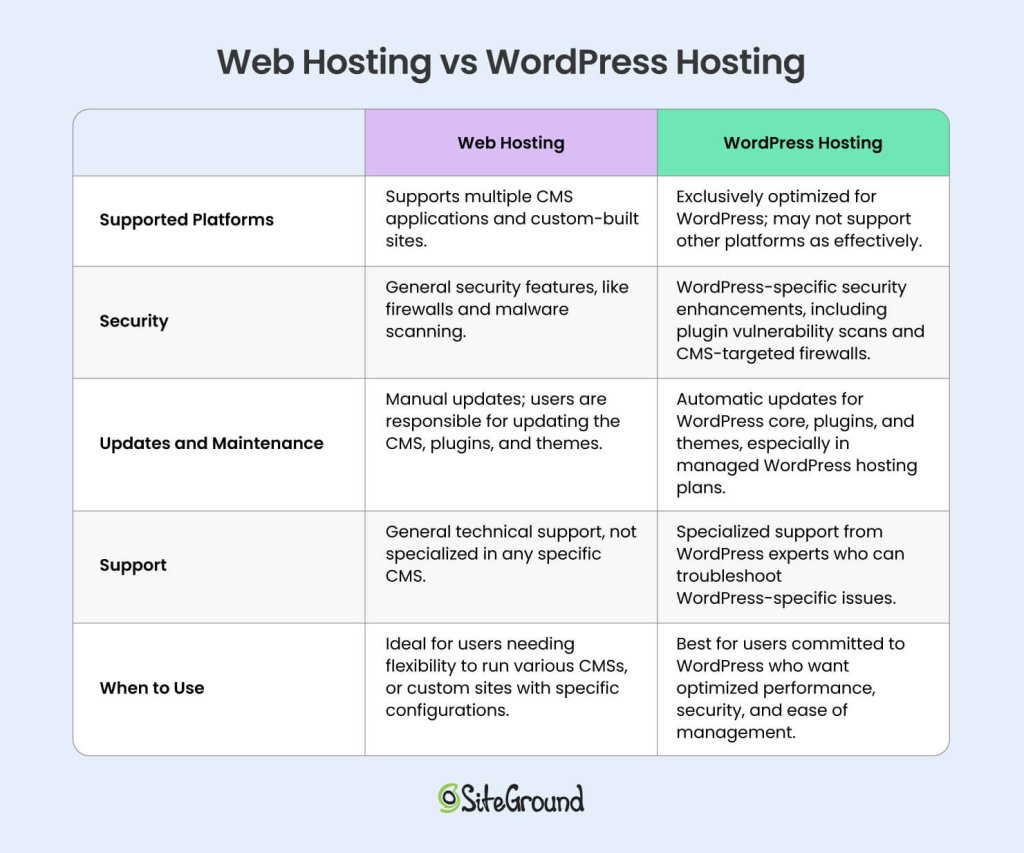
A comparison table showing the differences between web hosting and WordPress hosting, including features like supported platforms, security, updates and maintenance, support, and recommended use cases. Web hosting supports multiple CMSs and custom-built sites, while WordPress hosting is optimized specifically for WordPress.

Final Thoughts on the Difference between WordPress Hosting and Web Hosting

To sum up, WordPress hosting is a sub-type of web hosting that includes specific optimizations, features, and tools to make your WordPress site faster, more secure, and easier to manage. 

If your website is not WordPress – going with a general web hosting solution is the right choice. 

If you are building your site on WordPress – go for managed WordPress hosting, as it will help you significantly optimize your website and boost your online presence

Check out our Managed WordPress plans with free migration if you wish to start your WordPress journey today!